Release Notes for UCC PCF, Release 2026.03.0
Available Languages
Bias-Free Language
The documentation set for this product strives to use bias-free language. For the purposes of this documentation set, bias-free is defined as language that does not imply discrimination based on age, disability, gender, racial identity, ethnic identity, sexual orientation, socioeconomic status, and intersectionality. Exceptions may be present in the documentation due to language that is hardcoded in the user interfaces of the product software, language used based on RFP documentation, or language that is used by a referenced third-party product. Learn more about how Cisco is using Inclusive Language.
- US/Canada 800-553-2447
- Worldwide Support Phone Numbers
- All Tools
 Feedback
 Feedback
Ultra Cloud Core - Policy Control Function, Release 2026.03.0
Ultra Cloud Core - Policy Control Function, Release 2026.03.0
This Release Notes identifies changes and issues related to the release of Ultra Cloud Core Policy Control Function (PCF).
The key highlights of this release include:
● Offloads CDR processing to a dedicated pod to improve engine performance and log management.
● Enables time-scheduled usage tracking via the Monitoring-Time AVP.
● Supports dynamic billing rates and data rules based on specific time intervals.
● Simplifies configuration by routing traffic through an SCP instead of direct connections.
● Custom MongoDB Storage: Replaces the fixed 5 Gi limit with configurable storage sizes for MongoDB replica sets.
● Automatically removes duplicate sessions in the CDL to prevent capacity breaches.
● Implements pod-level traffic limits to prevent system instability during traffic spikes.
For more information about PCF, see the Related resources section.
Release lifecycle milestones
This table provides EoL milestones for Cisco UCC PCF software:
Table 1. EoL milestone information for Ultra Cloud Core - Policy Control Function
| Milestone |
Date |
| First Customer Ship (FCS) |
23-July-2026 |
| End of Life (EoL) |
23-July-2026 |
| End of Software Maintenance (EoSM) |
21-Jan-2028 |
| End of Vulnerability and Security Support (EoVSS) |
21-Jan-2028 |
| Last Date of Support (LDoS) |
31-Jan-2029 |
These milestones and the intervals between them are defined in the Cisco Ultra Cloud Core (UCC) Software Release Lifecycle Product Bulletin available on cisco.com.
This section provides a brief description of the new software features introduced in this release.
Table 2. New software features for Ultra Cloud Core - Policy Control Function, Release 2026.03.0
| Product impact |
Feature |
Description |
| Software Reliability |
This feature migrates Call Detail Record (CDR) processing from the CPC engine to a dedicated pcf-cdr-log pod to prevent engine performance degradation. It introduces centralized log management, configurable retention policies, and automated retry logic for secure remote file transfers. |
|
| Ease of Use |
This feature supports scheduled usage monitoring over the Diameter Gx interface by utilizing the Monitoring-Time AVP. It allows to track and grant usage quotas based on specific time schedules, facilitating precise cost control and dynamic billing adjustments |
|
| Ease of Use |
This feature enables service providers to define and apply variable billing rates and data rules for specific time intervals. It is introduced to support dynamic quota management and precise cost control, ensuring subscribers are billed accurately based on pre-defined tariff periods. |
|
| Ease of Use |
This feature enables the Converged Policy (CPC) to discover and route traffic through a Service Communication Proxy (SCP) rather than communicating directly with target Network Functions. It centralizes policy decision points across 5G interfaces to simplify session policy correlation and reduce configuration overhead by offloading discovery tasks. |
|
| Software Reliability |
This enhancement allows to define custom Persistent Volume Claim (PVC) storage sizes for individual MongoDB replica sets. It replaces the previous fixed 5 Gi limit, enabling to optimize storage capacity to meet specific Subscriber Profile Repository data volumes and retention requirement. |
|
| Software Reliability |
This feature identifies and removes duplicate sessions sharing identical IMSI and APN identifiers within the Cisco Data Layer (CDL). It prevents session capacity breaches in high-traffic environments by ensuring that only the most recent session record remains active, thereby maintaining datastore service availability. |
|
| Software Reliability |
This feature provides ingress protection for the Converged Policy Diameter endpoint by enforcing traffic limits at the pod level before requests reach the engine. It mitigates traffic bursts to prevent latency, request timeouts, and system instability, thereby ensuring consistent system reliability. |
There are no behavior changes introduced in this release.
This table lists the resolved issues in this specific software release.
Note: This software release may contain bug fixes first introduced in other releases. To see additional information, click the bug ID to access the Cisco Bug Search Tool.
Table 3. Resolved issues for Product Name, Release, 2026.03.0
| Bug ID |
Description |
| Debug loggers configuration in opscenter CLI does not update the config map of consolidated-logging pod. |
|
| Logger not reflected in diameter-ep pod runtime using ops-center logger config. |
|
| Diameter response total KPI is updated with empty DNN. |
|
| cps-diameter-ep generates malformed IPC key for RAA 5002. |
There are no open bugs in this specific software release.
This section lists compatibility information of the Cisco UCC software products that are verified to work with this version of the UCC PCF software.
Table 4. Compatibility information for Ultra Cloud Core - Policy Control Function, Release 2026.03.0
| Product |
Supported Release |
| Ultra Cloud Core SMI |
2026.03.1.08 |
| Ultra Cloud CDL |
2.2.0 |
This section provides information about the release packages associated with UCC PCF software.
Table 5. Software packages for Ultra Cloud Core - Policy Control Function, Release 2026.03.0
| Software package |
Description |
Release |
| pcf.2026.03.0.SPA.tgz |
The PCF offline release signature package. This package contains the PCF deployment software, NED package, as well as the release signature, certificate, and verification information. |
2026.03.0 |
| ncs-6.4.8.3-cisco-pcf-nc-1.1.2026.03.0.tar.SPA.gz |
The NETCONF NED package. This package includes all the yang files that are used for NF configuration. |
6.4.8.3
|
Cloud native product version numbering system
The show helm list command displays detailed information about the version of the cloud native product currently deployed.
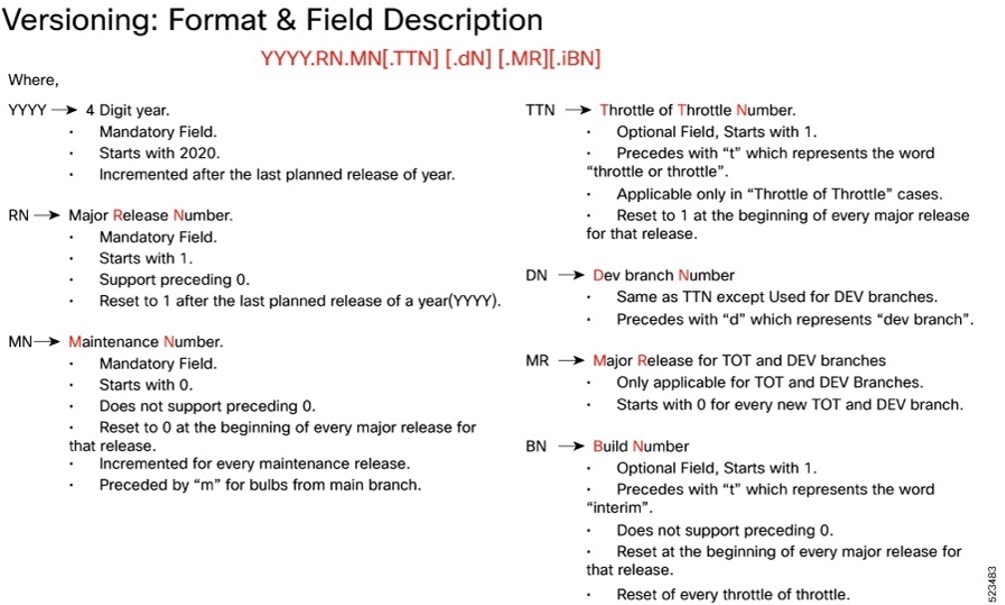
The appropriate version number field increments after a version has been released. The new version numbering format is a contiguous sequential number that represents incremental changes between releases. This format facilitates identifying the changes between releases when using Bug Search Tool to research software releases.
Software integrity version
To verify the integrity of the software image you have from Cisco, you can validate the SHA512 checksum information against the checksum identified by Cisco for the software.
Image checksum information is available through Cisco.com Software Download Details. To find the checksum, hover the mouse pointer over the software image you have downloaded.
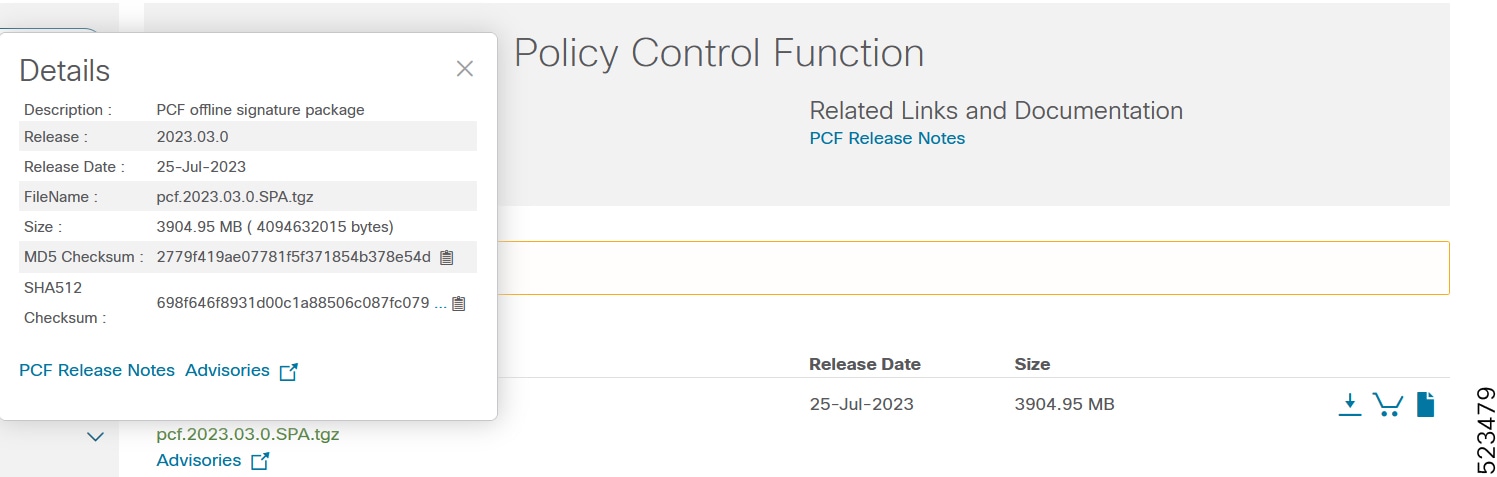
At the bottom you find the SHA512 checksum, if you do not see the whole checksum you can expand it by pressing the "..." at the end.
To validate the information, calculate a SHA512 checksum using the information in the following table and verify that it matches the one provided on the software download page.
To calculate a SHA512 checksum on your local desktop, see this table.
Table 6. Checksum Calculations per Operating System
| Operating system |
SHA512 checksum calculation command examples |
| Microsoft Windows |
Open a command line window and type the following command: > certutil.exe -hashfile <filename.extension> SHA512 |
| Apple MAC |
Open a terminal window and type the following command: $ shasum -a 512 <filename.extension> |
| Linux |
Open a terminal window and type the following command: $ sha512sum <filename.extension> OR $ shasum -a 512 <filename.extension> |
| Note: <filename> is the name of the file. <extension> is the file type extension (for example, .zip or .tgz). |
|
If the SHA512 checksum matches, you can be sure that no one has tampered with the software image or the image has not been corrupted during download.
If the SHA512 checksum does not match, we advise you to not attempt upgrading any systems with the corrupted software image. Download the software again and verify the SHA512 checksum again. If there is a constant mismatch, please open a case with the Cisco Technical Assistance Center.
Certificate validation
PCF software images are signed via x509 certificates. Please view the README file packaged with the software for information and instructions on how to validate the certificates.
This table provides key resources and links to the support information and essential documentation for PCF and SMI.
Table 7. Related resources and additional information
| Resource |
Link |
| PCF documentation |
|
| SMI documentation |
|
| Service request and additional information |
Cisco and the Cisco logo are trademarks or registered trademarks of Cisco and/or its affiliates in the U.S. and other countries. To view a list of Cisco trademarks, go to this URL: www.cisco.com/go/trademarks. Third-party trademarks mentioned are the property of their respective owners. The use of the word partner does not imply a partnership relationship between Cisco and any other company. (1110R)
Any Internet Protocol (IP) addresses and phone numbers used in this document are not intended to be actual addresses and phone numbers. Any examples, command display output, network topology diagrams, and other figures included in the document are shown for illustrative purposes only. Any use of actual IP addresses or phone numbers in illustrative content is unintentional and coincidental.
© 2026 Cisco Systems, Inc. All rights reserved.