Configuring and Validating Smart Licensing

Overview of Smart Licensing Support

Smart licensing for the gateway running in URWB mode supports the following scenarios:

  • Smart license management provides a seamless experience with the various aspects of licensing.

  • Gateway controls the feature based on the license type:

    • Essentials

    • Advantage

    • Premier

  • The platform can specify the number of license seats reserved. The system reports the higher value between the reserved license count and the actual licenses consumed. You can specify the number of purchased licenses for a deployment to avoid triggering a reporting event as the number fluctuates, provided that it remains equal to or less than the number of seats reserved.

  • Smart transport mode connects to smart software manager (SSM) (formerly it was CSSM) directly to sync license usage.

  • Airgap mode uses the downloaded file to sync with SSM manually.

  • All radio devices in URWB mode (such as Catalysts IW9167E and IW9165) in the same URWB network require the same license level. This license level is set globally at the Mesh End or Global Mesh end. The license levels for gateways is configured independently on each gateway. It can be configured at a different level than the radio devices in the network.

Table 1. Smart license level for IEC6400 Gateway

License Type

Features

Essentials

  • 5 Gbps fixed throughput

  • 5 Gbps gateway mobility throughput

  • 5 Gbps vehicle mobility throughput

Advantage

  • 10 Gbps fixed throughput

  • 10 Gbps gateway mobility throughput

  • 10 Gbps vehicle mobility throughput

Premier

  • 40 Gbps fixed throughput

  • 40 Gbps gateway mobility throughput

  • 40 Gbps vehicle mobility throughput


Note


Industrial protocols support and Titan (High Availability) capabilities are always included in all the license tiers.


Configuring and Validating Smart Licensing Using CLI

To configure a smart license for the IEC6400 gateway, use the following CLI command:

Command or Action

Purpose

To configure a smart license

Device# license iec-level [advantage | essentials | premier]
  advantage   Network Advantage for Gateway
  essentials  Network Essentials for Gateway
  premier     Network Premier for Gateway

Note

 
The IEC license must be configured on each IEC6400 gateway in the network.

To configure a smart license for Catalyst IW916x devices

Device# license iw-level [advantage | essentials | premier]
  advantage   Network Advantage for Radios
  essentials  Network Essentials for Radios
  premier     Network Premier for Radios

To configure the smart license Seats number for Catalyst IW916x devices

Device# license iw-network platform [iw9165 | iw9167] seats 6
  iw9165  iw9165 Platform
  iw9167  iw9167 Platform

To configure the smart license online deployment

Device# license smart transport smart
Device# license smart proxy address 192.168.1.1 (Optional)
Device# license smart proxy port 3128 (Optional)
Device# license smart trust idtoken <id_token_generate_from_SSM> local [force]
  force       Force CSSM to generate new trust code
Device# license smart usage interval 50 (Optional)

To configure smart license offline deployment

Device# license smart transport off
Device# license smart save usage all tftp://192.168.216.201/rum_report_all.xml
Device# license smart import tftp://192.168.216.201/rum_report_ack.xml

To configure the reset license configuration as default

Device# license smart factory reset

Note


Do not give CLI command as reload, it clears all the license configuration.

To validate smart license type

Device# license show usage
License Authorization:
  Status: Not Applicable

IEC6400_URWB_NW_E (IEC6400_URWB_NW_E):
  Description: Cisco URWB Network Essentials for IEC6400 Edge Compute Platform
  Count: 1
  Version: 01
  Status: IN USE
  Export status: NOT RESTRICTED
  Feature Name: IEC6400_URWB_NW_E
  Feature Description: Cisco URWB Network Essentials for IEC6400 Edge Compute Platform
  Enforcement type: NOT ENFORCED
  License type: Perpetual

To validate the smart license gateway number

Device# license show iw seats
    Platform  Configured     Current
      IW9167           0           0
      IW9165           0           0 

To validate the smart license usage count

Device# license show summary
Account Information:
  Smart Account: <none>
  Virtual Account: <none>

License Usage:
  License                 Entitlement Tag               Count Status
  -----------------------------------------------------------------------------
  IEC6400_URWB_NW_E       (IEC6400_URWB_NW_E)               1 IN USE 

Configuring Smart Licensing using GUI

Before you begin

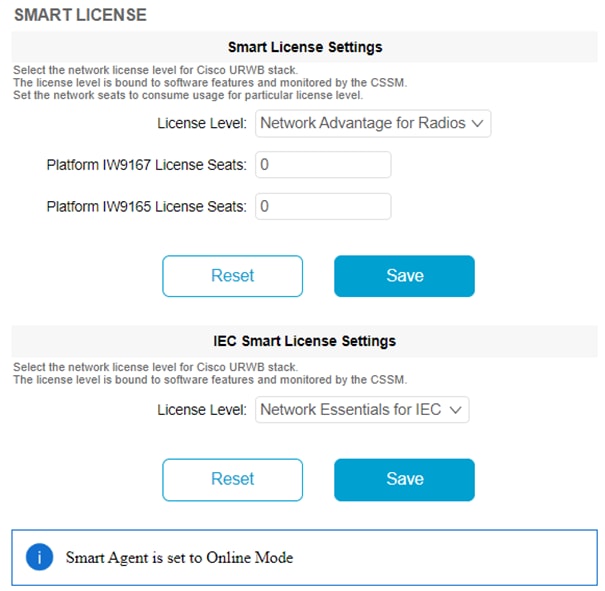
To select the network license level for the URWB network, follow these steps:

Procedure


Step 1

In the ADVANCED SETTINGS, click smart license.

The SMART LICENSE window appears.

Step 2

In the Smart License Settings section, configure the following parameters:

  1. Choose license level from the License Level drop-down list.

  2. Enter the platform iw9167 license seats value in the Platform IW9167 License Seats field.

  3. Enter the platform iw9165 license seats value in the Platform IW9165 License Seats field.

    Note


    There are no seats defined for the IEC6400 license.

Step 3

Click Save.

Step 4

In the IEC Smart License Settings section, choose license level from the License Level drop-down list.

Step 5

Click Save.


Configuring Smart License Seats Management using CLI

To configure a smart license seat, use the following CLI command:

Device# license iw-network platform [ iw9165 | iw9167 ] seats

Example:

Device# license iw-network platform iw9165 seats 12
Device# license iw-network platform iw9167 seats 15

Configuring Running License Level using CLI

The license level, for Catalyst IW916x devices, is configured by the primary Mesh End (ME) or GGW gateway (based on network configuration) then the license level applied to all the gateways connected to the network.

To configure a license level for ME and GGW (license distributor), use the following CLI command:
Device# license iw-level [ advantage | essentials | premier ]
  advantage   Network Advantage for Radios
  essentials  Network Essentials for Radios
  premier     Network Premier for Radios

The license level for IEC6400 devices needs to be configured on each IEC device.

To configure a license level for an IEC device, use the following CLI command:
Device# license iec-level 
advantage   Network Advantage for Gateway
  essentials  Network Essentials for Gateway
  premier     Network Premier for Gateway

Verifying License Smart License Seat using CLI

To verify the configured smart license seat, use the following CLI command:

Device# show license iw seats
Platform Configured Current
IW9167 0 15
IW9165 0 12
Device# write
Device# reboot
Device# license iw seats
Platform Configured Current
IW9167 0 15
IW9165 0 12

Configuring Running License Level for Gateway using CLI

To configure the license level for the gateway, use the following CLI command:

Device# license iec-level [ advantage | essentials | premier ]
advantage: Network Advantage for Radios
essentials: Network Essentials for Radios
premier: Network Premier for Radios