User defined networks
A user defined network (UDN) is a solution that
-
provides secure and remote on-boarding of devices in shared service environments like dormitory rooms, resident halls, class rooms and auditoriums
-
allows users to securely use Simple Discovery Protocols (SDP) like Apple Bonjour and mDNS-based protocols (Air Play, Air Print, Screen Cast, Print, and so on.), and UPnP based protocols to interact and share information with only their registered devices in a shared environment, and
-
enables the users to share their devices and resources with friends and roommates securely.
UDN solution features
The UDN solution provides an easy way to create a virtual segment that allows user to create a private segment to add their devices. Traffic (unicast, non-Layer 3 multicast, or broadcast) to these devices can be seen only by other devices and users in the private segment. This feature also eliminates the security concern where users knowingly or unknowingly take control of devices that belong to other users in a shared environment. As of now, the UDN is supported only in local mode.
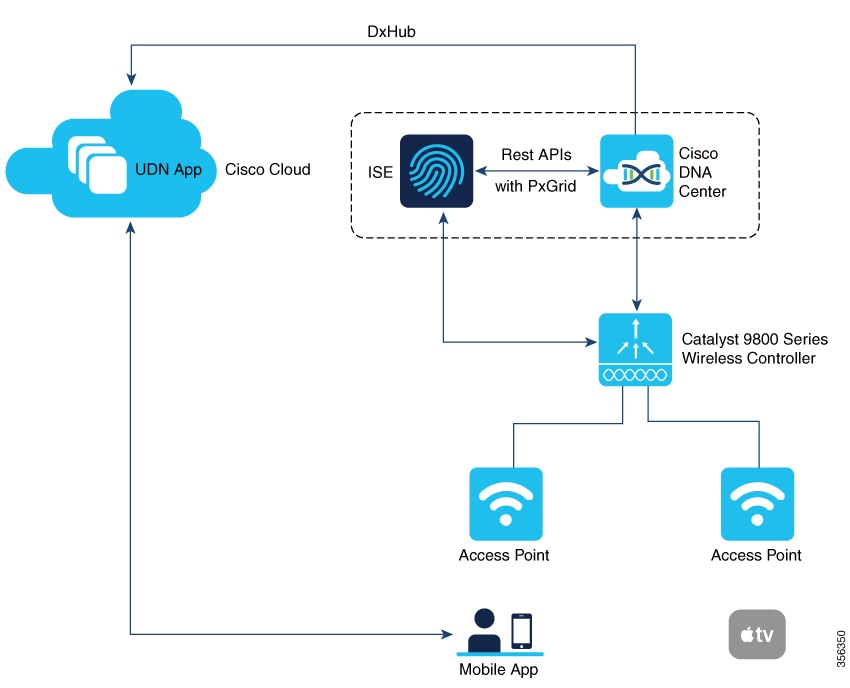
The User Defined Network solution workflow includes the following steps:
-
User Defined Network is enabled on the controller, using policy profile, and the policy configuration is pushed to all the WLANs on a site.
-
User Defined Network association is automatically generated by the UDN cloud service and is inherited by all the devices belonging to an user.
-
Users can add or modify devices to the User Defined Network assigned to them by using a web portal or a mobile application. Users can also add devices to another User Defined Network, if they are invited to join that User Defined Network.
-
The controller is updated with the client or resource information assigned to the User Defined Network.
 Note |
Cisco Identity Services Engine (ISE) policy infrastructure is not used to update User Defined Network information. Whenever, there is a change in the User Defined Network, the ISE updates the controller with an explicit or a separate Change of Authorization (CoA) containing only the change of the User Defined Network ID. |
Restrictions for User Defined Network
Consider these restrictions when implementing User Defined Network:
-
A user can be associated to only one UDN.
-
Roaming across controllers is not supported.
-
This feature is not applicable for Cisco Mobility Express and Cisco AireOS platforms. Hence, IRCM is not supported.
-
This feature is supported only in local mode on the Wave 2 access points and Cisco Catalyst 9100 series access points.
-
This feature is supported only for centrally switched SSIDs.
-
This feature is not supported for Flex mode APs.
-
This feature is not supported for Fabric SSIDs.
-
This feature is not supported for Guest Anchor scenario.
-
Layer 2 and Layer 3 roaming is not supported.
-
Layer 3 multicast (except SSDP/UPnP) containment using UDN is not supported, L3 multicast will continue to work as it is today.
-
It is not recommended to enable user-defined drop unicast option in GUI if UDN is disabled.
-
It is recommended to disable UDN from policy profile in SSIDs when integrating UDN+ solution with Cisco exclusive partner Splash Access.
Note
The UDN+ simplifies the solution and brings the same unique user experience for both Meraki and Cisco Catalyst 9800 Series Wireless Controller based deployments.
Configure a user defined network (CLI)
Before you begin
-
RADIUS server should be configured for the UDN solution to work.
-
Configure aaa-override in the policy profile.
Procedure
|
Step 1 |
Enter global configuration mode. Example: |
|
Step 2 |
Create a policy profile. Example:profile-name is the profile name of the policy profile. |
|
Step 3 |
Enable user defined private-network. Example: |
|
Step 4 |
Set action to drop unicast traffic. Example:By default, unicast traffic is allowed across UDN. |
|
Step 5 |
Exit to global configuration mode. Example: |
|
Step 6 |
Configure a remote LAN policy profile. Example: |
|
Step 7 |
Enable user defined private-network for remote LAN policy. Example: |
|
Step 8 |
Set action to drop unicast traffic for remote LAN policy. Example: |
Configure a user defined network (GUI)
Configure a user defined network to enable a user personal network and control unicast traffic behavior.
Use this procedure when you need to enable user defined networks and configure unicast traffic handling through the GUI interface.
Procedure
|
Step 1 |
Choose Configuration > Tags & Profiles > Policy. |
|
Step 2 |
In the Policy Profile window, select a policy profile. |
|
Step 3 |
In the Edit Policy Profile window, click the Advanced tab. |
|
Step 4 |
In the User Defined Network section, check the Status check box to enable a user personal network. |
|
Step 5 |
Check the Drop Unicast check box to set the action to Drop Unicast traffic. By default, unicast traffic is not contained. |
The user defined network is configured with the specified unicast traffic handling settings.
Verify user defined network configuration
Use the commands in this reference to verify the status of the User Defined Network (UDN) feature, view client UDN information, check UDN payloads, and examine mDNS service instances for private networks.
To view the status of the UDN feature (either enabled or disabled) and also information about the drop unicast flag, use this command:
Device# show wireless profile policy detailed default-policy-profile

User Defined (Private) Network               : Enabled
User Defined (Private) Network Unicast Drop  : Enabled
To view the name of the UDN to which the client belongs, use this command:
Device# show wireless client mac-address 00:0d:ed:dd:35:80 detailed

User Defined (Private) Network : Enabled
User Defined (Private) Network Drop Unicast : Enabled
              Private group name: upn*group*7
              Private group id : 7777
              Private group owner: 1
              Private group name: upn*group*7
              Private group id : 7777
              Private group owner:
To view the UDN payload sent from an AP to the controller, use this command:
Device# show wireless stats client detail | inc udn

Total udn payloads sent                           : 1
When mDNS gateway is enabled on the controller, the mDNS services are automatically filtered based on the user private network ID for all the clients on the WLANs where user private network is enabled.
To view the service instances of a private network, use this command:
Device# show mdns-sd cache udn 7777 detail

Name: _services._dns-sd._udp.local
  Type: PTR
  TTL: 4500
  WLAN: 2
  WLAN Name: mdns-psk
  VLAN: 16
  Client MAC: f4f9.51e2.a6a6
  AP Ethernet MAC: 002a.1087.d68a
  Remaining-Time: 4486
  Site-Tag: default-site-tag
  mDNS Service Policy: madhu-mDNS-Policy
  Overriding mDNS Service Policy: NO
  UDN-ID: 7777
  UDN-Status: Enabled
  Rdata: _airplay._tcp.local
.
.
.
To view the service instances that are learnt from a shared UDN ID, use this command:
Device# show mdns-sd cache udn shared

------------------------------------------------------------- PTR Records -----------------------------------------------------------------
RECORD-NAME                                    TTL      TYPE      ID    CLIENT-MAC       RR-RECORD-DATA
-------------------------------------------------------------------------------------------------------------------------------------------
9.1.1.7.5.D.E.F.F.F.6.C.7.E.2.1.0.0.0.0.0.0.0  4500     WLAN      2     10e7.c6d5.7119   HP10E7C6D57119-2860.local
_services._dns-sd._udp.local                   4500     WLAN      2     10e7.c6d5.7119   _ipps._tcp.local
_universal._sub._ipps._tcp.local               4500     WLAN      2     10e7.c6d5.7119   HP DeskJet 5000 series [D57119] (3127)._ipps._tcp.
_print._sub._ipps._tcp.local                   4500     WLAN      2     10e7.c6d5.7119   HP DeskJet 5000 series [D57119] (3127)._ipps._tcp.
_ePCL._sub._ipps._tcp.local                    4500     WLAN      2     10e7.c6d5.7119   HP DeskJet 5000 series [D57119] (3127)._ipps._tcp.
_ipps._tcp.local                               4500     WLAN      2     10e7.c6d5.7119   HP DeskJet 5000 series [D57119] (3127)._ipps._tcp.
_services._dns-sd._udp.local                   4500     WLAN      2     10e7.c6d5.7119   _ipp._tcp.local
_universal._sub._ipp._tcp.local                4500     WLAN      2     10e7.c6d5.7119   HP DeskJet 5000 series [D57119] (3127)._ipp._tcp.l
_print._sub._ipp._tcp.local                    4500     WLAN      2     10e7.c6d5.7119   HP DeskJet 5000 series [D57119] (3127)._ipp._tcp.l
_ePCL._sub._ipp._tcp.local                     4500     WLAN      2     10e7.c6d5.7119   HP DeskJet 5000 series [D57119] (3127)._ipp._tcp.l
_ipp._tcp.local                                4500     WLAN      2     10e7.c6d5.7119   HP DeskJet 5000 series [D57119] (3127)._ipp._tcp.l
.
.
.

------------------------------------------------------------- SRV Records -----------------------------------------------------------------
RECORD-NAME                                    TTL      TYPE      ID    CLIENT-MAC       RR-RECORD-DATA
-------------------------------------------------------------------------------------------------------------------------------------------
HP DeskJet 5000 series [D57119] (3127)._ipp._  4500     WLAN      2     10e7.c6d5.7119   0 0 631 HP10E7C6D57119-2860.local
HP DeskJet 5000 series [D57119] (3127)._http.  4500     WLAN      2     10e7.c6d5.7119   0 0 80 HP10E7C6D57119-2860.local
HP DeskJet 5000 series [D57119] (3127)._ipps.  4500     WLAN      2     10e7.c6d5.7119   0 0 631 HP10E7C6D57119-2860.local
HP DeskJet 5000 series [D57119] (3127)._uscan  4500     WLAN      2     10e7.c6d5.7119   0 0 8080 HP10E7C6D57119-2860.local
.
.
.
------------------------------------------------------------ A/AAAA Records ---------------------------------------------------------------
RECORD-NAME                                    TTL      TYPE      ID    CLIENT-MAC       RR-RECORD-DATA
-------------------------------------------------------------------------------------------------------------------------------------------
HP10E7C6D57119-2860.local                      4500     WLAN      2     10e7.c6d5.7119   8.16.16.99

------------------------------------------------------------- TXT Records -----------------------------------------------------------------
RECORD-NAME                                    TTL      TYPE      ID    CLIENT-MAC       RR-RECORD-DATA
-------------------------------------------------------------------------------------------------------------------------------------------
HP DeskJet 5000 series [D57119] (3127)._ipp._  4500     WLAN      2     10e7.c6d5.7119   [502]'txtvers=1''adminurl=http://HP10E7C6D57119-28
HPDeskJet 5000 series [D57119] (3127)._http.  4500     WLAN      2     10e7.c6d5.7119   [1]''
HP DeskJet 5000 series [D57119] (3127)._ipps.  4500     WLAN      2     10e7.c6d5.7119   [502]'txtvers=1''adminurl=http://HP10E7C6D57119-28
.
.
.
To view the multicast DNS (mDNS) Service Discovery cache detail, use this command:
Device# show mdns-sd cache detail

Name: _printer._tcp.local
  Type: PTR
  TTL: 4500
  VLAN: 21
  Client MAC: ace2.d3bc.047e
  Remaining-Time: 4383
  mDNS Service Policy: default-mdns-service-policy
  Rdata: HP OfficeJet Pro 8720 [BC047E] (2)._printer._tcp.local
 Feedback