NAT support for mobility groups
NAT support for mobility groups is a mobility architecture enhancement that
-
enables mobility tunnels between peer controllers, even when one or both peers operate behind a NAT device,
-
translates public and private IP addresses to maintain connectivity between controllers, and
-
requires proper configuration of both addresses for NAT peers to ensure seamless mobility communication.
Additional information
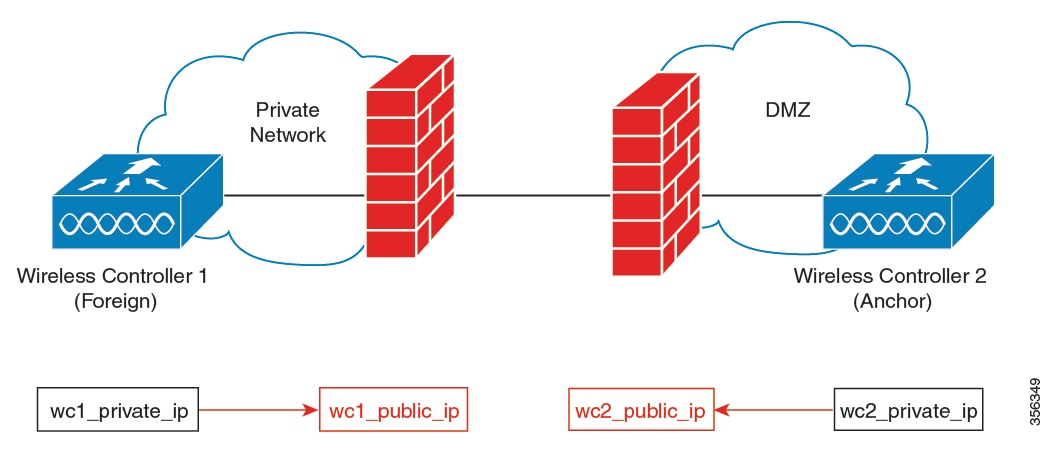
Depending on the placement and number of NAT devices, translation might be required at one or both ends of the tunnel.
When you configure a NAT mobility peer, configure both the private IP address (the address used inside the network before the NAT device) and the public IP address (the address visible on the external network).
If a firewall is present between mobility group controllers, ensure that the following ports are accessible:
-
Port 16666 for mobility control messages
-
Port 16667 for mobility data messages
 Note |
Ensure that ports 16666 and 16667 are accessible through any firewalls between peer controllers. |
This figure illustrates how public and private IP addresses are translated to establish a mobility tunnel between controllers behind NAT devices.
Restrictions for NAT support on mobility groups
-
Only one-to-one (static) NAT entries entries can exist for the controller peers that form the mobility tunnels.
-
Configuring multiple peers with the same public IP address is not supported.
-
Private IP addresses of the configured peers must be unique.
-
Port Address Translation (PAT) is not supported.
-
If peer controllers of different types, for example, Cisco AireOS and Cisco Catalyst 9800 Series, are placed behind NAT, Inter-Release Controller Mobility (IRCM) is not supported for client roaming.
-
IPv6 address translation is not supported.
Functionalities supported on mobility NAT
This topic lists the functionalities supported on mobility NAT.
|
Two controllers, with the foreign controller behind a NAT device (1to1 NAT only) |
Yes |
|
Two controllers, with the anchor controller behind a NAT device (1to1 NAT only) |
Yes |
|
Two controllers, with the anchor and foreign controller behind a NAT device (1to1 NAT only) |
Yes |
|
Multiple foreign and anchor controllers behind NATs (1to1 NAT only) |
Yes |
|
Supported Cisco Catalyst 9800 Series Wireless Controllers |
|
|
Number of peers supported |
72 |
|
Manageability using SNMP, Yang, and web UI |
Yes |
|
IRCM support for mobility |
Yes |
|
SSO |
Yes |
|
Client roaming (Layer 2 and Layer 3) between Cisco Catalyst 9800 Series Wireless Controllers |
Yes |
|
Client roaming (Layer 2 and Layer 3) between Cisco Catalyst 9800 Series Wireless Controller and AireOS controller |
No |
|
Supported applications on the mobility tunnel |
|
Configure a mobility peer (CLI)
Add a mobility peer to your wireless controller by specifying a required private IP address and, if needed, an optional public IP address using the CLI.
Before you begin
Ensure that both the private and public IP addresses of a mobility peer use the same type: IPv4 or IPv6.
Procedure
|
Step 1 |
Enter global configuration mode. Example: |
||
|
Step 2 |
Add a mobility peer to the list by specifying the required private IP address. Optionally, include a public IP address. Example:Example:
|
||
|
Step 3 |
Return to privileged EXEC mode. Example: |
The controller saves the mobility peer with its private IP address and, if provided, its public IP address. You can use this peer for wireless mobility group operations.
Verify NAT support on mobility groups
To display the mobility information of a client, use this command:
Device# show wireless client mac-address 000a.bd15.0010 detail

Client MAC Address : 000a.bd15.0010
Client IPv4 Address : 100.100.0.2
Client Username: N/A
AP MAC Address : 000a.ad00.0800
AP Name: SIM-AP-7
AP slot : 1
.
.
.
To display mobility peer information using a private peer IP address, use this command:
Device# show wireless mobility peer ip 21.0.0.2

Mobility Peer Info
===================
Ip Address : 21.0.0.2
Public Ip Address : 3.0.0.22
MAC Address : cc70.ed02.c3b0
Group Name : dom1
.
.
.
 Feedback