Cisco Workgroup Bridges
A workgroup bridge (WGB) is an Access Point (AP) mode to provide wireless connectivity to wired clients that are connected to the Ethernet port of the WGB AP. A WGB connects a wired network over a single wireless segment by learning the MAC addresses of its wired clients on the Ethernet interface and reporting them to the WLC through infrastructure AP using Internet Access Point Protocol (IAPP) messaging. The WGB establishes a single wireless connection to the root AP, which in turn, treats the WGB as a wireless client.
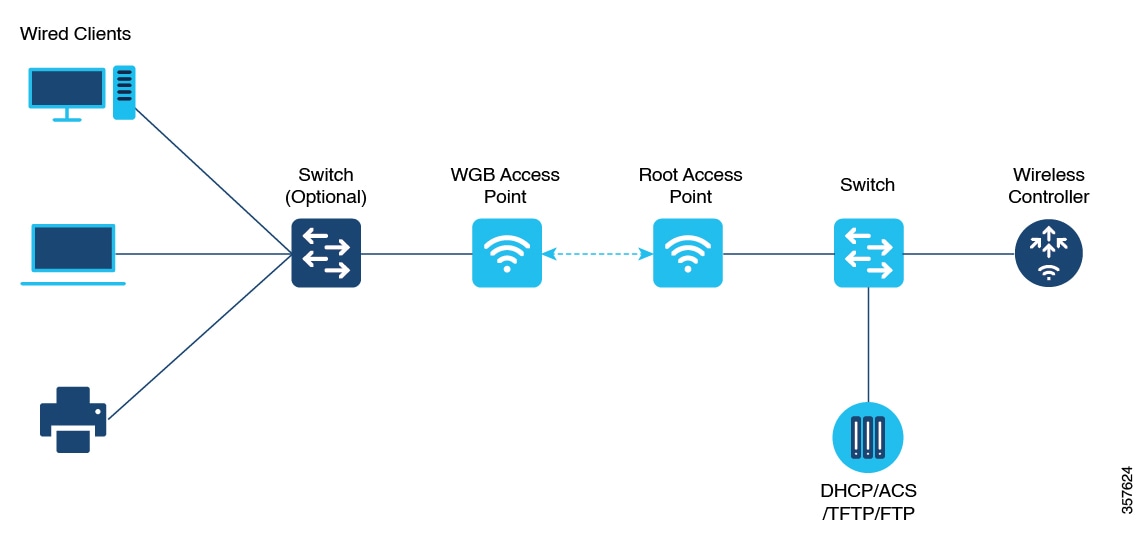
The following features are supported for use with a WGB:
|
Feature |
Cisco Wave 1 APs |
Cisco Wave 2 |
|---|---|---|
|
802.11r |
Supported |
Supported |
|
QOS |
Supported |
Supported |
|
UWGB mode |
Supported |
Supported on Wave 2 APs |
|
IGMP Snooping or Multicast |
Supported |
Supported |
|
802.11w |
Supported |
Supported |
|
PI support (without SNMP) |
Supported |
Not supported |
|
IPv6 |
Supported |
Supported |
|
VLAN |
Supported |
Supported |
|
802.11i (WPAv2) |
Supported |
Supported |
|
Broadcast tagging/replicate |
Supported |
Supported |
|
Unified VLAN client |
Implicitly supported (No CLI required) |
Supported |
|
WGB client |
Supported |
Supported |
|
802.1x – PEAP, EAP-FAST, EAP-TLS |
Supported |
Supported |
|
NTP |
Supported |
Supported |
|
Wired client support on all LAN ports |
Supported in Wired-0 and Wired-1 interfaces |
Supported in all Wired-0, 1 and LAN ports 1, 2, and 3 |
The following table shows the supported and unsupported authentication and switching modes for Cisco APs when connecting to a WGB.
|
Access Points |
Requirements |
|---|---|
|
Cisco Aironet 2700, 3700, and 1572 Series |
Requires autonomous image. |
|
Cisco Aironet 2800, 3800, 4800, 1562, and Cisco Catalyst 9105, 9115, IW6300 and ESW6300 Series |
CAPWAP image starting from Cisco AireOS 8.8 release. |
-
MAC filtering is not supported for wired clients.
-
Idle timeout is not supported for both WGB and wired clients.
-
Session timeout is not applicable for wired clients.
-
Web authentication is not supported.
-
WGB supports only up to 20 clients.
-
If you want to use a chain of certificates, copy all the CA certificates to a file and install it under a trust point on the WGB, else server certificate validation may fail.
-
Wired clients connected to the WGB are not authenticated for security. Instead, the WGB is authenticated against the access point to which it associates. Therefore, we recommend that you physically secure the wired side of the WGB.
-
Wired clients connected to a WGB inherit the WGB's QoS and AAA override attributes.
-
To enable the WGB to communicate with the root AP, create a WLAN and make sure that Aironet IE is enabled under the Advanced settings.
 Feedback