Post Call Survey

Capabilities

A Post Call Survey takes place after normal call treatment. Typically, you use the survey to determine whether a customer was satisfied with the call experience. You configure a call flow that sends the call to a DNIS for the Post Call Survey after the agent disconnects from the caller.

The Unified CCE script can enable and disable Post Call Survey on a per-call basis by testing for conditions and setting an expanded call variable that controls post call survey. For example, the script can invoke a prompt that asks callers whether they want to participate in a survey. Based on the caller's response, the script can set the expanded call variable that controls whether the call gets transferred to the Post Call Survey dialed number.

The Post Call Survey call works just like a regular call from the Unified CCE point of view. Scripts can be invoked and the customer can use the keypad on a touch tone phone and/or voice with ASR/TTS to respond to questions asked during the survey. During Post Call Survey, the call context information is retrieved from the original customer call.


Note


The call context for the post call survey includes all context up to the point where the call is transferred to the agent. Context that the agent creates after the transfer is not included in the post call survey context.


Design

Observe the following conditions when designing a Post Call Survey:

  • A Post Call Survey triggers when the outbound call gets disconnected with the called party. When the agent hangs up, the call routing script launches a survey script.

  • The mapping of a dialed number pattern to a Post Call Survey number enables the Post Call Survey feature for the call.

  • The value of the expanded call variable user.microapp.isPostCallSurvey controls whether the call transfers to the Post Call Survey number.

    • If user.microapp.isPostCallSurvey is set to y (the implied default), the call transfers to the mapped post call survey number.

    • If user.microapp.isPostCallSurvey is set to n, the call ends.

    • To route all calls in the dialed number pattern to the survey, your script does not have to set the user.microapp.isPostCallSurvey variable. The variable is set to y by default.

  • You cannot have a REFER call flow with Post Call Survey. REFER call flows remove Unified CVP from the call. But, Post Call Survey needs Unified CVP because the agent has already disconnected.

  • For Unified CCE reporting purposes, the Post Call Survey call inherits the call context for the initial call. When a survey starts, the call context of the customer call that was transferred to the agent replicates into the call context of the Post Call Survey call.

Initial Setup

To set up a Post Call Survey feature:

Procedure


Step 1

Create one or more survey scripts and add the files to the CVP media servers. See Create a Survey Script.

Step 2

Configure Unified CCE for Post Call Survey. This step adds a required expanded call context variable, adds a new call type for Post Call Survey, maps incoming dialed number to a survey dialed number pattern, and associates your survey dialed number patterns to the survey call type. See Configure Packaged CCE for Post Call Survey.

Step 3

Modify your Unified CCE call routing scripts to launch the survey scripts. See Modify CCE Scripts for Post Call Survey.

The scripts can optionally contain nodes that test for conditions and dynamically control whether a call is transferred to the survey.


Create a Survey Script

Procedure


Use the CVP Call Studio tool to create a survey script or application that queries the caller for information.

For more information about Unified CVP Call Studio, see User Guide for Cisco Unified CVP VXML Server and Unified Call Studio.


What to do next

Map CVP dialed number patterns to the survey script numbers.

Configure Packaged CCE for Post Call Survey

You can enable and disable Post Call Survey within a CCE routing script by using the ECC variable variableuser.microapp.isPostCallSurvey. A value of n or y disables and enables the feature. (The value is case-insensitive.)

Configure the ECC variable to a value of n or y before either the label node or the Queue to Skillgroup node. This configuration sends the correct value to Unified CVP before the agent transfer. This ECC variable is not needed to initiate a Post Call Survey call, but you can use it to control the feature once Post Call Survey is configured in the Unified CCE Administration. Dialed Number is mapped to the Post Call Survey Dialed Number patter to automatically transfer the call.


Note


  • The Post Call Survey DN is called if the Unified CVP has received at least one CONNECT message from CCE (either from the VRU leg or from the Agent leg). Use the END node in your CCE routing script if the Post Call Survey is not required for the calls disconnected from the IVR.

  • If Router Requery is configured incorrectly and the Ring-No-Answer timeout expires, the caller is still transferred to the Post Call Survey DN. This can occur if a Queue node is used and Enable target requery is not checked.


Procedure


Step 1

In Unified CCE Administration, navigate to Overview > Call Settings > Route Settings > Expanded Call Variables and click New to open the New Expanded Call Variable window.

  1. Create a new ECC variable with Name:user.microapp.isPostCallSurvey.

  2. Set Max Length: to 1.

  3. Check the Enabled checkbox. Then click Save.

    In your CCE routing scripts, remember that, at script start, the default behavior of Post Call Survey equals enabled, even if user.microapp.isPostCallSurvey has not yet been set in the script. You can turn off Post Call Survey in the script by setting user.microapp.isPostCallSurvey to n. You can later enable Post Call Survey in the same path of the script by setting this variable to y.

    For more information about configuring expanded call variables, see or Configure Expanded Call Variables.

Step 2

Navigate to Overview > Call Settings > Route Settings > Call Types and click New to create a Call Type.

For more information on how to create a Call Type, see the section Call Type in Cisco Packaged Contact Center Enterprise Administration and Configuration Guide at https://www.cisco.com/c/en/us/support/customer-collaboration/packaged-contact-center-enterprise/products-maintenance-guides-list.html

Step 3

Navigate to Overview > Call Settings > Route Settings > Dialed Numbers and click New to create Dialed Number.

Note


Select Post Call Survey as routing type for dialed number.

For more information on how to create Dialed Number, refer to the section Dialed Number in Cisco Packaged Contact Center Enterprise Administration and Configuration Guide at https://www.cisco.com/c/en/us/support/customer-collaboration/packaged-contact-center-enterprise/products-maintenance-guides-list.html


Configure Expanded Call Variables

Procedure


Step 1

In Unified CCE Administration, navigate to Overview > Call Settings > Route Settings > Expanded Call Variable.

Step 2

From the list of ECC variables, click on the user.microapp.isPostCallSurvey variable to open it.

  1. Set Max Length to 1.

  2. Check the Enabled check box.

  3. Click Save.

    When your CCE routing scripts starts, you can turn off Post Call Survey field in the script by setting user.microapp.isPostCallSurvey to n. You can later enable Post Call Survey in the same path of the script by setting this variable to y.

    Note


    In the script, set the user.microapp.isPostCallSurvey before routing it to the agent.

    Note

     
    To enable Experience Management, user.microapp.isPostCallSurvey must be set to y.

Step 3

Create a new ECC variable with Name:user.CxSurveyInfo.

  1. Set Max Length to 80.

  2. Check the Enabled check box.

Step 4

Click Save.

Note


The newly created ECC variables are added to the default payload list. If you want to save the ECC variables to a different payload list, in the Configuration Manager, navigate to Tools > List Tools > Expanded Call Variable Payload List and add the ECC variables to the payload list of your choice.

Note


You can use several ECC payloads in the same call flow, but only one ECC payload has scope at a given moment. For more information, see ECC Payloads sections in the Configuration Guide for Cisco Unified ICM/Contact Center Enterprise.

Step 5

Populate the POD. ID variable.

Step 6

Restart the active VRU PG (side A or B) to register the new ECC variable.

If the ECC variable exists, you can skip this step.

Note


The user.microapp.isPostCallSurvey setting takes effect on Unified CVP only when it receives a connect or temporary connect message. If you don’t want the survey to run, without first reaching an agent (such as 'after hours of treatment'), set the isPostCallSurvey to n before the initial 'Run script request'.


Modify CCE Scripts for Post Call Survey

Procedure


Use a Script Editor to modify your CCE call routing scripts for incoming calls as follows:

  • Add nodes to invoke the call studio survey script, if needed. The following notes explain when you might need to explicitly add nodes to call the survey script.

    If a DN is mapped for Post Call Survey, the call is automatically transferred to the configured Post Call Survey dialed number.

    Note

     
    The Post Call Survey dialed number is only called if the script ends with a call to an agent, or to a label or similar mechanism. If the script completes without going to an agent or label, the call is not directed to the Post Call Survey dialed number . In these cases, you can use a Go to Script node in your Unified CCE script to direct the call to the Post Call Survey script.
  • Optionally, you can add nodes in the script to test for conditions for which you want to turn the survey off.

    • To dynamically control whether the survey is offered to callers, you must explicitly set the user.microapp.isPostCallSurvey expanded call context variable to y and n.

    • To offer the survey to all callers, you do not need to set the variable in the script. It is set to y by default.

    • Configure the expanded call context variable to a value of n or y before the label node or before the Queue to Skillgroup node. This sends the correct value to Unified CVP before the agent transfer.


Example

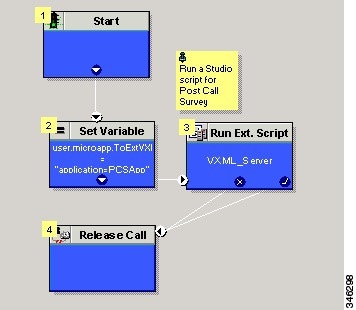
The following example calls a script that asks callers if they want to participate in a survey. The script then sets the user.microapp.isPostCallSurvey variable according to the caller's response.

Create a routing script for the Post Call Survey Call Type to play your survey script or application to the caller. The following script is an example:


Configure Unified CCE

Administration and Usage

Get Post Call Survey Results

For reporting purposes, in both the CVP and the CCE databases, a post call survey call has the same RouterCallKey, Call GUID, and call context as the original inbound call.

To obtain survey results, you query or create a report that gathers survey data from the CVP database. For more information about how to configure a Data Source, see the Cisco Packaged Contact Center Enterprise Installation and Upgrade Guide at https://www.cisco.com/c/en/us/support/customer-collaboration/packaged-contact-center-enterprise/products-installation-guides-list.html.

Procedure


Step 1

In Cisco Unified Intelligence Center Reporting tool, connect to the CVP database.

Step 2

Create a query that identifies survey calls, gathers call information from those calls, and extracts data related to specific survey dialed numbers:

  1. In the Call_Type table, test for Event_Type = Post_Call_Survey.

  2. If true, use that entry's call information to query the VXML_Element table and get the VXML data for the call.

  3. In the VXML data, you can identify the exact survey that a caller participated in from the dialed number used to place the Post Call Survey.

Step 3

To report on the results of a particular survey, collate the VXML data for all calls with that survey's dialed number.

Step 4

To identify answers to survey questions, in the CauseRef table, the CauseID is 20, and the Cause is Post Call Answer.