Installation Guides and Limitations
Be aware of the following guidelines and limitations when installing the Cisco UCS X580p PCIe Node.
-
The Cisco UCS X580p PCIe Node connects with the Cisco UCS X9516 X-Fabric Module to provide PCIe Gen5 connectivity. However, Cisco also offers PCIe Gen4 connectivity through the Cisco UCS X440p PCIe Node and Cisco UCS X9416 X-Fabric Modules. You cannot mix these products within the same Cisco UCS X9508 chassis. One X9508 chassis can support either the Gen5 or Gen4 products, but not both.
-
The Cisco UCS X580p PCIe Node is supported in the Cisco UCS X9508 chassis only. Do not attempt to install the PCIe node in any other UCS server chassis.
-
The companion compute node's host power should be off before attempting any removal or insertion procedures. Hot removal or insertion of the PCIe node while the host is on is not supported.
-
When installing the Cisco UCS X580p PCIe Nodes and Cisco UCS X9516 X-Fabric Modules, make sure to install the XFMs before installing the PCIe nodes.
Recommended Configuration
 Note |
Each new Cisco UCS X9508 chassis will ship with the Cisco UCS X580p PCIe node(s) pre-installed. However, for existing deployments, the Cisco UCS X580p PCIe node can be shipped by itself. If you are installing PCIe nodes in an existing Cisco UCS X9508 deployment, make sure to install the PCIe nodes as documented below. |
Each PCIe node must be paired with an X-Series M8 compute node, and therefore, has specific configurations based on the type of M8 compute node.
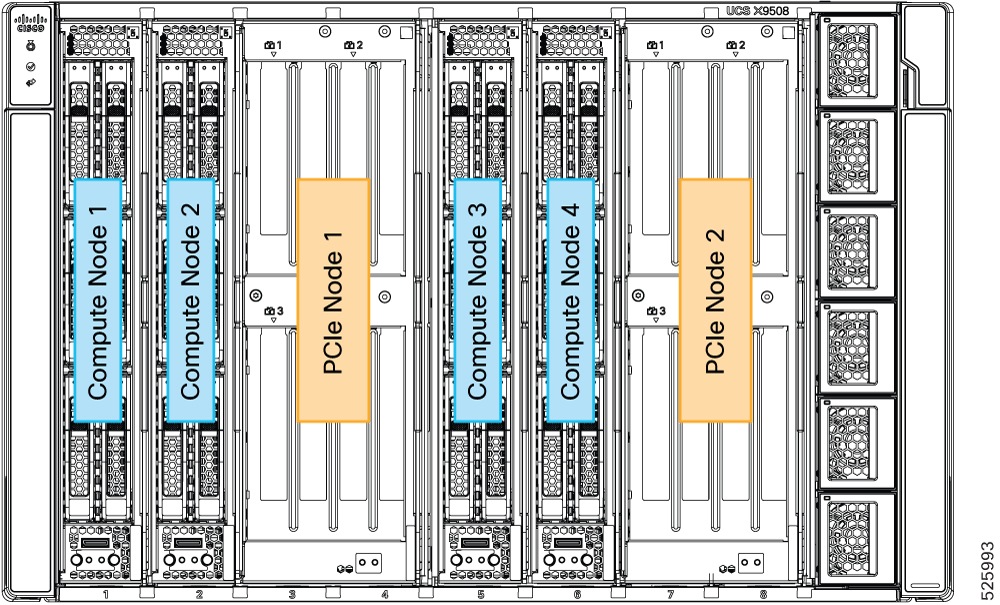
For single-slot M8 compute nodes (for example, the Cisco UCS X210c M8), the best practice is install PCIe and M8 compute nodes as shown.
In this configuration, the PCIe Nodes are installed in slots 3/4 and 7/8. The companion M8 compute nodes are installed in chassis slots 1/2 and 5/6. Be aware of these configurations, especially when removing and installing M8 compute nodes and PCIe nodes in your deployment.
Supported Configuration
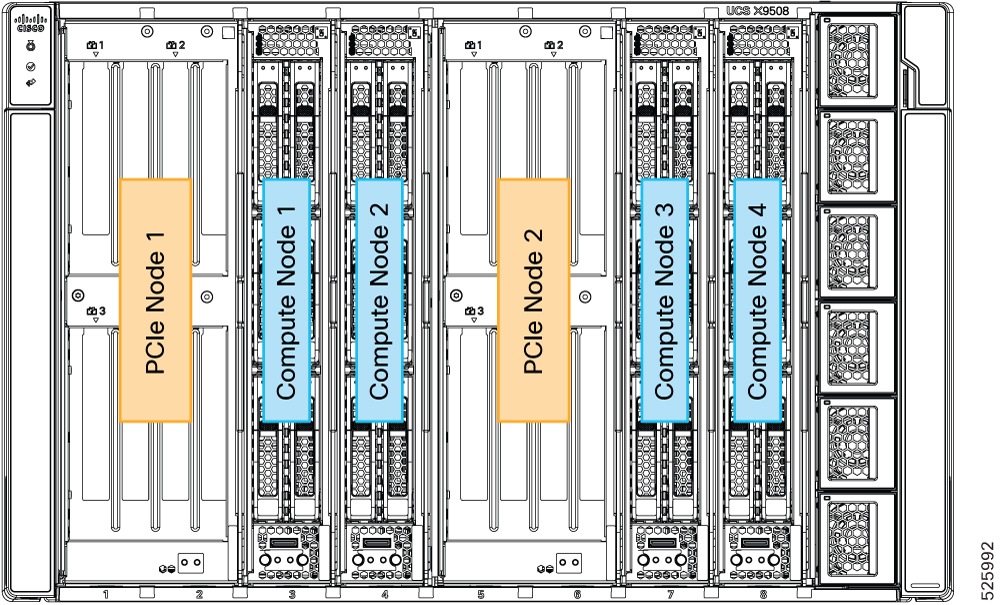
The following additional configuration is supported, but not recommended.
In this configurations, the PCIe node is installed in slots 1/2 and 5/6, and the M8 compute nodes are supported in slots 3/4 and 7/8.
Note |
Although this configuration is supported, the best practice is to install PCIe and M8 compute nodes as shown in the Recommended Configuration. |

 Feedback