Overview

This chapter contains the following topics:

Overview

The Cisco UCS C240 M8 is a 2U rack server chassis that can operate in both standalone environments and as part of the Cisco Unified Computing System (Cisco UCS).

Each Cisco UCS C240 M8 has two CPU sockets that can support the Intel® Xeon® 6 Scalable Processors, in either one or two CPU configurations. These processors feature 86 cores per CPU, 350W TDP per socket, 4xUPI 2.0 at up to 24 GT/s, 8 distinct channels of DDR5 DIMMs, and support a maximum of 88 PCIe version 5.0 lanes.

Additionally, the server supports the following features with one CPU or two identical CPUs:

  • 32 DDR5 DIMMs (RDIMM) are supported on a dual-CPU server, and 16 DDR5 DIMMS (RDIMM) in a single-CPU server:

    • Up to 6400 MT/s for 1 DPC

    • Up to 5200 MT/s for 2DPC

    • Up to 8000 MT/S MR DIMMs

    • 16 DIMMs are supported per CPU for a total system memory of 8 TB (up to 256 GB DDR5 DIMMs).

  • DDR5 DIMM capacities vary based on the CPU type for the compute node. For more information see the Cisco UCS Intel M8 Memory Guide..

  • Intel Xeon 6 Scalable Processors support 16, 32, 48, 64, 96, 128, and 256 GB DDR5 DIMMs per CPU socket.

The servers have different supported configurations, which differ based on the number and type of storage drives installed.

  • The servers can support small form factor (SFF), EDSFF (E3.S), and large form-factor (LFF) drives, most of which are front-loading into the server's drive cage, but one model of server supports mid-mount LFF drives.

  • Support for M.2 SSDs:

    • The server supports up to 2x M.2 SATA drives.

    • For boot RAID M.2 support: One M.2 Boot-Optimized RAID controller which can be internal or rear accessible. Rear M.2 RAID Controllers can be installed in either the mLOM slot or near Riser 3.

  • Rear PCIe risers support the following PCIe options:

    • Up to 7 PCIe Gen 5 slots (3 slots x16, plus 4 slots x8)

    • Up to 5 PCIe Gen 5 x16 slots

  • Optionally, GPUs can be installed in the rear PCIe risers:

    • Up to 3 double-wide GPUs.

    • Up to 8 single-wide GPUs

  • Internal slot for a 24 G Tri-Mode RAID controller with SuperCap for write-cache backup, or for up to two 24G treim-Mode HBA controllers.

  • One mLOM/VIC card provides 10/25/40/50/100/200 Gbps.

  • Two power supplies (PSUs) that support N+1 power configuration and cold redundancy.

  • Six modular, hot swappable fans.

Server Configurations, UCSC-C240-M8SX

The Cisco UCS C240 M8SX server offers a hybrid backplane that supports the following:

  • Front-loading drive bays 1 through 24 support 2.5-inch SAS/SATA/U.3 NVMe drives.

  • U.3 drives are supported in all 24 slots when using in conjunction with the tri-mode RAID controller

  • Slots 1 through 4 and 21 through 24 can support direct attach NVMe SSDs (either U.2 or U.3)

  • Optionally, the rear-loading drive bays support for 2.5-inch SAS/SATA or NVMe drives.

Server Configurations, UCSC-C240-M8E3S

The 32 NVMe configuration (UCSC-C240-M8E3S) can be ordered as an E3.S NVMe-only server. This server has an NVMe backplane that supports the following:

  • Front-loading drive bays 1 through 32 support 2.5-inch EDSFF NVMe drives

  • Front-loading drives support a flexible EDSFF drive config as either 32 E3.S 1TB drives or 16 E3.S 2TB drives.

  • Optionally, the rear-loading drive bays support up to four E3.S 1TB or 2TB drives.


Note


NVMe drives are supported only on a dual CPU server and are not RAID controlled.


Server Configurations, UCSC-X240 M8L

The server is orderable with the following configuration for large form factor (LFF) drives.

  • Cisco UCS C240 M8 LFF 16 (UCSC-C240-M8L)—Large form-factor (LFF) drives, with a 24-drive backplane.

    • Front-loading drive bays 1—12 support 3.5-inch SAS3/SAS4 drives (HDD)

    • The midplane drive cage supports up to four 3.5-inch SAS-only drives (HDD)

    • Optionally, rear-loading drive bays support either two or four SFF SAS3/SAS4 or ES.3 NVMe drives. With the rear drives installed, this configuration is the storage-centric server config.

External Features

This topic shows the external features of the different configurations of the server.

For definitions of LED states, see Front-Panel LEDs.

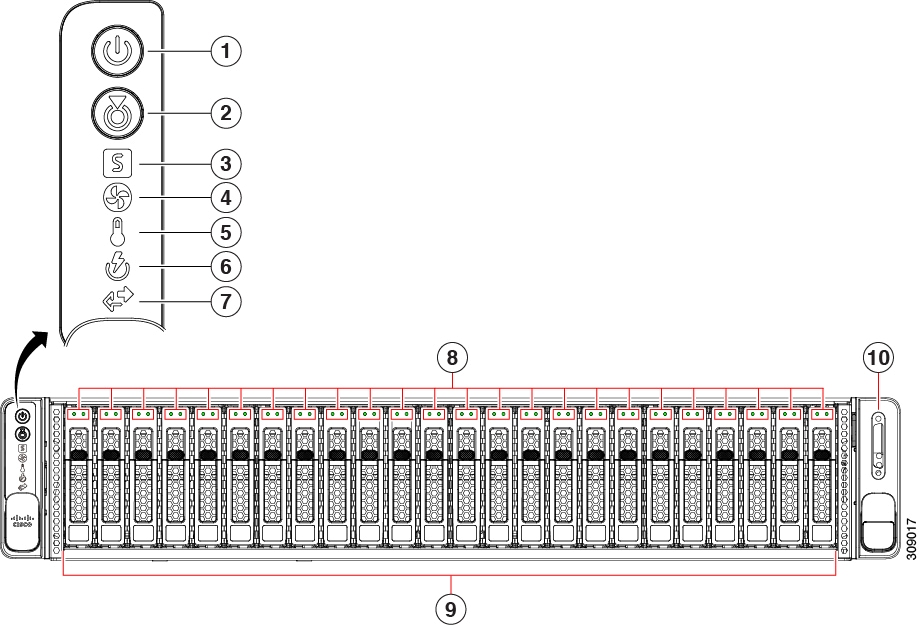
Cisco UCS C240 M8 Server 24 SAS/SATA Front Panel Features

The following figure shows the front panel features of Cisco UCS C240 M8S, which is the small form-factor (SFF), 24 SAS/SATA/U.3 drive version of the server. Front-loading drives can be mix and match in slots 1 through 4 to support up to four SFF NVMe or SFF SAS/SATA drives. UCS C240 M8 servers with any number of NVMe drives must be dual CPU systems.

This configuration can support up to 4 optional universal HDD drives in the rear PCIe slots (riser 1 and Riser 3).

Figure 1. Cisco UCS C240 M8 Server 24 SAS/SATA Front Panel

1

Power Button/Power Status LED

2

Unit Identification Button/Unit Identification LED

3

System Status LEDs

4

Fan Status LED

5

Temperature Status LED

6

Power Supply Status LED

7

Network Link Activity LED

8

Drive Status LEDs

9

NVMe Drive Bays, front loading

Drive bays 1—24 support front-loading SFF SAS/SATA/U.3 NVMe drives.

Drive bays 1 through 4 can support SAS/SATA hard drives and solid-state drives (SSDs) or NVMe PCIe drives. Any number of NVMe drives up to 4 can reside in these slots.

Drive bays 5 - 24 support SAS/SATA/U.3 NVMe drives.

Drive bays are numbered 1 through 24 with bay 1 as the leftmost bay.

10

KVM connector (used with KVM cable that provides one DB-15 VGA, one DB-9 serial, and two USB 2.0 connectors)

Cisco UCS C240 M8 Server 32 NVMe Drives Front Panel Features

The following figure shows the front panel features of Cisco UCS C240 M8E3S, which is the 32 E3.S NVMe drive version of the server. Front-loading drives are all NVMe; SAS/SATA drives are not supported. UCS C240 M8 servers with any number of NVMe drives must be dual CPU systems.

This configuration has up to 32 E3.S front-loading NVMe drives arranging in columns. Drive bays are numbered top-down, left to right, so column one contains drives one thorugh eight.

This configuration can support up to 4 optional E3.S NVMe drives in the rear PCIe slots (riser 1 and riser 3). Rear drive bays are numbered top-down in columns.

  • In riser 1, drive 101 is the top, and drive 102 is the bottom drive.

  • In riser 3, drive 103 is the top and drive 104 is the bottom.

Figure 2. Cisco UCS C240 M8 Server 32 NVMe Front Panel

Cisco UCS C240 M8 Server 16 LFF Drives Front Panel Features

The following figure shows the front panel features of Cisco UCS C240 M8L which is the large form-factor (LFF), 16 driveversion of the server. Front-loading drive bays support up to 12 LFF SAS/SATA drives. Optionally, up to four additional mid mount LFF drives can be installed to attach to the server's midplane.

This configuration can support up to 4 optional universal HDD drives in the rear PCIe slots (riser 1 and Riser 3).

Figure 3. Cisco UCS C240 M8 Server 16 SAS/SATA Front Panel

Common Rear Panel Features

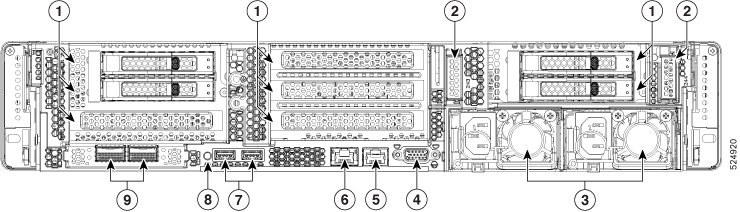
The following illustration shows the rear panel hardware features that are common across all models of the server.

1

Rear hardware configuration options:

  • For I/O-Centric, these are PCIe slots.

  • For Storage-Centric, these are storage drives bays.

This illustration shows the slots populated with two SFF drives.

2

Rear M.2 boot-optimized module slots. Each slot supports one M.2 module with one M.2 SSD.

3

Power supplies (two, redundant as 1+1)

See Power Specifications for specifications and supported options.

4

VGA video port (DB-15 connector)

5

Serial port (RJ-45 connector)

6

One dedicated 1Gbps management port

7

USB 3.0 ports, 2

8

Rear unit identification button/LED

9

Modular LAN-on-motherboard (mLOM) or OCP card slot (x16).

This slot can contain either a Cisco mLOM or an Intel X710 OCP 3.0 card.

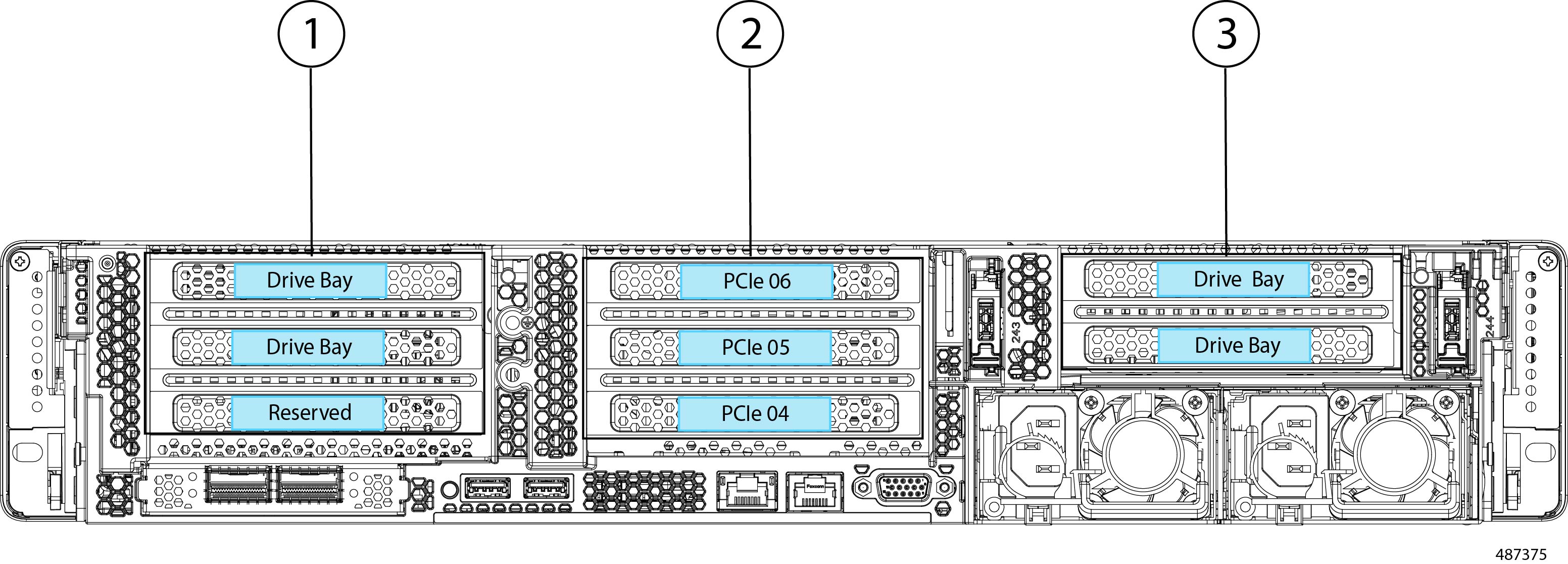
Cisco UCS C240 M8 Server 24 Drive Rear Panel, I/O Centric

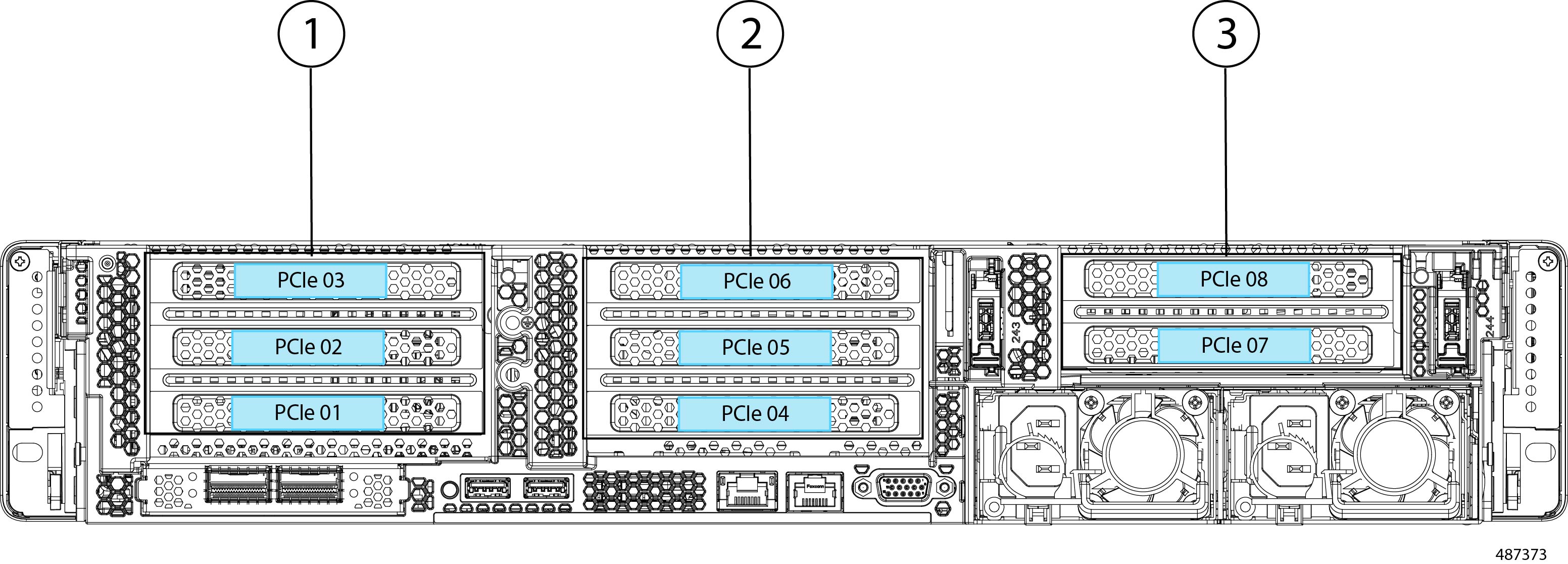
The Cisco UCS C240 M8 24 SAS/SATA SFF version has a rear configuration option, for either I/O (I/O Centric) or Storage (Storage Centric) with the I/O Centric version of the server offering PCIe slots and the Storage Centric version of the server offering drive bays.

The following illustration shows the rear panel features for the I/O Centric version of the Cisco UCS C240 M8SX.

  • For features common to all versions of the server, see Common Rear Panel Features.

  • For definitions of LED states, see Rear-Panel LEDs.

1

Riser 1A or 1C

2

Riser 2A or 2C

3

Riser 3A or 3C

-

-

The following table shows the riser options for this version of the server.

Table 1. Cisco UCS C240 M8 24 SFF SAS/SATA/NVMe (UCSC-C240-M8S)

Riser

Options

Riser 1

This riser is I/O-centric and controlled by CPU 1.

Riser 1A supports three PCIe slots numbered bottom to top:

  • Slot 1 is full-height, ¾ length, x8, NCSI

  • Slot 2 is full-height, full-length, x16, NCSI

  • Slot 3 is full-height, full-length, x8, no NCSI

Riser 1C supports two PCIe slots numbered bottom to top:

  • Slot 1 is full-height, ¾-length, x16 Gen5, NCSI

  • Slot 2 is full-height, full-length, x16 Gen5, no NCSI

Riser 2

This riser is I/O-centric and controlled by CPU 2.

Riser 2A supports three PCIe slots:

  • Slot 4 is full-height, ¾ length, x8, NCSI

  • Slot 5 is full-height, full-length, x16, NCSI

  • Slot 6 is full-height, full-length, x8, no NCSI

Riser 2C supports two PCIe slots, numbered bottom to top:

  • Slot 4 is full-height, ¾-length, x16 Gen5, NCSI

  • Slot 5 is full-height, full-length, x16 Gen5, no NCSI

Riser 3

This riser is I/O-centric and controlled by CPU 2.

Riser 3A supports two PCIe slots:

  • Slot 7 is full-height, full-length, x8

  • Slot 8 is full-height, full-length, x8

Riser 3C supports a GPU only.

  • Supports one full-height, full-length, double-wide GPU (PCIe slot 7 only), x16

  • Slot 8 is blocked by double-wide GPU

Cisco UCS C240 M8 Server 24 NVMe Drive Rear Panel, I/O Centric

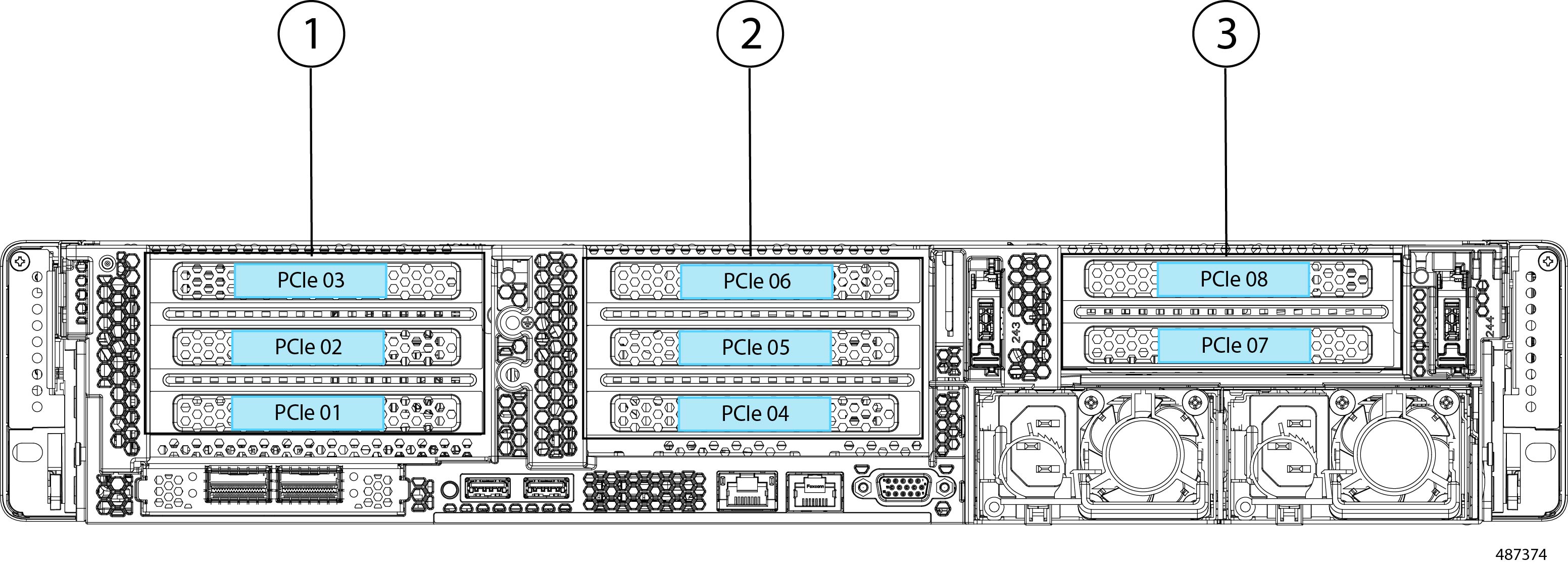
The Cisco UCS C240 M8 24 NVMe version has a rear configuration option, for either I/O (I/O Centric) or Storage (Storage Centric) with the I/O Centric version of the server offering PCIe slots and the Storage Centric version of the server offering drive bays.

The following illustration shows the rear panel features for the I/O Centric version of the Cisco UCS C240 M8SN.

  • For features common to all versions of the server, see Common Rear Panel Features.

  • For definitions of LED states, see Rear-Panel LEDs.

The following table shows the riser options for this version of the server.

1

Riser 1A or 1C

2

Riser 2A or 2C

3

Riser 3A, or 3C

-

Table 2. Cisco UCS C240 M8 24 SFF NVMe (UCSC-C240-M8S)

Riser

Options

Riser 1

This riser is I/O-centric and controlled by CPU 1.

Riser 1A supports three PCIe slots:

  • Slot 1 is full-height, ¾ length, x8, NCSI

  • Slot 2 is full-height, full-length, x16, NCSI

  • Slot 3 is full-height, full-length, x8, no NCSI

Riser 1C supports two PCIe slots numbered bottom to top:

  • Slot 1 is full-height,¾-length, x16 Gen5, NCSI

  • Slot 2 is full-height, full-length, x16 Gen5, no NCSI

Riser 2

This riser is I/O-centric and controlled by CPU 2.

Riser 2A supports three PCIe slots:

  • Slot 4 is full-height, ¾ length, x8

  • Slot 5 is full-height, full-length, x16

  • Slot 6 is full-height, full-length, x8

Riser 2C supports two PCIe slots numbered bottom to top:

  • Slot 4 is full-height,¾-length, x16 Gen5, NCSI

  • Slot 5 is full-height, full-length, x16 Gen5, no NCSI

Riser 3

Riser 3A supports two PCIe slots numbered bottom to top:

  • Slot 7 is full-height, full-length, x8

  • Slot 8 is full-height, full-length, x8

Riser 3C supports a GPU only:

  • Supports one full-height, full-length, double-wide GPU (PCIe slot 7 only), x16

  • Slot 8 is blocked by double-wide GPU

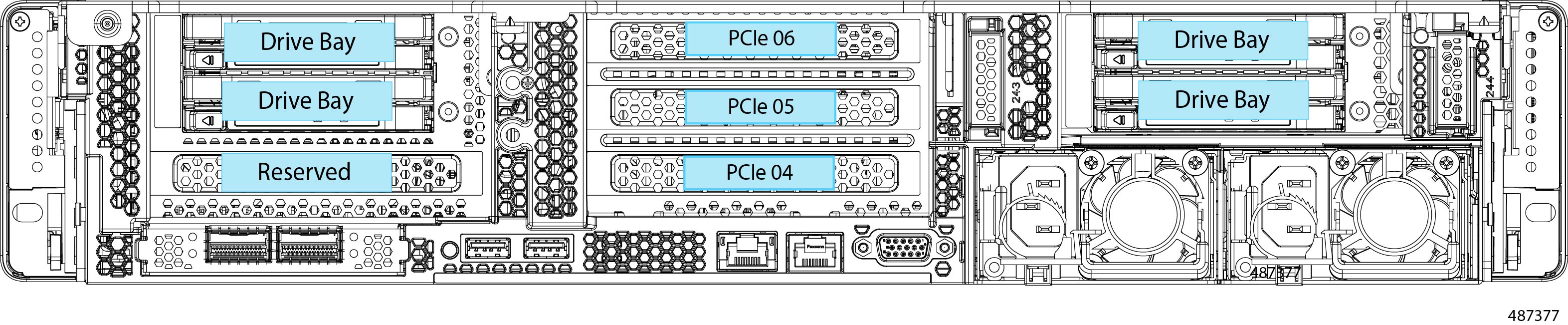
Cisco UCS C240 M8 Server 24 Drive Rear Panel, Storage Centric

The Cisco UCS C240 M8 24 SAS/SATA SFF version has a rear configuration option, for either I/O (I/O Centric) or Storage (Storage Centric) with the I/O Centric version of the server offering PCIe slots and the Storage Centric version of the server offering drive bays.

The following illustration shows the rear panel features for the Storage Centric version of the Cisco UCS C240 M8S.

  • For features common to all versions of the server, see Common Rear Panel Features.

  • For definitions of LED states, see Rear-Panel LEDs.

The following table shows the riser options for this version of the server.

1

Riser 1B

2

Riser 2Aor 2C

3

Riser 3B

-

Table 3. Cisco UCS C240 M8 24 SFF SAS/SATA/NVMe (UCSC-C240-M8S)

Riser

Options

Riser 1

This riser is Storage-centric and controlled by CPU 1.

Riser 1B supports two SFF SAS/SATA/NVMe drives

  • Slot 1 is reserved

  • Slot 2 (drive bay 102), x16

  • Slot 3 (drive bay 101), x8

When the server uses a hardware RAID controller card, SAS/SATA HDDs or SSDs, or NVMe PCIe SSDs are supported in the rear bays.

Riser 2

This riser is I/O-centric and controlled by CPU 2.

Riser 2A and 2C are supported for the Storage-centric version of the server.

Riser 2A supports three slots:

  • Slot 4 is full-height, ¾ length, x8, NCSI

  • Slot 5 is full-height, full-length, x16, NCSI

  • Slot 6 is full-height, full-length, x8

Riser 2C supports two slots:

  • Slot 4 is full-height, ¾-length, x16, Gen 5, NCSI

  • Slot 5 is full-height, full-length, x16, Gen 5

NCSI support is limited to one slot at a time.

Riser 3

This riser is controlled by CPU 2.

Riser 3B has two drive slots that can support two universal HHD or NVMe SFF drives.

  • Slot 7 (drive bay 107), x4

  • Slot 8 (drive bay 106), x4

When the server uses a hardware RAID controller card, SAS/SATA HDDs or SSDs, or NVME PCIe SSDs, are supported in the rear bays.

Cisco UCS C240 M8 Server 24 NVMe Drive Rear Panel, Storage Centric

The Cisco UCS C240 M8 24 NVMe SFF version has a rear configuration option, for either I/O (I/O Centric) or Storage (Storage Centric) with the I/O Centric version of the server using PCIe slots and the Storage Centric version of the server offering drive bays.

The following illustration shows the rear panel features for the Storage Centric version of the Cisco UCS C240 M8SN.

  • For features common to all versions of the server, see Common Rear Panel Features.

  • For definitions of LED states, see Rear-Panel LEDs.

The following table shows the riser options for this version of the server.

Table 4. Cisco UCS C240 M8 24 SFF NVMe (UCSC-C240-M8S)

Riser

Options

Riser 1B

This riser is Storage centric and controlled by CPU 1.

Riser 1B supports two universal HDD/NVMe SFF drive slots:

  • Slot 1 is reserved. and does not support HDD or NVMe drives. This slot does support one M.2 NVMe RAID card.

  • Slot 2 (drive bay 102), x4

  • Slot 3 (drive bay 101), x4

When the server uses a hardware RAID controller card, NVMe PCIe SSDs are supported in the rear bays.

Riser 2

Riser 2A and 2C are supported for the Storage-centric version of the server.

Riser 2A supports three slots:

  • Slot 4 is full-height, ¾ length, x8, NCSI

  • Slot 5 is full-height, full-length, x16, NCSI

  • Slot 6 is full-height, full-length, x8

Riser 2C supports two slots:

  • Slot 4 is full-height, ¾-length, x16, Gen 5, NCSI

  • Slot 5 is full-height, full-length, x16, Gen 5

NCSI support is limited to one slot at a time.

Riser 3

In the Storage-Centric configuration, Riser 3B has two slots that can support two universal HDD/NVMe SFF drives.

  • Slot 7 (drive bay 107), x4

  • Slot 8 (drive bay 106), x4

Cisco UCS C240 M8 Server E3.S NVMe Drive Rear Panel, Storage Centric

The Cisco UCS C240 M8 E3.S version has a rear configuration option, for either I/O (I/O Centric) or Storage (Storage Centric) with the I/O Centric version of the server using PCIe slots and the Storage Centric version of the server offering drive bays.

The following illustration shows the rear panel features for the Storage Centric version of the Cisco UCS C240 M8E3S.

  • For features common to all versions of the server, see Common Rear Panel Features.

  • For definitions of LED states, see Rear-Panel LEDs.

The following table shows the riser options for this version of the server.

Table 5. Cisco UCS C240 M8 E3.S NVMe (UCSC-C240-M8E3S)

Riser

Options

Riser 1B

This riser is Storage centric and controlled by CPU 1.

Riser 1B supports two E3.S drive slots:

  • Slot 1 is reserved. and does not support NVMe drives. This slot does support one M.2 NVMe RAID card.

  • Slot 2 (drive bay 102), x4

  • Slot 3 (drive bay 101), x4

When the server uses a hardware RAID controller card, NVMe PCIe SSDs are supported in the rear bays.

Riser 2

Riser 2A and 2C are supported for the Storage-centric version of the server.

Riser 2A supports three slots:

  • Slot 4 is full-height, ¾ length, x8, NCSI

  • Slot 5 is full-height, full-length, x16, NCSI

  • Slot 6 is full-height, full-length, x8

Riser 2C supports two slots:

  • Slot 4 is full-height, ¾-length, x16, Gen 5, NCSI

  • Slot 5 is full-height, full-length, x16, Gen 5

NCSI support is limited to one slot at a time.

Riser 3

In the Storage-Centric configuration, Riser 3B has two slots that can support two universal HDD/NVMe SFF drives.

  • Slot 7 (drive bay 107), x4

  • Slot 8 (drive bay 106), x4

PCIe Risers

The following different PCIe riser options are available.

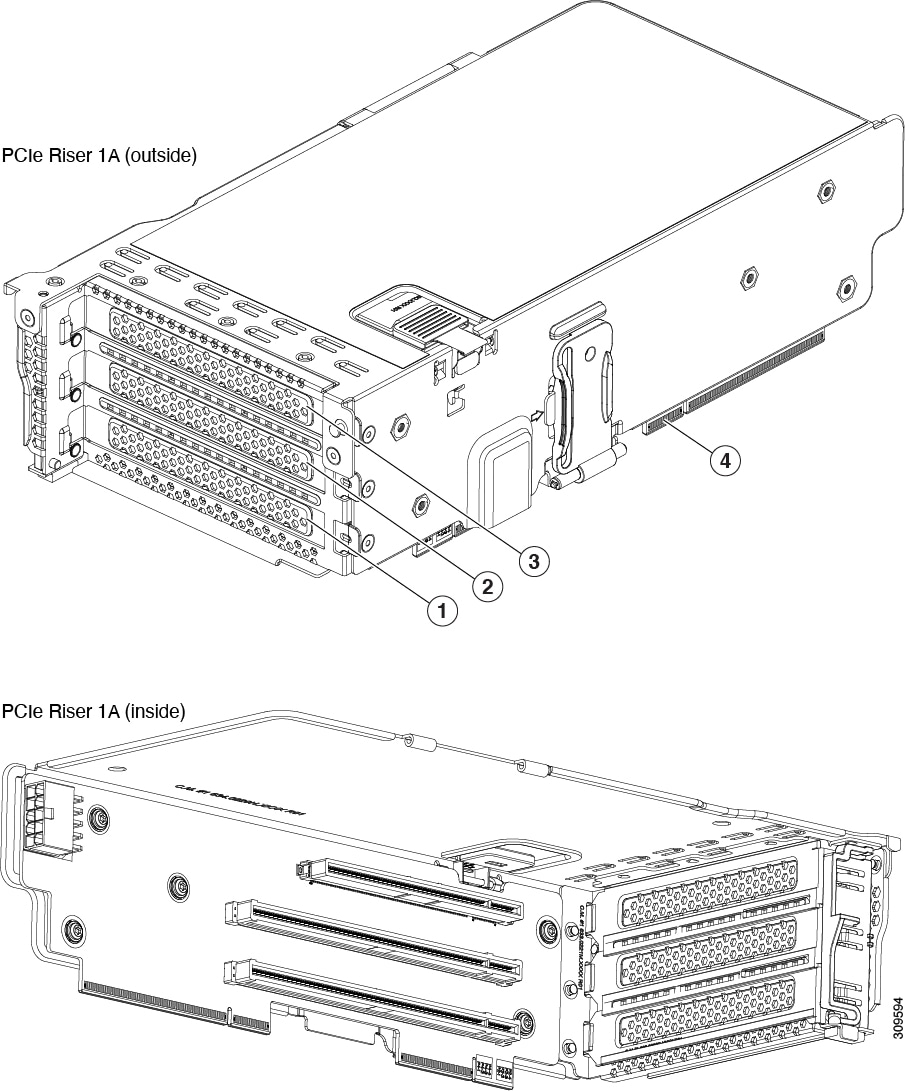
Riser 1 Options

This riser supports the following options, Riser 1A, 1B (two HDDs only), and 1C.

1

PCIe slot 1, supports full-height, ¾ length, x8, Gen 4, NCSI support for one slot at a time

2

PCIe slot 2, full height, full length, x16, Gen 4, GPU capable, NCSI support for one slot at a time

3

PCIe slot 3, full height, full length, x8, Gen 4, no NCSI

4

Edge Connectors

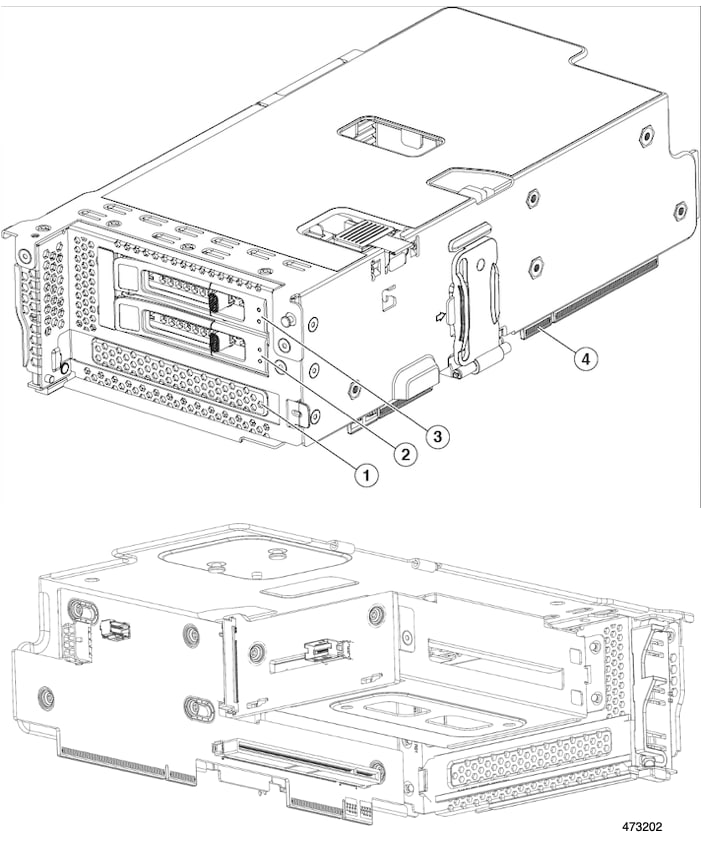
1

PCIe slot 1, Reserved for drive controller (NVMe M.2 RAID controller)

2

Drive Bay 102, x4, Gen 4, 2.5-inch Universal HDD, SSD, or NVMe

3

Drive 101, x4, Gen 4, 2.5-inch Universal HDD, SSD, or NVMe

4

Edge Connectors

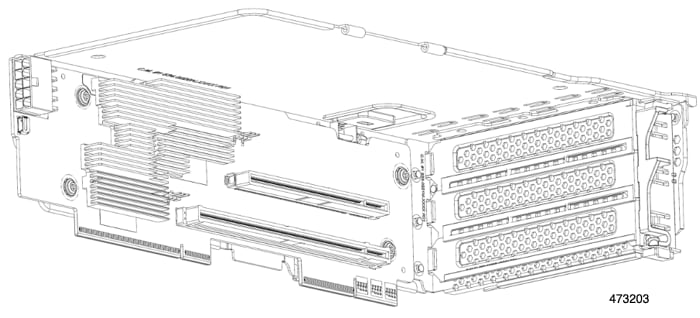
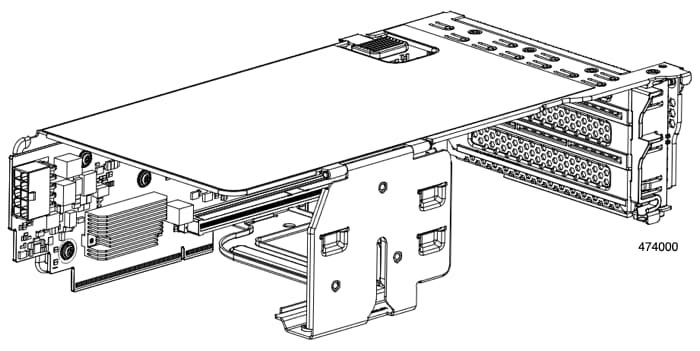
Riser 1C supports two PCIE Gen5 x16 Slots.

The following illustration shows Riser 1C (inside)

The following illustration shows Riser 1C (outside).

1

PCIe slot 1, supports full-height, ¾ length, x16, Gen 5, NCSI support on one slot at a time

2

PCIe slot 2, supports full-height, full length, x16, Gen 5, no NCSI

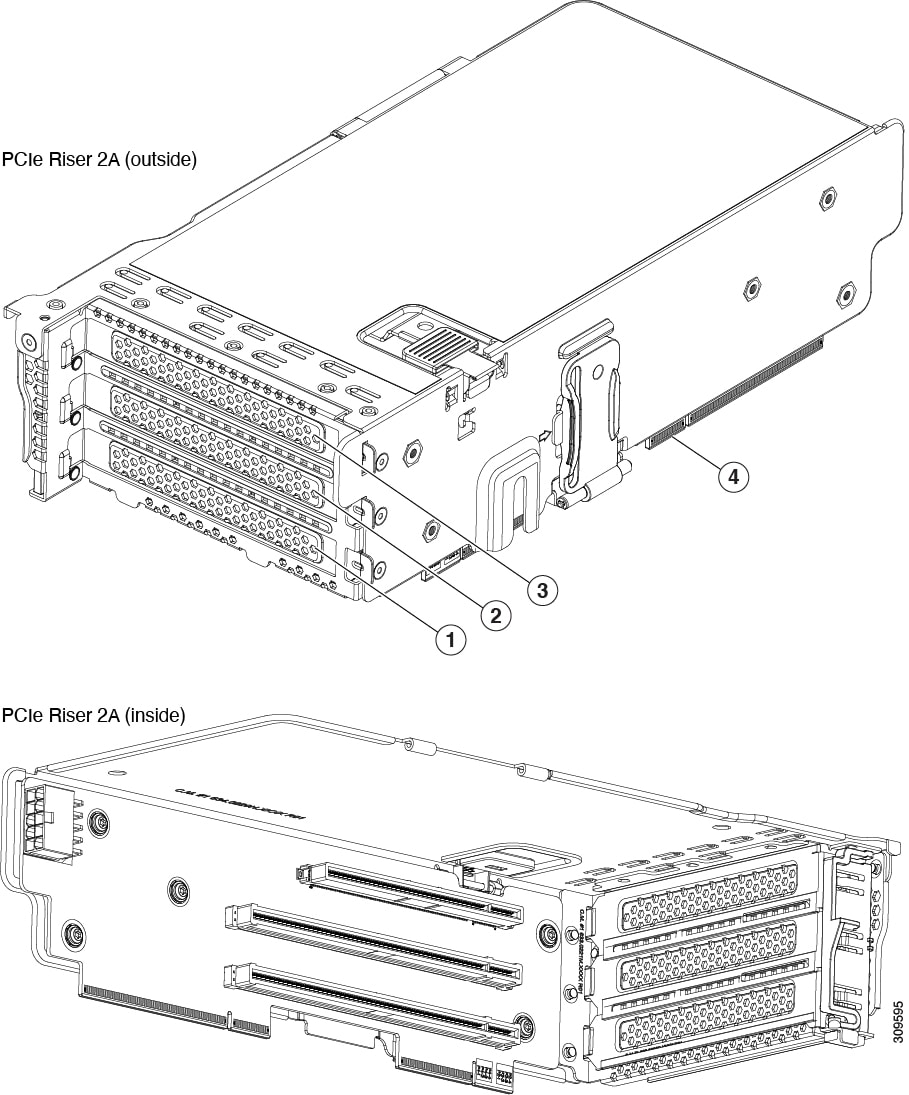
Riser 2

This riser supports options Riser 2A and 2C, which have the same electrical and mechanical properties as Riser 1A and Riser 1C, but Riser 2 has a different mechanical holder.

1

PCIe slot 4, supports full-height, ¾ length, x8, Gen 4, NCSI support on one slot at a time

2

PCIe slot 5, full height, full length, x16, Gen 4, GPU capable, NCSI support on one slot at a time

3

PCIe slot 6, full height, full length, x8, Gen 4, no NCSI

4

Edge Connectors

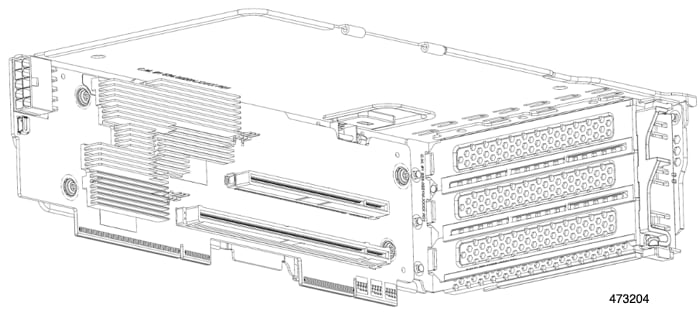
Riser 2C supports two PCIE Gen5 x16 Slots.

1

PCIe slot 4, supports full-height, ¾ length, x16, Gen 5, NCSI support on one slot at a time

2

PCIe slot 5, supports full-height, full length, x16, Gen 5, no NCSI

Riser 3

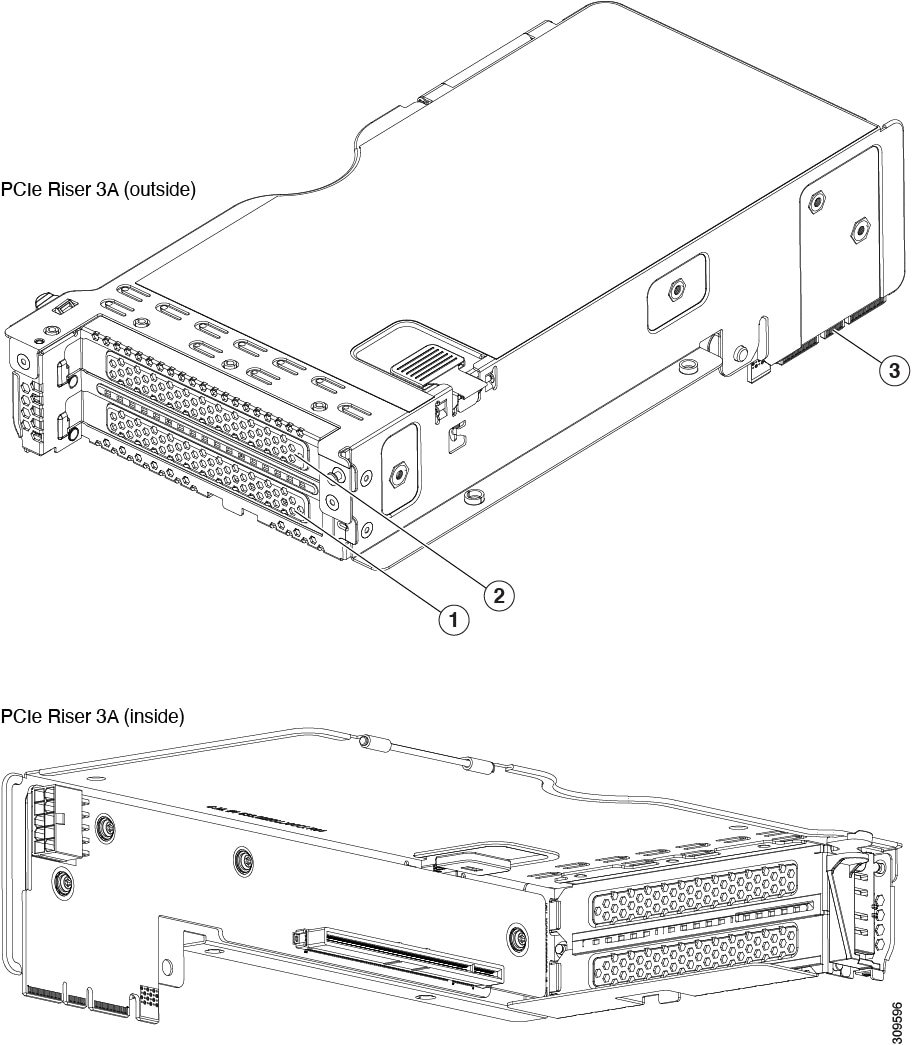
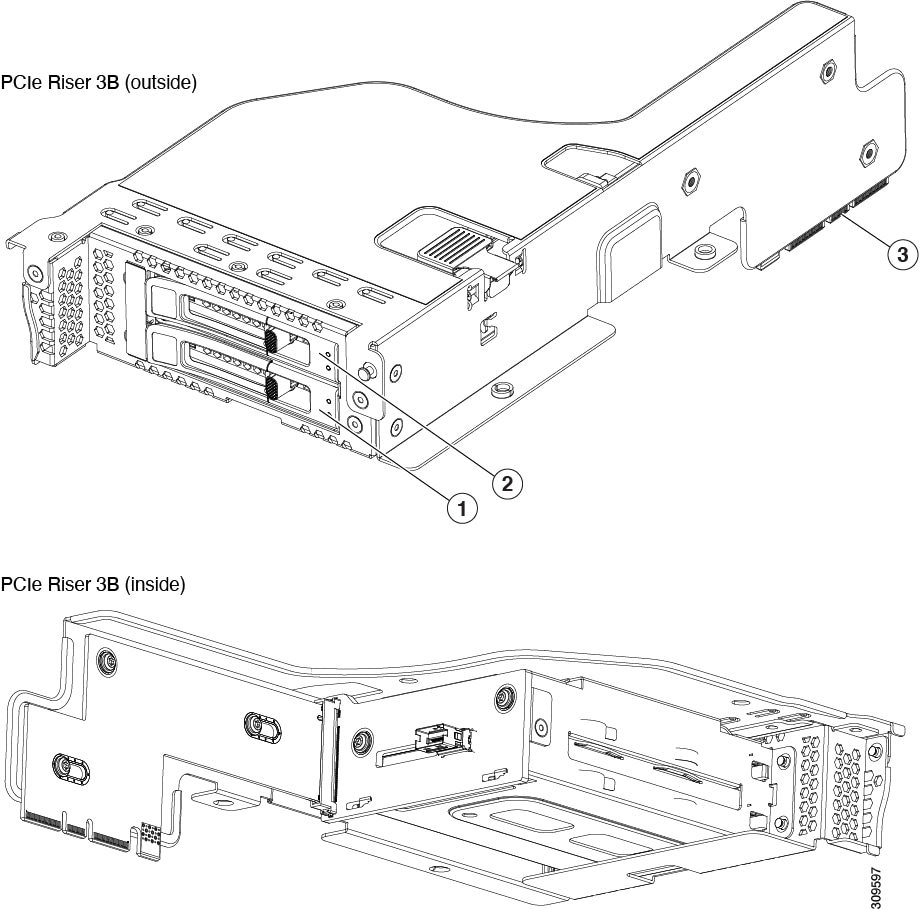
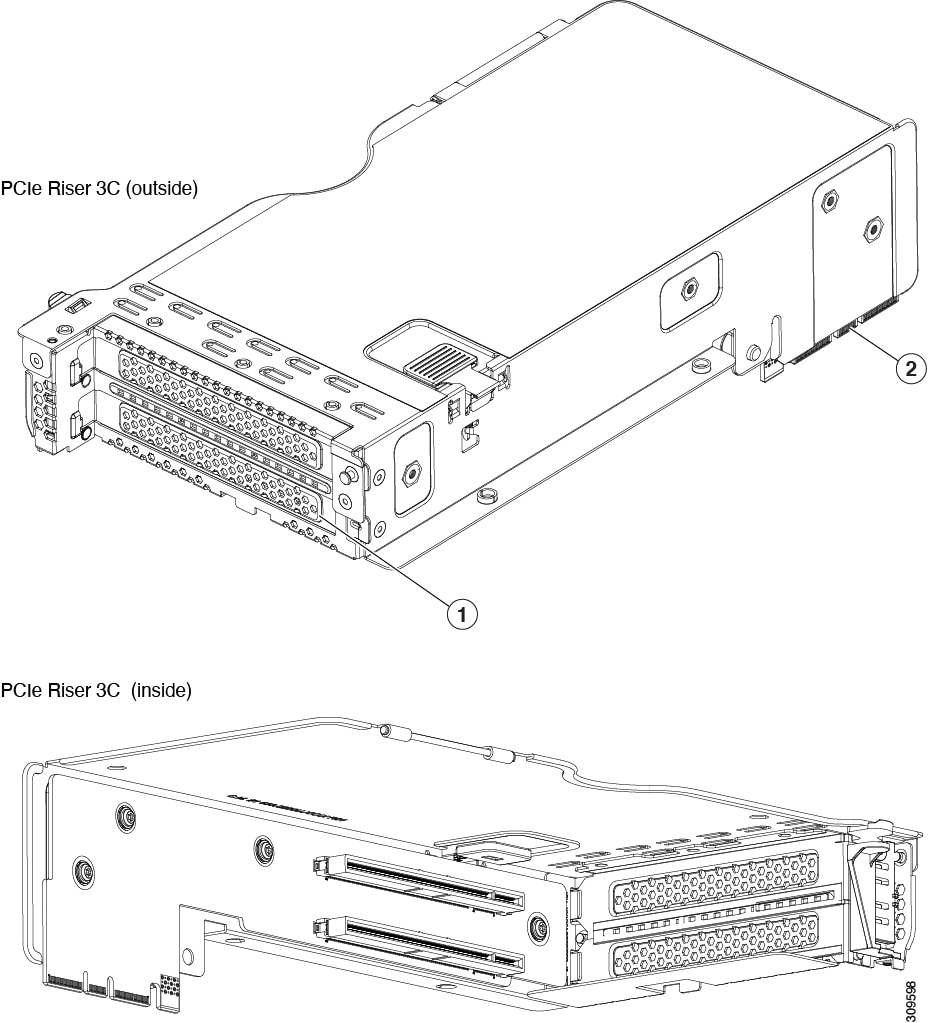
This riser supports three options, 3A, 3B (supports HDD, SSD, and NVMe), and 3C.

1

PCIe slot 7, full height, full length x8, Gen 4, no NCSI

2

PCIe slot 8, full height, full length, x8, Gen 4, no NCSI

3

Edge Connectors

1

PCIe Slot 7, Drive Bay 104, x4, Gen 4, no NCSI

2

PCIe Slot 8, Drive Bay 103, x4, Gen 4, no NCSI

3

Edge Connectors

1

PCIe Slot 7, supports one full height, full length, double-wide GPU (slot 7 only), x16, Gen 4, no NCSI

Note


The other slot is non configurable with hardware.

2

Edge Connectors

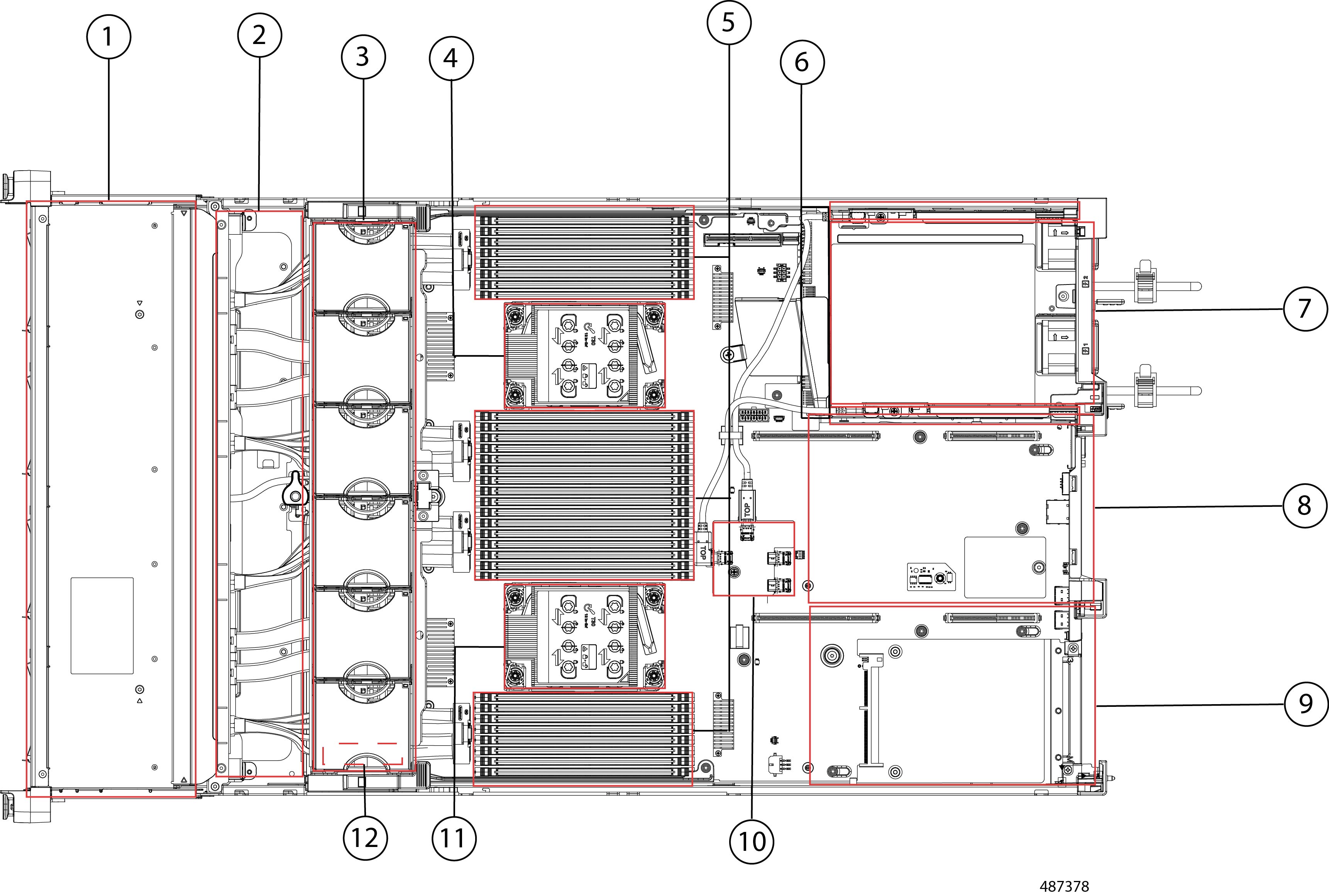
Serviceable Component Locations

This topic shows the locations of the field-replaceable components and service-related items. The view in the following figure shows the server with the top cover removed.

Figure 4. Cisco UCS C240 M8 Server, Serviceable Component Locations

Note


The preceding illustration shows a server with three half-height rear risers. The server supports also supports two full-height, full-width risers (not shown).


1

Front-loading drive bays.

2

RAID Module slot.

3

Cooling fan modules (six, hot-swappable fan modules in a single fan tray)

4

CPU socket 2

5

DIMM sockets on motherboard (16 per CPU)

See the Cisco UCS Intel M8 Memory Guide. for DIMM slot numbering.

Note


An air baffle rests on top of the DIMM and CPUs when the server is operating. The air baffle is not displayed in this illustration.

6

M.2 RAID Controllers, two individual pieces

7

PCIe riser 3 (PCIe slots 7 and 8 numbered from bottom to top), with the following options:

  • 3A (Default Option)—Slot 7 (x24 mechanical, x8 electrical, Gen 4)

    Slot 8 (x16 mechanical, x8 electrical, Gen 4)

  • 3B (Storage Option)—Slots 7 and 8, both support x4 electrical, Gen 4.

    Both slots can accept universal SFF HDDs or NVMe SSDs.

  • 3C (GPU Option)—Slot 7 (x24 mechanical, x16 electrical). Slot 7 can support a full height, full length GPU card.

8

PCIe riser 2 (PCIe slots 4, 5, 6 numbered from bottom to top), with the following options:

  • 2A (Default Option)—Slot 4 (x24 mechanical, x8 electrical, Gen 4. NCSI is supported on one slot at a time. Supports a full height, ¾ length card.

    Slot 5 (x24 mechanical, x16 electrical, Gen 4). NCSI is supported on one slot at a time. Supports one full height, full length card.

    Slot 6 (x16 mechanical, x8 electrical, Gen 4). Supports a full height, full length card.

  • 2C— Slots 4 (x24 mechanical, x16 electrical, Gen 5) NCSI supported on one slot at a time. Supports a full-height, full-length card.

    Slot 5 (x24 mechanical, x16 electrical Gen 5) Supports full-height, full-length drive.

9

PCIe riser 1 (PCIe slot 1, 2, 3 numbered bottom to top), with the following options:

  • 1A (Default Option)—Slot 1 (x24 mechanical, x8 electrical, Gen 4) NCSI is supported on one slot at a time. Supports full height, ¾ length card.

    Slot 2 (x24 mechanical, x16 electrical, Gen 4). NCSI is supported on one slot at a time. Supports full height, full length GPU card.

    Slot 3 (x16 mechanical, x8 electrical, Gen 4) Supports full height, full length card.

  • 1B (Storage Option)—Slot 1 supports an M.2 NVMe RAID card

    Slot 2 (x4 electrical), supports universal 2.5-inch HDD NVMe drive

    Slot 3 (x4 electrical), supports universal 2.5-inch HDD NVMe drive

  • 1C — (x24 mechanical, x16 electrical, Gen 5) NCSI supported on one slot at a time. Supports a full-height, ¾-length card.

    Slot 2 (x24 mechanical, x16 electrical, Gen 5) Supports a full-height, full-length card.

10

RAID controller card

11

CPU socket 1

12

SuperCap Module (under fan tray)

The Technical Specifications Sheets for all versions of this server, which include supported component part numbers, are at Cisco UCS Servers Technical Specifications Sheets (scroll down to Technical Specifications).

Summary of Server Features

The following tables list a summary of the server features.

Table 6. Server Features, SFF

Feature

Description

Chassis

Two rack-unit (2RU) chassis

Central Processor

One or two 6th Generation Intel Xeon Scalable processors.

Chipset

Intel® C741 chipset

Memory

32 slots for registered DIMMs (RDIMMs)

Multi-bit error protection

Multi-bit error protection is supported

Video

The Cisco Integrated Management Controller (CIMC) provides video using the Aspeed AST2600 video/graphics controller.

Network and management I/O

Rear panel:

  • One 10-Gb/100-G/1000-Gb Ethernet dedicated management port (RJ-45 connector)

  • One RS-232 serial port (RJ-45 connector)

  • One VGA video connector port (DB-15 connector)

  • Two USB 3.0 ports

  • Identification Button/Identification LED

  • (Optional) Four mLOM ports, 1-Gb/10-GB Ethernet

Front panel:

  • One front-panel keyboard/video/mouse (KVM) connector that is used with the KVM breakout cable. The breakout cable provides two type A USB 2.0 connectors, one VGA (DB-15) connector, and one DB-9 serial connector.

Power

Two of the following Platinum-efficiency hot-swappable power supplies:

  • 1050 W (DC)

  • 1200 W (AC), Titanium

  • 1600 W (AC)m Platinum

  • 2300 W (AC), Titanium

Two power supplies are mandatory, and power supplies must be the same. Cold redundancy and 1 + 1 redundancy are supported as long power supplies are the same.

For additional information, see Supported Power Supplies

ACPI

The advanced configuration and power interface (ACPI) 4.0 standard is supported.

Front Panel

The front panel controller provides status indications and control buttons KVM connector.

Cooling

Six hot-swappable fan modules for front-to-rear cooling.

InfiniBand

The PCIe bus slots in this server support the InfiniBand architecture.

Expansion Slots

For the SFF versions of the server, the following expansion slots are supported:

  • Riser 1A (Three PCIe slots)

  • Riser 1B (Two drive bays)

  • Riser 1C (Two PCIe Gen5 slots)

  • Riser 2A (Three PCIe slots)

  • Riser 2C (Two PCIe Gen5 slots)

  • Riser 3A (Two PCIe slots)

  • Riser 3B (Two drive bays)

  • Riser 3C (One PCIe slot)

Note


Not all risers are available in every server configuration option.

Interfaces

Rear panel:

  • One 10/100/1000 Base-T RJ-45 management port

  • One RS-232 serial COM port (RJ45 connector)

  • One DB15 VGA connector

  • Two Type A USB 3.0 port connectors

  • One flexible modular LAN on motherboard (mLOM) slot that can accommodate various interface cards

  • Identification Button/Identification LED

Front panel supports one KVM console connector that supplies:

  • two Type A USB 2.0 connectors

  • one DB-15 VGA video connector

  • one DB-9 serial port connector

Storage

  • UCSC-C240-M8S:

    • Up to 24 front SFF SAS/SATA hard drives (HDDs) or U.3 SFF solid state drives (SSDs).

    • Optionally, up to four front SFF NVMe PCIe SSDs. These drives must be placed in front drive bays 1, 2, 3, and 4 only. The rest of the bays (5 - 24) can be populated with SAS/SATA/U.3 SSDs or HDDs. Two CPUs are required in a server that has any number of NVMe drives.

    • Up to 8 direct-attach U.2/U3 SSDs

    • Optionally, up to four 2.5-inch rear-facing universal drives (SAS/SATA HDDs or SSDs, or NVMe SSDs)

  • UCSC-C240-M8E3S:

    • Up to 32 direct-attached front NVMe drives (Gen 5x2 or Gen 5x4).

    • Optionally, up to 4 direct-attaced E3.S NVMe drives (Gen 5x4)

    • Two CPUs are required

  • UCSC-C240-M8L

    • Up to 16 large form factor (LFF) HDDs configured as 12 front loading drives and 4 mid-mount drives.

    • Optionally, up to four SFF HDD/SSD/NVMe drives

    • GPUs are not supported in this configuration

  • Other Storage:

    • An optional mini-storage module connector on the motherboard supports a boot-optimized RAID controller. The controller can support up two Dual M.2 2280 SATA SSDs which can be used as boot volumes with corresponding interposer/controller cards.

      Mixing different capacity SATA M.2 SSDs is not supported.

Integrated Management Processor

Baseboard Management Controller (BMC) running Cisco Integrated Management Controller (CIMC) firmware.

Depending on your CIMC settings, the CIMC can be accessed through the 1GE dedicated management port, the 1GE/10GE LOM ports or a Cisco virtual interface card (VIC).

CIMC manages certain components within the server, such as the Cisco 12G SAS HBA.

Storage Controllers

  • One Cisco M7 12G SAS RAID controller with 4GB FBWC (for UCSC-240-M7SX server)

    • RAID support (RAID 0, 1, 5, 6, 10, 50, and 60) and SRAID0

    • Supports up to 28 internal drives

  • Two Cisco M7 12G SAS HBA (for UCSC-240-M7SX servers)

    • JBOD/Pass-through Mode support

    • Each HBA supports up to 14 SAS/SATA internal drives

  • Two Cisco 24G Tri-Mode RAID Controller with 4GB cache (UCSC-RAID-HP):

    • Supports up to 24 front-loading SFF SAS/SATA or U.3 NVMe drives plus four rear-loading SFF SAS/SATA or U.3 NVMe drives.

    • Provides RAID 0/1/5/6/10/50/60

    • Supports RAID for U.3 NVMe drives only

    • Drives behind this controller are hot swappable regardless of media type

Modular LAN over Motherboard (mLOM) slot

The dedicated mLOM slot on the motherboard can flexibly accommodate the Cisco Virtual Interface Cards (VICs), Series 15xxx

Server Management

Cisco Intersight provides server management.

CIMC

Cisco Integrated Management Controller (CIMC) 4.3(1) or later is required for the server.