Release Notes for Cisco Catalyst IE3x00 and ESS3300 Series Switches, Release 26.2.x
Available Languages
Bias-Free Language
The documentation set for this product strives to use bias-free language. For the purposes of this documentation set, bias-free is defined as language that does not imply discrimination based on age, disability, gender, racial identity, ethnic identity, sexual orientation, socioeconomic status, and intersectionality. Exceptions may be present in the documentation due to language that is hardcoded in the user interfaces of the product software, language used based on RFP documentation, or language that is used by a referenced third-party product. Learn more about how Cisco is using Inclusive Language.
- US/Canada 800-553-2447
- Worldwide Support Phone Numbers
- All Tools
 Feedback
 Feedback
Cisco Catalyst IE3x00 and ESS3300 Series Switches, Release 26.2.x
Cisco Catalyst IE3x00 and ESS3300 Series Switches, Release 26.2.x
This document provides release information for the following Catalyst IE and Cisco ESS switches:
● Cisco Catalyst IE3x00 Rugged Series
● Cisco Catalyst IE3400 Heavy Duty Series
● Cisco Embedded Services 3300 Series
Cisco Catalyst IE3x00 Rugged Series Switches provide advanced features, full Gigabit Ethernet performance for real-time data, and a modular, optimized design. These Cisco rugged switches bring simplicity, flexibility, and security to the network edge, and are optimized for size, power, and performance.
Note: For information on Cisco Catalyst IE3100 Series Switches, see the Release Notes for Cisco Catalyst IE31xx Series Switches, Release 26.2.x
From their end-to-end security architecture to delivering centralized automation and scale with Cisco intent-based networking, the Cisco Catalyst IE3x00 family is the perfect solution to your switching needs in almost any use case.
Cisco Embedded Services 3300 Series Switches (ESS3300) revolutionize Cisco’s embedded networking portfolio with 1G/10G capabilities. ESS3300 switches are optimized to meet specialized form-factor, ruggedization, port density, and power needs of many applications requiring customization. They complement Cisco’s off-the-shelf Industrial Ethernet switching portfolio.
On ESS3300, the small form factor, board configuration options, and optimized power consumption provide Cisco partners and integrators the flexibility to design custom solutions for defense, oil and gas, transportation, mining, and other verticals. The ESS3300 runs the trusted and feature-rich Cisco IOS XE Software, allowing Cisco partners and integrators to offer their customers the familiar Cisco IOS CLI and management experience on their ESS3300 solutions.
This section provides a brief description of the new software features introduced in the Cisco IOS XE 26.2.x release.
IOS XE 26.2.1
Table 1. New software features in release 26.2.1
| Product Impact |
Feature |
Description |
| Security |
As part of Cisco’s Resilient Infrastructure program and Cisco’s commitment to secure infrastructure, this release includes additional changes aimed towards continuing to make Cisco IOS XE more secure by default. Note that some of these changes may require operational changes if you are not following secure best practices. This release includes the following changes: ● The RADIUS client appends the Message-Authenticator attribute (Attribute 80 HMAC-MD5) to all outgoing Access-Request packets to mitigate cryptographic forgery and Blast-RADIUS vulnerabilities (CVE-2024-3596). ● The RADIUS client drops incoming Access-Accept, Access-Reject, and Access-Challenge packets if the Message-Authenticator is absent or invalid. Ensure AAA servers (example, Cisco ISE) are configured to return Attribute 80. ● Outbound SSH connections enforce Trust-On-First-Use (TOFU). The device prompts to verify and store remote server host keys in the known-hosts database on first connection and validates against them on subsequent sessions. ● Proxy ARP is disabled by default across all routed interfaces, SVIs, and subinterfaces to reduce Layer 2 broadcast domains and prevent ARP spoofing. Configure the ip proxy-arp command explicitly if required. ● The embedded web server daemon is disabled by default on factory configurations to restrict unauthenticated management access. Web UI and RESTCONF require explicit enablement of the ip http secure-server command. ● The IOS XE device rejects unauthenticated NTP Mode 6 and Mode 7 control queries (monlist) to prevent NTP reflection and amplification DDoS attacks. Standard time synchronization (Modes 3 and 4) is unaffected. ● System logging timestamps automatically include the four-digit calendar year (service timestamps log datetime msec year) to standardize multi-year audit logs and SIEM compliance. ● Integrates Linux auditd inside Cisco IOx Guest Shell. All commands, system calls, and privilege escalation events (sudo) executed inside the container are forwarded to the host syslog facility. ● Warning messages are emitted on the console and logged to syslog whenever legacy insecure protocols (telnet, ftp, tftp, http) are enabled in the configuration. ● Real-time tracking of active insecure services is published to the operational database (operDB) and YANG data models, allowing management controllers (such as Cisco Catalyst Center) to monitor security compliance. |
|
| Upgrade |
This feature provides enhanced security by converting legacy CIP passwords to the irreversible Type 8 (SHA-256) algorithm to resist cryptographic attacks. It ensures credential integrity and uninterrupted authentication across industrial deployments. |
|
| Enhanced Reliability |
FlexLink+ provides Layer 2 link redundancy without using STP. It supports active-standby failover on physical interfaces and EtherChannel bundles. VLAN load balancing lets both links forward traffic for different VLANs. After a failed link recovers, the preferred VLAN forwarding can be restored manually or automatically after a configured delay. |
|
| Security |
HTTPS servers disabled by default except for express setup |
Starting with Cisco IOS XE 26.2.1, HTTPS servers remain disabled by default, excluding express setup deployments which retain existing settings. |
| Security |
Cisco Industrial Ethernet switches can use ML-KEM-based key exchange with EAP-TLS 1.3 to provide quantum-resistant key establishment for MACsec connections. EAP-TLS derives keying material that MKA uses to establish secure MACsec communication between switches. |
|
| Security |
Cisco Industrial Ethernet switches can combine ML-KEM with traditional key-exchange algorithms to secure SSHv2 sessions. This hybrid approach provides quantum-resistant key establishment for secure remote management while retaining protection against classical attacks. |
|
| Upgrade |
This feature combines Precision Time Protocol with Resilient Ethernet Protocol to maintain millisecond-level time synchronization during network failures with <200 ms failover, eliminating PTP re-convergence delays that disrupt industrial applications. |
This section provides a brief description of the new hardware features introduced in Cisco IOS XE 26.2.x release.
IOS XE 26.2.1
There are no new hardware features introduced in this release.
WebHelp documentation discontinued
Starting with Cisco IOS XE Release 26.2.1, WebHelp documentation is not available for Industrial Ethernet switches. We recommend using the product documentation available on Cisco.com.
MRP uses the VLAN 1 MAC address
Starting with Cisco IOS XE Release 26.2.1, MRP uses the MAC address of the VLAN 1 interface to identify the best manager host.
This section lists resolved issues in Cisco IOS XE Release 26.2.x.
Note: This software release may contain bug fixes first introduced in other releases. To see additional information, click the bug ID to access the Cisco Bug Search Tool.
IOS XE 26.2.1
Table 2. Resolved issues release 26.2.1
| Bug ID |
Description |
| Remote Desktop Protocol (RDP) connections to a PC could fail when the PC was connected to a storage area network (SAN) device. |
|
| Throughput degradation and packet loss could occur in a High-availability Seamless Redundancy (HSR) network after a cable disconnection. |
|
| A Cisco Catalyst Industrial Ethernet switch may appear as Device Unresponsive after it is added to the Cisco Catalyst Center inventory. |
This table lists open issues in Cisco IOS XE 26.2.x release.
Note: This software release may contain open bugs first identified in other releases. To see additional information, click the bug ID to access the Cisco Bug Search Tool.
IOS XE 26.2.1
Table 3. Open issues in release 26.2.1
| Bug ID |
Description |
| MAC address move updates might not operate as expected on Cisco Catalyst IE3400 switches. |
|
| Cisco ESS3300 switches might generate User Datagram Protocol (UDP) checksum errors when Precision Time Protocol (PTP) end-to-end transparent clock mode is enabled. |
This section lists the limitations.
PoE configuration on Cisco Catalyst IE3x00 Switch
Even when using power supplies that can provide up to a supported maximum (for example, 170 W, 240 W, or 480 W) for the PoE budget, the PoE budget for the IE3x00 defaults to 125 W regardless of the power supplies used. You can configure the power budget to use the maximum.
Note: Before changing the power budget, the minimum power requirements for the switch need to be considered as well. Please refer to the data sheet for your switch for more details.
The attached power supply powers the IE3x00 switch operation as well as PoE power. When increasing the maximum PoE budget, you must subtract the power draw of the IE3x00 switch from the capacity of the attached power supply. You do so to prevent the IE3x00 switch from overdrawing the capacity of the attached power supply. For example, the IE3400 switch with an expansion module supports a maximum PoE budget of 480 W. The IE3400-8P2S with an attached IEM-3400-8P draws 67 W. With a 480 W capacity power supply, the maximum PoE budget that you should configure is (480 W - 67 W) = 413 W.
To use the power supply's maximum supported wattage for the PoE budget, configure the power supply max wattage in global configuration mode as follows:
1. Verify the maximum amount that the power supplies support for the PoE budget.
2. Subtract the operating power of the IE3x00 switch according to its data sheet from the maximum capacity of the power supply. This is your maximum PoE budget.
3. Enter power inline max max-wattage to increase the PoE budget based on the power supplies used.
4. max-wattage is the maximum available PoE power.
IE3200 and IE3300 with 10 Mbps or 100 Mbps speed in half-duplex mode
CRC errors were observed on the IE3200 and IE3300 platforms when the switch is configured with 10 Mbps or 100 Mbps speed in half-duplex mode.
As a workaround, configure no ptp enable on the half-duplex interface. This improves ingress and egress latencies considerably and ensures that there are no late collisions (and therefore, no CRC errors).
The issue and workaround apply to Cisco IOS XE releases 17.3.5 and later.
L3 ACL limitation on usage of L4OP in ACLs
Layer 4 Operator (L4OP) in ACLs is limited by the hardware to a maximum of 8 L4OP (range and gt) for UDP and 8 L4OP for TCP, for a total of 16 global L4OP. Keep in mind that the range operator consumes 2 L4OP.
The L4OPs include: gt (greater than), lt (less than), neq (not equal), eq (equal), range (inclusive range).
Note: The eq does not consume L4OPs. For more information, see the QoS Configuration Guide.
Refer to Cisco IOS XE Migration Guide for IIoT Switches for software upgrade and downgrade information for Cisco Catalyst IE3x00, IE3400 Heavy Duty, and ESS3300 Series Switches, Release 26.2.x.
This section lists the hardware support information.
IOx support for Cisco Catalyst IE3300 Switches
To see if the IE3300-8P2S switch or IE3300-8T2S switch supports IOx application environment, check the Hardware Version ID on the switch label. The Hardware Version ID is in the upper-right corner of the label, as shown in the following illustration. Support for the feature is available only with Hardware Version ID 06 or later. In the following illustration, the Version ID appears as "V06" at the end of the string inside the red rectangle in the upper-right corner of the label.
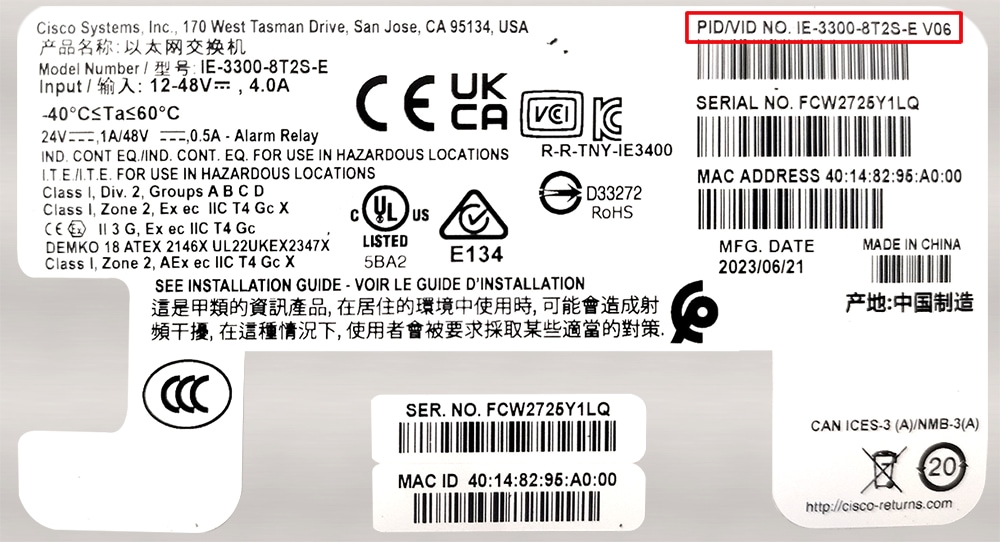
You can also see the Version ID by entering the show version command and examining the output, as shown in the following example:
Switch# show version
Base Ethernet MAC Address : b0:c5:3c:99:c8:a0
Motherboard Assembly Number : 73-101289-11
Motherboard Serial Number : FOC27151WEZ
Model Revision Number : V06
Motherboard Revision Number : B
Model Number : IE-3300-8T2S
System Serial Number : FCW2507P4CV
Top Assembly Part Number : 68-102662-01
Top Assembly Revision Number : B0
System FPGA version : 0.89.2
CIP Serial Number : 0x1999C8A0
SKU Brand Name : Cisco
Startup configuration is always read from flash
Starting with Cisco IOS XE release 17.10.1, the startup configuration is always read from flash. The latest configuration is available only in flash when you save the running configuration, irrespective of the booted media (for example, flash, sdflash, or usbflash) and the boot mode (install or bundle). If a switch cannot find a configuration in flash, it will try to find one in sdflash.
Note: Starting with Cisco IOS XE release 17.10.1, you can configure Cisco Catalyst embedded switches to use USB flash as the primary boot device.
SMU installation: Boot in Install mode
Software Maintenance Upgrade (SMU) installation is no longer supported in bundle mode. Previously, SMU installation was supported in both bundle and install modes. Beginning in Cisco IOS XE Release 17.9.1, SMU supports patching using install mode only.
SMU installation stops if the device is booted up in bundle mode and syslog messages are displayed. You must boot the switch in install mode to support SMU installation.
If the device is booted in install mode, SMU installation continues to work as before.
IE3400: Hardware changes may require action
Some hardware components on the Cisco Catalyst IE3400 Rugged Series and Cisco Catalyst IE3400 Heavy Duty Series switches have changed. The changes, which are automatically handled by the IOS XE software, do not affect switch functionality or the ordering process. New units shipped after May 31, 2022 have the hardware change.
However, you may need to upgrade the software, depending on which base switch and expansion module you have, as shown in the following table.
Note: For detailed information about affected hardware versions, supported software releases, and instructions for different scenarios, see Field Notices on Cisco.com.
| If you have… |
then… |
| Older versions (shipped before May 31, 2022) of the base switch and expansion module |
No action is required. |
| Newer versions (shipped after May 31, 2022) of the base switch and expansion module |
Deploy one of the supported releases of IOS XE. Refer to Field Notices on Cisco.com for details that are appropriate to your deployment. |
| Newer version of the base switch with an older version of the expansion module |
Deploy one of the supported releases of IOS XE. Refer to Field Notices on Cisco.com for details that are appropriate to your deployment. |
| Older version of the base switch with a newer version of the expansion module |
Deploy one of the supported releases of IOS XE. Refer to Field Notices on Cisco.com for details that are appropriate to your deployment. |
Cisco Catalyst IE and ESS Switches: Model numbers
This table lists the supported hardware models and the default license levels they are delivered with. For information about the available license levels, see section License Levels.
Table 4. Hardware models and their default license levels
| Model Number |
Default License Level |
Description |
| ESS-3300-NCP-E |
Network Essentials |
Main Board without a cooling plate 2 ports of 10 GE fiber, 8 ports of GE copper. 4 of the 8 GE copper ports can also be combo ports. Terminal Power: 16W |
| ESS-3300-NCP-A |
Network Advantage |
Main Board without a cooling plate 2 ports of 10 GE fiber, 8 ports of GE copper. 4 of the 8 GE copper ports can also be combo ports. Terminal Power: 16W |
| ESS-3300-CON-E |
Network Essentials |
Main Board conduction cooled 2 ports of 10 GE fiber, 8 ports of GE copper. 4 of the 8 GE copper ports can also be combo ports Terminal Power: 16W |
| ESS-3300-CON-A |
Network Advantage |
Main Board conduction cooled 2 ports of 10 GE fiber, 8 ports of GE copper. 4 of the 8 GE copper ports can also be combo ports Terminal Power: 16W |
| ESS-3300-24T-NCP-E |
Network Essentials |
Main Board with a 16p Expansion Board without a cooling plate 2 ports of 10 GE fiber, 24 ports of GE copper 4 of 8 GE ports can be combo ports on mainboard 4 of 16 GE ports can be combo ports on expansion board Terminal Power: 24W
|
| ESS-3300-24T-NCP-A |
Network Advantage |
Main Board with a 16p Expansion Board without a cooling plate 2 ports of 10 GE fiber, 24 ports of GE copper 4 of 8 GE ports can be combo ports on mainboard 4 of 16 GE ports can be combo ports on expansion board Terminal Power: 24W |
| ESS-3300-24T-CON-E |
Network Essentials |
Main Board with a 16p Expansion Board conduction cooled 2 ports of 10 GE fiber, 24 ports of GE copper 4 of 8 GE ports can be combo ports on mainboard 4 of 16 GE ports can be combo ports on expansion board Terminal Power: 24W |
| ESS-3300-24T-CON-A |
Network Advantage |
Main Board with a 16p Expansion Board conduction cooled 2 ports of 10 GE fiber, 24 ports of GE copper 4 of 8 GE ports can be combo ports on mainboard 4 of 16 GE ports can be combo ports on expansion board Terminal Power: 24W |
| IE-3200-8T2S-E |
Network Essentials |
8 x Gigabit Ethernet 10/100/1000 RJ-45 ports, 2 fiber 100/1000 SFP-based ports, non-PoE |
| IE-3200-8P2S-E |
Network Essentials |
8 x Gigabit Ethernet 10/100/1000 PoE/PoE+ ports, 2 fiber 100/1000 SFP-based ports; PoE power budget of 240 W |
| IE-3300-8T2S-E |
Network Essentials |
8 x Gigabit Ethernet 10/100/1000 RJ-45 ports, 2 fiber 100/1000 SFP-based ports, non-PoE |
| IE-3300-8P2S-E |
Network Essentials |
8 x Gigabit Ethernet 10/100/1000 PoE/PoE+ ports, 2 fiber 100/1000 SFP-based ports; PoE power budget of 360 W (including expansion module) |
| IE-3300-8T2S-A |
Network Advantage |
8 x Gigabit Ethernet 10/100/1000 RJ-45 ports, 2 fiber 100/1000 SFP-based ports, non-PoE |
| IE-3300-8P2S-A |
Network Advantage |
8 x Gigabit Ethernet 10/100/1000 PoE/PoE+ ports, 2 fiber 100/1000 SFP-based ports; PoE power budget of 360 W (including expansion module) |
| IE-3300-8T2X-A |
Network Advantage |
8 x Gigabit Ethernet 10/100/1000 RJ-45 ports, 2 fiber 1/10 Gigabit Ethernet SFP-based ports, non-PoE |
| IE-3300-8T2X-E |
Network Essentials |
8 x Gigabit Ethernet 10/100/1000 RJ-45 ports, 2 fiber 1/10 Gigabit Ethernet SFP-based ports, non-PoE |
| IE-3300-8U2X-E |
Network Essentials |
8 x Gigabit Ethernet 10/100/1000 4PPoE (802.3bt type 3) ports, 2 fiber 1/10 Gigabit Ethernet SFP-based ports; PoE power budget of 480W |
| IE-3300-8U2X-A |
Network Advantage |
8 x Gigabit Ethernet 10/100/1000 4PPoE (802.3bt type 3) ports, 2 fiber 1/10 Gigabit Ethernet SFP-based ports; PoE power budget of 480 W (requires an expansion module to deliver 480W) |
| IE-3400-8T2S-E |
Network Essentials |
8 x Gigabit Ethernet 10/100/1000 RJ-45 ports, 2 fiber 100/1000 SFP-based ports, non-PoE |
| IE-3400-8T2S-A |
Network Advantage |
8 x Gigabit Ethernet 10/100/1000 RJ-45 ports, 2 fiber 100/1000 SFP-based ports, non-PoE |
| IE-3400-8P2S-E |
Network Essentials |
8 x Gigabit Ethernet 10/100/1000 RJ-45 ports, 2 fiber 100/1000 SFP-based ports with PoE |
| IE-3400-8P2S-A |
Network Advantage |
8 x Gigabit Ethernet 10/100/1000 RJ-45 ports, 2 fiber 100/1000 SFP-based ports with PoE |
| IE-3400H-8T-E |
Network Essentials |
8 x Gigabit Ethernet 10/100/1000 X-Coded ports, 1 Alarm input and 1 Alarm output, 1 Console port, mini-change input for Single power source |
| IE-3400H-8T-A |
Network Advantage |
8 x Gigabit Ethernet 10/100/1000 X-Coded ports, 1 Alarm input and 1 Alarm output, 1 Console port, mini-change input for Single power source |
| IE-3400H-8FT-E |
Network Essentials |
8 x Fast Ethernet 10/100 D-coded ports, 1 Alarm input and 1 Alarm output, 1 Console port, Mini-change input for Single Power Source |
| IE-3400H-8FT-A |
Network Advantage |
8 x Fast Ethernet 10/100 D-coded ports, 1 Alarm input and 1 Alarm output, 1 Console port, Mini-change input for Single Power Source |
| IE-3400H-16T-E |
Network Essentials |
16 x Gigabit Ethernet 10/100/1000 X-Coded ports, 1 Alarm input and 1 Alarm output, 1 Console port, mini-change input for Single power source |
| IE-3400H-16T-A |
Network Advantage |
16 x Gigabit Ethernet 10/100/1000 X-Coded ports, 1 Alarm input and 1 Alarm output, 1 Console port, mini-change input for Single power source |
| IE-3400H-16FT-E |
Network Essentials |
16 x Fast Ethernet 10/100 D-coded ports, 1 Alarm input and 1 Alarm output, 1 Console port, Mini-change input for Single Power Source |
| IE-3400H-16FT-A |
Network Advantage |
16 x Fast Ethernet 10/100 D-coded ports, 1 Alarm input and 1 Alarm output, 1 Console port, Mini-change input for Single Power Source |
| IE-3400H-24T-E |
Network Essentials |
24 x Gigabit Ethernet 10/100/1000 X-Coded ports, 1 Alarm input and 1 Alarm output, 1 Console port, mini-change input for Single power source |
| IE-3400H-24T-A |
Network Advantage |
24 x Gigabit Ethernet 10/100/1000 X-Coded ports, 1 Alarm input and 1 Alarm output, 1 Console port, mini-change input for Single power source |
| IE-3400H-24FT-E |
Network Essentials |
24 x Fast Ethernet 10/100 D-coded ports, 1 Alarm input and 1 Alarm output, 1 Console port, Mini-change input for Single Power Source |
| IE-3400H-24FT-A |
Network Advantage |
24 x Fast Ethernet 10/100 D-coded ports, 1 Alarm input and 1 Alarm output, 1 Console port, Mini-change input for Single Power Source |
WebUI system requirements
The WebUI is a web browser-based switch management tool that runs on the switch. These subsections list the hardware and software required to access the WebUI.
Minimum hardware requirements
| Processor speed |
DRAM |
Number of colors |
Resolution |
| 233 MHz |
512 MB (We recommend 1 GB DRAM) |
256 |
1280 x 800 or higher |
Software requirements
Operating systems
● Windows 10 or later
● macOS 10.9.5 or later
Browsers
● Google Chrome: Version 59 or later (On Windows and Mac)
● Microsoft Edge
● Mozilla Firefox: Version 54 or later (On Windows and Mac)
● Safari: Version 10 or later (On Mac)
This section provides information about the release packages associated with Cisco Catalyst IE3x00, IE3400 Heavy Duty, and ESS3300 Series Switches.
Finding the software version
● The package files for Cisco IOS XE software can be found on the system board's internal flash memory device (flash:) or an external USB, depending on the platform configuration.
● Use the show version privileged EXEC command to display the software version running on the switch. The model name displayed at the end of the output reflects the factory configuration and does not change after software license upgrades.
● Use the dir filesystem: privileged EXEC command to view the names and versions of software images stored in flash memory.
Software images for Cisco IOS XE 26.2.x
This table provides the filename for the IOS XE 26.2.x software image for Cisco Catalyst IE3x00, IE3400 Heavy Duty, and ESS3300 Series Switches.
Table 5. Software packages in Cisco IOS XE Release 26.2.x
| Release |
Image Type |
Platform |
File Name |
| Universal |
IE3x00 (IE3200, IE3300, IE3400, and IE3400H) |
ie3x00-universalk9.26.02.01.SPA.bin |
|
| ESS3300 |
ess3x00-universalk9.26.02.01.SPA.bin |
Automatic boot loader upgrade
When you upgrade from the existing release on your switch to a later or newer release for the first time, the boot loader may be automatically upgraded, based on the hardware version of the switch. If the boot loader is automatically upgraded, it will take effect on the next reload.
For subsequent Cisco IOS XE releases, if there is a new boot loader in that release, it may be automatically upgraded based on the hardware version of the switch when you boot up your switch with the new image for the first time.
Caution: Do not power cycle your switch during the upgrade.
| Scenario |
Automatic Boot Loader Response |
| When you boot a Cisco IOS XE image on the switch for the first time |
On Cisco Catalyst IE3x00 and ESS3300 switches, the boot loader might be upgraded to version 8.1.2, depending on the hardware version. Checking Bootloader upgrade... … Bootloader upgrade successful |
Software installation options
To install and activate the specified file, and to make the changes persistent across reloads, enter this command: install add file filename [ activate commit]
Note: For the install command to be successful, ensure that available flash space is at least twice the image size. If there is not enough space available in flash, you are advised to free up space in flash either by issuing the install remove inactive command or to manually clean up the flash by removing unwanted core files or any other files that occupy a large amount of space in flash.
This table lists the options for the install command for the Cisco Catalyst IE3x00, IE3400 Heavy Duty, and ESS3300 Series Switches.
Table 6. Summary of software installation commands for install mode
| Option |
Description |
| activate [auto-abort-timer] |
Activates the file and reloads the device. The auto-abort-timer keyword automatically rolls back image activation. |
| add file tftp: filename |
Copies the install file package from a remote location to the device and performs a compatibility check for the platform and image versions. |
| commit |
Commit the changes to the load path. |
| remove |
Remove installed packages. |
Table 7. Additional references for Cisco Catalyst IE3x00, IE3400 Heavy Duty, and ESS3300 Series Switches
| Document |
Description |
| Provides information about Cisco IOS XE. |
|
| Provides information about Cisco Catalyst IE3200 Rugged Series Switches. |
|
| Provides information about Cisco Catalyst IE3300 Rugged Series Switches. |
|
| Provides information about Cisco Catalyst IE3400 Rugged Series Switches. |
|
| Provides information about Cisco Catalyst IE3400H Heavy Duty Series Switches. |
|
| Provides information about Cisco Catalyst ESS3300 Series Switches. |
|
| Provides information about Cisco Validated Designs. |
|
| Provides tools for locating and downloading MIBs. |
|
| Provides timely and relevant information from Cisco. |
|
| Provides services that help you deploy, manage, optimize, and secure Cisco technologies to achieve your business outcomes. |
|
| You can submit a service request here. |
|
| Enables you to discover and browse secure, validated, enterprise-class applications, products, solutions, and services. |
|
| Provides general networking, training, and certification titles. |
|
| Provides warranty information for a specific product or product family. |
|
| You can ask and answer questions, share suggestions, and collaborate with your peers. |
|
| You can browse Cisco products and find relevant features. It also allows you to compare platforms, determine common features between products, and identify unique product features. The CFN also has a tab that provides a MIB Locator. |
|
| Provides most up-to-date, detailed troubleshooting information. Go to Product Support and select your product from the list or enter the name of your product. Look under Troubleshoot and Alerts, to find information for the problem that you are experiencing. |
|
| Documentation Feedback |
To provide feedback about Cisco technical documentation, use the feedback form available in the right pane of every online document. |
| You can find information about the licensing packages for features here. |
Cisco and the Cisco logo are trademarks or registered trademarks of Cisco and/or its affiliates in the U.S. and other countries. To view a list of Cisco trademarks, go to this URL: www.cisco.com/go/trademarks. Third-party trademarks mentioned are the property of their respective owners. The use of the word partner does not imply a partnership relationship between Cisco and any other company. (1110R)
Any Internet Protocol (IP) addresses and phone numbers used in this document are not intended to be actual addresses and phone numbers. Any examples, command display output, network topology diagrams, and other figures included in the document are shown for illustrative purposes only. Any use of actual IP addresses or phone numbers in illustrative content is unintentional and coincidental.
© 2026 Cisco Systems, Inc. All rights reserved.