Cisco C9610 Supervisor Install Note

PDF

Cisco C9610 series supervisor engine modules

Want to summarize with AI?

Log in

Overview

Describes the Cisco C9610 series supervisor engines.

The Cisco C9610 supervisor engines are high-performance supervisor engines, optimized for large-scale enterprise and campus core network deployments. The supervisor engines acts as the centralized management and control module, and delivers switching, routing, and programmability capabilities. The Cisco C9610R chassis supports two supervisor engines.

This table provides the list of supported supervisor engines.

Table 1. Supported supervisor engines

Product ID

Description

C9610-SUP-3

Cisco C9610 Series Supervisor 3 module

C9610-SUP-3XL

Cisco C9610 Series Supervisor 3XL module

Chassis compatibility

This section lists the supervisor engines and the compatibility with the Cisco C9610R chassis.

Table 2. Chassis compatibility

Compatibility information

C9610-SUP-3

C9610-SUP-3XL

Chassis compatibility

Supported on Cisco C9610R series 10 slot chassis (C9610R) with two supervisor engine modules, and eight line card slots.

Minimum software requirements

Cisco IOS XE 17.18.1 and later releases

Cisco IOS XE 17.18.1 and later releases

Chassis slot restrictions

C9610R: Slots 5 and 6 only (redundant supervisor engines supported). The primary supervisor engine can be installed in either slot.

Bandwidth per slot

6.4 Tbps full-duplex per slot

6.4 Tbps full-duplex per slot

Memory

Double Data Rate 4 Synchronous Dynamic Random-Access Memory: 32 GB

Double Data Rate 4 Synchronous Dynamic Random-Access Memory: 32 GB

Onboard flash: 32 GB

Onboard flash: 32 GB

Line card compatibility

  • C9610-LC-32CD

  • C9610-LC-40YL4CD

  • C9610-LC-32CD

  • C9610-LC-40YL4CD

Supported with the LC adapter, C9610-LC-ADPT

  • C9600-LC-40YL4CD

  • C9600-LC-48TX

  • C9600X-LC-32CD

  • C9600X-LC-56YL4C

Supported with the LC adapter, C9610-LC-ADPT

  • C9600-LC-40YL4CD

  • C9600-LC-48TX

  • C9600X-LC-32CD

  • C9600X-LC-56YL4C


C9610-SUP-3

The supervisor engine, C9610-SUP-3 supported on the Cisco C9610R chassis is based on the Cisco Silicon One E100 ASIC.

This illustration shows the front view of C9610-SUP-3 with the major features identified.

Figure 1. Front-panel of C9610-SUP-3
Table 1. Front panel components

1

Ejector levers

7

RJ-45 console port

2

Supervisor engine LEDs

8

10 G SFP+ management port

3

10MHz (I/O) DIN port

9

USB Type A host port

4

1PPS (I/O) DIN port

10

USB C console port

5

TOD PTP RJ-45 port

11

Optional RFID

6

RJ-45 Ethernet management port

12

SATA SSD


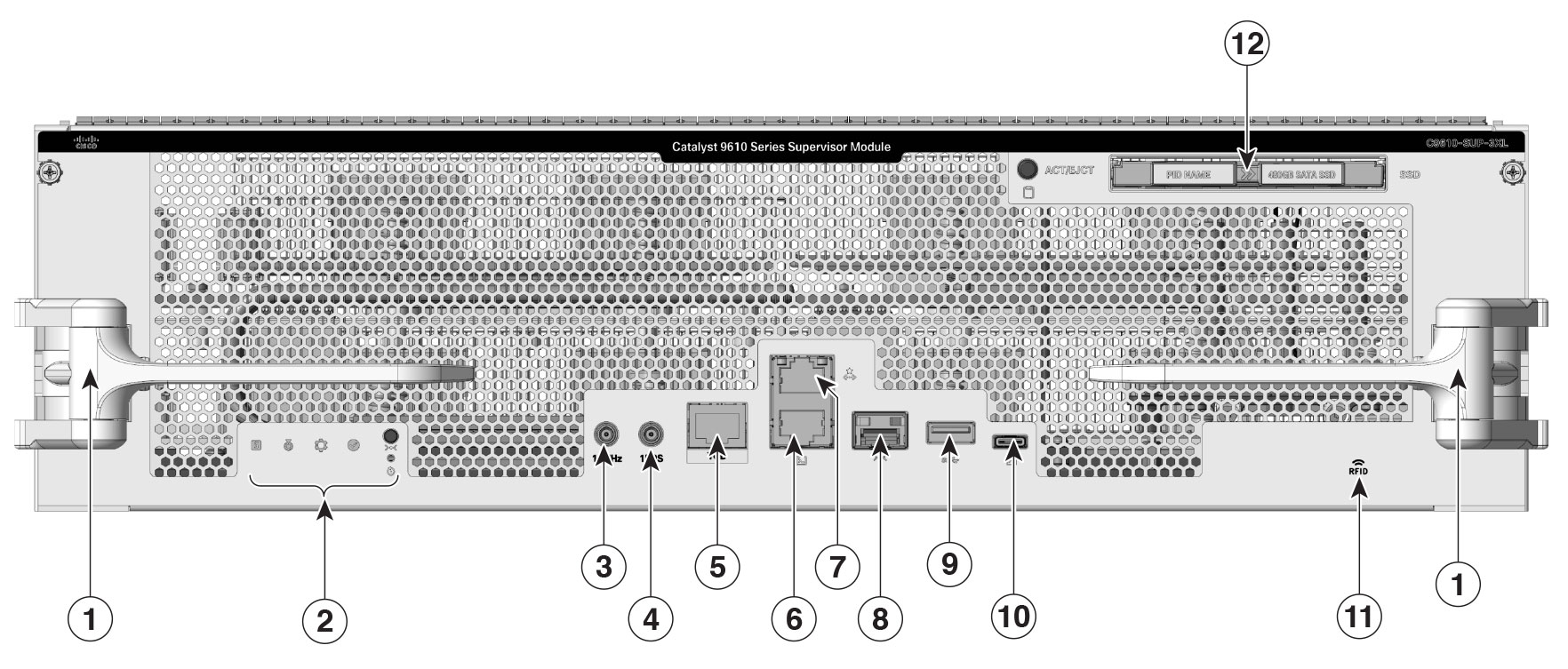
C9610-SUP-3XL

The supervisor engine, C9610-SUP-3XL supported on the Cisco C9610R chassis is based on the Cisco Silicon One Krypton (K100) ASIC.

This illustration shows the front view of C9610-SUP-3XL with the major features identified.

Figure 1. Front-panel of C9610-SUP-3XL
Table 1. Front panel components

1

Ejector levers

7

RJ-45 console port

2

Supervisor engine LEDs

8

10 G SFP+ management port

3

10MHz (I/O) DIN port

9

USB Type A host port

4

1PPS (I/O) DIN port

10

USB C console port

5

TOD PTP RJ-45 port

11

Optional RFID

6

RJ-45 Ethernet management port

12

SATA SSD


Ports and LEDs

This table describes the ports and LEDs on the supervisor engine modules of Cisco C9610 Series Smart Switches.

Table 1. Description of ports and LEDs

Feature

Description

USB Type C console port

The USB Type C port provides console connection using a USB C cable.

USB 3.0 Type A host port

The supervisor engine provides a single USB 3.0 Type A port for external storage and dongles. It supports USB versions 3.0, 2.0, 1.1, and 1.0.

10/100/1000 Ethernet Management port (RJ-45 connector)

The Ethernet management port is a Layer 3 host port to which you can connect a PC. By default, the Ethernet management port is enabled. You can use the Ethernet management port for network management.

Console port (RJ-45 connector)

The RJ-45 console port is a serial communication port used for device management and configuration. It allows direct access to the Cisco device’s CLI for initial setup, troubleshooting, or recovery when network access is unavailable. The console port transmits serial data rather than Ethernet traffic.

The RJ-45 console port uses the optional RJ-45-to-DB8 female cable physical connector.

Blue beacon

The blue beacon LED on the front panel of the supervisor engine that allows easy identification of the device.

By default, the blue beacon LED is off. You need to switch it on through the CLI.

Status LED

The status LED indicates the status of the supervisor engine.

  • Green indicates that all diagnostic tests have passed after image booting.

  • Amber indicates a major environmental warning.

  • Red indicates a fault in the module due to parity error or failed diagnostic tests or hardware failure.

  • Off indicates that the supervisor module is disabled or is not powered up.

System LED

Indicates the environmental monitors of the system.

Active LED

Indicates whether the supervisor is in active, standby, or ROMMON mode.

Reset button

The reset switch is used to reset and restart a supervisor engine.

10G SFP+ management port

The supervisor engine has one 10G SFP+ management port. This port requires small form-factor pluggable (SFP+) transceivers.

10MHz

A 10MHz (I/O) SyncE DIN port is available on the supervisor engine. This is an interface port used for precise frequency synchronization in networking equipments.

Note

This port is not enabled.

1PPS

The1PPS (I/O) SyncE DIN port is an interface that inputs or outputs a One Pulse Per Second (1PPS) timing signal for precise time synchronization, using a DIN-style 1.0/2.3 coaxial connector typically with 50-ohm impedance.

Note

This port is not enabled.

TOD

The Time of Day (TOD) port is used to receive or provide precise time information from external timing sources.

Note

This port is not enabled.

SATA SSD module slot

The supervisor module has a Serial Advanced Technology Attachment (SATA) connector that supports solid state drive (SSD) local storage for container-based application hosting. This is an optional feature.

Model number

Supervisor engine model number.

LEDs

Various LEDs available on the supervisor engine.