The documentation set for this product strives to use bias-free language. For the purposes of this documentation set, bias-free is defined as language that does not imply discrimination based on age, disability, gender, racial identity, ethnic identity, sexual orientation, socioeconomic status, and intersectionality. Exceptions may be present in the documentation due to language that is hardcoded in the user interfaces of the product software, language used based on RFP documentation, or language that is used by a referenced third-party product. Learn more about how Cisco is using Inclusive Language.
Consider these restrictions when implementing multihoming in BGP EVPN VXLAN networks:
Multihoming in single-active redundancy mode supports only dual-homing, which allows two nodes within a redundancy group.
Cross-linking between host or access devices and VTEPs is not supported for a dual-homed network.
A dual-homed network needs internal redundancy to avoid a network split.
Provision and operational state of EVPN instances must be consistent on both dual-homed VTEPs. Inconsistencies in configuration
or operational state of EVPN instances between the VTEPs leads to traffic blackholing.
A Cisco Catalyst 9000 Series switch does not support Ethernet Segment configuration if a Leaf node is also a Spine and a BGP
Route Reflector.
EVPN multihoming is not supported on Cisco Catalyst 9500X Series Switches and Cisco Catalyst 9600-Sup2.
Combined mode with StackWise Virtual and EVPN Multihoming is not supported in Cisco Catalyst 9400, 9500, and 9600 Series Switches.
EVPN multihoming for non-fabric and fabric networks with native VXLANv6 is not supported.
EVPN multihoming fabric networks in centralized gateway role is not supported.
EVPN multihoming ISSU from a previous release to Cisco IOS XE 17.18.2 is not supported on Cisco Catalyst 9400 and 9600 Series
Switches with redundant supervisors.
Anycast gateway (global or VRF-enabled) SVI with any First Hop Redundancy Protocol (FHRP) protocol is not supported.
Single-active mode
Multihoming in a BGP EVPN VXLAN fabric is a redundancy feature that
provides redundant connections between a host or Layer 2 switch and the EVPN VXLAN network
connects hosts or Layer 2 switches to the EVPN VXLAN network through either single-homing or multihoming, and
supports RFC 7432 and RFC 8365 for VXLAN encapsulation-based EVPN multihoming capabilities on Cisco Catalyst 9000 Series switches.
Single-homing
Single-homing is a network connectivity method that
allows you to connect a host or Layer 2 switch to a single VTEP in the EVPN VXLAN network
does not support redundancy in the connection between the host or access device and the VTEP, and
results in connection loss when the active link breaks down, making single-homed topologies not always reliable and efficient.
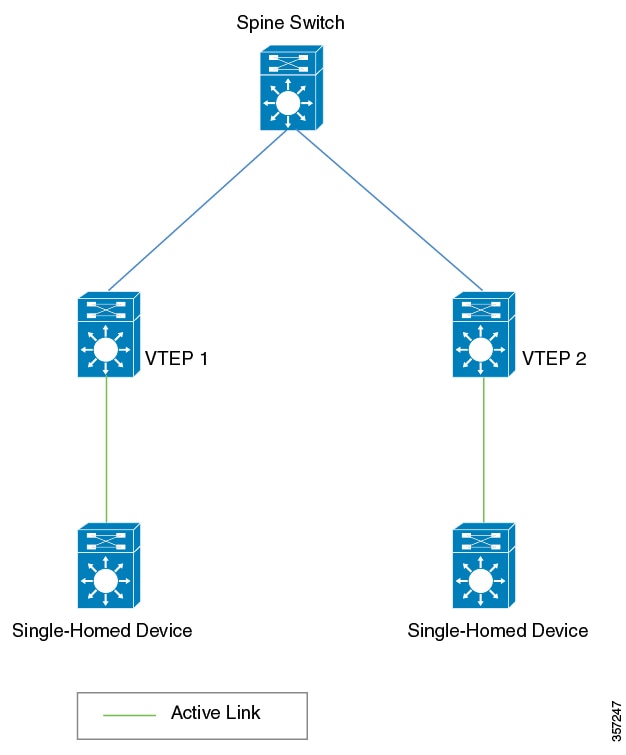
Single-homed topology
The following figure shows a single-homed topology:
Figure 1. Single-Homed topology
Multihoming
Multihoming allows you to connect a host or Layer 2 switch to more than one VTEP in a EVPN VXLAN network. This connection
provides redundancy and allows network optimization. Redundancy in connection with VTEPs ensures that there is no traffic
disruption when a network failure happens. Multihomed topologies are more reliant, secure, and efficient than single-homed
topologies.
Multihoming operates in single-active and all-active redundancy modes. In both modes, the connected host or access device
connects to the VTEPs through a set of links that together represent an Ethernet segment, identified by a globally unique
Ethernet segment ID.
This Ethernet segment ID must also be part of the configuration on the VTEP interface that connects the multihomed host or
network device. All traffic forwarded between the VTEPs and the host or Layer 2 switch passes through this Ethernet segment.
ESI-MH in single-active redundancy mode
ESI-MH in single-active redundancy mode is an EVPN configuration that
allows two VTEPs to act as an ESI-MH pair with only one VTEP forwarding traffic for a particular Ethernet-segment
results in multiple VLANs on the physical link with a single link active for a given VLAN, and
enables fabric-enabled VLANs and traditional Layer 2 VLANs to co-exist on the Ethernet-segment enabled trunk-downstream access
interface from the VTEPs.
Configuration requirements
The single access link must be a physical Layer 2 interface. Physical interfaces can be part of a Layer 2 port channel for
increased bandwidth, but member interfaces in the port channel must be connected to the same VTEP in single-active redundancy
mode. From the downstream Layer 2 switch, there should be at least two independent port channel interfaces, with each of these
interfaces terminating at a unique upstream VTEP.
Single-active redundancy mode is typically used when all the VLANs on a trunk port connected to an access switch cannot be
migrated to an EVPN fabric.
Migration between single-homed and multihomed network topologies
Migration between single-homed and multihomed network topologies is a BGP EVPN VXLAN capability that
allows transition from a single-homed topology to a multihomed topology
enables removal of redundancy from a multihomed topology to move back to a single-homed topology, and
requires corresponding changes to the Ethernet segment configuration to prevent traffic loops and traffic blackholing.
Migration requirements
Note
When you migrate from one topology to another, ensure you make corresponding changes to the Ethernet segment configuration.
If you change either of the two without making corresponding changes to the other, it results in traffic loops and traffic
blackholing.
Before you configure multihoming in a BGP EVPN VXLAN fabric, ensure that you configure EVPN VXLAN Layer 2 and Layer 3 overlay
networks. For detailed steps, refer to the How to Configure EVPN VXLAN Integrated Routing and Bridging section.
Configure dual-homing with single active redundancy in a BGP EVPN VXLAN fabric
This task configures dual-homing with single-active redundancy in a BGP EVPN VXLAN fabric to provide network resilience and
prevent traffic loops while ensuring only one path is active at a time.
Dual-homing with single-active redundancy is used in BGP EVPN VXLAN fabrics to provide redundant connectivity where only one
of the redundant links is active at any given time, ensuring traffic follows a single path while maintaining backup connectivity.
Procedure
Perform the following set of procedures to configure dual-homing with single-active redundancy in a BGP EVPN VXLAN fabric.
Dual-homing with single-active redundancy is configured in the BGP EVPN VXLAN fabric, providing redundant connectivity with
loop prevention.
Configure redundancy on an Ethernet segment
Configure redundancy on an ethernet segment to provide high availability and ensure proper designated forwarder election in
EVPN deployments.
Ethernet segment redundancy configuration is essential for EVPN multihoming scenarios where multiple provider edge devices
connect to the same customer edge device or network segment.
Before you begin
Follow these steps to configure redundancy on an ethernet segment:
The ethernet segment redundancy configuration is complete. The device will participate in designated forwarder election based
on the configured parameters and redundancy type.
Associate an Ethernet segment with an interface on a VTEP
Associate an Ethernet segment with an interface on a VTEP to enable EVPN dual-homing functionality. This configuration allows
multiple VTEPs to share connectivity to the same dual-homed device through a single Ethernet segment identifier.
This task is performed when configuring EVPN dual-homing where multiple VTEPs need to provide redundant connectivity to the
same device. Each Ethernet segment requires a unique identifier that must be consistent across all VTEPs connecting to the
same dual-homed device.
Procedure
Command or Action
Purpose
Step 1
enable
Example:
Device> enable
Enters privileged EXEC mode.
Enter password, if prompted.
Step 2
configure terminal
Example:
Device# configure terminal
Enters global configuration mode.
Step 3
interface interface-ID
Example:
Device(config)# interface GigabitEthernet1/0/10
Specifies the interface, and enters interface configuration mode.
Step 4
evpn ethernet-segment ethernet-segment-ID
Example:
Device(config-if)# evpn ethernet-segment 1
Associates the specified Ethernet segment with the interface. Each Ethernet segment is represented by a unique Ethernet segment
ID.
Note
Ensure that you configure a unique Ethernet segment ID on any interface. Ensure that you configure the same segment ID on
the link that connects the second VTEP and the dual-homed device (the second link through the Ethernet segment).
Step 5
end
Example:
Device(config-if)# end
Exits interface configuration mode and enters privileged EXEC mode.
The Ethernet segment is now associated with the specified interface on the VTEP. The interface is configured for EVPN dual-homing
with the assigned Ethernet segment ID.
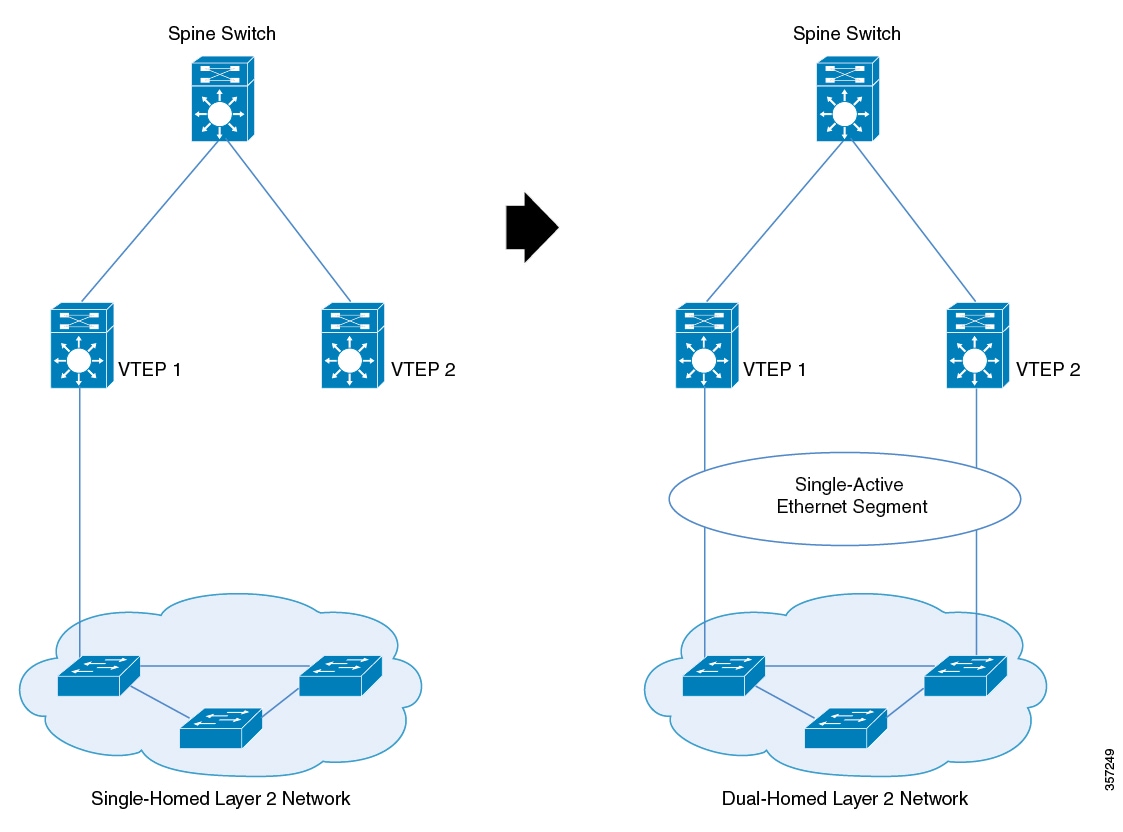
Migrate from a single-homed topology to a single-active dual-homed topology
This task migrates a network from a single-homed configuration to a single-active dual-homed configuration to provide redundancy
and improved network resilience.
When migrating between topologies, corresponding changes must be made to the Ethernet segment configuration. Failure to make
corresponding changes to both the topology and Ethernet segment configuration results in traffic loops and traffic blackholing.
Figure 2. Migration from a single-homed network to a single-active dual-homed network
Follow these steps to migrate from a single-homed topology to a single-active dual-homed topology:
Before you begin
Before you migrate, we recommend that you do not configure the VTEP as the root bridge of the spanning tree, as the provision
of Ethernet segment on the interface of a VTEP excludes it from spanning-tree. If the VTEP is the root bridge, its exclusion
from the spanning-tree triggers an immediate spanning tree re-convergence.
Procedure
Step 1
Ensure that you do not activate a link between VTEP 2 and a switch in the single-homed network.
Activate the second link only once you configure the Ethernet segment. In case a link is already activated, ensure that you
deactivate the link.
Step 2
Provision the Ethernet segment on the interface of the VTEP that has the active link.
Provision of the Ethernet segment updates all the MAC addresses that are locally learned on that interface with the Ethernet
segment ID of the interface.
Step 3
Provision the Ethernet segment on the interface of the second VTEP that needs to be connected to the switch in the single-homed
network.
Step 4
Connect the link and bring up the interface of the second VTEP.
By doing this, you trigger fast convergence, Ethernet segment auto-discovery, and DF reelection.
The single-homed network has now migrated to a dual-homed network.
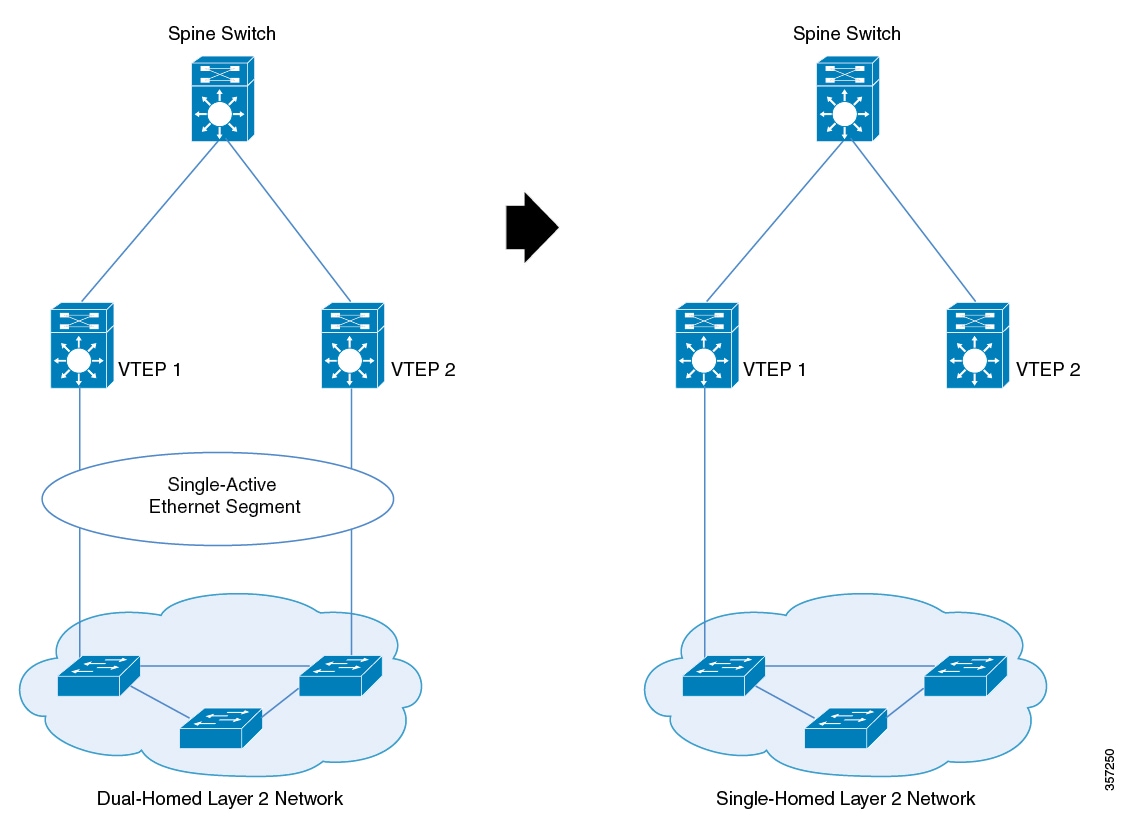
Migrate from a single-active dual-homed topology to a single-homed topology
This task enables you to change your network topology from a single-active dual-homed configuration to a single-homed configuration
while maintaining network connectivity and avoiding traffic disruptions.
The following figure illustrates the migration from a single-active dual-homed topology to a single-homed topology:
Figure 3. Migration from a single-active dual-homed network to a single-homed network
Follow these steps to migrate from a single-active dual-homed network to a single-homed network:
Before you begin
Note
When you migrate from one topology to another, ensure you make corresponding changes to the Ethernet segment configuration.
If you change either of the two without making corresponding changes to the other, it results in traffic loops and traffic
blackholing.
Note
Ensure that the Ethernet segment remains configured on the dual-homed links as long as the links are up. If the Ethernet segment
is removed from an active link, it causes traffic loops.
Procedure
Step 1
Configure portfast on the link you plan to activate.
Before you migrate, we recommended that you configure portfast on the link you activate. Removal of Ethernet segment from
an interface on the VTEP puts it back into the spanning-tree. If the interface is not configured with portfast, the port goes
through block-learn-forward states and causes extensive traffic loss.
Step 2
Shut down the interface that needs to be decommissioned.
When you shut down the interface, you trigger fast convergence, Ethernet segment auto-discovery, and DF reelection. As a result,
all the traffic converges into the active link.
Step 3
Remove the Ethernet segment from the decommissioned interface.
Ensure that the interface is down before you disconnect the link.
The dual-homed network has now migrated to a single-homed network with an Ethernet segment.
Step 4
(Optional) Remove the Ethernet segment from the interface with the active link on the VTEP.
Removal of the Ethernet segment updates all the MAC addresses that are locally learned on that interface without the Ethernet
segment ID.
The Ethernet segment is now removed from the single-homed network homed network.
You have successfully migrated from a single-active dual-homed topology to a single-homed topology. The network now operates
with a single connection path, and all traffic flows through the active link.
Configuration examples for multihoming in single-active redundancy mode
This section provides configuration examples for multihoming in single-active redundancy mode.
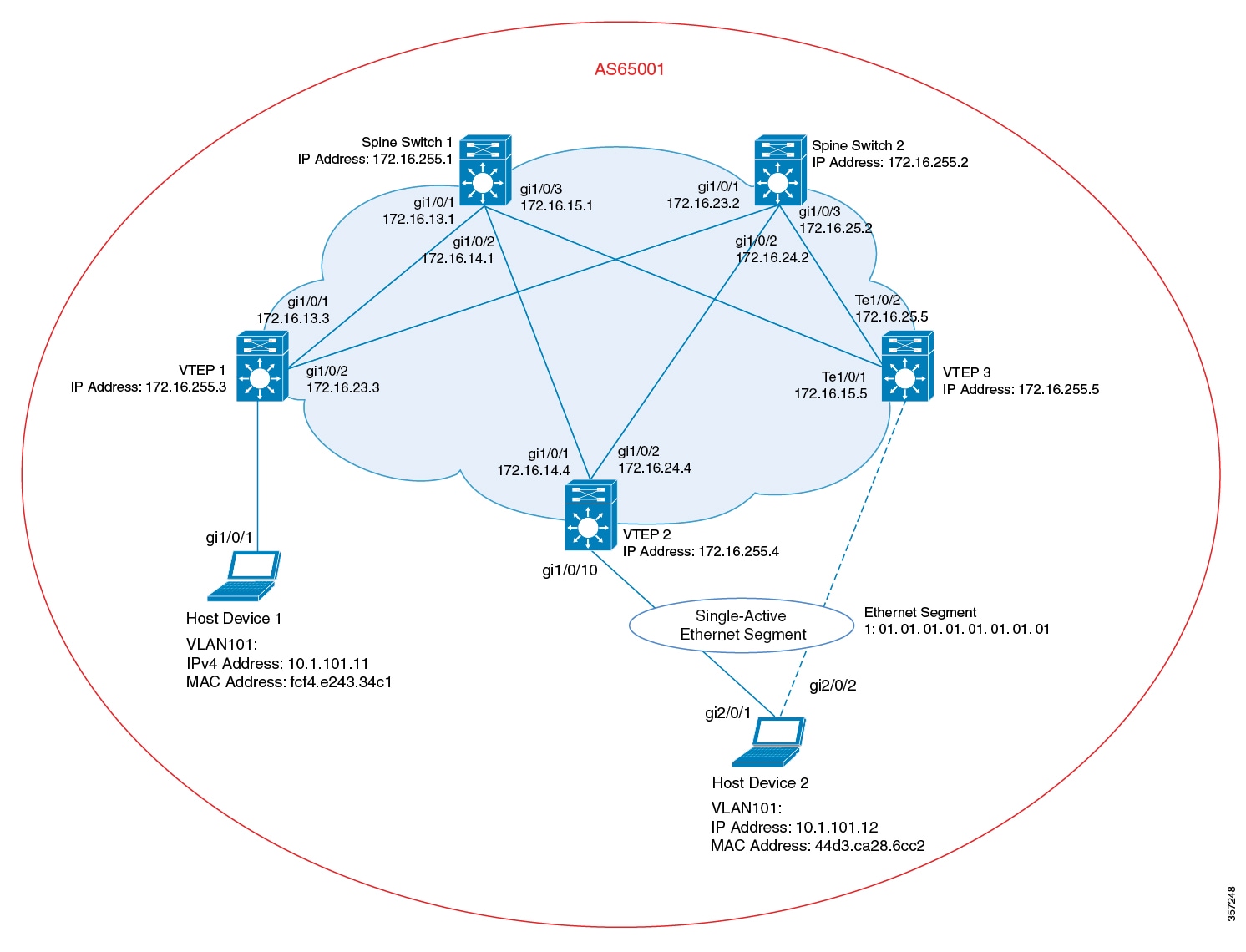
Example: Configuring Dual-Homing with Single-Active Redundancy in a BGP EVPN VXLAN Fabric
This example shows how to configure and verify dual-homing with single-active redundancy in a BGP EVPN VXLAN fabric for the
following topology:
Figure 4. Dual-Homing with Single-Active Redundancy in a BGP EVPN VXLAN Fabric
The topology shows an EVPN VXLAN network with two spine switches (Spine Switch 1 and Spine Switch 2) and three VTEPs (VTEP
1, VTEP 2, and VTEP 3). Host Device 1 is connected to VTEP 1. Host Device 2 is connected to VTEP 2 and VTEP 3 as a dual-homed
single-active connection that passes through Ethernet Segment 1.
Note
Ensure that you configure a unique Ethernet segment ID on any interface in the fabric. If an Ethernet segment ID is associated
with one of the connecting links passing through the segment, associate the same Ethernet segment ID with the second link.
interface Loopback1
ip address 172.16.254.4 255.255.255.255
ip ospf 1 area 0
!
interface GigabitEthernet0/0
vrf forwarding Mgmt-vrf
ip address 10.62.149.182 255.255.255.0
negotiation auto
!
interface GigabitEthernet1/0/1
no switchport
ip address 172.16.14.4 255.255.255.0
ip ospf network point-to-point
ip ospf 1 area 0
!
interface GigabitEthernet1/0/2
no switchport
ip address 172.16.24.4 255.255.255.0
ip ospf network point-to-point
ip ospf 1 area 0
!
interface GigabitEthernet1/0/10
switchport access vlan 101
switchport mode access
evpn ethernet-segment 1
spanning-tree portfast
!
interface Vlan101
vrf forwarding green
ip address 10.1.101.1 255.255.255.0
no autostate
!
interface Vlan901
vrf forwarding green
ip unnumbered Loopback1
ipv6 enable
no autostate
!
interface nve1
no ip address
source-interface Loopback1
host-reachability protocol bgp
member vni 10101 ingress-replication
member vni 50901 vrf green
interface Loopback1
ip address 172.16.254.5 255.255.255.255
ip ospf 1 area 0
!
interface GigabitEthernet0/0
vrf forwarding Mgmt-vrf
ip address 10.62.149.183 255.255.255.0
negotiation auto
!
interface GigabitEthernet1/0/1
no switchport
ip address 172.16.15.5 255.255.255.0
ip ospf network point-to-point
ip ospf 1 area 0
!
interface GigabitEthernet1/0/2
no switchport
ip address 172.16.25.5 255.255.255.0
ip ospf network point-to-point
ip ospf 1 area 0
!
interface GigabitEthernet1/0/10
switchport access vlan 101
switchport mode access
evpn ethernet-segment 1
spanning-tree portfast
!
interface Vlan101
vrf forwarding green
ip address 10.1.101.1 255.255.255.0
!
interface Vlan901
vrf forwarding green
ip unnumbered Loopback1
ipv6 enable
no autostate
!
interface nve1
no ip address
source-interface Loopback1
host-reachability protocol bgp
member vni 10101 ingress-replication
member vni 50901 vrf green
Table 2. Configuring Spine Switch 1, Spine Switch 2, and VTEP 1 to Configure Dual-Homing with Single-Active Redundancy
Spine Switch 1
Spine Switch 2
VTEP 1
                                        Spine-01#
                                        show running-config
hostname Spine-01
!
ip routing
!
system mtu 9198
!
interface Loopback0
ip address 172.16.255.1 255.255.255.255
ip ospf 1 area 0
!
interface GigabitEthernet0/0
vrf forwarding Mgmt-vrf
ip address 10.62.149.180 255.255.255.0
negotiation auto
!
interface GigabitEthernet1/0/1
no switchport
ip address 172.16.13.1 255.255.255.0
ip pim sparse-mode
ip ospf network point-to-point
ip ospf 1 area 0
!
interface GigabitEthernet1/0/2
no switchport
ip address 172.16.14.1 255.255.255.0
ip pim sparse-mode
ip ospf network point-to-point
ip ospf 1 area 0
!
interface GigabitEthernet1/0/3
no switchport
ip address 172.16.15.1 255.255.255.0
ip pim sparse-mode
ip ospf network point-to-point
ip ospf 1 area 0
!
router ospf 1
router-id 172.16.255.1
!
                                        Spine-01#
                                        show running-config
hostname Spine-01
!
ip routing
!
system mtu 9198
!
interface Loopback0
ip address 172.16.255.1 255.255.255.255
ip ospf 1 area 0
!
interface GigabitEthernet0/0
vrf forwarding Mgmt-vrf
ip address 10.62.149.180 255.255.255.0
negotiation auto
!
interface GigabitEthernet1/0/1
no switchport
ip address 172.16.13.1 255.255.255.0
ip pim sparse-mode
ip ospf network point-to-point
ip ospf 1 area 0
!
interface GigabitEthernet1/0/2
no switchport
ip address 172.16.14.1 255.255.255.0
ip pim sparse-mode
ip ospf network point-to-point
ip ospf 1 area 0
!
interface GigabitEthernet1/0/3
no switchport
ip address 172.16.15.1 255.255.255.0
ip pim sparse-mode
ip ospf network point-to-point
ip ospf 1 area 0
!
router ospf 1
router-id 172.16.255.1
!
                                        Leaf-01#
                                        show running-config
hostname Leaf-01
!
vrf definition green
rd 1:1
!
address-family ipv4
route-target export 1:1
route-target import 1:1
route-target export 1:1 stitching
route-target import 1:1 stitching
exit-address-family
!
address-family ipv6
route-target export 1:1
route-target import 1:1
route-target export 1:1 stitching
route-target import 1:1 stitching
exit-address-family
!
ip routing
!
l2vpn evpn
replication-type static
router-id Loopback1
default-gateway advertise
!
l2vpn evpn instance 101 vlan-based
encapsulation vxlan
replication-type ingress
!
!
system mtu 9198
!
vlan configuration 101
member evpn-instance 101 vni 10101
vlan configuration 901
member vni 50901
!
interface Loopback0
ip address 172.16.255.3 255.255.255.255
ip ospf 1 area 0
!
interface Loopback1
ip address 172.16.254.3 255.255.255.255
ip ospf 1 area 0
!
interface GigabitEthernet0/0
vrf forwarding Mgmt-vrf
ip address 10.62.149.179 255.255.255.0
negotiation auto
!
interface GigabitEthernet1/0/1
no switchport
ip address 172.16.13.3 255.255.255.0
ip ospf network point-to-point
ip ospf 1 area 0
!
interface GigabitEthernet1/0/2
no switchport
ip address 172.16.23.3 255.255.255.0
ip ospf network point-to-point
ip ospf 1 area 0
!
interface GigabitEthernet1/0/10
switchport access vlan 101
switchport mode access
spanning-tree portfast
!
interface Vlan101
vrf forwarding green
ip address 10.1.101.1 255.255.255.0
!
interface Vlan901
vrf forwarding green
ip unnumbered Loopback1
ipv6 enable
no autostate
!
interface nve1
no ip address
source-interface Loopback1
host-reachability protocol bgp
member vni 10101 ingress-replication
member vni 50901 vrf green
!
router ospf 1
router-id 172.16.255.3
!
Verify Dual-Homing with Single-Active Redundancy in a BGP EVPN VXLAN Fabric
The following sections provide sample outputs for
show
commands to verify dual-homing with single-active redundancy on the devices in the topology configured above:
The following example shows the output for the
show l2route evpn mac esi ethernet-segment-id
command on VTEP 2:
                Leaf-02#
                show l2route evpn mac esi 0001.0101.0101.0101.0101
  EVI       ETag  Prod    Mac Address                  Next Hop(s) Seq Number
----- ---------- ----- -------------- ---------------------------- ----------
  101          0   BGP 44d3.ca28.6c82         V:10101 172.16.254.5          0
  101          0   BGP 44d3.ca28.6cc2         V:10101 172.16.254.5          0
Leaf-02#
The following example shows the output for the
show l2route evpn mac esi ethernet-segment-id detail
command on VTEP 2:
                Leaf-02#
                show l2route evpn mac esi 0001.0101.0101.0101.0101 detail
EVPN Instance:            101
Ethernet Tag:             0
Producer Name:            BGP
MAC Address:              44d3.ca28.6c82
Num of MAC IP Route(s):   0
Sequence Number:          0
ESI:                      0001.0101.0101.0101.0101
Flags:                    B()
Next Hop(s):              V:10101 172.16.254.5
Resolved Next Hops:       V:10101 172.16.254.5
Resolved Redundancy Mode: Single-Active
EVPN Instance:            101
Ethernet Tag:             0
Producer Name:            BGP
MAC Address:              44d3.ca28.6cc2
Num of MAC IP Route(s):   0
Sequence Number:          0
ESI:                      0001.0101.0101.0101.0101
Flags:                    B()
Next Hop(s):              V:10101 172.16.254.5
Resolved Next Hops:       V:10101 172.16.254.5
Resolved Redundancy Mode: Single-Active
Leaf-02#
The following example shows the output for the
show bgp l2vpn evpn route-type
command for route type 4 on VTEP 3:
                Leaf-03#
                show bgp l2vpn evpn route-type 4
BGP routing table entry for [4][172.16.255.4:257][00010101010101010101][32][172.16.254.4]/23, version 337
Paths: (2 available, best #2, table EVPN-BGP-Table)
  Not advertised to any peer
  Refresh Epoch 5
  Local
    172.16.254.4 (metric 3) (via default) from 172.16.255.2 (172.16.255.2)
      Origin incomplete, metric 0, localpref 100, valid, internal
      Extended Community: ENCAP:8 EVPN ES-IMPORT:0x101:0x101:0x101
      Originator: 172.16.255.4, Cluster list: 172.16.255.2
      rx pathid: 0, tx pathid: 0
      Updated on Jan 26 2021 19:38:35 UTC
  Refresh Epoch 5
  Local
    172.16.254.4 (metric 3) (via default) from 172.16.255.1 (172.16.255.1)
      Origin incomplete, metric 0, localpref 100, valid, internal, best
      Extended Community: ENCAP:8 EVPN ES-IMPORT:0x101:0x101:0x101
      Originator: 172.16.255.4, Cluster list: 172.16.255.1
      rx pathid: 0, tx pathid: 0x0
      Updated on Jan 26 2021 19:38:35 UTC
BGP routing table entry for [4][172.16.255.5:257][00010101010101010101][32][172.16.254.5]/23, version 1269
Paths: (1 available, best #1, table EVPN-BGP-Table)
  Advertised to update-groups:
     2
  Refresh Epoch 1
  Local
    :: (via default) from 0.0.0.0 (172.16.255.5)
      Origin incomplete, localpref 100, weight 32768, valid, sourced, local, best
      Local vtep: 172.16.254.5
      Extended Community: ENCAP:8 EVPN ES-IMPORT:0x101:0x101:0x101
      rx pathid: 0, tx pathid: 0x0
      Updated on Jan 26 2021 19:40:14 UTC
Leaf-03#
The following example shows the output for the
show bgp l2vpn evpn evi evpn-instance
command on VTEP 3:
                Leaf-03#
                show bgp l2vpn evpn evi 101
BGP table version is 1284, local router ID is 172.16.255.5
Status codes: s suppressed, d damped, h history, * valid, > best, i - internal,
              r RIB-failure, S Stale, m multipath, b backup-path, f RT-Filter,
              x best-external, a additional-path, c RIB-compressed,
              t secondary path, L long-lived-stale,
Origin codes: i - IGP, e - EGP, ? - incomplete
RPKI validation codes: V valid, I invalid, N Not found
     Network          Next Hop            Metric LocPrf Weight Path
Route Distinguisher: 172.16.254.5:101
 *>   [1][172.16.254.5:101][00010101010101010101][0]/23
                      ::                                 32768 ?
 *mi                   172.16.254.4             0    100      0 ?
 *>i  [2][172.16.254.5:101][0][48][10B3D56A8FC1][32][10.1.101.1]/24
                      172.16.254.3             0    100      0 ?
 *>   [2][172.16.254.5:101][0][48][44D3CA286C82][0][*]/20
                      ::                                 32768 ?
 *>   [2][172.16.254.5:101][0][48][44D3CA286CC2][0][*]/20
                      ::                                 32768 ?
 *>   [2][172.16.254.5:101][0][48][7C210DBD2741][32][10.1.101.1]/24
                      ::                                 32768 ?
 *>i  [2][172.16.254.5:101][0][48][7C210DBD9541][32][10.1.101.1]/24
                      172.16.254.4             0    100      0 ?
 *>i  [2][172.16.254.5:101][0][48][F4CFE24334C1][0][*]/20
                      172.16.254.3             0    100      0 ?
 *>i  [2][172.16.254.5:101][0][48][F4CFE24334C1][32][10.1.101.11]/24
                      172.16.254.3             0    100      0 ?
 *>i  [3][172.16.254.5:101][0][32][172.16.254.3]/17
                      172.16.254.3             0    100      0 ?
 *>i  [3][172.16.254.5:101][0][32][172.16.254.4]/17
                      172.16.254.4             0    100      0 ?
 *>   [3][172.16.254.5:101][0][32][172.16.254.5]/17
                      ::                                 32768 ?
Leaf-03#
The following example shows the output for the
show l2route evpn mac
command on VTEP 3:
                Leaf-03#
                show l2route evpn mac
  EVI       ETag  Prod    Mac Address                  Next Hop(s) Seq Number
----- ---------- ----- -------------- ---------------------------- ----------
  101          0   BGP 10b3.d56a.8fc1         V:10101 172.16.254.3          0
  101          0 L2VPN 44d3.ca28.6c82                 Gi1/0/10:101          0
  101          0 L2VPN 44d3.ca28.6cc2                 Gi1/0/10:101          0
  101          0 L2VPN 7c21.0dbd.2741                      Vl101:0          0
  101          0   BGP 7c21.0dbd.9541         V:10101 172.16.254.4          0
  101          0   BGP f4cf.e243.34c1         V:10101 172.16.254.3          0
Leaf-03#
The following example shows the output for the
show l2route evpn mac esi ethernet-segment-id
command on VTEP 3:
                Leaf-03#
                show l2route evpn mac esi 0001.0101.0101.0101.0101
  EVI       ETag  Prod    Mac Address                  Next Hop(s) Seq Number
----- ---------- ----- -------------- ---------------------------- ----------
  101          0 L2VPN 44d3.ca28.6c82                 Gi1/0/10:101          0
  101          0 L2VPN 44d3.ca28.6cc2                 Gi1/0/10:101          0
Leaf-03#
The following example shows the output for the
show l2route evpn mac esi ethernet-segment-id detail
command on VTEP 3:
                Leaf-03#
                show l2route evpn mac esi 0001.0101.0101.0101.0101 detail
EVPN Instance:            101
Ethernet Tag:             0
Producer Name:            L2VPN
MAC Address:              44d3.ca28.6c82
Num of MAC IP Route(s):   0
Sequence Number:          0
ESI:                      0001.0101.0101.0101.0101
Flags:                    B()
Next Hop(s):              Gi1/0/10:101
EVPN Instance:            101
Ethernet Tag:             0
Producer Name:            L2VPN
MAC Address:              44d3.ca28.6cc2
Num of MAC IP Route(s):   0
Sequence Number:          0
ESI:                      0001.0101.0101.0101.0101
Flags:                    B()
Next Hop(s):              Gi1/0/10:101
Leaf-03#
Outputs to Verify the Configuration on Spine Switch 1
The following example shows the output for the
show bgp l2vpn evpn summary
command on Spine Switch 1:
                Spine-01#
                show bgp l2vpn evpn summary
BGP router identifier 172.16.255.1, local AS number 65001
BGP table version is 5443, main routing table version 5443
17 network entries using 5848 bytes of memory
34 path entries using 7072 bytes of memory
13/11 BGP path/bestpath attribute entries using 3744 bytes of memory
3 BGP rrinfo entries using 120 bytes of memory
10 BGP extended community entries using 480 bytes of memory
0 BGP route-map cache entries using 0 bytes of memory
0 BGP filter-list cache entries using 0 bytes of memory
BGP using 17264 total bytes of memory
BGP activity 101/84 prefixes, 2825/2791 paths, scan interval 60 secs
25 networks peaked at 14:54:41 Jan 26 2021 UTC (05:39:56.356 ago)
Neighbor        V           AS MsgRcvd MsgSent   TblVer  InQ OutQ Up/Down  State/PfxRcd
172.16.255.2    4        65001    5664    5668     5443    0    0 05:40:29       15
172.16.255.3    4        65001     378    5690     5443    0    0 05:35:23        5
172.16.255.4    4        65001     440    1633     5443    0    0 03:36:33        6
172.16.255.5    4        65001     594    5296     5443    0    0 04:34:27        8
Spine-01#
The following example shows the output for the
show bgp l2vpn evpn
command on Spine Switch 1:
                Spine-01#
                show bgp l2vpn evpn
BGP table version is 5443, local router ID is 172.16.255.1
Status codes: s suppressed, d damped, h history, * valid, > best, i - internal,
              r RIB-failure, S Stale, m multipath, b backup-path, f RT-Filter,
              x best-external, a additional-path, c RIB-compressed,
              t secondary path, L long-lived-stale,
Origin codes: i - IGP, e - EGP, ? - incomplete
RPKI validation codes: V valid, I invalid, N Not found
     Network          Next Hop            Metric LocPrf Weight Path
Route Distinguisher: 172.16.254.4:7
 *>i  [1][172.16.254.4:7][00010101010101010101][4294967295]/23
                      172.16.254.4             0    100      0 ?
Route Distinguisher: 172.16.254.4:101
 *>i  [1][172.16.254.4:101][00010101010101010101][0]/23
                      172.16.254.4             0    100      0 ?
Route Distinguisher: 172.16.254.5:9
 *>i  [1][172.16.254.5:9][00010101010101010101][4294967295]/23
                      172.16.254.5             0    100      0 ?
 * i                   172.16.254.5             0    100      0 ?
Route Distinguisher: 172.16.254.5:101
 *>i  [1][172.16.254.5:101][00010101010101010101][0]/23
                      172.16.254.5             0    100      0 ?
 * i                   172.16.254.5             0    100      0 ?
Route Distinguisher: 172.16.254.3:101
 * i  [2][172.16.254.3:101][0][48][10B3D56A8FC1][32][10.1.101.1]/24
                      172.16.254.3             0    100      0 ?
 *>i                   172.16.254.3             0    100      0 ?
 * i  [2][172.16.254.3:101][0][48][F4CFE24334C1][0][*]/20
                      172.16.254.3             0    100      0 ?
 *>i                   172.16.254.3             0    100      0 ?
 * i  [2][172.16.254.3:101][0][48][F4CFE24334C1][32][10.1.101.11]/24
                      172.16.254.3             0    100      0 ?
 *>i                   172.16.254.3             0    100      0 ?
Route Distinguisher: 172.16.254.4:101
 * i  [2][172.16.254.4:101][0][48][7C210DBD9541][32][10.1.101.1]/24
                      172.16.254.4             0    100      0 ?
 *>i                   172.16.254.4             0    100      0 ?
Route Distinguisher: 172.16.254.5:101
 * i  [2][172.16.254.5:101][0][48][44D3CA286C82][0][*]/20
                      172.16.254.5             0    100      0 ?
 *>i                   172.16.254.5             0    100      0 ?
 * i  [2][172.16.254.5:101][0][48][44D3CA286CC2][0][*]/20
                      172.16.254.5             0    100      0 ?
 *>i                   172.16.254.5             0    100      0 ?
 * i  [2][172.16.254.5:101][0][48][7C210DBD2741][32][10.1.101.1]/24
                      172.16.254.5             0    100      0 ?
 *>i                   172.16.254.5             0    100      0 ?
Route Distinguisher: 172.16.254.3:101
 * i  [3][172.16.254.3:101][0][32][172.16.254.3]/17
                      172.16.254.3             0    100      0 ?
 *>i                   172.16.254.3             0    100      0 ?
Route Distinguisher: 172.16.254.4:101
 * i  [3][172.16.254.4:101][0][32][172.16.254.4]/17
                      172.16.254.4             0    100      0 ?
 *>i                   172.16.254.4             0    100      0 ?
Route Distinguisher: 172.16.254.5:101
 * i  [3][172.16.254.5:101][0][32][172.16.254.5]/17
                      172.16.254.5             0    100      0 ?
 *>i                   172.16.254.5             0    100      0 ?
Route Distinguisher: 172.16.255.4:257
 * i  [4][172.16.255.4:257][00010101010101010101][32][172.16.254.4]/23
                      172.16.254.4             0    100      0 ?
 *>i                   172.16.254.4             0    100      0 ?
Route Distinguisher: 172.16.255.5:257
 * i  [4][172.16.255.5:257][00010101010101010101][32][172.16.254.5]/23
                      172.16.254.5             0    100      0 ?
 *>i                   172.16.254.5             0    100      0 ?
Route Distinguisher: 1:1
 * i  [5][1:1][0][24][10.1.101.0]/17
                      172.16.254.5             0    100      0 ?
 * i                   172.16.254.4             0    100      0 ?
 *>i                   172.16.254.3             0    100      0 ?
 * i                   172.16.254.3             0    100      0 ?
Spine-01#
The following example shows the output for the
show ip route
command on Spine Switch 1:
                Spine-01#
                show ip route
Codes: L - local, C - connected, S - static, R - RIP, M - mobile, B - BGP
       D - EIGRP, EX - EIGRP external, O - OSPF, IA - OSPF inter area
       N1 - OSPF NSSA external type 1, N2 - OSPF NSSA external type 2
       E1 - OSPF external type 1, E2 - OSPF external type 2, m - OMP
       n - NAT, Ni - NAT inside, No - NAT outside, Nd - NAT DIA
       i - IS-IS, su - IS-IS summary, L1 - IS-IS level-1, L2 - IS-IS level-2
       ia - IS-IS inter area, * - candidate default, U - per-user static route
       H - NHRP, G - NHRP registered, g - NHRP registration summary
       o - ODR, P - periodic downloaded static route, l - LISP
       a - application route
       + - replicated route, % - next hop override, p - overrides from PfR
Gateway of last resort is not set
      172.16.0.0/16 is variably subnetted, 17 subnets, 2 masks
C        172.16.13.0/24 is directly connected, GigabitEthernet1/0/1
L        172.16.13.1/32 is directly connected, GigabitEthernet1/0/1
C        172.16.14.0/24 is directly connected, GigabitEthernet1/0/2
L        172.16.14.1/32 is directly connected, GigabitEthernet1/0/2
C        172.16.15.0/24 is directly connected, GigabitEthernet1/0/3
L        172.16.15.1/32 is directly connected, GigabitEthernet1/0/3
O        172.16.23.0/24
           [110/2] via 172.16.13.3, 05:35:46, GigabitEthernet1/0/1
O        172.16.24.0/24
           [110/2] via 172.16.14.4, 03:37:00, GigabitEthernet1/0/2
O        172.16.25.0/24
           [110/2] via 172.16.15.5, 03:38:33, GigabitEthernet1/0/3
O        172.16.254.3/32
           [110/2] via 172.16.13.3, 05:35:46, GigabitEthernet1/0/1
O        172.16.254.4/32
           [110/2] via 172.16.14.4, 03:36:50, GigabitEthernet1/0/2
O        172.16.254.5/32
           [110/2] via 172.16.15.5, 03:38:33, GigabitEthernet1/0/3
C        172.16.255.1/32 is directly connected, Loopback0
O        172.16.255.2/32
           [110/3] via 172.16.15.5, 03:38:33, GigabitEthernet1/0/3
           [110/3] via 172.16.14.4, 03:37:00, GigabitEthernet1/0/2
           [110/3] via 172.16.13.3, 05:35:46, GigabitEthernet1/0/1
O        172.16.255.3/32
           [110/2] via 172.16.13.3, 05:35:46, GigabitEthernet1/0/1
O        172.16.255.4/32
           [110/2] via 172.16.14.4, 03:36:56, GigabitEthernet1/0/2
O        172.16.255.5/32
           [110/2] via 172.16.15.5, 03:38:33, GigabitEthernet1/0/3
Spine-01#
Outputs to Verify the Configuration on Spine Switch 2
The following example shows the output for the
show bgp l2vpn evpn summary
command on Spine Switch 2:
                Spine-02#
                show bgp l2vpn evpn summary
BGP router identifier 172.16.255.2, local AS number 65001
BGP table version is 5499, main routing table version 5499
17 network entries using 5848 bytes of memory
34 path entries using 7072 bytes of memory
13/11 BGP path/bestpath attribute entries using 3744 bytes of memory
3 BGP rrinfo entries using 120 bytes of memory
10 BGP extended community entries using 480 bytes of memory
0 BGP route-map cache entries using 0 bytes of memory
0 BGP filter-list cache entries using 0 bytes of memory
BGP using 17264 total bytes of memory
BGP activity 101/84 prefixes, 2823/2789 paths, scan interval 60 secs
25 networks peaked at 14:56:03 Jan 26 2021 UTC (05:40:54.652 ago)
Neighbor        V           AS MsgRcvd MsgSent   TblVer  InQ OutQ Up/Down  State/PfxRcd
172.16.255.1    4        65001    5669    5665     5499    0    0 05:41:28       15
172.16.255.3    4        65001     381    5691     5499    0    0 05:36:22        5
172.16.255.4    4        65001     440    1632     5499    0    0 03:37:31        6
172.16.255.5    4        65001     594    5291     5499    0    0 04:35:26        8
Spine-02#
The following example shows the output for the
show bgp l2vpn evpn
command on Spine Switch 2:
                Spine-02#
                show bgp l2vpn evpn
BGP table version is 5499, local router ID is 172.16.255.2
Status codes: s suppressed, d damped, h history, * valid, > best, i - internal,
              r RIB-failure, S Stale, m multipath, b backup-path, f RT-Filter,
              x best-external, a additional-path, c RIB-compressed,
              t secondary path, L long-lived-stale,
Origin codes: i - IGP, e - EGP, ? - incomplete
RPKI validation codes: V valid, I invalid, N Not found
     Network          Next Hop            Metric LocPrf Weight Path
Route Distinguisher: 172.16.254.4:7
 *>i  [1][172.16.254.4:7][00010101010101010101][4294967295]/23
                      172.16.254.4             0    100      0 ?
 * i                   172.16.254.4             0    100      0 ?
Route Distinguisher: 172.16.254.4:101
 *>i  [1][172.16.254.4:101][00010101010101010101][0]/23
                      172.16.254.4             0    100      0 ?
 * i                   172.16.254.4             0    100      0 ?
Route Distinguisher: 172.16.254.5:9
 *>i  [1][172.16.254.5:9][00010101010101010101][4294967295]/23
                      172.16.254.5             0    100      0 ?
Route Distinguisher: 172.16.254.5:101
 *>i  [1][172.16.254.5:101][00010101010101010101][0]/23
                      172.16.254.5             0    100      0 ?
Route Distinguisher: 172.16.254.3:101
 * i  [2][172.16.254.3:101][0][48][10B3D56A8FC1][32][10.1.101.1]/24
                      172.16.254.3             0    100      0 ?
 *>i                   172.16.254.3             0    100      0 ?
 * i  [2][172.16.254.3:101][0][48][F4CFE24334C1][0][*]/20
                      172.16.254.3             0    100      0 ?
 *>i                   172.16.254.3             0    100      0 ?
 * i  [2][172.16.254.3:101][0][48][F4CFE24334C1][32][10.1.101.11]/24
                      172.16.254.3             0    100      0 ?
 *>i                   172.16.254.3             0    100      0 ?
Route Distinguisher: 172.16.254.4:101
 * i  [2][172.16.254.4:101][0][48][7C210DBD9541][32][10.1.101.1]/24
                      172.16.254.4             0    100      0 ?
 *>i                   172.16.254.4             0    100      0 ?
Route Distinguisher: 172.16.254.5:101
 * i  [2][172.16.254.5:101][0][48][44D3CA286C82][0][*]/20
                      172.16.254.5             0    100      0 ?
 *>i                   172.16.254.5             0    100      0 ?
 * i  [2][172.16.254.5:101][0][48][44D3CA286CC2][0][*]/20
                      172.16.254.5             0    100      0 ?
 *>i                   172.16.254.5             0    100      0 ?
 * i  [2][172.16.254.5:101][0][48][7C210DBD2741][32][10.1.101.1]/24
                      172.16.254.5             0    100      0 ?
 *>i                   172.16.254.5             0    100      0 ?
Route Distinguisher: 172.16.254.3:101
 * i  [3][172.16.254.3:101][0][32][172.16.254.3]/17
                      172.16.254.3             0    100      0 ?
 *>i                   172.16.254.3             0    100      0 ?
Route Distinguisher: 172.16.254.4:101
 * i  [3][172.16.254.4:101][0][32][172.16.254.4]/17
                      172.16.254.4             0    100      0 ?
 *>i                   172.16.254.4             0    100      0 ?
Route Distinguisher: 172.16.254.5:101
 * i  [3][172.16.254.5:101][0][32][172.16.254.5]/17
                      172.16.254.5             0    100      0 ?
 *>i                   172.16.254.5             0    100      0 ?
Route Distinguisher: 172.16.255.4:257
 * i  [4][172.16.255.4:257][00010101010101010101][32][172.16.254.4]/23
                      172.16.254.4             0    100      0 ?
 *>i                   172.16.254.4             0    100      0 ?
Route Distinguisher: 172.16.255.5:257
 * i  [4][172.16.255.5:257][00010101010101010101][32][172.16.254.5]/23
                      172.16.254.5             0    100      0 ?
 *>i                   172.16.254.5             0    100      0 ?
Route Distinguisher: 1:1
 * i  [5][1:1][0][24][10.1.101.0]/17
                      172.16.254.5             0    100      0 ?
 * i                   172.16.254.4             0    100      0 ?
 *>i                   172.16.254.3             0    100      0 ?
 * i                   172.16.254.3             0    100      0 ?
Spine-02#
The following example shows the output for the
show ip route
command on Spine Switch 2:
                Spine-02#
                show ip route
Codes: L - local, C - connected, S - static, R - RIP, M - mobile, B - BGP
       D - EIGRP, EX - EIGRP external, O - OSPF, IA - OSPF inter area
       N1 - OSPF NSSA external type 1, N2 - OSPF NSSA external type 2
       E1 - OSPF external type 1, E2 - OSPF external type 2, m - OMP
       n - NAT, Ni - NAT inside, No - NAT outside, Nd - NAT DIA
       i - IS-IS, su - IS-IS summary, L1 - IS-IS level-1, L2 - IS-IS level-2
       ia - IS-IS inter area, * - candidate default, U - per-user static route
       H - NHRP, G - NHRP registered, g - NHRP registration summary
       o - ODR, P - periodic downloaded static route, l - LISP
       a - application route
       + - replicated route, % - next hop override, p - overrides from PfR
Gateway of last resort is not set
      172.16.0.0/16 is variably subnetted, 17 subnets, 2 masks
O        172.16.13.0/24
           [110/2] via 172.16.23.3, 05:36:24, GigabitEthernet1/0/1
O        172.16.14.0/24
           [110/2] via 172.16.24.4, 03:37:38, GigabitEthernet1/0/2
O        172.16.15.0/24
           [110/2] via 172.16.25.5, 03:39:11, GigabitEthernet1/0/3
C        172.16.23.0/24 is directly connected, GigabitEthernet1/0/1
L        172.16.23.2/32 is directly connected, GigabitEthernet1/0/1
C        172.16.24.0/24 is directly connected, GigabitEthernet1/0/2
L        172.16.24.2/32 is directly connected, GigabitEthernet1/0/2
C        172.16.25.0/24 is directly connected, GigabitEthernet1/0/3
L        172.16.25.2/32 is directly connected, GigabitEthernet1/0/3
O        172.16.254.3/32
           [110/2] via 172.16.23.3, 05:36:24, GigabitEthernet1/0/1
O        172.16.254.4/32
           [110/2] via 172.16.24.4, 03:37:28, GigabitEthernet1/0/2
O        172.16.254.5/32
           [110/2] via 172.16.25.5, 03:39:11, GigabitEthernet1/0/3
O        172.16.255.1/32
           [110/3] via 172.16.25.5, 03:39:11, GigabitEthernet1/0/3
           [110/3] via 172.16.24.4, 03:37:38, GigabitEthernet1/0/2
           [110/3] via 172.16.23.3, 05:36:24, GigabitEthernet1/0/1
C        172.16.255.2/32 is directly connected, Loopback0
O        172.16.255.3/32
           [110/2] via 172.16.23.3, 05:36:24, GigabitEthernet1/0/1
O        172.16.255.4/32
           [110/2] via 172.16.24.4, 03:37:34, GigabitEthernet1/0/2
O        172.16.255.5/32
           [110/2] via 172.16.25.5, 03:39:11, GigabitEthernet1/0/3
Spine-02#

 Feedback