MPLS VPN Route Target Rewrite

An MPLS VPN route target rewrite feature enables the replacement of route targets on inbound and outbound BGP updates to control which VPN routing and forwarding (VRF) instances and sites receive routes. This module explains the basic concepts of MPLS VPN route target rewrite and how to configure it on Cisco Smart Switches.

Feature history for MPLS VPN route target rewrite

This table provides release and platform support information for the features explained in this module.

These features are available in all the releases subsequent to the one they were introduced in, unless noted otherwise.

Release

Feature name and description

Supported platform

Cisco IOS XE 17.18.2

MPLS VPN route target rewrite

Cisco C9350 Series Smart Switches

Cisco C9610 Series Smart Switches

MPLS VPN route target rewrite

MPLS VPN route target rewrite is an MPLS VPN routing control mechanism that

  • influences routing table updates by modifying route targets

  • enables the replacement of route targets on inbound and outbound Border Gateway Protocol (BGP) updates, and

  • utilizes extended community attributes in BGP Virtual Private Network IP Version 4 (VPNv4) updates to control which VPN routing and forwarding (VRF) instances and sites receive routes.

Route targets (RTs) are BGP extended community attributes that

  • are carried in BGP VPNv4 updates

  • are used to identify which VRF instances and sites can receive specific VPN routes, and

  • control the distribution of VPN routes between VRFs through export and import lists, acting as a filtering mechanism.

Route maps and route target replacement

The MPLS VPN route target rewrite feature extends the Border Gateway Protocol (BGP) inbound/outbound route map functionality to enable route target replacement. The set extcomm-list[ list-number | list-name] delete command entered in route-map configuration mode allows the deletion of a route target extended community attribute based on an extended community list.

Restrictions for MPLS route target rewrite

MPLS route target rewrite on switches is subjected to these restrictions:

  • You can implement route target rewrite only in a single AS topology.

  • Does not support ip unnumbered command in MPLS configuration.

Configure route target replacement policy

Use this procedure to configure a route target replacement policy that involves creating an extended community list, defining a route map, and specifying the match and set actions for route target replacement.

You can configure the MPLS VPN route target rewrite feature on provider edge (PE) devices.

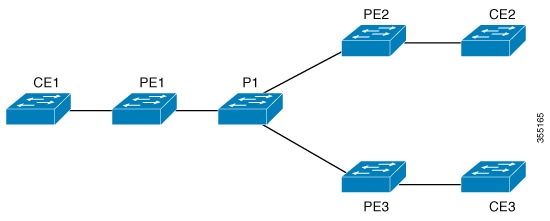
The figure shows an example of route target replacement on PE devices in an MPLS VPN single autonomous system topology.

Figure 1. Route target replacement on provider edge devices in a single MPLS VPN autonomous system topology

The example includes these configurations:

  • PE1 is configured to import and export RT 65000:1 for VRF Customer A and to rewrite all inbound VPNv4 prefixes with RT 65000:1 to RT 65000:2.

  • PE2 is configured to import and export RT 65000:2 for VRF Customer B and to rewrite all inbound VPNv4 prefixes with RT 65000:2 to RT 65000:1.

Before you begin

To implement MPLS VPN route target rewrite, you must

  • be familiar with configuring MPLS VPNs, and

  • identify the RT replacement policy and target device for the autonomous system (AS).

If you configure a PE device to rewrite RT x to RT y and the PE has a VRF instance that imports RT x, you must configure the VRF to import RT y in addition to RT x.

Procedure


Step 1

Create an extended community access list and control access to it.

Example:


Device> enable
Device# configure terminal
Device(config)# ip extcommunity-list 1 permit rt 65000:2

Specify the respective input values for each of the command options as applicable:

  • standard-list-number : identifies one or more permit or deny groups of extended communities

  • expanded-list-number : identifies one or more permit or deny groups of extended communities. Regular expressions can be configured with expanded lists, but not standard lists.

  • permit : permits access for a matching condition

  • deny : denies access for a matching condition

  • regular-expression : specifies an input string pattern to match against. When you use an expanded extended community list to match route targets, include the pattern RT: in the regular expression.

  • rt : specifies the route target extended community attribute. The rt keyword can be configured only with standard extended community lists and not expanded community lists.

  • soo : specifies the site of origin (SOO) extended community attribute. The soo keyword can be configured only with standard extended community lists and not expanded community lists.

  • extended-community-value : specifies the route target or site of origin. The value can be one of the these combinations:

    • autonomous-system-number :network-number

    • ip-address :network-number

    The colon is used to separate the combination values.

Step 2

Define the conditions for redistributing routes or enable policy routing, and enter route-map configuration mode.

Example:


Device(config)# route-map test-rtrewrite-map permit 10

Specify these values:

  • Route map name: Route maps define conditions for redistributing routes between routing protocols or enabling policy routing. Multiple route maps can share the same map name. The redistribute router configuration command uses this name to reference the route map.

  • Action: permit or deny

  • Sequence number: that indicates the position a new route map will have in the list of route maps already configured with the same name.

This table describes the conditional logic and actions of route maps:

If...

And...

Then...

the match criteria are met for the route map

the permit keyword is specified

the route is redistributed as controlled by the set actions.

In the case of policy routing, the packet is policy routed.

the match criteria are not met for the route map

the permit keyword is pecified

the next route map with the same map tag is tested.

If a route passes none of the match criteria for the set of route maps sharing the same name, it is not redistributed by that set.

the match criteria are met for the route map

the deny keyword is specified

the route is not redistributed.

In the case of policy routing, the packet is not policy routed, and no further route maps sharing the same map tag name will be examined.

If the packet is not policy routed, the normal forwarding algorithm is used.

Step 3

Match the BGP extended community list attributes by specifying the standard-list-number and expanded-list-number values.

Example:


Device(config-route-map)# match extcommunity 1

Example:


Device(config-route-map)# match extcommunity 101

The arguments identify one or more permit or deny groups of extended community attributes.

Step 4

Remove a route target from an extended community attribute of an inbound or outbound BGP VPNv4 update by specifying the extended community list number.

Example:


Device(config-route-map)# set extcomm-list 1 delete

The arguments identify one or more permit or deny groups of extended community attributes.

Step 5

Set BGP extended community attributes.

Example:


Device(config-route-map)# set extcommunity rt 65000:1 additive
Device(config-route-map)# end

The additive keyword adds a route target to the existing route target list without replacing any existing route targets.

Step 6

Verify that the match and set entries are correct.

Example:


Device# show route-map test-rtrewrite-map

A route target replacement policy is configured on the device.

What to do next

Associate route maps with specific BGP neighbors.

Apply route target replacement policy

Use this procedure to apply route target replacement policy by associating route maps with specific BGP neighbors.

Procedure


Step 1

Configure a BGP routing process by specifying the autonomous system number and place the device in router configuration mode.

Example:


Device> enable
Device# configure terminal
Device(config)# router bgp 100

The autonomous system number helps identify the device to other BGP devices and tags the routing information that is passed along.

Step 2

Add an entry to the BGP or multiprotocol BGP neighbor table by specifying the IP address of the neighbor, BGP peer group, and the autonomous system to which the neighbor belongs.

Example:


Device(config-router)# neighbor 172.10.0.2 remote-as 100

Step 3

Enter address family configuration mode for configuring routing sessions, such as BGP, that use standard VPNv4 address prefixes.

Example:


Device(config-router)# address-family vpnv4

Use the optional unicast keyword to specify VPNv4 unicast address prefixes.

Step 4

Enable the exchange of information with a neighboring BGP device by specifying the IP address of the neighbor and the BGP peer group name.

Example:


Device(config-router-af)# neighbor 172.16.0.2 activate

Step 5

Specify that a community attribute must be sent to a BGP neighbor.

Example:


Device(config-router-af)# neighbor 172.16.0.2 send-community extended

Use standard , extended , or both keyword respectively to send standard, extended, or both community attribute(s).

Step 6

Apply a route map to incoming or outgoing routes.

Example:


Device# 
Device(config-router-af)# neighbor 172.16.0.2 route-map test-rtrewrite-map in
Device(config-router-af)# end

Use in , or out keyword respectively to apply route map to incoming or outoging routes.


The route target replacement policy is applied to the specified BGP neighbor.

Verify route target replacement

Use this procedure to verify that the VPNv4 prefixes with a specified route target extended community attribute are replaced correctly.

Procedure


Verify the BGP VPNv4 routing table entry within a specific VRF on the provide edge device.

Example:


Device# show ip bgp vpnv4 vrf Customer_A 192.168.1.1/32 internal
BGP routing table entry for 65000:1:192.168.1.1/32, version 6901
Paths: (1 available, best #1, table Customer_A)
  Advertised to update-groups:
     5         
  Refresh Epoch 1
  650002
    3.3.3.3 (metric 3) (via default) from 3.3.3.3 (55.5.4.1)
      Origin IGP, metric 0, localpref 100, valid, internal, best
      Extended Community: RT:65000:1
      mpls labels in/out nolabel/3025
      rx pathid: 0, tx pathid: 0x0
      net: 0xFFB0A72E38, path: 0xFFB0E6A370, pathext: 0xFFB0E5D970
      flags: net: 0x0, path: 0x7, pathext: 0x181


The output confirms whether the RT extended community attributes have been replaced as expected.