The documentation set for this product strives to use bias-free language. For the purposes of this documentation set, bias-free is defined as language that does not imply discrimination based on age, disability, gender, racial identity, ethnic identity, sexual orientation, socioeconomic status, and intersectionality. Exceptions may be present in the documentation due to language that is hardcoded in the user interfaces of the product software, language used based on RFP documentation, or language that is used by a referenced third-party product. Learn more about how Cisco is using Inclusive Language.
MPLS LDP local label allocation filtering feature enables the configuration of filtering policies for selective local label
binding assignments by LDP to improve LDP scalability and convergence. This module explains the concepts related to MPLS LDP
local label allocation filtering and describes how to configure this feature on Cisco Smart Switches.
Feature history for MPLS LDP inbound label binding filtering
This table provides release and platform support information for the features explained in this module.
These features are available in all the releases subsequent to the one they were introduced in, unless noted otherwise.
Release
Feature name and description
Supported platform
Cisco IOS XE 17.18.2
MPLS LDP inbound label binding filtering
Cisco C9350 Series Smart Switches
Cisco C9610 Series Smart Switches
MPLS LDP local label allocation filtering
MPLS LDP local label allocation filtering is an MPLS LDP feature that
enables the configuration of filtering policies for selective local label binding assignments by LDP, and
improves LDP scalability and convergence by reducing the number of local labels allocated and therefore the number of messages
exchanged with peers.
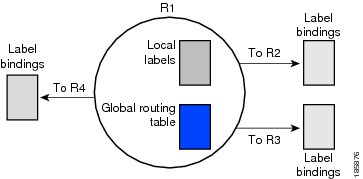
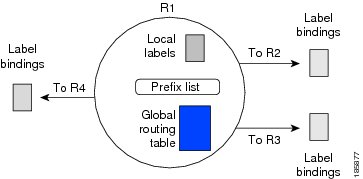
Comparison of default LDP local label allocation behavior and LDP behavior with local label allocation controls
In most Layer 3 Virtual Private Network (VPN) configurations only the label switched paths (LSPs) created to reach the /32
host routes or Border Gateway Protocol (BGP) next hops between the provider edge (PE) devices carry traffic and are relevant
to the Layer 3 VPNs. LSPs between the PE devices that are not members of a VPN use more memory and create additional processing
in LDP across the core. Controlling the local label allocation could off-load LDP processing of non-VPN LSPs in the service
provider network core devices.
Figure 1. Default LDP label allocation behavior
Figure 2. LDP behavior with local label allocation control configured
The figure shows that device R1 learns a number of routes from its IGP neighbors on devices R2, R3, and R4. A prefix list
defined on device R1 specifies the prefixes for which LDP allocates a local label.
The table contrasts the default behavior of LDP local label allocation with the behavior when local label allocation controls
are configured
Aspect
Default LDP label allocation behavior
LDP behavior with local label allocation control configured
LDP label allocation
The LDP allocates a local label for every route learned from the Interior Gateway Protocol (IGP).
You can configure LDP to selectively allocate local labels for a subset of the prefixes learned from the IGP.
Label advertisement
The local labels are advertised to and learned by all peers.
The size of the local label space and the number of label binding advertisements are reduced through the use of a prefix list.
Resource usage
Default LDP label allocation uses more memory and create additional processing in LDP across the core.
The decrease in the number of local labels and label binding advertisement messages reduces the amount of memory use and improves
convergence time for LDP.
LDP local label filtering and BGP routes
The default behavior of LDP is to allocate local labels for all non-Border Gateway Protocol (BGP) prefixes.
LDP does not apply the configured local label filter to redistributed BGP routes in the global table for which BGP allocates
local label, but LDP does the advertisements using Inter-AS Option C. LDP neither forwards these entries nor releases the
local labels allocated by BGP.
Benefits of using prefix lists for LDP local label allocation filtering
The MPLS LDP local label allocation filtering feature allows you to configure the LDP to allocate local labels for a subset
of the learned prefixes. LDP accepts the prefix and allocates a local label if the prefix is permitted by a prefix list. If
the prefix list is not defined, LDP accepts all prefixes and allocates local labels based on its default mode of operation.
Using prefix lists for LDP local label allocation filtering provides these benefits:
Prefix lists provide more flexibility for specifying a subset of prefixes and masks.
Prefix lists use a tree-based matching technique which is more efficient than evaluating prefixes or host routes sequentially.
Prefix lists are easy to modify.
Bahavior change for LDP local label allocation
The MPLS LDP local label allocation filtering feature modifies the local label allocation handling of LDP. The feature supports
local label allocation filtering through the specification of a prefix list or host routes.
With the introduction of this feature, LDP needs to determine whether a prefix filter is already configured to control the
local label allocation on the local node. If a prefix list exists, the local label allocation is confined to the list of prefixes
permitted by the configured prefix list.
LDP also needs to respond to local label allocation configuration changes and to configuration changes that affect the prefix
list that LDP is using.
Any of these configuration changes can trigger LDP actions:
Creating a local label allocation configuration
Deleting or changing a local label allocation configuration
Creating a new prefix list for a local label allocation configuration, or
Deleting or changing a prefix list for a local label allocation configuration.
LDP responds to local label allocation configuration changes by updating the Label Information Database (LIB) and the forwarding
table in the global routing table. To update the LIB after a local label filter configuration change without a session reset,
LDP keeps all remote bindings.
If you create a local label allocation configuration without defining a prefix list, no LDP action is required. The local
label allocation configuration has no effect because the prefix list is created and permits all prefixes.
If you create or change a prefix list and prefixes that were previously allowed are rejected, LDP goes through a label withdraw
and release procedure before the local labels for these prefixes are deallocated.
If you delete a prefix, LDP goes through the label withdraw and release procedure for the LIB local label. If the associated
prefix is one for which no LIB entry should be allocated, LDP bypasses this procedure.
The LDP default behavior is to allocate local labels for all non-BGP prefixes. This default behavior does not change with
the introduction of this feature and the mpls ldp label and allocate commands.
Topic 2.1
Restrictions for MPLS LDP local label allocation filtering
MPLS LDP local label allocation filtering is subjected to these restrictions:
The feature supports prefix lists; it does not support access lists.
The configuration for prefix list or host routes is supported only in the global routing table.
LDP and Routing Information Base (RIB) restart handling do not apply.
The feature does not support Wildcard Forwarding Equalence Class (FEC) requests.
Remote bindings are retained for LDP table entries that are filtered.
Configure MPLS LDP local label allocation filtering
Use this proecdure to configure filtering policies for selective local label binding assignments by LDP.
This task improves LDP scalability and convergence by controlling which local labels are allocated. You can use either a prefix
list or host routes as a filter.
The MPLS LDP local label allocation filtering feature introduces the mpls ldp label and allocate commands that allow you to configure LDP to selectively allocate local labels for a subset of the prefixes learned from the
IGP.
Note
A maximum of one local label allocation filter is supported for the global table.
Procedure
Step 1
Create a prefix list for MPLS LDP local label allocation filtering.
Example:
Device> enable
Device# configure terminal
Device(config)# ip prefix-list list1 permit 192.168.0.0/16 le 20
Specify the input parameters as applicable:
list-name: configures a name to identify the prefix list.
list-number: configures a number to identify the prefix list.
seq: applies a sequence number to a prefix-list entry. The range of sequence numbers is 1 to 4294967294. If a sequence number
is not entered when this command is configured, a default sequence numbering is applied to the prefix list. The number 5 is
applied to the first prefix entry, and subsequent unnumbered entries are incremented by 5.
deny: denies access for a matching condition.
permit: permits access for a matching condition.
network/length: configures the network address, and the length of the network mask in bits. The network number can be any valid IP address
or prefix. The bit mask can be a number from 0 to 32.
gege-length: represents the greater than or equal to operator along with the minimum prefix length to be matched.
lele-length: represents the less than or equal to operator along with the maximum prefix length to be matched
Step 2
Create a prefix list for MPLS LDP local label allocation filtering.
Example:
Device(config)# mpls ldp label
Step 3
Configure local label allocation filters for learned routes for LDP using a prefix list.
Example:
Device(config-ldp-lbl)#allocate global prefix-list list1
Specify the input parameters as applicable:
global: specifies the global routing.
prefix-list: specifies a prefix list to be used as a filter for MPLS LDP local label allocation.
list-name: indicates a name that identifies the prefix list.
list-number: indicates a number that identifies the prefix list.
Step 4
Configure local label allocation filters for learned routes for LDP.
Example:
Device(config-ldp-lbl)#allocate global host-routes
The host-routes keyword specifies that local label allocation be done for host routes only.
You can specify that LDP allocate local labels for prefixes configured in a prefix list in the global table or for host routes
in the global table.
Step 5
Remove the specific MPLS LDP local label allocation filter without resetting the LDP session..
Example:
Device(config-ldp-lbl)#no allocate global host-routes
The host-routes keyword specifies that host routes be used as a filter for MPLS LDP local label allocation.
Step 6
Remove all local label allocation filters configured under the MPLS LDP label configuration mode and restore LDP default behavior
for local label allocation without a session reset.
The output of this command verifies that host routes are configured as the local label allocation filter for the device.
Verify that local label allocation filtering was configured properly and display how LDP accepts or withdraws labels.
Example:
Device# debug mpls ldp binding filter
LDP Local Label Allocation Filtering changes debugging is on
.
.
.
Sample configuration for MPLS LDP local label filtering
This section provides a sample configuration for MPLS LDP local label allocation filtering.
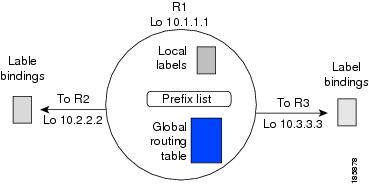
Figure 3. MPLS LDP local label allocation filtering example
In this sample configuration:
Devices R1, R2, and R3 have loopback addresses 10.1.1.1, 10.2.2.2, and 10.3.3.3 defined and advertised by the IGP, respectively.
10.1.1.1 is the router ID of device R1, 10.2.2.2 is the router ID of device R2, and 10.3.3.3 is the router ID of device R3.
A prefix list is defined on device R1 to specify the local labels for which LDP allocates a local label.
You can use the LDP CLI commands to verify that
device R1 has allocated a local label for the correct subset of the prefixes, and
devices R2 and R3 did not receive any remote bindings for the prefixes for which device R1 did not assign a local label.
Routing table on device R1
Enter the show ip route command to display the current state of the routing table. This example shows the routing table on device R1 based on the
sample configuration.
Device# show ip route

Codes: C - connected, S - static, R - RIP, M - mobile, B - BGP
       D - EIGRP, EX - EIGRP external, O - OSPF, IA - OSPF inter area
       N1 - OSPF NSSA external type 1, N2 - OSPF NSSA external type 2
       E1 - OSPF external type 1, E2 - OSPF external type 2
       i - IS-IS, su - IS-IS summary, L1 - IS-IS level-1, L2 - IS-IS level-2
       ia - IS-IS inter area, * - candidate default, U - per-user static route
       o - ODR, P - periodic downloaded static route
Gateway of last resort is not set
     10.0.0.0/32 is subnetted, 1 subnets
C       10.1.1.1 is directly connected, Loopback0
     10.2.0.0/32 is subnetted, 1 subnets
O       10.2.2.2 [110/11] via 10.10.7.1, 00:00:36, FastEthernet1/0/0
     10.3.0.0/32 is subnetted, 1 subnets
O       10.3.3.3 [110/11] via 10.10.9.1, 00:00:36, FastEthernet3/0/0
     10.0.0.0/24 is subnetted, 3 subnets
C       10.10.7.0 is directly connected, FastEthernet1/0/0
O       10.10.8.0 [110/20] via 10.10.9.1, 00:00:36, FastEthernet3/0/0
                  [110/20] via 10.10.7.1, 00:00:36, FastEthernet1/0/0
C       10.10.9.0 is directly connected, FastEthernet3/0/0
Local label bindings on devices R1, R2, and R3
Enter the show mpls ldp bindings command on devices R1, R2, and R3 to display the contents of the Label Information Base (LIB) on each device. In these examples,
the default LDP allocation behavior is in operation; that is, LDP allocates a local label for every route and advertises a
label binding for every route learned from the IGP.
Local label allocation filtering configuration on device R1
Enter the mpls ldp label command to configure a local label allocation filter. These examples show how to configure a local label allocation filter
by host routes only and by a prefix list.
Local label allocation filter—host routes only configuration:
This example shows the selection of host routes as the only filter. Here, the local label allocation filtering is defined
on device R1 under MPLS LDP label configuration mode
Local label allocation filter—prefix list configuration:
This example shows how to configure a local label allocation filter that allows or denies prefixes based on a prefix list:
configure terminal
!
mpls ldp label
 allocate global prefix-list ListA
 exit
end
ListA is a prefix list defined as:
configure terminal
!
ip prefix-list ListA permit 0.0.0.0/32 ge 32
Local label allocation filtering changes label bindings on devices R1, R2, and R3
After configuring a local label allocation filter on Device R1, enter the show mpls ldp bindings command again to see the changes in the local label bindings in the LIB on each device. Changes to the output in the LIB
entries are highlighted in bold text.
LIB on device R1 after local label allocation filtering
This example shows how the configuration of a local label allocation prefix-list filter changes the contents of the LIB on
device R1.
The 10.10.7.0/24, 10.10.8.0/24, and 10.10.9.0/24 prefixes are no longer assigned local labels. Therefore, device R1 sends
no label advertisement for these prefixes.
LIB on device R3 after local label allocation filtering
This example shows how the configuration of a local label allocation prefix-list filter on device R1 changes the contents
of the LIB on device R3.
The 10.10.7.0/24, 10.10.8.0/24, and 10.10.9.0/24 prefixes are no longer assigned local labels. Again, device R1 sends no label
advertisement for these prefixes.
Display the local label allocation filter
Enter the show mpls ldp detail command to display the filter used for local label allocation. For example:

 Feedback