MPLS Layer 3 VPN

An MPLS Virtual Private Network (VPN) consists of a set of sites that are interconnected by means of an MPLS provider core network. At each customer site, one or more customer edge (CE) devices attach to one or more provider edge (PE) devices. This module explains the basic concepts of MPLS L3VPN and how to configure it on Cisco Smart Switches.

Feature history for MPLS Layer 3 VPN

This table provides release and platform support information for the features explained in this module.

These features are available in all the releases subsequent to the one they were introduced in, unless noted otherwise.

Release

Feature name and description

Supported platform

Cisco IOS XE 17.18.2

MPLS Layer 3 VPN

Cisco C9350 Series Smart Switches

Cisco C9610 Series Smart Switches

MPLS virtual private networks

An MPLS virtual private network (VPN) is a Layer 3 IP-based network that

  • delivers private network services over a public or shared infrastructure

  • utilizes a peer model to exchange routing information between the service provider and the customer

  • functions at Layer 3 and allows the service provider to relay data between customer sites without direct customer involvement in the core routing, and

  • simplifies management by requiring updates only at the provider edge device when adding new sites.

A VPN is

  • an IP-based network delivering private network services over a public infrastructure, and

  • a set of sites that communicate with each other privately over the Internet or other public or private networks.

Provider and customer devices are network components that

  • define the architecture of an MPLS VPN

  • assign or process MPLS and VPN labels, and

  • establish the boundaries between the service provider core and the customer network.

Basic MPLS VPN terminology

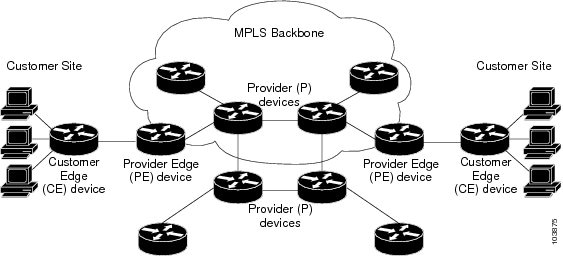
Figure 1. Sample MPLS VPN topology

Different components of the MPLS VPN topology include:

  • Provider device (P device): device in the core of the provider network. P devices run MPLS switching, and do not attach VPN labels to routed packets. The MPLS label in each route is assigned by the provider edge (PE) device. VPN labels are used to direct data packets to the correct egress device.

  • PE device: device that attaches the VPN label to incoming packets based on the interface or sub-interface on which they are received. A PE device attaches directly to a customer edge (CE) device.

  • Customer device (C device): device in the ISP or enterprise network

  • CE device: Edge device on the network of the ISP that connects to the PE device on the network. A CE device must interface with a PE device.

MPLS VPNs and conventional VPNs

The table compares the characteristics of conventional VPNs and MPLS-based VPNs.

Table 1. MPLS VPNs Vs. conventional VPNs

Attribute

Conventional VPN

MPLS VPN

Creation method

Created by configuring a full mesh of tunnels or permanent virtual circuits (PVCs) to all sites

Created in Layer 3 and based on the peer model

Routing model

Requires a connection-oriented, point-to-point overlay on the network

Enables the service provider and customer to exchange Layer 3 routing information

Data relaying

Relies on pre-established tunnels or circuits managed by the customer

The service provider relays data between customer sites without the customer involvement

Management and expansion

Difficult to maintain or expand

Easier to manage and expand than conventional models

Adding new sites

Requires configuration changes on every edge device within the VPN

Requires an update only to the service provider’s edge device that connects the new site

Benefits of MPLS virtual private network

MPLS virtual private networks allow service providers to deploy scalable VPNs. They build the foundation to deliver several value-added services.

Connectionless service

A significant technical advantage of MPLS VPNs is that they are connectionless. The Internet owes its success to its basic technology, TCP/IP. TCP/IP is built on a packet-based, connectionless network paradigm. This means that no prior action is necessary to establish communication between hosts, making it easy for two parties to communicate. To establish privacy in a connectionless IP environment, current VPN solutions impose a connection-oriented, point-to-point overlay on the network. Even if it runs over a connectionless network, a VPN cannot take advantage of the ease of connectivity and multiple services available in connectionless networks. When you create a connectionless VPN, you do not need tunnels and encryption for network privacy, thus eliminating significant complexity.

Centralized service

Building VPNs in Layer 3 allows delivery of targeted services to a group of users represented by a VPN. A VPN must give service providers more than a mechanism for privately connecting users to intranet services. It must also provide a way to flexibly deliver value-added services to targeted customers. Scalability is critical, because you want to use services privately in their intranets and extranets. Because MPLS VPNs are seen as private intranets, you may use new IP services such as:

  • Multicast

  • Quality of service (QoS)

  • telephony support within a VPN, and

  • centralized services including content and web hosting to a VPN.

You can customize several combinations of specialized services for individual customers. For example, a service that combines IP multicast with a low-latency service class enables video conferencing within an intranet.

Scalability

If you create a VPN using connection-oriented, point-to-point overlays, Frame Relay, or ATM virtual connections (VCs), the VPN’s key deficiency is scalability. Specifically, connection-oriented VPNs without fully meshed connections between customer sites are not optimal. MPLS-based VPNs, instead, use the peer model and Layer 3 connectionless architecture to leverage a highly scalable VPN solution. The peer model requires a customer site to peer with only one PE device as opposed to all other CE devices that are members of the VPN. The connectionless architecture allows the creation of VPNs in Layer 3, eliminating the need for tunnels or VCs.

Other scalability issues of MPLS VPNs are due to the partitioning of VPN routes between PE devices. And the further partitioning of VPN and Interior Gateway Protocol (IGP) routes between PE devices and provider (P) devices in a core network.

PE devices must maintain VPN routes for those VPNs who are members. P devices do not maintain any VPN routes. This increases the scalability of the provider’s core and ensures that no single device is a scalability bottleneck.

Security

MPLS VPNs offer the same level of security as connection-oriented VPNs. Packets from one VPN do not inadvertently go to another VPN.

Security is provided in the these areas:

  • at the edge of a provider network, ensuring packets that are received from a customer are placed on the correct VPN, and

  • at the backbone, VPN traffic is kept separate. Malicious spoofing—an attempt to gain access to a PE device—is nearly impossible because the packets that are received from customers are IP packets. These IP packets must be received on a particular interface or sub-interface to be uniquely identified with a VPN label.

Ease of creation

To take full advantage of VPNs, customers must be able to easily create new VPNs and user communities. Because MPLS VPNs are connectionless, no specific point-to-point connection maps or topologies are required. You can add sites to intranets and extranets and form closed user groups. Managing VPNs in this manner enables membership of any given site in multiple VPNs, maximizing flexibility in building intranets and extranets.

Flexible addressing

To make a VPN service more accessible, customers of a service provider can design their own addressing plan. This addressing plan can be independent of addressing plans for other service provider customers. Many customers use private address spaces, as defined in RFC 1918. They do not want to invest the time and expense of converting to public IP addresses to enable intranet connectivity. MPLS VPNs allow customers to continue to use their present address spaces without Network Address Translation (NAT) by providing a public and private view of the address. A NAT is required only if two VPNs with overlapping address spaces want to communicate. This enables customers to use their own unregistered private addresses, and communicate freely across a public IP network.

Integrated QoS support

QoS is an important requirement for many IP VPN customers. It provides the ability to address two fundamental VPN requirements:

  • predictable performance and policy implementation, and

  • support for multiple levels of service in an MPLS VPN.

Network traffic is classified and labeled at the edge of the network. The traffic is then aggregated according to policies defined by subscribers and implemented by the provider and transported across the provider core. Traffic at the edge and core of the network can then be differentiated into different classes by drop probability or delay.

Straightforward migration

For service providers to quickly deploy VPN services, use a straightforward migration path. MPLS VPNs are unique because you can build them over multiple network architectures, including IP, ATM, Frame Relay, and hybrid networks.

Migration for the end customer is simplified because there is no requirement to support MPLS on the CE device. No modifications are required to a customer’s intranet.
Restrictions for MPLS virtual private networks

Follow the restrictions mentioned in this section when configuring static routes in an MPLS or MPLS VPN environment.

Generic restrictions for MPLS VPN

  • Does not support MPLS fragmentation

  • Does not support MPLS maximum transmission unit (MTU) configuration

  • Supports only the default mode—per-VRF MPLS label allocation mode. However, they can inter-operate with remote peers operating in the per-prefix mode.

Supported static routes in an MPLS environment

When static routes are configured in an MPLS or MPLS VPN environment, only some variations of the ip route and ip route vrf commands are supported.

This variation of ip route command is supported when you configure static routes in an MPLS environment:

ip route destination-prefix mask interface next-hop-address

Use the interface and next-hop arguments when specifying static routes.

Unsupported static routes in an MPLS environment that uses the TFIB

Certain static routes are not supported in an MPLS environment that uses the TFIB.

  • This variation of ip route command is not supported when you configure static routes in an MPLS environment:

    ip route destination-prefix mask next-hop-address

  • This variation of ip route command is not supported when you configure static routes in an MPLS environment and enable load sharing where the next hop can be reached through two paths:

    ip route destination-prefix mask next-hop-address

  • These variations of ip route command are not supported when you configure static routes in an MPLS environment and enable load sharing where the destination can be reached through two next hops:

    • ip route destination-prefix mask next-hop1

    • ip route destination-prefix mask next-hop2

Supported static Routes in an MPLS VPN environment

Only certain static routes are supported in an MPLS VPN environment.

  • These variations of ip route vrf command are supported when you configure static routes in an MPLS VPN environment, and the next hop and interface are in the same VRF:

    • ip route vrf vrf-name destination-prefix mask next-hop-address

    • ip route vrf vrf-name destination-prefix mask interface next-hop-address

    • ip route vrf vrf-name destination-prefix mask interface1 next-hop1

    • ip route vrf vrf-name destination-prefix mask interface2 next-hop2

  • These variations of ip route vrf commands are supported when you configure static routes in an MPLS VPN environment, and the next hop is in the global table in the MPLS cloud in the global routing table. For example, these commands are supported when the next hop is pointing to the Internet gateway.

    • ip route vrf vrf-name destination-prefix mask next-hop-address global

    • ip route vrf vrf-name destination-prefix mask interface next-hop-address (This command is supported when the next hop and interface are in the core.)

Unsupported static routes in an MPLS VPN environment that uses the TFIB

Certain static routes are not supported in an MPLS environment that uses the TFIB.

  • This variation of ip route command is not supported when you configure static routes in an MPLS VPN environment, the next hop is in the global table in the MPLS cloud within the core, and you enable load sharing where the next hop can be reached through two paths:

    ip route vrf destination-prefix mask next-hop-address global

  • These variations of ip route commands are not supported when you configure static routes in an MPLS VPN environment, the next hop is in the global table in the MPLS cloud within the core, and you enable load sharing where the destination can be reached through two next hops:

    • ip route vrf destination-prefix mask next-hop1 global

    • ip route vrf destination-prefix mask next-hop2 global

  • These variations of ip route vrf commands are not supported when you configure static routes in an MPLS VPN environment, and the next hop and interface are in the same VRF:

    • ip route vrf vrf-name destination-prefix mask next-hop1 vrf-name destination-prefix mask next-hop1

    • ip route vrf vrf-name destination-prefix mask next-hop2

Supported static routes in an MPLS VPN environment where the next hop resides in the global table on the CE device

Only certain static routes are supported in an MPLS VPN environment where the next hop resides in the global table on the CE device.

  • This variation of ip route vrf command is supported when you configure static routes in an MPLS VPN environment, and the next hop is in the global table on the customer edge (CE) side. For example, the following command is supported when the destination prefix is the CE device’s loopback address, as in external Border Gateway Protocol (EBGP) multi-hop cases.

    ip route vrf vrf-name destination-prefix mask interface next-hop-address

  • This variation of ip route commands are supported when you configure static routes in an MPLS VPN environment, the next hop is in the global table on the CE side, and you enable load sharing with static nonrecursive routes and a specific outbound interface:

    • ip route destination-prefix mask interface1 nexthop1

    • ip route destination-prefix mask interface2 nexthop2

How MPLS virtual private networks work

MPLS VPN functionality is enabled at the edge of an MPLS network.

Summary

These are the key components involved in this process:

  • Provider Edge (PE) device: translates customer routing information into VPNv4 routes and exchanges them with other PE devices

  • Customer Edge (CE) device: exchanges standard routing updates with the PE device.

  • VPN route target communities: lists used to identify all members of a VPN community. VPN route targets need to be configured for each VPN community member.

  • Multiprotocol BGP (MP-BGP): propagates virtual routing and forwarding (VRF) reachability information

A one-to-one relationship does not necessarily exist between customer sites and VPNs. A given site can be a member of multiple VPNs. However, a site can associate with only one VRF. A customer-site VRF contains all the routes available to the site from the VPNs of which it is a member.

Workflow

These stages describe how MPLS VPNs work:

  1. Routing update exchange: The PE device exchanges routing updates with the connected CE device.
  2. Route translation: The PE device translates the received CE routing information into VPNv4 routes.
  3. VPNv4 propagation: The PE device uses MP-BGP to exchange these VPNv4 routes with other PE devices in the network.
  4. Label attachment: The PE device attaches VPN labels .
  5. MPLS forwarding: The provider core transports the traffic between VPN members using MPLS labels.

Result

Customer sites can communicate privately across a shared provider core as if they were on a single private network.

Configure an MPLS virtual private network

Before you begin

  • Make sure that you have installed Multiprotocol Label Switching (MPLS), Label Distribution Protocol (LDP), and Cisco Express Forwarding (CEF) in your network.

  • All devices in the core, including the provider edge (PE) devices, must be able to support CEF and MPLS forwarding. See the step to assess the needs of MPLS VPN customers.

  • Enable CEF on all devices in the core, including the PE devices.

  • The mpls ldp graceful-restart command must be configured to enable the device to protect LDP bindings and MPLS forwarding state during a disruption in service. We recommend you to configure this command even if you do not want to preserve the forwarding state to avoid device failure during SSO in a high availability setup with scale configurations.

Procedure


Step 1

Assess the needs of MPLS VPN customers.

Step 2

Enable MPLS on all devices in the core by configuring MPLS Label Distribution Protocol (LDP).

For configuration information, see the MPLS Label Distribution Protocol chapter.

Step 3

Connect the MPLS VPN customers.

  1. Enable customer connectivity by defining VRFs on the provider edge (PE) devices.

  2. Configure VRF interfaces on PE devices for each customer.

  3. Configure routing protocols between the PE and customer edge (CE) devices.

    Configure the PE device with the same routing protocol that the CE device uses. You can configure Border Gateway Protocol (BGP), Routing Information Protocol version 2 (RIPv2), EIGRP, Open Shortest Path First (OSPF), or static routes between the PE and CE devices.

Step 4

Verify the VPN configuration using the show ip vrf command.

A route distinguisher (RD) must be configured for the VRF instance.

The command output displays the set of defined VRF instances and associated interfaces. It also maps the VRF instances to the configured RD.

Step 5

Verify connectivity between MPLS VPN sites.


Assess core network requirements

This task identifies the core network topology to best serve MPLS VPN customers.

Perform this assessment before configuring a MPLS VPN to ensure that the infrastructure supports the required scale and features.

Procedure


Step 1

Identify the size of the network.

Identify these parameters to determine the number of devices and ports that you need:

  • the number of customers you need to support

  • the number of VPNs needed per customer, and

  • the number of virtual routing and forwarding instances for each VPN.

Step 2

Identify the routing protocols in the core.

Determine which routing protocols you need in the core network.

Step 3

Determine if you need MPLS VPN high availability (HA) support.

Step 4

Determine if you need Border Gateway Protocol (BGP) load sharing and redundant paths in the MPLS VPN core.

MPLS VPN Nonstop Forwarding and Graceful Restart are supported on selected devices and Cisco software releases. Contact Cisco Support for the exact requirements and hardware support.


What to do next

Configure MPLS in the core.

To enable MPLS on all devices in the core, you must configure MPLS Label Distribution Protocol (LDP).

Define VRFs on PE devices

This task defines a virtual routing and forwarding (VRF) configuration for IPv4.

Use this procedure on provider edge (PE) devices to segregate customer traffic and enable private connectivity.

Procedure


Step 1

Define the virtual private network (VPN) routing instance by assigning a VRF name.

Example:


Device> enable
Device# configure terminal
Device(config)# vrf definition vrf1

vrf1 in this example is the unique name assigned to a VRF.

Step 2

Create routing and forwarding tables

Example:


Device(config-vrf)# rd 100:1

The route-distinguisher (RD) argument adds an 8-byte value to an IPv4 prefix to create a unique VPN IPv4 prefix.

You can enter a route distinguisher (RD) in formats such as 16-bit AS number:32-bit number such as, 101:3, or 32-bit IP address:16-bit number such as, 10.0.0.1:1.

Step 3

Create a route-target extended community for a VRF to control the distribution of routing information.

Example:


Device(config-vrf)# address-family ipv4
Device(config-vrf-af)# route-target both 100:1
Device(config-vrf-af))# exit

You can use the import keyword to import routing information from the target VPN community, export keyword to export it, or both to perform both the actions.

100:1 in this example is the route-target-ext-community argument that adds the route-target extended community attributes to the VRF’s list of import, export, or both route-target extended communities.


Configure VRF interfaces on PE devices

This task associates a virtual routing and forwarding (VRF) instance with an interface or sub-interface.

Perform this task on provider edge (PE) devices for each VPN customer to link physical or logical interfaces to the correct VRF.

Procedure


Associate a VRF with an interface on the PE device.

Example:


Device> enable
Device# configure terminal
Device(config)# interface GigabitEthernet 0/0/1
Device(config-if)# vrf forwarding vrf1
Device(config-if)# end

What to do next

Verify the VPN configuration.

Verify connectivity between MPLS VPN sites

Procedure


Step 1

Verify IP connectivity from CE device to CE device across the MPLS core.

  1. Diagnose basic network connectivity on various networks using the ping command along with the respective protocol, and host-name or system-address arguments.

    Example:

    
    Device> enable
    Device# pingprotocol {host-name | system-address 
  2. Discover the routes that packets take when traveling to their destination using the trace command.

    The trace command can help isolate a trouble spot if two devices cannot communicate.

  3. Display the current state of the routing table using the show ip route command.

    Use the ip-address argument to verify that CE1 has a route to CE2. Verify the routes learned by CE1. Make sure that the route for CE2 is listed.

Step 2

Verify that the local and remote CE devices are in the PE routing table.

  1. Display the IP routing table that is associated with a VRF instance using the show ip route vrf command.

    Check if the loopback addresses of the local and remote CE devices are in the routing table of the provider edge (PE) devices.

  2. Display the Cisco Express Forwarding (CEF) forwarding table that is associated with a VRF using the show ip cef vrf command.

    Check if the prefix of the remote CE device is in the CEF table.


Configuration examples for MPLS virtual private network

Configuration example for MPLS VPN using RIP

This section provides a sample configuration for MPLS VPN using RIP.

PE configuration


 vrf vpn1
 rd 100:1
 route-target export 100:1
 route-target import 100:1
!
ip cef
mpls ldp router-id Loopback0 force
mpls label protocol ldp
mpls ldp graceful-restart
!
interface Loopback0
 ip address 10.0.0.1 255.255.255.255
!
interface GigabitEthernet 1/0/1
 vrf forwarding vpn1
 ip address 192.0.2.3 255.255.255.0
 no cdp enable
interface GigabitEthernet 1/0/1
ip address 192.0.2.2 255.255.255.0
mpls label protocol ldp
mpls ip 
!
router rip
version 2
timers basic 30 60 60 120 
!
address-family ipv4 vrf vpn1
version 2
redistribute bgp 100 metric transparent
network 192.0.2.0
distribute-list 20 in
no auto-summary
exit-address-family 
!
router bgp 100
 no synchronization
 bgp log-neighbor changes
 neighbor 10.0.0.3 remote-as 100
 neighbor 10.0.0.3 update-source Loopback0
 no auto-summary
 no bgp default ipv4-unicast
!        
address-family vpnv4
 neighbor 10.0.0.3 activate
 neighbor 10.0.0.3 send-community extended
 exit-address-family
!        
address-family ipv4 vrf vpn1
 redistribute connected
 redistribute rip
 no auto-summary
 no synchronization
 exit-address-family

CE configuration


ip cef
mpls ldp router-id Loopback0 force
!
interface Loopback0
 ip address 10.0.0.9 255.255.255.255
!
interface GigabitEthernet 1/0/1
 ip address 192.0.2.1 255.255.255.0
 no cdp enable
router rip
 version 2
 timers basic 30 60 60 120
 redistribute connected
 network 10.0.0.0
 network 192.0.2.0
 no auto-summary

Configuration example for MPLS VPN using static routes

This section provides a sample configuration for MPLS VPN using static routes.

PE configuration


vrf vpn1
 rd 100:1
 route-target export 100:1
 route-target import 100:1
!
ip cef
mpls ldp router-id Loopback0 force
mpls label protocol ldp
mpls ldp graceful-restart
!
interface Loopback0
 ip address 10.0.0.1 255.255.255.255
!
interface GigabitEthernet 1/0/1
 vrf forwarding vpn1
 ip address 192.0.2.3 255.255.255.0
 no cdp enable
!
interface GigabitEthernet 1/0/1
ip address 192.168.0.1 255.255.0.0
mpls label protocol ldp
mpls ip
!
router ospf 100
network 10.0.0. 0.0.0.0 area 100
network 192.168.0.0 255.255.0.0 area 100
!
router bgp 100
 no synchronization
 bgp log-neighbor changes
 neighbor 10.0.0.3 remote-as 100
 neighbor 10.0.0.3 update-source Loopback0
 no auto-summary
 no bgp default ipv4-unicast
 !        
address-family vpnv4
 neighbor 10.0.0.3 activate
 neighbor 10.0.0.3 send-community extended
 exit-address-family
 !        
address-family ipv4 vrf vpn1
 redistribute connected
 redistribute static
 no auto-summary
 no synchronization
 exit-address-family
!         
ip route vrf vpn1 10.0.0.9 255.255.255.255 192.0.2.2
ip route vrf vpn1 192.0.2.0 255.255.0.0 192.0.2.2

CE configuration


ip cef
!
interface Loopback0
 ip address 10.0.0.9 255.255.255.255
!
interface GigabitEthernet 1/0/1
 ip address 192.0.2.2 255.255.0.0
 no cdp enable
!
ip route 10.0.0.9 255.255.255.255 192.0.2.3 3
ip route 198.51.100.0 255.255.255.0 192.0.2.3 3

Configuration example for MPLS VPN using BGP

This section provides a sample configuration for MPLS VPN using BGP.

PE configuration

router bgp 5001
bgp log-neighbor-changes
bgp graceful-restart
no bgp default ipv-unicast
redistribute connected
neighbor 102.1.1.1 remote-as 5001
neighbor 102.1.1.1 update-source Loopback1
neighbor 105.1.1.1 remote-as 5001
neighbor 105.1.1.1 update-source Loopback10
!
address-family vpnv4
  neighbor 102.1.1.1 activate
  neighbor 102.1.1.1 send-community both
  neighbor 105.1.1.1 activate
  neighbor 105.1.1.1 send-community extended
exit-address-family
!
address-family vpnv6
  neighbor 102.1.1.1 activate
  neighbor 102.1.1.1 send-community extended
  neighbor 105.1.1.1 activate
  neighbor 105.1.1.1 send-community extended
exit-address-family
!
address-family ipv4 vrf full
  redistribute connected
  neighbor 20.1.1.1 remote-as 5000
  neighbor 20.1.1.1 ebgp-multihop 2
  neighbor 20.1.1.1 update-source Loopback2
  neighbor 20.1.1.1 activate
  neighbor 20.1.1.1 send-community both
exit-address-family
!
address-family ipv6 vrf full
  redistribute connected
  neighbor 2000::1 remote-as 5000
  neighbor 2000::1 ebgp-multihop 2
  neighbor 2000::1 update-source Loopback2
  neighbor 2000::1 activate
exit-address-family
!
address-family ipv4 vrf orange
  network 87.1.0.0 mask 255.255.252.0
  network 87.1.1.0 mask 255.255.255.0
  redistribute connected
  neighbor 40.1.1.1 remote-as 7000
  neighbor 40.1.1.1 ebgp-multihop 2
  neighbor 40.1.1.1 update-source Loopback3
  neighbor 40.1.1.1 activate
  neighbor 40.1.1.1 send-community extended
  neighbor 40.1.1.1 route-map orange-lp in
  maximum-paths eibgp 2
exit-address-family
!
address-family ipv6 vrf orange
  redistribute connected
  maximum-paths eibgp 2
  neighbor 4000::1 remote-as 7000
  neighbor 4000::1 ebgp-multihop 2
  neighbor 4000::1 update-source Loopback3
  neighbor 4000::1 activate
exit-address-family
!
address-family ipv4 vrf sona
  redistribute connected
  neighbor 160.1.1.2 remote-as 5002
  neighbor 160.1.1.2 activate
  neighbor 160.1.1.4 remote-as 5003
  neighbor 160.1.1.4 activate
exit-address-family

CE configuration


router bgp 5000
bgp log-neighbor-changes
neighbor 5.5.5.6 remote-as 5001
neighbor 5.5.5.6 ebgp-multihop 2
neighbor 5.5.5.6 update-source Loopback5
neighbor 35.2.2.2 remote-as 5001
neighbor 35.2.2.2 ebgp-multihop 2
neighbor 35.2.2.2 update-source Loopback1
neighbor 3500::1 remote-as 5001
neighbor 3500::1 ebgp-multihop 2
neighbor 3500::1 update-source Loopback1
!
address-family ipv4
  redistribute connected
  neighbor 5.5.5.6 activate
  neighbor 35.2.2.2 activate
  no neighbor 3500::1 activate
exit-address-family
!
address-family ipv6
  redistribute connected
  neighbor 3500::1 activate
exit-address-family