Layer 3 virtualization
Layer 3 virtualization is a technology that enables multiple virtual routing and forwarding instances (VRFs) on a single device, each with its own address space and routing tables.
-
Each VRF contains separate unicast and multicast route tables for IPv4 and IPv6.
-
Routing decisions are made independently for each VRF.
-
Each router has a default VRF and a management VRF.
VRF Types and Characteristics
The following sections describe the management VRF, default VRF, and the egress loadbalance resolution VRF.
-
Management VRF : Used exclusively for management purposes. Only the mgmt 0 interface can be in the management VRF, and it cannot be assigned to another VRF. No routing protocols can run in the management VRF (static only).
-
Default VRF : All Layer 3 interfaces exist in the default VRF until assigned to another VRF. Routing protocols run in the default VRF context unless another VRF context is specified. The default VRF uses the default routing context for all show commands and is similar to the global routing table concept in Cisco IOS.
-
Egress Loadbalance Resolution VRF : An internal VRF created automatically to assist in additional computation and resolution of routes for the VXLAN EVPN feature. This VRF is not configurable by the user and cannot be deleted. The VRF limit is increased from 4096 to 4097 to accommodate this new implicit VRF.
 Note |
|
VRF and routing
-
All unicast and multicast routing protocols support VRFs.
-
Routing parameters configured in a VRF are independent from those in another VRF for the same routing protocol instance.
-
Interfaces and route protocols can be assigned to a VRF to create virtual Layer 3 networks.
VRF and Routing Reference Information
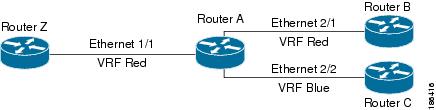
Each interface exists in only one VRF. A physical network can be split into multiple virtual networks using VRFs. Routers within the same VRF share route updates, while routers in different VRFs do not share route updates by default.
-
Routers Z, A, and B exist in VRF Red and form one address domain.
-
Router C is configured in a different VRF and does not share route updates with routers in VRF Red.
By default, Cisco NX-OS uses the VRF of the incoming interface to select which routing table to use for a route lookup. You can configure a route policy to modify this behavior and set the VRF that Cisco NX-OS uses for incoming packets.
-
Cisco NX-OS supports route leaking (import or export) between VRFs.
Route leaking and importing routes from the default VRF
Route leaking and importing routes from the default VRF is a process that allows the transfer of IP prefixes between VRFs in Cisco NX-OS using import policies and route maps.
-
Import policies use route maps to specify which prefixes are imported into a VRF.
-
Both IPv4 and IPv6 unicast prefixes can be imported.
-
Imported prefixes cannot be reimported into another VRF through this policy.
Importing routes from the default VRF: details and considerations
To import IP prefixes from the default VRF, define match criteria in the import route map using standard route policy filtering mechanisms such as prefix lists or as-path filters.
-
You can create an IP prefix list or an as-path filter to define an IP prefix or range, and use that in a match clause for the route map.
-
Prefixes that pass through the route map are imported into the specified VRF using the import policy.
Note |
Routes in the BGP default VRF can be imported directly. Any other routes in the default VRF should be redistributed into BGP first. |
For more information, see the Guidelines and Limitations for VRF Route Leaking section.
VRF-Aware services
A fundamental feature of the Cisco NX-OS architecture is that every IP-based feature is VRF aware.
The following VRF-aware services can select a particular VRF to reach a remote server or to filter information based on the selected VRF:
-
AAA—See the Cisco Nexus 9000 Series NX-OS Security Configuration Guide for more information.
-
Call Home—See the Cisco Nexus 9000 Series NX-OS System Management Configuration Guide for more information.
-
DNS—See DNS for more information.
-
HSRP—See Configuring HSRP for more information.
-
HTTP—See the Cisco Nexus 9000 Series NX-OS Fundamentals Configuration Guide for more information.
-
NTP—See the Cisco Nexus 9000 Series NX-OS System Management Configuration Guide for more information.
-
Ping and Traceroute—See the Cisco Nexus 9000 Series NX-OS Fundamentals Configuration Guide for more information.
-
RADIUS—See the Cisco Nexus 9000 Series NX-OS Security Configuration Guide for more information.
-
SNMP—See the Cisco Nexus 9000 Series NX-OS System Management Configuration Guide for more information.
-
SSH—See the Cisco Nexus 9000 Series NX-OS Security Configuration Guide for more information.
-
Syslog—See the Cisco Nexus 9000 Series NX-OS System Management Configuration Guide for more information.
-
TACACS+—See the Cisco Nexus 9000 Series NX-OS Security Configuration Guide for more information.
-
TFTP—See the Cisco Nexus 9000 Series NX-OS Fundamentals Configuration Guide for more information.
-
VRRP—See Configuring VRRP for more information.
-
XML—See the Cisco NX-OS XML Management Interface User Guide for more information.
See the appropriate configuration guide for each service for more information on configuring VRF support in that service.
Reachability
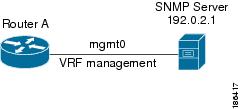
Reachability indicates which VRF contains the routing information necessary to get to the server providing the service. For example, you can configure an SNMP server that is reachable on the management VRF. When you configure that server address on the router, you also configure which VRF Cisco NX-OS must use to reach the server.
The following figure shows an SNMP server that is reachable over the management VRF. You configure Router A to use the management VRF for SNMP server host 192.0.2.1.
Filtering
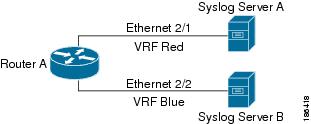
Filtering allows you to limit the type of information that goes to a VRF-aware service based on the VRF. For example, you can configure a syslog server to support a particular VRF. The following figure shows two syslog servers with each server supporting one VRF. Syslog server A is configured in VRF Red, so Cisco NX-OS sends only system messages generated in VRF Red to syslog server A.
Combine reachability and filtering
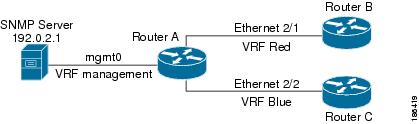
You can combine reachability and filtering for VRF-aware services. You can configure the VRF that Cisco NX-OS uses to connect to that service as well as the VRF that the service supports. If you configure a service in the default VRF, you can optionally configure the service to support all VRFs.
The following figure shows an SNMP server that is reachable on the management VRF. You can configure the SNMP server to support only the SNMP notifications from VRF Red, for example.
 Feedback