IPv6 addresses
IPv6 addresses are a network protocol designed to replace IPv4 addresses by expanding the address space and improving network functionality. IPv6 increases the address size from 32 bits in IPv4 to 128 bits, allowing for a vastly larger number of unique addresses. This expansion supports network scalability and global reachability.
Key attributes of IPv6 addresses include:
-
A much larger address space that reduces the need for private addresses and Network Address Translation (NAT).
-
A simplified main header and the use of extension headers, which improve packet processing efficiency.
-
Support for new application protocols that operate without requiring special processing by border routers.
-
Enhanced routing capabilities through features like prefix aggregation, simplified network renumbering, and site multihoming.
-
Compatibility with routing protocols such as Routing Information Protocol (RIP), Integrated Intermediate System-to-Intermediate System (IS-IS), Open Shortest Path First (OSPF) for IPv6, and multiprotocol Border Gateway Protocol (BGP).
These attributes make IPv6 a more flexible and efficient protocol for modern and future network environments, enabling better routing, easier network management, and support for emerging applications.
IPv6 Address Formats
An IPv6 address has 128 bits or 16 bytes. The address is divided into eight, 16-bit hexadecimal blocks separated by colons (:) in the format x:x:x:x:x:x:x:x.
Two examples of IPv6 addresses are as follows:
2001:0DB8:7654:3210:FEDC:BA98:7654:3210
2001:0DB8:0:0:8:800:200C:417A
IPv6 addresses contain consecutive zeros within the address. You can use two colons (::) at the beginning, middle, or end of an IPv6 address to replace the consecutive zeros. The following table shows a list of compressed IPv6 address formats.
 Note |
You can use two colons (::) only once in an IPv6 address to replace the longest string of consecutive zeros within the address. |
You can use a double colon as part of the IPv6 address when consecutive 16-bit values are denoted as zero. You can configure multiple IPv6 addresses per interface but only one link-local address.
The hexadecimal letters in IPv6 addresses are not case sensitive.
| IPv6 Address Type | Preferred Format | Compressed Format |
|---|---|---|
|
Unicast |
2001:0:0:0:0:DB8:800:200C:417A |
2001::0DB8:800:200C:417A |
|
Multicast |
FF01:0:0:0:0:0:0:101 |
FF01::101 |
|
Loopback |
0:0:0:0:0:0:0:0:1 |
::1 |
|
Unspecified |
0:0:0:0:0:0:0:0:0 |
:: |
A node may use the loopback address listed in the table to send an IPv6 packet to itself. The loopback address in IPv6 is the same as the loopback address in IPv4. For more information, see Overview.
Note |
You cannot assign the IPv6 loopback address to a physical interface. A packet that contains the IPv6 loopback address as its source or destination address must remain within the node that created the packet. IPv6 routers do not forward packets that have the IPv6 loopback address as their source or destination address. |
Note |
You cannot assign an IPv6 unspecified address to an interface. You should not use the unspecified IPv6 addresses as destination addresses in IPv6 packets or the IPv6 routing header. |
The IPv6 prefix is in the form documented in RFC 2373 where the IPv6 address is specified in hexadecimal using 16-bit values between colons. The prefix length is a decimal value that indicates how many of the high-order contiguous bits of the address comprise the prefix (the network portion of the address). For example, 2001:0DB8:8086:6502::/32 is a valid IPv6 prefix.
IPv6 unicast addresses
An IPv6 unicast address is an identifier for a single interface on a single node.
A packet that is sent to a unicast address is delivered to the interface identified by that address.
Aggregatable global addresses
An aggregatable global address is an IPv6 address from the aggregatable global unicast prefix that
-
enables strict aggregation of routing prefixes,
-
limits the number of routing table entries in the global routing table, and
-
is used on links aggregated upward through organizations to Internet service providers (ISPs).
This structure supports efficient routing by allowing hierarchical aggregation of addresses.
Aggregatable global IPv6 addresses are defined by a global routing prefix, a subnet ID, and an interface ID. All global unicast addresses, except those that start with binary 000, have a 64-bit interface ID. The IPv6 global unicast address allocation uses the range of addresses that start with binary value 001 (2000::/3). See Aggregatable Global Address Format for the structure of an aggregatable global address.
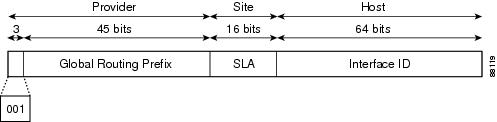
Addresses with a prefix of 2000::/3 (001) through E000::/3 (111) are required to have 64-bit interface identifiers in the extended universal identifier (EUI)-64 format. The Internet Assigned Numbers Authority (IANA) allocates the IPv6 address space in the range of 2000::/16 to regional registries.
The aggregatable global address consists of a 48-bit global routing prefix and a 16-bit subnet ID or Site-Level Aggregator (SLA). In the IPv6 aggregatable global unicast address format document (RFC 2374), the global routing prefix included two other hierarchically structured fields called Top-Level Aggregator (TLA) and Next-Level Aggregator (NLA). The IETF decided to remove the TLS and NLA fields from the RFCs because these fields are policy based. Some existing IPv6 networks deployed before the change might still use networks that are on the older architecture.
A subnet ID is a 16-bit subnet field that organizations can use to create a local addressing hierarchy and identify subnets. A subnet ID is similar to a subnet in IPv4. An organization with an IPv6 subnet ID can support up to 65,535 individual subnets.
An interface ID identifies interfaces on a link. The interface ID is unique to the link. In many cases, an interface ID is the same as or based on the link-layer address of an interface. Interface IDs used in aggregatable global unicast and other IPv6 address types have 64 bits and are in the modified EUI-64 format.
Interface IDs are in the modified EUI-64 format in one of the following ways:
-
For all IEEE 802 interface types (for example, Ethernet and Fiber Distributed Data interfaces), the first three octets (24 bits) are the Organizationally Unique Identifier (OUI) of the 48-bit link-layer address (MAC address) of the interface, the fourth and fifth octets (16 bits) are a fixed hexadecimal value of FFFE, and the last three octets (24 bits) are the last three octets of the MAC address. The Universal/Local (U/L) bit, which is the seventh bit of the first octet, has a value of 0 or 1. Zero indicates a locally administered identifier; 1 indicates a globally unique IPv6 interface identifier.
-
For all other interface types (for example, serial, loopback, ATM, and Frame Relay types), the interface ID is similar to the interface ID for IEEE 802 interface types; however, the first MAC address from the pool of MAC addresses in the router is used as the identifier (because the interface does not have a MAC address).
Note
For interfaces that use the Point-to-Point Protocol (PPP), where the interfaces at both ends of the connection might have the same MAC address, the interface identifiers at both ends of the connection are negotiated (picked randomly and, if necessary, reconstructed) until both identifiers are unique. The first MAC address in the router is used as the identifier for interfaces using PPP.
If no IEEE 802 interface types are in the router, link-local IPv6 addresses are generated on the interfaces in the router in the following sequence:
-
The router is queried for MAC addresses (from the pool of MAC addresses in the router).
-
If no MAC addresses are available in the router, the serial number of the router is used to form the link-local addresses.
-
If the serial number of the router cannot be used to form the link-local addresses, the router uses a Message Digest 5 (MD5) hash to determine the MAC address of the router from the hostname of the router.
Link-Local addresses
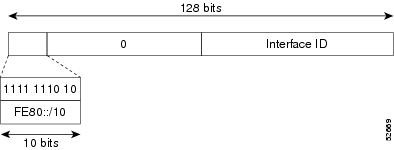
A link-local address is an IPv6 unicast address. It can be automatically configured on any interface using the link-local prefix FE80::/10 (1111 1110 10) and the interface identifier in the modified EUI-64 format.
Link-local addresses are used in the Neighbor Discovery Protocol (NDP) and the stateless autoconfiguration process. Nodes on a local link can use link-local addresses to communicate. These nodes do not need globally unique addresses to communicate. Figure Aggregatable Global Address Format shows the structure of a link-local address.
IPv6 routers cannot forward packets that have link-local source or destination addresses to other links.
IPv4-Compatible IPv6 addresses
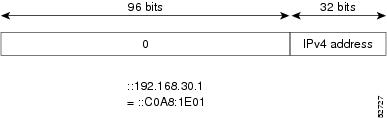
An IPv4-compatible IPv6 address is an IPv6 unicast address that has zeros in the high-order 96 bits of the address and an IPv4 address in the low-order 32 bits of the address. The format of an IPv4-compatible IPv6 address is 0:0:0:0:0:0:A.B.C.D or ::A.B.C.D.
The entire 128-bit IPv4-compatible IPv6 address is used as the IPv6 address of a node, and the IPv4 address embedded in the low-order 32 bits is used as the IPv4 address of the node. IPv4-compatible IPv6 addresses are assigned to nodes that support both the IPv4 and IPv6 protocol stacks and are used in automatic tunnels. Figure Aggregatable Global Address Format shows the structure of a n IPv4-compatible IPv6 address and a few acceptable formats for the address.
Unique local addresses
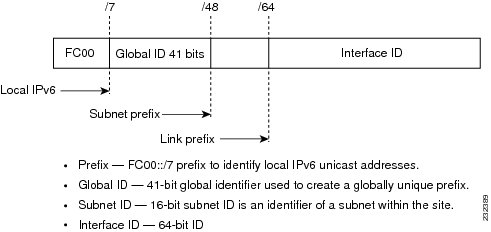
A unique local address is an IPv6 unicast address that is globally unique and is intended for local communications.
Unique local addresses are not expected to be routed on the global Internet. It can be routed inside of a limited area, such as a site, and it may be routed between a limited set of sites. Applications might treat unique local addresses like global scoped addresses.
These are the characteristics of unique local address:
-
It has a globally unique prefix (it has a high probability of uniqueness).
-
It has a well-known prefix to allow for easy filtering at site boundaries.
-
It allows sites to be combined or privately interconnected without creating any address conflicts or requiring renumbering of interfaces that use these prefixes.
-
It is ISP-independent and can be used for communications inside of a site without having any permanent or intermittent Internet connectivity.
-
If it is accidentally leaked outside of a site through routing or the Domain Name Server (DNS), there is no conflict with any other addresses.
Figure Aggregatable Global Address Format shows the structure of a unique local address.
Site local addresses
Because RFC 3879 deprecates the use of site-local addresses, follow the recommendations of unique local addressing (ULA) in RFC 4193 when you configure private IPv6 addresses.
IPv6 anycast addresses
An anycast address is an address that is assigned to a set of interfaces that belong to different nodes.
A packet sent to an anycast address is delivered to the closest interface as defined by the routing protocols in use identified by the anycast address. Anycast addresses are syntactically indistinguishable from unicast addresses because anycast addresses are allocated from the unicast address space.
Assigning a unicast address to more than one interface turns a unicast address into an anycast address. You must configure the nodes to which the anycast address belongs to recognize that the address is an anycast address.
Note |
Anycast addresses can be used only by a router, not by a host. Anycast addresses cannot be used as the source address of an IPv6 packet. |
Figure Subnet Router Anycast Address Format represents the format of the subnet router anycast address. The address has a prefix concatenated by a series of zeros (the interface ID). The subnet router anycast address can be used to reach a router on the link that is identified by the prefix in the subnet router anycast address.

IPv6 multicast addresses
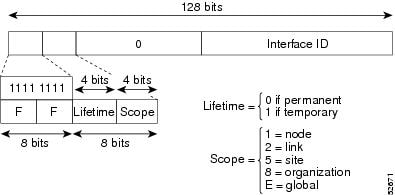
IPv6 multicast addresses are a type of IPv6 address that identify a group of interfaces across different nodes. These addresses always start with the prefix FF00::/8 (binary 1111 1111). When a packet is sent to an IPv6 multicast address, it is delivered to all interfaces that belong to the multicast group.
The second octet following the prefix defines the lifetime and scope of the multicast address. A permanent multicast address has a lifetime parameter equal to 0. A temporary multicast address has a lifetime parameter equal to 1.
A multicast address that has the scope of a node, link, site, or organization, or a global scope, has a scope parameter of 1, 2, 5, 8, or E, respectively. For example, a multicast address with the prefix FF02::/16 is a permanent multicast address with a link scope. Figure Subnet Router Anycast Address Format shows the format of the IPv6 multicast address.
IPv6 nodes (hosts and routers) are required to join (where received packets are destined for) these multicast groups:
-
All-nodes multicast group FF02:0:0:0:0:0:0:1 (the scope is link-local).
-
Solicited-node multicast group FF02:0:0:0:0:1:FF00:0000/104 for each of its assigned unicast and anycast addresses.
IPv6 routers must also join the all-routers multicast group FF02:0:0:0:0:0:0:2 (the scope is link-local).
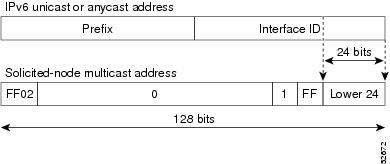
The solicited-node multicast address is a multicast group that corresponds to an IPv6 unicast or anycast address. IPv6 nodes must join the associated solicited-node multicast group for every unicast and anycast address to which they are assigned. The IPv6 solicited-node multicast address has the prefix FF02:0:0:0:0:1:FF00:0000/104 concatenated with the 24 low-order bits of a corresponding IPv6 unicast or anycast address (see the figure below). For example, the solicited-node multicast address that corresponds to the IPv6 address 2037::01:800:200E:8C6C is FF02::1:FF0E:8C6C. Solicited-node addresses are used in neighbor solicitation messages.
Note |
IPv6 has no broadcast addresses. IPv6 multicast addresses are used instead of broadcast addresses. |
IPv4 packet header
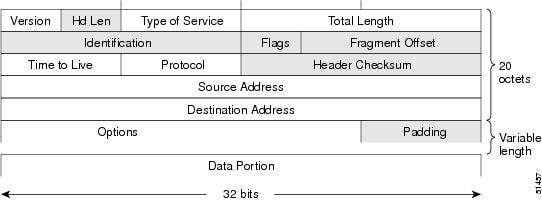
The base IPv4 packet header has 12 fields with a total size of 20 octets (160 bits). The 12 fields may be followed by an Options field, which is followed by a data portion that is usually the transport-layer packet. The variable length of the Options field adds to the total size of the IPv4 packet header. The shaded fields of the IPv4 packet header are not included in the IPv6 packet header.
Simplified IPv6 packet headers
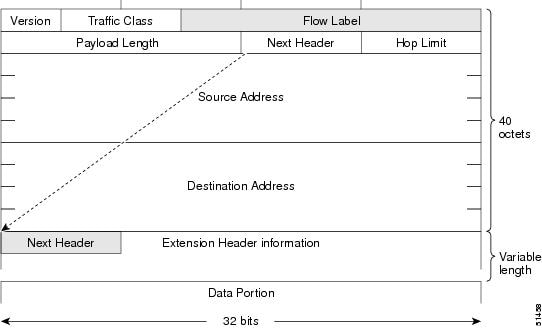
The base IPv6 packet header has 8 fields with a total size of 40 octets (320 bits). Fragmentation is handled by the source of a packet, and checksums at the data link layer and transport layer are used. The User Datagram Protocol (UDP) checksum checks the integrity of the inner packet, and the base IPv6 packet header and Options field are aligned to 64 bits, which can facilitate the processing of IPv6 packets.
The table lists the fields in the base IPv6 packet header.
| Field | Description |
|---|---|
|
Version |
Similar to the Version field in the IPv4 packet header, except that the field lists number 6 for IPv6 instead of number 4 for IPv4. |
|
Traffic Class |
Similar to the Type of Service field in the IPv4 packet header. The Traffic Class field tags packets with a traffic class that is used in differentiated services. |
|
Flow Label |
New field in the IPv6 packet header. The Flow Label field tags packets with a specific flow that differentiates the packets at the network layer. |
|
Payload Length |
Similar to the Total Length field in the IPv4 packet header. The Payload Length field indicates the total length of the data portion of the packet. |
|
Next Header |
Similar to the Protocol field in the IPv4 packet header. The value of the Next Header field determines the type of information that follows the base IPv6 header. The type of information that follows the base IPv6 header can be a transport-layer packet (for example, a TCP or UDP packet) or an Extension Header, as shown in the figure below. |
|
Hop Limit |
Similar to the Time to Live field in the IPv4 packet header. The value of the Hop Limit field specifies the maximum number of routers that an IPv6 packet can pass through before the packet is considered invalid. Each router decrements the value by one. Because no checksum is in the IPv6 header, the router can decrement the value without needing to recalculate the checksum, which saves processing resources. |
|
Source Address |
Similar to the Source Address field in the IPv4 packet header, except that the field contains a 128-bit source address for IPv6 instead of a 32-bit source address for IPv4. |
|
Destination Address |
Similar to the Destination Address field in the IPv4 packet header, except that the field contains a 128-bit destination address for IPv6 instead of a 32-bit destination address for IPv4. |
IPv6 Extension Headers
Optional extension headers and the data portion of the packet are after the eight fields of the base IPv6 packet header. If present, each extension header is aligned to 64 bits. There is no fixed number of extension headers in an IPv6 packet. Each extension header is identified by the Next Header field of the previous header. Typically, the final extension header has a Next Header field of a transport-layer protocol, such as TCP or UDP. The following figure shows the IPv6 extension header format.
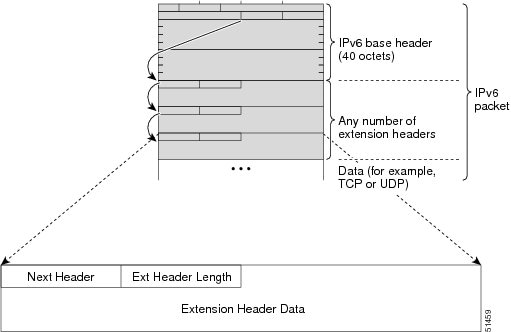
The table below lists the extension header types and their Next Header field values.
| Header Type | Next Header Value | Description |
|---|---|---|
|
Hop-by-hop options |
0 |
Header that is processed by all hops in the path of a packet. When present, the hop-by-hop options header always follows immediately after the base IPv6 packet header. |
|
Destination options |
60 |
Header that can follow any hop-by-hop options header. The header is processed at the final destination and at each visited address specified by a routing header. |
|
Routing |
43 |
Header that is used for source routing. |
|
Fragment |
44 |
Header that is used when a source fragments a packet that is larger than the maximum transmission unit (MTU) for the path between itself and a destination. The Fragment header is used in each fragmented packet. |
|
Authentication |
51 |
Header that is used to provide connectionless integrity and data origin authentication for packets. |
|
Encapsulation Security Payload |
50 |
All information following this header is encrypted. |
|
Mobility |
135 |
Header that is used in support of Mobile IPv6 service. |
|
Host Identity Protocol |
139 |
Header that is used for Host Identity Protocol version 2 (HIPv2), which provides secure methods for IP multihoming and mobile computing. |
|
Shim6 |
140 |
Header that is used for IP multihoming, which allows a host to be connected to multiple networks. |
|
Upper layer headers |
6 (TCP) 17 (UDP) |
Headers that are used inside a packet to transport the data. The two main transport protocols are TCP and UDP. |
Note |
Some switch models support only a subset of IPv6 extension header types. The following list shows the extension header types that are supported by Cisco Nexus 3600 Platform Switches (N3K-C36180YC-R and N3K-C3636C-R) and by Cisco Nexus 9504 and 9508 modular chassis with these line cards: N9K-X9636C-R, N9K-X9636Q-R, N9K-X9636C-RX, and N9K-X96136YC-R. Supported: Destination options (60), Routing (43), Fragment (44), Mobility (135), Host Identity Protocol (HIP) (139), Shim6 (140). Not supported: Hop-by-hop options (0), Encapsulation Security Payload (50), Authentication Header (51), and experimental (253 and 254). |
DNS for IPv6
IPv6 supports DNS record types that are supported in the DNS name-to-address and address-to-name lookup processes. See Table 1 table for the DNS record types support IPv6 addresses.
Note |
IPv6 also supports the reverse mapping of IPv6 addresses to DNS names. |
| Record Type | Description | Format |
|---|---|---|
|
AAAA |
Maps a hostname to an IPv6 address. (Equivalent to an A record in IPv4.) |
www.abc.test AAAA 3FFE:YYYY:C18:1::2 |
|
PTR |
Maps an IPv6 address to a hostname. (Equivalent to a PTR record in IPv4.) |
2.0.0.0.0.0.0.0.0.0.0.0.0.0.0.0.1.0.0.0.8.1.c.0.y.y.y.y.e.f.f.3.ip6.int PTR www.abc.test |
Path MTU discovery for IPv6
As in IPv4, you can use path maximum transmission unit (MTU) discovery in IPv6 to allow a host to dynamically discover and adjust to differences in the MTU size of every link along a data path.
In IPv6, however, fragmentation is handled by the source of a packet when the path MTU of one link along a given data path is not large enough to accommodate the size of the packets. Having IPv6 hosts handle packet fragmentation saves IPv6 router processing resources and helps IPv6 networks run more efficiently. Once the path MTU is reduced by the arrival of an ICMP Too Big message, Cisco NX-OS retains the lower value. The connection does not increase the segment size to gauge the throughput.
Note |
In IPv6, the minimum link MTU is 1280 octets. We recommend that you use an MTU value of 1500 octets for IPv6 links. |
CDP IPv6 address support
Cisco Discovery Protocol (CDP) IPv6 address support is a feature that
-
transfers IPv6 addressing information between directly connected Cisco devices,
-
provides IPv6 neighbor information to network management and troubleshooting tools, and
-
enhances network visibility and management for IPv6-enabled environments.
LPM routing modes
By default, Cisco NX-OS programs routes in a hierarchical fashion to allow for the longest prefix match (LPM) on the device. However, you can configure the device for different routing modes to support more LPM route entries.
Theses tables list the LPM routing modes that are supported on Cisco Nexus 9000 Series switches.
LPM routing modes for Cisco Nexus 9200 platform switches
|
LPM routing mode |
CLI command |
|---|---|
|
Default system routing mode |
|
|
LPM dual-host routing mode |
system routing template-dual-stack-host-scale |
|
LPM heavy routing mode |
system routing template-lpm-heavy |
Note |
Cisco Nexus 9200 platform switches do not support the system routing template-lpm-heavy mode for IPv4 Multicast routes. Make sure to reset LPM's maximum limit to 0. |
LPM routing modes for Cisco Nexus 9300 platform switches
|
LPM routing mode |
Broadcom T2 mode |
CLI command |
|---|---|---|
|
Default system routing mode |
3 |
|
|
ALPM routing mode |
4 |
system routing max-mode l3 |
LPM routing modes for Cisco Nexus 9300-EX/FX/FX2/FX3/GX platform switches
|
LPM routing mode |
CLI command |
|---|---|
|
LPM dual-host routing mode |
system routing template-dual-stack-host-scale |
|
LPM heavy routing mode |
system routing template-lpm-heavy |
|
LPM Internet-peering mode |
system routing template-internet-peering |
LPM routing modes for Cisco Nexus 9300-FX platform switches
LPM routing modes for Cisco Nexus 9300-fx2 platform switches
LPM routing modes for Cisco Nexus 9300-GX platform switches
LPM routing modes for Cisco Nexus 9500 platform switches with 9700-ex and 9700-fx line cards
|
LPM routing mode |
Broadcom T2 mode |
CLI command |
||
|---|---|---|---|---|
|
Default system routing mode |
3 (for line cards); 4 (for fabric modules) |
|||
|
Max-host routing mode |
2 (for line cards); 3 (for fabric modules) |
system routing max-mode host |
||
|
Nonhierarchical routing mode |
3 (for line cards); 4 with max-l3-mode option (for line cards) |
system routing non-hierarchical-routing [max-l3-mode] |
||
|
64-bit ALPM routing mode |
Submode of mode 4 (for fabric modules) |
system routing mode hierarchical 64b-alpm |
||
|
LPM heavy routing mode |
system routing template-lpm-heavy
|
|||
|
LPM Internet-peering mode |
system routing template-internet-peering
|
|||
|
LPM dual-host routing mode |
LPM routing modes for Cisco Nexus 9500-R platform switches with 9600-R line cards
Host to LPM spillover
Beginning with Cisco NX-OS Release 7.0(3)I5(1), host routes can be stored in the LPM table in order to achieve a larger host scale. In ALPM mode, the switch allows fewer host routes. If you add more host routes than the supported scale, the routes that are spilled over from the host table take the space of the LPM routes in the LPM table. The total number of LPM routes allowed in that mode is reduced by the number of host routes stored. This feature is supported on Cisco Nexus 9300 and 9500 platform switches.
In the default system routing mode, Cisco Nexus 9300 platform switches are configured for higher host scale and fewer LPM routes, and the LPM space can be used to store more host routes. For Cisco Nexus 9500 platform switches, only the default system routing and nonhierarchical routing modes support this feature on line cards. Fabric modules do not support this feature.
 Feedback