Configuring the Embedded Event Manager

This chapter describes how to configure the Embedded Event Manager (EEM) to detect and handle critical events on Cisco NX-OS devices.

Embedded Event Manager

An Embedded Event Manager is an automation feature that

  • monitors device events and triggers configured actions,

  • includes event statements, action statements, and policies, and

  • automates troubleshooting, recovery, and notifications.

Embedded Event Manager (EEM) is a software component that monitors device events and takes automated actions to recover or troubleshoot, as configured by the user.

EEM consists of three major components:

  • Event statements—Events to monitor from another NX-OS component that may require some action, workaround, or notification.

  • Action statements—An action that EEM can take, such as executing command line interface commands, sending an email through the use of Smart Call Home feature, and disabling an interface to recover from an event.

  • Policies—An event that is paired with one or more actions to troubleshoot or recover from the event.

Policies

An Embedded Event Manager (EEM) policy consists of an event statement and one or more action statements.

The event statement defines the event to look for as well as the filtering characteristics for the event. The action statement defines the action EEM takes when the event occurs.

This figure shows the two basic statements in an EEM policy.

Figure 1. EEM Policy Statements

You can configure EEM policies using the command-line interface or a VSH script.

EEM gives you a device-wide view of policy management. You configure EEM policies on the supervisor, and EEM pushes the policy to the correct module based on the event type. EEM takes any actions for a triggered event either locally on the module or on the supervisor (the default option).

EEM maintains event logs on the supervisor.

NX-OS has a number of preconfigured system policies. These system policies define many common events and actions for the device. System policy names begin with two underscore characters (__).

You can create user policies to suit your network. If you create a user policy, any actions in your policy occur after EEM triggers any system policy actions that are related to the same event as your policy.

You can also override some system policies. The overrides that you configure take the place of the system policy. You can override the event or the actions.

Use the show event manager system-policy command to view the preconfigured system policies and determine which policies that you can override.


Note


You should use the show running-config eem command to check the configuration of each policy. An override policy that consists of an event statement and no action statement triggers no action and no notification of failures.

Note


Your override policy should always include an event statement. An override policy without an event statement overrides all possible events in the system policy.

Event statements

Event statements specify the event that triggers a policy to run.

Embedded Event Manager (EEM) defines event filters so only critical events or multiple occurrences of an event within a specified time period trigger an associated action.

This figure shows events that are handled by EEM.
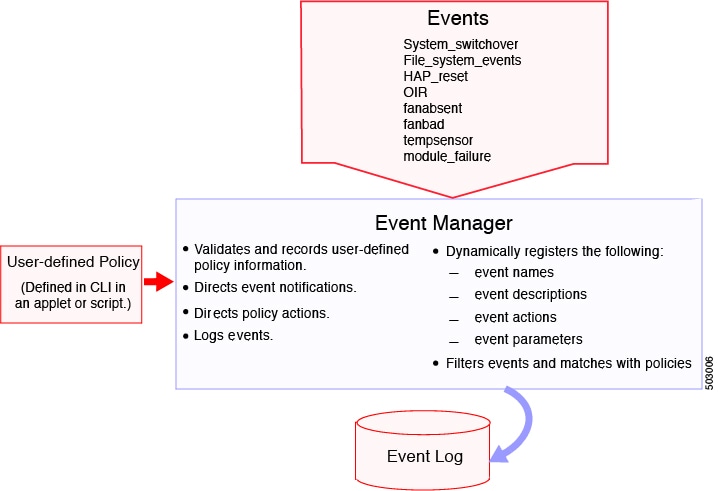
Figure 2. EEM Overview

You can configure multiple event triggers. EEM schedules and runs policies on the basis of event statements. EEM examines the event and action commands and runs them as defined.


Note


If you want to allow the triggered event to process any default actions, you must configure the EEM policy to allow the event default action statement.

Action statements

Action statements describe the action triggered by a policy. Each policy can have multiple action statements. If no action is associated with a policy, Embedded Event Manager (EEM) still observes events but takes no actions.

EEM supports these actions in action statements:

  • Device and module operations

    • Execute any command line interface commands

    • Force the shutdown of any module

    • Reload the device

    • Shut down specified modules because the power is over budget

  • Monitoring and notification

    • Log an exception

    • Generate a syslog message

    • Generate a Call Home event

    • Generate an SNMP notification

  • System and policy handling

    • Update a counter

    • Use the default action for the system policy


Note


EEM can only process a complete action command line interface list of up to 1024 characters in total. If more actions are required, you must define them as a new redundant applet with same trigger.


Note


If you want to allow the triggered event to process any default actions, you must configure the EEM policy to allow the default action. For example, if you match a command line interface command in a match statement, you must add the event-default action statement to the EEM policy or EEM does not allow the command line interface command to execute.

Note


Verify that your action statements within your user policy or overriding policy do not negate each other or adversely affect the associated system policy.

VSH script policies

You can also write policies in a VSH script, using a text editor. These policies have an event statement and action statement(s) just as other policies, and these policies can either augment or override system policies. After you write your VSH script policy, copy it to the device and activate it.

Environment variables

You can define environment variables for EEM that are available for all policies.

Environment variables are useful for configuring common values that you can use in multiple policies. For example, you can create an environment variable for the IP address of an external email server.

You can use an environment variable in action statements by using the parameter substitution format.

This example shows a sample action statement to force a module 1 shutdown, with a reset reason of "EEM action".

switch (config-eem-policy)# action 1.0 forceshut module 1 reset-reason “EEM action.”

If you define an environment variable for the shutdown reason, called default-reason, you can replace that reset reason with the environment variable, as shown in the following example.

switch (config-eem-policy)# action 1.0 foreshut module 1 reset-reason $default-reason

You can reuse this environment variable in any policy.

EEM event correlation

You can trigger an EEM policy based on a combination of events.

First, you use the tag keyword to create and differentiate multiple events in the EEM policy. Then using a set of boolean operators (and, or, andnot), along with the count and time, you can define a combination of these events to trigger a custom action.

High Availability

NX-OS supports stateless restarts for EEM. After a reboot or supervisor switchover, NX-OS applies the running configuration.

Virtualization support

Not all actions or events are visible. You must have network-admin privileges to configure policies.

Prerequisites for Embedded Event Manager

The prerequisites Embedded Event Manager (EEM) include:

  • You must have network-admin user privileges to configure EEM.

Guidelines and limitations for Embedded Event Manager

This topic describes the configuration guidelines and limitations for Embedded Event Manager (EEM).

General

  • NX-OS does not support evmc restart.

  • Action with option collect must be always first action in the event applet statement.

  • Only 10 triggers from the same client (for example, vshd is the client for event cli, snmp is the client for event snmp and so on) are allowed to be published within one second.

  • You can invoke EEM from Python. For more information about Python, see the Cisco Nexus 9000 Series NX-OS Programmability Guide.

Policies

  • The maximum number of configurable EEM policies is 500.

  • Action statements within your user policy or overriding policy should not negate each other or adversely affect the associated system policy.

  • To allow a triggered event to process any default actions, you must configure the EEM policy to allow the default action. For example, if you match a command in a match statement, you must add the event-default action statement to the EEM policy or EEM will not allow the command to execute.

  • When more than one event statement is included in an EEM policy, each event statement must have a tag keyword with a unique tag argument.

  • Default action execution is not supported for policies that are configured with tagged events.

  • Note these statements about override policies:

    • An override policy that consists of an event statement without an action statement triggers no action and no notification of failures.

    • An override policy without an event statement overrides all possible events in the system policy.

Commands

  • When you configure an EEM policy action to collect show tech commands, make sure to allocate enough time for the show tech commands to complete before the same action is called again.

  • The following rules apply to regular command expressions:

    • All regular expressions must conform to the Portable Operating System Interface for uniX (POSIX) extended standard.

    • All keywords must be expanded.

    • Only the * symbol can be used for argument replacement.

EEM event correlation

  • EEM event correlation is supported only on the supervisor module.

  • EEM event correlation is not supported across different modules within a single policy.

  • EEM event correlation supports up to four event statements in a single policy. The event types can be the same or different, but only these event types are supported: cli, counter, module, module-failure, oir, snmp, and syslog.

  • EEM event correlation does not override the system default policies.

Event log collection and backup

  • The guidelines that apply to Event Log Auto-Collection and Backup are:

    • By default, enabled log collection on a switch provides between 15 minutes to several hours of event logs depending on size, scale and component activity.

    • To be able to collect relevant logs that span a longer period, only enable event log retention for the specific services/features you need. See Enabling Extended Log File Retention For a Single Service. You can also export the internal event logs. See External Log File Storage.

    • When troubleshooting, it is good practice to manually collect a snapshot of internal event logs in real time. See Generating a Local Copy of Recent Log Files.

Release-specific

  • Beginning with NX-OS Release 10.3(1)F, the default auto-collect is not supported with system switchover. On system switchover, re-run the bloggerd auto-collect commands on the new Active supervisor to enable auto-collect for respective components.

  • Beginning with NX-OS Release 10.3(3)F, default bloggerd auto-collect is supported for adjmgr, cts, l2fm, and vmtracker.

  • Beginning with NX-OS Release 10.4(1)F, default bloggerd auto-collect is supported for additional components ipqosmgr, aclqos, cfs, ethport, feature-mgr, icam, interface manager, lacp, m2rib, mfdm, nbm, ngoam, nve, port-channel, qos, sla_responder, sla_sender, sla_twamp, smm, spm, sysmgr, and vpc.

    • The minimum configurable purge time is increased from 0 to 48 hours.

    • Files that cross 14 days are purged automatically, regardless of the reserved bootflash space (a maximum of 5%).

    • When the maximum reserved space for auto-collect is in use, new auto-collections are rejected until space becomes available again in the reserved space after file purging or manual file deletion.

  • Beginning with NX-OS Release 10.4(3)F, you can use event policy-default disable command to disable system policies from an applet overriding the system policy. You need to apply this command to the applet overriding the system policy to stop them from triggering. If you have multiple applets overriding the same system policy, with some of them have event policy-default disable is configured, those applets will not be triggered but other applets which are configured with a different event override will still trigger the system policy.

    • When a system policy is overridden multiple times with the same event, only the last policy is executed.

    • Also in the above case, if there is one policy hitting in less time, only that will get executed not other policies.

  • Beginning with NX-OS Release 10.5(3)F, until a line card is fully operational, any custom overriding policies of system-policies related to the line card are not triggered. Only the default system-policies are honored. The logs for any triggers of line card-related system-policies are only available after the line card is fully brought up.

Default settings for EEM

This table lists the default settings for EEM parameters.

Parameters

Default

System policies

Active

Configure Embedded Event Manager

You can create policies that contain actions to take based on system policies.

To display information about the system policies, use the show event manager system-policy command.

Defining an Environment Variable

You can define a variable to serve as a parameter in an EEM policy.

SUMMARY STEPS

  1. configure terminal
  2. event manager environment variable-name variable-value
  3. (Optional) show event manager environment {variable-name | all}
  4. (Optional) copy running-config startup-config

DETAILED STEPS

  Command or Action Purpose

Step 1

configure terminal

Example:

switch# configure terminal
switch(config)#

Enters global configuration mode.

Step 2

event manager environment variable-name variable-value

Example:

switch(config)# event manager environment emailto “admin@anyplace.com”

Creates an environment variable for EEM. The variable-name can be any case-sensitive, alphanumeric string up to 29 characters. The variable-value can be any quoted alphanumeric string up to 39 characters.

Step 3

(Optional) show event manager environment {variable-name | all}

Example:

switch(config)# show event manager environment all
(Optional)

Displays information about the configured environment variables.

Step 4

(Optional) copy running-config startup-config

Example:

switch(config)# copy running-config startup-config
(Optional)

Copies the running configuration to the startup configuration.

Define a user policy using the command line interface

You can define a user policy using the command line interface to the device.

Procedure


Step 1

Enter global configuration mode using the configure terminal command.

Example:

switch# configure terminal
switch(config)#

Step 2

Register the applet with EEM and enters applet configuration mode using the event manager applet applet-name command.

The applet-name can be any case-sensitive, alphanumeric string up to 29 characters.

Example:

switch(config)# event manager applet monitorShutdown
switch(config-applet)#

Step 3

(Optional) Configure a descriptive string for the policy using the description policy-description command.

The string can be any alphanumeric string up to 80 characters. Enclose the string in quotation marks.

Example:

switch(config-applet)# description “Monitors interface shutdown.”

Step 4

Configure the event statement for the policy using the event event-statement command.

Example:

switch(config-applet)# event cli match “conf t ; interface * ; shutdown”

Repeat this step for multiple event statements. See Configure event statements.

Step 5

(Optional) Correlate multiple events in the policy using the tag tag {and | andnot | or} tag [and | andnot | or {tag}] {happens occurs in seconds} command.

The range for the occurs argument is from 1 to 4294967295. The range for the seconds argument is from 0 to 4294967295 seconds.

Example:

switch(config-applet)# tag one or two happens 1 in 10000

Step 6

Configure an action statement for the policy using the action number[.number2] action-statement command.

Example:

switch(config-applet)#action 1.0 cli show interface Ethernet 3/1

Repeat this step for multiple action statements. See Configure action statements.

Step 7

(Optional) Display information about the status of the configured policy using the show event manager policy-state name [module module-id] command.

Example:

switch(config-applet)# show event manager policy-state monitorShutdown

Step 8

(Optional) Copy the running configuration to the startup configuration using the copy running-config startup-config command.

Example:

switch(config)# copy running-config startup-config

Configure event statements

Use one of these commands in applet configuration mode to configure an event statement.

Command

Purpose

event application [tag tag] sub-system sub-system-id type event-type

Example:

switch(config-applet)# event application
sub-system 798 type 1

Triggers an event when an event specification matches the subsystem ID and application event type.

The range for the sub-system-id and for the event-type is from 1 to 4294967295.

The tag tag keyword-argument pair identifies this specific event when multiple events are included in the policy.

Note

 
To use this command, you must first enable the feature evmed command to enable generic event detectors.
event cli [tag tag] match expression [count repeats | time seconds]

Example:

switch(config-applet)# event cli match “conf t ; interface * ; shutdown”

Triggers an event if you enter a command that matches the regular expression.

The tag tag keyword-argument pair identifies this specific event when multiple events are included in the policy.

The repeats range is from 1 to 65000. The time range, in seconds, is from 0 to 4294967295, where 0 indicates no time limit.

event counter [tag tag] name counter entry-val entry entry-op {eq | ge | gt | le | lt | ne} [exit-val exit exit-op {eq | ge | gt | le | lt | ne}]

Example:

switch(config-applet)# event counter name
mycounter entry-val 20 gt

Triggers an event if the counter crosses the entry threshold based on the entry operation. The event resets immediately. Optionally, you can configure the event to reset after the counter passes the exit threshold.

The tag tag keyword-argument pair identifies this specific event when multiple events are included in the policy.

The counter name can be any case-sensitive, alphanumeric string up to 28 characters. The entry and exit value ranges are from 0 to 2147483647.

event fanabsent [fan number] time seconds

Example:

switch(config-applet)# event fanabsent time
300

Triggers an event if a fan is removed from the device for more than the configured time, in seconds. The number range is module-dependent. The seconds range is from 10 to 64000.

event fanbad [fan number] time seconds

Example:

switch(config-applet)# event fanbad time
3000

Triggers an event if a fan fails for more than the configured time, in seconds. The number range is module-dependent. The seconds range is from 10 to 64000.

event fib {adjacency extra | resource tcam usage | route {extra | inconsistent | missing}}

Example:

switch(config-applet)# event fib adjacency
extra

Triggers an event for one of the following:

  • adjacency extra—If there is an extra route in the unicast FIB.

  • resource tcam usage—Each time the TCAM utilization percentage becomes a multiple of 5, in either direction.

  • route {extra | inconsistent | missing} —If a route is added, changed, or deleted in the unicast FIB.

event gold module {slot | all} test test-name [severity {major | minor | moderate}] testing-type {bootup | monitoring | ondemand | scheduled} consecutive-failure count

Example:

switch(config-applet)# event gold module 2
test ASICRegisterCheck testing-type
ondemand consecutive-failure 2

Triggers an event if the named online diagnostic test experiences the configured failure severity for the configured number of consecutive failures. The slot range is from 1 to 10. The test-name is the name of a configured online diagnostic test. The count range is from 1 to 1000.

event memory {critical | minor | severe}

Example:

switch(config-applet)# event memory
critical

Triggers an event if a memory threshold is crossed. See also Configure memory thresholds.

event module [tag tag] status {online | offline | any} module {all | module-num}

Example:

switch(config-applet)# event module status
offline module all

Triggers an event if the specified module enters the selected status.

The tag tag keyword-argument pair identifies this specific event when multiple events are included in the policy.

event module-failure [tag tag] type failure-type module {slot | all} count repeats [time seconds]

Example:

switch(config-applet)# event module-failure
type lc-failed module 3 count 1

Triggers an event if a module experiences the failure type configured.

The tag tag keyword-argument pair identifies this specific event when multiple events are included in the policy.

The repeats range is from 0 to 4294967295. The seconds range is from 0 to 4294967295, where 0 indicates no time limit.

event none

Example:

switch(config-applet)# event none

Manually runs the policy event without any events specified.

Note

 
To use this command, you must first enable the feature evmed command to enable generic event detectors.
event oir [tag tag] {fan | module | powersupply} {anyoir | insert | remove} [number]

Example:

switch(config-applet)# event oir fan remove
4

Triggers an event if the configured device element (fan, module, or power supply) is inserted or removed from the device.

The tag tag keyword-argument pair identifies this specific event when multiple events are included in the policy.

You can optionally configure a specific fan, module, or power supply number. The number range is as follows:

  • Fan number—Module dependent.

  • Module number—Device dependent.

  • Power supply number—The range is from 1 to 3.

event policy-default count repeats [time seconds]

Example:

switch(config-applet)# event policy-default
count 3

Uses the event configured in the system policy. Use this option for overriding policies.

The repeats range is from 1 to 65000. The seconds range is from 0 to 4294967295, where 0 indicates no time limit.

event poweroverbudget

Example:

switch(config-applet)# event
poweroverbudget

Triggers an event if the power budget exceeds the capacity of the configured power supplies.

event snmp [tag tag] oid oid get-type {exact | next} entry-op {eq | ge | gt | le | lt | ne} entry-val entry [exit-comb {and | or}] exit-op {eq | ge | gt | le | lt | ne} exit-val exit exit-time time polling-interval interval

Example:

switch(config-applet)# event snmp oid
1.3.6.1.2.1.31.1.1.1.6 get-type next
entry-op lt 300 entry-val 0 exit-op eq 400
exit-time 30 polling-interval 300

Triggers an event if the SNMP OID crosses the entry threshold based on the entry operation. The event resets immediately, or optionally you can configure the event to reset after the counter passes the exit threshold. The OID is in dotted decimal notation.

The tag tag keyword-argument pair identifies this specific event when multiple events are included in the policy.

The entry and exit value ranges are from 0 to 18446744073709551615. The time, in seconds, is from 0 to 2147483647. The interval, in seconds, is from 1 to 2147483647.

event storm-control

Example:

switch(config-applet)# event storm-control

Triggers an event if traffic on a port exceeds the configured storm control threshold.

event syslog [occurs count] {pattern string | period time | priority level | tag tag}

Example:

switch(config-applet)# event syslog period
500

Triggers an event if the specified syslog threshold is exceeded. The range for the count is from 1 to 65000, and the range for the time is from 1 to 4294967295. The priority range is from 0 to 7.

The tag tag keyword-argument pair identifies this specific event when multiple events are included in the policy.

event sysmgr memory [module module-num] major major-percent minor minor-percent clear clear-percent

Example:

switch(config-applet)# event sysmgr memory
minor 80

Triggers an event if the specified system manager memory threshold is exceeded. The range for the percentage is from 1 to 99.

event sysmgr switchover count count time interval

Example:

switch(config-applet)# event sysmgr
switchover count 10 time 1000

Triggers an event if the specified switchover count is exceeded within the time interval specified. The switchover count is from 1 to 65000. The time interval is from 0 to 2147483647.

event temperature [module slot] [sensor-number] threshold {any | major | minor}

Example:

switch(config-applet)# event temperature
module 2 threshold any

Triggers an event if the temperature sensor exceeds the configured threshold. The sensor range is from 1 to 18.

event timer {absolute time time name name | countdown time time name name | cron cronentry string | tag tag | watchdog time time name name}

Example:

switch(config-applet)# event timer absolute
time 100 name abtimer

Triggers an event if the specified time is reached. The range for the time is from 1 to 4294967295.

  • absolute time—Triggers an event when the specified absolute time of day occurs.

  • countdown time—Triggers an event when when the specified time counts down to zero. The timer does not reset.

  • cron cronentry—Triggers an event when the cron string specification matches the current time.

  • watchdog time—Triggers an event when the specified time counts down to zero. The timer automatically resets to the initial value and continues to count down.

The tag tag keyword-argument pair identifies this specific event when multiple events are included in the policy.

Note

 
To use this command, you must first enable the feature evmed command to enable generic event detectors.
event track [tag tag] object-number state {any | down | up}

Example:

switch(config-applet)# event track 1 state
down

Triggers an event if the tracked object is in the configured state.

The tag tag keyword-argument pair identifies this specific event when multiple events are included in the policy.

The object-number range is from 1 to 500.

Configure action statements

Use the commands in the table in EEM configuration mode to configure the required action statements.

Command

Purpose

action number[.number2] cli command1 [command2...] [local]

Example:

switch(config-applet)# action 1.0 cli
show interface Ethernet 3/1

Runs the configured CLI commands. You can optionally run the commands on the module where the event occurred. The action label is in the format number1.number2.

number can be any number up to 16 digits. The range for number2 is from 0 to 9.

action number[.number2] counter name counter value val op {dec | inc | nop | set}

Example:

switch(config-applet)# action 2.0 counter
name mycounter value 20 op inc

Modifies the counter by the configured value and operation. The action label is in the format number1.number2.

number can be any number up to 16 digits. The range for number2 is from 0 to 9.

The counter name can be any case-sensitive, alphanumeric string up to 28 characters. The val can be an integer from 0 to 2147483647 or a substituted parameter.

action number[.number2] event-default

Example:

switch(config-applet)# action 1.0 event-default

Executes the default action for the associated event. The action label is in the format number1.number2.

number can be any number up to 16 digits. The range for number2 is from 0 to 9.

action number[.number2] forceshut [module slot | xbar xbar-number] reset-reason seconds

Example:

switch(config-applet)# action 1.0 forceshut 
module 2 reset-reason “flapping links”

Forces a module, crossbar, or the entire system to shut down. The action label is in the format number1.number2.

number can be any number up to 16 digits. The range for number2 is from 0 to 9.

The reset reason is a quoted alphanumeric string up to 80 characters.

action number[.number2] overbudgetshut [module slot[-slot]]

Example:

switch(config-applet)# action 1.0
overbudgetshut module 3-5

Forces one or more modules or the entire system to shut down because of a power overbudget issue.

number can be any number up to 16 digits. The range for number2 is from 0 to 9.

action number[.number2] policy-default

Example:

switch(config-applet)# action 1.0 policy-default

Executes the default action for the policy that you are overriding. The action label is in the format number1.number2.

number can be any number up to 16 digits. The range for number2 is from 0 to 9.

action number[.number2] publish-event

Example:

switch(config-applet)# action 1.0 publish-event

Forces the publication of an application-specific event. The action label is in the format number1.number2.

number can be any number up to 16 digits. The range for number2 is from 0 to 9.

action number[.number2] reload [module slot[-slot]]

Example:

switch(config-applet)# action 1.0 reload
module 3-5

Forces one or more modules or the entire system to reload.

number can be any number up to 16 digits. The range for number2 is from 0 to 9.

action number[.number2] snmp-trap {[intdata1 data [intdata2 data]] [strdata string]}

Example:

switch(config-applet)# action 1.0 snmp-trap
strdata “temperature problem”

Sends an SNMP trap with the configured data. number can be any number up to 16 digits. The range for number2 is from 0 to 9.

The data arguments can by any number up to 80 digits. The string can be any alphanumeric string up to 80 characters.

action number[.number2] syslog [priority prio-val] msg error-message

Example:

switch(config-applet)# action 1.0 syslog
priority notifications msg “cpu high”

Sends a customized syslog message at the configured priority. number can be any number up to 16 digits. The range for number2 is from 0 to 9.

The error-message can be any quoted alphanumeric string up to 80 characters.


Note


If you want to allow the triggered event to process any default actions, you must configure the EEM policy to allow the default action. For example, if you match a command line interface command in a match statement, you must add the event-default action statement to the EEM policy or EEM will not allow the command line interface command to execute. You can use the terminal event-manager bypass command to allow all EEM policies with command line interface matches to execute the command line interface command.

Define a policy using a VSH script

You can define a policy using a VSH script.

Before you begin

Ensure that you are logged in with administrator privileges.

Ensure that your script name is the same name as the script filename.

Procedure


Step 1

In a text editor, list the commands that define the policy.

Step 2

Name the text file and save it.

Step 3

Copy the file to the following system directory: bootflash://eem/user_script_policies.


Register and activate a VSH script policy

You can register and activate a policy defined in a VSH script.

Procedure


Step 1

Enter global configuration mode using the configure terminal command.

Example:

switch# configure terminal
switch(config)#

Step 2

Register and activate an EEM script policy using the event manager policy policy-script command.

The policy-script can be any case-sensitive alphanumeric string up to 29 characters.

Example:

switch(config)# event manager policy moduleScript

Step 3

(Optional) Copy the running configuration to the startup configuration using the copy running-config startup-config command.

Example:

switch(config)# copy running-config startup-config

Override a policy

You can override a system policy.

Procedure


Step 1

Enter global configuration mode using the configure terminal command.

Example:

switch# configure terminal
switch(config)#

Step 2

(Optional) Display information about the system policy that you want to override, including thresholds, using the show event manager policy-state system-policy command.

Use the show event manager system-policy command to find the system policy names. For information about system policies, see Embedded Event Manager System Events and Configuration Examples.

Example:

switch(config-applet)# show event manager policy-state __ethpm_link_flap 
Policy __ethpm_link_flap
Cfg count : 5
Cfg time interval : 10.000000 (seconds)
Hash default, Count 0

Step 3

Override a system policy and enter applet configuration mode using the event manager applet applet-name override system-policy command.

The applet-name can be any case-sensitive alphanumeric string up to 29 characters. The system-policy must be one of the existing system policies.

Example:

switch(config)# event manager applet ethport override __ethpm_link_flap
switch(config-applet)#

Step 4

(Optional) Configure a descriptive string for the policy using the description policy-description command.

The string can be any alphanumeric string up to 80 characters. Enclose the string in quotation marks.

Example:

description “Overrides link flap policy.”

Step 5

Configure or disable the event statement for the policy using the [no] event {event-statement | policy-default disable} command.

Example:

switch(config-applet)# event policy-default count 2 time 1000

The no form of this command removes the configuration.

Step 6

Configure an action statement for the policy using the action number action-statement command.

Example:

switch(config-applet)# action 1.0 syslog priority warnings msg “Link is flapping.”

Repeat this step for multiple action statements.

Step 7

(Optional) Display information about the configured policy using the show event manager policy-state name command.

Example:

switch(config-applet)# show event manager policy-state ethport

Step 8

(Optional) Copy the running configuration to the startup configuration using the copy running-config startup-config command.

Example:

switch(config)# copy running-config startup-config

Configure memory thresholds

You can set the memory thresholds that are used to trigger events and set whether the operating system should kill processes if it cannot allocate memory.

Before you begin

Ensure that you are logged in with administrator privileges.

Procedure


Step 1

configure terminal command.

Example:

switch# configure terminal
switch(config)#

Enters global configuration mode.

Step 2

Configure the system memory thresholds that generate EEM memory events using the system memory-thresholds minor minor severe severe critical critical command.

Example:

switch(config)# system memory-thresholds minor 60 severe 70 critical 80

The default values are as follows:

  • Minor-85

  • Severe-90

  • Critical-95

When the memory thresholds are exceeded, the system generates syslogs.

  • 2013 May 7 17:06:30 switch %$ %PLATFORM-2-MEMORY_ALERT: Memory Status Alert : MINOR

  • 2013 May 7 17:06:30 switch %$ %PLATFORM-2-MEMORY_ALERT: Memory Status Alert : SEVERE

  • 2013 May 7 17:06:30 switch %$ %PLATFORM-2-MEMORY_ALERT: Memory Status Alert : CRITICAL

  • 2013 May 7 17:06:35 switch %$ %PLATFORM-2-MEMORY_ALERT: Memory Status Alert : MINOR ALERT RECOVERED

  • 2013 May 7 17:06:35 switch %$ %PLATFORM-2-MEMORY_ALERT: Memory Status Alert : SEVERE ALERT RECOVERED

  • 2013 May 7 17:06:35 switch %$ %PLATFORM-2-MEMORY_ALERT: Memory Status Alert : CRITICAL ALERT RECOVERED

Step 3

(Optional) Configure the system to not kill processes when the memory cannot be allocated using the system memory-thresholds threshold critical no-process-kill command.

The default value is to allow the system to kill processes, starting with the one that consumes the most memory.

Example:

switch(config)# system memory-thresholds threshold critical no-process-kill

Step 4

(Optional) Display information about the system memory configuration using the show running-config | include "system memory" command.

Example:

switch(config-applet)# show running-config | include “system memory”

Step 5

(Optional) Copy the running configuration to the startup configuration using the copy running-config startup-config command.

Example:

switch(config)# copy running-config startup-config

Configure syslog as EEM publisher

Before you begin

EEM should be available for registration by syslog.

The syslog daemon must be configured and executed.

You can monitor syslog messages from the switch.


Note


The maximum number of searchable strings to monitor syslog messages is 10.

Procedure


Step 1

Enter global configuration mode using the configure terminal command.

Example:

switch# configure terminal
switch(config)#

Step 2

Register an applet with EEM and enter applet configuration mode using the event manager applet applet-name command.

Example:

switch(config)# event manager applet abc
switch(config-applet)#

Step 3

Monitor syslog messages and invokes the policy based on the search string in the policy using the event syslog [tag tag] {occurs number | period seconds | pattern msg-text | priority priority} command.

  • The tag tag keyword-argument pair identifies this specific event when multiple events are included in the policy.

  • The occurs number keyword-argument pair specifies the number of occurrences. The range is from 1 to 65000.

  • The period seconds keyword-argument pair specifies the interval during which the event occurs. The range is from 1 to 4294967295.

  • The pattern msg-text keyword-argument pair specifies the matching regular expression. The pattern can contain character text, an environment variable, or a combination of the two. If the string contains embedded blanks, it is enclosed in quotation marks.

  • The priority priority keyword-argument pair specifies the priority of the syslog messages. If this keyword is not selected, all syslog messages are set at the informational priority level.

Example:

switch(config-applet)# event syslog occurs 10

Step 4

(Optional) Copy the running configuration to the startup configuration using the copy running-config startup-config command.

Example:

switch(config)# copy running-config startup-config

Commands for verifying the Embedded Event Manager configuration

Perform any of the show commands to view the required EEM configuration information.

Command

Purpose

show event manager environment [variable-name | all]

Displays information about the event manager environment variables.

show event manager event-types [event | all | module slot]

Displays information about the event manager event types.

show event manager history events [detail] [maximum num-events] [severity {catastrophic | minor | moderate | severe}]

Displays the history of events for all policies.

show event manager policy-state policy-name

Displays information about the policy state, including thresholds.

show event manager script system [policy-name | all]

Displays information about the script policies.

show event manager system-policy [all]

Displays information about the predefined system policies.

show running-config eem

Displays information about the running configuration for EEM.

show startup-config eem

Displays information about the startup configuration for EEM.

Configuration examples for Embedded Event Manager

This topic provides configuration examples for Embedded Event Manager (EEM) policies, including how to override system policies, send syslog messages, trigger SNMP notifications, and correlate multiple events.

This example shows how to override the __lcm_module_failure system policy by changing the threshold for just module 3 hitless upgrade failures. This example also sends a syslog message. The settings in the system policy, __lcm_module_failure, apply in all other cases.

event manager applet example2 override __lcm_module_failure
event module-failure type hitless-upgrade-failure module 3 count 2
action 1 syslog priority errors msg module 3 “upgrade is not a hitless upgrade!”
action 2 policy-default

This example shows how to override the __ethpm_link_flap system policy and shuts down the interface:

event manager applet ethport override __ethpm_link_flap
event policy-default count 2 time 1000
action 1 cli conf t
action 2 cli int et1/1
action 3 cli no shut

This example creates an EEM policy that allows the CLI command to execute but triggers an SNMP notification when a user enters configuration mode on the device:

event manager applet TEST
event cli match "conf t"
action 1.0 snmp-trap strdata "Configuration change"
action 2.0 event-default

Note


You must add the event-default action statement to the EEM policy or EEM will not allow the CLI command to execute.

This example shows how to correlate multiple events in an EEM policy and execute the policy based on a combination of the event triggers. In this example, the EEM policy is triggered if one of the specified syslog patterns occurs within 120 seconds.

event manager applet eem-correlate
event syslog tag one pattern "copy bootflash:.* running-config.*”
event syslog tag two pattern “copy run start”
event syslog tag three pattern “hello”
tag one or two or three happens 1 in 120
action 1.0 reload module 1

Upon reaching a maximum failure threshold, the AsicMemory, FpgaRegTest, and L2ACLRedirect system policies force a reload of the switch. This example shows how to override the default action for one of these policies and issue a syslog instead:

event manager applet gold override __fpgareg
action 1 syslog priority emergencies msg FpgaRegTest_override

This example shows how to override a default policy but still enact the default action:

event manager applet gold_fpga_ovrd override __fpgareg
  action 1 policy-default
  action 2 syslog priority emergencies msg FpgaRegTest_override


Note


For additional EEM configuration examples, see Embedded Event Manager System Events and Configuration Examples.

Event Log Auto-Collection and backup

Automatically collected event logs are stored locally on switch memory. Event log file storage is a temporary buffer that stores files for a fixed amount of time. Once the time period has elapsed, a roll-over of the buffer makes room for the next files. The roll-over uses a first-in-first-out method.

EEM uses these methods of collection and backup:

  • Extended Log File Retention

  • Trigger-Based Event Log Auto-Collection

Extended Log File Retention

All Nexus platform switches, with at least 8Gb of system memory, support the extended retention of event logging files. Storing the log files locally on the switch or remotely through an external container, reduces the loss of event logs due to rollover.

Enable Extended Log File Retention for all services

Extended Log File Retention is enabled by default for all services running on a switch. If the switch does not have the log file retention feature enabled (no bloggerd log-dump is configured), use this procedure to enable it.

Procedure

Step 1

Enter global configuration mode using the configure terminal command.

Example:
switch# configure terminal
switch(config)#

Step 2

Enable the log file retention feature for all services using the bloggerd log-dump all command.

Example:
switch(config)# bloggerd log-dump all
switch(config)#

switch# configure terminal
switch(config)# bloggerd log-dump all
Sending Enable Request to Bloggerd
Bloggerd Log Dump Successfully enabled
switch(config)#

Disable Extended Log File Retention for all services

Extended Log File Retention is enabled by default for all services running on the switch.

If the switch has the log file retention feature enabled for all services, and you want to disable it, use this procedure.

Procedure

Step 1

Enter global configuration mode using the configure terminal command.

Example:
switch# configure terminal
switch(config)#

Step 2

Disable the log file retention feature for all services on the switch using the no bloggerd log-dump all command.

Example:
switch(config)# no bloggerd log-dump all
switch(config)#

switch# configure terminal
switch(config)# no bloggerd log-dump all
Sending Disable Request to Bloggerd
Bloggerd Log Dump Successfully disabled
switch(config)#

Enable Extended Log File Retention for a single service

Use this procedure to enable Log File Retention for a single service.

Procedure

Step 1

Display information about the ACL Manager including the service SAP number using the show system internal sysmgr service nameservice-type command.

Example:
switch# show system internal sysmgr service name aclmgr

Step 2

Enter global configuration mode using the configure terminal command.

Example:
switch# configure terminal
switch(config)#

Step 3

Enable the log file retention feature for the ACL Manager service using the bloggerd log-dump sapnumber command.

Example:
switch(config)# bloggerd log-dump sap 351

Step 4

Display information about the log file retention feature on the switch using the show system internal bloggerd info log-dump-info command.

Example:
switch(config)# show system internal bloggerd info log-dump-info

switch# show system internal sysmgr 
service name aclmgr Service "aclmgr" ("aclmgr", 80):
UUID = 0x182, PID = 653, SAP = 351
State: SRV_STATE_HANDSHAKED (entered at time Mon Nov  4 11:10:41 2019).
Restart count: 1
Time of last restart: Mon Nov  4 11:10:39 2019.
The service never crashed since the last reboot.
Tag = N/A
Plugin ID: 0
switch(config)# configure terminal
switch(config)# bloggerd log-dump sap 351
Sending Enable Request to Bloggerd
Bloggerd Log Dump Successfully enabled
switch(config)# show system internal bloggerd info log-dump-info 
-------------------------------------------------------------
Log Dump config is READY
Log Dump is DISABLED for ALL application services in the switch
Exceptions to the above rule (if any) are as follows: 
-------------------------------------------------------------
Module     | VDC        | SAP                       | Enabled?  
-------------------------------------------------------------
1          | 1          | 351 (MTS_SAP_ACLMGR     ) | Enabled  
-------------------------------------------------------------
-------------------------------------------------------------
Log Dump Throttle Switch-Wide Config:
-------------------------------------
Log Dump Throttle                                      : ENABLED
Minimum buffer rollover count (before throttling)      : 5
Maximum allowed rollover count per minute              : 1
-------------------------------------------------------------

switch(config)# 

Display Extended Log Files

Use this task to display the event log files currently stored on the switch.

Procedure

Display the event log files currently stored on the switch using the dir debug:log-dump/ command.

Example:
switch# dir debug:log-dump/

switch# dir debug:log-dump/

3676160 Dec 05 02:43:01 2019 20191205023755_evtlog_archive.tar
3553280 Dec 05 06:05:06 2019 20191205060005_evtlog_archive.tar

Usage for debug://sup-local
913408 bytes used
4329472 bytes free
5242880 bytes total

Display global dictionary per log statistics

This commands displays the statistics of log message being logged by each component with a counter, to store the number of times a log being repeated from the system up time.

Procedure

Display the per log statistics of each component using the show system internal sdwrap buffers sap <sap-num> dict-stats detailed command.

Example:
switch# show system internal sdwrap buffers sap <sap-num> dict-stats detailed

switch# show system internal sdwrap buffers sap 221 dict-stats detailed 

Sap received is: 221 

SDWrap Format Strings Dictionary stats for sap MTS_SAP_L2FM (221) 

UUID: SRVUUID_LIBSDWRAP, Inst Type: 0 

MsgId Frequency Message                                                  --------- --------- ------------------------------ 
 4    1 System is not undergoing ISSU 
78    1 Vlan %d is part of reserved vlan bmp from sdb                       179   1 Vlan %d is not found in L2FM database. Skipping the delete request 306   1 Vlan %d is removed from L2FM database and MTM database 
416   1 mts_drap_get_my_local_swid_only_msg failed with rc %#x 
496   1 Lookup for backplane mac failed for vdc %d with st = %s 
598   1 L2FM - Slot %d SwCardId %d Port %d - %d Fp %d Cli %d 

Disable Extended Log File Retention for a single service

Extended Log File Retention is enabled by default for all services on the switch. If the switch has the log file retention feature enabled for a single service or all services, and you want to disable a specific service or services, use this procedure.

Procedure

Step 1

Display information about the Access Control List (ACL) Manager including the service Service Access Point (SAP) number using the show system internal sysmgr service nameservice-type command.

Example:
switch# show system internal sysmgr service name aclmgr

Step 2

Enter global configuration mode using the configure terminal command.

Example:
switch# configure terminal
switch(config)#

Step 3

Disable the log file retention feature for the ACL Manager service using the no bloggerd log-dump sapnumber command.

Example:
switch(config)# no bloggerd log-dump sap 351

Step 4

Display information about the log file retention feature on the switch using the show system internal bloggerd info log-dump-info command.

Example:
switch(config)# show system internal bloggerd info log-dump-info

This example shows how to disable extended log file retention for a service named aclmgr.

switch# show system internal sysmgr service name aclmgr
Service "aclmgr" ("aclmgr", 80):
        UUID = 0x182, PID = 653, SAP = 351
        State: SRV_STATE_HANDSHAKED (entered at time Mon Nov  4 11:10:41 2019).
        Restart count: 1
        Time of last restart: Mon Nov  4 11:10:39 2019.
        The service never crashed since the last reboot.
        Tag = N/A
        Plugin ID: 0
switch(config)# configure terminal
switch(config)# no bloggerd log-dump sap 351
Sending Disable Request to Bloggerd
Bloggerd Log Dump Successfully disabled
switch(config)# show system internal bloggerd info log-dump-info 
-------------------------------------------------------------
Log Dump config is READY
Log Dump is DISABLED for ALL application services in the switch
Exceptions to the above rule (if any) are as follows: 
-------------------------------------------------------------
Module     | VDC        | SAP                       | Enabled?  
-------------------------------------------------------------
1          | 1          | 351 (MTS_SAP_ACLMGR     ) | Disabled  
-------------------------------------------------------------
-------------------------------------------------------------
Log Dump Throttle Switch-Wide Config:
-------------------------------------
Log Dump Throttle                                      : ENABLED
Minimum buffer rollover count (before throttling)      : 5
Maximum allowed rollover count per minute              : 1
-------------------------------------------------------------

switch(config)# 

Trigger-based event log auto-collection

CTWG Nov 2025

Automatically collect relevant data when issues occur using trigger-based log collection.

  • No impact on control plane.

  • Customizable configuration:

    • Defaults populated by Cisco.

    • Selectively override what-to-collect by network administrator or by Cisco TAC.

    • Automatically update new triggers on image upgrades.

  • Store logs locally on the switch or remotely on an external server.

  • Supports severity 0, 1, and 2 syslogs.

  • Supports unexpected protocol events such as BGP, BFD, OSPF, and ISIS.

  • Custom syslogs for ad-hoc events (auto-collection commands attached to the syslogs).

Enable trigger-based log file auto-collection

To enable trigger-based automatic creation of log files, you must create an override policy for the __syslog_trigger_default system policy with a custom YAML file and define the specific logs for which information is collected.

For more information on creating a custom YAML file to enable log file auto-collection, see Auto-Collection YAML file contents.

Log-profile YAML files

A log-profile YAML file is a configuration file that

  • sets logging parameters,

  • limits log exports per minute and log file rotations to manage storage,

  • and is located at /bootflash/log_profile.yaml.

The local backup storage, designated for backing up the event history of various components, is a shared resource. To prevent any single component from consuming the entire storage capacity, two key parameters are set within the bloggerd log profile: rollovers_allowed and rotations_allowed .

The log-profile YAML file, named as log_profile.yaml, specifies these bloggerd extended logging parameters. It controls the number of exports per minute (rollovers_allowed ) and the retention of log files (rotations_allowed ) for each component, essentially dictating how much space each component is allowed to use within the backup storage memory.

It is generally advisable not to alter the default values unless directed by the support engineers.

The parameters that can be adjusted for each component in the Log-Profile file are:

  • rollovers_allowed —This parameter determines the maximum number of times data can be exported from a component to the backup storage memory within a minute.

  • rotations_allowed —This parameter sets the number of log file rotations (or versions) that are retained in the backup storage before the system overwrites them, effectively limiting the buffer space used by each component's logs.

To reflect the changes made in /bootflash/log_profile.yaml file, execute the bloggerd reparse log-profile command during run time at bloggerd.

This is an example of a default log_profile.yaml file which is packaged as part of the image. The definitions for the keys/values in the file are mentioned in the table.

Example log-profile YAML file

This is an example of a default log_profile.yaml file which is packaged as part of the image.

273:
    entry_1:
          srv_uuid: 273
          instance: 0
          rollovers_allowed: 250
          rotations_allowed: 5
          mod: sup

274:
    entry_1:
          srv_uuid: 274
          instance: 0
          rollovers_allowed: 250
          rotations_allowed: 5
          mod: sup
Table 1. Log-profile YAML Key/Value definitions

Key: Value

Description

273

UUID of the component whose sdwrap buffer throttling needs to be overridden.

entry_1:

Only one entry supported per component.

Up to 20 entries can be made per component. Each entry is identified entry_1 through entry_20.

srv_uuid:

Each sdwrap log buffer is identified with (uuid, instance id) tuple.

instance:

Sdwrap log buffer instance id with respect to srv_uuid field above. A "-1" means all instances.

rollovers_allowed:

How many rollovers allowed per minute. 0-500 allowed value.

rotations_allowed:

How many rotations allowed per throttle.

mod:

Name of the syslog component (platform is a facility name in syslog).


Note


It is advisable not to alter the default values unless directed by the support engineers.


Auto-Collection YAML files

The Auto-Collection YAML file is a file that

  • is specified in the action command in the EEM function,

  • defines actions for different system or feature components, and

  • specifies what data should be collected automatically during trigger-based event log auto-collection.

Auto-Collection YAML file usage and precedence

This file is located in the switch directory: /bootflash/scripts. In addition to the default YAML file, you can create component-specific YAML files and place them in the same directory. The naming convention for component-specific YAML files is component-name.yaml. If a component-specific file is present in the same directory, it takes precedence over the file that is specified in the action command. For example, if the action file, bootflash/scripts/platform.yaml is in the /bootflash/scripts directory with the default action file, bootflash/scripts/test.yaml, then the instructions defined in platform.yaml file take precedence over the instructions for the platform component present in the default test.yaml file.

Examples of components are Address Resolution Protocol (ARP), Border Gateway Protocol (BGP), Intermediate System to Intermediate System (IS-IS), and so on. If you are not familiar with all the component names, contact Customer Support for assistance in defining the YAML file for component-specific actions (and for the default test.yaml file as well).

Example for Auto-Collection YAML file in EEM applet
event manager applet test_1 override __syslog_trigger_default
  action 1.0 collect test.yaml $_syslog_msg
Create or delete Auto-Collection per component

Beginning with NX-OS Release 10.2(2)F, the auto-collect adoption improvement feature allows you to control the auto-collection for a single or set of components based on your requirement.


Note


Beginning with NX-OS Release 10.3(1)F, multiple components are enabled by default and the YAML file of the component is copied to the default auto-collect folder. However, you can disable and enable bloggerd auto-collect component using this command.


Note


The YAML file is editatble and handle it with caution. If the file gets corrupted with any syntax, tar will not be generated. .


You can use this command for creation or deletion of auto-collect YAML files.

switch# bloggerd auto-collect component <component_name> {enable | disable} 

Beginning with NX-OS Release 10.4(3)F, auto-collect is enabled by default on ufdm, ipfib, mrib, pim, eltm, and iftmc components. You can view the list of default enabled auto-collect components using the dir bootflash:scripts/default-autocollect command.

To disable the required components, use bloggerd auto-collect component <component_name> {enable | disable} command.

The collected logs are saved in bootflash:eem_snapshots folder dir bootflash:eem_snapshots.

When you use the enable command, the YAML file of the component is copied from the backup folder to the default auto-collect folder. Note that you cannot copy the contents of the backup-staging folder as it is a read-only folder; whereas, you can copy the contents of the default auto-collect folder (bootflash:scripts folder), if required.

When you use the disable command, the YAML file of the component is removed from the default auto-collect folder under the bootflash:scripts folder.


Caution


As the yaml is editable, you need use this file with caution. If the file is corrupted with any syntax issues, the tarball will not be generated.


YAML files are located in:

Spine_1# run bash sudo su
 bash-4.4# ls /bootflash/scripts/default-autocollect/

YAML files:

/bootflash/scripts/default-autocollect/m6rib.yaml
/bootflash/scripts/default-autocollect/mrib.yaml
/bootflash/scripts/default-autocollect/pim6.yaml
/bootflash/scripts/default-autocollect/pim.yaml

Note


You must manually clear the bootfalsh:eem_snapshots folder. The logs are not collected otherwise.


To view the syslogs of auto collect in the following scenarios by enabling the logging like below:

  1. if auto collect fails

  2. tarball collection

Logging enablement:

logging level user 6
 logging logfile messages 6

This is a sample output.

switch# bloggerd auto-collect component arp enable
Component arp auto-collect successfully enabled.
arp.yaml file copied from /bootflash/scripts/backup-staging to /bootflash/scripts/default-autocollect
switch# dir bootflash:scripts/default-autocollect
435 Nov 10 08:43:21 2021 arp.yaml
438 Oct 25 05:55:11 2021 fex.yaml
579 Oct 25 05:55:11 2021 kern.yaml
Usage for bootflash://sup-local
11078049792 bytes used
10653151232 bytes free
21731201024 bytes total
switch# dir bootflash:scripts/backup-staging/
switch# bloggerd auto-collect component ?
  CrdCfg         Auto-collect for CRDCFG
  aclmgr         Auto-collect for ACLMgr
  aclqos         Auto-collect for ACLQOS
  adjmgr         Auto-collect for Adjacency Manager
  arp            Auto-collect for ARP
  bcm_usd        Auto-collect for BCM USD
  bgp            Auto-collect for BGP
  cardclient     Auto-collect for CARD CLIENT
  cdp            Auto-collect for CPD
  cfs            Auto-collect for CFS
  clis           Auto-collect for CLIS
  cts            Auto-collect for CTS
  dhcp_snoop     Auto-collect for DHCP Snoop
  eigrp          Auto-collect for EIGRP
  eltm           Auto-collect for ELTM
  ethport        Auto-collect for Eth Port Manager
  feature-mgr    Auto-collect for Feature Manager
  fex            Auto-collect for Fex (Satellite Manager)
  hmm            Auto-collect for HMM
  hsrp_engine    Auto-collect for HSRP
  icam           Auto-collect for ICAM
  icmpv6         Auto-collect for ICMPv6
  iftmc          Auto-collect for IFTMC
  im             Auto-collect for IM
  ip             Auto-collect for IP
  ipfib          Auto-collect for IPFIB Manager
  ipqosmgr       Auto-collect for QOS Manager
  isis           Auto-collect for ISIS
  jer_usd        Auto-collect for JER USD
  kafka          Auto-collect for KAFKA Manager
  kern           Auto-collect for Kernel
  l2fm           Auto-collect for L2FM
  l2rib          Auto-collect for L2RIB
  l3vm           Auto-collect for L3VM
  lacp           Auto-collect for LACP
  lldp           Auto-collect for LLDP
  m2rib          Auto-collect for M2RIB
  mfdm           Auto-collect for MFDM
  mrib           Auto-collect for MRIB
  nbm            Auto-collect for NBM Daemon
  netstack       Auto-collect for Netstack
  ngoam          Auto-collect for NGOAM
  nve            Auto-collect for NVE
  ospf           Auto-collect for Open Shortest Path First Unicast Routing Protocol (OSPF)
  ospfv3         Auto-collect for Open Shortest Path First Version 3 Unicast Routing Protocol
  pfma           Auto-collect for PFM
  pim            Auto-collect for PIM
  pktmgr         Auto-collect for Packet Manager
  pltfm_config   Auto-collect for PLTFM CONFIG
  port-channel   Auto-collect for Port Channel Manager
  qos            Auto-collect for QOS Manager
  rip            Auto-collect for RIP
  sdaa           Auto-collect for SDAA
  sla_responder  Auto-collect for SLA Responder
  sla_sender     Auto-collect for SLA Sender
  sla_twamp      Auto-collect for SLA Twamp
  smm            Auto-collect for SMM
  snmpmib_proc   Auto-collect for Snmpmib_proc
  spm            Auto-collect for SPM
  statsclient    Auto-collect for Statistics Client
  sysmgr         Auto-collect for SYSMGR
  tahusd         Auto-collect for TAHUSD
  tctrl_usd      Auto-collect for TCTRL USD
  tun_enc_mgr    Auto-collect for TEM
  udld           Auto-collect for UDLD
  ufdm           Auto-collect for UFDM
  vmtracker      Auto-collect for VMTRACKER
  vntag_mgr      Auto-collect for VNTAG Mgr
  vpc            Auto-collect for VPC
  vrrp-cfg       Auto-collect for VRRP Configuration
  vrrp-eng       Auto-collect for VRRP Engine
  vrrpv3         Auto-collect for VRRPV3
Usage for bootflash://sup-local 11078049792 bytes used
10653151232 bytes free
21731201024 bytes total
switch# dir bootflash:scripts/default-autocollect^C n9k-A# dir bootflash:scripts/default-autocollect
435 Nov 10 08:43:21 2021 arp.yaml
438 Oct 25 05:55:11 2021 fex.yaml
579 Oct 25 05:55:11 2021 kern.yaml Usage for bootflash://sup-local 11078049792 bytes used
10653151232 bytes free
21731201024 bytes total

This is an example to create pre-populated YAML file for the UDLD component.

n9k-A# bloggerd auto-collect component udld enable
Component udld auto-collect successfully enabled.
udld.yaml file copied from /bootflash/scripts/backup-staging to /bootflash/scripts/default-autocollect
n9k-A# dir bootflash:scripts/default-autocollect
435 Nov 10 08:43:21 2021 arp.yaml
438 Oct 25 05:55:11 2021 fex.yaml
579 Oct 25 05:55:11 2021 kern.yaml
431 Nov 10 08:44:45 2021 udld.yaml
Usage for bootflash://sup-local
11078053888 bytes used
10653147136 bytes free
21731201024 bytes total
n9k-A# sh running-config all | include bloggerd
bloggerd log-dump all
bloggerd log-throttle
no bloggerd log-transfer

This is an example to detele pre-populated YAML file for the UDLD component.

n9k-A# bloggerd auto-collect component udld disable
Component udld auto-collect successfully disabled.
udld.yaml file deleted from /bootflash/scripts/default-autocollect
n9k-A# dir bootflash:scripts/default-autocollect
435 Nov 10 08:43:21 2021 arp.yaml
438 Oct 25 05:55:11 2021 fex.yaml
579 Oct 25 05:55:11 2021 kern.yaml
Usage for bootflash://sup-local
11078049792 bytes used
10653151232 bytes free
21731201024 bytes total
n9k-A#
Auto-Collection for protocol flap

From NX-OS Release 10.4(1)F, in case of unexpected protocol flap events, automatic data collection is enabled by default for BGP, OSPF, ISIS, and BFD protocols.

The existing auto-collect works for syslog messages of severity 0,1, and 2. Unexpected protocol flap auto collection will be triggered by routing protocol unexpected event is detected by a given protocol process. This auto-collection is controlled by system EEM policy trigger_generic_evt_default.

This example shows how to enable default auto collect on the BGP component.

switch# configure terminal
switch(config)# bloggerd auto-collect component bgp enable
component bgp auto-collect successfully enabled
bgp.yaml file copied from /bootflash/scripts/backup-staging to /bootflash/scripts/default-autocollect
switch(config)# run bash
bash-4.4$ cd /bootflash/scripts/default-autocollect/
bash-4.4$ ls bgp.yaml

This example shows auto-collect history on the switch.

switch(config)# show system internal event-logs auto-collect history
DateTime    SnapshotID  Syslog      Status/Secs/Logsize(Bytes)
2023-Mar-21 11:04:03 1395380375    NVE-0- TEST_SYSLOGPROCESSED:23:5756541
Auto-Collection YAML file contents

The contents of a YAML file determine the data collected during trigger-based auto-collection. There must be only one YAML file on the switch, but it can contain auto-collection meta-data for any number of switch components and messages.

Locate the YAML file in the /bootflash/scripts directory on the switch.

Invoke the YAML file for trigger-based collection by using the following example. The example shows the minimum required configuration for trigger-based collection to work with a user-defined YAML file.

switch# show running-config eem
!Command: show running-config eem
!Running configuration last done at: Mon Sep 30 19:34:54 2019
!Time: Mon Sep 30 22:24:55 2019
version 9.3(3) Bios:version 07.59
event manager applet test_1 override __syslog_trigger_default
  action 1.0 collect test.yaml $_syslog_msg

In the preceding example, test_1 is the name of the applet and test.yaml is the name of the user-configured YAML file present in the /bootflash/scripts directory.

Example YAML file

This is an example of a basic YAML file supporting the trigger-based event log auto-collection feature. The definitions for the keys/values in the file are in the table.


Note


Make sure that the YAML file has proper indentation. As a best practice, run it through any online YAML validator before using it on a switch.


bash-4.3$ cat /bootflash/scripts/test.yaml
version: 1
components:
   securityd:
        default:
            tech-sup: port
            commands: show module
   platform:
        default:
            tech-sup: port
            commands: show module

Key: Value

Description

version: 1

Set to 1. Any other number creates an incompatibility for the auto collect script.

components:

Keyword specifying that what follows are switch components.

securityd:

Name of the syslog component (securityd is a facility name in syslog).

default:

Identifies all messages belonging to the component.

tech-sup: port

Collect tech support of the port module for the securityd syslog component.

commands: show module

Collect show module command output for the securityd syslog component.

platform:

Name of the syslog component (platform is a facility name in syslog).

tech-sup: port

Collect tech support of the port module for the platform syslog component.

commands: show module

Collect show module command output for the platform syslog component.

Use this example to associate auto-collect metadata only for a specific log, for example, SECURITYD-2-FEATURE_ENABLE_DISABLE.

securityd:
                feature_enable_disable:
                        tech-sup: security
                        commands: show module

Key: Value

Description

securityd:

Name of the syslog component (securityd is a facility name in syslog).

feature_enable_disable:

Message ID of the syslog message.

tech-sup: security

Collect tech support of the security module for the securityd syslog component.

commands: show module

Collect show module command output for the security syslog component.

This is an example syslog output for the above YAML entry.

2019 Dec 4 12:41:01 n9k-c93108tc-fx %SECURITYD-2-FEATURE_ENABLE_DISABLE: User 
has enabled the feature bash-shell

Use this example to specify multiple values.

version: 1
components:
   securityd:
        default:
            commands: show module;show version;show module
            tech-sup: port;lldp

Note


Use semicolons to separate multiple show commands and tech support key values (see the preceding example).


Beginning with Release 10.1(1), test.yaml can be replaced with a folder inside which more than one YAML files can be present. All the YAML files in the folder must follow the ComponentName.yaml naming convention.

In this example, test.yaml is replaced with test_folder.


test.yaml:
event manager applet logging2 override __syslog_trigger_default
   action 1.0 collect test.yaml rate-limt 30 $_syslog_msg

test_folder:
event manager applet logging2 override __syslog_trigger_default
   action 1.0 collect test_folder rate-limt 30 $_syslog_msg

This example shows the path and component(s) for test_folder.


ls /bootflash/scripts/test_folder
bgp.yaml ppm.yaml

Auto-collection bundle limits per component

This topic describes the default limit of auto-collection bundles per component event and the behavior when the limit is reached.

For auto-collection, the system limits the number of bundles saved per component event. This is set to one (1) by default from NX-OS Release 10.2(2)F. Earlier, this limit was three (3) by default. If more events occur for a component than the default set for the component, then the events are dropped with the status message EVENTLOGLIMITREACHED. Auto-collection resumes for the component after the event log has rolled over.

Example:

switch# show system internal event-logs auto-collect history 
DateTime              Snapshot ID  Syslog                   Status/Secs/Logsize(Bytes)
2020-Jun-27 07:20:03  1140276903   ACLMGR-0-TEST_SYSLOG     EVENTLOGLIMITREACHED
2020-Jun-27 07:15:14  1026359228   ACLMGR-0-TEST_SYSLOG     RATELIMITED
2020-Jun-27 07:15:09  384952880    ACLMGR-0-TEST_SYSLOG     RATELIMITED
2020-Jun-27 07:13:55  1679333688   ACLMGR-0-TEST_SYSLOG     PROCESSED:2:9332278
2020-Jun-27 07:13:52  1679333688   ACLMGR-0-TEST_SYSLOG     PROCESSING
2020-Jun-27 07:12:55  502545693    ACLMGR-0-TEST_SYSLOG     RATELIMITED
2020-Jun-27 07:12:25  1718497217   ACLMGR-0-TEST_SYSLOG     RATELIMITED
2020-Jun-27 07:08:25  1432687513   ACLMGR-0-TEST_SYSLOG     PROCESSED:2:10453823
2020-Jun-27 07:08:22  1432687513   ACLMGR-0-TEST_SYSLOG     PROCESSING
2020-Jun-27 07:06:16  90042807     ACLMGR-0-TEST_SYSLOG     RATELIMITED
2020-Jun-27 07:03:26  1737578642   ACLMGR-0-TEST_SYSLOG     RATELIMITED
2020-Jun-27 07:02:56  40101277     ACLMGR-0-TEST_SYSLOG     PROCESSED:3:10542045
2020-Jun-27 07:02:52  40101277     ACLMGR-0-TEST_SYSLOG     PROCESSING
 

Auto-Collection log files

Auto-Collection log files are generated and managed based on YAML configuration, with options to control purge frequency and storage locations.

About Auto-Collection log files

The configuration in a YAML file determines the contents of an auto-collected log file. You can't configure the amount of memory used for collected log files. You can configure the frequency of when the stored files get purged.

Auto-collected log files get saved in the following directory:

switch# dir bootflash:eem_snapshots
   44205843    Sep 25 11:08:04 2019  1480625546_SECURITYD_2_FEATURE_ENABLE_DISABLE_eem_snapshot.tar.gz
  Usage for bootflash://sup-local
 6940545024 bytes used
44829761536 bytes free
51770306560 bytes total
Accessing the log files

Locate the logs by using the command keyword debug.

switch# dir debug:///
...
       26    Oct 22 10:46:31 2019  log-dump
       24    Oct 22 10:46:31 2019  log-snapshot-auto
       26    Oct 22 10:46:31 2019  log-snapshot-user

This table describes the log locations and the log types stored.

Table 2. Log Locations and Types

Location

Description

log-dump

This folder stores Event logs on log rollover.

log-snapshot-auto

This folder contains the auto-collected logs for syslog events 0, 1, 2.

log-snapshot-user

This folder stores the collected logs when you run the bloggerd log-snapshot <> command.

Use this example to view the log files generated on log rollover.

switch# dir debug:log-dump/
debug:log-dump/20191022104656_evtlog_archive.tar
debug:log-dump/20191022111241_evtlog_archive.tar
debug:log-dump/20191022111841_evtlog_archive.tar
debug:log-dump/20191022112431_evtlog_archive.tar
debug:log-dump/20191022113042_evtlog_archive.tar
debug:log-dump/20191022113603_evtlog_archive.tar
Parse the log tar files

Use this example to parse the logs in the tar files.

switch# show system internal event-logs parse debug:log-dump/20191022104656_evtlog_archive.tar
--------LOGS:/tmp/BLOGGERD0.991453012199/tmp/1-191022104658-191022110741-device_test-M27-V1-I1:0-P884.gz--------
2019 Oct 22 11:07:41.597864 E_DEBUG Oct 22 11:07:41 2019(diag_test_start):Data Space Limits(bytes): Soft: -1  Ha rd: -1
2019 Oct 22 11:07:41.597857 E_DEBUG Oct 22 11:07:41 2019(diag_test_start):Stack Space Limits(bytes): Soft: 500000  Hard: 500000
2019 Oct 22 11:07:41.597850 E_DEBUG Oct 22 11:07:41 2019(diag_test_start):AS: 1005952076 -1
2019 Oct 22 11:07:41.597406 E_DEBUG Oct 22 11:07:41 2019(device_test_process_events):Sdwrap msg unknown
2019 Oct 22 11:07:41.597398 E_DEBUG Oct 22 11:07:41 2019(diag_test_start):Going back to select
2019 Oct 22 11:07:41.597395 E_DEBUG Oct 22 11:07:41 2019(nvram_test):TestNvram examine 27 blocks
2019 Oct 22 11:07:41.597371 E_DEBUG Oct 22 11:07:41 2019(diag_test_start):Parent: Thread created test index:4 thread_id:-707265728
2019 Oct 22 11:07:41.597333 E_DEBUG Oct 22 11:07:41 2019(diag_test_start):Node inserted
2019 Oct 22 11:07:41.597328 E_DEBUG Oct 22 11:07:41 2019(diag_test_start):The test index in diag is 4
2019 Oct 22 11:07:41.597322 E_DEBUG Oct 22 11:07:41 2019(diag_test_start):result severity level
2019 Oct 22 11:07:41.597316 E_DEBUG Oct 22 11:07:41 2019(diag_test_start):callhome alert level

This table describes the additional keywords available for parsing the specific tar file.

Table 3. Parse Keywords

Keyword

Description

component

Decode logs belonging to the component identified by process name.

from-datetime

Decode logs from a specific date and time in yy[mm[dd[HH[MM[SS]]]]] format.

instance

List of SDWRAP buffer instances to be decoded (comma separated).

module

Decode logs from modules such as SUP and LC (using module IDs).

to-datetime

Decode logs up to a specific date and time in yy[mm[dd[HH[MM[SS]]]]] format.

Copy logs to a different location

Use this example to copy logs to a different location such as a remote server.

switch# copy debug:log-dump/20191022104656_evtlog_archive.tar scp://<ip-adress>/nobackup/<user> vrf management  use-kstack 
Enter username: user@<ip-address>'s password: 
20191022104656_evtlog_archive.tar                                             100%  130KB 130.0KB/s   00:00    
Copy complete, now saving to disk (please wait)...
Copy complete.
Purge Auto-Collection Log Files

There are two types of generated trigger-based auto-collection logs: EventHistory and EventBundle.

Purge logic for EventHistory logs

For event history, purging occurs in the /var/sysmgr/srv_logs/xport folder. 250MB of partitioned RAM is mounted at the /var/sysmgr/srv_logs directory.

If the /var/sysmgr/srv_logs memory usage is under 65% of the 250MB allocated, no files get purged. When the memory utilization reaches the 65% limit level, the oldest files get purged until there's enough memory available to continue saving new logs.

Purge logic for EventBundle logs

For event bundles, the purge logic occurs in the /bootflash/eem_snapshots folder. For storing the auto-collected snapshots, the Embedded Event Manager (EEM) auto-collect script allocates 5% of the bootflash storage. The logs get purged once the 5% bootflash capacity is used.

When a new auto-collected log is available but there is no space to save it in bootflash (already at 5% capacity), the system checks:

  1. If there are existing auto-collected files that are more than 12 hours old, the system deletes the files and the new logs get copied.

  2. If the existing auto collected files are less than 12 hours old, the system discards the newly collected logs without saving them.

You can modify the 12-hour default purge time by using the following commands. The time specified in the command is in minutes.

switch(config)# event manager applet test override __syslog_trigger_default
switch(config-applet)# action 1.0 collect test.yaml purge-time 300 $_syslog_msg
event manager command: test is an example name for the policy. __syslog_trigger_default is the name of the system policy that you want to override. This name must begin with a double underscore ( __ ).

action command: 1.0 is an example number for the order in which the action is executed. collect indicates that data is collected using the YAML file. test.yaml is an example name of the YAML file. $_syslog_msg is the name of the component.


Note


At any given time, there can be only one trigger-based auto-collection event in progress. If another new log event is attempting to be stored when auto-collection is already occurring, the new log event is discarded.


By default, there's only one trigger-based bundle collected every five minutes (300 sec). This rate limiting is also configurable by the following commands. The time specified in the command is in seconds.

switch(config)# event manager applet test override __syslog_trigger_default
switch(config-applet)# action 1.0 collect test.yaml rate-limit 600 $_syslog_msg

event manager command: test is an example name for the policy. __syslog_trigger_default is an example name of the system policy to override. This name must begin with a double underscore ( __ ).

action command: 1.0 is an example number for the order in which the action is executed. collect indicates that data is collected using the YAML file. test.yaml is an example name of the YAML file. $_syslog_msg is the name of the component.

Beginning with Release 10.1(1), the rate of collection can also be regulated using a maximum number of triggers option, ensuring that only those many number of triggers are honored. After the max-triggers value is reached, no more bundles will be collected on the syslog occurrence.


event manager applet test_1 override __syslog_trigger_default
  action 1.0 collect test.yaml rate-limt 30 max-triggers 5 $_syslog_msg

Note


If you delete auto collected bundles manually from debug:log-snapshot-auto/, then it will restart the collection based on the configured number of max-triggers when the next event occurs.


Auto-Collection statistics and history

This example shows trigger-based collection statistics.

switch# show system internal event-logs auto-collect statistics
---------------------EEM Auto Collection Statistics--------------------
Syslog Parse Successful :88 Syslog Parse Failure :0
Syslog Ratelimited :0 Rate Limit Check Failed :0
Syslog Dropped(Last Action In Prog) :53 Storage Limit Reached :0
User Yaml Action File Unavailable :0 User Yaml Parse Successful :35
User Yaml Parse Error :0 Sys Yaml Action File Unavailable :11
Sys Yaml Parse Successful :3 Sys Yaml Parse Error :0
Yaml Action Not Defined :0 Syslog Processing Initiated :24
Log Collection Failed :0 Tar Creation Error :0
Signal Interrupt :0 Script Exception :0
Syslog Processed Successfully :24 Logfiles Purged :0

This example shows trigger-based collection history (the processed syslogs, process time, size of the data collected) obtained using a command line interface command.

switch# show system internal event-logs auto-collect history
DateTime Snapshot ID Syslog Status/Secs/Logsize(Bytes)
2019-Dec-04 05:30:32 1310232084 VPC-0-TEST_SYSLOG PROCESSED:9:22312929
2019-Dec-04 05:30:22 1310232084 VPC-0-TEST_SYSLOG PROCESSING
2019-Dec-04 04:30:13 1618762270 ACLMGR-0-TEST_SYSLOG PROCESSED:173:33194665
2019-Dec-04 04:28:47 897805674 SYSLOG-1-SYSTEM_MSG DROPPED-LASTACTIONINPROG
2019-Dec-04 04:28:47 947981421 SYSLOG-1-SYSTEM_MSG DROPPED-LASTACTIONINPROG
2019-Dec-04 04:27:19 1618762270 ACLMGR-0-TEST_SYSLOG PROCESSING
2019-Dec-04 02:17:16 1957148102 CARDCLIENT-2-FPGA_BOOT_GOLDEN NOYAMLFILEFOUND

Examples of supported log collection

A sample collection of supported logs for a few components are:

  • Component: IPQoSMgr

    Supported logs:

    QOSMGR_MTS_FAILURE
    QOSMGR_NETWORK_QOS_POLICY_CHANGE
    QOSMGR_LLFC_APPLY_FAILURE
    QOSMGR_FCOE_POLICY_NOT_REMOVED
  • Component: ACLQOS

    Supported logs:

    ACLQOS_UNEXPECTED_MCAST_FRAMES
    ACLQOS_UNEXPECTED_PFC_FRAMES
    PPF_SUBSCRIPTION_FAILED
    ACLQOS_QOS_NO_DROP_CLASSIFICATION_UNSUPPORTED
    ACLQOS_QUEUE_LIMIT_IGNORED_ON_FEX
    ACLQOS_BUFFER_DRAIN_FAILURE
    ACLQOS_BURST_DETECT_FPGA_INCOMPATIBLE
    ACLQOS_BURST_DETECT_OVER_THRESHOLD
    ACLQOS_FAILED
    PPF_FAILED

Verify trigger-based log collection

Procedure

Verify that the trigger-based log collection feature is enabled by entering the show event manager system-policy | i trigger command, and here is an example.

Example:
switch# show event manager system-policy | i trigger n 2
           Name : __syslog_trigger_default
    Description : Default policy for trigger based logging
    Overridable : Yes
     Event type : 0x2101

Check trigger-based log file generation

You can check to see if the trigger-based auto-collection feature has generated any event log files.

You can check to see if the trigger-based auto-collection feature has generated any event log files. Enter one of the commands in these examples:

switch# dir bootflash:eem_snapshots
9162547 Nov 12 22:33:15 2019 1006309316_SECURITYD_2_FEATURE_ENABLE_DISABLE_eem_snapshot.tar.gz

Usage for bootflash://sup-local
8911929344 bytes used
3555950592 bytes free
12467879936 bytes total
switch# dir debug:log-snapshot-auto/
63435992 Dec 03 06:28:52 2019 20191203062841_1394408030_PLATFORM_2_MOD_PWRDN_eem_snapshot.tar.gz

Usage for debug://sup-local
544768 bytes used
4698112 bytes free
5242880 bytes total

Local log file storage

Local log file storage capabilities are:

  • Amount of local data storage time depends on the scale, and type, of deployment. For both modular and nonmodular switches, the storage time is from 15 minutes to several hours of data. To be able to collect relevant logs that span a longer period:

  • Compressed logs are stored in RAM.

  • 250MB memory is reserved for log file storage.

  • Log files are optimized in tar format (one file for every five minutes or 10MB, whichever occurs first).

  • Allow snap-shot collection.

Generate a local copy of recent log files

Extended Log File Retention is enabled by default for all services running on a switch. Log files are stored locally on flash memory.

Procedure

Create a snapshot bundle file of the last ten event logs stored on the switch using the bloggerd log-snapshot [ file-name ] [ bootflash: file-path | logflash: file-path | usb1: ] [ size file-size ] [ time minutes ] command.

Example:
switch# bloggerd log-snapshot snapshot1

Default storage for this operation is logflash .

file-name : The filename of the generated snapshot log file bundle. Use a maximum of 64 characters for file-name .

Note


This variable is optional. If it is not configured, the system applies a timestamp and _snapshot_bundle.tar as the filename. Example:

20200605161704_snapshot_bundle.tar

bootflash: file-path : The file path where the snapshot log file bundle is being stored on the bootflash. Choose one of the following initial paths:

  • bootflash:///

  • bootflash://module-1/

  • bootflash://sup-1/

  • bootflash://sup-active/

  • bootflash://sup-local/

logflash: file-path : The file path where the snapshot log file bundle is being stored on the logflash. Choose one of the following initial paths:

  • logflash:///

  • logflash://module-1/

  • logflash://sup-1/

  • logflash://sup-active/

  • logflash://sup-local/

usb1: : The file path where the snapshot log file bundle is being stored on the USB device.

size file-size : The snapshot log file bundle based on size in megabytes (MB). Range is from 5MB through 250MB.

time minutes : The snapshot log file bundle based on the last x amount of time (minutes). Range is from 1 minute through 30 minutes.


switch# bloggerd log-snapshot snapshot1
Snapshot generated at logflash:evt_log_snapshot/snapshot1_snapshot_bundle.tar Please cleanup once done.
switch#
switch# dir logflash:evt_log_snapshot
159098880 Dec 05 06:40:24 2019 snapshot1_snapshot_bundle.tar
159354880 Dec 05 06:40:40 2019 snapshot2_snapshot_bundle.tar

Usage for logflash://sup-local
759865344 bytes used
5697142784 bytes free
6457008128 bytes total

Display the same files using the command in this example:

switch# dir debug:log-snapshot-user/
159098880 Dec 05 06:40:24 2019 snapshot1_snapshot_bundle.tar
159354880 Dec 05 06:40:40 2019 snapshot2_snapshot_bundle.tar

Usage for debug://sup-local
929792 bytes used
4313088 bytes free
5242880 bytes total

Note


Note the filename at the end of the example. Each individual log file is also identified by the date and time it was generated.


The LC core file includes the log-snapshot bundle. The log-snapshot bundle filename is tac_snapshot_bundle.tar.gz. Here is an example:


bash-4.2$ tar -tvf 1610003655_0x102_aclqos_log.17194.tar.gz
drwxrwxrwx root/root 0 2021-01-07 12:44 pss/
-rw-rw-rw- root/root 107 2021-01-07 12:44 pss/dev_shm_aclqos_runtime_info_lc.gz
-rw-rw-rw- root/root 107 2021-01-07 12:44 pss/dev_shm_aclqos_runtime_cfg_lc.gz
-rw-rw-rw- root/root 107 2021-01-07 12:44 pss/dev_shm_aclqos_debug.gz
-rw-rw-rw- root/root 129583 2021-01-07 12:44 pss/clqosdb_ver1_0_user.gz
-rw-rw-rw- root/root 20291 2021-01-07 12:44 pss/clqosdb_ver1_0_node.gz
-rw-rw-rw- root/root 444 2021-01-07 12:44 pss/clqosdb_ver1_0_ctrl.gz
drwxrwxrwx root/root 0 2021-01-07 12:44 proc/
-rw-rw-rw- root/root 15159 2021-01-07 12:44 0x102_aclqos_compress.17194.log.25162
-rw-rw-rw- root/root 9172392 2021-01-07 12:43 0x102_aclqos_core.17194.gz
-rw-rw-rw- root/root 43878 2021-01-07 12:44 0x102_aclqos_df_dmesg.17194.log.gz
-rw-rw-rw- root/root 93 2021-01-07 12:44 0x102_aclqos_log.17194
-rw-rw-rw- root/root 158 2021-01-07 12:44 0x102_aclqos_mcore.17194.log.gz
drwxrwxrwx root/root 0 2021-01-07 12:44 usd17194/
-rw-rw-rw- root/root 11374171 2021-01-07 12:44 tac_snapshot_bundle.tar.gz

External log file storage

External log file storage is a solution that

  • securely stores switch logs on an external server through HTTPS,

  • supports about 10 switches per server, and

  • requires manual certificate management.

Characteristics and operational details of external log file storage

External log file storage allows you to enable secure, off-switch storage of logs using an external server.

  • Logs are stored securely outside the switch.

  • Supports HTTPS-based transport for log transfer.

  • Storage requirements differ by switch type: 300MB for nonmodular switches, 12GB per day per modular switch.

  • External server typically stores logs for 10 switches, but there is no firm limit.

An external server solution provides the capability to store logs off-switch in a secure manner.


Note


To create the external storage capability, contact Technical Assistance Center(TAC) to help deploy the external server solution.


The external log file storage capabilities are:

  • Enabled on-demand

  • HTTPS-based transport

  • Storage requirements:

    • Nonmodular switches: 300MB

    • Modular switches: 12GB (per day, per switch)

  • An external server generally stores logs for 10 switches. However, there's no firm limit to the number of switches supported by an external server.

The external server solution has the following characteristics:

  • Controller-less environment

  • Manual management of security certificates

  • Three supported use-cases:

    • Continuous collection of logs from selected switches

    • TAC-assisted effort to deploy and upload logs to servers.

    • Limited on-premise processing

  • Data are exported using telemetry


Note


Contact TAC for information regarding the setup and collection of log files in an external server.