Header Stripping for Nexus Data Broker

Overview

Cisco Nexus Data Broker (NDB) is a solution that builds scalable packet broker network solutions, providing a software-defined approach for monitoring both out-of-band and inline network traffic using Cisco Nexus Dashboard Data Broker controller software and Cisco Nexus switches.

  • NDB enables packet monitoring for performance monitoring, intrusion detection, and compliance checking.

  • Header stripping is performed on NDB switches, allowing traffic to be filtered, replicated, and stripped of headers before being forwarded to monitoring tools.

  • Input/source ports are where header stripping occurs, and monitoring/tool ports connect directly to the tools.
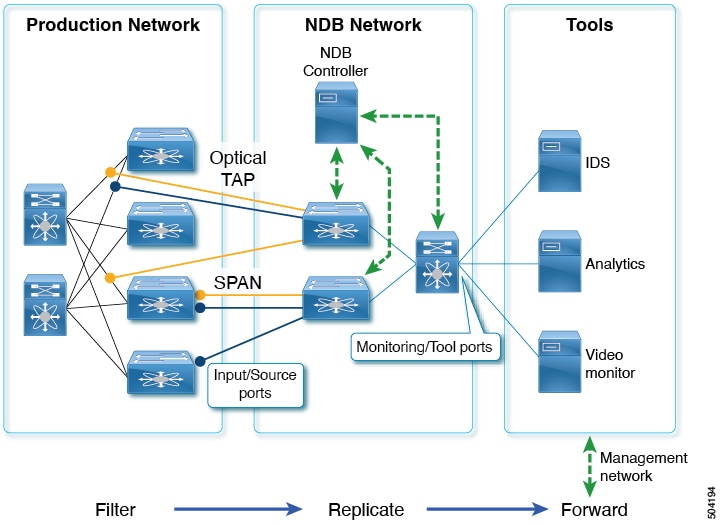
Figure 1. NDB Centralized Deployment Model

Header Stripping and Feature Benefits

The reasons for removing the header are as follows:

  • Some monitoring tools do not understand an encapsulated packet.

  • Presence of an additional header skews the analytics data.

  • Addition of a header adds to the packet size, hampering the optimization of the amount of data that is sent to and processed by the tools.

The benefits of the packet header or label stripping feature of Cisco Nexus Data Broker switch are as follows:

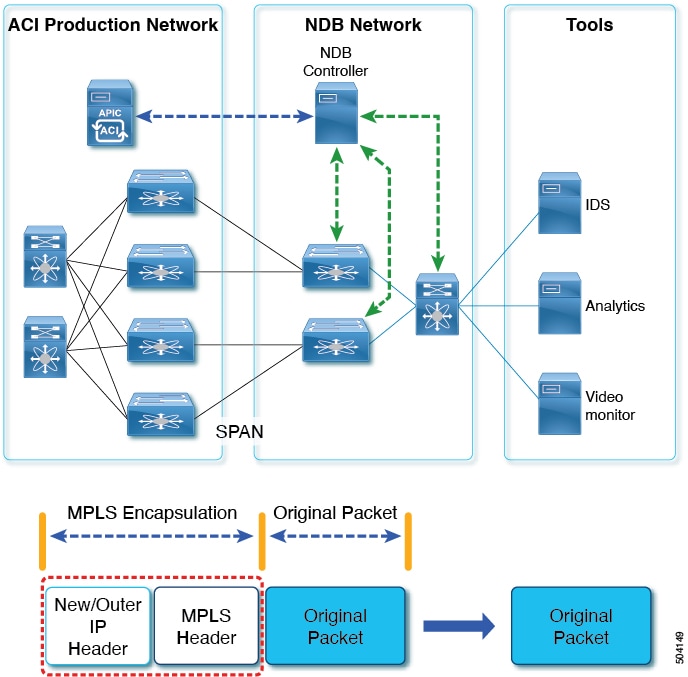
  • Enable Multiprotocol Label Switching (MPLS) label stripping

  • Native support for VXLAN header stripping from copy traffic

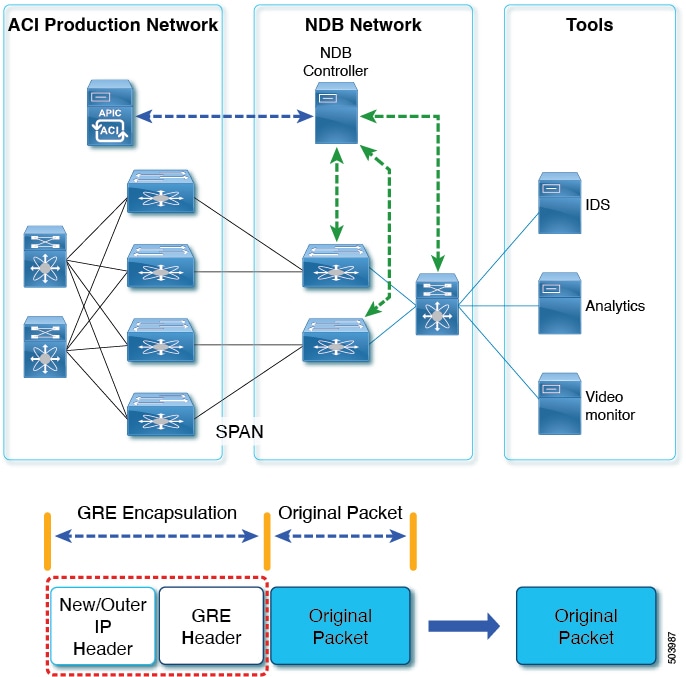
  • Support for Generic Route Encapsulation (GRE) header stripping

  • Q-in-Q VLAN header stripping at egress

NDB aligns the legacy VXLAN, IVXLAN, ERSPAN, GRE, and MPLS stripping functionality to the Overlay Forwarding Manager (OFM) based model. The OFM hosts the command line interface (CLI) for header stripping functionality.

This chapter contains the following sections:

Guidelines and Limitations

This topic lists the guidelines and limitations applicable to all header stripping features.

General Guidelines and Limitations

  • A maximum of 500 flow terminate interfaces are supported across all tunnel-profiles with various encapsulation types such as VxLAN, iVxLAN, GRE, and MPLS. For ERSPAN, the maximum flow terminate interfaces supported is 31.

  • The co-existence can be on the same interface or different interfaces.

  • The legacy MPLS stripping feature and OFM stripping features are mutually exclusive.

  • After performing non-disruptive ISSU from an earlier release to Cisco NX-OS Release 10.2(3)F and performing any header stripping functions, if dot1q tunnel VLAN_tag is missing or set to vlan_id=1, then remove and add the port ACL from L2 interfaces for that particular stripping-enabled interface.

  • If no VLAN is configured on an interface, but the switchport mode dot1q-tunnel command is configured on that interface, then stripped packets will have VLAN=1 by default.

  • In a scenario where incompatible OFM commands are present in the show running command output, and disruptive ISSU from Cisco NX-OS Release 10.2(3)F to an earlier release is done, wherein OFM commands were not supported in the earlier NX-OS version, then appropriate errors are displayed. However, the show incompatibility command does not flag such errors for OFM-related incompatibility commands.

  • The OFM-based GRE, ERSPAN, and MPLS stripping features are supported only on TORs, not on line cards.

  • As part of the encapsulation (iVXLAN, VXLAN, GRE, MPLS, ERSPAN), the following restrictions are common:

    • Two or more tunnel-profiles cannot have the same encapsulation-type.

    • OFM-based header stripping features are not supported when feature tunnel is enabled.

Release Specific Guidelines

Beginning with Cisco NX-OS Release 10.2(3)F

  • Traffic with IPv6 inner packet is supported for all stripping functions.

  • The MPLS stripping using the OFM model co-exists with the other stripping features. However, the existing MPLS stripping feature will continue to support MPLS stripping when co-existence is not needed with other types of stripping features.

  • ERSPAN coexistence on the same interface is supported. However, this is supported on 9300-FX2 and later platforms only.

Overview

MPLS label stripping is a process that removes the MPLS header from incoming packets and adds an Ethernet header with specific custom fields.

  • It is supported for both IPoMPLS and EoMPLS packet formats.

  • After label strip, an Ethernet header is added to the inner packet.

  • The Ethernet header includes a VLAN tag, destination MAC, and source MAC address.

Custom Fields

After MPLS label stripping, the following custom fields are added to the Ethernet header:

  • 802.1q header with VLAN configured on the incoming port.

  • Destination MAC address is set to 00:00:00:ab:cd:ef or 000.000.abc.def.

  • Source MAC address is set to VDC MAC address of the switch.

Guidelines and Limitations

Guidelines for Migration from legacy MPLS header stripping to OFM-based configuration

The following guidelines and limitations apply when migrating from legacy MPLS header stripping to OFM-based configuration:

Not Supported Features :

  • Legacy MPLS stripping implementation cannot co-exist with any OFM-based stripping.

  • Feature OFM and feature tunnel cannot co-exist on the same switch.

  • Tunnel-encapsulation type modification is not allowed.

    QP-CF-1(config-tnl-profile)# encapsulation mpls
    Error: encap-type modify not allowed, delete and add again
  • On an interface where MPLS head strip is enabled, mode tap-aggregation should not be present.

  • MPLS Stripping is based on IP PACL, so do not use MAC-ACL for stripping.

  • During MPLS stripping, incoming VLAN in the original packet is not preserved.

  • After non-disruptive upgrade from previous NX-OS version to 10.2(3)F, port ACL must be removed from all interfaces and added before enabling MPLS header stripping feature for a particular interface.

  • The hardware acl tap-agg redirect disable-dot1q-sharing command is required on Cisco Nexus 9300-GX platform switches to allow dot1q tunnel propagation. The switch needs reload after enabling this command.

  • If ERSPAN ACL redirect tunnel-profile is not configured and the interface is receiving ERSPAN packets, then the ERSPAN packets will hit ERSPAN ACL redirect entries in TapAgg policy and will not be stripped.

  • With ERSPAN tunnel-profile, when ingress interface is converted from dot1q-tunnel to trunk mode, egress packets will have dot1q tag with VLAN=1. This tagging takes place for both stripped packets and regular IP packets that are redirected.

  • When an MPLS strip-enabled interface receives ERSPAN traffic, stripping succeeds, but traffic is not forwarded to the redirect port.

  • To remove flow interface from a tunnel-profile, use remove instead of no . The use of no in flow terminate command will delete all interfaces from flow terminate list.

    For example:
    switch(config)# tunnel-profile mpls_strip
    switch(config-tnl-profile)# flow terminate interface remove Ethernet 1/48
  • When flow terminate interface command is configured without the add keyword, it acts as replace , which means previously added flow terminate interfaces are deleted and only the new ones will act as flow terminate interfaces.

  • MPLS packets with multicast bit set cannot be terminated, but MPLS packets with unicast bit set can be terminated.

  • Ingress interface can be either in trunk mode or access mode. Both modes allow redirection of tagged and untagged packets. When access-mode is used along with dot1q-tunnel mode, after header stripping VLAN_tag is added as specified by the access-mode.

NDB MPLS Header Stripping Feature Guidelines

Beginning with Cisco NX-OS Release 10.2(3)F, the NDB MPLS Header Stripping feature is supported.


Note


The OFM MPLS stripping feature is supported only on TORs; it is not supported on line cards.


Cleanup for Migrating from legacy MPLS stripping functionality

Migrating from legacy MPLS stripping functionality requires the following cleanup before enabling OFM-based MPLS stripping:

  • Removal of mode tap-aggregation at interface(s) level

  • Removal of mpls strip; mpls strip dot1q at the global level

  • Save the configuration and reload the switch with the above configuration

EoMPLS Guidelines

  • EoMPLS stripping can co-exist with all other header stripping features on same or different interfaces.

  • Pseudo Wire Control Word is not supported.

  • On Cisco Nexus 9300-GX platform switches, two ingress ports cannot share acl unless the dot1q vlan config is the same on them, else tagging does not work.

Configuration

  • This topic provides configuration steps for ingress ports, including access VLAN assignment, dot1q-tunnel mode, and applying an IP access group.

  • It also covers configuration for egress ports, such as trunk mode setup and applying IP access lists with redirect actions.

  • These configurations are essential for managing traffic flow and security on network switches.

Configuration Details for Egress and Ingress Ports

The following sections provide the configuration commands for both ingress and egress ports on the switch.

  • Ingress port configuration

  • Egress port configuration

  1. Configure the ingress port with access VLAN, dot1q-tunnel mode, and apply the IP access group.

  2. Configure the egress port as a trunk and apply the IP access list with redirect actions.

  • Ingress port: Assign VLAN, set mode, apply ACL

  • Egress port: Set trunk mode, apply ACL with redirect


Note


In case of decapsulated packet such as MPLS, the NDB-switch adds an Ethernet/VLAN header to the original packet , so egressing packet will have Ethernet/VLAN - original packet.


Figure 2. NDB MPLS Header Strip Solution
Example configuration for ingress port:
interface eth1/1
                    switchport access vlan 101
                    switchport mode dot1q-tunnel
                    ip port access-group ndb_acl in
                    no shutdown
Example configuration for egress port:
interface Ethernet1/7
                    switchport mode trunk
                    no shutdown
                    IP access list ndb_acl
                    statistics per-entry
                    10 permit udp any any eq 4789 redirect Ethernet1/7
                    15 permit ip any any redirect Ethernet1/7

Commands for MPLS Header Strip Feature

The following commands should be configured for enabling MPLS header on an interface:

feature ofm
tunnel-profile
mpls_strip encapsulation mpls destination any
flow terminate interface add Ethernet1/1-10

The show command for tunnel-profile is as follows:

switch# show tunnel-profile mpls_strip
  Profile               : mpls_strip
  Encapsulation         : MPLS
  State                 : UP
  Destination           : Any
  Terminate Interfaces  : 10
  Terminate List        : Ethernet1/1 Ethernet1/2 Ethernet1/3 Ethernet1/4 Ethernet1/5 Ethernet1/6 Ethernet1/7 Ethernet1/8 Ethernet1/9 Ethernet1/10