Preparing the Site

Operating temperatures

The operating temperature of the switch is 32 to 104 degrees Fahrenheit (0 to 40 degrees Celsius) at sea level. For every 1,000 feet (300 meters) above sea level, the maximum operating temperature is reduced by one degree Celsius. The non-operating temperature of the switch is –40 to 158 degrees Fahrenheit (–40 to 70 degrees Celsius).

Module Temperatures

Built-in automatic sensors continuously monitor all Cisco Nexus 9000 Series switches. Each module (supervisor, I/O, and fabric) includes temperature sensors with two thresholds:


Note


For any major temperature alarms from the sensors, the switch powers down in 2 minutes. After you resolve the temperature issue, power on the switch.


  • If the minor temperature threshold is exceeded, a minor alarm occurs. All four sensors perform these actions:

    • The system displays messages.

    • The system sends Call Home alerts if configured.

    • The system sends Simple Network Management Protocol (SNMP) notifications if configured.

    • The system increases the fan speed.

  • If the major temperature threshold is exceeded, a major alarm occurs, and these actions happen:

    If the threshold is exceeded in a switching module, only that module is shut down.

    For all sensors:

    • The system displays messages.

    • The system sends Call Home alerts if configured.

    • The system sends SNMP notifications if configured.

    • The system increases the fan speed.

    • If the major threshold is exceeded in a switching module, only that module is shut down.

    • If the major threshold is exceeded in an active supervisor module with HA-standby or standby present, the switch shuts down only that supervisor module. The standby supervisor module takes over.

    • If you do not have a standby supervisor module in your switch, you have 2 minutes to decrease the temperature. During this time, the software checks the temperature every 5 seconds and sends system messages every 10 seconds.

Humidity Requirements

High humidity can cause moisture to enter the switch. Moisture can cause corrosion of internal components. It can also degrade properties such as electrical resistance, thermal conductivity, physical strength, and size. The switch withstands relative humidity levels of 5 to 95 percent when off and 5 to 90 percent when operating.

A climate-controlled building keeps humidity within an acceptable level for your switch. If the switch is located in an unusually humid location, use a dehumidifier to maintain the humidity within an acceptable range.

Altitude Requirements

The altitude rating is 10,000 feet (3,048 meters) worldwide except in China, where the rating is 6,562 feet (2,000 meters).

For every 1,000 feet (300 meters) of elevation, the maximum ambient temperature decreases by one degree Celsius (1°C).

Dust and Particulate Requirements

Exhaust fans cool power supplies. System fans cool switches by drawing in air and exhausting air out through various openings in the chassis.

Fans also introduce dust and other particles, causing contaminant buildup in the switch and increased internal chassis temperature. Dust and particles can act as insulators and interfere with the mechanical components in the switch. Keep a clean operating environment to reduce the negative effects of dust and other particles.

In addition to keeping your environment free of dust and particles, use these precautions to avoid contamination of your switch:

  • Keep the switch area smoke-free.

  • Keep food and drinks away from the switch.

Minimizing electromagnetic and radio frequency interference

Electromagnetic interference (EMI) and radio frequency interference (RFI) from your switch can affect other devices, such as radio and television receivers. Additionally, radio frequencies from the switch can interfere with cordless and low-power telephones. RFI from high-power telephones can cause spurious characters to appear on your switch monitor.

RFI is any EMI with a frequency above 10 kHz. This type of interference can travel from the switch to other devices either through the power cable and source or through the air as transmitted radio waves.

The Federal Communications Commission (FCC) publishes specific regulations to limit the amount of EMI and RFI that are emitted by computing equipment. Each switch meets these FCC regulations.

To reduce the possibility of EMI and RFI, use these guidelines:

  • Install blank filler plates to cover any open expansion slots on your switch.

  • Attach peripherals using shielded cables with metal connector shells to your switch.

When wires are run for any significant distance in an electromagnetic field, interference can occur to the signals on the wires. Consider these implications:

  • Improper wiring can result in radio interference from the plant wiring.

  • Strong EMI, especially from lightning or radio transmitters, can destroy the signal drivers and receivers in your chassis. It can also create an electrical hazard by conducting power surges through lines into equipment.


Note


Consult RFI expert for help with predicting and preventing strong EMI.


To reduce radio interference risk, use twisted-pair cables with well-distributed grounding conductors. Keep copper cable lengths within the maximum distance specified for the cable type.


Caution


If cables exceed the recommended distance or run between buildings, be aware of possible lightning strikes nearby. Electromagnetic pulses from lightning or other high-energy events can create enough energy into unshielded cables and destroy electronic switches. Consult experts in electrical surge suppression and shielding if you have had similar problems in the past.

Shock and vibration requirements

The switch has been shock- and vibration-tested for operating ranges, handling, and earthquake standards.

Preventing Electrostatic Discharge Damage

Many switch components can be damaged by static electricity. Failing to take proper electrostatic discharge (ESD) precautions can result in intermittent or complete component failures. To minimize the potential for ESD damage, always use an ESD-preventive, anti-static wrist strap (or ankle strap). Ensure that the strap makes adequate skin contact.


Note


Check the resistance value of the ESD-preventive strap periodically. The measurement should be between 1 to 10 megohms. Before you perform any of the procedures in this guide, attach an ESD-preventive strap to your wrist and connect the leash to the chassis.


Grounding Requirements

The switch is sensitive to changes in its power supply voltage that is supplied by the power sources.

To prevent data loss or hardware failure caused by overvoltage, undervoltage, or transients (spikes), make sure your switch has an earth-ground connection.

Connect the grounding pad on your switch directly to the earth-ground connection or to a fully bonded and grounded rack.

Install the chassis in a grounded rack to ensure metal-to-metal contact grounds the switch. Remove any paint, stain, dirt, or other material. Maintain proper conductivity between the rack and switch as described in the Note.

Alternatively, ground your chassis with a customer-supplied grounding cable that meets your local and national installation requirements. For installations in the United States, use 6 AWG wire (13.3 mm²). Attach the grounding cable to the chassis using the grounding lug from the accessory kit. Connect the cable to the facility ground.

Note


Create an electrical conducting path between the chassis and the metal surface of the enclosure or rack. You can also connect it to a grounding conductor. Provide electrical continuity by using thread-forming type mounting screws that remove any paint or non-conductive coatings and establish a metal-to-metal contact. Remove any paint or other non-conductive coatings on the surfaces between the mounting hardware and the enclosure or rack. Clean the surfaces and apply an antioxidant before installation.


Planning for Power Requirements

The switch includes two power supplies (one-to-one redundancy with current sharing) in one of these combinations:

  • two 1400-watt AC power supplies or

  • two 2000-watt DC power supplies.


Note


For one-plus-one redundancy, you must use two power sources and connect each power supply to a separate power source.


The power supplies are rated to output up to 1400 watts for AC power supplies and up to 2000 watts for DC power supplies. The switch typically requires less power than the supply ratings.

To operate the switch, provision enough power from the source to meet the requirements of both the switch and one power supply.

Typically, this switch and a power supply require 605 watts of power input from the power source, but you must provision as much as 1100 watts power input from the power source to cover peak demand.


Note


Some of the power supply modules have rating capabilities that exceed the switch requirements. When calculating your power requirements, use the switch requirements to determine the amount of power that is required for the power supplies.


To minimize the possibility of circuit failure, verify that each power source circuit that is used by the switch is dedicated to the switch.

Airflow Requirements

The switch is positioned with its ports in either the front or the rear of the rack, depending on your cabling and maintenance requirements. To identify the airflow options for your switch, review the user-replaceable components in the Overview section of this document.

Position the air intake for the switch in a cold aisle to prevent overheating and shutdown.

  • port-side exhaust airflow: Cool air enters the chassis through the fan and power supply modules in the cold aisle and exhausts through the port end of the chassis in the hot aisle.

  • port-side intake airflow: Cool air enters the chassis through the port end in the cold aisle and exhausts through the fan and power supply modules in the hot aisle.

  • single-direction airflow: The airflow direction depends on how the fan modules are installed.

Identify the airflow direction of each fan and power supply module by its coloring.

  • Blue coloring indicates port-side exhaust airflow.

  • Red coloring indicates port-side intake airflow.


Note


Position the air intake for the switch in a cold aisle to prevent overheating and shutdown. Install the fan and power supply modules so that their airflow directions match. To change the airflow direction for the switch, shut down the switch before changing the modules.


Rack and Cabinet Requirements

Install these types of racks or cabinets for your switch:

  • Standard perforated cabinets,

  • Solid-walled cabinets with a roof fan tray (bottom-to-top cooling), and

  • Standard open four-post Telco racks.

Consult your cabinet vendors to determine which of their cabinets meet these requirements. You can also contact the Technical Assistance Center (TAC) for recommendations.

  • Use a standard 19-inch (48.3-centimeter), four-post Electronic Industries Alliance (EIA) cabinet or rack with mounting rails that conform to English universal hole spacing per section 1 of the ANSI/EIA-310-D-1992 standard.

  • The depth of a four-post rack must be 24 to 32 inches (61.0 to 81.3 cm) between the front and rear mounting rails (for proper mounting of the bottom-support brackets or other mounting hardware).

Also, you must have power receptacles that are located within reach of the power cords that are used with the switch.

Clearance Requirements

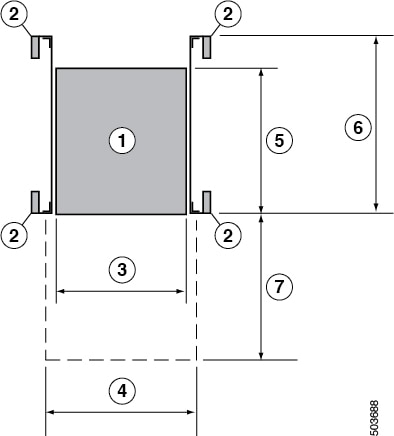
Ensure the chassis has enough clearance from other racks, devices, or structures to allow proper installation. Allow sufficient space around the chassis for cable routing, airflow, and maintenance. Refer to the figure for clearance requirements for installing the chassis in a four-post rack.

Diagram showing the chassis clearance requirements for installation.

Note


Both the front and rear of the chassis must be open to both aisles for airflow.

1

Chassis

5

Depth of the chassis with PSU

18.74 in (47.6 cm)

2

Vertical rack-mount posts and rails

6

Maximum extension of the bottom-support rails

36.0 in (91.0 cm)

3

Chassis width

17.4 in (44.2 cm)

7

Depth of the front clearance area (equal to the depth of the chassis)

22.27 in (56.68 cm)

4

Width of the front clearance area (equal to the width of the chassis with two rack-mount brackets that are attached to it)

19.0 in (48.26 cm)

Chassis height

3.4 in (8.63 cm)

Network Equipment-Building System (NEBS) Statements

NEBS describes the environment of a typical United States Regional Bell Operating Company (RBOC) central office. NEBS is the most common set of safety, spatial, and environmental design standards applied to telecommunications equipment in the United States. It is not a legal or regulatory requirement, but rather an industry requirement.


Note


Statement 7001—ESD Mitigation

This equipment may be ESD sensitive. Always use an ESD ankle or wrist strap before handling equipment. Connect the equipment end of the ESD strap to an unfinished surface of the equipment chassis or to the ESD jack on the equipment if provided.


Warning


Statement 7003 —Shielded Cable Shielded Cable Requirements for Intrabuilding Lightning Surge

The intrabuilding port(s) of the equipment or subassembly must use shielded intrabuilding cabling/wiring that is grounded at both ends.

The following port(s) are considered intrabuilding ports on this equipment:

RJ-45 Ethernet Port


Note


Statement 7004— Special Accessories Required to Comply with GR-1089 Emission and Immunity Requirements

To comply with the emission and immunity requirements of GR-1089, shielded cables are required for the following ports:

Copper RJ-45 Ethernet port


Warning


Statement 7005—Intrabuilding Lightning Surge and AC Power Fault

The intrabuilding port(s) of the equipment or subassembly must not be metallically connected to interfaces that connect to the outside plant (OSP) or its wiring. These interfaces are designed for use as intrabuilding interfaces only (Type 2 or Type 4 ports as described in GR-1089-CORE) and require isolation from the exposed OSP cabling. The addition of primary protectors is not sufficient protection to connect these interfaces metallically to OSP wiring.

This statement applies to the intrabuilding ports listed below:

RJ-45 Ethernet port


Warning


Statement 7012—Equipment Interfacing with AC Power Ports

Connect this equipment to AC mains that are provided with a surge protective device (SPD) at the service equipment that complies with NFPA 70, the National Electrical Code (NEC).


Note


Statement 7013—Equipment Grounding Systems—Common Bonding Network (CBN)

This equipment is suitable for installations using the CBN.


Note


Statement 7016 —Battery Return Conductor

Treat the battery return conductor of this equipment as DC-I.


Note


Statement 7018—System Recover Time

The equipment is designed to boot up in less than 30 minutes provided the neighboring devices are fully operational.


Note


Statement 8015—Installation Location Network Telecommunications Facilities

This equipment is suitable for installation in network telecommunications facilities.


Note


Statement 8016—Installation Location Where the National Electric Code (NEC) Applies

This equipment is suitable for installation in locations where the NEC applies.