Overview
The Cisco Nexus 9364E-SG2 switch (N9364E-SG2-Q) is a 2-rack unit (RU), fixed-port, high-density switch designed to support high-density 800G fabrics for next generation leaf and spine designs. This switch contains Cisco Silicon One G200 which focuses specifically on enhanced Ethernet-based artificial intelligence/machine learning AI/ML and web-scale spine deployments. It is a 5 nm, 51.2 TeraBits per second (Tbps), 512 X 112 Gbps serializer-deserializer (SerDes) switch. This switch has these ports and capabilities:
-
64 QSFP-DD ports that provide high-speed interface connection to networking equipment
-
2 SFP28 and Punt Injection Engine (PIE) ports
Figure 1. Cisco Nexus 9364E-SG2-Q Switch 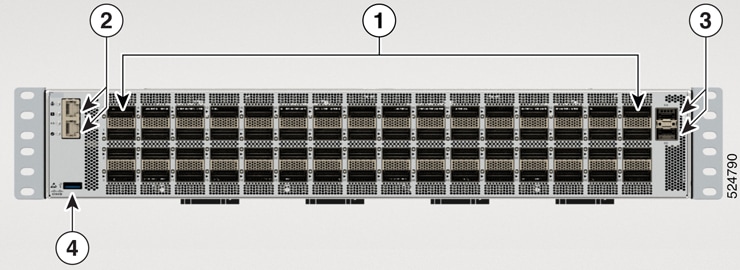
|
1 |
QSFP-DD ports (64) |
3 |
2 SFP28 Punt Injection Ethernet (PIE) ports |
|
2 |
One Console port and 1 GE Management Ethernet port |
4 |
USB Port Type-A |
Each QSFP-DD port has its own bi-color (amber or green) LED that can be used to display the link status indication. For port LED status information, see Switch Chassis LEDs.
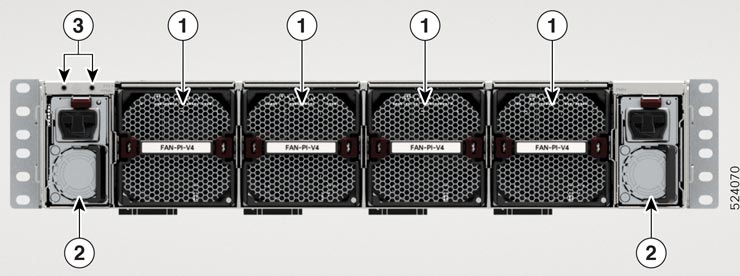
|
1 |
Fan Tray Four Fans: FT1, FT2, FT3, and FT4 |
|
2 |
PSU-1 and PSU-2 |
|
3 |
Ground lug location |
This switch includes these user-replaceable components:
-
Fan modules (four) with one airflow choice: Port-side intake fan module (FAN-PI-V4).
Table 1. Fan Speeds for this Switch Port-Side Intake
Fan Speed %
Typical/Minimum
40-70%
Maximum
90%

Note
The switch functions normally when only one fan tray fails. If more than one fan tray fails, the switch issues a warning and powers down within two minutes.
The switch has four, latched fan modules that install into the chassis from the rear. Fans cool the system and maintain proper airflow through the system. The fan modules work with N+1 redundancy.
-
Power supply modules (two—one for operations and one for redundancy [1+1]). The power supply module can be AC type ONLY. The option is: 3kW AC, PSU3KW-HVPI.
Note
-
A mix of AC and DC power supplies in the same switch is not supported.
-
All the fan modules and power supplies must use the same airflow direction. For this switch, the air flow direction is front-to-back.
-
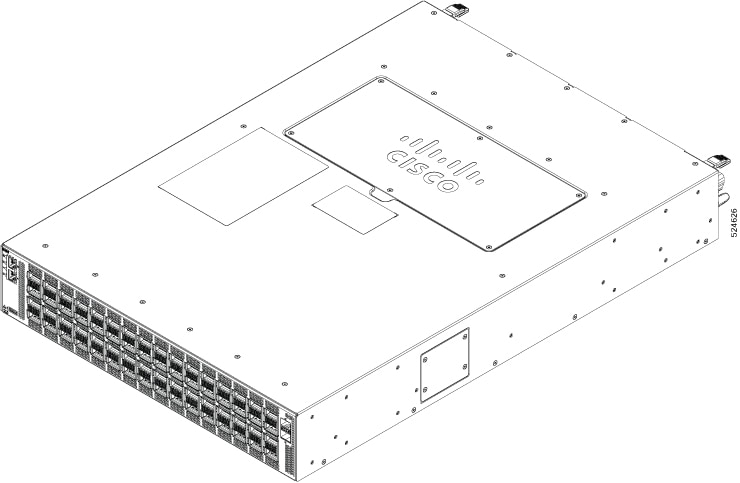
The figure shows the switch on the port side of the chassis.
 Feedback