Secure Connections Overview

A virtual private network (VPN) connection establishes a secure tunnel between endpoints over a public network such as the Internet.

This chapter applies to Remote Access and Site-to-site VPNs on Secure Firewall Threat Defense devices. It describes the Internet Protocol Security (IPsec), the Internet Security Association and Key Management Protocol (ISAKMP, or IKE) and SSL standards that are used to build site-to-site and remote access VPNs.

VPN types

VPN types are network connection categories that

  • provide secure, encrypted connections between remote locations and private networks

  • support deployment models including remote access and site-to-site configurations, and

  • use various protocols including SSL and IPsec for establishing secure tunnels.

Supported VPN connection types

The Firewall Management Center supports these types of VPN connections:

  • Remote Access VPNs in Firewall Threat Defense devices.

    Remote access VPNs provide secure, encrypted connections, or tunnels, between remote users and your company's private network. These connection use two devices: a VPN endpoint device, which is a workstation or mobile device with VPN client capabilities, and a VPN headend device, or secure gateway, at the edge of the corporate private network.

    Secure Firewall Threat Defense devices can be configured to support Remote Access VPNs over SSL or IPsec IKEv2 by the Firewall Management Center. When acting as secure gateways, these devices authenticate remote users, authorize access, and encrypt data to provide secure connections to your network. Only these devices support remote access VPN connections, managed by the Firewall Management Center.

    Secure Firewall Threat Defense secure gateways support the Secure Client full tunnel client. This client is required to provide secure SSL IPsec IKEv2 connections for remote users. This client automatically installs when a connection is established, so network administrators do not need to manually install or configure it on remote computers. It is the only client supported on endpoint devices.

  • Site-to-site VPNs in Firewall Threat Defense devices.

    A site-to-site VPN connects networks in different geographic locations. You can create site-to-site IPsec connections between managed devices, and between managed devices and other Cisco or third-party peers. These peers can use either IPv4 and IPv6 addresses. Site-to-site tunnels are built using the Internet Protocol Security (IPsec) protocol suite and IKEv1 or IKEv2. After the VPN connection is established, the hosts behind the local gateway can connect to the hosts behind the remote gateway through the secure VPN tunnel.

VPN basics

A VPN is a secure networking technology that

  • uses tunneling to create secure connections between remote users and private corporate networks over public TCP/IP networks such as the Internet

  • employs IPsec-based technologies with ISAKMP (IKE) and IPsec tunneling standards to build and manage tunnels, and

  • enables bidirectional data transfer through tunnel endpoints that encapsulate and unencapsulate packets.

VPN tunnel management capabilities

ISAKMP and IPsec accomplish these tunnel management functions:

  • Negotiate tunnel parameters.

  • Establish tunnels.

  • Authenticate users and data.

  • Manage security keys.

  • Encrypt and decrypt data.

  • Manage data transfer across the tunnel.

  • Manage data transfer inbound and outbound as a tunnel endpoint or router.

A device in a VPN functions as a bidirectional tunnel endpoint. It can receive plain packets from the private network, encapsulate them, create a tunnel, and send them to the other end of the tunnel where they are unencapsulated and sent to their final destination. It can also receive encapsulated packets from the public network, unencapsulate them, and send them to their final destination on the private network.

After the site-to-site VPN connection is established, the hosts behind the local gateway can connect to the hosts behind the remote gateway through the secure VPN tunnel. A connection consists of the IP addresses and hostnames of the two gateways, the subnets behind them, and the method the two gateways use to authenticate to each other.

VPN deployments use two primary device types:

  • Hubs: Devices that enable secure VPN connectivity to and from one or more remote branch devices or spokes. Hubs also act as a gateway for spokes to communicate with each other.

  • Spokes: Devices that connect over VPN to a hub to securely access the corporate resources behind the hub. Spokes communicate with each other through the hub.

Internet Key Exchange (IKE)

Internet Key Exchange (IKE) is a key management protocol that

  • authenticates IPsec peers

  • negotiates and distributes IPsec encryption keys, and

  • automatically establishes IPsec security associations (SAs).

IKE negotiation phases and policies

The IKE negotiation comprises two phases:

  • Phase 1 negotiates a security association between two IKE peers, which enables the peers to communicate securely in Phase 2.

  • During Phase 2 negotiation, IKE establishes SAs for other applications, such as IPsec.

Each phase uses proposals to negotiate a connection.

An IKE policy is a set of algorithms that two peers use to secure the IKE negotiation between them. IKE negotiation begins when each peer agrees on a common IKE policy. This policy defines security parameters to protect subsequent IKE negotiations. IKEv1 policies contain a single set of algorithms and a modulus group. In an IKEv2 policy, you can select multiple algorithms and modulus groups for peers to choose from during the Phase 1 negotiation. You may create a single IKE policy, or create multiple policies to give higher priority to preferred options. For site-to-site VPNs, you can create an IKE policy. IKEv1 and IKEv2 each support a maximum of 20 IKE policies, each with a different set of values. Assign a unique priority to each policy that you create. A lower priority number indocates a higher priority for the policy.

To define an IKE policy, specify:

  • A unique priority (1 to 65,543, with 1 being the highest priority).

  • An encryption method for the IKE negotiation to protect the data and ensure privacy.

  • A Hashed Message Authentication Codes (HMAC) method (called integrity algorithm in IKEv2) to verify the sender's identity, and to confirm that the message is unchanged during transit.

  • For IKEv2, a separate pseudorandom function (PRF) used as the algorithm to derive keying material and hashing operations required for the IKEv2 tunnel encryption. The options are the same as those used for the hash algorithm.

  • A Diffie-Hellman group to determine the strength of the encryption key determination algorithm. The device uses this algorithm to derive the encryption and hash keys.

  • An authentication method, to ensure the identity of the peers.

  • A limit to the time the device uses an encryption key before replacing it.

When IKE negotiation begins, the initiating peer sends all its policies to the remote peer. The remote peer searches for a match with its own policies, in priority order. IKE policies match if both peers use the same encryption, hash (integrity and PRF for IKEv2), authentication, and Diffie-Hellman values. The SA lifetime must be less than or equal to the lifetime in the policy sent. If the lifetimes are not identical, the shorter value from the remote peer policy applies. By default, the Secure Firewall Management Center deploys an IKEv1 policy with the lowest priority for all VPN endpoints to ensure a successful negotiation.

IPsec

IPsec is a secure method for setting up a VPN that:

  • provides data encryption at the IP packet level,

  • transmits data over a public network through tunnels, which are secure, logical communication paths between two peers, and

  • secures traffic that enters an IPsec tunnel by a combination of security protocols and algorithms.

With IPsec, data is transmitted over a public network through tunnels.

IPsec proposal policy components

An IPsec proposal policy defines the settings for IPsec tunnels. An IPsec proposal includes one or more crypto maps that are applied to the VPN interfaces in the devices. A crypto map combines all the components required to set up IPsec security associations, including:

  • A proposal (or transform set) combines security protocols and algorithms that secure traffic in an IPsec tunnel. During the IPsec security association (SA) negotiation, peers search for a matching proposal. Apply the selected proposal to create an SA that protects data flows in the crypto map's access list and secures VPN traffic. There are separate IPsec proposals for IKEv1 and IKEv2. In IKEv1 proposals (or transform sets), you set one value for each parameter. In IKEv2 proposals, you can configure multiple encryption and integration algorithms for a single proposal.

  • A crypto map combines all components required to set up IPsec security associations (SA), including IPsec rules, proposals, remote peers, and other parameters that are necessary to define an IPsec SA. When two peers try to establish an SA, they must each have at least one compatible crypto map entry.

    Dynamic crypto map policies are used in site-to-site VPNs when an unknown remote peer tries to start an IPsec security association with the local hub. The hub does not initiate the security association negotiation. Dynamic crypto policies allow remote peers to exchange IPsec traffic with a local hub, even if the hub does not know the remote peer's identity. A dynamic crypto map policy creates a crypto map entry before configuring all parameters. IPsec negotiation then dynamically configures the missing parameters to match a remote peer's requirements.

    Dynamic crypto map policies are applicable to both hub-and-spoke and point-to-point VPN topologies. To apply dynamic crypto map policies, specify a dynamic IP address for one of the peers in the topology and ensure that the dynamic crypto-map is enabled on this topology. In a full mesh VPN topology, you can apply only static crypto map policies.


    Note


    Simultaneous IKEv2 dynamic crypto map is not supported for the same interface for both remote access and site-to-site VPNs in a Firewall Threat Defense device.


VPN packet flow

VPN packet flow is a security process that

  • requires explicit permission through access control before allowing traffic to pass through,

  • decrypts incoming tunnel packets before sending them to the Snort process,

  • processes outgoing packets through Snort before encryption, and

  • blocks tunnel traffic to the public source when the tunnel is down.

Access control requirements

Access control identifies the protected networks for each endpoint node of a VPN tunnel and determines which traffic is allowed to pass through the Firewall Threat Defense device and reach the endpoints. For remote access VPN traffic, a group policy filter or an access control rule must be configured to permit VPN traffic flow.

IPsec flow offload

IPsec flow offload is a performance optimization feature that

  • offloads IPsec connections to field-programmable gate array (FPGA) or specialized hardware components after initial setup

  • improves device performance by handling pre-decryption, decryption, pre-encryption, and encryption processing in hardware, and

  • is enabled by default on supporting device models while allowing system software to handle inner flow security policies.

IPsec flow offload characteristics

After the initial setup of an IPsec site-to-site VPN or remote access VPN security association (SA), IPsec connections are offloaded to the field-programmable gate array (FPGA) in the device. This process improves device performance.

Offloaded operations include pre-decryption and decryption processing on ingress and egress. The system software applies your security policies for traffic within the inner flow.

IPsec flow offload applies to these device types:

  • Secure Firewall 3100

  • Secure Firewall 4200

IPsec flow offload is also used when the device's VTI loopback interface is enabled.

By default, the system enables IPsec flow offload on supported device models. To change the configuration, use FlexConfig to implement the flow-offload-ipsec command. For more information, refer to the ASA command reference.

VPN licensing

You do not need any specific license to enable VPN on a Firewall Threat Defense device, it is available by default.

The Firewall Management Center determines whether to allow or block the usage of strong encryption in the Firewall Threat Defense device based on the export-controlled functionality in the device. You can enable this functionality when you register with the Cisco Smart License Manager. If you are using the evaluation license, or you did not enable export-controlled functionality, you cannot use strong encryption. Choose System (system gear icon) > Licenses > Smart Licenses to verify this functionality in Firewall Management Center.

If you created your VPN configurations with an evaluation license and later upgraded your license to a smart license with export-controlled functionality, check and update your encryption algorithms to use stronger encryption so that the VPNs function properly. Do not use DES-based encryption, as it is not supported.

VPN encryption and performance

When you configure VPN tunnel encryption, provide sufficient protection and maintain efficiency by balancing security and performance.

Because a VPN tunnel typically traverses a public network, most likely the Internet, you need to encrypt the connection to protect the traffic. You define the encryption and other security techniques with IKE policies and IPsec proposals. Using stronger tunnel encryption may lower system performance.

If your device license allows strong encryption, you can choose from a range of encryption and hash algorithms and Diffie-Hellman groups. This document does not provide specific guidance on which options you should choose. If you operate within a larger corporation or other organization, there might already be defined standards that you need to meet. If not, take the time to research the options.

Comply with security certification requirements

Review your certification requirements and the available options to plan your VPN configuration. Many VPN settings have options that allow you to comply with various security certification standards.

Decide encryption algorithms for VPN policies

When deciding which encryption algorithms to use for the IKE policy or IPsec proposal, your choice is limited to algorithms supported by the devices in the VPN.

  • For IKEv2, you can configure multiple encryption algorithms. The system orders the settings from the most secure to the least secure and negotiates with the peer using that order.

  • For IKEv1, you can select a single option only.

  • For IPsec proposals, the algorithm is used by the Encapsulating Security Protocol (ESP), which provides authentication, encryption, and anti-replay services. ESP is IP protocol type 50. In IKEv1 IPsec proposals, the algorithm name is prefixed with ESP-.

If your device license qualifies for strong encryption, you can choose from the available encryption algorithms. If you are not qualified for strong encryption, you can select DES only.

Strong encryption license considerations


Note


If you are qualified for strong encryption, before upgrading from the evaluation license to a smart license, check and update your encryption algorithms for stronger encryption so that the VPN configuration works properly. Choose AES-based algorithms. DES is not supported if you are registered using an account that supports strong encryption. After registration, you cannot deploy changes until you remove all uses of DES.


Available encryption algorithms

  • AES-GCM—(IKEv2 only) Advanced Encryption Standard in Galois or Counter Mode is a block cipher mode that provides confidentiality and data-origin authentication. It offers greater security than AES.

    AES-GCM offers three different key strengths: 128-bit, 192-bit, and 256-bit keys. Longer keys increase security but reduce performance. NSA Suite B, a set of cryptographic algorithms that devices must support to meet federal cryptographic strength standards, requires GCM.

  • AES—Advanced Encryption Standard is a symmetric cipher algorithm that provides greater security than DES and is computationally more efficient than 3DES. AES offers three different key strengths: 128-bit, 192-bit, and 256-bit keys. Longer keys increase security but reduce performance.

  • DES—Data Encryption Standard, which encrypts using 56-bit keys, is a symmetric secret-key block algorithm. If your license account does not meet the requirements for export controls, this is your only option.

  • Null, ESP-Null—A null encryption algorithm provides authentication without encryption. This method is not secure; use at your own discretion.

Decide which hash algorithms to use

In IKE policies, the hash algorithm creates a message digest to ensure your messages remain secure. In IKEv2, you can choose one hash algorithm for integrity and another for the pseudo-random function (PRF).

In IPsec proposals, the Encapsulating Security Protocol (ESP) uses the hash algorithm for authentication. In IKEv2 IPsec proposals, this is called the integrity hash. In IKEv1 IPsec proposals, the algorithm name has the ESP- prefix and an -HMAC suffix.

The system arranges your settings from the most secure to the least secure and negotiates with the peer in that order. For IKEv1, select only one option.

Select a hash algorithm that meets your security and performance needs:

  • SHA (Secure Hash Algorithm)—The standard SHA (SHA1) produces a 160-bit digest.

    These SHA-2 options provide increased security and are available for IKEv2 configurations. Choose one if you require NSA Suite B cryptography compliance.

    • SHA256—Specifies the Secure Hash Algorithm SHA 2 with the 256-bit digest.

    • SHA384—Specifies the Secure Hash Algorithm SHA 2 with the 384-bit digest.

    • SHA512—Specifies the Secure Hash Algorithm SHA 2 with the 512-bit digest.

  • Null or None (NULL, ESP-NONE)—(IPsec Proposals only) AUse a null hash algorithm only for testing purposes. If you select one of the AES-GCM options as the encryption algorithm, choose the null integrity algorithm. For these encryption standards, the integrity hash is ignored even if you choose a non-null option.

Decide which Diffie-Hellman modulus group to use

You can use Diffie-Hellman key derivation algorithms to generate IPsec security association (SA) keys. Each group has a different size modulus. A larger modulus increases security but requires more processing time. You must have a matching modulus group on both peers.

For AES encryption, use Diffie-Hellman (DH) Group 5 or higher to support the large key sizes required by AES. IKEv1 policies do not support all of the groups.

To implement the NSA Suite B cryptography specification, use IKEv2 and select one of the elliptic curve Diffie-Hellman (ECDH) options: 19, 20, or 21. Elliptic curve options and groups that use a 2048-bit modulus reduce exposure to attacks such as Logjam.

For IKEv2, you can configure multiple groups. The system orders the settings from the most secure to the least secure, then negotiates with the peer using that order. For IKEv1, you can select only a single option.

  • 14—Diffie-Hellman Group 14: 2048-bit modular exponential (MODP) group. Considered good protection for 192-bit keys.

  • 15—Diffie-Hellman Group 15: 3072-bit MODP group.

  • 16—Diffie-Hellman Group 16: 4096-bit MODP group.

  • 19—Diffie-Hellman Group 19: National Institute of Standards and Technology (NIST) 256-bit elliptic curve modulo a prime (ECP) group.

  • 20—Diffie-Hellman Group 20: NIST 384-bit ECP group.

  • 21—Diffie-Hellman Group 21: NIST 521-bit ECP group.

  • 31—Diffie-Hellman Group 31: Curve25519 256-bit EC Group.

Decide VPN authentication methods

A VPN authentication method is a security mechanism that

  • validates the identity of peers in a VPN connection

  • enables secure communication between network devices, and

  • ensures that only authorized devices can establish VPN connections.

Available authentication methods

VPNs support two primary authentication methods:

  • Preshared keys: A secret key shared between two peers and used by IKE during the authentication phase. The same shared key must be configured at each peer or the IKE SA cannot be established.

  • Digital certificates: Use RSA key pairs to sign and encrypt IKE key management messages. Certificates provide proof of communication between two peers.

VPN type support varies by authentication method.

Table 1. VPN authentication method support

VPN Type

Preshared Keys

Digital Certificates

Site-to-site IKEv1 and IKEv2

Supported

Supported

Remote Access (SSL and IPsec IKEv2)

Not supported

Supported

When you use digital certificate authentication, you need a Public Key Infrastructure (PKI) defined for peers to obtain digital certificates from a Certification Authority (CA). CAs manage certificate requests and issue certificates to participating network devices, providing centralized key management for all participating devices.

Preshared keys are difficult to manage for large networks. CAs make it easier to manage and scale your IPsec network. With a CA, you do not need to configure keys between all encrypting devices. Register each device with the CA to request its certificate. Devices with their own certificates and the CA’s public key can authenticate other devices within the CA’s domain.

Pre-shared keys

A pre-shared key is a secret key that

  • enables you to share authentication credentials between two peers

  • is used by IKE in the authentication phase, and

  • must be configured identically on each peer or the IKE SA cannot be established.

Key configuration options

To configure pre-shared keys, select either a manual key or an automatically generated key. Specify this key in the IKEv1 or IKEv2 options. When you deploy your configuration, the key is configured on all devices in the topology.

PKI infrastructure and digital certificates

A PKI infrastructure is a centralized key management system that

  • provides defined policies, procedures, and roles supporting public key cryptography

  • generates, verifies, and revokes public key certificates, commonly known as digital certificates, and

  • manages key pairs consisting of public and private keys for VPN endpoints to sign and encrypt messages.

Public key cryptography and certificate components

In public key cryptography, each endpoint of a connection has a key pair consisting of both a public and a private key. The key pairs are used by the VPN endpoints to sign and encrypt messages. The keys act as complements, and anything encrypted with one of the keys can be decrypted with the other, securing the data flowing over the connection.

Generate a general-purpose RSA, ECDSA, or EDDSA key pair for signing and encryption. Alternatively, generate separate key pairs for each purpose. Separate signing and encryption keys help to reduce key exposure. SSL uses a key for encryption, while IKE uses a key for signing. Separate keys for each purpose minimize exposure.

Certificates also ensure non-repudiation by providing proof that communication between two peers occurred.

You can obtain CA certificates by:

  • Using the Simple Certificate Enrollment Protocol (SCEP) or Enrollment over Secure Transport (EST) to retrieve the CA's certificate from the CA server

  • Manually copying the CA's certificate from another participating device

Trustpoints represent the object representation of a CA and associated certificates. A trustpoint includes the identity of the CA, CA-specific parameters, and an association with a single enrolled identity certificate.

A PKCS#12, or PFX, file holds the server certificate, any intermediate certificates, and the private key in one encrypted file. This type of file may be imported directly into a device to create a trustpoint.

A CA may also revoke certificates for peers that no longer participate in your network. Revoked certificates are either managed by an Online Certificate Status Protocol (OCSP) server or are listed in a certificate revocation list (CRL) stored on an LDAP server. A peer may check these before accepting a certificate from another peer.

Digital certificates or identity certificates

When you use digital certificates as the authentication method for VPN connections, peers are configured to obtain digital certificates from a Certificate Authority (CA). CAs are trusted authorities that sign certificates to verify their authenticity, thereby guaranteeing the identity of the device or user.

Digital certificates contain these components:

  • The digital identification of the owner for authentication, such as name, serial number, company, department, or IP address.

  • A public key needed to send and receive encrypted data to the certificate owner.

  • The secure digital signature of a CA.

The certificate enrollment process includes these steps:

  1. CA servers manage public CA certificate requests and issue certificates to participating network devices as part of a PKI.

  2. Each participating device enrolls individually with a CA server, which validates identities and creates an identity certificate.

  3. Each participating peer sends their identity certificate to the other peer to validate their identities and establish encrypted sessions with the public keys contained in the certificates.

Certificate enrollment

Using a PKI improves the manageability and scalability of your VPN because you do not have to configure preshared keys between all encrypting devices. Instead, enroll each participating device with a CA server, which validates identities and creates an identity certificate for the device. After completing enrollment, each participating peer sends its identity certificate to the other peer to validate their identities and establish encrypted sessions with the public keys contained in the certificates. For more information about enrolling Firewall Threat Defense device certificates, refer to Certificate Enrollment Objects.

Certificate authority certificates

In order to validate a peer’s certificate, each participating device must retrieve the CA's certificate from the server. A CA certificate is used to sign other certificates. It is self-signed and called a root certificate. This certificate contains the CA's public key, which you use to decrypt and validate the CA's digital signature and the contents of the received peer's certificate.

To obtain the CA certificate:

  • Use the Simple Certificate Enrollment Protocol (SCEP) or Enrollment over Secure Transport (EST) to retrieve the CA’s certificate from the CA server

  • Manually copy the CA's certificate from another participating device

Trustpoints

Once enrollment is complete, a trustpoint is created in the managed device. It is the object representation of a CA and associated certificates. A trustpoint includes the identity of the CA, CA-specific parameters, and one enrolled identity certificate.

PKCS#12 file

A PKCS#12 file, or PFX file holds the server certificate, intermediate certificates, and the private key in one encrypted file. This type of file may be imported directly into a device to create a trustpoint.

Revocation checking

A CA may also revoke certificates for peers that no longer participate in your network. Revoked certificates are either managed by an Online Certificate Status Protocol (OCSP) server or are listed in a certificate revocation list (CRL) stored on an LDAP server. A peer may check these before accepting a certificate from another peer.

Deprecated hash algorithms, encryption algorithms, and Diffie-Hellman modulus groups

Update your VPN configuration to use supported DH and encryption algorithms before upgrading to Firewall Threat Defense 6.70 or later.

  • Update your IKE proposals and IPSec policies to match the ones supported in Firewall Threat Defense 6.70 or later.

  • Deploy the configuration changes after updating to supported algorithms.

Support has been removed for these less secure ciphers from Firewall Threat Defense Version 6.70:

  • Diffie-Hellman GROUP 5 is deprecated for IKEv1 and IKEv2.

  • Diffie-Hellman groups 2 and 24 have been removed.

  • Encryption algorithms: 3DES, AES-GMAC, AES-GMAC-192, and AES-GMAC-256 have been removed.


    Note


    DES continues to be supported in evaluation mode or for users who do not satisfy export controls for strong encryption.

    NULL is removed in IKEv2 policy, but supported in both IKEv1 and IKEv2 IPsec transform-sets.


VPN topologies

When you create a new VPN topology you must give it a unique name, specify a topology type, and select the IKE version. You can select from three types of topologies, each containing a group of VPN tunnels:

  • Point-to-point (PTP) topologies establish a VPN tunnel between two endpoints.

  • Hub and spoke topologies establish a group of VPN tunnels connecting a hub endpoint to a group of spoke endpoints.

  • Full mesh topologies establish a group of VPN tunnels among a set of endpoints.

There is no default pre-shared key for VPN authentication. You must define a pre-shared key manually or let the system generate it automatically. When choosing automatic, the Secure Firewall Management Center generates a pre-shared key and assigns it to all the nodes in the topology.

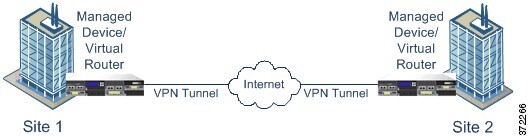
Point-to-point VPN topologies

A point-to-point VPN topology is a network configuration that

  • enables two endpoints to communicate directly with each other

  • allows you to configure the two endpoints as peer devices, and

  • permits either device to start the secured connection.

This diagram displays a typical point-to-point VPN topology.

Figure 1. Point-to-point VPN topology
Diagram illustrating a point-to-point VPN topology

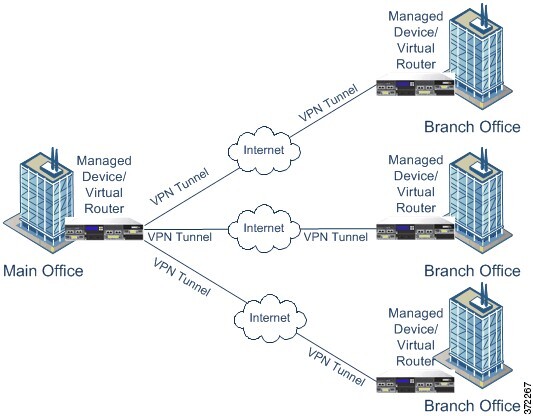
Hub and spoke VPN topology

A hub and spoke VPN topology is a network architecture that

  • connects a central endpoint (hub node) with multiple remote endpoints (spoke nodes)

  • establishes each connection between the hub node and an individual spoke endpoint as a separate VPN tunnel, and

  • enables hosts behind any of the spoke nodes to communicate with each other through the hub node.

The hub and spoke topology commonly represent a VPN that connects an organization's main and branch office locations using secure connections over the Internet or other third-party network. These deployments provide all employees with controlled access to the organization's network. Typically, the hub node is located at the main office. Spoke nodes are located at branch offices and start most of the traffic.

This diagram displays a typical hub and spoke VPN topology.

Figure 2. Hub and spoke VPN topology diagram
Diagram illustrating a hub and spoke VPN topology

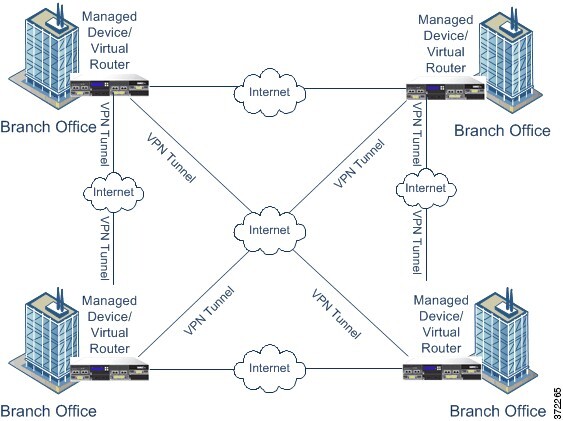
Full mesh VPN topology

A full mesh VPN topology is a network configuration that

  • allows all endpoints to communicate with every other endpoint by an individual VPN tunnel

  • offers redundancy so that when one endpoint fails, the remaining endpoints can still communicate with each other, and

  • commonly represents a VPN that connects a group of decentralized branch office locations.

The number of VPN-enabled managed devices you deploy in this configuration depends on the level of redundancy you require.

This diagram displays a typical full mesh VPN topology.

Figure 3. Full mesh VPN topology
Diagram illustrating mesh VPN topology

Implicit topologies

Implicit topologies are complex VPN network configurations that

  • combine elements from the three main VPN topologies (full mesh, hub-and-spoke, and point-to-point)

  • create more advanced network architectures than individual topology types, and

  • provide customized connectivity solutions for specific network requirements.

Types of implicit topologies

  • Partial mesh: A network where some devices use a full mesh topology, while others form either hub-and-spoke or point-to-point connections with some fully meshed devices. The partial mesh does not offer the redundancy found in a full mesh but costs less to implement. Peripheral networks use partial mesh topologies to connect to a fully meshed backbone.

  • Tiered hub-and-spoke: A network of hub-and-spoke topologies where devices act as a hub in some topologies and as a spoke in others. Spoke groups can send traffic to their closest hub.

  • Joined hub-and-spoke: A combination of two topologies (hub-and-spoke, point-to-point, or full mesh) that connect to form a point-to-point tunnel. For example, a joined hub-and-spoke topology could comprise two hub-and-spoke topologies, with the hubs acting as peer devices in a point-to-point topology.