Network Discovery Overview

The following topics discuss network discovery:

Detection of host, application, and user data

Detection of host, application, and user data is a network monitoring capability that

  • collects host and application data using host identity sources and application detectors according to network discovery policy settings,

  • gathers user data through user identity sources according to network discovery and identity policy configurations, and

  • enables comprehensive network asset mapping, forensic analysis, behavioral profiling, access control, and vulnerability mitigation.

Host, application, and user data collection

The system uses network discovery and identity policies to collect host, application, and user data for traffic on your network. The system analyzes discovery and identity data to create a detailed map of network assets, perform forensic analysis, behavioral profiling, access control, and respond to potentials vulnerabilities and hazards to your organization.

The system collect various types of data to enhance network security and performace analytics:

  • Host and Application Data: Collected by host identity sources and application detectors according to the settings in your network discovery policy. Managed devices observe traffic on the network segments you specify.

    For more information about fundamentals of host and application data, see Host and application detection fundamentals

  • User Data: Collected by user identity sources according to the settings in your network discovery and identity policies. Use the data for user awareness and user control.

    For more information about user identity, see About user identity.

Logging discovery and identity data allows you to take advantage of many features in the system, including:

  • Viewing the network map, which is a detailed representation of your network assets and topology that you can view by grouping hosts and network devices, host attributes, application protocols, or vulnerabilities.

  • Performing application and user controls using access control rules with application conditions, realm conditions, user conditions, user group conditions, and ISE attribute conditions.

  • Viewing complete profiles for detected hosts.

  • Monitoring network assets and user activity through dashboards.

  • Viewing detailed information on the discovery events and user activity.

    Logging and using NetFlow connections, if applicable.

  • Associate hosts, servers, and clients with susceptible exploits to identify and mitigate vulnerabilities.

    Evaluate the impact that intrusion events have on your network, and tune intrusion rule states so that they provide maximum protection for your network assets.

  • Receiving alerts by email, SNMP trap, or syslog when the system generates either an intrusion event with a specific impact flag, or a specific type of discovery event.

  • Monitoring your organization's compliance with an allow list of allowed operating systems, clients, application protocols, and protocols.

  • Creating correlation policies with rules that trigger and generate correlation events when the system generates discovery events or detects user activity.

Host and application detection fundamentals

The network discovery policy is a feature that serves multiple purposes. You can:

  • enable device identification,

  • monitor network devices and services, and

  • configure detection settings to track performance.

For more information on host and application detection, refer to Overview: Host Data Collection and Overview: Application Detection.

Passive detection of operating system and host data

Passive detection is a network mapping method that

  • analyzes network traffic and any exported NetFlow data to populate the network map

  • provides contextual information about network assets, such as operating systems and running applications, and

  • serves as the system's default detection method.

Operating system determination process

If traffic from a monitored host does not offer conclusive evidence of the host's operating system, the network map displays the most likely operating system. For example, a NAT device may appear to be running several operating systems because of the hosts "behind" the NAT device. To make this most-likely determination, the system uses a confidence value it assigns to each detected operating system, and the amount of corroborating data among detected operating systems.


Note


The system does not consider reported "unknown" applications and operating systems in its determination.

If passive detection inaccurately identifies your network assets, consider the placement of your managed devices. You can also augment the system's passive detection capabilities with custom operating-system fingerprints and custom application detectors. Or, you can use active detection, which is not based on traffic analysis, but instead allows you to directly update the network map using scan results or other information sources.

Active detection of operating system and host data

Active detection is a network discovery capability that

  • adds host information collected by active sources to network maps,

  • discovers operating systems and applications on hosts using tools like Nmap Scanner, and

  • allows active addition of host input data to network maps.

Host input data is categorized into:

  • User input data—Data added through the system user interface, permitting modification of the host's operating system or application identity.

  • Host import input data—Data imported using a command line utility.

Identity retention and priority behavior

The system retains one identity for each active source. For example, when you run an Nmap scan instance, previous results are updated with the new scan data. However, replacing scan results with data from a client whose results are imported through the command line, the system retains both the identities. The system then uses the priorities set in the network discovery policy to determine which active identity to use as the current identity.

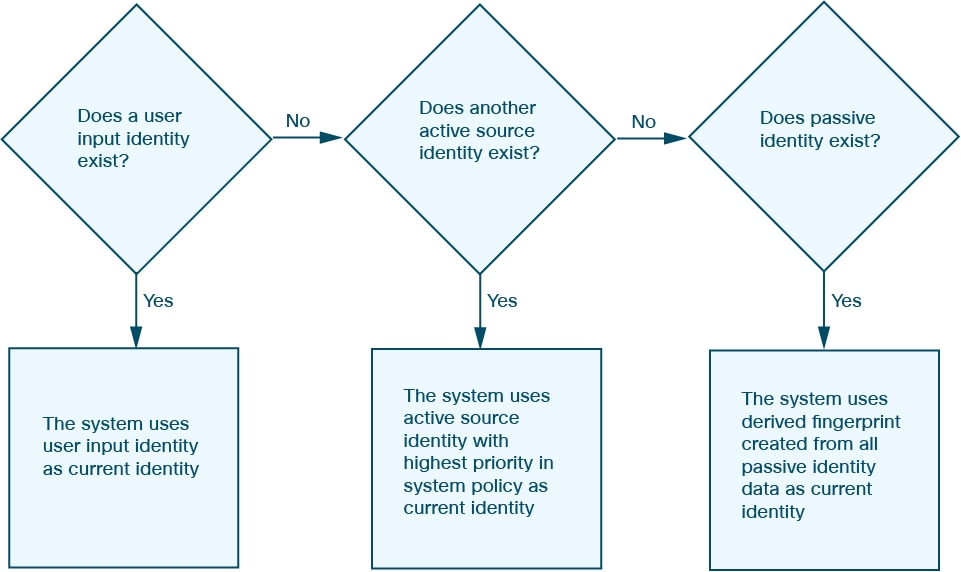
User input supersedes other identities, regardless of the source. For example, if UserA sets the operating system through the host profile, and then UserB changes that definition through the host profile, the definition set by UserB is retained. User input overrides all other active sources and is used as the current identity if it exists.

Current identities for applications and operating systems

A current identity is an identity determination for an application or operating system that

  • represents the identity that the system finds most likely to be correct,

  • is used for vulnerability assignments and impact assessments, and

  • is determined by source priorities when multiple identities exist for the same host.

Current identity uses

The system uses the current identity for an operating system or application for these purposes:

  • Assign vulnerabilities to a host

  • Assess impact

  • Evaluate correlation rules relating to operating system identifications, host profile qualifications, and compliance allow lists

  • Display in the Hosts and Servers table views in workflows

  • Display in the host profile

  • Calculate the operating system and application statistics on the Discovery Statistics page

The system uses source priorities to determine which active identity should be used as the current identity for an application or operating system.

Figure 1. Current identity determination process
Diagram illustrating which active identity should be used as the current identity for an application or operating system

The database may retain information from multiple sources for an operating system or for a specific application on a host.

The system treats an operating system or application identity as the current identity when the source for the data has the highest source priority. Possible sources have this priority order:

  1. User

  2. Scanner and application (set in the Network Discovery Policy)

  3. Managed devices

  4. NetFlow records

If a new higher priority application identity has less detail than the current identity, it will not override the current application identity.

In addition, when an identity conflict occurs, the resolution of the conflict depends on settings in the network discovery policy or on your manual resolution.

Operating system assignment as current identity

For example, if a user sets the operating system to Windows 2003 Server on a host, Windows 2003 Server becomes the current identity and attacks targeting Windows 2003 Server vulnerabilities on that host are given a higher impact. The vulnerabilities listed for that host in the host profile include Windows 2003 Server vulnerabilities.

Current user identities

A current user identity is a system determination that:

  • identifies the last authoritative user login as the current user when multiple users log into the same host

  • assumes only one user is logged into any given host at a time

  • records the first login for a user on a specific host and disregards subsequent logins by the same user, and

  • reports the last user detected by the server to the Firewall Management Center when multiple users are logged in through remote sessions.

User login tracking behavior

The system uses specific rules to determine current user identity:

  • When the system detects multiple logins to the same host by different users, the system assumes that only one user is logged into any given host at a time, and that the current user of a host is the last authoritative user login. If only non-authoritative user logins have been logged into the host, the last non-authoritative user login is considered the current user. If multiple users are logged in through remote sessions, the last user reported by the server is the user reported to the Firewall Management Center.

  • When the system detects multiple logins to the same host by the same user, the system records the first time that a user logs into a specific host and disregards subsequent logins. If an individual user is the only person who logs into a specific host, the only login that the system records is the original login.

  • If another user logs into that host, however, the system records the new login. Then, if the original user logs in again, his or her new login is recorded.

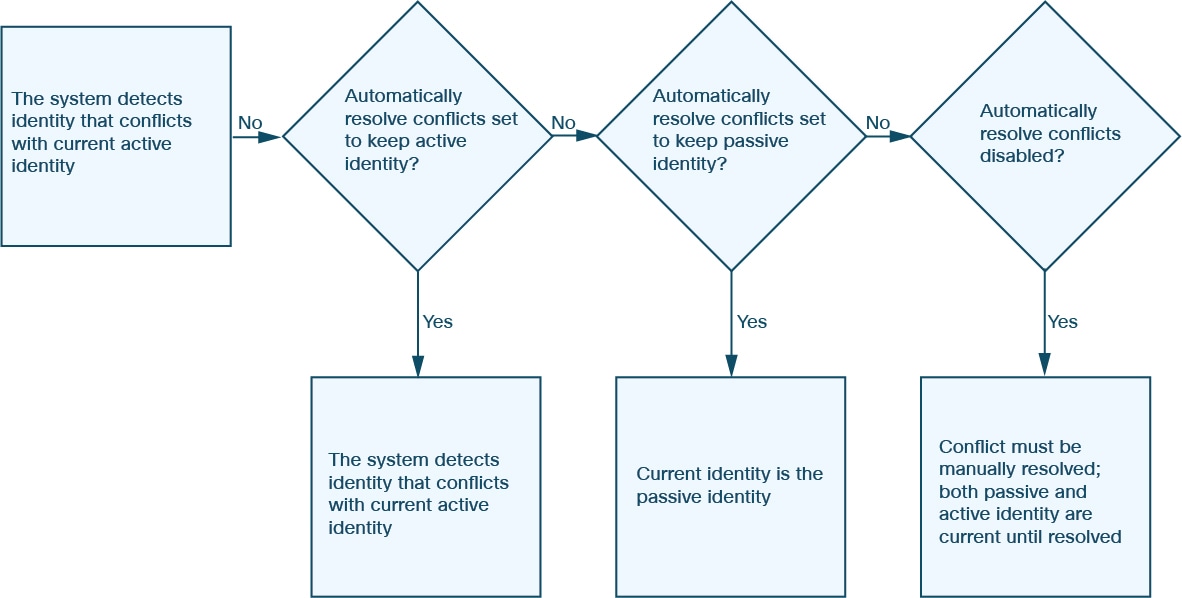
Application and operating system identity conflicts

An identity conflict is a system condition that

  • occurs when the system reports a new passive identity that conflicts with the current active identity and previously reported passive identities

  • results in both conflicting identities being listed as current and used for impact assessment until the conflict is resolved, and

  • can be resolved automatically by choosing to always use the passive identity or always use the active identity.

Identity conflict behavior and resolution

When an identity conflict exists for the identity of the host's operating system or one of the applications on the host, the system lists both conflicting identities as current and uses both for impact assessment until the conflict is resolved.

A user with Administrator privileges can resolve identity conflicts automatically by choosing to always use the passive identity or always use the active identity. Unless you disable automatic resolution of identity conflicts, identity conflicts are always automatically resolved.

A user with Administrator privileges can also configure the system to generate an event when an identity conflict occurs. That user can then set up a correlation policy with a correlation rule that uses an Nmap scan as a correlation response. When an event occurs, Nmap scans the host to obtain updated host operating system and application data.

Diagram illustrating identity conflict resolution

Operating system identity conflict scenario

The previous passive identity for an operating system is reported as Windows 2000, then an active identity of Windows XP becomes current. Next, the system detects a new passive identity of Ubuntu Linux 8.04.1. The Windows XP and the Ubuntu Linux identities are in conflict.

NetFlow data

NetFlow data is a collection of network flow statistics that

  • provides statistics on packets flowing through a router through a Cisco IOS application

  • is available on Cisco networking devices and can also be embedded in Juniper, FreeBSD, and OpenBSD devices, and

  • stores records of flows in a database on the device called the NetFlow cache when NetFlow is enabled on a network device.

NetFlow data processing and usage

A flow, called a connection in the system, is a sequence of packets that represents a session between a source and destination host, using specific ports, protocol, and application protocol. The network device can be configured to export this NetFlow data. In this documentation, network devices configured in this way are called NetFlow exporters.

Managed devices can be configured to collect records from NetFlow exporters, generate unidirectional end-of-connection events based on the data in those records, and finally send those events to the Firewall Management Center to be logged in the connection event database. You can also configure the network discovery policy to add host and application protocol information to the database based on the information in NetFlow connections.

You can use this discovery and connection data to supplement the data gathered directly by your managed devices. This is especially useful if you have NetFlow exporters monitoring networks that your managed devices cannot monitor.

Requirements for using NetFlow data (principle)

Requirement: NetFlow device configuration

Before you configure the system to analyze NetFlow data, you must enable the NetFlow feature on the routers or other NetFlow-enabled network devices you plan to use. Configure the devices to broadcast NetFlow data to a destination network where the sensing interface of a managed device is connected.

Requirement: NetFlow version and field specifications

The system can parse both NetFlow version 5 and NetFlow version 9 records. NetFlow exporters must use one of those versions if you export data. Ensure the exported NetFlow templates and records contain specific fields like IN_BYTES, IN_PKTS, PROTOCOL, among others. If your NetFlow exporters are using version 9, which you can customize, you must make sure that the exported templates and records contain the following fields, IN any order:

  • IN_BYTES (1)

  • IN_PKTS (2)

  • PROTOCOL (4)

  • TCP_FLAGS (6)

  • L4_SRC_PORT (7)

  • IPV4_SRC_ADDR (8)

  • L4_DST_PORT (11)

  • IPV4_DST_ADDR (12)

  • LAST_SWITCHED (21)

  • FIRST_SWITCHED (22)

  • IPV6_SRC_ADDR (27)

  • IPV6_DST_ADDR (28)

Requirement: managed device deployment

Your deployment must include at least one managed device that can monitor NetFlow exporters. Connect at least one sensing interface on that managed device to a network for collecting exported NetFlow data. The system does not support the direct collection due to lack of IP addresses on sensing interfaces.

Note: sampled NetFlow considerations

Note that the Sampled NetFlow feature available on some network devices collects NetFlow statistics on only a subset of packets that pass through the devices. While enabling this feature improves CPU utilization, it may affect the NetFlow data collected for system analysis.

Differences between NetFlow and managed device data

NetFlow and managed device data differences are analytical distinctions that

  • result from converting exported NetFlow records into connection logs and host and application protocol data rather than directly analyzing traffic

  • affect statistics on detected connections, operating system information, and application data, and

  • impact the identification of connection initiators and responders.

Key differences in data collection and analysis

The traffic represented by NetFlow data is not directly analyzed. Instead, it converts exported NetFlow records into connection logs and host and application protocol data.

As a result, there are several differences between converted NetFlow data and the discovery and connection data gathered directly by your managed devices. You should keep these differences in mind when performing analysis that requires:

  • Statistics on the number of detected connections

  • Operating system and other host-related information (including vulnerabilities)

  • Application data, including client information, web application information, and vendor and version server information

  • Knowing which host in a connection is the initiator and which is the responder

Network discovery policy versus access control policy:

You configure NetFlow data collection, including connection logging, using rules in the network discovery policy. Contrast this with connection logging for connections detected by managed devices, which you configure per access control rule.

Types of connection events:

  • Because NetFlow data collection is linked to networks rather than access control rules, you do not have granular control over which NetFlow connections the system logs.

  • NetFlow data cannot generate Security Intelligence events.

  • NetFlow-based connection events can be stored in the connection event database only; you cannot send them to the system log or an SNMP trap server.

Number of connection events generated per monitored session:

For connections detected directly by managed devices, you can configure the access control rule to log a bidirectional connection event at the beginning or end of a connection, or both.

In contrast, because exported NetFlow records contain unidirectional connection data, the system generates at least two connection events for each NetFlow record it processes. This also means that a summary's connection count is incremented by two for every connection based on NetFlow data, providing an inflated count of the number of connections that are actually occurring on your network.

Because the NetFlow exporter outputs records at regular intervals, even during an ongoing connection, long-running sessions can result in multiple exported records, each of which generates a connection event. For example, if the NetFlow exporter exports every five minutes, and a particular connection lasts twelve minutes, the system generates six connection events for that session:

  • One pair of events for the first five minutes

  • One pair for the second five minutes

  • A final pair when the connection is terminated

Host and operating system data:

Hosts added to the network map from NetFlow data do not have operating system, NetBIOS, or host type (host vs network device) information. However, using the host input feature, you can manually set a host's operating system identity.

Application data:

For connections detected directly by managed devices, the system can identify application protocols, clients, and web applications by examining the packets in the connection.

When the system processes NetFlow records, the system uses a port correlation in /etc/sf/services to extrapolate application protocol identity. However, there is no vendor or version information for those application protocols, nor do connection logs contain information on client or web applications used in the session. You can, however, manually provide this information using the host input feature.

Note that a simple port correlation means that application protocols running on non-standard ports may be unidentified or misidentified. Additionally, if no correlation exists, the system marks the application protocol as unknown in connection logs.

Vulnerability mappings:

The system cannot map vulnerabilities to hosts monitored by NetFlow exporters, unless you use the host input feature to manually set either a host's operating system identity or an application protocol identity. Note that because there is no client information in NetFlow connections, you cannot associate client vulnerabilities with hosts created from NetFlow data.

Initiator and responder information in connections:

For connections detected directly by managed devices, the system can identify which host is the initiator, or source, and which is the responder, or destination. However, NetFlow data does not contain initiator or responder information.

When the System processes NetFlow records, it uses an algorithm to determine this information based on the ports each host is using, and whether those ports are well-known:

  • If both or neither port being used is a well-known port, the system considers the host using the lower-number port to be the responder.

  • If only one of the hosts is using a well-known port, the system considers that host to be the responder.

For this purpose, a well-known port is any port that is either numbered from 1 to 1023,or any port that the system considers a server port, regardless of number.

NetFlow byte counts

Connection events based on unidirectional NetFlow records contain only one byte count, which the system assigns to either Initiator Bytes or Responder Bytes, depending on the port-based algorithm. The system sets the other field to 0. Note that if you are viewing connection summaries (aggregated connection data) of NetFlow records, both fields may be populated.

NetFlow-only connection event fields

A small number of fields are present only in connection events generated from NetFlow records; see Information Available in Connection Event Fields in the Cisco Secure Firewall Management Center Administration Guide.