IPS interfaces
Intrusion Prevention System (IPS) interfaces include passive interfaces, passive Enhanced Remote Switch Port Analyzer (ERSPAN) interfaces, and inline sets. Interfaces in IPS-only mode bypass many firewall checks and support only IPS security policy (Snort). Implement IPS-only interfaces if you have a separate firewall protecting these interfaces and want to avoid firewall function overhead.
 Note |
The firewall mode only affects regular firewall interfaces, and not IPS-only interfaces such as inline sets or passive interfaces. IPS-only interfaces can be used in both firewall modes. |
Inline sets
An inline set acts like a bump on the wire and binds one or more interface pairs together to slot into an existing network. This function allows the Firewall Threat Defense to be installed in any network environment without requiring configuration of adjacent network devices. Inline interfaces receive all traffic unconditionally and retransmit all traffic out of the other interface in the inline pair unless traffic is explicitly dropped. When you have multiple inline pairs in an inline set, traffic can only pass between the interfaces in the pair; it can't pass between interfaces in different pairs.
Tap mode functionality
With tap mode, the Firewall Threat Defense is deployed inline, but the network traffic flow is undisturbed. Instead, the Firewall Threat Defense makes a copy of each packet so that it can analyze the packets. Note that rules of these types do generate intrusion events when they are triggered, and the table view of intrusion events indicates that the triggering packets would have dropped in an inline deployment.
There are benefits to using tap mode with Firewall Threat Defense that are deployed inline:
-
You can set up the cabling between the Firewall Threat Defense and the network as if the Firewall Threat Defense were inline and analyze the kinds of intrusion events the Firewall Threat Defense generates.
-
Based on the results, you can modify your intrusion policy and add the drop rules that best protect your network without impacting its efficiency.
-
When you are ready to deploy the Firewall Threat Defense inline, you can disable tap mode and begin dropping suspicious traffic without having to reconfigure the cabling between the Firewall Threat Defense and the network.
Note |
Tap mode significantly impacts Firewall Threat Defense performance, depending on the traffic. |
Note |
Inline sets might be familiar to you as "transparent inline sets," but the inline interface type is unrelated to the transparent firewall mode or the firewall-type interfaces. |
Multiple inline pairs and asynchronous routing
Asynchronous routing is a network configuration that routes traffic between a host on your network and external hosts through different inline pairs, depending on whether the traffic is inbound or outbound. It requires multiple inline pairs in an inline set to correctly analyze network traffic.
If you deploy asynchronous routing, but you include only one inline pair in an inline set, the device might not correctly analyze your network traffic because it might see only half of the traffic.
Multiple inline pairs configuration
Adding multiple inline pairs to the same inline set lets the system identify the inbound and outbound traffic as part of the same traffic flow. For passive interfaces only, you can also achieve this by including the interface pairs in the same security zone.
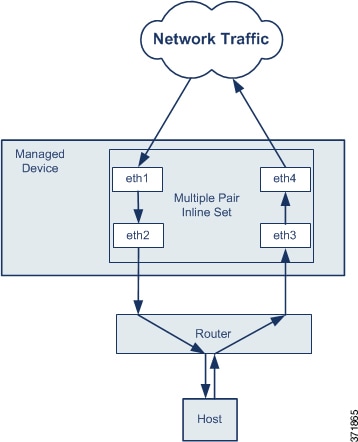
Note |
If you assign multiple inline pairs to a single inline set, but you experience issues with duplicate traffic, you might need to reassign your inline pairs to separate inline sets or modify your security zones. If fragments of a packet are received on different interface pairs, they are not reassembled and get dropped. Make sure all the fragments of the packet are received and sent on the same interface pair. |
Passive interfaces
Passive interfaces monitor traffic flowing across a network using a switch SPAN or mirror port. The SPAN or mirror port allows for traffic to be copied from other ports on the switch. This function allows the system to view network traffic without participating in the flow of data.
Passive interface functionality
The SPAN or mirror port allows for traffic to be copied from other ports on the switch. When you configure the Firewall Threat Defense in a passive deployment, the Firewall Threat Defense cannot take certain actions such as blocking or shaping traffic.
Encapsulated remote switched port analyzer (ERSPAN) interfaces allow you to monitor traffic from source ports distributed over multiple switches and use GRE to encapsulate the traffic. ERSPAN interfaces are only allowed when the Firewall Threat Defense is in routed firewall mode.
Note |
Using SR-IOV interfaces as passive interfaces on NGFWv is not supported on some Intel network adapters (such as Intel X710 or 82599) using SR-IOV drivers due to a promiscuous mode restriction. In such cases, use a network adapter that supports this functionality. See Intel Ethernet Products for more information on Intel network adapters. |
Hardware Bypass for inline sets
Hardware Bypass ensures that traffic continues to flow between an inline interface pair during a power outage. It maintains network connectivity when software or hardware failures occur and is available for certain interface modules on supported models.
Supported interface modules
For information about which interface modules support this feature, see Requirements and prerequisites for inline sets.
Hardware Bypass triggers
Hardware Bypass can be triggered in these scenarios.
-
Firewall Threat Defense crash
-
Firewall Threat Defense reboot
-
Security Module reboot
-
Chassis crash
-
Chassis reboot
-
Manual trigger
-
Chassis power loss
-
Security Module power loss
Note |
Hardware bypass is intended for unplanned/unexpected failure scenarios, and is not automatically triggered during planned software upgrades. Hardware bypass activates only at the end of a planned upgrade process, when the Firewall Threat Defense application reboots. |
Hardware bypass switchover
When you switch from normal operation to hardware bypass, or back to normal operation, you may experience several seconds of interrupted traffic. During this time, connections may drop.
Connection interruption factors
Several factors can affect the length of the traffic interruption during hardware bypass switchover.
-
Copper port auto-negotiation
-
Behavior of the optical link partner such as how it handles link faults and de-bounce timing
-
Spanning tree protocol convergence
-
Dynamic routing protocol convergence
You may also experience dropped connections due to application identification errors when analyzing connections midstream after the returning to normal operations.
Snort Fail Open vs. Hardware Bypass
Snort Fail Open and Hardware Bypass allow traffic to flow during system failures.
Functionality differences
You can configure the Snort Fail Open option for inline sets other than those in tap mode. This option either drops traffic or allows traffic to pass without inspection when the Snort process is busy or down. Snort Fail Open is supported on all inline sets except those in tap mode, not just on interfaces that support Hardware Bypass.
The Hardware Bypass functionality allows traffic to flow during a hardware failure, including a complete power outage, and certain limited software failures. A software failure that triggers Snort Fail Open does not trigger a Hardware Bypass.
Hardware Bypass status
When the system has power, the Bypass LED indicates the Hardware Bypass status. See the Firepower chassis hardware installation guide for LED descriptions.

 Feedback