Decryption Policies

The following topics provide an overview of decryption policy creation, configuration, management, and logging.

About Decryption Policies

An SSL policy determines how the system handles encrypted traffic on your network. You can configure one or more SSL policies, associate an SSL policy with an access control policy, then deploy the access control policy to a managed device. When the device detects a TCP handshake, the access control policy first handles and inspects the traffic. If it subsequently identifies a TLS/SSL-encrypted session over the TCP connection, the SSL policy takes over, handling and decrypting the encrypted traffic.

You can create multiple rules at the same time, including rules for decrypting incoming traffic (Decrypt - Known Key rule action) and outgoing traffic (Decrypt - Resign rule action). To create a rule with a Do Not Decrypt or other rule action (such as Block or Monitor), create an empty decryption policy and add the rule afterward.

Do Not Decrypt policy example

Following is an example decryption policy with a Do Not Decrypt rule action:
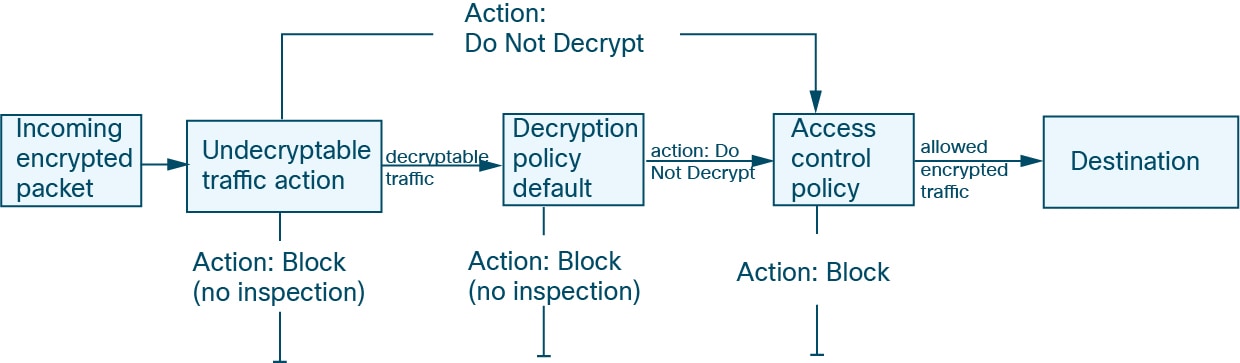
A Do Not Decrypt rule action passes the traffic through the firewall without trying to decrypt it; the access control policy then determines whether or not the traffic is inspected

The simplest SSL policy, as shown in the following diagram, directs the device where it is deployed to handle encrypted traffic with a single default action. You can set the default action to block decryptable traffic without further inspection, or to inspect undecrypted decryptable traffic with access control. The system can then either allow or block the encrypted traffic. If the device detects undecryptable traffic, it either blocks the traffic without further inspection or does not decrypt it, inspecting it with access control.
Requirements and Prerequisites for SSL Policies

Supported domains

Any

User roles

  • Admin

  • Access Admin

  • Network Admin

Create a Decryption Policy

This topic discusses how to create a decryption policy and optionally one or more rules to protect internal or external servers. You can also create a decryption policy without rules and add the rules later. Creating an empty policy is a good choice to create rules with a Do Not Decrypt, Block, Block With Reset, or Monitor rule actions.

Before you begin

Review your needs for decryption:

  • Decryption is a way to expose network traffic to deep inspection; however, there are times you should not decrypt traffic: Best practice for deciding when to decrypt traffic.

  • To protect internal servers by decrypting and optionally inspecting traffic, you must have the internal certificate for your internal server: PKI objects.

  • To protect external servers by decrypting and optionally inspecting traffic, you must upload an internal CA object that will be used to decrypt ad resign the traffic: PKI objects.

Procedure


Step 1

Log in to the Firewall Management Center if you haven't already done so.

Step 2

Click Policies > Access Control heading > SSL.

Step 3

Click New Policy.

Step 4

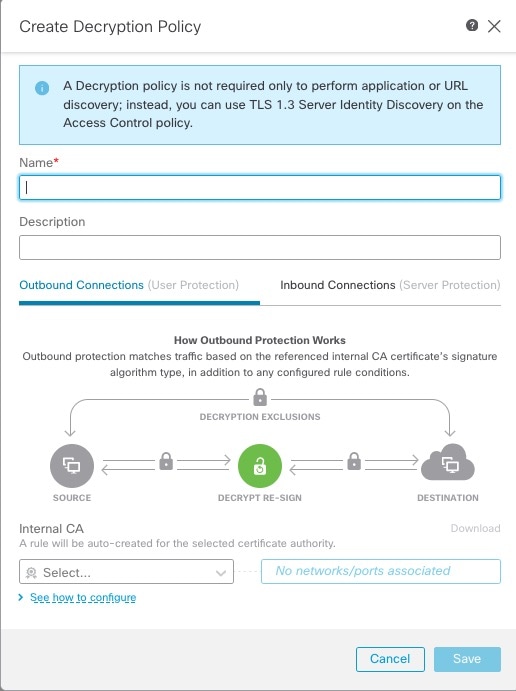
Enter a name for the policy in the Name field and an optional description in the Description field.

A decryption policy can protect either outbound connections (Decrypt - Resign rule action) or inbound connectors (Decrypt - Known Key rule action)

The Outbound Connections tab page enables you to create Decrypt - Resign rules. These rules require an internal certificate that you can either create beforehand (using Objects > Object Management > PKI > Internal CAs) or you can create them as part of the outbound connection rule.

the Inbound Connections tab page enables you to create Decrypt - Known Key rules. These rules require an internal certificate that you can either create beforehand (using Objects > Object Management > PKI > Internal Certs) or you can create them as part of the inbound connection rule.

Step 5

Associate the decryption rule with an access control rule as discussed in Associate prefilter, decryption, and identity policies with an access control.


SSL Policy default actions

The default action for an SSL policy determines how the system handles decryptable encrypted traffic that does not match any non-monitor rule in the policy. When you deploy an SSL policy without a TLS/SSL rules, the default action determines how all decryptable traffic on your network is handled. Note that the system does not perform any kind of inspection on encrypted traffic that the default action blocks.

Table 1. SSL Policy Default Actions

Default Action

Effect on Encrypted Traffic

Block

Block the TLS/SSL session without further inspection.

Block with reset

Block the TLS/SSL session without further inspection and reset the TCP connection. Choose this option if traffic uses a connectionless protocol like UDP. In that case, the connectionless protocol tries to reestablish the connection until it is reset.

This action also displays a connection reset error in the browser so the users are informed that the connection is blocked.

Do not decrypt

Inspect the encrypted traffic with access control.

Default handling options for undecryptable traffic

This reference provides information about identifying and managing undecryptable TLS/SSL traffic types in decryption policies. It covers handling handshake errors, unsupported cipher suites, compressed sessions, and session caching issues, along with user-facing actions for blocking or allowing such encrypted connections.

Table 2. Undecryptable traffic types

Type

Description

Default Action

Available Action

Compressed Session

The TLS/SSL session applies a data compression method.

Inherit default action

Do not decrypt

Block

Block with reset

Inherit default action

SSLv2 Session

The session is encrypted with SSL version 2.

Note that traffic is decryptable if the ClientHello message is SSL 2.0, and the remainder of the transmitted traffic is SSL 3.0.

Inherit default action

Do not decrypt

Block

Block with reset

Inherit default action

Unknown Cipher Suite

The system does not recognize the cipher suite.

Inherit default action

Do not decrypt

Block

Block with reset

Inherit default action

Unsupported Cipher Suite

The system does not support decryption based on the detected cipher suite.

Inherit default action

Do not decrypt

Block

Block with reset

Inherit default action

Session not cached

The TLS/SSL session has session reuse enabled, the client and server reestablished the session with the session identifier, and the system did not cache that session identifier.

Inherit default action

Do not decrypt

Block

Block with reset

Inherit default action

Handshake Errors

An error occurred during TLS/SSL handshake negotiation.

Inherit default action

Do not decrypt

Block

Block with reset

Inherit default action

Decryption Errors

An error occurred during traffic decryption.

Block

Block

Block with Reset

When you first create an SSL policy, logging connections that are handled by the default action is disabled by default. Because the logging settings for the default action also apply to undecryptable traffic handling, logging connections handled by the undecryptable traffic actions is disabled by default.

Note that if your browser uses certificate pinning to verify a server certificate, you cannot decrypt this traffic by re-signing the server certificate. For more information, see TLS/SSL Rules guidelines and limitations.

Set default handling for undecryptable traffic

Set undecryptable traffic actions to handle certain types of encrypted traffic the system cannot decrypt or inspect, ensuring proper network security enforcement for encrypted connections.

You can set undecryptable traffic actions at the SSL policy level to handle certain types of encrypted traffic the system cannot decrypt or inspect. When you deploy an SSL policy that contains no TLS/SSL rules, the undecryptable traffic actions determine how all undecryptable encrypted traffic on your network is handled.

Depending on the type of undecryptable traffic, you can choose to:

  • Block the connection.

  • Block the connection, then reset it. This option is preferrable for connectionless protocols like UDP, which keep trying to connect until the connection is blocked.

  • Inspect the encrypted traffic with access control.

  • Inherit the default action from the SSL policy.

Procedure


Step 1

Log in to Secure Firewall Management Center if you haven't already done so.

Step 2

Click Policies > Access Control heading > SSL.

Step 3

Click Edit (edit icon) next to the name of the SSL policy.

Step 4

In the SSL policy editor, click Undecryptable Actions.

Step 5

For each field, choose either the SSL policy's default action or another action you want to take on the type of undecryptable traffic. See Default handling options for undecryptable traffic and SSL Policy default actions for more information.

Step 6

Click Save to save the policy.


What to do next

SSL Policy advanced options

An SSL policy 's Advanced Settings page contains global settings. These settings apply to all managed devices that are configured for Snort 3.

An SSL policy advanced settings are all ignored on any managed device that runs:

  • A version earlier than 7.1

  • Snort 2

Block flows requesting ESNI

Encrypted Server Name Indication (ESNI (link to draft proposal)) is a way for a client to tell a TLS 1.3 server what the client is requesting. Because the SNI is encrypted, the system cannot identify the server. You can choose to block these connections.

Disable HTTP/3 advertisement

This option strips HTTP/3 (RFC 9114) from the ClientHello in TCP connections. HTTP/3 is part of the QUIC transport protocol, not the TCP transport protocol. Blocking clients from advertising HTTP/3 provides protection against attacks and evasion attempts potentially burried within QUIC connections.

Propagate untrusted server certificates to clients

This setting applies only to traffic matching a Decrypt - Resign rule action.

Enable this option when the server certificate is untrusted. The managed device substitutes its certificate authority (CA) for the server certificate. An untrusted server certificate is one that is not listed as a trusted CA in the Secure Firewall Management Center. (Objects > Object Management > PKI > Trusted CAs).

Enable TLS 1.3 decryption

Whether to apply decryption rules to TLS 1.3 connections. If you do not enable this option, the decryption rules apply to TLS 1.2 or lower traffic only. See TLS 1.3 decryption best practices.

TLS 1.3 decryption best practices

Both the SSL policy and the access control policy have advanced options that affect how traffic is handled, whether the traffic is being decrypted or not.

The advanced options are:

  • Decryption policy:

    • TLS 1.3 decryption

    • TLS adaptive server identity probe

  • Access control policy: TLS 1.3 Server Identity Discovery

    The access control policy setting takes precedence over the decryption policy setting.

Use the following table to decide which option to enable:

TLS adaptive server identity probe setting (decryption policy)

TLS 1.3 Server Identity Discovery setting (access control policy)

Result

Recommended when

Enabled

Disabled

Adaptive probe sent if decryption policy contains any rule conditions specified in SSL Policy advanced options and if the server certificate is not cached.

  • You're not using application or URL conditions in access control rules

  • You're decrypting traffic

Enabled

Enabled

Probe is always sent if the server certificate is not cached.

Use only if your access control rules have URL or application conditions

Disabled

Enabled

Probe is always sent if the server certificate is not cached.

Not recommended.

Disabled

Disabled

Probe is never sent.

Very limited usefulness; use only if not decrypting traffic and not using application or URL conditions in the access control rule


Note


A cached TLS server's certificate is available to all Snort instances on a particular Firewall Threat Defense. The cache can be cleared with a CLI command and is automatically cleared when the device is rebooted.


For more information, see the discussion of TLS server identity discovery on secure.cisco.com.