Secure Firewall 3100 Threat Defense Getting Started: Firewall Device Manager

PDF

(If Needed) Power off the firewall

Want to summarize with AI?

Log in

Overview

How to safely power off the Secure Firewall 3100 to avoid file system damage, using either the FXOS CLI shutdown command or the Firewall Device Manager shutdown workflow.

It's important that you shut down your system properly. Simply unplugging the power or pressing the power switch can cause serious file system damage. There are many processes running in the background all the time, and unplugging or shutting off the power does not allow the graceful shutdown of your firewall system.

Power off the firewall at the CLI

You can use the FXOS CLI to safely shut down the system and power off the firewall.

Procedure

1.

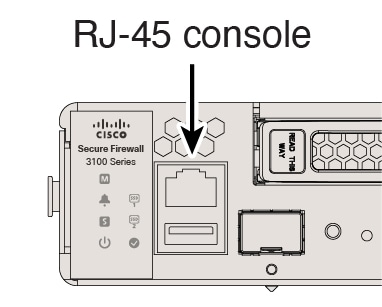
Connect to the console port.

Figure 1. Console Port
Console port
2.

In the FXOS CLI, connect to local-mgmt mode.

firepower # connect local-mgmt

3.

Shut down the system.

firepower(local-mgmt) # shutdown

Example:

firepower(local-mgmt)# shutdown 
This command will shutdown the system.  Continue?
Please enter 'YES' or 'NO': yes
INIT: Stopping Cisco Threat Defense......ok
4.

Monitor the system prompts as the firewall shuts down. When the shutdown is complete, you will see the following prompt.


System is stopped.
It is safe to power off now.
Do you want to reboot instead? [y/N]
5.

You can now turn off the power switch and unplug the power to physically remove power from the chassis if necessary.


Power off the firewall using the Firewall Device Manager

Shut down your system properly using the Firewall Device Manager.

Procedure

1.

Shut down the firewall.

  1. Click Device, then click the System Settings > Reboot/Shutdown link.

  2. Click Shut Down.

2.

If you have a console connection to the firewall, monitor the system prompts as the firewall shuts down. When shutdown is complete, you will see the following prompt.


System is stopped.
It is safe to power off now.

Do you want to reboot instead? [y/N]

If you do not have a console connection, wait approximately 3 minutes to ensure the system has shut down.

3.

You can now turn off the power switch and unplug the power to physically remove power from the chassis if necessary.