Overview
How to use the ASDM Startup Wizard to set up a basic Firepower 1010 configuration, including initial interface addressing, routing, and DHCP settings for inside-to-outside connectivity.
Using ASDM, you can use wizards to configure basic and advanced features. The Startup Wizard builds on the default configuration:
-
inside→outside traffic flow
-
Interface PAT for all traffic from inside to outside.
The Startup Wizard walks you through configuring:
-
The enable password
-
Interfaces, including setting the inside and outside interface IP addresses and enabling interfaces.
-
Static routes
-
The DHCP server
-
And more...
Procedure
| 1. | Choose Wizards > Startup Wizard, and click the Modify existing configuration radio button. 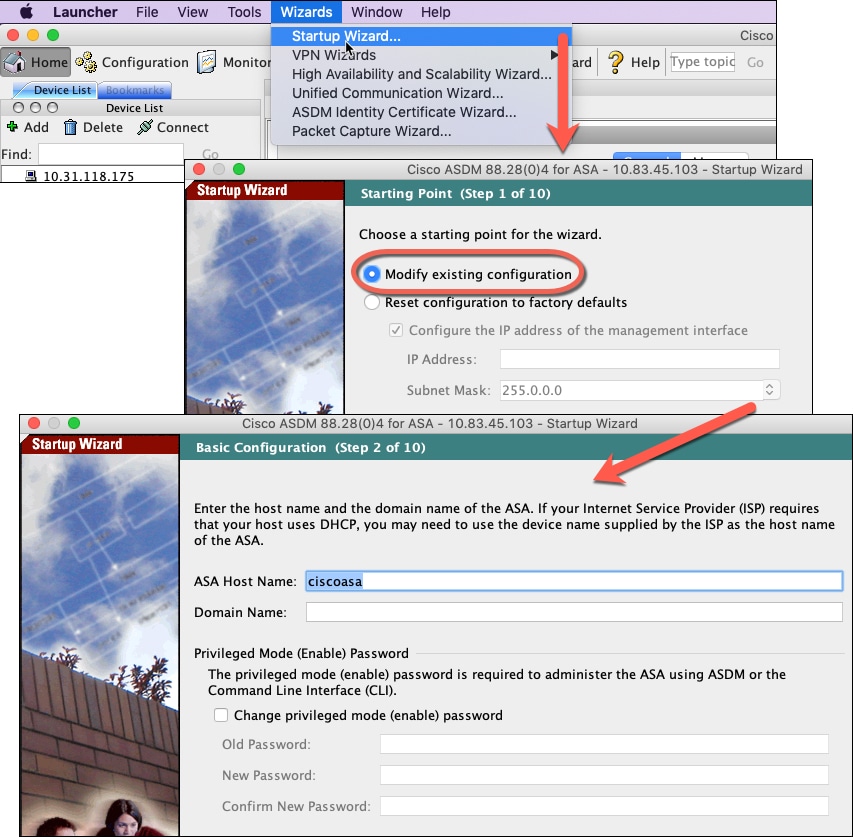
|
|
| 2. | Click Next on each page to conifgure the features you want. |
|
| 3. | For other wizards, see the ASDM general operations configuration guide. |