Cisco Catalyst SD-WAN Remote Access Configuration Guide, Releases 26.x and Later

PDF

Cisco Catalyst SD-WAN Remote Access Configuration Guide, Releases 26.x and Later

Configure Cisco Catalyst SD-WAN Remote Access

Want to summarize with AI?

Log in

Guides the configuration of Software-Defined Wide Area Network Remote Access through Cisco vManage, including setup using configuration groups and feature profiles.


Configure IKEv2 ciphers and parameters

Configure the IKEv2 encryption settings required for an SD-WAN RA headend device to establish secure VPN connections.

When configuring a device to function as an SD-WAN RA headend, you can combine all the required configuration commands into a single CLI add-on template. Use the configuration commands in config-transaction mode.

Procedure

1.

Configure an IKEv2 proposal.

Example:

crypto ikev2 proposal ikev2-proposal-name 
encryption encryption-algorithms 
integrity integrity-algorithms 
group DH-group-numbers 
prf prf-algorithms 

Example:

crypto ikev2 proposal sdra_ikev2_proposal
encryption aes-cbc-256
integrity sha256
group 19
prf sha384
2.

Configure an IKEv2 policy.

Example:

crypto ikev2 policy ikev2-policy-name 
proposal ikev2-proposal-name 

Example:

crypto ikev2 policy sdra_ikev2_policy
proposal sdra_ikev2_proposal
3.

Configure IKEv2 parameters.

Example:

crypto ikev2 cookie-challenge threshold-half-open-connections 
crypto ikev2 fragmentation mtu ikev2-mtu 

Example:

crypto ikev2 cookie-challenge 100
crypto ikev2 fragmentation mtu 1400

The IKEv2 encryption settings are configured for the SD-WAN RA headend device.


Configure a PKI trustpoint for certificate enrollment

This task configures a PKI trustpoint for certificate enrollment when the remote access headend is configured to use certificate authentication.

Perform this task if the remote access headend is configured to use certificate authentication. In Cisco SD-WAN Manager, use a CLI add-on template for the SD-WAN RA headend device to configure a PKI trustpoint that specifies a CA server for SCEP-based auto enrollment.

Procedure

Configure the PKI trustpoint with the required parameters for certificate enrollment.

Example:

crypto pki trustpoint sdra_trustpoint 
 auto-enroll renewal_percentage 
 enrollment url http://ca-ip-address:80 
 fingerprint ca_certificate_fingerprint  
 subject-name cn= subj-name-string 
 revocation-check none  
 auto-trigger  
 vrf ca-vrf 

Example:

crypto pki trustpoint sdra_trustpoint
auto-enroll 80
enrollment url http://10.1.1.11
fingerprint 0123456789ABCDEF0123456789ABCDEF
subject-name cn=sdra_headend_1
revocation-check none
auto-trigger
vrf 1

The PKI trustpoint is configured with SCEP-based auto enrollment for certificate authentication.


Configure an IKEv2 profile

The IKEv2 profile enables grouping of peers by identity, and specifies authentication and authorization policy.

In Cisco SD-WAN Manager, use a CLI add-on template for the SD-WAN RA headend device to configure the following:

Procedure

1.

Configure an IKEv2 profile.

  1. Specify a name for the profile.

    Example:

    crypto ikev2 profile sdra_ikev2_profile 
  2. Match peer identities and specify a local identity.

    Example:

    match identity remote { any |  id-type id-value}  
    identity local id-type id-value 
  3. Specify authentication types and credentials.

    Example:

    authentication local auth-type [ key pre-shared-key]  
    authentication remote auth-type 
    keyring aaa sdra-author-aaa-mlist password sdra-radius-password 
    pki trustpoint sdra_trustpoint 
    aaa authentication eap sdra_authen_mlist 
  4. Specify user authorization parameters.

    Example:

    aaa authorization user peer-auth-type cached 
  5. Specify group authorization parameters.

    Example:

    aaa authorization group peer-auth-type list sdra_author_mlist name-mangler sdra-group-author-name-mangler password sdra-radius-password 
  6. Enable AAA accounting.

    Example:

    aaa accounting peer-auth-type list sdra_acc_mlist 
  7. Specify an IPsec virtual-template interface.

    Example:

    virtual-template interface-number mode auto 

Example:

Example:

crypto ikev2 profile sdra_ikev2_profile
 match identity remote any 
 identity local email sdra_headend1@abc.com
 authentication local rsa-sig
 authentication remote anyconnect-eap aggregate
 pki trustpoint sdra_pki_trustpoint
 aaa authentication anyconnect-eap sdra_authen_mlist
 aaa authorization user anyconnect-eap cached
 aaa authorization group anyconnect-eap list sdra_author_mlist name-mangler sdra_group_author_name_mangler password sdra_radius_author_passwd
 aaa accounting anyconnect-eap sdra_acc_mlist
 virtual-template 1 mode auto
2.

Configure the IKEv2 name mangler to extract the domain portion from the peer identity, using a Cisco SD-WAN Manager CLI template.

Example:

crypto ikev2 name-mangler sdra_group_author_name 
 fqdn domain 
 email domain 
 eap suffix delimiter @  

Example:

crypto ikev2 name-mangler sdra_group_author_name_mangler
fqdn domain
email domain
eap suffix delimiter @

The IKEv2 profile is configured with authentication and authorization policy, and the name mangler is configured to extract the domain portion from peer identities.


Configure IPsec ciphers, parameters, and template interface

This task configures the IPsec settings required for the SD-WAN RA headend device to establish secure tunnel connections.

Use this procedure to set up IPsec encryption settings, security parameters, and the virtual template interface that enables secure communication for remote access connections.

Before you begin

Define the VRF for the service VPN before beginning this procedure. You can use a Cisco SD-WAN Manager feature template to define the VRF.

Follow these steps to configure IPsec ciphers, parameters, and template interface:

Procedure

1.

Configure IPsec ciphers.

Example:

crypto ipsec transform-set sdwan-ra_transform_se ipsec-cipher 
mode tunnel 

Example:

crypto ipsec transform-set sdwan-ra_ipsec_ts esp-gcm 256
mode tunnel
2.

Configure IPsec parameters.

Example:

crypto ipsec profile sdwan-ra_ipsec_profile 
set transform-set sdwan-ra_transform_set 
set security-association lifetime seconds ipsec_sa_life_sec  
set security-association replay window-size window-size 
set ikev2-profile sdwan-ra_ikev2_profile 

Example:

crypto ipsec profile sdwan-ra_ipsec-profile
 set security-association lifetime seconds 33600
 set security-association replay window-size 64 
 set transform-set sdwan-ra_transform_set
 set ikev2-profile sdwan-ra_ikev2_profile
3.

Configure the IPsec virtual-template interface.

Example:

interface Loopback 65515  
 vrf forwarding sdwan-ra_service_vpn 
 ip address private_ipv4_addr subnet_mask 
interface Virtual-Template sdwan-ra_vt_intf_num type tunnel  
 vrf forwarding sdwan-ra_service_vpn 
 tunnel mode ipsec ipv4 
 tunnel protection ipsec profile sdwan-ra_ipsec_profile 

Example:

vrf definition sdwan-ra_service_vpn
!
interface interface Loopback 65515 
 vrf forwarding sdwan-ra_service_vpn
 ip address 10.0.0.100 255.255.255.0
!
interface Virtual-Template101 type tunnel 
 vrf forwarding sdwan-ra_service_vpn
 tunnel mode ipsec ipv4
 tunnel protection ipsec profile sdwan-ra_ipsec-profile

The IPsec ciphers, parameters, and virtual template interface are configured for the SD-WAN RA headend device.


Configure AnyConnect profile download

Configure AnyConnect profile download functionality on the Cisco Catalyst SD-WAN remote access headend device to enable client profile distribution.

In Cisco SD-WAN Manager, use a CLI add-on template for the SD-WAN RA headend device to configure the AnyConnect profile download functionality.

Before you begin

Ensure that you have an AnyConnect profile XML file available. Step 3 uses the file. For information about AnyConnect profiles, see the documentation for AnyConnect.

Follow these steps to configure AnyConnect profile download:

Procedure

1.

Disable HTTP secure server functionality.

Example:

no ip http secure-server 
2.

Configure SSL policy and specify the Cisco Catalyst SD-WAN remote access WAN IP as the local address for profile download.

Example:

crypto ssl policy sdra_anyconnect_profile_download 
 pki trustpoint sdra_pki_trustpoint  sign 
 ip address local sdra_wan_ip port 443 
3.

Copy the AnyConnect profile XML file to the SDremote access headend bootflash and specify the path.

Example:

crypto vpn anyconnect profile sdra_anyconnect_profile  bootflash: sdra_anyconnect_profile.xml 
Note

You can copy the AnyConnect profile XML file to the Cisco Catalyst SD-WAN remote access headend bootflash from a host reachable in a service VPN, using the secure copy command on the Cisco Catalyst SD-WAN remote access headend.

4.

Specify the AnyConnect profile name in the IKEv2 profile.

Example:

crypto ikev2 profile sdra_ikev2_profile 
 anyconnect profile sdra_anyconnect_profile 

The AnyConnect profile download is configured on the headend device. The following example shows the complete configuration:

no ip http secure-server
!
crypto ssl policy sdra_anyconnect_profile_download
 pki trustpoint sdra_pki_trustpoint sign
 ip address local 172.16.1.1 port 443
!
crypto vpn anyconnect profile sdra_anyconnect_profile bootflash: sdra_anyconnect_profile.xml
!
crypto ikev2 profile sdra_ikev2_profile
anyconnect profile sdra_anyconnect_profile

Configure a unique local private IP pool on the SD-WAN RA headend

Configure each SD-WAN RA headend with a unique private IP pool from which to assign IP addresses to remote access clients. The IP pool can be shared across the service VPNs in which remote access clients connect to the SD-WAN RA headend.

Note

This task is optional if all remote access users connect to the headend by hardware remote access client.

Procedure

1.

In Cisco SD-WAN Manager, use a CLI add-on template for the SD-WAN RA headend device to configure the local IP pool.

Ensure that the IP pool range is sufficient for the expected number of remote access connections.

Example:

ip local pool sdra-ip-pool ip-address-range-start ip-address-address-end 

Example:

ip local pool sdra_ip_pool 10.0.0.1 10.0.0.100
2.

On the RADIUS server, configure the per-user or group policy to specify the IP pool name configured in the previous step.

3.

Optionally, for each remote access service VPN, use a Cisco SD-WAN Manager OMP feature template to advertise the remote access IP pool range as a summary-only route.

If the SD-WAN RA IP pool summary is not advertised, OMP automatically advertises, for each remote access client, static host routes that are dynamically programmed by the SD-WAN RA headend. This may not be optimal if there is a large number of remote access clients across the Cisco Catalyst SD-WAN fabric.

The SD-WAN RA headend is configured with a unique private IP pool for assigning IP addresses to remote access clients.


Configure AAA parameters and RADIUS server parameters

This task configures AAA parameters and RADIUS server parameters to enable authentication, authorization, and accounting services for the SD-WAN RA headend device.

Use a CLI add-on template in Cisco SD-WAN Manager to configure both RADIUS server parameters and AAA method lists for your SD-WAN RA headend device.

Procedure

1.

Configure RADIUS server parameters.

Example:

aaa new-model 
aaa group server radius sdra_radius_grp 
server-private radius-ip key encr_key 
ip vrf forwarding radius-vrf 
2.

Configure AAA method lists for authentication, authorization and accounting.

Example:

aaa authentication login sdra_authen_mlist group sdra_radius_grp 
aaa authorization network sdra_author_mlist group sdra_radius_grp 
aaa accounting network sdra_acc_mlist group sdra_radius_group 

The AAA parameters and RADIUS server parameters are configured with the specified settings. The following example shows the complete configuration:

aaa new-model
aaa group server radius sdra_radius_group
server-private 10.0.8.100 key sdra-encr-key 
ip vrf forwarding 1
!
aaa authentication login sdra_authen_mlist group sdra_radius_grp
aaa authorization network sdra_author_mlist group sdra_radius_grp
aaa accounting network sdra_acc_mlist group sdra_radius_group

Configure the RADIUS server with user credentials and policy

The SD-WAN RA headend relies on the RADIUS server as the repository of remote access user authentication credentials, and of policy configuration details, such as VRF, security group tag (SGT), IP pool name, and server subnets. Using the RADIUS server for these functions is preferable to trying to manage credential and policy configuration on each remote access headend device, as the RADIUS server centralizes this configuration and provides scalability.

The RADIUS server also functions as an extensible authentication protocol (EAP) server when remote access clients use the EAP authentication method.

This task requires a working knowledge of RADIUS server configuration.

To support the SD-WAN RA headend, ensure that these parameters are configured on the RADIUS server. These parameters are required for enabling remote access connections:

  • User authentication credentials

    • Username and password for AnyConnect-EAP connections

    • Pre-shared keys for the pre-shared key authentication method

    • EAP credentials for EAP authentication method

  • Policy parameters that apply to a user or to a user group

    • VRF: Service VPN that the remote access user is assigned to

    • IP pool name: Name of the IP pool defined on the remote access headend

    • Server subnets: Subnet access to provide to the remote access user

    • SGT: Trustsec SGT tag to assign to the user traffic

For full configuration information, see the RADIUS documentation. For a list of supported attributes, see FlexVPN RADIUS Attributes.

For reference, see this subset of RADIUS parameters. These parameters are required, to enable SD-WAN RA to establish remote access connections.

Table 1. Subset of the parameters in a user profile

Parameter

Description

Profile name

Remote access user identity.

Example:

user1@example.com

Cleartext-password := "password"

Remote access user password specified by the remote access user on the remote access client.

This is required for AnyConnect EAP authentication.

Tunnel-Password = pre-shared-key-string

Pre-shared-key string to use for the remote access user.

This is required for pre-shared key authentication.

cisco-avpair+="ip:interface-config=VRF forwarding VRF-name"

VRF (service VPN) that the remote access user is assigned to.

Prerequisite: Define the VRF locally on the headend.

cisco-avpair+="ip:interface-config=IP unnumbered interface-name"

The IP unnumbered interface for the virtual-template and virtual-access interfaces.

  • Prerequisite: On the SD-WAN RA headend, configure the interface to use for remote access, and a private IP address, preferably from the IP pool subnet range.

  • The SD-WAN RA headend re-uses the private IP address described above for virtual-template and per-remote-access-user virtual-access interfaces.

Note

If the VRF attribute is configured in a RADIUS profile, then the IP numbered interface attribute must also be configured after the VRF attribute.

Framed-Pool=pool-name

Name of the IP pool, defined on the headend, that the remote access headend uses to assign an IP address to the remote access user.

cisco-avpair+="ipsec:route-set=prefix prefix/prefix-length"

IP prefixes to which the remote access user requires access over the remote access VPN tunnel.

You can configure this attribute multiple times to specify multiple prefixes.

cisco-avpair+="ip:interface-config=cts role-based SGT-map SGT SGT-value"

The SGT to assign to the traffic from this remote access user that is destined to a Cisco Catalyst SD-WAN tunnel.

Table 2. Subset of the parameters in a user group profile

Parameter

Description

Group profile name

Domain portion of the remote access user identity.

The group profile enables grouping of remote access users based on the domain portion of the remote access user identity. Grouping enables you to specify common policy parameters.

Specifying example.com would include in the group any user with example.com domain after the @ character.

The RADIUS server applies the parameters specified in this group profile to any users included in this group.

Cleartext-password := "password"

For an authorization request from remote access headend to the RADIUS server, the password is configured on the remote access headend as part of the authorization command in IKEv2 profile.

If the password is not configured, the default password is cisco .

cisco-avpair+="ip:interface-config=VRF forwarding VRF-name"

VRF (service VPN) that the group of remote access users is assigned to.

Prerequisite: Define the VRF locally on the headend.

cisco-avpair+="ip:interface-config=IP unnumbered interface-name"

The IP unnumbered interface for the virtual-template and virtual-access interfaces.

  • Prerequisite: On the SD-WAN RA headend, configure the interface to use for remote access, and a private IP address, preferably from the IP pool subnet range.

  • The SD-WAN RA headend re-uses the private IP address described above for virtual-template and per-remote-access-user virtual-access interfaces.

Note

If the VRF attribute is configured in a RADIUS profile, then the IP numbered interface attribute must also be configured after the VRF attribute.

Framed-Pool=pool-name

Name of the IP pool, defined on the headend, that the remote access headend uses to assign IP addresses to this group of remote access users.

cisco-avpair+="ipsec:route-set=prefix prefix/prefix-length"

IP prefixes to which the group of remote access users require access over the remote access VPN tunnel.

You can configure this attribute multiple times to specify multiple prefixes.


Configure remote access traffic rate limiting

You can limit the rate of the aggregate upstream and downstream aggregate remote access traffic by applying quality of service (QoS) policers and shapers.

Remote access traffic rate limiting helps control bandwidth usage and ensure network performance by managing traffic flow between remote access clients and Cisco Catalyst SD-WAN sites.

Procedure

1.

Rate limit remote access upstream traffic (from the remote access client).

Note

The upstream traffic may be destined to Cisco Catalyst SD-WAN sites such as the SD-WAN RA headend, a data center LAN, or the internet.

Use one or both of the following options to rate limit to the required rate.

  • For encrypted upstream traffic: Using Cisco SD-WAN Manager, add an inbound QoS policer on the SD-WAN RA WAN interface, using the local data policy (access list), to rate limit encrypted upstream traffic.

    Rate limiting encrypted traffic drops excess remote access traffic, irrespective of the traffic destination, remote access client type, or application type.

    Configure the following match conditions and action:

    • Match IKEv2 and encrypted IPsec traffic. Include the following:

      • UDP ports 500 and 4500

      • IP protocol ESP

    • Action: Configure the required rate for the policing.

  • For decrypted upstream traffic: Using Cisco SD-WAN Manager, add an inbound QoS policer on the SD-WAN RA WAN interface, using the centralized data policy, to rate limit decrypted upstream traffic.

    When rate limiting decrypted traffic, you can specify remote access clients and application types.

    Note

    SD-WAN RA places a remote access user in a service VPN based on the user identity. After decryption, the traffic from a remote access user is treated as inbound traffic from the VPN of the remote access user.

    Configure the following match conditions and action:

    • Match remote access inner (within the IPsec tunnel) traffic. Specify the following:

      • Remote access user service VPN

      • For the source IP, specify the IP address(es) assigned to the remote access client.

      • Application

    • Action: Configure the required rate for the policing.

2.

Using Cisco SD-WAN Manager, add an inbound QoS policer to the centralized policy to rate limit remote access downstream (toward the remote access client) traffic.

The traffic may originate from sources such as traffic from the site where the SD-WAN RA headend is located, a data center LAN, software-as-a-service (SaaS) applications, or the internet.

Effect: This step rate limits the enterprise and internet (including SaaS) remote access return traffic as close as possible to the traffic source (application server). When rate limiting unencrypted traffic, you can specify remote access clients and application types.

Configure the following match conditions and action:

Remote access traffic is rate limited according to the configured QoS policers, controlling bandwidth usage for both upstream and downstream traffic flows.


Configure remote access traffic symmetry

This task ensures remote access traffic symmetry (both directions of a flow using the same path) to enable return traffic to be correctly routed to remote access clients.

At Cisco Catalyst SD-WAN sites with multiple Cisco IOS XE Catalyst SD-WAN devices acting as SD-WAN RA headends, traffic symmetry configuration is required to prevent routing issues.

Procedure

1.

Choose the appropriate configuration method based on your site configuration.

  • For sites that use VRRP, follow procedure A below.
  • For sites that use routing protocols such as OSPF or EIGRP, follow procedure B below.
2.

Configure remote access traffic symmetry for sites that use VRRP.

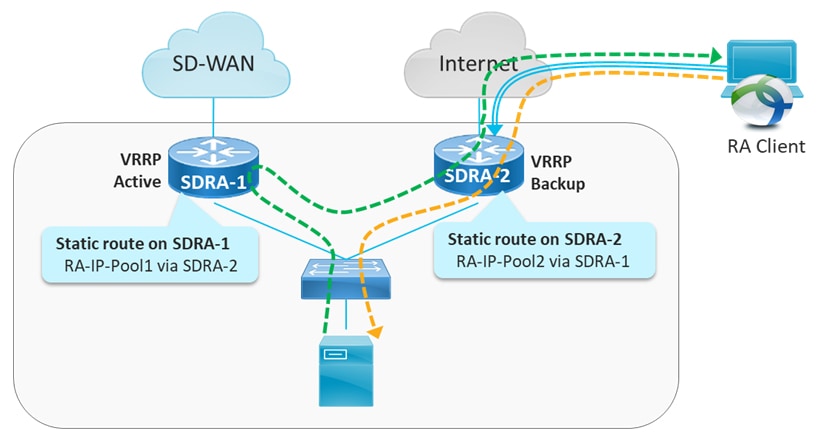
At a site with multiple Cisco IOS XE Catalyst SD-WAN devices functioning as SD-WAN RA headends, and with a LAN that uses the virtual router redundancy protocol (VRRP), use this procedure to ensure remote access traffic symmetry and return traffic reachability.

Figure 1. Site with Service-Side VRRP
The diagram illustrates a site configuration featuring multiple headends utilizing the Virtual Router Redundancy Protocol (VRRP) to achieve remote access traffic symmetry. It highlights the importance of unique local private IP pools for each headend to ensure proper IP address assignment for remote access clients.
  1. Ensure that each SD-WAN RA headend has a unique local private IP pool (remote access IP pool) for assigning IP addresses to remote access clients. remote access clients use the assigned private IP as the source IP for all inner (within the IPsec tunnel) traffic.

  2. On each SD-WAN RA headend, in each of the end user service VPNs, add a static route to the remote access IP pool of each of the neighbor SD-WAN RA headends. For the static route, configure the corresponding SD-WAN RA headend as the next hop.

    The effect of this step is that if there is an asymmetric traffic flow, where return traffic arrives at a different device at the site than forward traffic, the static route forwards the traffic to the correct SD-WAN RA headend device, which is the headend device with the IPsec tunnel and host route to the remote access client.

Example:

In the example shown in the figure, there are two SD-WAN RA headend devices (SDRA-1 and SDRA-2) at the same site. They are interconnected with a service VPN. Each has a unique local IP pool.

  • On SDRA-1, configure a static route as follows:

    • Route destination: SDRA-2 IP pool subnet

    • Route next-hop: SDRA-2 service VPN IP

  • On SDRA-2, configure a static route as follows:

    • Route destination: SDRA-1 IP pool subnet

    • Route next-hop: SDRA-1 service VPN IP

3.

Configure remote access traffic symmetry for sites that use routing protocols.

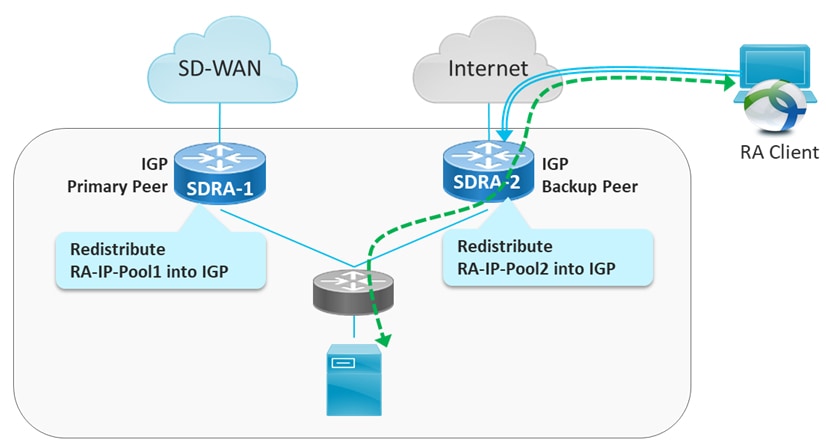
At a site with multiple Cisco IOS XE Catalyst SD-WAN devices functioning as SD-WAN RA headends, and with a LAN that uses routing protocols such as open shortest path first (OSPF) or enhanced interior gateway routing protocol (EIGRP), use this procedure to ensure remote access traffic symmetry and return traffic reachability.

Figure 2. Site with Service-Side routing protocol
The diagram illustrates a site configuration with multiple headends utilizing service-side routing protocols, highlighting the importance of unique local private IP pools for remote access clients to maintain traffic symmetry and return traffic reachability.
  1. Ensure that each SD-WAN RA headend has a unique local private IP pool for assigning IP addresses to remote access clients (remote access IP pool). remote access clients use the assigned private IP as the source IP for all inner (within the IPsec tunnel) traffic.

  2. On each SD-WAN RA headend, redistribute the remote access IP pool into the service side routing protocol, so that the LAN-side router/L3 switch forwards any return traffic destined to remote access clients to the correct device, based on the assigned IP address (return traffic destination IP).

Remote access traffic symmetry is configured, ensuring that return traffic is correctly routed to remote access clients at sites with multiple SD-WAN RA headends.


Cisco Catalyst SD-WAN features for remote access traffic

Cisco Catalyst SD-WAN features for remote access traffic are security and networking capabilities that

  • apply to remote access traffic after it is decrypted and becomes inbound traffic on the assigned service VPN

  • are configured for the service VPN where the SD-WAN RA headend places remote access users based on their identity, and

  • include NAT-DIA, UTD, and ZBF capabilities.

Configuration requirements

When the SD-WAN RA headend establishes a connection with a remote access user, it places the user in a service VPN based on the identity of the remote access user. Ensure that each service VPN is configured with the Cisco Catalyst SD-WAN features that you want to apply to the remote access traffic that uses that service VPN.