Cisco N-type Lightning Arrestor

This chapter contains the following sections:

Introduction

The Cisco Lightning Arrestor provides a level of safety protection to the user as well as to wireless equipment by shunting to ground over-voltage transients induced into outdoor antennas and cables. These transients, in mild cases can produce interfering signals in a wireless system, and in extreme cases, can be dangerous and destructive.

Overvoltage transients can be created through lightning static discharges, switch processes, direct contact with power lines, or through earth currents. The Cisco Lightning Arrestor limits the amplitude and duration of disturbing interference voltages and improves the overvoltage resistance of in-line equipment, systems, and components.

The Lightning Arrestor also provides the following benefits:

  • Broadband operation

  • DC continuity for outdoor powering

  • Bidirectional installation

  • Permanently installed gas capsule

Kit Contents

The lightning arrestor (CGR-LA-NM-NF, CGR-LA-NF-NF) contains the following parts:

  • Lightning arrestor, nut, and washer

  • Grounding lug

Technical Specifications

The following are the technical specifications of the Lightning Arrestor:

Feature

Description

Arrestor Type

Gas discharge tube

Main path connectors

Port 1:

  • CGR-LA-NM-NF: protected, N (male)

  • CGR-LA-NF-NF: protected, N (female)

Port 2: protected, N (female, bulkhead side)

Impedance

50 ohms

Frequency range

0 MHz to 7000 MHz

Return loss

  • 0 to 6700 MHz: -20 dB max

  • 6700 to 7000 MHz: -17 dB max

Insertion loss

  • 0 to 6700 MHz: 0.2 dB max

  • 6700 to 7000 MHz: 0.3 dB max

RF CW power

Less than or equal to 60 W

Surge current handling capability

10 single, multiple kA (test pulse 8/20 microseconds)

Residual pulse energy

250 microsecond typically (test pulse 4 kV 1.2/50 microsecond; 2kA 8/20 microsecond), main path (protected side)

Operating temperature range

–40-degrees F to 185-degrees F (–40-degrees C to 85-degrees C)

Waterproof rating

IP 67 (according to IEC 60529, data refer to the coupled state)

Mounting and grounding

MH24 (bulkhead)

Material

  • Housing: white bronze-plated aluminum

  • Male center contact: silver-plated brass

  • Female center contact: silver-plated phosphor bronze

Warnings


Warning


Statement 1071—Warning Definition

IMPORTANT SAFETY INSTRUCTIONS

Before you work on any equipment, be aware of the hazards involved with electrical circuitry and be familiar with standard practices for preventing accidents. Read the installation instructions before using, installing, or connecting the system to the power source. Use the statement number at the beginning of each warning statement to locate its translation in the translated safety warnings for this device.

SAVE THESE INSTRUCTIONS


Warning


Statement 1024—Ground Conductor

This equipment must be grounded. To reduce the risk of electric shock, never defeat the ground conductor or operate the equipment in the absence of a suitably installed ground conductor. Contact the appropriate electrical inspection authority or an electrician if you are uncertain that suitable grounding is available.


Installation Considerations

We recommend that you bulkhead mount the lightning arrestor onto the router.

The importance of obtaining a good ground and bonding connection cannot be overstressed. Consider these points when grounding the lightning arrestor:

  • Connect the lightning arrestor components directly to the chassis-mounted bulkhead connector.

  • The contact points between the bulkhead connector and the lightning arrestor must be clean and free of dust and moisture.

  • Tighten threaded contacts to the torque specified by the manufacturer.

Installing the Lightning Arrestor

The Cisco Lightning Arrestor must be bulkhead-mounted onto the enclosure or router chassis. The lightning arrestor must be attached directly onto a well-grounded chassis through the threaded shaft of the lightning arrestor and the bulkhead adapter.


Warning


Statement 1074—Comply with Local and National Electrical Codes

To reduce risk of electric shock or fire, installation of the equipment must comply with local and national electrical codes.


Note


This part might be factory installed in an antenna port on the router when the router is shipped.

Note


When you install the lightning arrestor, follow the regulations or best practices applicable to lightning protection installation in your local area.

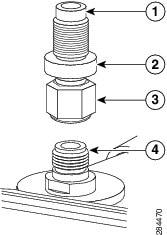
Refer to the following figure during installation:

Figure 1. Lightning Arrestor Detail (CGR-LA-NM-NF shown)

1

Protected side N jack (to antenna)

2

Lightning arrestor

3

Protected side N plug (to radio)

4

N-bulkhead port (on host chassis)

Installation Steps

Procedure


Step 1

Install the bulkhead N-connector adapter onto the appropriate antenna port on the router chassis. Tighten to a 6-to-7 ft-lbs torque rating.

Step 2

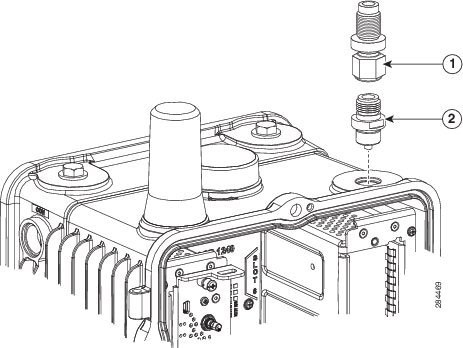
Install the N-plug end of the lightning arrestor onto the top of the bulkhead N-connector). Tighten to a 6-to-7 ft-lbs torque rating.

1

Lightning arrestor

2

N-bulkhead port (on host chassis)

Step 3

Install the N-plug end of your antenna cable onto the N-jack of the lightning arrestor. Tighten to a 6-to-7 ft-lbs torque rating.


Suggested Cables

We recommend using a 20’ LMR-400 N(m)-N(m) low-loss coaxial cable (part numbers CAB-L400-20-N-N) or a 30’ LMR-600 N(m)-N(m) very low-loss coaxial cable (CAB-L600-30-N-N).