Find all the information you need about this release—new features, known behavior, resolved and open bugs, and related information.
 Note |
Explore Content Hub, the all new portal that offers an enhanced product documentation experience. Content Hub offers the following features to personalize your content experience.
|
New and Enhanced Software Features for Cisco IOS XE Amsterdam 17.1.x
Note |
When you upgrade from one Polaris release to another, you may see |
New and Enhanced Features for Cisco IOS XE Amsterdam 17.1.x
-
Syslog for Improper Card Seating—This feature helps you detect if the card is seated properly in the chassis. If the card is not inserted correctly, a message is displayed on the console prompting you to re-insert the card correctly again.
-
SMU Integrity Hash Verification against Known Good Value—This feature helps you to authenticate and maintain the integrity of Cisco IOS XE software SMU images and keep track of security changes in the software.
-
Stronger Network Time Protocol (NTP) Authentication—The authentication keys of NTP and Simple Network Time Protocol (SNTP) support enhanced cryptographic options such as CMAC, SHA-1, and SHA-256. These options enhance the security of the message exchange of NTP and SNTP.
-
MPLS over DMVPN Enhancement —In an MPLS over DMVPN configuration, spoke nodes can now be configured as Provider (P) nodes. This removes the limitation of previous releases in which spoke nodes had to be configured as Provider Edge (PE) nodes.
-
Select IPv6 DNS traffic for ALG Processing This is an enhancement to the existing ip nat service dns-v6 command. You can now use the keyword list with this command to select the IPv6 DNS traffic to be processed by ALG.
-
Accounting and Policing for VXLAN—This enhancement to the existing VXLAN static routing feature deploys the Cisco ASR 1000 router at the gateway of the core network and offers the following support:
-
Accounting: Helps charge for egress/ingress traffic that flows from any core network through the ASR 1000 network.
-
Policy: Helps track ingress traffic flowing into a specific VNET through the ASR 1000 network, to protect virtual machines deployed in the cloud.
-
-
New default credentials for WebUI—The login credentials for connecting to the device using WebUI at day 0 are updated.
-
RFC 8263 compliance for GDOI implementation—The Group Domain of Interpretation (GDOI) feature includes the ability of a Key Server (KS) to provide a set of current Group Member (GM) devices with additional security associations. RFC 8263 has added the ability for a KS to request that the GM devices return an acknowledgement of its rekey message and specify the acknowledgement method.
-
Configuring the Routing Information Protocol via Web User Interface—Supports an embedded GUI-based device-management tool that provides the ability to provision the router, simplifies device deployment and manageability, and enhances user experience.
-
Debug Messages for OSPF LSA MaxAge Events—
To display debug messages about OSPF LSA MaxAge events, use the following commands:
-
debug ip ospf lsa-maxage
-
debug ospfv3 lsa-maxage
-
-
Suppression of ESI Re-frame Errors During Upgrade or OIR—ESI re-frame errors are expected after an OIR or upgrade of a line card and need no troubleshooting. This feature supresses these expected ESI re-frame error messages so that you can skip investigating these messages.
-
Link Delay Measurement for SR-TE—With this feature, you can configure the measurement and advertisement of link delay metrics such as minimum link delay, maximum link delay, average link delay, and delay variation. You can use these metrics to evaluate the performance of your network and as input for traffic engineering to direct the flow of traffic through the network to conform to SLAs.
Resolved and Open Bugs for Cisco IOS XE Amsterdam 17.1.x
About the Cisco Bug Search Tool
Use the Cisco Bug Search Tool to access open and resolved bugs for a release.
The tool allows you to search for a specific bug ID, or for all bugs specific to a product and a release.

You can filter the search results by last modified date, bug status (open, resolved), severity, rating, and support cases.
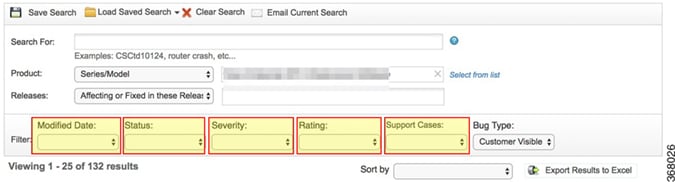
Resolved Bugs for Cisco IOS XE Amsterdam 17.1.x
All resolved bugs for this release are available in the Cisco Bug Search Tool through the Resolved Bug Search.
|
Caveat ID Number |
Description |
|---|---|
|
ASR1000-RP2/ASR1000-RP3: OIR after clock set doesnt save the time in RTC |
|
|
"sh macsec statistics int <>" and "sh macsec status interface <>" does not show output |
|
|
ASR1K DSP MIB cdspTotalChannels not responding |
Open Bugs for Cisco IOS XE Amsterdam 17.1.x
All open bugs for this release are available in the Cisco Bug Search Tool through the Open Bug Search.
|
Caveat ID Number |
Description |
|---|---|
|
Multicast VRF Nat not working properly |
|
|
APN password in clear text when configuring profile under cellular controller. |
|
|
IPSEC install failed IPSEC_PAL_SA shows "unexpected number of parents" |
|
|
ASR 1000 - SPA crashed with various watchdog timeout- Mem increase at "CPP CEF MPLS Gtrie " |
|
|
Cat9400R-96U macsec encryption on the downlink loses IP address after port bounce |
|
|
CFT crashed frequently |
|
|
MKA session up but unable to pass data across link using AES-256-XPN cipher |
|
|
CPP crash on router with PFR |
Important Notes, Known Behavior, and Workaround
Important Notes
As of August 2017, Autonomic Networking is no longer supported in any version of Cisco IOS-XE software.
Recover from the ROMmon mode
When you upgrade your IOS software image, you might accidentally delete your old image without updating the boot statement. This could result in entering the ROMmon (ROMMonitor) mode. To recover from the ROMmon mode, the following enhancements are supported for different use cases.
Supported Workaround
|
Use Case |
Supported Enhancement |
|---|---|
|
Reload the router with config-reg configuration |
Before reloading, the routerchecks if the first boot statement points to an image that exists and verifies it. If the image is missing or invalid, the users are prompted for confirmation to proceed with reload of the router. |
|
Reload the router with config-register 0x2102–autoboot |
The router checks if the boot variableis set properly, and accordingly prompts the users to proceed with caution. |
|
Reload the router with config-register 0x2102 |
Auto boot and the boot variable (bootvar) is set, but there is no image in bootvar set path–The router checks if the bootvar is properly set and if there is any image set in the bootvar path. If there is no image in the bootvar path (harddisk/bootflash/flash,and so on), then the reload is aborted with a warning message,and the users are prompted to correct the boot statement or copy the image to hard disk |
|
Auto boot and boot variableis set |
If the image is present in the bootvar path, then the router reload is allowed. |
ROMmon Release Requirements
For more information on ROMmon support for Route Processors (RPs), Embedded Services Processors (ESPs), Modular Interface Processors (MIPs), and Shared Port Adapter Interface Processors (SIPs) on Cisco ASR 1000 Series Aggregation Services Routers, see https://www.cisco.com/c/en/us/td/docs/routers/asr1000/rommon/asr1000-rommon-upg-guide.html
 Feedback