Performance Measurement for Traffic Engineering

Metrics such as packet loss, delay, delay variation (jitter) and bandwidth utilization help you evaluate the performance of your network. You can use these metrics as input for Traffic Engineering (TE) and direct the flow of traffic through the network to conform to Service Level Agreements (SLAs). With this feature, you can configure the measurement and advertisement of link delay metrics for TE.

Feature Information for Performance Measurement for Traffic Engineering

The following table provides release information about the feature or features described in this module. This table lists only the software release that introduced support for a given feature in a given software release train. Unless noted otherwise, subsequent releases of that software release train also support that feature.

Use Cisco Feature Navigator to find information about platform support and Cisco software image support. To access Cisco Feature Navigator, go to www.cisco.com/go/cfn. An account on Cisco.com is not required.
Table 1. Feature Information for Performance Measurement for Traffic Engineering

Feature Name

Releases

Feature Information

Link Delay Measurement

Cisco IOS XE Bengaluru 17.4

Metrics such as packet loss, delay, delay variation (jitter) and bandwidth utilization help you evaluate the performance of your network. You can use these metrics as input for Traffic Engineering (TE) and direct the flow of traffic through the network to conform to Service Level Agreements (SLAs). With this feature, you can configure the measurement and advertisement of link delay metrics for TE.

Information about Performance Metrics for Traffic Engineering

Overview of Link Delay Measurement

Link delay is measured using PM Query packets in the format defined in RFC 6374. To support the packet format, the remote line card must be MPLS capable.


Note


Only two-way link delay measurement is supported.


For link delay measurement, an MPLS multicast MAC address is used to send delay measurement probe packets to next-hops. You need not configure next-hop addresses for the links. The remote side line card must support the MPLS multicast MAC address.

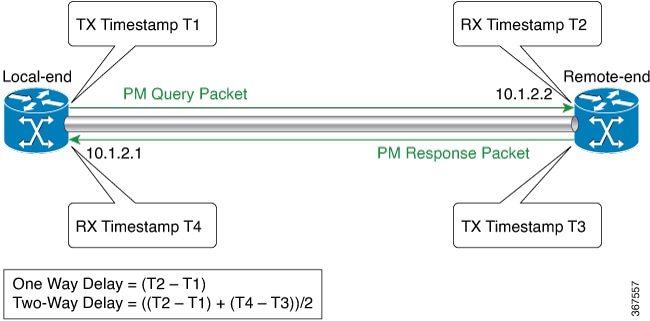
The following figure shows the measurement of link delay using the PM Query and Response packets.

  1. The local-end router sends a burst of PM Query packets to the remote-end router at the configured interval. The packets are timestamped (T1) before they are sent.

  2. At the remote-end router, packets are timestamped (T2) when they are received.

  3. The remote-end router sends the PM packets containing the timestamps (T1 and T2) back to the local-end router. The packets are timestamped (T3) before they are sent.

  4. At the local-end router, packets are timestamped (T4) when they are received.

  5. At the local-end router, two-way link delay is measured using the timestamps of the PM packets.

Link Delay Metrics for a Computation Interval

The local-end router sends a configured count of PM query packets to the remote-end router at configured burst intervals. The local-end router measures two-way link delay for each burst of PM Query packets that it sends to the remote-end router and receives back with timestamps.

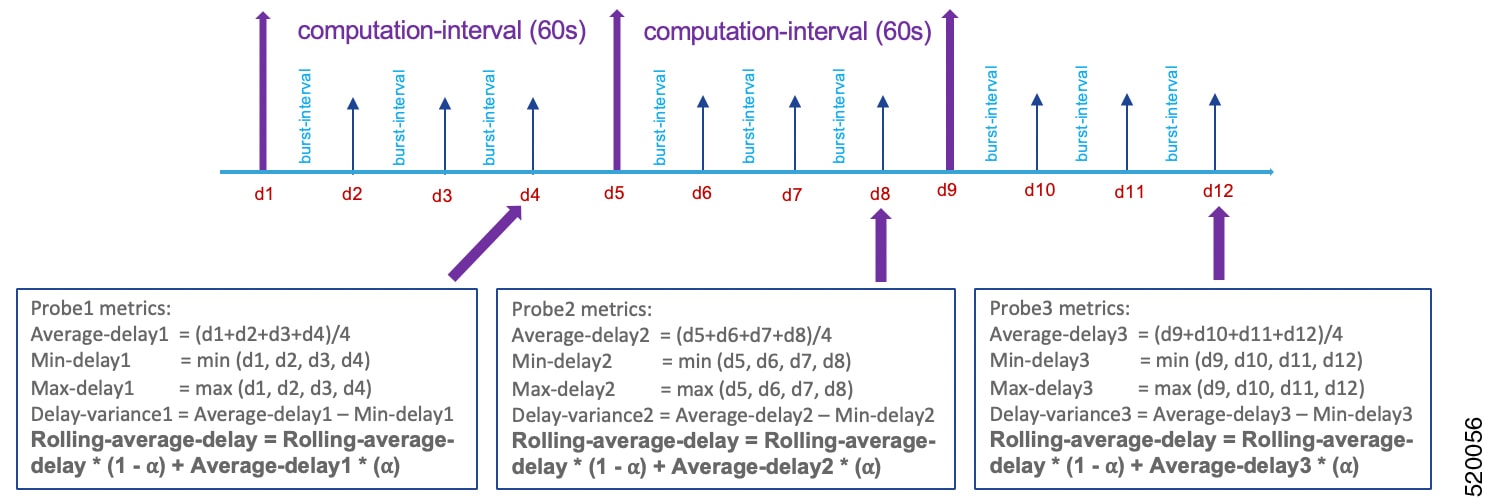
During each configured probe or computation interval, multiple bursts of PM packets are sent and link delay is measured. Minimum, maximum, and average link delay, and delay variance are calculated for the interval. These metrics are calculated using the link delay that is measured for the bursts sent during the interval.

The following figure illustrates the calculation of delay metrics for a computation interval. In this example, the computation interval is 60 seconds and the burst interval is 15 seconds.

Link Delay Metrics for Advertisement

You can configure the computation and advertisement of delay metrics in a periodic manner, an accelerated manner, or both. The advertisement of link delay metrics is supported with the ISIS, OSPF, and BGP-LS protocols. No additional configuration is required to flood link delay metrics through ISIS, OSPF, and BGP-LS protocols.

Periodic Advertisement

Periodic advertisement is enabled by default. A periodic advertisement interval consists of one or more computation or probe intervals. Link delay metrics are computed at the end of each computation interval. In a periodic advertisement interval, after the last computation interval, the minimum delay computed for a link is compared with the value advertised previously. If the variation in values is beyond configured limits, all the delay metrics for the link are advertised. If the variation in values is within configured limits, the delay metrics for the link are not advertised.

  • Suppose a periodic advertisement interval consists of N computation intervals, at the end of a computation interval i, the following metrics are computed:

    • Rolling average delay

      Rolling average delay = rolling-average-delay(i-1) * 0.5 + average-delay(i) * 0.5

    • Minimum delay

      Minimum delay = min[min-delay(1),..., min-delay(i-1), min-delay(i)]

    • Maximum delay

      Maximum delay = max[max-delay(1),…, max-delay(i-1), max-delay(i)]

    • Delay variance

      Delay variance = average[delay-variance(1),…, delay-variance(i-1), delay-variance(i)]

  • After the last computation interval in the periodic advertisement interval, the minimum delay for a link is compared with the value advertised after the previous interval.

    • Case 1: change between the two values is beyond the configured threshold and minimum-change. In this case, all the delay metrics computed for the link after the recent periodic advertisement interval are advertised.

    • Case 2: change between the two values is within the configured threshold and minimum-change. In this case, the delay metrics are not advertised.

Accelerated Advertisement

By default, accelerated advertisement is disabled. When you enable accelerated advertisement, the minimum link delay that is computed for a link after a computation interval is compared with the value previously advertised. If the variation in values is beyond configured limits, all the delay metrics for the link are advertised. If the variation in values is within configured limits, the delay metrics for the link aren't advertised.

When link delay metrics are advertised in an accelerated manner, the periodic advertisement interval is reset. This reset ensures the configured interval of time between the recent advertisement and the next periodic assessment.

Link Delay Metrics when the Link State Changes

When a link enters the DOWN state, link delay metrics are advertised with the highest value. The minimum, maximum, and average link delay, and delay variance are advertised with a value of 16.7 seconds (0xFFFFFF). With the highest metric values advertised, routing and SR-TE path computation don't use stale metric values when the link enters the UP state.

Global Link Delay Profile

You can configure a global profile for the measurement of link delay metrics. The profile defines parameters that control the computation and advertisement of link delay metrics and replaces the default configuration. Being global, the profile applies to link delay measurement on all interfaces.

You can configure the following parameter as part of the global profile:

Table 2. Global Link Delay Profile Parameters

Aspect

Parameter

Description

probe

interval

The default probe or computation interval is 30 seconds. The range is 30–3600 seconds.

protocol

Protocol used to send probes. The default and the only supported protocol is pm-mpls: link delay measurement based on RFC 6374 with MPLS encapsulation.

burst

count

The default value is 10 and range is 1–30.

interval

The default value is 3000 milliseconds and the range is 30–15000 milliseconds.

periodic advertisement

interval

The default value is 120 seconds and the interval range is 30–3600 seconds.

threshold

The default value of periodic advertisement threshold is 10 percent.

minimum-change

The default value is 1000 microseconds and the range is 0–10000 microseconds.

disabled

Periodic advertisement is enabled by default.

accelerated advertisement

threshold

The default value is 20 percent and the range is 0–100 percent.

minimum-change

The default value is 1000 microseconds and the range is 1–100000 microseconds.

Benefits of Link Delay Measurement

You can use link delay metrics such as average, minimum, and maximum delay, and delay variance to determine network latency. Using link delay metrics, you can troubleshoot latency issues or apply Traffic Engineering (TE) solutions to meet Service Level Agreements (SLAs). For example, you could

  • configure SR Policies that have acceptable delay

  • steer traffic through alternative SR Policies when the delay performance of the serving SR Policies deteriorates beyond acceptable limits.

Restrictions for Link Delay Measurement

Restrictions in IOS XE Release 17.1.x

  • Measurement of only two-way link delay is supported.

  • PM link delay measurement is based on RFC 6374 and the PM packets use MPLS/GAL encapsulation.

  • Only minimum-delay value is used for threshold checks.

  • You cannot configure the packet size and TOS/DSCP/EXP of link-delay probe protocol packets.

  • Link delay values that exceed two seconds are discarded.

How to Configure Performance Measurement for Traffic Engineering

Configuring Global Link Delay Profile

Configure the parameters of the global link delay profile by entering the interface delay profile mode:

performance-measurement
    delay-profile
        interfaces    ---> Global default profile for link delay measurement
            probe
                  computation-interval <seconds> (range:30-3600 seconds; default:30 seconds) 
                  burst-interval <milliseconds> (range:30-15000 milliseconds; default: 3000 milliseconds)                
                protocol
                    pm-mpls                     Link delay measurement using RFC6374 with MPLS encapsulation
                    twamp-light                 Link delay measurement using RFC5357 [Default]
            advertisement
                periodic                        (default: enabled)
                    disabled
                    interval <seconds>             (range:30-3600 seconds; default:120 seconds)
                    threshold <percentage>         (range:0-100%; default:10%)
                    minimum-change <microseconds>  (range:0-100000 microseconds; default: 1000 microseconds)
                accelerated                      (default: disabled)
                    threshold <percentage>         (range:0-100%; default: 20%)
                    minimum-change <microseconds>  (range:0-100000 microseconds; default: 1000 microseconds)

Note


For scale scenarios where number of PM Link Delay sessions is higher than 500 sessions, it is recommended to increase burst-interval to the maximum value of 15000 milliseconds.


Configuring Link Delay Measurement for an Interface

Enabling Link Delay Measurement for an Interface

Enable delay-measurement for an interface as follows:

performance-measurement
    interface <interface-name>
        delay-measurement

Disabling Link Delay Measurement for an Interface

Disable delay-measurement for an interface as follows:

performance-measurement
    interface <interface-name>
        no delay-measurement

Configuring a Link Delay for an Interface

Set a link delay for an interface as follows:

performance-measurement
    interface <interface-name>
        delay-measurement
            advertise-delay <microseconds>    (range: 0–16777215 microseconds)

When the advertise-delay is set for an interface,

  • the minimum, maximum, and average delays for the associated link are set to the advertise-delay value

  • the delay variance for the link is set to zero

  • the link delay metrics are immediately advertised.

During the computation interval, PM query and response packets are exchanged and link delay metrics are computed. These metrics are stored in the history buffer and can be accessed using the command show performance-measurement history interfaces [name interface-name] [adv | aggr | probe] . However, when advertise-delay is configured, threshold checks are not performed. Therefore, the computed metrics are not advertised.

Remove the set link delay for an interface as follows:

performance-measurement
    interface <interface-name>
        delay-measurement
            no advertise-delay <microseconds>    (range: 0–16777215 microseconds)

When the set link delay is removed for an interface,

  • delay metrics are unpublished by removing TLVs from the IGP,

  • at the end of the subsequent advertisement interval, threshold checks are performed. Based on the threshold checks, link delay metrics are advertised if necessary.

Enabling Monitoring Mode

In the Monitoring Mode, the computed delay metrics are stored in the history buffer. However, the metrics are not advertised by an IGP or BGP-LS. You can display the metrics in the history buffer using the show performance-measurement history interfaces [name interface-name] [adv | aggr | probe] command.

To enable Monitoring Mode, disable both periodic and accelerated advertisement of link delay metrics.


Note


Accelerated advertisement is disabled by default.


Disable periodic advertisement as follows:

performance-measurement
    delay-profile
        interfaces    ---> Global default profile for link delay measurement
            advertisement
                periodic                        (default: enabled)
                    disabled

With Monitoring Mode enabled,

  • link delay metrics are not published through Interface Manager attributes in the system.

  • link delay metrics are not flooded in the network by IGPs or advertised by BGP-LS.

Verifying Link Delay Configuration

Use the show performance-measurement summary [detail] command to view the link delay configuration.

Example

router#show performance-measurement summary 
Total interfaces                    : 2
Maximum PPS                         : 100 pkts/sec

Interface Delay-Measurement:
  Total sessions                    : 2
  Profile configuration:
    Measurement Type                : Two-Way
    Probe interval                  : 30 seconds
    Burst interval                  : 3000 mSec
    Burst count                     : 10 packets
    Protocol                        : MPLS RFC6374
    HW Timestamp Supported          : Yes
    Periodic advertisement          : Enabled
      Interval                      : 120 (effective: 120) sec
      Threshold                     : 10%
      Minimum-Change                : 1000 uSec
    Advertisement accelerated       : Disabled
    Threshold crossing check        : Minimum-delay
  Counters:
    Packets:
      Total sent                    : 289588
      Total received                : 289588
    Errors:
      Total sent errors             : 23
      Total received errors         : 21
        .
        .
        .

Viewing Link Delay Information for an Interface

Use the show performance-measurement interfaces [name interface-name] [detail] command to view information about the link delay measurement for an interface.

Example

router#show performance-measurement interfaces name gigabitEthernet 0/0/7 detail 
Interface Name: GigabitEthernet0/0/7 (ifh: 0xF)
  Delay-Measurement           : Enabled
  Local IPV4 Address          : 10.100.1.1
  Local IPV6 Address          : ::
  State                       : Up

  Delay Measurement session:
    Session ID                : 1

    Last advertisement:
      Advertised at: 13:53:11  28 2019 (434548 seconds ago)
      Advertised reason: Periodic timer, min delay threshold crossed
      Advertised delays (uSec): avg: 4011, min: 4033, max: 4050, variance: 4

    Next advertisement:
      Check scheduled in 2 more probes (roughly every 120 seconds)
      Aggregated delays (uSec): avg: 4040, min: 4035, max: 4054, variance: 5
      Rolling average (uSec): 4040

    Current Probe:
      Started at 14:35:38  02 2019 (1 second ago)
      Packets Sent: 1, received: 1
      Measured delays (uSec): avg: 4035, min: 4035, max: 4035, variance: 0
      Probe samples:
              Packet Rx Timestamp Measured Delay
                14:35:38  02 2019 4035081       
      Next probe scheduled at 14:36:08  02 2019 (in 29 seconds)
      Next burst packet will be sent in 2 seconds

Additional Commands

show Commands

Table 3. show Commands for the Local-End Router (Querier)

Command

Description

show performance-measurement summary [detail]

Displays the PM link-delay information, including configuration, session data, and counters.

show performance-measurement interfaces [name interface-name] [detail]

Displays the PM link-delay information for an interface.

show performance-measurement history interfaces [name interface-name] [adv | aggr | probe]

  • probe – Displays the PM link-delay probe history for an interfaces.

  • adv – Displays the PM link-delay advertisement history for interfaces. Advertised values of link delay metrics are values flooded using ISIS, OSPF, or BGP.

  • aggr – Displays the PM link-delay aggregated history for interfaces.

show performance-measurement counters interfaces [name interface-name] [detail]

Displays the PM link-delay session counters.

show performance-measurement sessions interface [session-id] [detail]

Displays information about interfaces that received probe queries from the remote side.

Table 4. show Commands for the Remote-End Router (Responder)

Command

Description

show performance-measurement responder summary

Displays the PM for link-delay summary on the remote-end router (responder).

show performance-measurement responder interfaces [name interface-name]

Displays the PM link-delay configuration information for interfaces on the remote-end router.

show performance-measurement responder counters interface [name interface-name]

Displays the PM link-delay session counters on the remote-end router.

clear Commands

Table 5. clear Commands for the Local-End Router (Querier)

Command

Description

clear performance-measurement all

Clear all performance measurement data, including advertised delay metrics. Using this command withdraws any delay metrics flooded using an IGP or BGP.

clear performance-measurement delay interfaces [name interface-name]

Clear PM delay information for interfaces.

Note


Using this command withdraws the previously advertised delay for the cleared interfaces. Use this command with care.

clear performance-measurement counters interfaces [name interface-name]

Clear PM interface counters.

clear performance-measurement counters summary

Clear PM summary counters.

Table 6. clear Commands for the Remote-End Router (Responder)

Command

Description

clear performance-measurement responder counters interfaces [name interface-name]

Clear PM interface counters on the responder.

clear performance-measurement responder counters summary

Clear PM summary counters on the responder.

debug Commands

Table 7. debug Commands for the Local-End Router (Querier)

Command

Description

debug performance-measurement query [errors | entry | packet-errors | packets | queues | timers]

Enable debug messages on the querier.

Table 8. debug Commands for the Remote-End Router (Responder)

Command

Description

debug performance-measurement responder [errors | entry | packet-errors | packets | queues | timers]

Enable debug messages on the querier.

show tech-support Commands

Command

Description

show tech-support perf_measure

Display Performance Measurement related information.

show tech-support monitor event-trace perf_measure

Display trace information related to Performance Measurement.

Additional References

Standards and RFCs

Standard/RFC Title
RFC 6374 Packet Loss and Delay Measurement for MPLS Networks