Application hosting
Application Hosting is the infra IOS-XR that allows you to
-
run third-party applications on the NCS 1001 devices, and
-
use third-party applications to extend device capabilities to complement IOS-XR features.
The Docker daemon is packaged with IOS-XR software on the base Linux OS. This provides native support for running applications inside docker containers on IOS-XR. Docker is the preferred way to run TPAs on IOS-XR.
App Manager
The App Manager is the infra on IOS-XR tasked with the responsibility of managing the life cycle of all container apps (third part and Cisco internal) and process scripts. App Manager runs natively on the host as an IOS-XR process. App Manager leverages the functionalities of docker, systemd and RPM for managing the lifecycle of third-party applications.
Restriction in docker container application hosting
MPLS packets are not supported on Linux interfaces.
Docker container application hosting architecture
This section describes the docker container application hosting architecture.
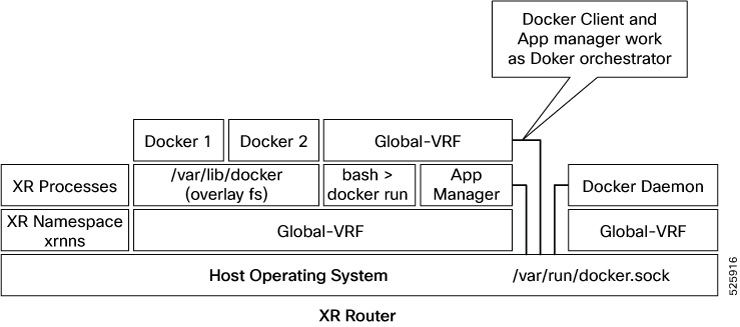
The App manager internally uses docker client, which interacts with TPAs (docker 1 and docker 2) by using the docker commands. The docker client sends the docker commands to docker daemon, which, then, executes the commands. The docker daemon uses the docker.sock Unix socket to communicate with the dockers.
When the docker run command is executed, a docker container is created and started from the docker image. Docker containers can be either in global-vrf namespace.
The docker utilizes overlayfs under the /var/lib/docker folder for managing the directories.
To host an application in docker containers, see Hosting an Application in Docker Containers.
Guidelines and limitations
-
For docker run options --mount and --volume, use the host paths.
-
"/var/run/netns"
-
"/var/lib/docker"
-
"/misc/disk1"
-
"/disk0"
-
"/misc/config/grpc"
-
"/etc"
-
"/dev/net/tun"
-
"/var/xr/config/grpc"
-
"/opt/owner"
-
-
The maximum allowed size for shm-size option is 64 Mb.
TP application resource configuration
IOS XR is equipped with inherent safeguards to prevent third party applications from interfering with its role as a Network OS.
-
Although IOS XR does not impose a limit on the number of TPAs that can run concurrently, it does impose constraints on the resources allocated to the Docker daemon, based on these parameters:
-
CPU: By default, ¼ of the CPU per core available in the platform.
You can hard limit the default CPU usage in the range between 25-75% of the total system CPU using the appmgr resources containers limit cpu value command. This configuration restricts the TPAs from using more CPU than the set hard limit value irrespective of the CPU usage by other XR processes.
This example provides the CPU hard limit configuration.
RP/0/RSP0/CPU0:ios(config)#appmgr resources containers limit cpu ? <25-75> In Percentage RP/0/RSP0/CPU0:ios(config)#appmgr resources containers limit cpu 25 -
RAM: By default, 1 GB of memory is available.
You can hard limit the default memory usage in the range between 1-25% of the overall system memory using the appmgr resources containers limit memory value command. This configuration restricts the TPAs from using more memory than the set hard limit value.
This example provides the memory hard limit configuration.
RP/0/RSP0/CPU0:ios(config)#appmgr resources containers limit memory ? <1-25> In Percentage RP/0/RSP0/CPU0:ios(config)#appmgr resources containers limit memory 20 -
Disk space is restricted by the partition size, which varies by platform and can be checked by executing "run df -h" and examining the size of the /misc/app_host or /var/lib/docker mounts.
-
-
All traffic to and from the application is monitored by the XR control protection, LPTS.
-
Signed Applications are supported on IOS XR. Users have the option to sign their own applications by onboarding an Owner Certificate (OC) through Ownership Voucher-based workflows as described in RFC 8366. Once an Owner Certificate is onboarded, users can sign applications with GPG keys based on the Owner Certificate, which can then be authenticated during the application installation process on the router.
This table shows the various functions performed by appmgr.
|
Package manager |
Lifecyle manager |
Monitoring and debugging |
|---|---|---|
|
|
|
TP App Bring-up
This section provides the information, how to bring-up the TP container app. This can be done by these four ways.
-
App Config
-
UM Model
-
Native Yang Model
-
gNOI Containerz
Bring up TPAs using application configuration
Follow these steps to configure the docker run time options.
Procedure
|
Step 1 |
Configure the docker run time option. Use --pids-limit to limit the number of process IDs using appmgr. Example:This example shows the configuration of the docker run time option --pids-limit to limit the number of process IDs using appmgr. The number of process IDs is limited to 90. |
|
Step 2 |
Verify the docker run time option configuration. Use the show running-config appmgr command to verify the run time option. Example:This example shows how to verify the docker run time option configuration. |
Bring up TPAs using UM model
Follow these steps to configure the docker run time options.
Procedure
|
Configure the docker run time option. Use --pids-limit to limit the number of process IDs using Netconf. Example:This example shows the configuration of the docker run time option --pids-limit to limit the number of process IDs using Netconf. The number of process IDs is limited to 90. |
Bring up TPAs using native model
This example shows the configuration of the docker run time option --pids-limit to limit the number of process IDs using Native YANG model.
<rpc xmlns="urn:ietf:params:xml:ns:netconf:base:1.0" message-id="101">
  <edit-config>
    <target>
      <candidate/>
    </target>
    <config>
      <appmgr xmlns=http://cisco.com/ns/yang/Cisco-IOS-XR-appmgr-cfg>
        <applications>
          <application>
            <application-name>alpine_app</application-name>
            <activate>
              <type>docker</type>
               <source-name>alpine</source-name>
               <docker-run-cmd>/bin/sh</docker-run-cmd>
               <docker-run-opts>-it --pids-limit=90</docker-run-opts>
            </activate>
          </application>
        </applications>
      </appmgr>
    </config>
  </edit-config>
Bringup TPAs using gNOI Containerz
The Containerz - gNOI Container Service on NCS 1001 device is a workflow to onboard and manage third-party applications using gNOI RPCs.
For more information, see gNOI Containerz.Docker run options Using application manager
With this feature, runtime options for docker containerized applications on IOS-XR can be configured during launch using the appmgr activate " command. AppMgr, which oversees docker containerized applications, ensures that these runtime options can effectively override default configurations, covering aspects like CPU, security, and health checks during the container launch.
This feature introduces multiple runtime options that allow users to customize different parameters of docker containers. The configuration of these runtime options is flexible, as users can use either command or Netconf for the configuration process. Regardless of the chosen method, runtime options must be added to docker-run-opts as needed.
|
Docker run option |
Description |
|---|---|
|
--cpus |
Number of CPUs |
|
--cpuset-cpus |
CPUs in which to allow execution (0-3, 0,1) |
|
--cap-drop |
Drop Linux capabilities |
|
--user, -u |
Sets the username or UID |
|
--group-add |
Add additional groups to run |
|
--health-cmd |
Run to check health |
|
--health-interval |
Time between running the check |
|
--health-retries |
Consecutive failures needed to report unhealthy |
|
--health-start-period |
Start period for the container to initialize before starting health-retries countdown |
|
--health-timeout |
Maximum time to allow one check to run |
|
--no-healthcheck |
Disable any container-specified HEALTHCHECK |
|
--add-host |
Add a custom host-to-IP mapping (host:ip) |
|
--dns |
Set custom DNS servers |
|
--dns-opt |
Set DNS options |
|
--dns-search |
Set custom DNS search domains |
|
--domainname |
Container NIS domain name |
|
--oom-score-adj |
Tune host's OOM preferences (-1000 to 1000) |
|
--shm-size |
Option to set the size of /dev/shm |
|
--init |
Run an init inside the container that forwards signals and reaps processes |
|
--label, -l |
Set meta data on a container |
|
--label-file |
Read in a line delimited file of labels |
|
--pids-limit |
Tune container pids limit (set -1 for unlimited) |
|
--work-dir |
Working directory inside the container |
|
--ulimit |
Ulimit options |
|
--read-only |
Mount the container's root filesystem as read only |
|
--volumes-from |
Mount volumes from the specified container(s) |
|
--stop-signal |
Signal to stop the container |
|
--stop-timeout |
Timeout (in seconds) to stop a container |
|
--cap-addNET_RAW |
Enable NET_RAW capabilities |
|
--publish |
Publish a container's port(s) to the host |
|
--entrypoint |
Overwrite the default ENTRYPOINT of the image |
|
--expose |
Expose a port or a range of ports |
|
--link |
Add link to another container |
|
--env |
Set environment variables |
|
--env-file |
Read in a file of environment variables |
|
--network |
Connect a container to a network |
|
--hostname |
Container host name |
|
--interactive |
Keep STDIN open even if not attached |
|
--tty |
Allocate a pseudo-TTY |
|
--publish-all |
Publish all exposed ports to random ports |
|
--volume |
Bind mount a volume |
|
--mount |
Attach a filesystem mount to the container |
|
--restart |
Restart policy to apply when a container exits |
|
--cap-add |
Add Linux capabilities |
|
--log-driver |
Logging driver for the container |
|
--log-opt |
Log driver options |
|
--detach |
Run container in background and print container ID |
|
--memory |
Memory limit |
|
--memory-reservation |
Memory soft limit |
|
--cpu-shares |
CPU shares (relative weight) |
|
--sysctl |
Sysctl options |

 Feedback