NetFlow and sFlow Configuration Guide on Cisco 8000 Series Routers, Cisco IOS XR Releases

PDF

NetFlow and sFlow Configuration Guide on Cisco 8000 Series Routers, Cisco IOS XR Releases

sFlow operations

Want to summarize with AI?

Log in

Describes how sFlow samples network traffic in real time and enables near real-time traffic analysis for network monitoring and capacity planning.


A sFlow operation is a network monitoring method that

  • samples network traffic in real time,

  • streams packet headers and metadata to an external collector, and

  • enables near real-time analysis of network traffic patterns and trends.

sFlow operations and traffic analysis

Describes how sFlow operates by sampling network traffic and transmitting packet headers and metadata to an external collector for near real-time analysis.

sFlow operates by sampling network traffic rather than capturing all packets, which distinguishes it from technologies like NetFlow. Devices in the network disaggregate the flow pipeline and transmit sampled packet headers and metadata as UDP datagrams to an external collector. The collector decodes these datagrams and generates flow records, providing a near real-time view of network activity.

This real-time analysis allows network administrators to monitor patterns and trends, automate traffic engineering, and make informed decisions for network capacity planning.

Note

Tip: sFlow sampling provides efficient network monitoring without the overhead of capturing every packet.
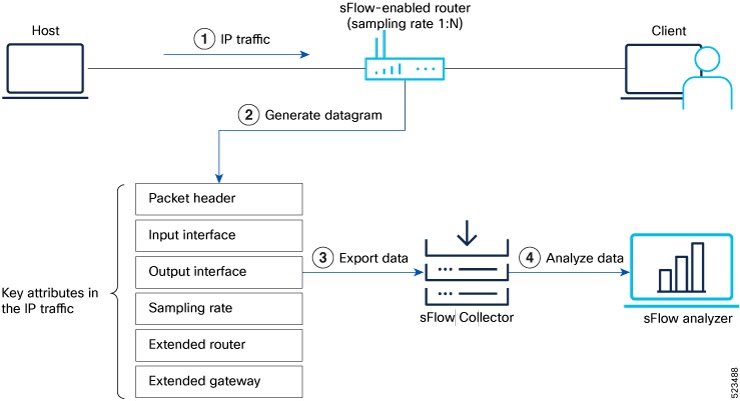

Recording of Packet Flows in sFlow

The packet in sFlow is recorded as follows:

Figure 1. Packet Flows in sFlow
Recording flow of packets using sFlow technology

In sFlow, the focus is on collecting sampled network traffic data rather than recording full packet flows. sFlow is designed to provide a statistical overview of network traffic by sampling packets and extracting relevant information for analysis.

Here's how sFlow handles the recording of packet flows:

  1. Sampling: sFlow agent process in network devices sample packets based on a configured sampling rate. The sampling rate determines the percentage of packets that will be selected for analysis. For example, a sampling rate of 1-in-100 means that 1% of the packets will be sampled.

  2. Datagram Generation: The sFlow agent generates datagrams that contain information about the sampled packets. These datagrams include details such as packet header, sampling rate, port numbers, protocol information, and various flow statistics.

  3. Data Export: The sFlow datagrams are periodically exported from the sFlow agent to a designated sFlow collector or analyzer. The export can be done using protocols like UDP or TCP, and the datagrams are typically sent in a structured format like XDR.

  4. Analysis and Reporting: Upon receiving the sFlow data, the sFlow collector or analyzer processes and analyzes the information. It aggregates the sampled data to provide statistical insights into network traffic, including top talkers, protocol distribution, traffic patterns, and other metrics.