NetFlow and sFlow Configuration Guide on Cisco 8000 Series Routers, Cisco IOS XR Releases

PDF

NetFlow and sFlow Configuration Guide on Cisco 8000 Series Routers, Cisco IOS XR Releases

NetFlow versions

Want to summarize with AI?

Log in

Explains the differences between NetFlow v9 and NetFlow v10 (IPFIX) based on transport, compatibility, flexibility, and information elements.


A NetFlow version is a network flow monitoring protocol that

  • provides transport options for exporting flow data

  • ensures compatibility with previous NetFlow versions, and

  • offers varying flexibility and extensibility for information elements

Comparison of NetFlow v9 and NetFlow v10 (IPFIX)

Describes the differences between NetFlow v9 and NetFlow v10 (IPFIX) in transport, compatibility, flexibility, and information elements.

NetFlow v9 and NetFlow v10 (IPFIX) differ in several key areas:

Lists the main factors that distinguish NetFlow v9 from NetFlow v10 (IPFIX).

Table 1. NetFlow v9 and NetFlow v10 (IPFIX)

Factor

NetFlow v9

NetFlow v10 (IPFIX)

Transport Typically uses UDP Supports both UDP and TCP transport protocols
Compatibility Compatible with older NetFlow versions Backward-compatible with NetFlow v9

Flexibility

Fixed set of predefined fields

More flexible with variable-length information elements and custom-defined attribute

Information Elements

Limited set of predefined fields

Extensive list of predefined elements


Configure IPFIX

Configure IPFIX to monitor network traffic by exporting flow data to a collector using exporter, monitor, and sampler maps.

  • Enable traffic monitoring and analysis on the router.

  • Export flow data for external collection and review.

This task configures IPFIX for traffic monitoring using exporter, monitor, and sampler maps. The configuration enables exporting flow data to a collector for analysis.

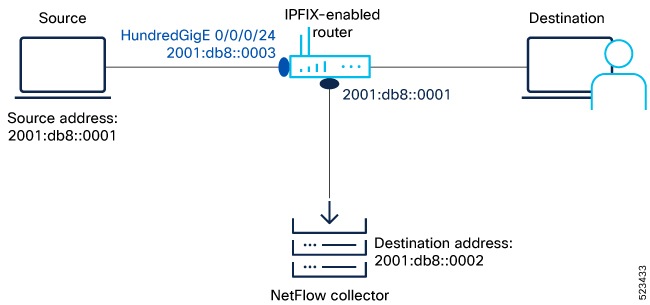
Figure 1. NetFlow IPFIX Configuration
Configuring NetFlow IPFIX for traffic monitoring

To monitor traffic, configure one or more Flow exporter details and associate it to a Flow monitor. Enable IPFIX on the interface in either egress or ingress direction. Optionally, configure a Flow sampler configuration parameters to set the sampling rate for flow samples.

  • IPFIX enables detailed traffic monitoring and flow export for analysis.

Before you begin

Ensure you have access to the router CLI and the following details:

  • Source IP address: 2001:db8::0001

  • IPFIX Collector (destination) address: 2001:db8::0002

  • Router interface for IPFIX: HundredGigE 0/0/0/24

  • NetFlow version: IPFIX

Follow these steps to configure IPFIX for traffic monitoring and flow export.

Procedure

  1. Gather the required details to enable IPFIX on the router.

    Example:

    
    Source IP address: 2001:db8::0001
    IPFIX Collector address: 2001:db8::0002
    Router interface: HundredGigE 0/0/0/24
    NetFlow version: IPFIX
              

    Collect all necessary information before starting the configuration.

    • Source IP address: 2001:db8::0001

    • IPFIX Collector address: 2001:db8::0002

    • Router interface: HundredGigE 0/0/0/24

    • NetFlow version: IPFIX

    If...

    Then...

    If all required details are available

    Proceed to configure IPFIX.

    If any detail is missing

    Obtain the missing information before continuing.

    If incorrect values are used

    Configuration may fail or traffic may not be monitored correctly.

    All required details are gathered for IPFIX configuration.

  2. Configure a Flow Exporter using the flow exporter-map command to specify where and how packets are exported.

    Example:

    
    Router(config)# flow exporter-map fem_ipfix
    Router(config-fem)# destination 2001:db8::0002
    Router(config-fem)# source Loopback 0
    Router(config-fem)# transport udp 9001
    Router(config-fem)# version ipfix
    Router(config-fem-ipfix)# template data timeout 600
    Router(config-fem-ipfix)# options interface-table
    Router(config-fem-ipfix)# exit
              

    Verify the Flow Exporter configuration using the show flow exporter-map command.

    • Use the show flow exporter-map command to confirm exporter settings.

    If...

    Then...

    If exporter configuration is correct

    Flow data will be exported to the collector.

    If exporter configuration is incorrect

    Flow export may fail or data may not reach the collector.

    If show flow exporter-map output matches configuration

    Exporter is configured as intended.

    
    Router# show flow exporter-map fem_ipfix
    Flow Exporter Map : fem_ipfix
    -------------------------------------------------
    Id                  : 1
    Packet-Length       : 1468
    DestinationIpAddr   : 2001:db8::2
    VRFName             : default
    SourceIfName        : 
    SourceIpAddr        : 2001:db8::3
    DSCP                : 0
    TransportProtocol   : UDP
    TransportDestPort   : 1024
    Do Not Fragment     : Not Enabled
    
    Export Version: IPFIX
      Common Template Timeout : 1800 seconds
      Options Template Timeout : 1800 seconds
      Data Template Timeout : 1800 seconds
      Interface-Table Export Timeout : 1800 seconds
      Sampler-Table Export Timeout : 0 seconds
      VRF-Table Export Timeout : 0 seconds
              

    Flow Exporter is configured and verified.

  3. Create a Flow Monitor using the flow monitor-map command to define the type of traffic to be monitored. You can include one or more exporter maps in the monitor map. A single flow monitor map can support up to eight exporters.

    Example:

    
    Router(config)# flow monitor-map fmm1
    Router(config-fmm)# record ipv6
    Router(config-fmm)# option filtered
    Router(config-fmm)# exporter fem_ipfix
    Router(config-fmm)# cache entries 65535
    Router(config-fmm)# cache timeout active 1800
    Router(config-fmm)# cache timeout inactive 15
    Router(config-fmm)# exit
              

    The record type specifies the type of packets that are sampled as the packets pass through the router. MPLS, IPv4, and IPv6 packet sampling is supported.

    • Choose the record type based on the traffic to be monitored.

    If...

    Then...

    If record type is set to ipv6

    IPv6 packets will be monitored.

    If record type is set to ipv4

    IPv4 packets will be monitored.

    If record type is set to mpls

    MPLS packets will be monitored.

    
    Router# show flow monitor-map fmm1
    
    Flow Monitor Map : fmm1
    -------------------------------------------------
    Id:                1
    RecordMapName:     ipv6
    ExportMapName:     Expo1
    CacheAgingMode:    Normal
    CacheMaxEntries:   500000
    CacheActiveTout:   60 seconds
    CacheInactiveTout: 20 seconds
    CacheUpdateTout:   N/A
    CacheRateLimit:    2000
    HwCacheExists:     False
    HwCacheInactTout:  50
              

    Flow Monitor is configured and verified.

  4. Configure a Flow Sampler using the sampler-map command. Use the same sampler map configuration on the sub-interfaces and physical interfaces under a port.

    Example:

    
    Router(config)# configure
    Router(config)# sampler-map fsm1
    Router(config-sm)# random 1 out-of 4000
    Router(config)# exit
    Router(config)# commit
    Router(config)# exit
    Router#
              

    Verify the sampler map configuration using the show sampler-map command.

    • Apply the sampler map consistently across interfaces.

    If...

    Then...

    If sampler map is applied to all interfaces

    Sampling rate is consistent across the router.

    If sampler map is not applied to all interfaces

    Sampling may be inconsistent.

    If show sampler-map output matches configuration

    Sampler map is configured as intended.

    
    Router# show sampler-map fsm1
    
    Sampler Map : fsm1
    -------------------------------------------------
    Id:      1
    Mode:    Random (1 out of 4000 Pkts)
    Router#
              

    Flow Sampler is configured and verified.

  5. View the running configuration to verify the configuration.

    Example:

    Review the running configuration to confirm all settings are applied.

    • Verify exporter, monitor, and sampler map configurations.

    If...

    Then...

    If running configuration matches intended settings

    IPFIX is configured as required.

    If running configuration does not match

    Review and correct configuration as needed.

    If all maps are present

    Traffic monitoring and export are enabled.

    Configuration is verified in the running configuration.

  6. Apply a Monitor Map and a Sampler Map to a physical interface using the flow command to enable IPFIX on the router.

    Example:

    
    Router(config)# interface HundredGigE 0/0/0/24
    Router(config-if)# flow ipv4 monitor fmm1 sampler fsm1 ingress
    Router(config-if)# exit
              

    Enable IPFIX monitoring on the desired interface.

    • Apply monitor and sampler maps to the interface for traffic monitoring.

    If...

    Then...

    If monitor and sampler maps are applied to the interface

    IPFIX traffic monitoring is enabled.

    If maps are not applied

    Traffic monitoring will not occur on that interface.

    If configuration is committed

    Settings take effect immediately.

    Monitor and sampler maps are applied to the interface. IPFIX is enabled.

IPFIX is now configured on the router. Traffic flow data is exported to the collector for monitoring and analysis.

What to do next

Review exported flow data in the collector to confirm monitoring and analysis are functioning as expected.

  • Verify collector receives flow data.


Configure IPFIX 315

Configure IPFIX 315 to enable advanced flow monitoring and export flow statistics on Cisco IOS XR Software.

Use this task to enable and configure IPFIX 315 for enhanced visibility into network traffic and to export flow statistics for analysis.

Procedure

  1. Enable IPFIX 315 for flow monitoring.

    Example:

    Router(config)# hw-module profile netflow ipfix315-enable
              

    Enables the IPFIX 315 profile for NetFlow on the device.

    IPFIX 315 is enabled for flow monitoring.

  2. Configure an exporter map with IPFIX as the exporter version using the flow exporter-map command in global configuration mode to specify where and how the packets should be exported.

    Example:

    Router(config)# flow exporter-map ipfix_exp
    Router(config-fem)# version ipfix
    Router(config-fem-ipfix)# template data timeout 10
    Router(config-fem)# dscp 63
    Router(config-fem)# transport udp 12000
    Router(config-fem)# source Loopback 0
    Router(config-fem)# destination 100.10.1.159
    Router(config-fem)# exit
              

    Defines the exporter map for IPFIX, sets the export version, template timeout, DSCP, transport protocol and port, source interface, and destination address.

    The exporter map is configured for IPFIX export.

  3. Create a flow monitor using the flow monitor-map command in global configuration mode to define the type of traffic to be monitored. You can include one or more exporter maps in the monitor map.

    Example:

    
    Router(config)# flow monitor-map ipfix_mon
    Router(config-fmm)# record datalinksectiondump
    Router(config-fmm)# exporter ipfix_exp
    Router(config-fmm)# cache immediate
    Router(config-fmm)# exit
              

    Creates a flow monitor map, specifies the record type, associates the exporter map, and configures the cache behavior.

    The flow monitor map is created and linked to the exporter map.

  4. Configure a sampler map using the sampler-map command to define the rate at which the packet sampling should be performed at the interface where IPFIX is enabled.

    Example:

    Router# sampler-map ipfix_sm
    Router(config-sm)# random 1 out-of 32000 
    Router(config)# exit

    Configures a sampler map to randomly sample 1 out of every 32,000 packets for flow monitoring.

    The sampler map is configured for packet sampling.

  5. Apply a monitor map and a sampler map to a physical interface using the flow command to enable IPFIX on the router.

    Example:

    
    Router(config)# interface TenGigE0/0/0/5
    Router(config)# interface TenGigE0/0/0/1
    Router(config-if)# ipv4 address 192.1.108.2 255.255.255.0
    Router(config-if)# ipv6 address 1:108::2/64
    Router(config-if)# flow datalinkframesection monitor ipfix_mon sampler ipfix_sm ingress
    Router(config-if)# encapsulation dot1q 139
              

    Assigns the flow monitor and sampler maps to the interface and configures IP addresses and encapsulation as needed.

    The monitor and sampler maps are applied to the interface for IPFIX monitoring.

  6. Verify the sampled and exported flow statistics using the show flow platform producer statistics location command.

    Example:

    Router# show flow platform producer statistics location 0/0/0/5
    Router# show flow platform producer statistics location 0/0/CPU0
    Netflow Platform Producer Counters:
    IPv4 Ingress Packets: 0
    IPv4 Egress Packets: 0
    IPv6 Ingress Packets: 0
    IPv6 Egress Packets: 0
    MPLS Ingress Packets: 0
    MPLS Egress Packets: 0
    IPFIX315 Ingress Packets: 630478
    IPFIX315 Egress Packets: 0
    Drops (no space): 0
    Drops (other): 0
    Unknown Ingress Packets: 0
    Unknown Egress Packets: 0
    Worker waiting: 2443
    

    This show output demonstrates that the system has actively received and monitored a total of 630,478 IPFIX 315 packets.

    Sampled and exported flow statistics are verified.

  7. Verify the flow monitor statistics using the show flow monitor cache location command.

    Example:

    Router# show flow platform producer statistics location 0/0/0/5
    Router# show flow platform producer statistics location 0/0/CPU0
    Cache summary for Flow Monitor ipfix_mon:
    Cache size: 65535
    Current entries: 0
    Flows added: 50399
    Flows not added: 0
    Ager Polls: 2784
    - Active timeout 0
    - Inactive timeout 0
    - Immediate 50399
    - TCP FIN flag 0
    - Emergency aged 0
    - Counter wrap aged 0
    - Total 50399
    Periodic export:
    - Counter wrap 0
    - TCP FIN flag 0
    Flows exported 50399
    Matching entries: 0

    This example shows that there were 50,399 flows added to the cache and exported.

    Flow monitor statistics are verified.

IPFIX 315 is configured and operational for flow monitoring and statistics export on Cisco IOS XR Software.


IPFIX information elements for MPLS IPv4 and IPv6

IPFIX information elements for MPLS IPv4 and IPv6 are network features that:

  • enable the collection of additional BGP information elements in IPFIX records for MPLS IPv4 and IPv6 traffic,

  • improve congestion mitigation in core-edge link scenarios by providing more granular flow data, and

  • support efficient network monitoring and optimization by recording key BGP and TTL fields.

IPFIX information elements for MPLS IPv4 and IPv6 reference information

Describes the IPFIX information elements for MPLS IPv4 and IPv6, including their purpose, supported fields, and configuration details.

IPFIX information elements for MPLS IPv4 and IPv6 enable the collection of additional BGP information elements in IPFIX records for MPLS IPv4 and IPv6 traffic, improve congestion mitigation in core-edge link scenarios by providing more granular flow data, and support efficient network monitoring and optimization by recording key BGP and TTL fields.

  • Eight additional BGP fields are supported in IPFIX MPLS IPv4/IPv6 records.

  • Two new Information Elements, Minimum Time-to-Live (TTL) and Maximum TTL, are recorded for each flow.

  • IE number, or Information Element Number, is a unique identifier assigned to specific elements within network communication protocols, facilitating standardized interpretation and management.

For more information, refer to IP Flow Information Export (IPFIX) Entities .

Table 2. Information Elements

IE Field

IE Number

BgpSourceAsNumber

16

BgpDestinationAsNumber

17

BgpNextHopIPv4Address

18

BgpNextHopIPv6Address

63

DestinationIPv4PrefixLength

13

DestinationIPv6PrefixLength

30

IpNextHopIPv4Address

15

IpNextHopIPv6Address

62

Minimum TTL

52

Maximum TTL

53

Configuration example: Collect MPLS traffic with both IPv6 and IPv4 fields.

Configuring Monitor map:

Router(config)#flow monitor-map mpls-1
Router(config-fmm)#record mpls ipv4-ipv6-fields
Router(config-fmm)#commit
Router(config-fmm)#exit

Configuring Sampler map:

Router(config)#sampler-map fsm1
Router(config-sm)#random 1 out-of 4000
Router(config-sm)#commit
Router(config-sm)#exit

Apply a Monitor Map and a Sampler Map to a physical interface:

Router(config)#interface HundredGigE 0/0/0/24
Router(config-if)#flow mpls monitor mpls-1 sampler fsm1 ingress
Router(config-if)#exit

Verification: Use the show flow monitor cache location command to verify flow monitor statistics.

Router#show flow monitor mpls-1 cache summary location 0/0/CPU0
========== Record number: 1 ==========
LabelType        :   Unknown
Prefix/Length    : 20.1.1.0/24
Label1-EXP-S     :    16001-0-1
Label2-EXP-S     :       -
Label3-EXP-S     :       -
Label4-EXP-S     :       -
Label5-EXP-S     :       -
Label6-EXP-S     :       -
InputInterface   : FH0/0/0/1
OutputInterface  : FH0/0/0/0
ForwardStatus    : Fwd
FirstSwitched    : 00 08:28:52:189
LastSwitched     : 00 08:28:57:649
ByteCount        : 2352
PacketCount      : 56
Dir              : Ing
SamplerID        : 1
IPV4SrcAddr      : 30.1.1.1
IPV4DstAddr      : 20.1.1.1
IPV4TOS          : 0
IPV4Prot         : udp
L4SrcPort        : 2025
L4DestPort       : 2500
L4TCPFlags       : 0
IPV4SrcPrfxLen   : 24
IPV4DstPrfxLen   : 24
BGPNextHopV4     : 192.168.10.10
BGPNextHopV6     : ::
BGPSrcOrigAS     : 2000
BGPDstOrigAS     : 1000
IPV4NextHop      : 192.168.10.10
IPV6NextHop      : ::
MinimumTTL       : 90       
MaximumTTL       : 110      
InputVRFID       : default
OutputVRFID      : default

========== Record number: 1 ==========
LabelType        :   Unknown
Prefix/Length    : ::/0
Label1-EXP-S     :    16001-0-1
Label2-EXP-S     :       -
Label3-EXP-S     :       -
Label4-EXP-S     :       -
Label5-EXP-S     :       -
Label6-EXP-S     :       -
InputInterface   : FH0/0/0/1
OutputInterface  : FH0/0/0/0
ForwardStatus    : Fwd
FirstSwitched    : 00 08:27:38:692
LastSwitched     : 00 08:27:47:572
ByteCount        : 5580
PacketCount      : 90
Dir              : Ing
SamplerID        : 1
IPv6SrcAddr      : 50::1
IPv6DstAddr      : 40::1
IPv6TC           : 0
IPv6FlowLabel    : 0
IPv6OptHdrs      : 0x0
IPV6Prot         : udp
L4SrcPort        : 2025
L4DestPort       : 2500
L4TCPFlags       : 0
IPV6SrcPrfxLen   : 64
IPV6DstPrfxLen   : 64
BGPNextHopV4     : 0.0.0.0
BGPNextHopV6     : ::ffff:192.168.10.10
BGPSrcOrigAS     : 2000
BGPDstOrigAS     : 1000
IPV4NextHop      : 192.168.10.10
IPV6NextHop      : ::
MinimumTTL       : 195      
MaximumTTL       : 205      
InputVRFID       : default
OutputVRFID      : default
Note

Starting from Cisco IOS XR Software Release 25.2.1, when processing the ICMP Layer 4 header, the destination port is determined based on the ICMPv6 message type, instead of being set to zero. This behavior is specific to ICMPv6 and does not apply to ICMP for IPv4.

For example, in the following output, the L4DestPort value corresponds to ICMPv6 Msg Type 3 (Time Exceeded). For more information, refer to https://www.iana.org/assignments/icmpv6-parameters/icmpv6-parameters.xhtml#icmpv6-parameters-codes-4.

IPv6SrcAddr     : 1700::2                                 
IPv6DstAddr     : 1800::2                                 
BGPDstOrigAS    : 0           
BGPSrcOrigAS    : 0           
BGPNextHopV6    : fcbb:bb00:3::                           
IPv6TC          : 8     
IPv6FlowLabel   : 4             
IPv6OptHdrs     : 0x0         
IPV6Prot        : icmpv6  
MinimumTTL      : 120       
MaximumTTL      : 120       
L4SrcPort       : 0         
L4DestPort      : 3               
L4TCPFlags      : 0           
IPV6DstPrfxLen  : 64             
IPV6SrcPrfxLen  : 128            
InputInterface  : Hu0/0/0/1      
OutputInterface : Hu0/0/0/0      
ForwardStatus   : Fwd                 
BGPNextHopV4    : 0.0.0.0         
IPV4NextHop     : 0.0.0.0         
IPV6NextHop     : ::                                      
FirstSwitched   : 04 02:36:55:363
LastSwitched    : 04 02:37:19:963
ByteCount       : 25190       
PacketCount     : 229         
Dir             : Ing
SamplerID       : 4         
SrcMacAddr      : 00:ca:ff:ee:00:01 
DstMacAddr      : 04:00:00:07:1d:04 
EthType         : 34525   
Dot1qPriority   : 0             
Dot1qVlanId     : 0           
CustVlanId      : 0           
InputVRFID      : vrf_1                            
OutputVRFID     : default     

Feature History Table: