EVPN Configuration Guide for Cisco 8000 Series Routers, Cisco IOS XR Releases

PDF

EVPN Configuration Guide for Cisco 8000 Series Routers, Cisco IOS XR Releases

Flow label support for EVPN

Want to summarize with AI?

Log in

Explains how flow label support for EVPN enables provider routers to optimize traffic distribution using flow-based load balancing in an MPLS environment.


A flow label support for EVPN is a feature that

  • enables provider (P) routers to use flow-based load balancing to forward traffic between PE devices

  • utilizes Flow-Aware Transport (FAT) of pseudowires (PW) over an MPLS packet-switched network for load balancing traffic across BGP-based signaled pseudowires for EVPN and

  • improves traffic distribution across equal cost multipaths (ECMP) or link-bundled paths in the core.

Table 1. Feature History Table

Feature Name

Release Information

Feature Description

Flow label support for EVPN

Release 26.3.1

Introduced in this release on: Modular Systems (8800 [LC ASIC: K100])(select variants only*)

*This feature is supported on:

  • 88-LC1-48Y8H-EM

  • 88-LC1-16H16F-EM

Flow label support for EVPN

Release 25.4.1

Introduced in this release on: Fixed Systems (8010 [ASIC: A100])(select variants only*)

*This feature is now supported on:

  • 8011-32Y8L2H2FH

  • 8011-12G12X4Y-A

  • 8011-12G12X4Y-D

Flow label support for EVPN

Release 25.1.1

Introduced in this release on: Fixed Systems (8010 [ASIC: A100]) (select variants only*)

*This feature is now supported on the Cisco 8011-4G24Y4H-I routers.

Flow label support for EVPN

Release 24.4.1

Introduced in this release on: Fixed Systems (8200 [ASIC: P100], 8700 [ASIC: P100, K100])(select variants only*); Modular Systems (8800 [LC ASIC: Q100, P100])(select variants only*)

The Flow Label Support for EVPN functionality is now extended to:

  • 8212-48FH-M

  • 8712-MOD-M

  • 8711-32FH-M

  • 88-LC1-52Y8H-EM

  • 88-LC1-12TH24FH-E

  • 88-LC1-36EH

Flow label support for EVPN

Release 7.3.2

The Flow Label support improves traffic distribution by enabling flow-based load balancing between provider edge devices. It uses Flow-Aware Transport (FAT) pseudowires over an MPLS network to efficiently manage traffic across BGP-signaled pseudowires in an Ethernet VPN. Flow labels, based on packet flows, help optimize traffic across equal cost multipaths or link-bundled paths.

Optimize traffic distribution using flow label

A service provider deploying EVPN can use this feature to optimize traffic distribution across multiple paths in their MPLS core network. A network with high traffic volumes can benefit from reduced congestion and improved performance by leveraging flow-based load balancing.

Flow-based load balancing with FAT pseudowires

FAT pseudowires (PWs) in EVPN provides the capability to identify individual flows within a PW, allowing routers to load-balance traffic effectively. When ECMP is used, FAT PWs ensure better traffic distribution by creating a flow label based on indivisible packet flows entering an imposition PE. This flow label is inserted as the lowermost label in the packet. P routers then use the flow label for load balancing.

A flow is identified by either:

  • The source and destination IP address of the traffic, or

  • The source and destination MAC address of the traffic.

Supported EVPN services

Flow label support for EVPN is supported on EVPN E-Line and EVPN E-LAN services in both single-homing and multihoming deployments. You enable the flow-label command at the EVPN instance (EVI) level. After it is enabled for an EVI, the flow-label configuration applies to all services attached to that EVI.
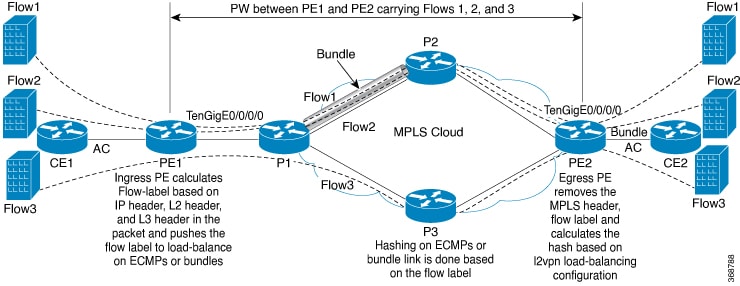


Configure flow label for EVPN

Configure a flow label for EVPN on both PE1 and PE2 to enable load balancing and efficient traffic management.

EVPN services, such as E-Line and E-LAN, use MPLS encapsulation. Configuring a flow label ensures proper load balancing across the network.

EVPN E-Line and EVPN E-LAN use different service attachment models. For EVPN E-Line, configure the service using an xconnect. For EVPN E-LAN, configure the service using a bridge domain. In both cases, enable flow-label under the EVPN instance. The EVI configured under the EVPN instance must match the EVI used in the E-Line or E-LAN service configuration.

Before you begin

Identify whether you are configuring EVPN E-Line or EVPN E-LAN services.

Procedure


  • Configure flow label for EVPN E-Line
  • Configure flow label for EVPN E-LAN

Configure flow label for EVPN E-Line

EVPN E-Line deployments benefit from flow labels, which enable effective load balancing and improved traffic handling between provider edge routers (PE1 and PE2).

Enable load balancing and optimize traffic management on EVPN E-Line services by configuring flow labeling on both PE1 and PE2.

Before you begin

  • Ensure that PE1 and PE2 are running compatible software versions.

  • Verify that the interfaces and EVPN instances are pre-configured.

Procedure

  1. Configure EVPN and enable flow label on PE1 and PE2.

    Example:

    Router# configure
    Router(config)# evpn
    Router(config-evpn)# evi 101
    Router(config-evpn-instance)# load-balancing
    Router(config-evpn-instance-lb)# flow-label static
    Router(config-evpn-instance-lb)# commit 
  2. Configure the Ethernet segment and identifier for the interface.

    Example:

    Router# configure
    Router(config)# interface Bundle-Ether100
    Router(config-if)# ethernet-segment
    Router(config-if-es)# identifier type 0 11.11.1.1.1.1.1.1.0
    Router(config-if-es)# commit 
  3. Configure the L2VPN and xconnect group for E-Line service.

    Example:

    Router# configure
    Router(config)# l2vpn
    Router(config-l2vpn)# xconnect group ELINE
    Router(config-l2vpn-xc)# p2p ELINE101
    Router(config-l2vpn-xc-p2p)# interface Bundle-Ether100.2
    Router(config-l2vpn-xc-p2p)# neighbor evpn evi 101 service 101
    Router(config-l2vpn-xc-p2p)# commit
  4. Flow label for EVPN E-Line running configuration.

    Example:

    
    evpn
     evi 101
      load-balancing
       flow-label static
      !
     !
    !
    
    interface Bundle-Ether100
     ethernet-segment
      identifier type 0 11.11.1.1.1.1.1.1.0
     !
    !
    
    l2vpn
     xconnect group ELINE
      p2p ELINE101
       interface Bundle-Ether100.2
       neighbor evpn evi 101 service 101
       !
      !
     !
    !
  5. Use the show l2vpn xconnect detail command to verify that EVPN flow label is configured.

    Example:

    
    Router# show l2vpn xconnect detail
    Group ELINE, XC ELINE101, state is up; Interworking none
      AC: Bundle-Ether100.2, state is up
        Type Ethernet
        MTU 1500; XC ID 0x1; interworking none
        Statistics:
          packets: received 21757444, sent 0
          bytes: received 18226521128, sent 0
      EVPN: neighbor 100.100.100.2, PW ID: evi 101, ac-id 101, state is up ( established )
        XC ID 0xc0000001
        Encapsulation MPLS
       Encap type Ethernet, control word disabled
        Sequencing not set
        LSP : Up
        Flow Label flags configured (Tx=1,Rx=1) statically
     
          EVPN         Local                          Remote                       
          ------------ ------------------------------ -----------------------------
          Label        64002                          64002                        
          MTU          1500                           1500                         
          Control word disabled                       disabled                     
          AC ID        101                            101                           
          EVPN type    Ethernet                       Ethernet                     
              
          ------------ ------------------------------ -----------------------------
        Create time: 30/10/2018 03:04:16 (00:00:40 ago)
        Last time status changed: 30/10/2018 03:04:16 (00:00:40 ago)
        Statistics:
          packets: received 0, sent 21757444
          bytes: received 0, sent 18226521128

Configure Flow Label for EVPN E-LAN

EVPN E-LAN deployments benefit from flow labels, which enable effective load balancing and improved traffic handling between provider edge routers (PE1 and PE2).

Enable load balancing and efficient traffic management by configuring EVPN E-LAN flow labels on PE routers.

Before you begin

  • Ensure that PE1 and PE2 are running compatible software versions.

  • Verify that the interfaces and EVPN instances are pre-configured.

Procedure

  1. Configure the EVPN E-LAN flow label.

    Example:

    Router# configure
    Router(config)# evpn
    Router(config-evpn)# evi 100
    Router(config-evpn-instance)# load-balancing
    Router(config-evpn-instance-lb)# flow-label static
    Router(config-evpn-instance-lb)# advertise-mac
    Router(config-evpn-instance)# commit 
  2. Configure the interface with the Ethernet segment.

    Example:

    Router# configure
    Router(config)# interface Bundle-Ether100
    Router(config-if)# ethernet-segment
    Router(config-if-es)# identifier type 0 11.11.1.1.1.1.1.1.0
    Router(config-if-es)# commit 
  3. Configure L2VPN bridge group and bridge-domain.

    Example:

    Router# configure
    Router(config)# l2vpn
    Router(config-l2vpn)# bridge group ELAN
    Router(config-l2vpn-bg)# bridge-domain ELAN100
    Router(config-l2vpn-bg-bd)# interface Bundle-Ether100.1
    Router(config-l2vpn-bg-bd-ac)# evi 100
    Router(config-l2vpn-bg-bd-ac)# commit
  4. Flow label for EVPN E-LAN running configuration.

    Example:

    
    evpn
     evi 100
      load-balancing
       flow-label static
      !
      advertise-mac
     !
    !
    
    interface Bundle-Ether100
     ethernet-segment
      identifier type 0 11.11.1.1.1.1.1.1.0
     !
    !
    
    l2vpn
     bridge group ELAN
      bridge-domain ELAN100
       interface Bundle-Ether100.1
        evi 100
       !
      !
     !
    !