EVPN Configuration Guide for Cisco 8000 Series Routers, Cisco IOS XR Releases

PDF

EVPN Configuration Guide for Cisco 8000 Series Routers, Cisco IOS XR Releases

EVPN bridging and E-Line services over BGP-LU underlay

Want to summarize with AI?

Log in

Introduces EVPN bridging and E-Line services over a BGP-LU underlay, enabling end-to-end connectivity between data centers, supporting EVPN E-LAN and E-Line service types, and offering transport, BGP-LU, and service-level load balancing.


A BGP Labeled Unicast (BGP-LU) underlay is a network transport method that

  • enables configuration of end-to-end services between data centers

  • supports various EVPN E-LAN and E-Line services, and

  • provides load balancing at the transport, BGP-LU, and service levels.

Table 1. Feature History Table

Feature Name

Release Information

Feature Description

EVPN Bridging and E-Line Services over BGP-LU Underlay

Release 26.3.1

Introduced in this release on: Modular Systems (8800 [LC ASIC: K100])(select variants only*)

*This feature is supported on:

  • 88-LC1-48Y8H-EM

  • 88-LC1-16H16F-EM

EVPN Bridging and E-Line Services over BGP-LU Underlay

Release 25.4.1

Introduced in this release on: Fixed Systems (8010 [ASIC: A100])(select variants only*)

*This feature is now supported on:

  • 8011-32Y8L2H2FH

  • 8011-12G12X4Y-A

  • 8011-12G12X4Y-D

EVPN Bridging and E-Line Services over BGP-LU Underlay

Release 25.2.1

Introduced in this release on: Fixed Systems (8200 [ASIC: P100], 8700 [ASIC: P100, K100], 8010 [ASIC: A100]); Modular Systems (8800 [LC ASIC: P100])

You can now configure end-to-end services between data centers using the BGP Labeled Unicast (BGP-LU) underlay with segment routing.

The feature supports EVPN E-LAN and E-Line services and enables load balancing across transport, BGP-LU, and service levels using segment routing.

EVPN Bridging and E-Line Services over BGP-LU Underlay

Release 25.1.1

Introduced in this release on: Fixed Systems (8010 [ASIC: A100]) (select variants only*)

*This feature is now supported on the Cisco 8011-4G24Y4H-I routers.

EVPN Bridging and E-Line Services over BGP-LU Underlay

Release 24.4.1

Introduced in this release on: Fixed Systems (8700) (select variants only*)

*The EVPN Bridging and E-Line Services over BGP-LU Underlay functionality is now extended to the Cisco 8712-MOD-M routers.

EVPN Bridging and E-Line Services over BGP-LU Underlay

Release 24.3.1

Introduced in this release on: Fixed Systems (8200 [ASIC: P100], 8700 [ASIC: P100])(select variants only*); Modular Systems (8800 [LC ASIC: P100])(select variants only*)

*The EVPN Bridging and E-Line Services over BGP-LU Underlay functionality is now extended to:

  • 8212-48FH-M

  • 8711-32FH-M

  • 88-LC1-52Y8H-EM

  • 88-LC1-12TH24FH-E

EVPN Bridging and E-Line Services over BGP-LU Underlay

Release 24.2.11

Introduced in this release on: Modular Systems (8800 [LC ASIC: P100]) (select variants only*)

*The EVPN Bridging and E-Line Services over BGP-LU Underlay functionality is now extended to routers with the 88-LC1-36EH line cards.

EVPN Bridging and E-Line Services over BGP-LU Underlay

Release 7.11.1

You can configure end-to-end services between data centers using the BGP Labeled Unicast (BGP-LU) underlay.

This feature allows you to configure various EVPN E-LAN and E-Line services, and enables load balancing at transport, BGP-LU, and service level.


End-to-end EVPN services with BGP-LU underlay

The EVPN bridging and E-Line services over BGP-LU underlay feature enables configuration of end-to-end EVPN services between data centers. This feature supports equal-cost multipath (ECMP) load balancing at three levels: transport, BGP-LU, and service.

This feature supports these services:

  • EVPN aliasing over BGP-LU using IGP, including segment routing (SR) or non-SR protocols such as LDP or IGP.

  • E-Line services over BGP-LU using IGP.

By leveraging BGP with label switching, this underlay provides seamless connectivity and efficient traffic distribution across data center networks. It allows network administrators to build scalable and resilient inter-data center services with flexible load balancing capabilities.


How EVPN bridging and E-Line services over BGP-LU underlay works

Summary

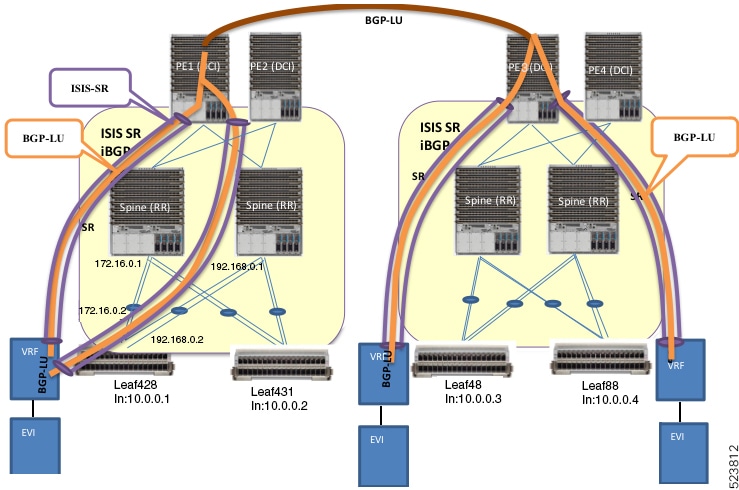
The key components involved in the EVPN bridging and E-Line services over BGP-LU underlay process are:

  • Leaf nodes: Configure EVPN with bridging and inter-subnet routing; act as default gateways for local hosts.

  • Spine nodes: Route traffic between leaf nodes and serve as route reflectors (RR) for iBGP.

  • Provider edge (PE) device and Data Center Interconnect (DCI): Connect spine nodes across data centers.

  • IS-IS labeled IGP and iBGP: Provide internal routing and route reflection across leaf, spine, and DCI nodes.

  • BGP Labeled Unicast (BGP-LU): Establishes labeled routes tunneled through IS-IS Segment Routing (SR) paths between data centers.

EVPN bridging and E-Line services over BGP-LU underlay use leaf and spine nodes with IS-IS and iBGP routing to establish labeled tunnels across data centers. This setup ensures scalable, resilient bridging and routing with efficient load balancing across interconnected sites.

Workflow

These are the stages of EVPN bridging and E-Line services over BGP-LU underlay.

  1. Configure EVPN with bridging and inter-subnet routing on leaf nodes.

  2. Connect hosts to leaf nodes, which route traffic across spine nodes.

  3. Connect spine nodes through PE devices and DCI for inter-data center connectivity.

  4. Enable IS-IS labeled IGP and iBGP across leaf, spine, and DCI nodes, with spine nodes acting as route reflectors.

  5. Configure IS-IS SR policy across leaf, spine, and DCI nodes.

  6. Establish BGP-LU sessions between data centers.

  7. Learn BGP-LU routes on leaf nodes and tunnel them through IS-IS SR labeled paths.

    For example, leaf node Leaf428 learns BGP-LU routes for remote loopback addresses 10.0.0.3 and 10.0.0.4.

Result

This process enables scalable and resilient EVPN bridging and E-Line services with efficient load balancing and routing across interconnected data centers.


Configure EVPN bridging and E-Line services over BGP-LU underlay with LDP

Configure EVPN Bridging and E-Line Services overging and E-Line Services over a BGP-LU underlay network using LDP.

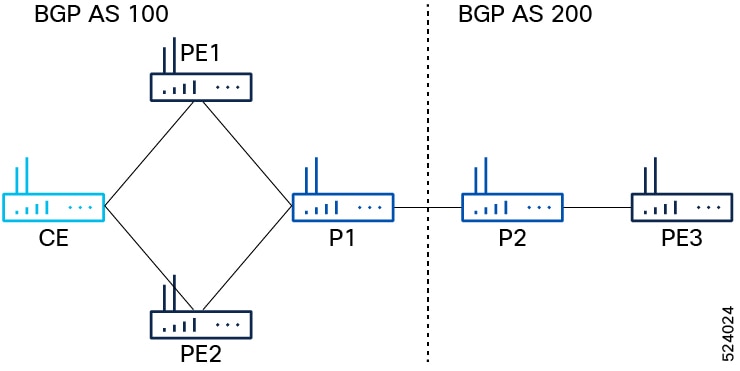
This task applies to a network topology with P routers (P1, P2) and PE routers (PE1, PE2, PE3) connected across two BGP autonomous systems (AS 100 and AS 200). P1 connects to P2, and P1 connects to PE1 and PE2 in AS 100, while P2 connects to PE3 in AS 200.

Before you begin

Ensure you have the network topology as described and access to configure IGP, MPLS, and BGP on all routers.

Procedure

  1. Configure IGP, MPLS, and BGP on PE1, PE2, and PE3.

    1. Configure IGP on PE1 and PE2

      Example:

      Router(config)#router ospf pyats_test
      Router(config-ospf)#router-id 54.54.54.54
      Router(config-ospf)#redistribute bgp 100
      Router(config-ospf)#mpls ldp sync
      Router(config-ospf)#mpls ldp auto-config
      Router(config-ospf)#area 0
      Router(config-ospf-ar)#interface loopback0
      Router(config-ospf-ar-if)#exit
      Router(config-ospf-ar)#interface FourHundredGigE0/0/0/2
      Router(config-ospf-ar-if)#commit
      
    2. Configure MPLS on PE1 and PE2.

      Example:

      Router(config)# mpls ldp
      Router(config-ldp)# router-id 54.54.54.54
      Router(config-ldp)# address-family ipv4
      Router(config-ldp-af)# label
      Router(config-ldp-af-lbl)# local
      Router(config-ldp-af-lbl)# allocate for host-routes
      Router(config-ldp-af-lbl-lcl)# root
      Router(config)# mpls ldp
      Router(config-ldp)# interface FourHundredGigE0/0/0/2
    3. Configure BGP on PE1 and PE2.

      Example:

      Router(config)#router bgp 100
      Router(config-bgp)#bgp router-id 54.54.54.54
      Router(config-bgp)#address-family ipv4 unicast
      Router(config-bgp-af)#exit
      Router(config-bgp)#address-family l2vpn evpn 
      Router(config-bgp-af)#retain route-target all
      Router(config-bgp-af)#exit
      Router(config-bgp)#neighbor-group IBGP-PEERS
      Router(config-bgp-nbrgrp)#remote-as 100
      Router(config-bgp-nbrgrp)#update-source loopback0
      Router(config-bgp-nbrgrp)#address-family ipv4 unicast
      Router(config-bgp-nbrgrp-af)#exit
      Router(config-bgp-nbrgrp)#address-family l2vpn evpn
    4. Configure IGP, MPLS, and BGP on PE3.

      Example:

      Router# configure
      Router(config)#router ospf pyats_test
      Router(config-ospf)#router-id 51.51.51.51
      Router(config-ospf)#redistribute bgp 200
      Router(config-ospf)#mpls ldp sync
      Router(config-ospf)#mpls ldp auto-config
      Router(config-ospf)#area 0
      Router(config-ospf-ar)#interface loopback0
      Router(config-ospf-ar-if)#exit
      Router(config-ospf-ar)#interface FourHundredGigE0/0/0/10
      Router(config-ospf-ar-if)#commit
      Router(config)# mpls ldp
      Router(config-ldp)# router-id 51.51.51.51
      Router(config-ldp)# address-family ipv4
      Router(config-ldp-af)# label
      Router(config-ldp-af-lbl)# local
      Router(config-ldp-af-lbl-lcl)# allocate for host-routes
      Router(config-ldp-af-lbl-lcl)# root
      Router(config)# mpls ldp
      Router(config-ldp)# interface FourHundredGigE0/0/0/10
      Router(config-ldp-if)# root
      Router(config)#router bgp 100
      Router(config-bgp)#bgp router-id 54.54.54.54
      Router(config-bgp)#address-family ipv4 unicast
      Router(config-bgp-af)#exit
      Router(config-bgp)#address-family l2vpn evpn 
      Router(config-bgp-af)#retain route-target all
      Router(config-bgp-af)#exit
      Router(config-bgp)# neighbor 56.56.56.56
      Router(config-bgp-nbr)#remote-as 200
      Router(config-bgp-nbr)#update-source loopback0
      Router(config-bgp-nbr)#address-family ipv4 unicast
      Router(config-bgp-nbr-af)#exit
      Router(config-bgp-nbr)#address-family l2vpn evpn
  2. Configure iBGP peer on P1 and PE2.

    1. Configure iBGP peer on P1.

      Example:

      Router(config-bgp)# neighbor 52.52.52.52
      Router(config-bgp-nbr)# use neighbor-group IBGP-PEERS
    2. Configure iBGP peer on PE2.

      Example:

      Router(config-bgp)# neighbor 55.55.55.55 
      Router(config-bgp-nbr)# remote-as 100
      Router(config-bgp-nbr)# use neighbor-group IBGP-PEERS
      Router(config-bgp-nbr)# update-source Loopback0
      Router(config-bgp-nbr)# address-family l2vpn evpn
  3. Configure P2 as route reflector.

    Example:

    Router(config)# prefix-set LOOPBACKS
    Router(config-pfx)# 53.53.53.53,
    Router(config-pfx)# 54.54.54.54,
    Router(config-pfx)# 55.55.55.55,
    Router(config-pfx)# 52.52.52.52,
    Router(config-pfx)# 56.56.56.56,
    Router(config-pfx)# 51.51.51.51
    Router(config-pfx)# end-set
    Router(config)# route-policy passall
    Router(config-rpl)# pass
    Router(config-rpl)# end-policy
    Router(config)# route-policy MATCH_LOOPBACKS
    Router(config-rpl)#if destination in LOOPBACKS then
    Router(config-rpl-if)#pass
    Router(config-rpl-if)#else
    Router(config-rpl-else)#drop
    Router(config-rpl-else)#endif
    Router(config-rpl)#end-policy
  4. Configure route policy, IGP, MPLS, and BGP on P1 and P2.

    1. Configure route policy, IGP, MPLS, and BGP on P1.

      Example:

      
      Router(config)#router ospf pyats_test
      Router(config-ospf)#router-id 52.52.52.52
      Router(config-ospf)#redistribute bgp 100
      Router(config-ospf)#mpls ldp sync
      Router(config-ospf)#mpls ldp auto-config
      Router(config-ospf)#area 0
      Router(config-ospf-ar)#interface loopback0
      Router(config-ospf-ar-if)#exit
      Router(config-ospf-ar)#interface FourHundredGigE0/0/0/11
      Router(config-ospf-ar-if)#exit
      Router(config-ospf-ar)#interface FourHundredGigE0/0/0/12 
      Router(config-ospf-ar-if)#root
      Router(config)# router static
      Router(config-static)# address-family ipv4 unicast
      Router(config-static-afi)# 100.0.0.2/32 FourHundredGigE0/0/0/13
      Router(config-static-afi-if)# root
      Router(config)# mpls ldp
      Router(config-ldp)# router-id 52.52.52
      Router(config-ldp)# address-family ipv4
      Router(config-ldp-af)# label
      Router(config-ldp-af-lbl)# local
      Router(config-ldp-af-lbl-lcl)# allocate for host-routes
      Router(config-ldp-af-lbl-lcl)# root
      Router(config)# mpls ldp
      Router(config-ldp)# interface FourHundredGigE0/0/0/11
      Router(config-ldp-if)# exit
      Router(config-ldp)# interface FourHundredGigE0/0/0/12
    2. Configure route policy, IGP, MPLS, and BGP on P2.

      Example:

      Router(config)#router ospf pyats_test
      Router(config-ospf)#router-id 56.56.56.56
      Router(config-ospf)#redistribute bgp 200
      Router(config-ospf)#mpls ldp sync
      Router(config-ospf)#mpls ldp auto-config
      Router(config-ospf)#area 0
      Router(config-ospf-ar)#interface loopback0
      Router(config-ospf-ar-if)#passive enable
      Router(config-ospf-ar-if)#exit
      Router(config-ospf-ar)#interface FourHundredGigE0/0/0/2
      Router(config-ospf-ar)#root
      Router(config)# router static
      Router(config-static)# address-family ipv4 unicast
      Router(config-static-afi)# 100.0.0.1/32 FourHundredGigE0/0/0/5
      Router(config-static-afi)# root
      Router(config)# mpls ldp
      Router(config-ldp)# router-id 56.56.56.56
      Router(config-ldp)# address-family ipv4
      Router(config-ldp-af)# label
      Router(config-ldp-af-lbl)# local
      Router(config-ldp-af-lbl-lcl)# allocate for host-routes
      Router(config-ldp-af-lbl-lcl)# root
      Router(config)# mpls ldp
      Router(config-ldp)# interface FourHundredGigE0/0/0/4
    3. Configure router reflector client on P2, which is essential for copying the EVPN routes between the AS.

      Example:

      
      Router(config)#router bgp 200
      Router(config-bgp)#bgp router-id 56.56.56.56
      Router(config-bgp)#address-family ipv4 unicast
      Router(config-bgp-af)#network 51.51.51.51/32
      Router(config-bgp-af)#network 52.52.52.52/32
      Router(config-bgp-af)#network 53.53.53.53/32
      Router(config-bgp-af)#network 54.54.54.54/32
      Router(config-bgp-af)#network 55.55.55.55/32
      Router(config-bgp-af)#network 56.56.56.56/32
      Router(config-bgp-af)#redistribute connected
      Router(config-bgp-af)#redistribute ospf 0
      Router(config-bgp-af)#allocate-label all
      Router(config-bgp-af)#exit
      Router(config-bgp)#address-family l2vpn evpn 
      Router(config-bgp-af)#retain route-target all
      Router(config-bgp-af)#exit
      Router(config-bgp)#neighbor-group IBGP-PEERS
      Router(config-bgp-nbrgrp)#remote-as 200
      Router(config-bgp-nbr)#update-source loopback0
      Router(config-bgp-nbr)#address-family ipv4 unicast
      Router(config-bgp-nbr-af)#exit
      Router(config-bgp-nbr)#address-family l2vpn evpn
      Router(config-bgp-nbr-af)#route-reflector-client
  5. Configure P1 and P2 as eBGP neighbor.

    1. Configure P1 as eBGP neighbor.

      Example:

      Router(config-bgp)# neighbor 100.0.0.1
      Router(config-bgp-nbr)#remote-as 100
      Router(config-bgp-nbr)#ebgp-multihop 255
      Router(config-bgp-nbr)#address-family ipv4 labeled-unicast 
      Router(config-bgp-nbr-af)#next-hop-self 
      Router(config-bgp-nbr-af)#route-policy passall in
      Router(config-bgp-nbr-af)#route-policy MATCH_LOOPBACKS out
      Router(config-bgp-nbr-af)#send-extended-community-ebgp 
      Router(config-bgp-nbr-af)#exit
      Router(config-bgp-nbr)#address-family l2vpn evpn
      Router(config-bgp-nbr-af)#route-policy passall in
      Router(config-bgp-nbr-af)#route-policy passall out
      Router(config-bgp-nbr-af)#next-hop-unchanged
    2. Configure P2 as eBGP neighbor.

      Example:

      Router(config-bgp)# neighbor 100.0.0.2
      Router(config-bgp-nbr)#remote-as 200
      Router(config-bgp-nbr)#ebgp-multihop 255
      Router(config-bgp-nbr)#address-family ipv4 labeled-unicast 
      Router(config-bgp-nbr-af)#next-hop-self 
      Router(config-bgp-nbr-af)#route-policy passall in
      Router(config-bgp-nbr-af)#route-policy MATCH_LOOPBACKS out
      Router(config-bgp-nbr-af)#send-extended-community-ebgp 
      Router(config-bgp-nbr-af)#exit
      Router(config-bgp-nbr)#address-family l2vpn evpn
      Router(config-bgp-nbr-af)#route-policy passall in
      Router(config-bgp-nbr-af)#route-policy passall out
      Router(config-bgp-nbr-af)#next-hop-unchanged
  6. Configure PE1, PE2, and PE3 as iBGP neighbor.

    1. Configure PE3 as iBGP neighbor.

      Example:

      Router(config-bgp)#neighbor 51.51.51.51 
      Router(config-bgp-nbr)#use neighbor-group IBGP-PEERS
    2. Configure PE1 and PE2 as iBGP neighbor.

      Example:

      
      Router(config-bgp)#neighbor 54.54.54.54 
      Router(config-bgp-nbr)#use neighbor-group IBGP-PEERS
      Router(config-bgp-nbr)#exit
      Router(config-bgp)#neighbor 55.55.55.55 
      Router(config-bgp-nbr)#use neighbor-group IBGP-PEERS
  7. For P1, the iBGP peers are PE1 and PE2, and the eBGP peer is P2.

    1. For P1, the iBGP peers are PE1 and PE2, and the eBGP peer is P2.

      Example:

      Router(config)# prefix-set LOOPBACKS
      Router(config-pfx)# 53.53.53.53,
      Router(config-pfx)# 54.54.54.54,
      Router(config-pfx)# 55.55.55.55,
      Router(config-pfx)# 52.52.52.52,
      Router(config-pfx)# 56.56.56.56,
      Router(config-pfx)# 51.51.51.51
      Router(config-pfx)# end-set
      Router(config)# route-policy passall
      Router(config-rpl)# pass
      Router(config-rpl)# end-policy
      Router(config)# route-policy MATCH_LOOPBACKS
      Router(config-rpl)#if destination in LOOPBACKS then
      Router(config-rpl-if)#pass
      Router(config-rpl-if)#else
      Router(config-rpl-else)#drop
      Router(config-rpl-else)#endif
      Router(config-rpl)#end-policy
      
    2. Configure router reflector client.

      Example:

      
      Router(config)#router bgp 100
      Router(config-bgp)#bgp router-id 52.52.52.52
      Router(config-bgp)#address-family ipv4 unicast
      Router(config-bgp-af)#network 51.51.51.51/32
      Router(config-bgp-af)#network 52.52.52.52/32
      Router(config-bgp-af)#network 53.53.53.53/32
      Router(config-bgp-af)#network 54.54.54.54/32
      Router(config-bgp-af)#network 55.55.55.55/32
      Router(config-bgp-af)#network 56.56.56.56/32
      Router(config-bgp-af)#redistribute connected
      Router(config-bgp-af)#redistribute ospf 0
      Router(config-bgp-af)#allocate-label all
      Router(config-bgp-af)#exit
      Router(config-bgp)#address-family l2vpn evpn 
      Router(config-bgp-af)#retain route-target all
      Router(config-bgp-af)#exit
      Router(config-bgp)#neighbor-group IBGP-PEERS
      Router(config-bgp-nbrgrp)#remote-as 100
      Router(config-bgp-nbr)#update-source loopback0
      Router(config-bgp-nbr)#address-family ipv4 unicast
      Router(config-bgp-nbr-af)#exit
      Router(config-bgp-nbr)#address-family l2vpn evpn
      Router(config-bgp-nbr-af)#route-reflector-client
  8. Configure L2VPN and EVPN on PE1, PE2, and PE3.

    Example:

    Router(config)# l2vpn 
    Router(config-l2vpn)# bridge group bg1
    Router(config-l2vpn-bg)# bridge-domain bd1
    Router(config-l2vpn-bg-bd)# interface Bundle-Ether3.1
    Router(config-l2vpn-bg-bd-ac)# evi 1
    Router(config-l2vpn-bg-bd-ac)# root
    Router(config)# l2vpn 
    Router(config-l2vpn)# bridge group bg2
    Router(config-l2vpn-bg)# bridge-domain bd2
    Router(config-l2vpn-bg-bd)# interface Bundle-Ether3.2
    Router(config-l2vpn-bg-bd-ac)# evi 2
    Router(config-l2vpn-bg-bd-ac-evi)# root
    Router(config)# evpn
    Router(config-evpn)# evi 1
    Router(config-evpn-evi)# advertise-mac
    Router(config-evpn-evi)# exit
    Router(config-evpn)# evi 2
    Router(config-evpn-evi)# advertise-mac
  9. Use these show commands to verify that you have successfully configured EVPN bridging and E-Line services over BGP-LU underlay with LDP.

    • show evpn internal-label vpn-id 1 detail

    • show bgp l2vpn evpn route-type inclusive-mcast

    • show l2vpn forwarding bridge-domain mac location 0/RP0/CPU0

    • show bgp l2vpn evpn route-type mac-advertisement

    Example:

    Router# show evpn internal-label vpn-id 1 detail
    
    VPN-ID     Encap  Ethernet Segment Id         EtherTag     Label   
    ---------- ------ --------------------------- ----------   --------
    1          MPLS   0040.0000.0000.0000.0001    0            24010   
       Multi-paths resolved: TRUE (Remote all-active) 
       Multi-paths Internal label: 24010
        EAD/ES  (ID:0x0000000000000652)
                    54.54.54.54                                0              
                    55.55.55.55                                0              
        EAD/EVI (ID:0x0000000000000649)
                    54.54.54.54                                24000          
                    55.55.55.55                                24000          
       Summary pathlist (ID 0x000000000000064d):
     0x02000001 (P) 54.54.54.54                                24000          
     0x02000002 (P) 55.55.55.55                                24000          
    
    Router# show bgp l2vpn evpn route-type inclusive-mcast
    
    BGP router identifier 51.51.51.51, local AS number 200
    BGP generic scan interval 60 secs
    Non-stop routing is enabled
    BGP table state: Active
    Table ID: 0x0
    BGP table nexthop route policy: 
    BGP main routing table version 100
    BGP NSR Initial initsync version 1 (Reached)
    BGP NSR/ISSU Sync-Group versions 0/0
    BGP scan interval 60 secs
    
    Status codes: s suppressed, d damped, h history, * valid, > best
                  i - internal, r RIB-failure, S stale, N Nexthop-discard
    Origin codes: i - IGP, e - EGP, ? - incomplete
       Network            Next Hop            Metric LocPrf Weight Path
    Route Distinguisher: 51.51.51.51:1 (default for vrf bd1)
    Route Distinguisher Version: 94
    *> [3][0][32][51.51.51.51]/80
                          0.0.0.0                                0 i N
    *>i[3][0][32][54.54.54.54]/80
                          54.54.54.54                   100      0 100 i N
    *>i[3][0][32][55.55.55.55]/80
                          55.55.55.55                   100      0 100 i N
    Route Distinguisher: 51.51.51.51:2 (default for vrf bd2)
    Route Distinguisher Version: 100
    *> [3][0][32][51.51.51.51]/80
                          0.0.0.0                                0 i N
    *>i[3][0][32][54.54.54.54]/80
                          54.54.54.54                   100      0 100 i N
    *>i[3][0][32][55.55.55.55]/80
                          55.55.55.55                   100      0 100 i N
    Route Distinguisher: 54.54.54.54:1
    Route Distinguisher Version: 92
    *>i[3][0][32][54.54.54.54]/80
                          54.54.54.54                   100      0 100 i N
    Route Distinguisher: 54.54.54.54:2
    Route Distinguisher Version: 99
    *>i[3][0][32][54.54.54.54]/80
                          54.54.54.54                   100      0 100 i N
    Route Distinguisher: 55.55.55.55:1
    Route Distinguisher Version: 67
    *>i[3][0][32][55.55.55.55]/80
                          55.55.55.55                   100      0 100 i N
    Route Distinguisher: 55.55.55.55:2
    Route Distinguisher Version: 96
    *>i[3][0][32][55.55.55.55]/80
                          55.55.55.55                   100      0 100 i N
    
    Processed 10 prefixes, 10 paths
    
    Router# show l2vpn forwarding bridge-domain mac location 0/RP0/CPU0
    
     To Resynchronize MAC table from the Network Processors, use the command...
        l2vpn resynchronize forwarding mac-address-table location <r/s/i>
    
    Mac Address    Type    Learned from/Filtered on    LC learned Resync Age/Last Change Mapped to       
    -------------- ------- --------------------------- ---------- ---------------------- --------------  
    0000.cccc.dddd dynamic FH0/0/0/0.2                 N/A        12 Mar 13:17:36        N/A   --> MAC 0000.cccc.dddd was locally learned from interface FH0/0/0/0.2         
    0000.aaaa.bbbb EVPN    BD id: 1                    N/A        N/A                    N/A   --> MAC 0000.aaaa.bbbb was advertised from PE1/PE2
    
    Router# show bgp l2vpn evpn route-type mac-advertisement
    
    BGP router identifier 51.51.51.51, local AS number 200
    BGP generic scan interval 60 secs
    Non-stop routing is enabled
    BGP table state: Active
    Table ID: 0x0
    BGP table nexthop route policy: 
    BGP main routing table version 100
    BGP NSR Initial initsync version 1 (Reached)
    BGP NSR/ISSU Sync-Group versions 0/0
    BGP scan interval 60 secs
    
    Status codes: s suppressed, d damped, h history, * valid, > best
                  i - internal, r RIB-failure, S stale, N Nexthop-discard
    Origin codes: i - IGP, e - EGP, ? - incomplete
       Network            Next Hop            Metric LocPrf Weight Path
    Route Distinguisher: 51.51.51.51:2 (default for vrf bd2)
    Route Distinguisher Version: 100
    *>i[2][0][48][0000.aaaa.bbbb][0]/104 --> 
                          54.54.54.54                   100      0 100 i N
    * i                   55.55.55.55                   100      0 100 i N
    *> [2][0][48][0000.cccc.dddd][0]/104 --> 
                          0.0.0.0                                0 i N
    Route Distinguisher: 54.54.54.54:2
    Route Distinguisher Version: 99
    *>i[2][0][48][0000.aaaa.bbbb][0]/104
                          54.54.54.54                   100      0 100 i N
    Route Distinguisher: 55.55.55.55:2
    Route Distinguisher Version: 96
    *>i[2][0][48][0000.aaaa.bbbb][0]/104
                          55.55.55.55                   100      0 100 i N
    Processed 4 prefixes, 5 paths
    

Configure EVPN bridging and E-Line services over BGP-LU underlay with SR

Configure EVPN bridging and E-Line services over a BGP-LU underlay network using SR for efficient traffic engineering and simplified forwarding.

This task applies to networks where Segment Routing is enabled within the IGP domain using IS-IS, and BGP-LU is used to advertise loopback addresses with associated SR labels. The configuration involves PE and Route Reflector (RR) nodes participating in EVPN services over the SR-enabled underlay.

Before you begin

Ensure all participating nodes support IS-IS with Segment Routing and BGP-LU. Have loopback interfaces configured for router IDs and SR prefix SIDs assigned.

Procedure

  1. Configure IS-IS with SR on all participating nodes.

    Configure SR with IS-IS to enable SR within the IGP domain and assign prefix SIDs to the router loopback interface. Configure all the participating nodes, which include the PE or Route Reflector (RR) nodes in the underlay to run IS-IS and advertise their loopbacks with SIDs. The prefix SID varies for each node and instance.

    Example:

    Router#config
    Router(config)#router isis igp1
    Router(config-isis)#address-family ipv4 unicast 
    Router(config-isis-af)#segment-routing mpls sr-prefer 
    Router(config-isis-af)#segment-routing prefix-sid-map advertise-local
    Router(config-isis-af)#exit
    Router(config-isis)#address-family ipv6 unicast 
    Router(config-isis-af)#segment-routing mpls sr-prefer 
    Router(config-isis-af)#segment-routing prefix-sid-map advertise-local
    Router(config-isis-af)#exit
    Router(config-isis)#interface Loopback 0
    Router(config-isis-if)#passive 
    Router(config-isis-if)#address-family ipv4 unicast 
    Router(config-isis-if-af)#prefix-sid index 1 
    Router(config-isis-if-af)#exit
    Router(config-isis-if)#address-family ipv6 unicast 
    Router(config-isis-if-af)#prefix-sid index 101
  2. Configure BGP on all nodes.

    Ensure that the bgp router-id is the loopback address used for peering and SR SID assignment. The router ID varies for each node.

    Example:

    Router(config)#router bgp 65600
    Router(config-bgp)#nsr
    Router(config-bgp)#bgp router-id 192.168.1.1
    Router(config-bgp)#bgp graceful-restart 
    Router(config-bgp)#ibgp policy out enforce-modifications
  3. Enable the BGP-LU address families and advertise the router loopback address with an associated label derived from the SR node SID.

    Configure all the participating nodes to advertise the router loopback address through BGP-LU.

    Example:

    The network and SID index vary for each node. The following is a sample configuration for IPv4 and IPv6 unicast address families.

    Router#config
    Router(config)#router bgp 64600
    Router(config-bgp)#address-family ipv4 unicast 
    Router(config-bgp-af)#additional-paths receive 
    Router(config-bgp-af)#additional-paths send
    Router(config-bgp-af)#nexthop trigger-delay critical 50
    Router(config-bgp-af)#network 192.168.1.1/32 route-policy SID (1)
    Router(config-bgp-af)#allocate-label all
    Router(config-bgp-af)#exit             
    Router(config-bgp)#address-family ipv6 unicast 
    Router(config-bgp-af)#additional-paths receive 
    Router(config-bgp-af)#additional-paths send 
    Router(config-bgp-af)#nexthop trigger-delay critical 50
    Router(config-bgp-af)#network 2001:DB8::/32 route-policy SID (101)
    Router(config-bgp-af)#allocate-label all

    Example:

    Sample route-policy configuration.

    Router#config
    Router(config)#route-policy SID ($SID)
    Router(config-rpl)#set label-index $SID
    Router(config-rpl)#end-policy 
  4. Configure BGP neighbors and neighbor groups.

    Configure the BGP neighbors or neighbor groups to establish iBGP peering between all the participating nodes such as PEs and RRs, and enable the BGP-LU and EVPN address families.

    1. Create a session group with remote AS and update source as loopback0.

      Example:

      Router(config)#router bgp 64600 
      Router(config-bgp)#session-group current
      Router(config-bgp-sngrp)#remote-as 64600
      Router(config-bgp-sngrp)#update-source Loopback 0
    2. Configure a BGP neighbor group for BGP-LU for IPv4 and IPv6 address families.

      Example:

      
      Router(config-bgp)#neighbor-group bgp-lu-rr
      Router(config-bgp-nbrgrp)#use session-group current
      Router(config-bgp-nbrgrp)#address-family ipv4 labeled-unicast 
      Router(config-bgp-nbrgrp-af)#next-hop-self 
      Router(config-bgp-nbrgrp-af)#exit
      Router(config-bgp-nbrgrp)#address-family ipv6 labeled-unicast 
      Router(config-bgp-nbrgrp-af)#next-hop-self 
      Router(config-bgp-nbrgrp-af)#exit
    3. Configure BGP neighbor group for L2VPN services such as VPLS-VPWS and EVPN address families.

      Example:

      Router(config-bgp)#neighbor-group bgp-lu-rr
      Router(config-bgp-nbrgrp)#use session-group current
      Router(config-bgp-nbrgrp)#address-family ipv4 labeled-unicast 
      Router(config-bgp-nbrgrp-af)#next-hop-self 
      Router(config-bgp-nbrgrp-af)#exit
      Router(config-bgp-nbrgrp)#address-family ipv6 labeled-unicast
      Router(config-bgp-nbrgrp)#address-family l2vpn vpls-vpws 
      Router(config-bgp-nbrgrp-af)#exit
      Router(config-bgp-nbrgrp)#address-family l2vpn evpn
    4. Associate an individual BGP neighbor with a predefined neighbor group.

      Example:

      Router(config)#router bgp 64600
      Router(config-bgp)#neighbor 192.168.101.1 
      Router(config-bgp-nbr)#use neighbor-group bgp-lu-rr
      Router(config-bgp-nbr)#commit