Application Hosting Configuration Guide for Cisco 8000 Series Routers, Cisco IOS XR Releases

PDF

Application Hosting Configuration Guide for Cisco 8000 Series Routers, Cisco IOS XR Releases

CPU-based packet generators

Want to summarize with AI?

Log in

The CPU-based packet generator is a built-in Linux application that generates diverse traffic streams directly within the production environment, enabling in-production network diagnostics without physically isolating routers.


A CPU-based packet generator is a Linux application that

  • generates a wide range of traffic streams for network diagnostics in production environments

  • allows direct in-production diagnosis without physically isolating routers, and

  • integrates with IOS XR interfaces to send packets using the Packet I/O infrastructure.

Table 1. Feature History

Feature Name

Release Information

Feature Description

CPU-Based Packet Generator

Release 25.4.1

Introduced in this release on: Fixed Systems (8010 [ASIC: A100])(select vonlyariants *)

*This feature is supported on:

  • 8011-32Y8L2H2FH

  • 8011-12G12X4Y-A/D

CPU-Based Packet Generator

Release 25.1.1

Introduced in this release on: Fixed Systems (8010 [ASIC: A100])(select variants only*)

This feature is supported on Cisco 8011-4G24Y4H-I routers.

CPU-Based Packet Generator

Release 24.4.1

Introduced in this release on: Fixed Systems (8200 [ASIC: P100], 8700 [ASIC: P100, K100])(select variants only); Modular Systems (8800 [LC ASIC: P100])(select variants only*)

*This feature is supported on: 8212-48FH-M, 8711-32FH-M, 8712-MOD-M, 88-LC1-36EH, 88-LC1-12TH24FH-E, 88-LC1-52Y8H-EM.

CPU-Based Packet Generator

Release 24.2.1

Use a CPU-based packet generator for IOS XR routers to simplify diagnostics without physically isolating routers. The feature introduces the packetgen command with different options to generate different types of packets.

Benefits

  • Versatile traffic crafting: Create complex nested packets, such as IPinIPinIPinIP, to test and diagnose various scenarios.

  • In-production diagnosis: Diagnose routers in a problem state directly, without disrupting the network setup.

Capabilities

  • Support for diverse packet types: The CPU-based packet generator supports ARP, TCP, UDP, GRE, MPLS, IPinIP, ICMPv4, and ICMPv6 packet types.

  • Corrupt or error packet generation: Can intentionally create packets with known errors for debugging, such as IPv4 packets with TTL 0, incorrect checksum, or mismatched IP option length fields.


Restrictions for CPU-based packet generators

You must follow these restrictions for CPU-based packet generators:

  • CPU-based packet generators are not optimized for high-speed packet processing and may not match the performance of NPU-based packet generators.

  • CPU-based packet generators can introduce higher CPU loads during operation, which may affect router performance.

  • The probe packet rate is limited to 40 kpps.


Topology of the CPU-based packet generator

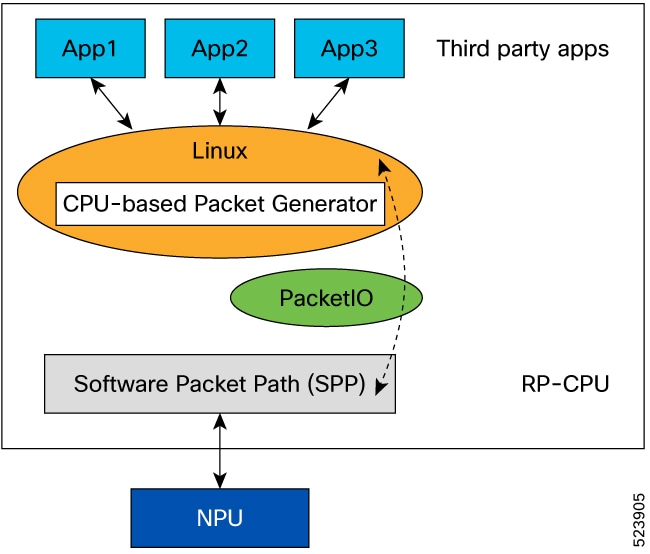
The CPU-based packet generator leverages the Cisco IOS XR Packet I/O framework, which serves as a host for third-party applications on the XR platform. The Packet I/O infrastructure facilitates packet transport and manages interactions between the Linux environment and IOS XR, enabling seamless communication between processes.

Implemented as a Linux application packaged within the IOS XR platform base image, the CPU-based packet generator is distributed as part of the platform, ensuring consistent deployment and integration.

The Linux infrastructure maintains a database of all IOS XR interfaces, including bundle interfaces. The CPU-based packet generator uses this database to send a specific packet type over a chosen interface, providing flexibility for testing and diagnostics.

Figure 1. Topology of the CPU-based packet generator

Packetgen CLI options and sample commands

Use the packetgen command with the following options from the XR bash environment. You can also replay a pcap file using:

packetgen -i interface_name -pcap pcap_file 
Table 2. Packetgen CLI Options

Option

Description

-accounting

Turn on accounting for packets. Only works if packets come back to the packet generator.

-arp-destination-hw-address string

ARP target hardware address (default: uses interface MAC address).

-arp-destination-ip-address string

ARP target IP address (default: 127.0.0.1 or ::1).

-arp-operation uint

ARP operation (1: request, 2: reply, 3: rarp).

-arp-source-hw-address string

ARP sender hardware address (default: uses interface MAC).

-arp-source-ip-address string

ARP sender IP address (default: uses interface IP).

-burst int

Number of packets to inject at a time. Use with -sleep.

-count int

Number of packets to generate.

-data-type string

Payload type: constant, incrementing, random (default: no payload).

-ethernet-dmac string

Destination MAC address (default: ff:ff:ff:ff:ff:ff).

-ethernet-smac string

Source MAC address (default: interface MAC address).

-file string

Write packets to file.

-gre

Enable GRE.

-gre-checksum-present

Enable GRE checksum present bit.

-gre-key-present

Enable GRE key present bit.

-gre-over-mpls

Enable GRE over MPLS.

-gre-protocol uint

Set the protocol type of the GRE payload (default: 0x0800 (IP)).

-gre-seq-present

Enable GRE sequence number present bit.

-gre-version uint

Set the GRE version number (default: 0).

-header string

Custom header for all packets.

-hex

Print hex dump of packets.

-i string

Interface name for packet injection.

-icmp-code uint

ICMP code (default: 0).

-icmp-type uint

ICMP type (default: 0).

-inc-dmac

Increment destination MAC.

-inc-smac

Increment source MAC.

-inner-ethernet-dmac string

Inner Ethernet destination MAC address (default: ff:ff:ff:ff:ff:ff).

-inner-ethernet-smac string

Inner Ethernet source MAC address (default: ff:ff:ff:ff:ff:ff).

-inner-ip-checksum uint

Inner IP checksum (default: compute automatically).

-inner-ip-dont-fragment uint

Set inner IP Don't Fragment flag as 1.

-inner-ip-dst string

Inner destination IP address (default: 127.0.0.1 or ::1).

-inner-ip-flow-label uint

Inner IPv6 Flow Label value (default: 0).

-inner-ip-frag-offset uint

Inner IP fragment offset in units of 64-bits (for example, 1 = 64 bits).

-inner-ip-protocol string

Inner IP protocol. Supports protocol text (TCP, UDP) and code (63 for TCP) (default: TCP).

-inner-ip-src string

Inner source IP address (default: 127.0.0.1 or ::1).

-inner-ip-tos uint

Inner IP Type Of Service (TOS) value (default: 0).

-inner-ip-traffic-class uint

Inner IP traffic-class value (default: 0).

-inner-ip-ttl uint

Inner IP time to live (TTL) (default: 64).

-inner-ip-version int

Inner IP version (default: 4).

-inner-vlan-id uint

Inner VLAN ID (default: 0).

-inner-vlan-tpid uint

Inner VLAN Ethernet type (default: 33024, Dot1Q).

-inner-vlan-vpri uint

Inner VLAN priority (default: 0).

-ip-checksum string

IP checksum (default: compute automatically).

-ip-dont-fragment string

Set IP flag: 0 → 000 (nothing set), 1 → 001 (More Fragments), 2 → 010 (Don't Fragment), 4 → 100 (reserved bit).

-ip-dst string

Destination IP address (default: 127.0.0.1 or ::1).

-ip-flow-label string

IPv6 Flow Label value (default: 0).

-ip-frag-offset string

Fragment offset in units of 64-bits (1 = 64 bits).

-ip-protocol string

IP protocol. Supports protocol text (TCP, UDP, GRE, VXLAN, ICMP, NDP) and code (default: TCP).

-ip-src string

Source IP address (default: interface IP).

-ip-tos string

IP Type Of Service value (default: 0).

-ip-traffic-class string

IP traffic-class value (default: 0).

-ip-ttl string

IP time to live (TTL) (default: 64).

-ip-version string

IP version. Set for accurate IP packet creation (default: 4).

-mpls-exp string

Comma-separated MPLS EXP (Experimental) value (default: 0).

-mpls-label string

Comma-separated list of MPLS labels to add to the packet, from top to bottom.

-mpls-ttl string

Comma-separated MPLS TTL value (default: 64).

-ndp string

Specify the Neighbor Discovery Protocol: nbr-solicit or nbr-advt.

-ndp-target-address string

NDP target address (default: for advertisement, source IP; for solicitation, destination IP).

-pcap string

File to replay pcap.

-progress

Display a progress bar.

-seed int

Seed for pseudo-random payload generator.

-size int

Size of payload.

-sleep string

Time duration to sleep during each burst. Use with -burst.

-stdout

Print packets to stdout.

-tcp-dport int

TCP destination port (default: 40000).

-tcp-flags string

Set TCP control flags: U (Urgent), A (Acknowledgement), P (Push), R (Reset), S (Synchronize), F (Finish).

-tcp-sport int

TCP source port (default: 40000).

-udp-dport int

UDP destination port (default: 40000).

-udp-sport int

UDP source port (default: 40000).

-vlan-id uint

VLAN ID (default: 0).

-vlan-tpid uint

VLAN Ethernet type (default: 33024, Dot1Q).

-vlan-vpri uint

VLAN priority (default: 0).

-vxlan-udp-dport int

UDP destination port for VXLAN (default: 4789).

-vxlan-udp-sport int

UDP source port for VXLAN (default: 0).

-vxlan-vni uint

VXLAN VNI (default: 0).

Table 3. Sample Packetgen Commands

Packet Type

Sample Command

ARP

packetgen -i enp0s8 -ip-ttl 32 -arp-operation 1 -progress -count 10000 -inc-smac -arp-destination-ip-address 192.168.56.1

TCP

packetgen -i enp0s8 -ip-ttl 32 -tcp-sport 40000 -progress -count 10000 -inc-smac

UDP

packetgen -i enp0s8 -ip-ttl 32 -udp-sport 40000 -progress -count 10000 -inc-smac

ICMP - PING

packetgen -i enp0s8 -ip-ttl 32 -icmp-type 8 -progress -count 10000 -ip-dst 192.168.56.1

GRE

packetgen -i enp0s8 -ip-ttl 32 -gre -count 100 -inner-ip-ttl 32 -tcp-sport 3222 -progress

IP in IP

packetgen -i enp0s8 -count 100 -tcp-sport 3222 -progress -ip-src="1.1.1.1,2.2.2.2"

ETHER-IP

packetgen -i enp0s8 -ip-ttl 32 -count 100 -inner-ip-version 6 -tcp-sport 3222 -progress -inner-ethernet-smac ff:ff:ff:ff:ff:ff

VLAN

packetgen -i enp0s8 -ip-ttl 32 -tcp-sport 40000 -progress -count 10000 -inc-smac -vlan-id 2

QinQ

packetgen -i enp0s8 -ip-ttl 32 -tcp-sport 40000 -progress -count 10000 -inc-smac -vlan-id 2 -inner-vlan-id 2

VXLAN

packetgen -i enp0s8 -ip-ttl 32 -tcp-sport 40000 -progress -count 10000 -inc-smac -vxlan-vni 3 -vxlan-udp-sport 4444 -inner-ip-version 4 -inner-ethernet-smac ff:ff:ff:ff:ff:ff -data-type constant

NDP

packetgen -i enp0s8 -ip-version 6 -ndp nbr-advt -count 100 -ip-checksum 1 -progress

MPLS

packetgen -i enp0s8 -ip-version 4 -mpls-label 1,2,3,4,5 -tcp-sport 4556 -count 1000 -progress


Generate packets using the CPU-based packet generator

Run the CPU-based packet generator from the IOS XR bash environment to inject packets over IOS XR interfaces for network diagnostics.

The packetgen command enables you to generate a wide range of packet types directly on a router without physically isolating it from the production network. IOS XR interfaces appear as Linux interfaces in the bash environment, allowing direct use of interface names.

Before you begin

Review the CLI options and sample commands. For details, see Packetgen CLI options and sample commands.

Follow these steps to generate packets and verify injection through the CPU-based packet generator.

Procedure

1.

Access the bash shell on the router.

Example:

Router#bash
[ios:~]$
2.

Run packetgen with the required options to generate packets. This example sends 50 ICMP ping requests from source address 10.0.0.1 to destination address 10.0.0.2 over interface Hu0_0_0_25.

Example:

[ios:~]$packetgen -i Hu0_0_0_25 -ip-ttl 32 -progress -count 50 -icmp-type 8 -ip-dst 10.0.0.2 -ip-src 10.0.0.1 --ethernet-smac 78:c5:51:84:48:c4 --ethernet-dmac 00:00:00:1e:ca:fc
INFO[0000] [ETH IP ICMP]
INFO[0000] Setting SRC IP to 10.0.0.1
INFO[0000] Setting DST IP to 10.0.0.2
INFO[0000] Opening Handle Hu0_0_0_25
INFO[0000] Opened Handle Hu0_0_0_25
INFO[0000] Starting Packet Injection
Sending Packets... 2% | | (1/50, 254 packet/s) [0s:0s] /* Truncated output. */

Address Age Hardware Addr State Type Interface
10.0.0.1 - 78c5.5184.48c4
Interface ARPA HundredGigE0/0/0/25
10.0.0.2 00:50:23 0000.001e.cafc Dynamic ARPA HundredGigE0/0/0/25

Source stats:
Stat Name      Port Name            Control Packet Tx.  Control Packet Rx.  Ping Reply Tx.
20.0.0.2/
Card01/Port01  Ethernet - VM - 001  51                  51                  50

Interface stats:
Input    Punt XIPC  InputQ     XIPC         PuntQ
ClientID Drop/Total Drop/Total Cur/High/Max Cur/High/Max
ipv6_icmp 0/0        0/0       0/0/1000     0/0/1000
icmp      0/50       0/0       0/15/1000    0/0/1000
3.

Verify packet delivery by reviewing the interface statistics in the output.

The statistics confirm that 50 ICMP packets were injected and received on interface Hu0_0_0_25, verifying successful packet injection through the Packet I/O infrastructure.

The packetgen command injects specified packets over the selected IOS XR interface. Using interface statistics output, you can verify packet delivery and diagnose forwarding issues.