Application Hosting Configuration Guide for Cisco 8000 Series Routers, Cisco IOS XR Releases

PDF

Application Hosting Configuration Guide for Cisco 8000 Series Routers, Cisco IOS XR Releases

Docker container application hosting architectures

Want to summarize with AI?

Log in

Explains how Cisco IOS XR uses Docker container application hosting architectures to enable efficient app management and execution.


A Docker container application hosting architecture is a platform solution that

  • utilizes Docker containers to deploy and manage applications,

  • enables the App Manager to interact with containers through the Docker client and daemon, and

  • facilitates application isolation and resource management across network devices.
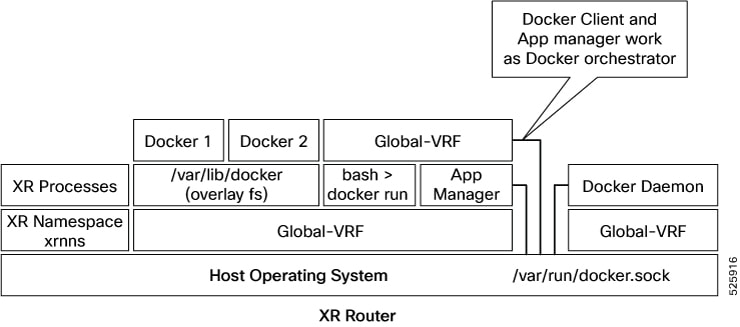
Figure 1. Docker on IOS XR

Cisco IOS XR employs Docker to enable application hosting through a structured architecture. The App Manager internally uses the Docker client, which communicates with Trusted Platform Applications (TPAs) such as Docker 1 and Docker 2 by sending Docker commands.

The Docker client transmits commands to the Docker daemon, which then executes them. The Docker daemon uses the docker.sock Unix socket to communicate with the Docker containers.

When the docker run command is executed, a Docker container is created and started from a Docker image. Docker containers can operate within the global-vrf namespace, providing networking isolation.

Docker relies on overlayfs, located under the /var/lib/docker directory, for managing container directories and files


Recommendation: Follow hosting guidelines for Docker containers

Use the host paths listed below when specifying the --mount and --volume options with docker run:

  • "/var/run/netns"

  • "/var/lib/docker"

  • "/misc/disk1"

  • "/disk0"

  • "/misc/config/grpc"

  • "/etc"

  • "/dev/net/tun"

  • "/var/xr/config/grpc"

  • "/opt/owner"


TP application resource configurations

A TP application resource configuration is a system resource management feature that

  • limits the allocation of CPU, RAM, and disk space to third party applications (TPAs),

  • enforces these limits through the IOS XR application manager (appmgr), and

  • ensures platform security and operational integrity by monitoring application traffic and supporting application signing.

Third party applications (TPAs): Applications packaged as Docker containers and managed by the IOS XR operating system.

IOS XR is equipped with inherent safeguards to prevent third party applications from interfering with its role as a Network OS.

  • Although IOS XR doesn't impose a limit on the number of TPAs that can run concurrently, it does impose constraints on the resources allocated to the Docker daemon, based on the following parameters:

    • CPU: By default, ΒΌ of the CPU per core available in the platform.

      You can hard limit the default CPU usage in the range between 25-75% of the total system CPU using the appmgr resources containers limit cpu value command. This configuration restricts the TPAs from using more CPU than the set hard limit value irrespective of the CPU usage by other XR processes.

      This example provides the CPU hard limit configuration.

      RP/0/RSP0/CPU0:ios(config)#appmgr resources containers limit cpu ?
        <25-75>  In Percentage
      RP/0/RSP0/CPU0:ios(config)#appmgr resources containers limit cpu 25
      
    • RAM: By default, 1 GB of memory is available.

      You can hard limit the default memory usage in the range between 1-25% of the overall system memory using the appmgr resources containers limit memory value command. This configuration restricts the TPAs from using more memory than the set hard limit value.

      This example provides the memory hard limit configuration.

      RP/0/RSP0/CPU0:ios(config)#appmgr resources containers limit memory ?
        <1-25>  In Percentage
      RP/0/RSP0/CPU0:ios(config)#appmgr resources containers limit memory 20
      
    • Disk space is restricted by the partition size, which varies by platform and can be checked by executing "run df -h" and examining the size of the /misc/app_host or /var/lib/docker mounts.

  • All traffic to and from the application is monitored by the XR control protection, LPTS.

  • Signed Applications are supported on IOS XR. Users have the option to sign their own applications by onboarding an Owner Certificate (OC) through Ownership Voucher-based workflows as described in RFC 8366. Once an Owner Certificate is onboarded, users can sign applications with GPG keys based on the Owner Certificate, which can then be authenticated during the application installation process on the router.

This table shows the various functions performed by appmgr.

Package Manager

Lifecyle Manager

Monitoring and Debugging

  • Handles installation of docker images packaged as RPMs.

  • Syncs the required state to standby to restart apps in cases of switchover, etc

  • Handles application start/stop/kill operations.

  • Handles automatic application reload on:

    • Router reboot

    • Container crash

    • Switchover

  • Logging, stats, application health check.

  • Forwards docker deamon logs to XR syslog.

  • Allows to execute into docker shell of running application.