Provides details on the PXE server Docker container feature for Cisco IOS XR routers, including supported releases, hardware, specifications, and behavioral guidelines.
Preboot Execution Environment (PXE) is a client-server interface that enables devices in a network to download the files (like boot image, configurations and so on) from a PXE server.
The client uses DHCP protocol to receive the PXE server details and uses TFTP or HTTP protocol to download the file.
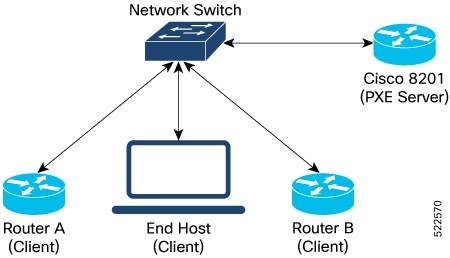
PXE server Docker functionality
-
The PXE server Docker feature enables PXE and iPXE functionality on routers running Cisco IOS XR software.
-
It allows client devices (routers, Linux devices, VMs) to download boot images and configuration files from a Docker-hosted server managed by the application manager.
-
Services provided within the PXE server Docker container:
-
DHCP
-
HTTP (iPXE)
-
TFTP (PXE)
-
-
The feature is supported on both IPv4 and IPv6.
-
The PXE server is installed on Cisco 8201 routers as a Docker container, managed by Cisco IOS XR Application Manager. The clients (routers or end-hosts such as Linux devices, VMs and so on) that are connected to this server can request and download the boot image.
PXE server Docker optional RPM
The optional RPM, xr-pxeserver, contains:
-
Executables for the pxe_svr_mgr Cisco IOS XR process.
-
PXE server Docker image: pxe-server-docker.rpm.
-
When installed, the Docker image is placed in the appmgr images directory: /pkg/opt/cisco/XR/appmgr/images/pxe-server-docker.rpm.
-
-
Helper scripts: install_pxeserver.py and uninstall_pxeserver.py (located in /pkg/bin/) for manual installation/uninstallation.
-
Helper scripts are used for manual operations, otherwise use application manager commands.
-