The documentation set for this product strives to use bias-free language. For the purposes of this documentation set, bias-free is defined as language that does not imply discrimination based on age, disability, gender, racial identity, ethnic identity, sexual orientation, socioeconomic status, and intersectionality. Exceptions may be present in the documentation due to language that is hardcoded in the user interfaces of the product software, language used based on RFP documentation, or language that is used by a referenced third-party product. Learn more about how Cisco is using Inclusive Language.
Service Provider WiFi: Support for Integrated Ethernet Over GRE
Generic Routing Encapsulation (GRE) is a tunneling protocol that
encapsulates a wide variety of network layer protocols inside virtual
point-to-point links over a Layer 3 IPv4 or Layer 3 IPv6 access network.
Finding Feature
Information
Your software release may not support all the features documented in
this module. For the latest caveats and feature information, see
Bug Search Tool and the
release notes for your platform and software release. To find information about
the features documented in this module, and to see a list of the releases in
which each feature is supported, see the feature information table at the end
of this module.
Use Cisco Feature Navigator to find information about platform support
and Cisco software image support. To access Cisco Feature Navigator, go to
www.cisco.com/go/cfn. An account on
Cisco.com is not required.
Information About
Ethernet Over GRE
Ethernet over GRE
(EoGRE) is a new aggregation solution for aggregating WiFi traffic from
hotspots. This solution enables customer premises equipment (CPE) devices to
bridge the Ethernet traffic coming from an end host, and encapsulate the
traffic in Ethernet packets over an IP GRE tunnel. When the IP GRE tunnels are
terminated on a service provider broadband network gateway, the end host’s
traffic is terminated and subscriber sessions are initiated for the end host.
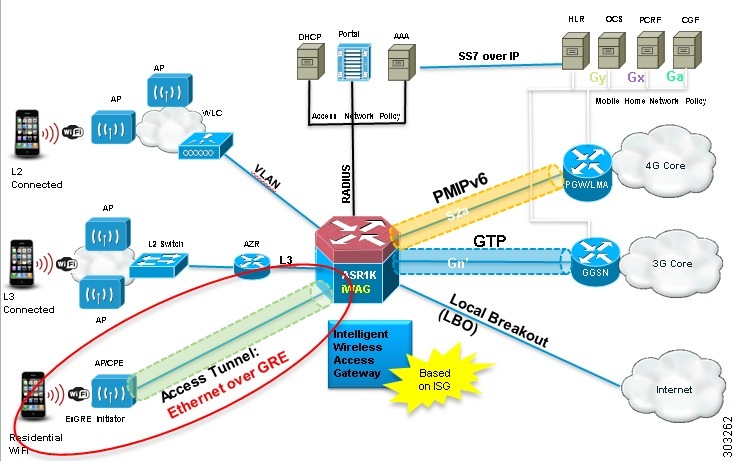
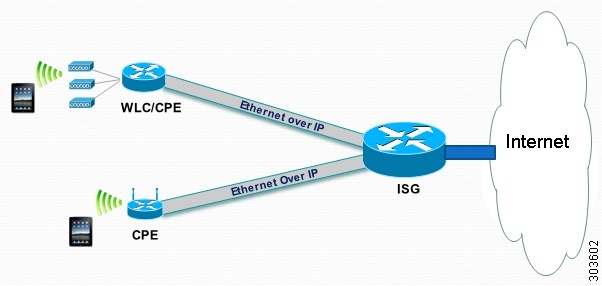
The following figure
shows the structure of the Ethernet over GRE.
Figure 1. Ethernet Over
GRE Structure
Restrictions for
Configuring Ethernet Over GRE
The following
features are not supported on the Cisco ASR 1000 Series Aggregation Services
Routers:
IPsec tunnel between the
Cisco ASR 1000 Series Aggregation Services Routers and the CPE devices
Native multicast
coexistence for subscribers
Per-CPE QoS
IPv6 subscriber
The Cisco Intelligent
Services Gateway (ISG) RADIUS proxy initiator
QinQ tag for the inner L2
frame
High Availability is not
supported if ISG is not configured.
If the VLAN priority tag inside the
EoGRE packet is set to a nonzero value, iWAG ignores the packet
Prerequisites for Configuring Ethernet Over GRE
Before you configure the Ethernet over GRE feature on the Cisco ASR
1000 Series Aggregation Services Routers, ensure that the following
prerequisites are met:
A physical interface or
dot1Q interface should be configured.
The ISG policy should not
be applied to the physical interface.
Information About
Configuring Ethernet Over GRE
The Cisco ASR 1000
Series Aggregation Services Routers serve as a service provider broadband
network gateway that:
Terminates IPv4 or IPv6 GRE
tunnels.
Manages the subscriber
session for end-host clients.
The EoGRE feature
works with legacy residential gateways and CPE devices to terminate the
Ethernet L2 traffic in the Cisco ASR 1000 Series Aggregation Services Routers.
When configured as an intelligent Wireless Access Gateway (iWAG) with EoGRE
access tunneling support, the Cisco ASR 1000 Series Aggregation Services
Routers can extend mobility and the ISG services in support of these legacy
devices.
The following figure
shows the structure of the EoGRE feature with PMIP/GTP integrated for mobility
service.
Figure 2. Structure of
the EoGRE Feature with PMIP/GTP Integrated for Mobility Service
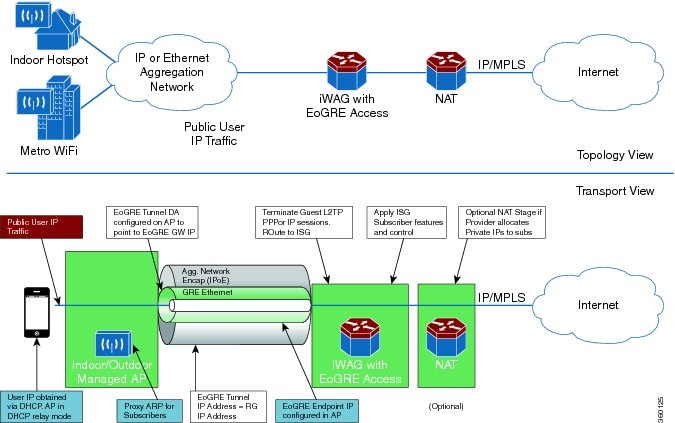
The following figure
shows the structure of the EoGRE feature for simple IP service.
Figure 3. Structure of
the EoGRE Feature for Simple IP Service
The EoGRE feature
supports the following deployments:
EoGRE Deployment with
PMIPv6 Integrated for Mobility Service
EoGRE Deployment with GTP
Integrated for Mobility Service
EoGRE Deployment with ISG
Integrated for Simple IP Service
EoGRE Deployment
with PMIPv6 Integrated for Mobility Service
Proxy Mobile IPv6
(PMIPv6) provides mobility service to the mobile nodes that are connected to
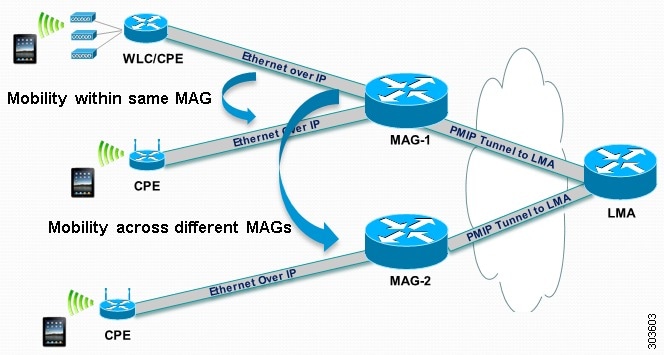
the Mobile Access Gateway (MAG) via an EoGRE tunnel. The following figure shows
the structure of the EoGRE deployment with PMIPv6 integrated for mobility
service.
Figure 4. Structure of
the EoGRE Deployment with PMIPv6 Integrated for Mobility Service
Mobile nodes access
the mobile internet service over Wi-Fi access points. The access points are
either autonomous access points or are connected to the Cisco Wireless LAN
Controller (WLC). These access points and WLCs are used as residential gateways
or CPE devices. CPEs are preconfigured with a point-to-multipoint GRE IP tunnel
to the Cisco ASR 1000 Series Aggregation Services Routers as the MAG. The
tunnel from the CPE device can be configured with a static GRE key. The CPEs
are provisioned to forward the Ethernet traffic from both public and private
customers to the GRE tunnel, and to add a VLAN tag on the Ethernet frame before
forwarding the traffic.
As with regular
PMIPv6 deployments, the Cisco ASR 1000 Series Aggregation Services Routers can
create IP sessions on EoGRE access tunnels similar to the regular IP sessions
on the physical Ethernet interfaces, and allocate IP addresses for mobile
nodes, either locally or in the proxy mode. Mobility service is provided to the
mobile nodes and the tunneled Ethernet traffic is forwarded via IP tunnels to
the Local Mobility Anchor (LMA).
Note
When you ping a
mobile node from the MAG with a packet size that is larger than that of the
path maximum transmission unit (PMTU) that is configured with the DF bit set,
the packet will be dropped. However, you will not get the return type as M.M.M
(could not fragment). This is reflected in the log messages or error messages.
For more information
about PMIPv6 and the ISG configurations for the iWAG, see the
Intelligent
Wireless Gateway Configuration Guide.
EoGRE Deployment
with GTP Integrated for Mobility Service
GPRS Tunneling
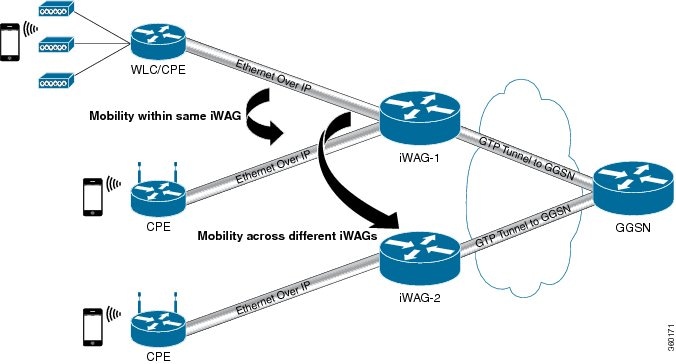
Protocol (GTP) provides mobility service to the mobile nodes that are connected
to the iWAG via an EoGRE tunnel, as shown in the following figure.
Figure 5. Structure of
the EoGRE Deployment with GTP Integrated for Mobility Service
For more
information about the GTP and ISG configurations for the iWAG, see the
Intelligent
Wireless Gateway Configuration Guide.
EoGRE Deployment
with ISG Integrated for Simple IP Service
The ISG provides
simple IP service to mobile nodes that are connected to ISG via the EoGRE
tunnel, as shown in the following figure. The Cisco ASR 1000 Series Aggregation
Services Routers use the ISG framework to allocate IP sessions for
authenticated subscribers. Simple IP subscribers are provided ISG services,
including Internet access, but are not provided access to mobility services via
GTP or PMIPv6.
Figure 6. Structure of
the EoGRE Deployment with ISG Integrated for Simple IP Service
Supported Features
The following features are supported as part of the EoGRE feature on
the Cisco ASR 1000 Series Aggregation Services Routers:
Ethernet over GRE traffic
termination on the routers
Frames can have up to one
dot1Q VLAN tag
L2-connected IPv4 mobile
nodes
GRE tunnel for IPv4 or
IPv6
ISG and PMIPv6 or GTP
integrated with the EoGRE tunnel
ISG initiator-unclassified
MAC, DHCP, DNAv4
Subscriber roaming
How to Configure the EoGRE Feature
SUMMARY STEPS
enable
configure terminal
interface interface-name
ip unnumbered loopback interface-name or
ip address ip-address
tunnel source interface-type interface-number
(For simple IP mode)
mac-address H.H.H
tunnel mode ethernet gre ipv4 or
tunnel mode ethernet gre ipv6
(Optional)tunnel vlan vlan-id
end
DETAILED STEPS
Command or Action
Purpose
Step 1
enable
Example:
Router> enable
Enables the privileged EXEC mode.
Enter your password, if prompted.
Step 2
configure terminal
Example:
Router# configure terminal
Enters the global configuration mode.
Step 3
interface interface-name
Example:
Router(config)# interface Tunnel 0
Specifies the logical interface for the EoGRE tunnel.
Step 4
ip unnumbered loopback interface-name or
ip address ip-address
Example:
Router(config-if)# ip unnumbered loopback 0

or

Router(config-if)# ip address 20.1.1.2 255.255.255.0
For PMIPv6 and GTP scenarios, an unnumbered address or a
specified IP address can be configured on the tunnel interface.
For a simple IP scenario, only a specified IP address can be
configured on the tunnel interface. This IP address can be used as a default
gateway IP address.
Step 5
tunnel source interface-type interface-number
Example:
Router(config-if)# tunnel source Loopback 0
Sets the source interface for the EoGRE tunnel interface.
Step 6
(For simple IP mode)
mac-address H.H.H
Example:
Router(config-if)# mac-address 0000.5e00.5213
Sets the source MAC address for the EoGRE tunnel interface. The
MAC address is mandatory for simple IP deployment. For PMIPv6/GTP, the default
MAC address associated with EoGRE Tunnel is 0000.5e00.5213.
Step 7
tunnel mode ethernet gre ipv4 or
tunnel mode ethernet gre ipv6
Example:
Router(config-if)# tunnel mode ethernet gre ipv4

or

Router(config-if)# tunnel mode ethernet gre ipv6
Sets the EoGRE encapsulation mode for the tunnel interface for
IPv4.
or
Sets the EoGRE encapsulation mode for the tunnel interface for
IPv6.
Step 8
(Optional)tunnel vlan vlan-id
Example:
Router(config-if)# tunnel vlan 1000
(Optional) Sets the VLAN ID of the EoGRE tunnel.
Step 9
end
Example:
Router(config-if)# end
Ends the current configuration session.
Example: Configuring the EoGRE Feature
aaa new-model
!
aaa group server radius AAA_SERVER_CAR
server-private 5.3.1.76 auth-port 2145 acct-port 2146 key cisco
!
aaa authentication login default none
aaa authentication login ISG_PROXY_LIST group AAA_SERVER_CAR
aaa authorization network ISG_PROXY_LIST group AAA_SERVER_CAR
aaa authorization subscriber-service default local group AAA_SERVER_CAR
aaa accounting network PROXY_TO_CAR
action-type start-stop
group AAA_SERVER_CAR
!
aaa accounting network ISG_PROXY_LIST start-stop group AAA_SERVER_CAR
!
aaa server radius dynamic-author
client 5.3.1.76 server-key cisco
auth-type any
ignore server-key
!
!
ip dhcp excluded-address 172.16.254.254
!
ip dhcp pool ISG_SIMPLE_IP
 network 172.16.0.0 255.255.0.0
 default-router 172.16.254.254
 domain-name cisco.com
!
policy-map type control EOGRE_L2_ISG
 class type control always event session-start
  2 authorize aaa list ISG_PROXY_LIST password cisco identifier mac-address
  4 set-timer IP_UNAUTH_TIMER 5
 !
 class type control always event service-start
  1 service-policy type service identifier service-name
  2 collect identifier nas-port
 !
!
interface Loopback0
 ip address 9.9.9.9 255.255.255.255
interface GigabitEthernet1/0/0
ip address 192.168.0.9 255.255.255.0
negotiation auto
!
interface GigabitEthernet1/0/0.778
description "to ASR5K GGSN"
encapsulation dot1Q 778
ip address 172.16.199.9 255.255.255.0
!
interface Tunnel10
 description "EoGRE Tunnel for Simple IP subscribers"
 mac-address 0000.5e00.5213
 ip address 172.16.254.254 255.255.0.0
 no ip redirects
 tunnel source 172.16.199.9
 tunnel mode ethernet gre ipv4
 service-policy type control EOGRE_L2_ISG
 ip subscriber l2-connected
  initiator unclassified mac-address
  initiator dhcp
interface Tunnel100
description "IPv4 EoGRE Tunnel for PMIP/GTP subscribers"
 ip unnumbered Loopback0
 tunnel source GigabitEthernet1/0/0
 tunnel mode ethernet gre ipv4
 tunnel vlan 100
 service-policy type control EOGRE_L2_ISG
 ip subscriber l2-connected
  initiator unclassified mac-address
  initiator dhcp
!
interface Tunnel200
description "IPv6 EoGRE Tunnel for PMIP/GTP subscribers"
 ip unnumbered Loopback0
 tunnel source 2001:161::9
 tunnel mode ethernet gre ipv6
 tunnel vlan 200
service-policy type control EOGRE_L2_ISG
 ip subscriber l2-connected
  initiator unclassified mac-address
  initiator dhcp
!
mcsa
 enable sessionmgr
!
ipv6 mobile pmipv6-domain D1
 replay-protection timestamp window 255
lma LMA_5K
  ipv4-address 192.168.199.1
!
ipv6 mobile pmipv6-mag M1 domain D1
sessionmgr
 role 3GPP
 address ipv4 9.9.9.9
interface Tunnel100
 interface Tunnel200
 lma LMA_5K D1
  ipv4-address 192.168.199.1
  encap gre-ipv4
!
ntp master
!
gtp
 information-element rat-type wlan
 interface local GigabitEthernet1/0/0.778
 apn 1
  apn-name gtp.com
  ip address ggsn 172.16.199.1
  fixed link-layer address 00ab.00cd.00ef
  default-gw 20.100.254.254 prefix-len 16
  dns-server 20.100.254.254
  dhcp-server 20.100.254.254
!
end
You can use the
following commands to check and show subscriber session information:
show ip dhcp sip statistics
show subscriber statistics
show subscriber session
show ipv6 mobile pmipv6 mag binding
show gtp pdp-context all
show interface tunnel-name
The
Cisco Support website provides extensive online resources, including
documentation and tools for troubleshooting and resolving technical issues with
Cisco products and technologies.
To
receive security and technical information about your products, you can
subscribe to various services, such as the Product Alert Tool (accessed from
Field Notices), the Cisco Technical Services Newsletter, and Really Simple
Syndication (RSS) Feeds.
Access
to most tools on the Cisco Support website requires a Cisco.com user ID and
password.
Feature
Information for Configuring Ethernet Over GRE
The following table provides release information about the feature or features described in this module. This table lists
only the software release that introduced support for a given feature in a given software release train. Unless noted otherwise,
subsequent releases of that software release train also support that feature.
Use Cisco Feature Navigator to find information about platform support and Cisco software image support. To access Cisco
Feature Navigator, go to www.cisco.com/go/cfn. An account on Cisco.com is not required.
Table 1. Feature
Information for Configuring the Ethernet Over GRE Feature
Feature
Name
Releases
Feature
Information
Service
Provider WiFi: Integrated Ethernet Over GRE
3.9.1S
This feature enables the Ethernet over Generic Routing
Encapsulation (EoGRE) tunnel to be used as a service provider WiFi access
interface from CPE devices. A Cisco ASR 1000 Series Aggregation Services Router
is used as an L2 aggregator to terminate L2 traffic at the GRE tunnel interface
and provide L3 services.
In Cisco IOS XE Release 3.9.1S, this feature is implemented on
the Cisco ASR 1000 Series Aggregation Services Routers.
The following sections provide information about this feature:


 Feedback