Overview of the Intelligent Wireless Access Gateway

Service providers use a combination of WiFi and mobility offerings to offload their mobility networks in the area of high-concentration service usage. This led to the evolution of the Intelligent Wireless Access Gateway (iWAG).

The iWAG provides a WiFi offload option to 4G and 3G service providers by enabling a single-box solution that provides the combined functionality of Proxy Mobile IPv6 (PMIPv6) and GPRS Tunneling Protocol (GTP) on the Cisco Intelligent Services Gateway (Cisco ISG) framework. This document provides information about the iWAG and how to configure it, and contains the following sections:

Finding Feature Information

Your software release may not support all the features documented in this module. For the latest caveats and feature information, see Bug Search Tool and the release notes for your platform and software release. To find information about the features documented in this module, and to see a list of the releases in which each feature is supported, see the feature information table at the end of this module.

Use Cisco Feature Navigator to find information about platform support and Cisco software image support. To access Cisco Feature Navigator, go to www.cisco.com/go/cfn. An account on Cisco.com is not required.

Prerequisites for the iWAG

  • Enable mobile client service abstraction (MCSA).

  • Enable the ipv6 unicast-routing command.

Restrictions for the iWAG

  • Roaming from a 3G mobility network to a WLAN is not supported for the GTP and Cisco ISG sessions.
  • IP subscriber-routed (L3) sessions are not supported.
  • IPv6 and quality of service (QoS) are not supported in a 3G mobility network.
  • Only newly established calls are offloaded to the WLAN Third-Generation Partnership Project (3GPP) IP access.
  • The iWAG solution for WLAN offload is currently available only for the 3G Universal Mobile Telecommunications System (UMTS).

Information About the iWAG

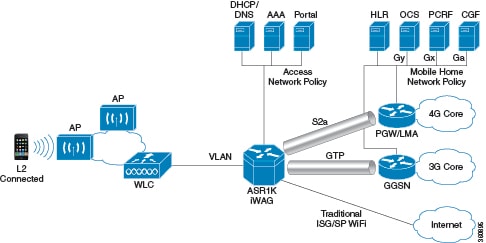
The iWAG deployment includes a combination of simple IP users (traditional ISG and WiFi) and mobile IP users (PMIPv6 or GTP tunneling). The term mobility service is used to refer to either the GTP service or the PMIPv6 service applied to user traffic. The iWAG provides mobility services to mobile IP users, and as a result, a mobile client can seamlessly access a 3G or 4G mobility network. However, the iWAG does not provide mobility services to simple IP users. Therefore, simple IP users can access the Public Wireless LAN (PWLAN) network through the Cisco ISG. Clients are devices that access WiFi Internet (public wireless), where possible. However, if WiFi is not available, the same clients can

connect to the Internet service using a 3G or 4G mobility network.

The iWAG has a transport or switching element with Cisco ISG subscriber awareness. The iWAG also has RADIUS-based authentication and accounting, and policy-based subscriber routing for the WiFi wholesale model.

For more information about the iWAG, see the Overview of iWAG video.

The following figure shows a deployment model of the iWAG on a Cisco ASR 1000 Series Aggregation Services Router.

Figure 1. iWAG Deployment on a Cisco ASR 1000 Series Aggregation Services Router

Benefits of the iWAG

The iWAG offers the following benefits for mobile operators:

  • Reduces network congestion by reducing OpEx and increasing network efficiency by offloading 3G and 4G traffic.

  • Provides access to 3G and 4G core inspite of a lack of or weak cell signal, leading to subscriber retention.

  • Lowers CapEx on per user basis or bandwidth basis in dense metro environments.

The iWAG offers the following benefits for wireline and WiFi operators:

  • Provides WiFi security and subscriber control. Delivers scalable, manageable, and secure wireless connectivity.

  • Enables new revenue-sharing business models, such as Mobile Virtual Network Operators (MVNO) and others.

  • Delivers a WiFi platform that offers new location-based services.

The iWAG offers the following benefits for subscribers:

  • Provides enhanced quality of experience to subscribers on WiFi networks.

  • Provides unified billing across access networks.

  • Provides mobility across radio access technologies—3G or 4G to WiFi and WiFi to WiFi.

  • Provides multiple options within the WiFi platform, thereby enabling location-based services.

AAA Attributes

The following table lists the authentication, authorization, and accounting (AAA) attributes required for the iWAG configuration:


Note

The following indicate the availability of the attributes:

C: Conditional

M: Mandatory

O: Optional

N: Not present


Table 1. iWAG AAA Attributes

Attrib

ute

/Subattri

bute

Attri

bute

Name

Value Description ARq1 AA2 ARj3 AS4 CoA5
1

User Name

String Network Access Identifier M M M O C
4

NAS-IP

-Address

String IP address of the MAG M N N M O
31

Calling-

Station-ID

String MAC address of the mobile node M M M M M

26/

10415/

1

3GPP-

IMSI

String 3GPP IMSI N O N N O

26/

10415

/13

3GPP

-Charging

-Characteristics

String Rules for producing charging information N O N O O

26

/9

/1

Cisco-Service

-Selection

String Service Identifier (APN) N C N N C

26

/9

/1

Cisco

-Mobile

-Node

-Identifier

String Mobile Node Identifier N M N M C

26

/9/1

Cisco

-WLAN

-SSID

String SSID of the Access Point C N N C N
26/9/1

Cisco

-MSISDN

String Mobile Subscriber ISDN number N C N C C
26/9/1

Cisco-MN

-Service

ENUM

  • none

  • ipv4

  • ipv6

  • dual

Mobile Node Service type N M N M O
26/9/1

Cisco-MPC

-Protocol

-Interface

ENUM

  • none

  • pmipv6

  • gtpv1

  • pmipv4

Protocol Interface to be used for interfacing with MPC N M N O O
26/9/1

Cisco

-Multihoming

-Support

Binary True/False: Multihoming support for mobile node N O N N O
26/9/1

Cisco

-Uplink

-GRE

-Key

Integer 32-bit GRE Key to be used on the uplink path (4-octet hex encoding) N O N N O
26/9/1

Cisco

-Downlink

-GRE

-Key

Integer 32-bit GRE Key to be used on the downlink path (4-octet hex encoding) N O N N O
26/9/1

Cisco

-Home

-LMA

-IPv6

-Address

String Mobile node's Home LMA IPv6 address N C N N O
26/9/1

Cisco

-Visited

-LMA

-IPv6

-Address

String Mobile node's Visited LMA IPv6 address N C N N O
26/9/1

Cisco

-Home

-LMA

-IPv4

-Address

IPv4 Address Mobile node's Home LMA IPv4 address N C N N O
26/9/1

Cisco

-Visited

-LMA

-IPv4

-Address

IPv4 Address Mobile node's Visited LMA IPv4 address N C N N O
26/9/1

Cisco

-Home

-IPv4

-Home

-Address

IPv4 Address Mobile node's Visited LMA IPv4 address N O N N C
26/9/1

Cisco

-Visited

-IPv4

-Home

-Address

IPv4 Address Mobile node's Visited IPv4 address N O N N C

26

/10415

/5

THREEGENPP

_GPRS

_QOS

_PROFILE

String GRPS QoS Profile N O N N N

26

/10415

/7

THREEGENPP

_GGSN

_ADDRESS

IPv4 Address GGSN's Address N O N N N
26/9/1

Cisco

-Access

-Vrf

-Id

String Access-side VRF ID N O N N N
26/9/1

Cisco

-Apn

-Vrf

-Id

IPv4 Address GGSN's IPv4 address N O N N N
1 Access Request
2 Access Accept
3 Access Reject
4 Accounting Start
5 Change of Authorization

Supported Hardware and Software Compatibility Matrix for the iWAG

Chassis RP Memory ESP

Cisco ASR 1001 Router

Integrated RP with 16 GB

Integrated

Cisco ASR 1002-X Router

Integrated RP with 16 GB

Integrated

Cisco ASR 1004 Router

RP2 16 GB

ESP-40G

Cisco ASR 1006 Router and Cisco ASR 1013 Router offering duplex RP or ESP setup

RP2 16 GB

ESP-40G

Cisco ASR 1006 Router and Cisco ASR 1013 Router offering duplex RP or ESP setup

RP2 16 GB

ESP-100G

For information about the field-replaceable units (FRUs) of the Cisco ASR 1000 Series Aggregation Services Routers supported by each ROMmon release, see the "ROMmon Release Requirements" section in the Cisco ASR 1000 Series Aggregation Services Routers Release Notes.

Stateless Inter-Chassis Redundancy Support Matrix for the iWAG

Session Tunneling Local Breakout (No Tunneling) GTPv1 GTPv2 PMIPv6 (IWAG=MAG)

With HSRP

Without HSRP

With HSRP

Without HSRP

With HSRP

Without HSRP

With HSRP

Without HSRP

Layer 2

Yes

No

Not Supported

Not Supported

Not Supported

Not Supported

Not Supported

Not Supported

Layer 3

Yes

No

Not Applicable

Not Applicable

Not Applicable

Not Applicable

Not Applicable

Not Applicable

EoGRE

Yes

No

Not Supported

Not Supported

Not Supported

Not Supported

Not Supported

Not Supported

How to Configure the iWAG

Configuring the iWAG for Simple IP Users

You must configure the Cisco Intelligent Services Gateway (ISG) for the iWAG to enable simple IP users to access Internet services.

The tasks listed below enable IP sessions and indicate how these sessions are identified. For detailed steps, see the "Creating ISG Sessions for IP Subscribers" section in the Intelligent Services Gateway Configuration Guide.

  • Creating ISG IP interface sessions

  • Creating ISG Static Sessions

  • Creating ISG IP Subnet Sessions

  • Configuring IP Session Recovery for DHCP-Initiated IP Sessions

  • Verifying ISG IP Subscriber Sessions

  • Clearing ISG IP Subscriber Sessions

  • Troubleshooting ISG IP Subscriber Sessions

You must configure DHCP support in your network before performing the tasks listed below. For detailed steps on assigning IP addresses using DHCP, see the "Assigning ISG Subscriber IP Addresses by Using DHCP" section in the Intelligent Services Gateway Configuration Guide.

  • Configuring an ISG Interface for Dynamic DHCP Class Association

  • Configuring DHCP Server User Authentication

  • Configuring a DHCP Class in a Service Policy Map

  • Configuring a DHCP Class in a Service Profile or User Profile on the AAA Server

  • Configuring a DHCP Server IP Address

Configuring the iWAG for 3G Mobile IP Users

You must configure GTP for the iWAG to allow access to 3G mobile IP users. The various tasks described in the following sections are mandatory for configuring the iWAG for 3G mobile IP users.

Configuring Authentication, Authorization, and Accounting for the iWAG

This section describes how to configure authentication, authorization, and accounting (AAA) for the iWAG on the Cisco ASR 1000 Series Aggregation Services Routers.

SUMMARY STEPS

  1. enable
  2. configure terminal
  3. aaa new-model
  4. aaa group server radius group-name
  5. server-private ip-address [auth-port port-number | acct-port port-number ] [non-standard] [timeout seconds ] [retransmit retries ] [ key string]
  6. aaa authentication login {default | list-name} { [passwd-expiry] method1 [method2...]}
  7. aaa authorization network authorization-name group server-group name
  8. aaa authorization subscriber-service {default {cache | group | local} | list-name} method1 [method2...]
  9. aaa accounting { auth-proxy | system | network | exec | connection | commands level | dot1x} { { default | list-name } [ vrf vrf-name] {start-stop | stop-only | none} [broadcast] group group-name
  10. action-type {none | start-stop | stop-only}
  11. group {tacacs+ server-group}
  12. aaa accounting { auth-proxy | system | network | exec | connection | commands level | dot1x } { default | list-name } [ vrf vrf-name ] {start-stop | stop-only | none} [broadcast] group group-name

DETAILED STEPS

  Command or Action Purpose
Step 1

enable

Example:
Router# enable

Enables the privileged EXEC mode.

Enter your password, if prompted.

Step 2

configure terminal

Example:
Router# configure terminal

Enters the global configuration mode.

Step 3

aaa new-model

Example:
Router(config)# aaa new-model

Enables the AAA access control model.

Step 4

aaa group server radius group-name

Example:
Router(config)# aaa group server radius AAA_SERVER_CAR

Groups different RADIUS server hosts into distinct lists and methods.

Step 5

server-private ip-address [auth-port port-number | acct-port port-number ] [non-standard] [timeout seconds ] [retransmit retries ] [ key string]

Example:
Router(config-sg-radius)# server-private 5.3.1.76 auth-port 2145 acct-port 2146 key cisco

Configures the IP address of the private RADIUS server for the group server.

Step 6

aaa authentication login {default | list-name} { [passwd-expiry] method1 [method2...]}

Example:
Router(config-sg-radius)# aaa authentication login default none

Sets AAA authentication at login.

Step 7

aaa authorization network authorization-name group server-group name

Example:
Router(config)# aaa authorization network ISG_PROXY_LIST group AAA_SERVER_CAR

Runs authorization for all network-related service requests.

Step 8

aaa authorization subscriber-service {default {cache | group | local} | list-name} method1 [method2...]

Example:
Router(config)# aaa authorization subscriber-service default local group AAA_SERVER_CAR

Specifies one or more AAA authorization methods for the Cisco ISG to provide subscriber service.

Step 9

aaa accounting { auth-proxy | system | network | exec | connection | commands level | dot1x} { { default | list-name } [ vrf vrf-name] {start-stop | stop-only | none} [broadcast] group group-name

Example:
Router(config)# aaa accounting network PROXY_TO_CAR

Enables AAA accounting of requested services for billing and security purposes when either the RADIUS server or the TACACS+ server is used.

Step 10

action-type {none | start-stop | stop-only}

Example:
Router(cfg-acct-mlist)# action-type start-stop

Enables the type of actions to be performed on accounting records.

Step 11

group {tacacs+ server-group}

Example:
Router(cfg-preauth)# group AAA_SERVER_CAR

Specifies the AAA TACACS+ server group to use for preauthentication.

Step 12

aaa accounting { auth-proxy | system | network | exec | connection | commands level | dot1x } { default | list-name } [ vrf vrf-name ] {start-stop | stop-only | none} [broadcast] group group-name

Example:
Router(config)# aaa accounting network ISG_PROXY_LIST start-stop group AAA_SERVER_CAR

Enables AAA accounting of requested services for billing and security purposes when you use either the RADIUS server or the TACACS+ server.

Configuring DHCP when the iWAG Acts as a DHCP Proxy

This section describes how to configure the Dynamic Host Configuration Protocol (DHCP) for the iWAG solution when the iWAG acts as a DHCP proxy.

SUMMARY STEPS

  1. enable
  2. configure terminal
  3. ip dhcp excluded-address [vrf vrf-name] ip-address
  4. ip dhcp pool pool-name
  5. network network-number [ mask [secondary] | /prefix-length [secondary]
  6. default-router ip-address [last-ip-address]
  7. domain-name domain
  8. lease {days [hours [ minutes ]] | infinite}

DETAILED STEPS

  Command or Action Purpose
Step 1

enable

Example:
Router> enable

Enables the privileged EXEC mode.

Enter your password, if prompted.

Step 2

configure terminal

Example:

Router# configure terminal

Enters the global configuration mode.

Step 3

ip dhcp excluded-address [vrf vrf-name] ip-address

Example:

Router(config)# ip dhcp excluded-address 192.168.10.1

Specifies the IP address that a DHCP server should not assign to DHCP clients.

Step 4

ip dhcp pool pool-name

Example:

Router(config)# ip dhcp pool test

Configures a DHCP address pool on a DHCP server and enters the DHCP pool configuration mode.

Step 5

network network-number [ mask [secondary] | /prefix-length [secondary]

Example:

Router(dhcp-config)# network 192.168.0.0 255.255.0.0

Configures the network number and mask for a DHCP address pool primary subnet or DHCP address pool secondary subnet on a Cisco IOS DHCP server.

Step 6

default-router ip-address [last-ip-address]

Example:

Router(dhcp-config)# default-router 192.168.10.1

Specifies the default router list for a DHCP client.

Step 7

domain-name domain

Example:

Router(dhcp-config)# domain-name example.com

Specifies the domain name for a DHCP client.

Step 8

lease {days [hours [ minutes ]] | infinite}

Example:

Router(dhcp-config)# lease 1 2 2
Configures the duration of the lease for an IP address that is assigned from a Cisco IOS DHCP server to a DHCP client.
Note 
The DHCP pool lease time is applicable only to simple sessions. For mobile GTP sessions, lease time from the GTP configuration will be used. Under the GTP configuration, lease duration should be configured the same way as the address hold timer in the GGSN or PGW.

Configuring the Cisco ISG Class Map and Policy Map for the iWAG

This section describes how to configure the Cisco ISG class map and policy map for the iWAG.

SUMMARY STEPS

  1. enable
  2. configure terminal
  3. class-map type traffic match-any class-map-name
  4. match access-group output {access-group | name access-group-name}
  5. match access-group input {access-group | name access-group-name}
  6. policy-map type service policy-map-name
  7. [ priority ] class type traffic {class-map-name | default {in-out | input | output } }
  8. accounting aaa list aaa-method-list
  9. [ priority ] class type traffic { class-map-name | default {in-out | input | output}}
  10. drop
  11. policy-map type control policy-map-name
  12. class type control control-class-name | always} [ event { access-reject | account-logoff | account-logon | acct-notification | credit-exhausted | dummy-event | quota-depleted | radius-timeout | service-failed | service-start | service-stop | session-default-service | session-restart | session-service-found | session-start | timed-policy-expiry }]
  13. action- number service-policy type service [unapply] [aaa list list-name ] { name service-name | identifier { authenticated-domain | authenticated-username | dnis | nas-port | tunnel-name | unauthenticated-domain | unauthenticated-username }}
  14. action-number authorize [ aaa { list-name | list { list-name | default}} [ password password]] [ upon network-service-found {continue | stop}] [ use method authorization-type ] identifier identifier-type [ plus identifier-type]

DETAILED STEPS

  Command or Action Purpose
Step 1

enable

Example:
Router> enable

Enables the privileged EXEC mode.

Enter your password, if prompted.

Step 2

configure terminal

Example:

Router# configure terminal

Enters the global configuration mode.

Step 3

class-map type traffic match-any class-map-name

Example:

Router(config)# class-map type traffic match-any TC_OPENGARDEN

Creates or modifies a traffic class map that is used for matching packets to a specified Cisco ISG traffic class.

Step 4

match access-group output {access-group | name access-group-name}

Example:

Router(config-traffic-classmap)# match access-group output name ACL_OUT_OPENGARDEN

Configures the match criteria for a Cisco ISG traffic class map on the basis of the specified access control list (ACL).

Step 5

match access-group input {access-group | name access-group-name}

Example:

Router(config-traffic-classmap)# match access-group input name ACL_IN_OPENGARDEN

Configures the match criteria for a Cisco ISG traffic class map on the basis of the specified ACL.

Step 6

policy-map type service policy-map-name

Example:

Router(config)# policy-map type service OPENGARDEN_SERVICE

Creates or modifies a service policy map that is used to define a Cisco ISG subscriber service.

Step 7

[ priority ] class type traffic {class-map-name | default {in-out | input | output } }

Example:

Router(config-service-policymap)# 20 class type traffic TC_OPENGARDEN

Creates or modifies a traffic class map that is used for matching packets to a specified Cisco ISG traffic class.

Step 8

accounting aaa list aaa-method-list

Example:

Router(config-service-policymap)# accounting aaa list PROXY_TO_CAR

Enables Cisco ISG accounting and specifies an AAA method list to which accounting updates are forwarded.

Step 9

[ priority ] class type traffic { class-map-name | default {in-out | input | output}}

Example:

Router(config-service-policymap)# class type traffic default in-out

Creates or modifies a traffic class map that is used for matching packets to a specified Cisco ISG traffic class.

Step 10

drop

Example:

Router(config-service-policymap)# drop

Configures a Cisco ISG to discard packets belonging to the default traffic class.

Step 11

policy-map type control policy-map-name

Example:

Router(config)# policy-map type control BB_PROFILE

Creates or modifies a control policy map that defines a Cisco ISG control policy.

Step 12

class type control control-class-name | always} [ event { access-reject | account-logoff | account-logon | acct-notification | credit-exhausted | dummy-event | quota-depleted | radius-timeout | service-failed | service-start | service-stop | session-default-service | session-restart | session-service-found | session-start | timed-policy-expiry }]

Example:

Router (config-control-policymap)# class type control always event session-start

Specifies a control class for which actions can be configured in a Cisco ISG control policy.

Step 13

action- number service-policy type service [unapply] [aaa list list-name ] { name service-name | identifier { authenticated-domain | authenticated-username | dnis | nas-port | tunnel-name | unauthenticated-domain | unauthenticated-username }}

Example:

Router(config-control-policymap-class-control)# 10 service-policy type service name OPENGARDEN_SERVICE

Activates a Cisco ISG service.

Step 14

action-number authorize [ aaa { list-name | list { list-name | default}} [ password password]] [ upon network-service-found {continue | stop}] [ use method authorization-type ] identifier identifier-type [ plus identifier-type]

Example:

Router(config-control-policymap-class-control)# 20 authorize aaa list ISG_PROXY_LIST password cisco identifier mac-address

Initiates a request for authorization based on a specified identifier in a Cisco ISG control policy.

Configuring a Session Initiator for the iWAG

This section describes how to configure a session initiator for the iWAG solution. A session can be created using different triggers, such as an unknown MAC address, an unclassified MAC address, a RADIUS message with the Cisco ASR 1000 Series Aggregation Services Router acting as RADIUS proxy or a DHCP DISCOVER message with the Cisco ASR 1000 Series Aggregation Services Router acting as DHCP proxy.


Note

To enable roaming, one initiator is required for DHCP sessions and another for the unclassified MAC.

SUMMARY STEPS

  1. enable
  2. configure terminal
  3. interface GigabitEthernet slot/subslot/port
  4. description string
  5. ip address ip-address mask [secondary [vrf vrf-name]]
  6. negotiation auto
  7. service-policy type control policy-map-name
  8. ip subscriber {l2-connected}
  9. initiator {dhcp | radius-proxy | static ip subscriber list listname | unclassified ip | unclassified mac-address}
  10. initiator {dhcp | radius-proxy | static ip subscriber list listname | unclassified ip | unclassified mac-address}

DETAILED STEPS

  Command or Action Purpose
Step 1

enable

Example:
Router> enable 

Enables the privileged EXEC mode.

Enter your password, if prompted.

Step 2

configure terminal

Example:

Router# configure terminal

Enters the global configuration mode.

Step 3

interface GigabitEthernet slot/subslot/port

Example:

Router(config)# interface GigabitEthernet 1/3/3

Enters the interface configuration mode for Gigabit Ethernet.

Step 4

description string

Example:

Router(config-if)# description access interface connected to subscriber

Adds a description to an interface configuration.

Step 5

ip address ip-address mask [secondary [vrf vrf-name]]

Example:

Router(config-if)# ip address 192.171.10.1  255.255.0.0

Sets a primary IP address or secondary IP address for an interface.

Step 6

negotiation auto

Example:

Router(config-if)# negotiation auto

Enables auto negotiation on a Gigabit Ethernet interface.

Step 7

service-policy type control policy-map-name

Example:

Router(config-if)# service-policy type control BB_Profile

Applies a control policy to a context.

Step 8

ip subscriber {l2-connected}

Example:

Router(config-if)# ip subscriber l2-connected

Enables Cisco ISG IP subscriber support on an interface and specifies the access method that IP subscribers use for connecting to the Cisco ISG on an interface.

Note 

The iWAG does not support the routed access method.

Step 9

initiator {dhcp | radius-proxy | static ip subscriber list listname | unclassified ip | unclassified mac-address}

Example:

Router(config-subscriber)# initiator unclassified mac-address

Enables the Cisco ISG to create an IP subscriber session upon receipt of a specified type of packet.

Step 10

initiator {dhcp | radius-proxy | static ip subscriber list listname | unclassified ip | unclassified mac-address}

Example:

Router(config-subscriber)# initiator dhcp

Enables the Cisco ISG to create an IP subscriber session upon receipt of a specified type of packet.

Configuring a GGSN-Facing Interface for the iWAG

This section describes how to configure a GGSN-facing interface between the iWAG solution and the GGSN.

SUMMARY STEPS

  1. enable
  2. configure terminal
  3. interface GigabitEthernet slot/subslot/port
  4. description string
  5. ip address ip-address mask [secondary [vrf vrf-name ]]
  6. negotiation auto

DETAILED STEPS

  Command or Action Purpose
Step 1

enable

Example:
Router> enable

Enables the privileged EXEC mode.

Enter your password, if prompted.

Step 2

configure terminal

Example:
Router# configure terminal

Enters the global configuration mode.

Step 3

interface GigabitEthernet slot/subslot/port

Example:
Router(config)# interface GigabitEthernet 1/3/5

Enters the interface configuration mode for Gigabit Ethernet interface.

Step 4

description string

Example:
Router(config-if)#description interface connected to GGSN

Adds a description to an interface configuration.

Step 5

ip address ip-address mask [secondary [vrf vrf-name ]]

Example:

Router(config-if)# ip address 192.170.10.1 255.255.0.0

Sets a primary IP address or secondary IP address for an interface.

Step 6

negotiation auto

Example:

Router(config-if)# negotiation auto

Enables auto negotiation on a Gigabit Ethernet interface.

Enabling Mobile Client Service Abstraction

This section describes how to enable Mobile Client Service Abstraction (MCSA) for PMIPv6.

Note

Enabling MCSA is mandatory before you enable the Mobility feature in the Cisco ASR 1000 Series Aggregation Services Routers.


SUMMARY STEPS

  1. enable
  2. configure terminal
  3. mcsa
  4. enable sessionmgr

DETAILED STEPS

  Command or Action Purpose
Step 1

enable

Example:
Router> enable

Enables the privileged EXEC mode.

Enter your password, if prompted.

Step 2

configure terminal

Example:

Router# configure terminal

Enters the global configuration mode.

Step 3

mcsa

Example:

Router(config)# mcsa

Enables MCSA on the Cisco ASR 1000 Series Aggregation Services Router.

Step 4

enable sessionmgr

Example:

Router(config-mcsa)# enable sessionmgr

Enables MCSA to receive notifications from the Cisco ISG.

Configuring the GTP of the iWAG

This section describes how to configure GTPv1 for the iWAG solution.

Before you begin

Enable MCSA.

SUMMARY STEPS

  1. enable
  2. configure terminal
  3. gtp
  4. n3- request number of requests
  5. interval t3-response number of seconds
  6. interval echo-request request-number
  7. interface local GigabitEthernet slot/subslot/port
  8. apn-name apn-name
  9. ip address ggsn ip-address
  10. default-gw address prefix-len value
  11. dns-server ip-address
  12. dhcp-server ip-address
  13. dhcp-lease seconds

DETAILED STEPS

  Command or Action Purpose
Step 1

enable

Example:
Router> enable

Enables the privileged EXEC mode.

Enter your password, if prompted.

Step 2

configure terminal

Example:

Router# configure terminal

Enters the global configuration mode.

Step 3

gtp

Example:

Router(config)# gtp

Configures the GTP for the iWAG solution on the Cisco ASR 1000 Series Aggregation Services Router.

Step 4

n3- request number of requests

Example:

Router(config-gtp)# n3-request 3

Specifies the number of times a control message must be retried before a failure message is sent. The default value is 5.

Step 5

interval t3-response number of seconds

Example:

Router(config-gtp)# interval t3-response 10

Specifies the time interval, in seconds, for which the SGSN of the iWAG waits for a response for the control message sent. The default value is 1.

Step 6

interval echo-request request-number

Example:

Router(config-gtp)# interval echo-request 60

Specifies the time interval, in seconds, for which the SGSN of the iWAG waits for before sending an echo request message. The range is from 60 to 65535. The default value is 60. The value of 0 disables the Echo Request feature.

Step 7

interface local GigabitEthernet slot/subslot/port

Example:

Router(config-gtp)# interface local GigabitEthernet 0/0/3

Configures the transport interface to communicate with the GGSN.

Step 8

apn-name apn-name

Example:

Router(config-gtp)# apn-name example.com

Configures an APN name string for GPRS load balancing.

Step 9

ip address ggsn ip-address

Example:

Router(config-gtp-apn)# ip address ggsn 192.170.10.2

Sets the IP address for the GGSN.

Step 10

default-gw address prefix-len value

Example:

Router(config-gtp-apn)# default-gw 192.171.10.1 prefix-len 16
Specifies the default gateway address of the subscriber.
Note 
This is the default gateway address of the IP provided by the GGSN using GTP, and not the default gateway address on the physical local interface that the subscriber is connected to. They can be the same, but we recommend that they be two different subnets.
Step 11

dns-server ip-address

Example:

Router(config-gtp-apn)# dns-server 192.165.1.1

Specifies the Domain Name System (DNS) IP server that is available for a DHCP client.

Step 12

dhcp-server ip-address

Example:

Router(config-gtp-apn)# dhcp-server 192.168.10.1

Specifies the primary and backup DHCP server that is used to allocate IP addresses, the IP address can be a local iWAG interface address, to mobile station users entering a particular public data network (PDN) access point.

Step 13

dhcp-lease seconds

Example:

Router(config-gtp-apn)# dhcp-lease 3000

Configures the duration (in seconds) of the lease for an IP address that is assigned from a Cisco IOS DHCP Server to a DHCP client.

Configuring the iWAG for 4G Mobile IP Users

Configuring PMIPv6 for the iWAG

You must configure PMIPv6 for the iWAG to allow access to mobile IP users.

The tasks listed below describe the procedures involved in configuring the Mobile Access Gateway. For detailed steps, see the "How to Configure Proxy Mobile IPv6 Support for MAG Functionality" section in the IP Mobility: PMIPv6 Configuration Guide, Cisco IOS XE Release 3S .

  • Configuring a Proxy Mobile IPv6 Domain by Using the Configuration from the AAA Server

  • Configuring the Minimum Configuration for a MAG to Function

  • Configuring a Detailed Configuration for a MAG when an AAA Server is not Available

  • Configuring a Minimum Configuration for a MAG

  • Configuring a Detailed Configuration for a MAG

The tasks listed below describe the procedures involved in configuring Local Mobility Anchor. For detailed steps, see the "How to Configure Proxy Mobile IPv6 Support for LMA Functionality" section in the IP Mobility: PMIPv6 Configuration Guide, Cisco IOS XE Release 3S .

  • Configuring a Proxy Mobile IPv6 Domain by Using the Configuration from the AAA Server

  • Configuring a Minimum Configuration for a Domain When an AAA Server Is Not Available

  • Configuring a Detailed Configuration for a Domain When the AAA Server Is Not Available

  • Configuring a Minimum Configuration for an LMA

  • Configuring a Detailed Configuration for an LMA

Enabling Mobile Client Service Abstraction

This section describes how to enable Mobile Client Service Abstraction (MCSA) for PMIPv6.

Note

Enabling MCSA is mandatory before you enable the Mobility feature in the Cisco ASR 1000 Series Aggregation Services Routers.


SUMMARY STEPS

  1. enable
  2. configure terminal
  3. mcsa
  4. enable sessionmgr

DETAILED STEPS

  Command or Action Purpose
Step 1

enable

Example:
Router> enable

Enables the privileged EXEC mode.

Enter your password, if prompted.

Step 2

configure terminal

Example:

Router# configure terminal

Enters the global configuration mode.

Step 3

mcsa

Example:

Router(config)# mcsa

Enables MCSA on the Cisco ASR 1000 Series Aggregation Services Router.

Step 4

enable sessionmgr

Example:

Router(config-mcsa)# enable sessionmgr

Enables MCSA to receive notifications from the Cisco ISG.

Additional References

Related Documents

Related Topic

Document Title

Cisco IOS commands

Cisco IOS Master Command List, All Releases

ISG concepts, configuration tasks, and examples

ISG Configuration Guide

ISG commands

Cisco IOS Intelligent Services Gateway Command Reference

iWAG commands

Cisco IOS Intelligent Wireless Access Gateway Command Reference

Mobile IP configuration concepts, tasks, and examples

IP Mobility: PMIPv6 Configuration Guide

IP Mobility commands

Cisco IOS IP Mobility Command Reference

GGSN configuration concepts, tasks, and examples

Mobile Wireless GGSN Configuration Guide

Standards and RFCs

Standard/RFC

Title

RFC 3775

Mobility Support in IPv6

RFC 5213

Proxy Mobile IPv6

RFC 5844

IPv4 Support for Proxy Mobile IPv6

RFC 5845

Generic Routing Encapsulation (GRE) Key Option for Proxy Mobile IPv6

MIBs

MIB

MIBs Link

No new or modified MIBs are supported by this feature.

To locate and download MIBs for selected platforms, Cisco software releases, and feature sets, use Cisco MIB Locator found at the following URL:

http://www.cisco.com/go/mibs

Technical Assistance

Description

Link

The Cisco Support and Documentation website provides online resources to download documentation, software, and tools. Use these resources to install and configure the software and to troubleshoot and resolve technical issues with Cisco products and technologies. Access to most tools on the Cisco Support and Documentation website requires a Cisco.com user ID and password.

http://www.cisco.com/cisco/web/support/index.html

Feature Information for the Intelligent Wireless Access Gateway

The following table provides release information about the feature or features described in this module. This table lists only the software release that introduced support for a given feature in a given software release train. Unless noted otherwise, subsequent releases of that software release train also support that feature.

Use Cisco Feature Navigator to find information about platform support and Cisco software image support. To access Cisco Feature Navigator, go to www.cisco.com/go/cfn. An account on Cisco.com is not required.
Table 2. Feature Information for the Intelligent Wireless Access Gateway

Feature Name

Releases

Feature Information

Intelligent Wireless Access Gateway

Cisco IOS XE Release 3.8S

The iWAG solution offers the following tunneling technologies to integrate WiFi access with the Evolved Packet Core (EPC):

  • GPRS Tunnel Protocol version 1 (GTPv1) allows integration of a 3G environment, where iWAG behaves in a way that is similar to a Serving GPRS Support Node (SGSN) connecting to a Gateway GPRS Support Node (GGSN).

  • Proxy Mobile IPv6 (PMIPv6) allows the integration of a 4G environment where iWAG behaves as a PMIPv6 Mobile Access Gateway (MAG) connecting to an Local Mobility Anchor (LMA) that is co-located with a Packet Gateway (PGW), which acts as PMIPv6 LMA.

In Cisco IOS XE Release 3.8S, this feature was implemented on the Cisco ASR 1000 Series Aggregation Services Routers.