Learn how to select the correct software image for the AP access point based on its operational mode to ensure proper functionality and compatibility.
Before you begin
Select the correct AP software image for the AP based on its mode of operation. This ensures proper functionality and compatibility of the device.
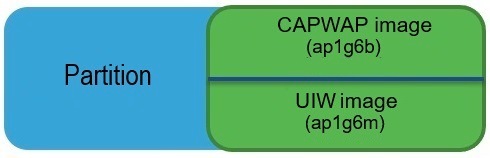
Software images for the AP are stored in various folders within the same section of the device. Each image corresponds to a specific AP mode, such as CAPWAP, URWB, or WGB/uWGB.
Procedure
-
Locate the software images.
Navigate to the section where software images are stored on the AP. Ensure you have access to the appropriate folders containing the images.
-
Identify the AP's mode.
Determine the operational mode of the AP. The device can operate in one of the following modes:
-
Select the corresponding software image.
Choose the software image that matches the device's mode of operation. Refer to the table below for the appropriate software image:
|
IW9165E mode
|
Software image
|
|
CAPWAP
|
ap1g6b-k9w8-xxx.tar
|
|
URWB
|
UIW image ap1g6m-k9c1-xxx.tar
|
|
WGB or uWGB
|