High-availability Seamless Redundancy

High-availability Seamless Redundancy

High-availability Seamless Redundancy overview

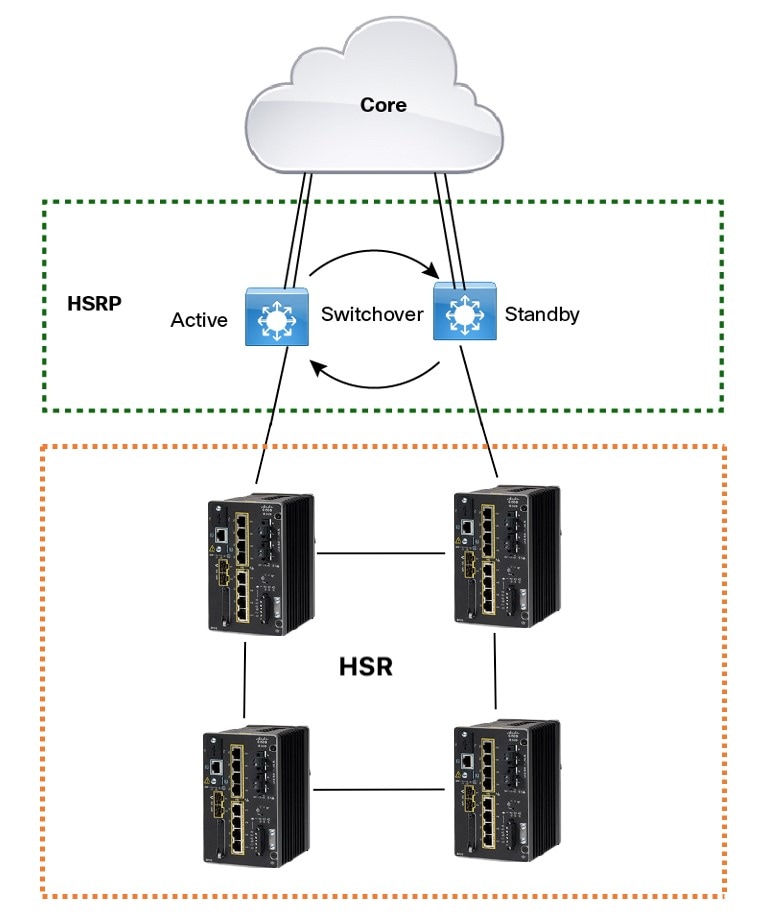
HSR is defined in International Standard IEC 62439-3-2016 clause 5. HSR is similar to Parallel Redundancy Protocol (PRP) but is designed to work in a ring topology. Instead of two parallel independent networks of any topology (LAN-A and LAN-B), HSR defines a ring with traffic in opposite directions. Port-A sends traffic counter clockwise in the ring, and Port-B sends traffic clockwise in the ring.

The HSR packet format is also different from PRP. To allow the switch to determine and discard duplicate packets, additional protocol specific information is sent with the data frame. For PRP, this is sent as part of a trailer called the redundancy control trailer (RCT), whereas for HSR this is sent as part of the header called the HSR header. Both the RCT and HSR header contain a sequence number, which is the primary data used to determine if the received frame is the first instance or a duplicate instance.

In this release, the switch supports only HSR-singly attached node (SAN) and only one HSR instance. If you have created a PRP instance, no HSR instance can be created.

The non-switching nodes with two interfaces attached to the HSR ring are referred to as Doubly Attached Nodes implementing HSR (DANHs). Similar to PRP, Singly Attached Nodes (SANs) are attached to the HSR ring through a device called a RedBox (Redundancy Box). The RedBox acts as a DANH for all traffic for which it is the source or the destination. The switch implements RedBox functionality using Gigabit Ethernet port connections to the HSR ring.

The following figure shows an example of an HSR ring as described in IEC 62439-3.
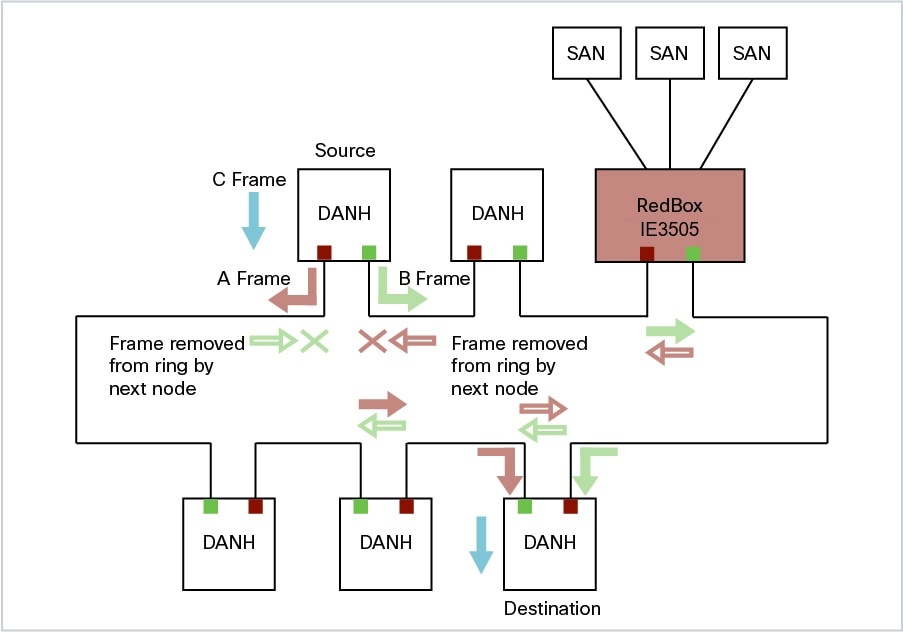
Figure 1. Example of HSR Ring Carrying Unicast Traffic

Devices that do not support HSR out of the box (for example, laptops and printers) cannot be attached to the HSR ring directly because all HSR capable devices must be able to process the HSR header on packets received from the ring and add the HSR header to all packets sent into the ring. These nodes are attached to the HSR ring through a RedBox. As shown in the figure above, the RedBox has two ports on the DANH side. Non-HSR SAN devices are attached to the upstream switch ports. The RedBox generates the supervision frames on behalf of these devices so that they are seen as DANH devices on the ring. Because the RedBox emulates these as DANH, they are called Virtual Doubly Attached Nodes (VDAN).

Switches that Support HSR

Table 1. The following Advanced base modules SKUs (PIDs) supports HSR.

Switch

PID

Cisco IE3505 Rugged Series Switch

IE-3505-8P3S

IE-3505-8T3S

Cisco IE3505 Heavy-Duty Series Switch

IE-3505H-16T

Support for HSR is available on Network Essentials and Network Advantage licenses.

Supported HSR Features

IE-3505-8P3S, IE-3505-8T3S, and IE-3505H-16T switches support the following HSR features.

Maximum of one HSR ring is supported as shown in the following table:

Table 2. HSR Support for Cisco IE3505 Series Switch and Expansion Models

Switch

FPGA Profile

Number of Rings

Cisco IE3505 Rugged Series without expansion module

Default

1

Redundancy

1

Cisco IE3505 Rugged Series with expansion module

Default

1

Redundancy

1

IE-3505H-16T

Default

1

Redundancy

1

Loop Avoidance

Each node in the HSR ring forwards frames received from one port to the other port of the HSR pair. To avoid loops and use network bandwidth effectively, the RedBox does not transmit frames that are already transmitted in same direction. When a node injects a packet into the ring, the packet is handled as follows to avoid loops:

  • Unicast packet with destination inside the ring: When the unicast packet reaches the destination node, the packet is consumed by the respective node and is not forwarded.

  • Unicast packet with destination not inside the ring: Because this packet does not have a destination node in the ring, it is forwarded by every node in the ring until it reaches the originating node. Because every node has a record of the packet it sent, along with the direction in which it was sent, the originating node detects that packet has completed the loop and drops the packet.

  • Multicast packet: A multicast packet is forwarded by each node because there can be more than one consumer of this packet. For this reason a multicast packet always reaches the originating node. However, every node will check whether it has already forwarded the received packet through its outgoing interface. Once the packet reaches the originating node, the originating node determines that it already forwarded this packet and drops the packet instead of forwarding it again.

HSR RedBox Modes of Operation

The most basic mode of operation is HSR-SAN mode (single RedBox mode). In this mode, the RedBox is used to connect SAN devices to the HSR ring. The Redbox’s responsibility in this mode is to represent SAN devices as VDANs on the ring.

HSR SAN Mode

In HSR-SAN mode, the RedBox inserts the HSR tag on behalf of the host and forwards the ring traffic, except for frames sent by the node itself, duplicate frames, and frames for which the node is the unique destination. In this mode, packets are handled as follows:

  • A source DANH sends a frame passed from its upper layers (C frame), prefixes it with an HSR tag to identify frame duplicates, and sends the frame over each port (A frame and B frame).

  • A destination DANH receives two identical frames from each port within a certain interval. The destination DANH removes the HSR tag of the first frame before passing it to its upper layers and discards any duplicate.

  • Each node in the HSR ring forwards frames received from one port to the other port of the HSR pair. A node will not forward frames received on one port to the other under the following conditions:

    • The received frame returns to the originating node in the ring.

    • The frame is a unicast frame with a destination MAC address of a node upstream of the receiving node.

    • The node had already sent the same frame in the same direction. This rule prevents a frame from spinning in the ring in an infinite loop.

HSR-SAN interfaces

HSR-SAN mode is supported on interfaces GigabitEthernet 1/1-2 and GigabitEthernet 1/4-5. HSR ring 1 is configured as a pair of ports: Gi1/1 and Gi1/2 or Gi1/4 and Gi1/5.

Table 3. The supported HSR-SAN channel interfaces for IE3505 Rugged Series Switch

Mode

Module

Port Interface

HSR-SAN ring 1

Base Module

GigabitEthernet1/1 and 1/2 or GigabitEthernet1/4 and 1/5

HSR-PRP (Dual RedBox Mode)

HSR-PRP mode, also called Dual RedBox mode, is used to bridge HSR and PRP networks. Dual RedBox mode is supported on the Cisco IE3505 Series Switch.

In this mode, two different RedBoxes connect to LAN A and LAN B of the PRP network. Two ports connect to the HSR ring and one port connects to one of the two PRP LANs. The traffic on the upstream interlink port connecting the RedBox to the PRP network is PRP-tagged. In HSR-PRP mode, the RedBox extracts data from the PRP frame and generates the HSR frame using this data, and performs the reverse in the opposite direction. To avoid loops and use network bandwidth effectively, the RedBox does not transmit frames already transmitted in same direction (see Loop Avoidance).

The following figure shows an HSR ring connected to a PRP network through two RedBoxes, one for each LAN. In this example, the source frame originates in the PRP network. RedBoxes are configured to support PRP traffic on the interlink ports and HSR traffic on the ring ports. Nodes connected to the HSR-PRP Redbox act as a SAN to the PRP Redbox and a VDAN to the HSR-PRP Dual Redbox.
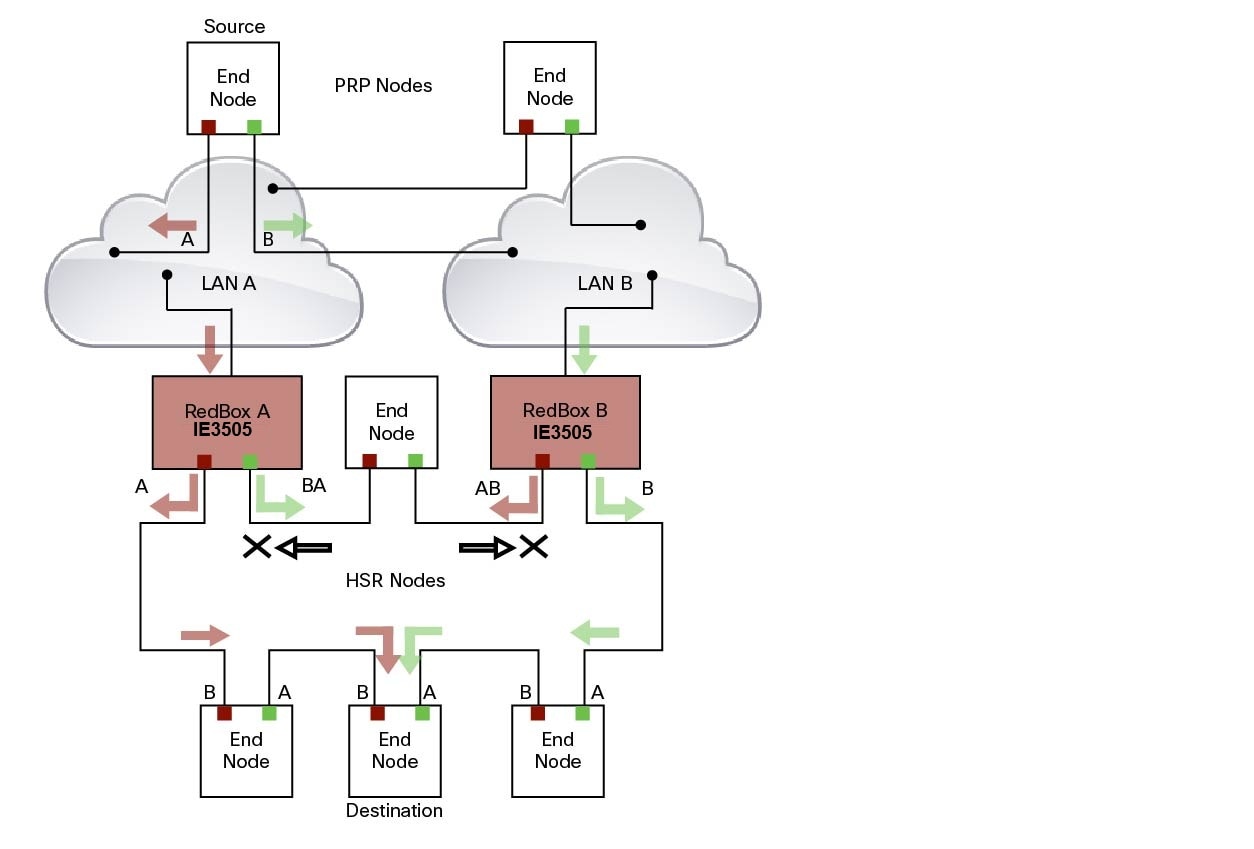
The sequence number from the PRP RCT is reused for the HSR tag and vice versa to allow frame identification from one redundancy network to the other and to identify the pairs and duplicates on either network. In the figure above, RedBox A and RedBox B send the same frame (A and AB and B and BA, respectively), but a RedBox does not transmit a frame that it already received.

Every DANH device generates its own sequence number, which is incremented for each outgoing frame. When a packet is switched from HSR to PRP or PRP to HSR, the sequence number is taken from the incoming packet so the same sequence number is used. Any node, whether it is an intermediate or final destination in the HSR or PRP network, uses the source MAC address and sequence number as the key for duplicate packet detection. Because the source address is expected to be unique for each node, there are no overlapping sequence numbers between different nodes.

Multicast frames or unicast frames without a receiver in the ring (arrows with the black outline in the figure) are removed by the RedBox that inserted them into the ring, if they originated from outside the ring. For this purpose, the frames carry a LAN identifier that is also the RedBox identifier.

The following figure shows an HSR ring coupled to a PRP network, where the source frame originates in the HSR ring.
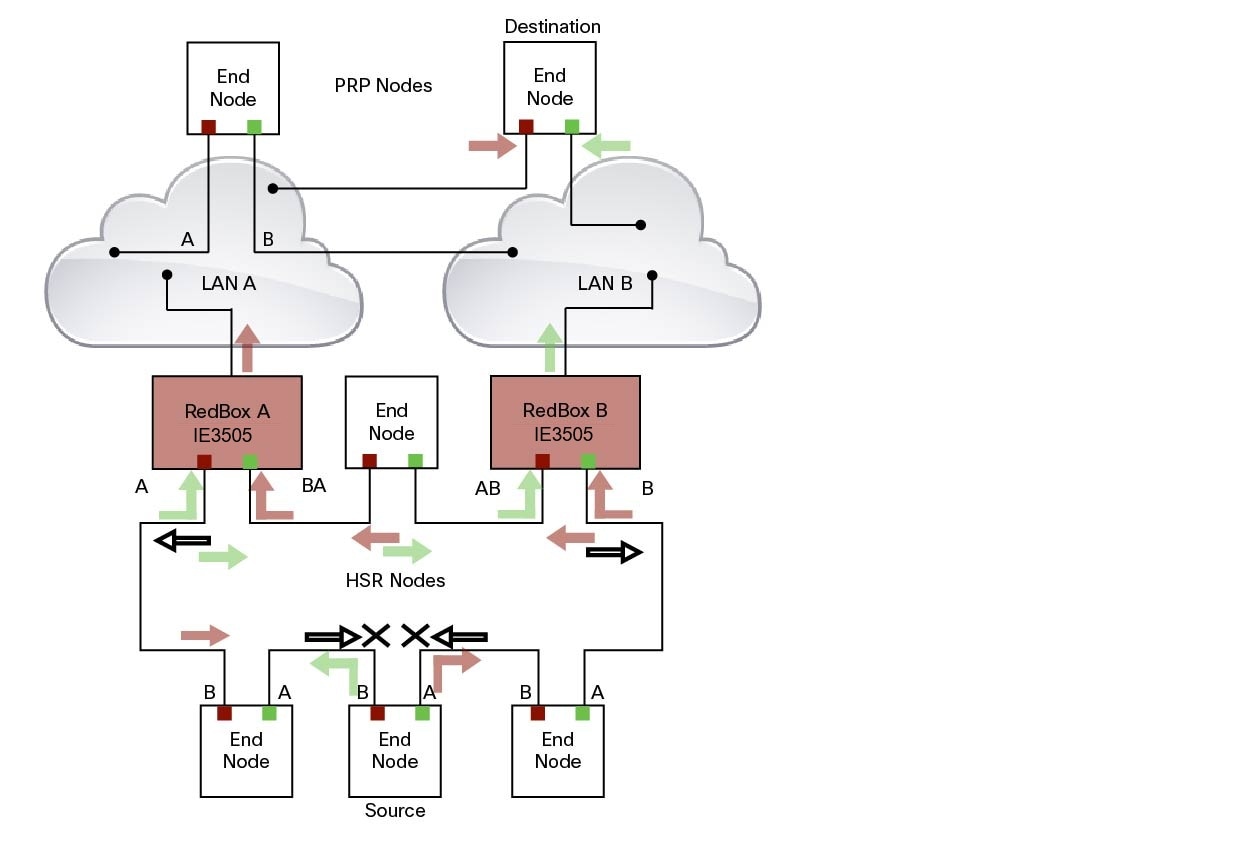
To prevent frames from being reinjected into the PRP network through the other RedBox, each HSR frame carries the 4-bit PathId, which identifies the PRP network from which the frame came originally. RedBoxes are configured and identified by the PathId of the PRP LAN to which they are attached.

Different PathIds can be used to bridge more than one PRP network to an HSR ring. Likewise, more than one HSR ring can be bridged to a PRP network.

PRP is not needed for HSR-PRP to function in the IE3500 Rugged Series Switches. Any third port can be connected to PRP LAN A or LAN B network without PRP or any specific configurations.

PRP Supervision frames are sent toward PRP LAN A or LAN B from conversion of HSR Supervision Frames originated from DANHs and VDANs of HSR RedBoxes in the HSR ring. The HSR-PRP Redbox does not generate them but passes them along.

Packet flow in HSR-PRP

Packets coming from PRP network in the coupled PRP LAN-A or LAN-B are expected to have an RCT (Redundancy Control Trailer) tag. The switch removes the RCT and transfers the information to the HSR header using the programmed Net ID and LAN ID, recalculates the CRC, and sends the modified packet out to both ring A and ring B. If the packets originate from a SAN in the coupled PRP network, the switch treats it similarly as a VDAN to the HSR ring.

Egress Data Path—Packets coming from a SAN or PRP LAN A or LAN B to the HSR ring:

  • For PRP packets, the switch converts the PRP RCT to an HSR tag for all packets (transfers Sequence Number and LAN ID from PRP to HSR).

  • For SAN packets, the switch just inserts the HSR tag as is done in HSR-SAN RedBox mode.

  • The switch needs to learn the MAC source address and add it to the Proxy Node table (VDAN table) with a new additional bit that allows the switch to distinguish between DANP or SAN. This allows the ingress path to determine whether to include the RCT trailer or not.

Ingress Data Path—Packets coming from the HSR ring to a SAN or PRP LAN A or LAN B:

  • If the Proxy Node table or VDAN table lookup of the MAC destination address returns DANP, the switch converts the HSR tag to PRP RCT for accepted packets (transfers Sequence Number and LAN ID from HSR to PRP RCT).

  • If the Proxy Node table or VDAN table lookup of the MAC destination address returns SAN, the switch strips the HSR tag and sends the packet without the RCT.

HSR-PRP Interfaces

In HSR-PRP Dual RedBox mode, two ports are connected to the HSR ring, and one port is connected to the PRP LAN A or LAN B network. The two ports that connect to the HSR ring are fixed (Gi1/1 and Gi1/2). When set to HSR-PRP mode, the two ports that connect to the HSR ring (Gi1/1 and Gi1/2) are automatically configured to HSR.

Table 4. The supported HSR-PRP channel interfaces for IE3505 Rugged Series Switch

Mode

Module

Port Interface

HSR-PRP

Base Module

GigabitEthernet1/1 and 1/2

The port connected to PRP LAN A or LAN B can be any other port from the base module or expansion module. All remaining ports of the HSR-PRP RedBox (base module or expansion module ports) can be used for any other purpose, for example, to connect a DHCP server.

These ports act as non-HSR/PRP nodes (SANs/VDANs) in the topology. The HSR-PRP RedBox can use all remaining ports (base module or expansion module ports) for other purposes, such as connecting a DHCP server. These non-PRP and non-HSR ports must be in the same VLAN as the HSR and PRP ports to achieve SAN/VDAN behavior.

Connecting Multiple PRP Networks to an HSR Ring

A maximum of six PRP networks, identified by the PathId, can be connected to the same HSR ring. The 4-bit PathId consists of the following:

  • The 3-bit NetId (1 to 6), which identifies a PRP network and the two RedBoxes that connect the PRP network to an HSR ring.

  • The 1-bit LanId (LAN A = 0 and LAN B = 1)

NetId values are as follows:

  • 0 for regular HSR frames

  • 1 to 6 for frames originating from a PRP network

  • 7 is reserved

The following table lists the combinations of NetIds and LanIds for Redbox-A and Redbox-B.

PathId

NetId

LanId

RedBox-A

RedBox-B

001

0

1

010

0

1

011

0

1

100

0

1

101

0

1

110

0

1

000

Used for Local HSR Ring

111

Reserved

The following figure shows an example of an HSR ring connected to two PRP networks.
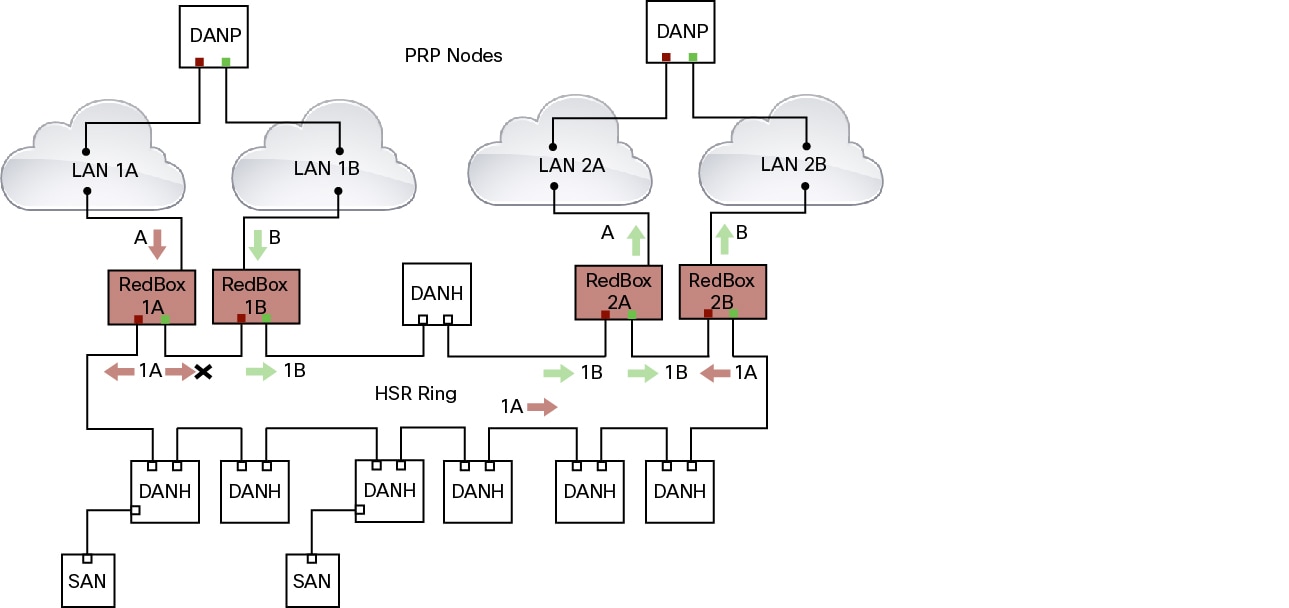
To prevent reinjection of frames coming from one PRP network into another PRP network or from the other LAN of the same PRP network, a RedBox only forwards frames that do not carry its own PathId from the HSR ring.

When a PRP frame from LAN A or from LAN B of a PRP network with a given NetId is inserted to the HSR ring, a RedBox inserts its own NetId and the LanId “A” or ”B” into the PathId of the HSR tag.

When forwarding a frame from the HSR ring to a PRP network, the RedBox inserts the LanId “A” or ”B” into the RCT.

Connecting Multiple HSR Rings to a PRP Network

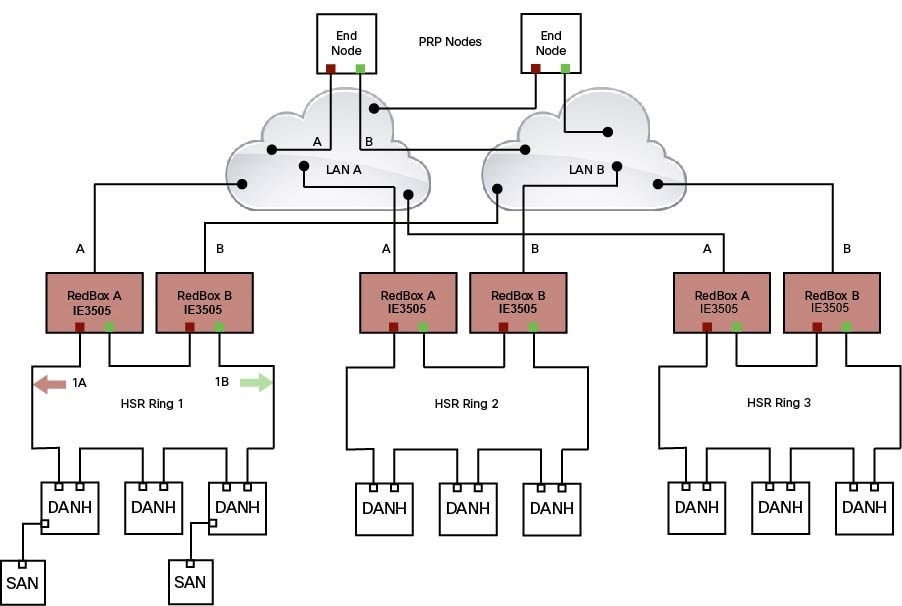
A PRP network can be connected to any number of HSR rings, but these rings cannot be connected to each other because this would create loops. The following figure shows an example of three HSR rings connected to one PRP LAN.
HSR Alarms

An HSR ring can generate the following two alarms:

  • Partial Ring Fault: This fault is generated by an HSR RedBox when one of its physical ring ports/links is down. Because the packets can be sent using the redundant path, this is considered as a partial fault. However, this fault still requires user intervention to restore the ring. This is a minor fault and cannot be associated with an external hardware alarm relay.

  • Full Ring Fault: This fault is generated by an HSR RedBox when both of its physical ring ports/links are down. This is a catastrophic failure and needs immediate attention. This is a major fault and can be associated with an external hardware alarm relay.

When an event that raises an alarm is generated, it can be associated with one or more of the following actions to notify the user:

  • Syslog: A syslog is generated when the Alarm is raised/cleared.

  • SNMP Notification: SNMP notification is sent when the alarm is raised/cleared.

  • Relay output: External relay contacts can be asserted/de-asserted in response to the alarm. Relays are activated by major faults only.

See Enabling HSR Alarms for steps to configure HSR alarms.

The following table lists the HSR events and their representations.

Event Number

Event Description

System Log (Level)

Alert/Alarm Log

Alarm LED and Output relay

1

Ring goes from UP to DOWN state.

2

2

Major Alarm/Assert

2

Ring goes from DOWN to UP state.

6

6

De-assert

3

One ring port goes DOWN, the other ring port and the ring itself is UP.

3

3

4

Both ring ports are UP again.

6

6

You can view currently active alarms using the show facility alarm status command. The following example shows alarm status for minor and major HSR alarms:

Switch#show facility-alarm status
Source          Severity    Description                      Relay   Time
Switch            MINOR    34 HSR ring is partially down        MAJ    Oct 24 2017 10:16:10 
-------
Switch# show facility-alarm status
Source          Severity    Description                   Relay     Time
Switch            MAJOR    33 HSR ring is down               MAJ      Oct 24 2017 10:17:07

The following examples show the syslog entries that are generated for each HSR alarm event assertion and clear event (if configured):

  • Syslog generated on occurrence of Partial fault:

    Oct 24 11:07:13.952 IST: %HSR_ALARM-3-HSR_PARTIALFAULT: The HSR ring in now in PARTIAL FAULT state
    
  • Syslog generated when the Partial fault is cleared:

    Oct 24 11:07:38.032 IST: %HSR_ALARM-3-HSR_PARTIALFAULT: The HSR ring in now in PARTIAL FAULT state - event cleared
    
  • Syslog generated on occurrence of Full fault:

    Oct 24 11:07:38.036 IST: %HSR_ALARM-2-HSR_RINGFAULT: The HSR ring in now in FAULT state
  • Syslog generated when the Full fault is cleared:

    Oct 24 11:08:19.082 IST: %HSR_ALARM-2-HSR_RINGFAULT: The HSR ring in now in FAULT state - event cleared
    

CDP and LLDP for HSR

HSR supports the Cisco Discovery Protocol (CDP) and Link Layer Discovery Protocol (LLDP). CDP and LLDP are Layer 2 neighbor discovery protocols. Both CDP and LLDP can provide information about nodes directly connected to the device. They also provide additional information such as the local and remote interface and device names.

When CDP or LLDP is enabled, you can use the CDP or LLDP information to find the adjacent nodes on an HSR ring and their status. You can then use the neighbor information from each node to determine the complete HSR network topology and debug and locate ring faults.

CDP and LLDP are configured on physical interfaces only.

For more information, see Configuring an HSR Ring and Verifying Configuration.

PTP over HSR

Precision Time Protocol (PTP) is supported on the IE3500 Rugged and IE3500H Heavy Duty Series Switches for the PTP Power Profile only.

Because the PTP 1588 standard does not currently account for clocks synchronized over redundant, simultaneously active paths, HSR must handle PTP packets differently that other packet types. To provide high availability for PTP through redundancy, the HSR duplicate/discard logic is not used for PTP packets.

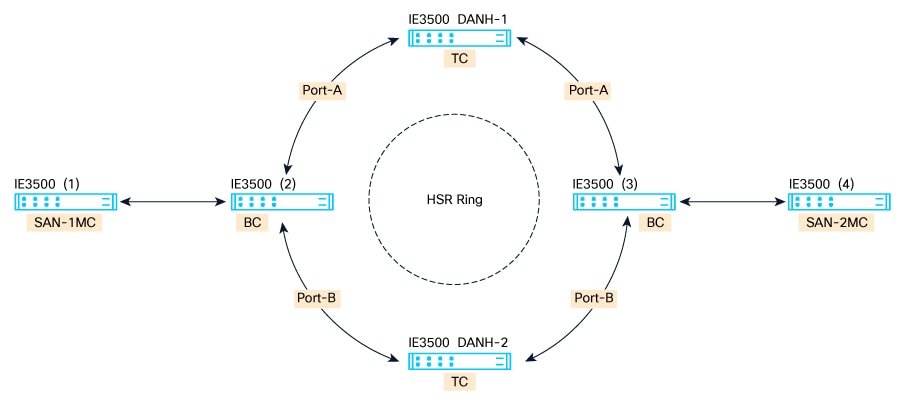
To understand how PTP clock syncronization works in an HSR network, suppose that a VDAN/SAN is the PTP grandmaster clock (GMC). Dually attached devices receive PTP synchronization information over both their HSR ports. However, only one of the ports (referred to as time recipient) is used to synchronize the local clock. The other HSR port (referred to as PASSIVE) continues to receive synchronization information, but is not used to synchronize the local clock. Suppose that RedBox 2 has its port-A as time recipient and port-B as PASSIVE. When port-A goes down, the port-B port takes over as the time recipient and is used to continue synchronizing the local clock on RedBox 2.


Note


Cisco is moving from the traditional Master/Slave nomenclature. In this document, the terms Grandmaster clock (GMC) or time source and time recipient are used instead.


The PTP grandmaster in an HSR network can be a RedBox, a VDAN/SAN, or a DANH.

To use PTP over HSR, configure HSR and PTP separately. PTP over HSR works without any additional configuration. Note that in most cases, you do not need to perform any PTP configuration on the interfaces because PTP is enabled by default on all physical ethernet interfaces.

Supported PTP Profiles and Modes

PTP over HSR is supported only for the for the PTP Power Profile. For unsupported PTP profiles, PTP traffic flows over HSR port-A only.

The following table shows the HSR support for PTP profiles, clock modes and RedBox types.

PTP Profile

Clock Mode

Supported?

HSR Redbox Type as per IEC 62439-3

Power Profile

BC

Yes

HSR RedBox as doubly attached BC (DABC) with P2P

P2P TC

Yes

HSR RedBox as doubly attached TC (DATC) with P2P

GMC-BC

No

Not applicable

Forward

No

Not applicable

Default Profile

BC

No

Not applicable

E2E TC

No

Not applicable

HSR RedBox as Doubly Attached BC (DABC) with P2P

This section describes the operation of PTP over HSR using an example where RedBox M and RedBox S are configured to run in Power Profile as Boundary Clocks that use the Peer-to-Peer delay measurement mechanism.

Assume for this example that SAN-1 is the GMC. All the clocks are configured to run Peer-to-Peer Delay measurement and the peer delay is regularly calculated and maintained on every link shown in the figure. The BMCA on RedBox M determines the port to SAN-1 to be connected to the time source. The PTP protocol running on RedBox M will forward Sync and Follow_up messages on ports A and B.

On RedBox S, the regular BMCA operation determines port A to be time recipient and port B to be PASSIVE. However, with the knowledge that ports A and B are part of the same HSR ring, port B is forced into PASSIVE_SLAVE state and port A becomes active for PTP.

Port A works as a regular time recipient port. It uses the Sync and Follow_Up messages along with their correction field to calculate the delay and offset from time source and synchronize the local clock. (Unlike an E2E BC, it does not need to generate Delay_Req messages since all the link delays and residence times along the PTP path are accumulated in the correction field of the Follow_Up messages.)

Port B, which is in PASSIVE_SLAVE state operates as follows: Just like port A, it maintains the delay and offset from time source, but does not perform any operation on the local clock. Having all the synchronization information available enables it to seamlessly take over as the new time recipient in case port A loses communication with the GMC. Note that on IE switch platforms we currently do not support PTP profile conversion. For example, if RedBox S in the figure above were an IE switch, it would not support the Delay_Req/Delay_Resp message exchange. It would only support the Peer-to-Peer delay measurement mechanism using PDelay messages.

Configuration Example
SAN-1#conf t
Enter configuration commands, one per line.  End with CNTL/Z.
SAN-1(config)#ptp profile power
SAN-1(config)#ptp mode boundary pdelay-req
SAN-1(config)#ptp priority1 1
SAN-1(config)#end

SAN-2#conf t
Enter configuration commands, one per line.  End with CNTL/Z.
SAN-2(config)#ptp profile power
SAN-2(config)#ptp mode boundary pdelay-req
SAN-2(config)#end

REDBOX-M#conf t
Enter configuration commands, one per line.  End with CNTL/Z.
REDBOX-M(config)#ptp profile power
REDBOX-M(config)#ptp mode boundary pdelay-req
REDBOX-M(config)#end

REDBOX-S#conf t
Enter configuration commands, one per line.  End with CNTL/Z.
REDBOX-S(config)#ptp profile power
REDBOX-S(config)#ptp mode boundary pdelay-req
REDBOX-S(config)#end

DANH-TOP#conf t
Enter configuration commands, one per line.  End with CNTL/Z.
DANH-TOP(config)#ptp profile power
DANH-TOP(config)#ptp mode p2ptransparent
DANH-TOP(config)#end

DANH-BOTTOM#conf t
Enter configuration commands, one per line.  End with CNTL/Z.
DANH-BOTTOM(config)#ptp profile power
DANH-BOTTOM(config)#ptp mode p2ptransparent
DANH-BOTTOM(config)#end

SAN-1#sh ptp parent
 PTP PARENT PROPERTIES
  Parent Clock:
  Parent Clock Identity: 0x0:35:1A:FF:FE:94:4F:0
  Parent Port Number: 0
  Observed Parent Offset (log variance): N/A
  Observed Parent Clock Phase Change Rate: N/A

  Grandmaster Clock:
  Grandmaster Clock Identity: 0x0:35:1A:FF:FE:94:4F:0
  Grandmaster Clock Quality:
	Class: 248
	Accuracy: Unknown
	Offset (log variance): N/A
	Priority1: 1
	Priority2: 128

SAN-2#sh ptp parent
 PTP PARENT PROPERTIES
  Parent Clock:
  Parent Clock Identity: 0x0:29:C2:FF:FE:3C:6A:C0
  Parent Port Number: 9
  Observed Parent Offset (log variance): N/A
  Observed Parent Clock Phase Change Rate: N/A

  Grandmaster Clock:
  Grandmaster Clock Identity: 0x0:35:1A:FF:FE:94:4F:0
  Grandmaster Clock Quality:
	Class: 248
	Accuracy: Unknown
	Offset (log variance): N/A
	Priority1: 1
	Priority2: 128

REDBOX-M#sh ptp parent
 PTP PARENT PROPERTIES
  Parent Clock:
  Parent Clock Identity: 0x0:35:1A:FF:FE:94:4F:0
  Parent Port Number: 3
  Observed Parent Offset (log variance): N/A
  Observed Parent Clock Phase Change Rate: N/A

  Grandmaster Clock:
  Grandmaster Clock Identity: 0x0:35:1A:FF:FE:94:4F:0
  Grandmaster Clock Quality:
	Class: 248
	Accuracy: Unknown
	Offset (log variance): N/A
	Priority1: 1
	Priority2: 128

REDBOX-S#sh ptp parent
 PTP PARENT PROPERTIES
  Parent Clock:
  Parent Clock Identity: 0x0:29:C2:FF:FE:3C:5D:80
  Parent Port Number: 3
  Observed Parent Offset (log variance): N/A
  Observed Parent Clock Phase Change Rate: N/A

  Grandmaster Clock:
  Grandmaster Clock Identity: 0x0:35:1A:FF:FE:94:4F:0
  Grandmaster Clock Quality:
	Class: 248
	Accuracy: Unknown
	Offset (log variance): N/A
	Priority1: 1
	Priority2: 128

DANH-TOP#sh ptp parent
 PTP PARENT PROPERTIES
  Parent Clock:
  Parent Clock Identity: 0x0:29:C2:FF:FE:3C:5D:80
  Parent Port Number: 3
  Observed Parent Offset (log variance): N/A
  Observed Parent Clock Phase Change Rate: N/A

  Grandmaster Clock:
  Grandmaster Clock Identity: 0x0:35:1A:FF:FE:94:4F:0
  Grandmaster Clock Quality:
	Class: 248
	Accuracy: Unknown
	Offset (log variance): N/A
	Priority1: 1
	Priority2: 128

DANH-BOTTOM#sh ptp parent
 PTP PARENT PROPERTIES
  Parent Clock:
  Parent Clock Identity: 0x0:29:C2:FF:FE:3C:5D:80
  Parent Port Number: 4
  Observed Parent Offset (log variance): N/A
  Observed Parent Clock Phase Change Rate: N/A

  Grandmaster Clock:
  Grandmaster Clock Identity: 0x0:35:1A:FF:FE:94:4F:0
  Grandmaster Clock Quality:
	Class: 248
	Accuracy: Unknown
	Offset (log variance): N/A
	Priority1: 1
	Priority2: 128

HSR RedBox as Doubly Attached TC (DATC) with P2P

This section describes the operation of PTP over HSR using an example where RedBox M and RedBox S are configured to run in Power Profile as Transparent Clocks.

Assume for this example that SAN-1 is the GMC. All the clocks are configured to run Peer-to-Peer Delay measurement and the peer delay is regularly calculated and maintained on every link shown in the figure. RedBox M and RedBox S run BMCA even though it is not mandatory for a P2P TC to run BMCA. On RedBox M, the BMCA on redbox M determines the port to SAN-1 to be connected to the time source. RedBox M forwards all Sync and Follow_Up messages received on port C out of ports A and B.

On RedBox S, port A is determined to be time recipient and port B to be PASSIVE_SLAVE as described earlier.

Port A operates as follows: It uses the Sync and Follow_Up messages along with their correction field to calculate the delay and offset from time source and synchronize the local clock. (Unlike a E2E BC, it does not need to generate Delay_Req messages since all the link delays and residence times along the PTP path are accumulated in the correction field of the Follow_Up messages.) It also forwards the Sync and Follow_Up messages out of port C.

Port B operates as follows: Just like port A, it maintains the delay and offset from time source, but does not perform any operation on the local clock. Having all the synchronization information available enables it to seamlessly take over as the new time recipient in case port A loses communication with the GMC. Post-processing, it drops the Sync/Follow_Up messages since the copy of Sync/Follow_Up that arrives on port A is forwarded out of port C.

Configuration Example
SAN-1#conf t
Enter configuration commands, one per line.  End with CNTL/Z.
SAN-1(config)#ptp profile power
SAN-1(config)#ptp mode boundary pdelay-req
SAN-1(config)#ptp priority1 1
SAN-1(config)#end
SAN-2#conf t
Enter configuration commands, one per line.  End with CNTL/Z.
SAN-2(config)#ptp profile power
SAN-2(config)#ptp mode boundary pdelay-req
SAN-2(config)#end
REDBOX-M#conf t
Enter configuration commands, one per line.  End with CNTL/Z.
REDBOX-M(config)#ptp profile power
REDBOX-M(config)# ptp mode p2ptransparent
REDBOX-M(config)#end
REDBOX-S#conf t
Enter configuration commands, one per line.  End with CNTL/Z.
REDBOX-S(config)#ptp profile power
REDBOX-S(config)# ptp mode p2ptransparent
REDBOX-S(config)#end
DANH-TOP#conf t
Enter configuration commands, one per line.  End with CNTL/Z.
DANH-TOP(config)#ptp profile power
DANH-TOP(config)#ptp mode p2ptransparent
DANH-TOP(config)#end
DANH-BOTTOM#conf t
Enter configuration commands, one per line.  End with CNTL/Z.
DANH-BOTTOM(config)#ptp profile power
DANH-BOTTOM(config)#ptp mode p2ptransparent
DANH-BOTTOM(config)#end
SAN-1#sh ptp parent
 PTP PARENT PROPERTIES
  Parent Clock:
  Parent Clock Identity: 0x0:35:1A:FF:FE:94:4F:0
  Parent Port Number: 0
  Observed Parent Offset (log variance): N/A
  Observed Parent Clock Phase Change Rate: N/A

  Grandmaster Clock:
  Grandmaster Clock Identity: 0x0:35:1A:FF:FE:94:4F:0
  Grandmaster Clock Quality:
	Class: 248
	Accuracy: Unknown
	Offset (log variance): N/A
	Priority1: 1
	Priority2: 128
SAN-2#sh ptp parent
 PTP PARENT PROPERTIES
  Parent Clock:
  Parent Clock Identity: 0x0:35:1A:FF:FE:94:4F:0
  Parent Port Number: 3
  Observed Parent Offset (log variance): N/A
  Observed Parent Clock Phase Change Rate: N/A

  Grandmaster Clock:
  Grandmaster Clock Identity: 0x0:35:1A:FF:FE:94:4F:0
  Grandmaster Clock Quality:
	Class: 248
	Accuracy: Unknown
	Offset (log variance): N/A
	Priority1: 1
	Priority2: 128
REDBOX-M#sh ptp parent
 PTP PARENT PROPERTIES
  Parent Clock:
  Parent Clock Identity: 0x0:35:1A:FF:FE:94:4F:0
  Parent Port Number: 3
  Observed Parent Offset (log variance): N/A
  Observed Parent Clock Phase Change Rate: N/A

  Grandmaster Clock:
  Grandmaster Clock Identity: 0x0:35:1A:FF:FE:94:4F:0
  Grandmaster Clock Quality:
	Class: 248
	Accuracy: Unknown
	Offset (log variance): N/A
	Priority1: 1
	Priority2: 128
REDBOX-S#sh ptp parent
 PTP PARENT PROPERTIES
  Parent Clock:
  Parent Clock Identity: 0x0:35:1A:FF:FE:94:4F:0
  Parent Port Number: 3
  Observed Parent Offset (log variance): N/A
  Observed Parent Clock Phase Change Rate: N/A

  Grandmaster Clock:
  Grandmaster Clock Identity: 0x0:35:1A:FF:FE:94:4F:0
  Grandmaster Clock Quality:
	Class: 248
	Accuracy: Unknown
	Offset (log variance): N/A
	Priority1: 1
	Priority2: 128
DANH-TOP#sh ptp parent
 PTP PARENT PROPERTIES
  Parent Clock:
  Parent Clock Identity: 0x0:35:1A:FF:FE:94:4F:0
  Parent Port Number: 3
  Observed Parent Offset (log variance): N/A
  Observed Parent Clock Phase Change Rate: N/A

  Grandmaster Clock:
  Grandmaster Clock Identity: 0x0:35:1A:FF:FE:94:4F:0
  Grandmaster Clock Quality:
	Class: 248
	Accuracy: Unknown
	Offset (log variance): N/A
	Priority1: 1
	Priority2: 128
DANH-BOTTOM#sh ptp parent
 PTP PARENT PROPERTIES
  Parent Clock:
  Parent Clock Identity: 0x0:35:1A:FF:FE:94:4F:0
  Parent Port Number: 3
  Observed Parent Offset (log variance): N/A
  Observed Parent Clock Phase Change Rate: N/A

  Grandmaster Clock:
  Grandmaster Clock Identity: 0x0:35:1A:FF:FE:94:4F:0
  Grandmaster Clock Quality:
	Class: 248
	Accuracy: Unknown
	Offset (log variance): N/A
	Priority1: 1
	Priority2: 128

Guidelines and Limitations

  • HSR is supported only in a standalone deployment.

  • Only one HSR instance is supported. Note that the switch supports only one HSR or one PRP instance, so if a PRP instance has been created, no HSR instance can be created.

  • HSR ring 1 can only be configured as a pair of ports: Gi1/1 and Gi1/2 or Gi1/4 and Gi1/5. Using these port pairs, you can configure 1 HSR ring.

  • The HSR feature requires the Network Essentials license.

  • The HSR feature is not enabled by default and you must explicitly configure the HSR rings.

  • HSR is disabled automatically if the required firmware image is not available on the system.

  • Once a port is part of a ring, the media-type, speed, and duplex settings of the port cannot be changed. We recommend that you apply those settings before configuring ring membership.

  • If mode of HSR interfaces is changed from access to trunk mode or vice-versa after configuring the ring,we recommended that you flap the HSR ring.

  • The recommended maximum number of nodes in the node table is 512. Nodes are all the DANH and VDAN devices that can be connected to the ring at same time. This number is not an absolute limit, but higher numbers of entries may increase the number of duplicate packets received by the end devices.

  • HSR ring ports can only be configured in L2 mode.

  • HSR is supported on following port types:

    • 100 mbps, Full Duplex. Half duplex is not supported.

    • 1000 mbps, Full Duplex. Half duplex is not supported.

    • HSR is not supported on the uplink ports.

  • Both ports of one ring must be of same speed and type (that is, both can be SFPs or both can be copper)

  • The following protocols and features are mutually exclusive with HSR on the same port:

    • PRP

    • EtherChannels

    • Link Aggregation Control Protocol (LACP)

    • Port Aggregation Protocol (PAgP)

    • Resilient Ethernet Protocol (REP)

  • MACsec, HSR, and PRP are not allowed together.

  • HSR supports an MTU size of up to 1998 bytes of Ethernet payload.

  • STP is not supported on the HSR ring. By default, all modes of Spanning Tree Protocol (STP) will be disabled on the ring ports.

  • Switched Port Analyzer (SPAN) and Remote SPAN (RSPAN) are not supported on HSR. That is, SPAN and RSPAN should not be used to monitor the traffic on an HSR ring. In addition, traffic that has been monitored using RSPAN should not be transferred over an HSR ring.

  • It is important for all interfaces in an HSR ring to have the same speed and duplex settings. It is recommended to apply those settings before configuring ring membership.

  • Once a port is part of ring, the port cannot be shut down.

    For example, if Gi1/4 and Gi1/5 are part of an HSR ring and you try to shut down Gi1/4 or Gi1/5, the operation will not be permitted:

    Switch(config)# interface gi1/4
    Switch(config-if)#shutdown
     %Interface GigabitEthernet1/4 is configured in a HSR ring shutdown not permitted!
    Switch(config-if)# 

    You can perform a shutdown of the HSR ring. For example:

    Switch# conf t
    Switch(config)#int hs1
    Switch(config-if)#shut
  • VLAN configuration such as trunk and access mode must be the same on both the ports participating in the ring. For example, if Gi1/4 and Gi1/5 in an HSR ring are in trunk mode and you attempt to change the mode of one port to access, the ports in the ring will not be bundled:

    Switch(config)#interface range gi1/4
    Switch(config-if)#switchport mode  access
    Jul 27 22:00:27.809 IST: %EC-5-CANNOT_BUNDLE2: Gi1/4 is not compatible with Gi1/5 and will be suspended (trunk mode of Gi1/4 is access, Gi1/5 is dynamic)
    
  • After an interface is added in the HSR ring, only the primary interface counters are updated. You should not need to configure and check the status of individual physical interfaces after they are added to the HSR ring.

  • As soon as you configure an HSR ring on two ports of a switch, MAC flaps will be observed on other switches where the HSR configuration is yet to be applied. We recommend that you shut down the newly created HSR ring on the switch before configuring the ring on all switches, and then re-enable them one by one as shown below. For example, if there are four switches in the ring, disable the HSR ring interfaces on each switch:

    Switch1(config)#interface range gi1/1-2
    Switch1(config-if)#shutdown
    Switch1(config-if)#hsr-ring hs1
    Creating a HSR-ring interface hs1
    Switch1(config-if)#int hs1
    Switch1(config-if)#shutdown
    Switch1(config-if)#end

    After all four switches are configured with the ring, re-enable the HSR ports on each switch:

    Switch1#conf t
    Enter configuration commands, one per line. End with CNTL/Z.
    Switch1(config)#int hs1
    Switch1(config-if)#no shutdown
    Switch1(config-if)#end
    Switch1#
    

    This prevents interim MAC flapping during HSR ring configuration in member switches.

Default Settings

Table 5. HSR Ring Parameters

Parameter

Description

Range

Default Value

entryForgetTime

Time for clearing an inactive entry from duplicate discard table.

0-65535

400 ms

fpgamode-DualUplinkEnhancement

Set FPGA register for source mac filtering.

enable or disable

enable

nodeForgetTime

Time to clear an inactive entry from the node table.

0-65535

60000 ms

nodeRebootInterval

Time after which the RedBox must start sending supervision frames after bootup.

0-65535

500 ms

pauseFrameTime

Time interval between HSR pause frames.

0-65535

25 ms

proxyNodeTableForgetTime

Time to clear an inactive entry from the proxy node table or vdan table.

0-65535

60000 ms

supervisionFrameLifeCheckInterval

Life check interval value for supervision frames.

0-65535

1600 ms

supervisionFrameOption

mac-da

The last bytes of the destination MAC address of supervision frames (01:15:4E:00:01:00). The last 00 is replaced by the value of this parameter.

1-255 MAC DA last eight bits option value

No default

vlan-cfi

Enable Canonical Format Indicator (CFI) for the VLAN tagged frame.

enable or disable

disable

vlan-cos

Class of Service (COS) value to be set in the VLAN tag of the Supervision frame.

0-7

0

vlan-id

The VLAN tag of the supervision frame.

0-4095

0

vlan-tagged

Set VLAN tagging option.

enable or disable

disable

supervisionFrameRedboxMacaddress

The RedBox MAC address in the supervision frames.

48-bit RedBox MAC address

The interface HSR ring MAC address

supervisionFrameTime

Time interval between supervision frames.

0-65535

3 ms

Configure an HSR Ring

Follow these steps to configure an HSR ring:

Before you begin

  • Read and understand the Guidelines and Limitations section of this chapter.

  • Ensure that the member interfaces of a HSR ring are not participating in any redundancy protocols such as FlexLinks, EtherChannel, REP, and so on before configuring a HSR ring.

Procedure


Step 1

Enter global configuration mode:

Switch# configure terminal

Step 2

(Optional) Globally enable CDP to provide information about HSR ring nodes:

Switch(config)# cdp run

Step 3

(Optional) Globally enable LLDP to provide information about HSR ring nodes:

Switch(config)# lldp run

Step 4

Enter interface configuration mode and disable PTP on the ports to be assigned to the HSR ring:

Switch(config)# interface range gi1/1-2
Switch(config-if-range)# no ptp enable

Step 5

(Optional) Enable CDP on the ports to be assigned to the HSR ring:

Switch(config-if-range)#cdp enable

Step 6

(Optional) Enable LLDP on the ports to be assigned to the HSR ring:

Switch(config-if-range)#lldp transmit
Switch(config-if-range)#lldp receive

Step 7

Shut down the ports before configuring the HSR ring:

Switch(config-if-range)# shutdown

Step 8

Create the HSR ring interface and assign the ports to the HSR ring:

Switch(config)# interface range gigabitEthernet 1/1-2
Switch(config-if-range)# hsr-ring 1

Step 9

(Optional) If required, configure HSR ring optional parameters. See the Default Settings section for the parameter descriptions, ranges and default values.


Switch(config-if-range)# hsr 1 supervisionFrameLifeCheckInterval 10000

Step 10

Turn on the HSR interface:

Switch(config-if-range)# no shutdown
Switch(config-if)# end

Example

Switch# conf t
Enter configuration commands, one per line.  End with CNTL/Z.
Switch(config)# interface range gigabitEthernet 1/1-2
Switch(config-if-range)# no ptp enable
Switch(config-if-range)# shutdown
Switch(config-if-range)# hsr-ring 1
Switch(config-if-range)# hsr-ring 1 supervisionFrameLifeCheckInterval 10000
Switch(config-if-range)# no shutdown
Switch(config-if-range)# end

Configuring HSR-PRP

Follow these steps to enable HSR-PRP Redbox mode on the switch. Enabling HSR-PRP mode creates an HSR ring and bridges the the HSR ring to a PRP network.

Before you begin

Procedure


Step 1

Enter global configuration mode:

switch# configure terminal

Step 2

Enable HSR-PRP mode and select LAN A or LAN B and the optional PRP Net ID:

hsr-prp-mode enable {prp-lan-a | prp-lan-b} [1-6]
  • prp-lan-a: Redbox is connected to LAN A.

  • prp-lan-b: Redbox is connected to LAN B.

  • 1-6: PRP Net ID value from 1 to 6.

    The default is 1.

    Note


    Be sure to configure the same Net ID in Redbox A and B that is part of the same PRP network.

Example:

switch(config)#hsr-prp-mode enable prp-lan-a

To disable HSR-PRP Redbox mode, use the command no hsr-prp-mode enable .


Enabling HSR Alarms

To enable alarms for HSR, follow these steps:

Before you begin

Alarms and actions can be enabled/disabled at the facility level only. You cannot enable only partial faults or full faults; either all alarms for given facility are enabled or all are disabled.

See HSR Alarms for details about HSR alarms.

Procedure


Step 1

Enter global configuration mode:

Switch# configure terminal

Step 2

Enable the HSR alarm facility:

Switch(config)# alarm facility hsr enable

To disable HSR alarms, enter no alarm facility hsr enable .

Step 3

(Optional) Enable SNMP notification for HSR alarms:

Switch(config)# alarm facility hsr notifies

Step 4

(Optional) Associate HSR alarms with the Major Relay:

Switch(config)# alarm facility hsr relay major

Step 5

(Optional) Send HSR alarms to a syslog server:

Switch(config)# alarm facility hsr syslog

Step 6

(Optional) Enable logging of informational HSR alarm messages:

Switch(config)# logging alarm informational

Step 7

Exit global configuration mode:

Switch(config)# end

Step 8

Verify the configuration:

Switch# show facility-alarm status

Clear All Node Table and VDAN Table Dynamic Entries

Procedure


Step 1

To clear all dynamic entries in the node table, enter the following command: clear hsr node-table

Step 2

To clear all dynamic entries in the VDAN table, enter the following command; clear hsr vdan-table


Verifying the Configuration

Command

Purpose

show hsr ring 1 [detail ]

Displays configuration details for the specified HSR ring.

show hsr statistics {egressPacketStatistics | ingressPacketStatistics | nodeTableStatistics | pauseFrameStatistics }

Displays statistics for HSR components.

Note


To clear HSR statistics information, enter the command clear hsr statistics .

show hsr node-table

Displays HSR node table.

show hsr vdan-table

Displays HSR Virtual Doubly Attached Node (VDAN) table.

Note


The VDAN table and Proxy node table are the same.

show cdp neighbors

Displays CDP neighbor information for an HSR ring.

show lldp neighbors

Displays LLDP neighbor information for an HSR ring.

Configuration Examples

HSR-SAN

This example shows the configuration of an HSR ring (Ring 1) using Gi1/1 and Gi1/2 ports between four devices.

Switch-1# conf t
Enter configuration commands, one per line.  End with CNTL/Z.
Switch-1(config)#interface range gigabitEthernet 1/1-2
Switch-1(config-if-range)#shutdown 
Switch-1(config-if-range)#hsr-ring 1
Creating a HSR-ring interface HSR-ring 1

Switch-1(config-if-range)#no shutdown 
Switch-1(config-if-range)#exit
Switch-1(config)#exit
Switch-1#          
Switch-2# conf t
Enter configuration commands, one per line.  End with CNTL/Z.
Switch-2(config)#interface range gigabitEthernet 1/1-2
Switch-2(config-if-range)#shutdown 
Switch-2(config-if-range)#hsr-ring 1
Creating a HSR-ring interface HSR-ring 1

Switch-2(config-if-range)#no shutdown 
Switch-2(config-if-range)#exit
Switch-2(config)#exit
Switch-2#      
Switch-3# conf t
Enter configuration commands, one per line.  End with CNTL/Z.
Switch-3(config)#interface range gigabitEthernet 1/1-2
Switch-3(config-if-range)#shutdown 
Switch-3(config-if-range)#hsr-ring 1
Creating a HSR-ring interface HSR-ring 1

Switch-3(config-if-range)#no shutdown 
Switch-3(config-if-range)#exit
Switch-3(config)#exit
Switch-3#         
Switch-4# conf t
Enter configuration commands, one per line.  End with CNTL/Z.
Switch-4(config)#interface range gigabitEthernet 1/1-2
Switch-4(config-if-range)#shutdown 
Switch-4(config-if-range)#hsr-ring 1
Creating a HSR-ring interface HSR-ring 1

Switch-4(config-if-range)#no shutdown 
Switch-4(config-if-range)#exit
Switch-4(config)#exit
Switch-4#          
Switch-1# show hsr ring 1 detail
HSR-ring: HS1
------------
 Layer type = L2 
 Operation Mode = mode-H
 Ports: 2       Maxports = 2
 Port state = hsr-ring is In use
 Protocol = Enabled  Redbox Mode = hsr-san  
Ports in the ring:
  1) Port: Gi1/1
   Logical slot/port = 1/1      Port state = In use 
        Protocol = Enabled
  2) Port: Gi1/2
   Logical slot/port = 1/2      Port state = In use 
        Protocol = Enabled

Ring Parameters: 
 Redbox MacAddr: 9433.d845.2a81
 Node Forget Time: 60000 ms
 Node Reboot Interval: 500 ms
 Entry Forget Time: 400 ms
 Proxy Node Forget Time: 60000 ms
 Supervision Frame COS option: 0
 Supervision Frame CFI option: 0
 Supervision Frame VLAN Tag option: Disabled
 Supervision Frame MacDa: 0x00
 Supervision Frame VLAN id: 0
 Supervision Frame Time: 3 ms
 Life Check Interval: 1600 ms
 Pause Time: 25 ms
 fpgamode-DualUplinkEnhancement: Enabled 

HSR-HSR quad box

HSR-HSR QuadBox

High-availability Seamless Redundancy (HSR)-HSR QuadBox is a quadruple port specialized device used to interconnect two independent HSR networks. This network redundancy feature:

  • provides enhanced protection against a failure on one QuadBox device,

  • utilizes four specific ports to bridge traffic between two HSR domains for seamless failover, and

  • ensures continuous network operation with minimal packet loss even during link or node failures.

Table 6. Feature History Table

Feature Name

Release information

Description

HSR-HSR QuadBox

26.1.1

This feature enables you to interconnect two distinct High-availability Seamless Redundancy (HSR) rings, providing continuous, fault-tolerant communication between them. This capability is crucial in industrial and critical infrastructure environments where zero packet loss and high network availability are paramount. It allows for robust network segmentation and enhanced resilience on IE3505 and IE3505H platforms.

The HSR-HSR QuadBox mode is a specialized configuration that enables the system to interconnect two independent HSR rings. This functionality explicitly supports HSR port assignments across both base and expansion modules, overriding general HSR limitations that typically restrict a system to a single HSR ring or HSR ports to base modules only.

The QuadBox connects multiple HSR rings by linking two rings through four dedicated ports without causing any learning or forwarding delays. It is designed for industrial networks that demand zero downtime, high fault tolerance, and reliability. The HSR-HSR QuadBox mode is a specialized switch configuration with fixed port assignments that vary based on the module type, ensuring seamless and efficient bridging of the two HSR rings.


Note


The interface assignment for HSR-HSR QuadBox is fixed and cannot be changed.


Table 7. Interface assignment for HSR-HSR QuadBox
Port Pair Module Ring 1 ports Ring 2 ports
Copper Base Module Gig1/4, Gig1/5 Gig1/6, Gig1/7
Mixed (SFP + Cu) Base Module Gig1/1, Gig1/2 Gig1/6, Gig1/7
SFP

Base + 8P SFP Expansion Module

Gig1/1, Gig1/2 Gig2/1, Gig2/2
Base + 8P Mixed Expansion Module Gig1/1, Gig1/2 Gig2/7, Gig2/8
Base + 16P Mixed Expansion Module Gig1/1, Gig1/2 Gig2/15, Gig2/16

The port pair option is chosen via CLI and in case of SFP, based on the expansion module attached too.

Guidelines and limitations for configuring HSR-HSR QuadBox

Activation, configuration, and management limitations and restrictions

  • Activate a new FPGA profile and reload the box to enable HSR QuadBox.

  • The feature is available in Network Essentials license.

  • When you enable HSR-HSR QuadBox mode, only the four HSR-HSR ports stay active. All other ports shut down, and their features stop working. You receive a warning for this mode change.

  • You can manage the switch through interfaces such as the device manager, CLI, or SNMP, using an in-band Switched Virtual Interface (SVI) over the HSR Ring, but expect a temporary loss of connection when you enable or disable QuadBox mode.

    So, we strongly recommend you to use a console connection when switching into or out of HSR-HSR mode.

  • Disabling HSR-HSR mode resets all physical interfaces to their default configuration and erases settings on non-QuadBox ports.

  • Set the same native VLAN on both QuadBox rings and all connected ports.

Functional limitations and restrictions

  • QuadBox disables MAC address learning.

  • When the topology has more than one QuadBox, the VLAN and multicast filter configuration must match on all the QuadBoxes and both the HSR rings.

  • HSR-HSR mode restricts switchport access.

  • HSR-HSR mode sets MTU to 2020 and you cannot change it.

  • QuadBox disables PTP.

  • HSR-HSR FPGA profile does not support show and clear commands for Node and VDAN tables, HSR ring proxyNodeTableForgetTime, HSR ring nodeforgetTime, or creation of independent HSR ring interfaces.

  • Multicast filters drop only multicast MAC addresses. They do not drop unicast MAC addresses

HSR-HSR QuadBox workflow

Summary

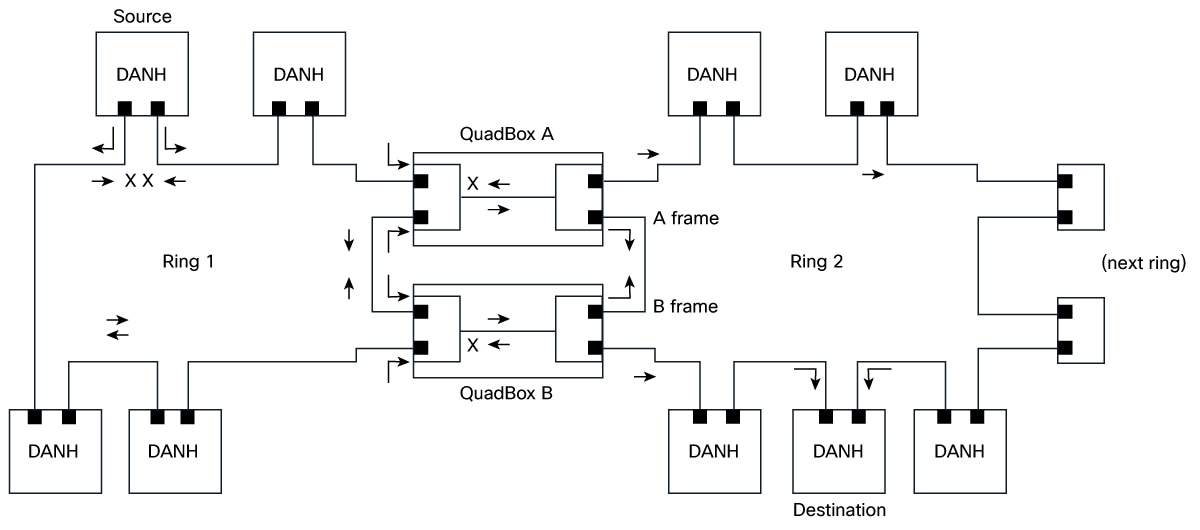
A HSR QuadBox, or quadruple port device, connects two HSR rings to each other. Two of these ports connect to the first ring, and the other two connect to the second ring, while any other ports on the device remain inactive.

To segregate traffic between the two rings, you can configure the QuadBox with VLAN and multicast filters. This allows you to restrict the specified VLAN and multicast groups from crossing the rings. VLAN filtering uses the VLAN allowed list to restrict VLANs. Multicast filtering matches packets with the same MAC destination address (MACDA) and optional mask as configured in the filters. If there is a match, the packets are dropped.

A QuadBox manages duplicate information. If two QuadBoxes are on the same ring and both try to send the same data from the first ring to the second, the system prevents it. If a QuadBox receives a piece of information that it has already sent, or the another QuadBox on the same ring has already sent, it recognizes the duplicate and do not forward it further. This prevents four copies to be circulated on the second ring.

The key components involved in the process are:

  • Doubly Attached Node for HSR (DANH) source node: Duplicates each outgoing frame and injects the copies into the ring in opposite directions.

  • Ring 1: Redundant path that carries the two counter-rotating frame copies and continues service even when a link is broken.

  • QuadBox A: Interconnect device that receives frames from Ring 1 and forwards a copy to Ring 2 or vice versa.

  • QuadBox B: Interconnect device that receives frames from Ring 1 and forwards a copy to Ring 2 or vice versa.

  • Ring 2: Second redundant ring that transports both frame copies (labeled as A frame and B Frame as per HSR-HSR QuadBox workflow figure) toward destination nodes and onward to the next ring if present.

  • DANH destination node: Accepts the first-arriving frame and discards the duplicate to avoid loops and duplicates.

  • Next ring: Downstream ring link that can receive forwarded traffic for extended topologies.

Workflow

Figure 2. HSR-HSR QuadBox workflow

The process involves these stages:

  1. The DANH source node sends a data frame and immediately creates two copies, injecting those copies into Ring 1 in opposite directions.
  2. The two frame copies propagate around Ring 1. If a link is broken (as indicated by the cross marks), the intact path still carries the frames to the interconnects.
  3. QuadBox A receives the Ring 1 frame traveling in one direction (clockwise) and forwards a copy to Ring 2, preserving redundancy.
  4. QuadBox B receives the Ring 1 frame traveling in the opposite direction (counter‑clockwise) and forwards a copy to Ring 2, ensuring both directions of Ring 2 carry the duplicated frames.
  5. On Ring 2, the A frame and B frame travel in opposite directions, so that all attached DANH nodes can receive at least one copy.
  6. The DANH destination node takes the first-arriving frame, processes it, and discards the second copy to prevent duplicate delivery.
  7. If the topology includes a downstream link, Ring 2 forwards traffic toward the next ring to extend connectivity.

Result

The switch provides seamless interconnection between two HSR rings, ensuring redundancy and network resilience in industrial environments.

Enable HSR-HSR QuadBox mode

You can activate HSR-HSR QuadBox mode to bridge two HSR rings using four dedicated ports on an IE3505 or IE3505H switch.

Use this task when you need to interconnect two HSR rings for redundancy.

Procedure


Step 1

Use the fpga-profile activate hsr-quadbox command to activate FPGA profile for QuadBox.

Example:

Switch# fpga-profile activate hsr-quadbox

Use the reload command to reload the device to apply the new profile.

Step 2

Use the configure terminal command to enter configuration mode.

Example:

Switch# configure terminal

Step 3

Use the hsr-hsr-mode enable pair [copper | sfp | mixed] command to enable HSR-HSR QuadBox based on the port pair option mentioned in the Interface configuration for HSR-HSR QuadBox table.

Example:

Switch(config)# hsr-hsr-mode enable pair sfp
PLEASE READ THE FOLLOWING INFORMATION ABOUT THE HSR-HSR MODE:

By enabling this mode, Ethernet ports that are not part of the feature will
no longer be operational.

When operating in this mode note the following:
        1. When this mode is configured and enabled, all other ports apart
           from the mode ports, will be shut down. Any feature running on these
           Ethernet ports will no longer function.
        2. The only means to manage the Switch will be available through the Serial Console.
        3. IP management of the Switch will be restored once "inband access via HTTP/HTTPS" 
           is configured and Device Manager will be not be accessible until inband 
           IP management is operational.

        4. Make sure Native VLAN is same on both the Quadboxes.
        5. Make sure Vlan allowed list configuration and Multicast
           filters configured are same on both quadboxes 
        6. The CLI switchport mode acess will be disabled
           when quadbox is enabled 
        7. Switchport access mode will be disabled when HSR-HSR is configured.
        8. MTU size is restricted to 2020.


ACCEPT? (yes/[no]): yes
Creating a HSR-ring interface HSR-ring 1

Creating a HSR-ring interface HSR-ring 2

Interface GigabitEthernet1/1 set to default configuration
Interface GigabitEthernet1/2 set to default configuration
Interface GigabitEthernet1/3 set to default configuration
Interface GigabitEthernet1/8 set to default configuration
Interface GigabitEthernet1/9 set to default configuration

Confirm acceptance of the mode change and acknowledge the warning about port shutdown and management changes.

Table 8. Syntax description

Keyword

Description

copper

Configures both HSR rings to use built-in copper ports.

sfp

Configures both HSR rings to use SFP ports.

mixed

Configures one HSR ring to use SFP ports and the other to use copper ports.

Refer to Interface assignment for HSR-HSR QuadBox table for additional ports information.

Step 4

(Optional) Use the hsr-ring ring_number multicast-filter deny group multicast_group_number_with_mask [ multicast_group_number_without_mask] address multicast address [mask multicast_address_mask] command to configure multicast filtering for the QuadBox.

Example:

Switch(config)# hsr-ring 1 multicast_filter_deny_group 1 0000.0100.0a00 ffff.ffff.ffff
Switch(config)# hsr-ring 2 multicast_filter_deny_group 5 0000.0100.0b00
Table 9. Syntax description

Keyword

Description

multicast_group_number_with_mask

The multicast group number configured with a mask. Configure the 48-bit multicast address and mask. The MAC destination address (MACDA) of a frame is matched with the configured 48-bit match-pattern up to the number of bits configured in the 48-bit mask. Once a match is found between the frame’s MACDA and the mask/match-pattern setting, the frame is dropped and not forwarded from the QuadBox. It ranges from 1 to 4.

multicast_group_number_without_mask

The multicast group number configured without a mask. These 256 filters allow you to specify a single group that can be blocked. Because there is no mask, each filter can block only one multicast group. Any packets with a MACDA matching the configured MAC addresses are then dropped by the QuadBox. It ranges from 5 to 260.

multicast_address_mask

The 48-bit MAC destination address written as a dotted triple of four-digit hexadecimal numbers. The ones bits in the mask are the bits to be ignored in the MAC Address.

Step 5

(Optional) Perform these steps to configure VLAN filtering for HSR ring interface 1 or 2.

  1. Use the interface hsr-ringring_number command to configure the interface for HSR ring.

    Example:

    Switch(config)# interface hsr-ring 1
  2. Use the switchport mode trunk allowed vlan vlan_num command to configure the switch mode.

    Example:

    Switch(config-if)# switchport mode trunk allowed vlan 1

    The allowed vlan_num value on the HSR ring ranges from 1 to 4096. All other VLANs are dropped.

  3. Use the exit command to exit from the configuration mode.

    Example:

    Switch(config-if)# exit

Step 6

Use the show hsr ring [multicast-filter | allowed-vlan | vlan-filter-drop-count | multicast-filter-drop] command to monitor the information.

Example:

Switch# show hsr ring multicast-filter
                HSR-ring listing:
                --------------------
HSR-ring: HS1
---------------

Filter No.  Address         Mask
=============================================
2           0000.0100.0a00 ffff.ffff.ffff

HSR-ring: HS2
---------------

Filter No.  Address         Mask
=============================================
5           0000.0100.0b00 0000.0000.0000
Switch# 
Switch# show hsr ring allowed-vlan
                HSR-ring listing:
                --------------------
HSR-ring: HS1
---------------
Vlan allowed list
----------------------
0-4094

HSR-ring: HS2
---------------
Vlan allowed list
----------------------
0-4094
Switch# show hsr ring vlan-filter-drop-count 
HSR-ring listing: 
--------------------
HSR-ring: HS1
---------------
VLAN filter drop count : 0
 HSR-ring: HS2
---------------
VLAN filter drop count : 0
Switch# show hsr ring multicast-filter-drop
                HSR-ring listing:
                --------------------
HSR-ring: HS1
---------------
Multicast filter drop count: 0
HSR-ring: HS2
---------------
Multicast filter drop count: 0
Switch# show hsr ring detail 
HSR-ring listing: 
--------------------
HSR-ring: HS1
------------
Layer type = L2 
Operation Mode = mode-H
Ports: 2	Maxports = 2
Port state = hsr-ring is In use
Protocol = Enabled  Redbox Mode = hsr-hsr  
Ports in the ring:
  1) Port: Gi1/1
   Logical slot/port = 1/1	Port state = In use 
Protocol = Enabled
  2) Port: Gi1/2
   Logical slot/port = 1/2	Port state = In use 
Protocol = Enabled
 
Ring Parameters: 
Redbox MacAddr: 9433.d845.5002
Node Forget Time: 60000 ms
Node Reboot Interval: 500 ms
Entry Forget Time: 400 ms
Proxy Node Forget Time: 60000 ms
Supervision Frame COS option: 0
Supervision Frame CFI option: 0
Supervision Frame VLAN Tag option: Disabled
Supervision Frame MacDa: 0x00
Supervision Frame VLAN id: 0
Supervision Frame Time: 3 ms
Life Check Interval: 1600 ms
Pause Time: 25 ms
fpgamode-DualUplinkEnhancement: Enabled 
 
HSR-ring: HS2
------------
Layer type = L2 
Operation Mode = mode-H
Ports: 2	Maxports = 2
Port state = hsr-ring is In use
Protocol = Enabled  Redbox Mode = hsr-hsr  
Ports in the ring:
  1) Port: Gi2/7
   Logical slot/port = 1/19	Port state = In use 
Protocol = Enabled
  2) Port: Gi2/8
   Logical slot/port = 1/20	Port state = In use 
Protocol = Enabled
 
Ring Parameters: 
Redbox MacAddr: 9433.d845.5013
Node Forget Time: 60000 ms
Node Reboot Interval: 500 ms
Entry Forget Time: 400 ms
Proxy Node Forget Time: 60000 ms
Supervision Frame COS option: 0
Supervision Frame CFI option: 0
Supervision Frame VLAN Tag option: Disabled
Supervision Frame MacDa: 0x00
Supervision Frame VLAN id: 0
Supervision Frame Time: 3 ms
Life Check Interval: 1600 ms
Pause Time: 25 ms
fpgamode-DualUplinkEnhancement: Enabled