Configuring EIGRP

EIGRP protocol

EIGRP is a routing protocol that

  • uses the same distance vector algorithm and distance information as IGRP,

  • improves convergence properties and operating efficiency, and

  • provides increased network width compared to RIP and IGRP.

Convergence technology and network width

The convergence technology employs the Diffusing Update Algorithm (DUAL). DUAL guarantees loop-free operation at every instant during a route computation. It also allows devices involved in a topology change to synchronize simultaneously. Routers that are not affected by topology changes are not involved in recomputations.

IP EIGRP provides increased network width. With RIP, the largest possible width of your network is 15 hops. The EIGRP metric is large enough to support thousands of hops, so the transport-layer hop counter is the only barrier to expanding the network. EIGRP increments the transport control field only when an IP packet has traversed 15 routers and the next hop to the destination was learned through EIGRP. When a RIP route is used as the next hop to the destination, the transport control field is incremented as usual.

EIGRP IPv6

EIGRP IPv6 is a routing protocol, which

  • runs on interfaces without requiring a global IPv6 address,

  • is configured directly on the interfaces where it operates, and

  • supports stub routing on switches running Network Essentials.

Router ID requirements for EIGRP IPv6

EIGRP IPv6 instance requires an implicit or explicit router ID before it can run.

  • An implicit router ID is derived from a local IPv6 address, ensuring any IPv6 node always has an available router ID.

  • EIGRP IPv6 may operate in a network with only IPv6 nodes. In this scenario, a router ID might not be available.

For information on how to configure EIGRP for IPv6, see the Configuring EIGRP for IPv6 section.

For more information on EIGRP for IPv6, see the Cisco IOS IPv6 Configuration Library on Cisco.com.

EIGRP features

EIGRP offers several features that enhance routing efficiency and scalability.

EIGRP provides these features:

  • Fast convergence.

  • Incremental updates when the state of a destination changes, instead of sending the entire contents of the routing table, minimizing the bandwidth required for EIGRP packets.

  • Less CPU usage because full update packets need not be processed each time that they are received.

  • Protocol-independent neighbor discovery mechanism to learn about neighboring routers.

  • Variable-length subnet masks (VLSMs).

  • Arbitrary route summarization.

  • EIGRP scales to large networks.

EIGRP components

EIGRP component details

EIGRP has these four basic components:

  • Neighbor discovery and recovery: Routers use this process to dynamically learn of other routers on their directly attached networks. Routers must also discover when their neighbors become unreachable or inoperative. Neighbor discovery and recovery is achieved with low overhead by periodically sending small hello packets. As long as hello packets are received, the Cisco IOS software can learn that a neighbor is alive and functioning. When this status is determined, the neighboring routers can exchange routing information.

  • Reliable transport protocol:Reliable transport protocol is responsible for guaranteed, ordered delivery of EIGRP packets to all neighbors. This protocol supports intermixed transmission of multicast and unicast packets. Some EIGRP packets must be sent reliably, and others do not. For efficiency, reliability is provided only when necessary. On a multiaccess network with multicast capabilities, such as Ethernet, it is unnecessary to send hello packets reliably to each neighbor individually. Instead, EIGRP sends a single multicast hello and indicates in the packet that acknowledgment is not needed. Other packet types, such as updates, require acknowledgment, which is shown in the packet. The reliable transport protocol can send multicast packets quickly when unacknowledged packets are pending. This approach helps ensure that convergence time remains low when link speeds vary.

  • DUAL finite state machine:The DUAL finite state machine embodies the decision process for all route computations. It tracks every route advertised by all neighbors. DUAL uses distance information, also called a metric, to select efficient, loop-free paths. It selects the routes to be placed into the routing table based on feasible successors. A successor is a neighboring router used for packet forwarding and has a least-cost path to a destination that cannot form a routing loop. When there are no feasible successors but neighbors do advertise the destination, DUAL must perform a recomputation. During this process, a new successor is determined. The time needed to recompute a route affects the convergence time. Recomputation is processor-intensive, so it is beneficial to avoid it unless necessary. When the topology changes, DUAL tests for feasible successors. If feasible successors exist, DUAL uses them to avoid unnecessary recomputation.

  • Protocol-dependent modules:Protocol-dependent modules are responsible for network layer protocol-specific tasks. For example, the IP EIGRP module sends and receives EIGRP packets encapsulated in IP. It also parses EIGRP packets and informs DUAL of new information received. EIGRP requests DUAL to make routing decisions, and the results are stored in the IP routing table. EIGRP is also responsible for redistributing routes learned from other IP routing protocols.

EIGRP stub routing

An EIGRP stub routing feature is a network routing mechanism that

  • improves network stability

  • reduces resource utilization, and

  • simplifies the stub device configuration.

Hub-and-spoke network topologies

Stub routing is commonly used in hub-and-spoke network topologies. In a hub-and-spoke network, one or more end (stub) networks are connected to a remote device (the spoke) that is connected to one or more distribution devices (the hub).

The remote device is adjacent to one or more distribution devices. The only route for IP traffic to reach the remote device is through a distribution device. This configuration is commonly used in WAN topologies, where the distribution device is directly connected to a WAN and can serve many remote devices.

In a hub-and-spoke topology, the remote device must forward all nonlocal traffic to a distribution device, so it becomes unnecessary for the remote device to have a complete routing table. Generally, the distribution device need not send anything more than a default route to the remote device.

When using the EIGRP stub routing feature, you need to configure the distribution and remote devices to use EIGRP and configure only the remote device as a stub. Only specified routes are propagated from the remote (stub) device. The stub device responds to all queries for summaries, connected routes, redistributed static routes, external routes, and internal routes with the message inaccessible. A device that is configured as a stub will send a special peer information packet to all neighboring devices to report its status as a stub device.

Any neighbor that receives a packet informing it of the stub status will not query the stub device for any routes, and a device that has a stub peer will not query that peer. The stub device will depend on the distribution device to send proper updates to all peers.
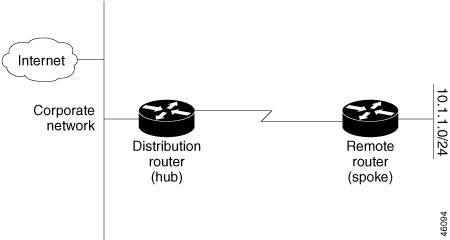
Figure 1. Simple Hub-and-spoke network
Simple Hub-and-Spoke Network

The stub routing feature by itself does not prevent routes from being advertised to the remote device. In this scenario, the remote device can access the corporate network and the Internet only through the distribution device. Having a complete route table on the remote device would serve no functional purpose because the path to the corporate network and the Internet would always be through the distribution device. The large route table would only reduce the amount of memory that is required by the remote device. Bandwidth and memory can be conserved by summarizing and filtering routes in the distribution device. The remote device need not receive routes that have been learned from other networks because the remote device must send all nonlocal traffic, regardless of the destination, to the distribution device. If a true stub network is desired, the distribution device should be configured to send only a default route to the remote device. The EIGRP stub routing feature does not automatically enable summarization on distribution devices. In most cases, the network administrator will need to configure summarization on distribution devices.


Note


When configuring the distribution device to send only a default route to the remote device, you must use the IPclassless command on the remote device. By default, the IPclassless command is enabled in all Cisco images that support the EIGRP stub routing feature.


Without the EIGRP stub routing feature, even after routes that are sent from the distribution device to the remote device have been filtered or summarized, a problem might occur. If a route is lost somewhere in the corporate network, EIGRP could send a query to the distribution device, which in turn would send a query to the remote device, even if routes are being summarized. If a communication problem occurs over the WAN link between the distribution device and the remote device, the EIGRP stuck in active (SIA) condition might occur, leading to instability in the network. The EIGRP stub routing feature allows a network administrator to prevent queries from being sent to the remote device.

EIGRP stub routing

An EIGRP stub routing feature is a network routing mechanism that

  • improves network stability,

  • reduces resource utilization, and

  • simplifies the stub device configuration.

Stub routing is commonly used in hub-and-spoke network topologies. In a hub-and-spoke network, one or more end (stub) networks are connected to a remote device (the spoke) that is connected to one or more distribution devices (the hub).

The remote device is adjacent to one or more distribution devices. The only route for IP traffic to reach the remote device is through a distribution device. This type of configuration is commonly used in WAN topologies, where the distribution device is directly connected to a WAN. The distribution device can be connected to many remote devices, which is often the case.

In a hub-and-spoke topology, the remote device must forward all nonlocal traffic to a distribution device, so it becomes unnecessary for the remote device to have a complete routing table. Generally, the distribution device need not send anything more than a default route to the remote device.

When using the EIGRP stub routing feature, you need to configure the distribution and remote devices to use EIGRP and configure only the remote device as a stub. Only specified routes are propagated from the remote (stub) device. The stub device responds to all queries for summaries, connected routes, redistributed static routes, external routes, and internal routes with the message “inaccessible.” A device that is configured as a stub will send a special peer information packet to all neighboring devices to report its status as a stub device.

Any neighbor that receives a packet informing it of the stub status will not query the stub device for any routes, and a device that has a stub peer will not query that peer. The stub device will depend on the distribution device to send proper updates to all peers.
Figure 2. EIGRP Stub Router Configuration

The stub routing feature by itself does not prevent routes from being advertised to the remote device. In this example, the remote device can access the corporate network and the Internet only through the distribution device. Having a complete route table on the remote device would serve no functional purpose because the path to the corporate network and the Internet would always be through the distribution device. The large route table would only reduce the amount of memory that is required by the remote device. Bandwidth and memory can be conserved by summarizing and filtering routes in the distribution device. The remote device need not receive routes that have been learned from other networks because the remote device must send all nonlocal traffic, regardless of the destination, to the distribution device. If a true stub network is desired, the distribution device should be configured to send only a default route to the remote device. The EIGRP stub routing feature does not automatically enable summarization on distribution devices. In most cases, the network administrator will need to configure summarization on distribution devices.


Note


When configuring the distribution device to send only a default route to the remote device, you must use the IPclassless command on the remote device. By default, the IPclassless command is enabled in all Cisco images that support the EIGRP stub routing feature.


Without the EIGRP stub routing feature, even after routes that are sent from the distribution device to the remote device have been filtered or summarized, a problem might occur. If a route is lost somewhere in the corporate network, EIGRP could send a query to the distribution device, which in turn would send a query to the remote device, even if routes are being summarized. If there is a communication problem (over the WAN link) between the distribution device and the remote device, an EIGRP stuck in active (SIA) condition could occur and cause instability elsewhere in the network. The EIGRP stub routing feature allows a network administrator to prevent queries from being sent to the remote device.

Configure EIGRP

To create an EIGRP routing process, you must enable EIGRP and associate networks. EIGRP sends updates to the interfaces in the specified networks. If you do not specify an interface network, it is not advertised in any EIGRP update.


Note


If your network contains devices configured for IGRP and you plan to migrate to EIGRP, designate certain devices as transition points by configuring both IGRP and EIGRP on them. In these situations, perform steps 1 through 3 in the next section. Also, review the Split Horizon configuration. You must use the same AS number for routes to be automatically redistributed.


Default EIGRP configuration

These are the default settings for EIGRP features and parameters.
Table 1. Default EIGRP configuration

Feature

Default Setting

Auto summary

Disabled

Default-information

Exterior routes are accepted and default information is passed between EIGRP processes when doing redistribution

Default metric

Only connected routes and interface static routes can be redistributed without a default metric. The metric includes:

  • Bandwidth: 0 or greater kb/s

  • Delay (tens of microseconds): 0 or any positive number that is a multiple of 39.1 nanoseconds

  • Reliability: any number between 0 and 255 (255 means 100 percent reliability)

  • Loading: effective bandwidth as a number between 0 and 255 (255 is 100 percent loading)

  • MTU: maximum transmission unit size of the route in bytes. 0 or any positive integer

Distance

Internal distance: 90

External distance: 170

EIGRP log-neighbor changes

Disabled. No adjacency changes logged

IP authentication key-chain

No authentication provided

IP authentication mode

No authentication provided

IP bandwidth-percent

50 percent

IP hello interval

For low-speed nonbroadcast multiaccess (NBMA) networks: 60 seconds; all other networks: 5 seconds

IP hold-time

For low-speed NBMA networks: 180 seconds; all other networks: 15 seconds

IP split-horizon

Enabled

IP summary address

No summary aggregate addresses are predefined

Metric weights

tos: 0; k1 and k3: 1; k2, k4, and k5: 0

Network

None specified

Offset-list

Disabled

Router EIGRP

Disabled

Set metric

No metric set in the route map

Traffic-share

Distributed proportionately to the ratios of the metrics

Variance

1 (equal-cost load-balancing)

Configure basic EIGRP parameters

This task enables you to configure the essential parameters for Enhanced Interior Gateway Routing Protocol (EIGRP) on your device, allowing for dynamic routing and efficient network communication.

Use this task when you need to set up or modify EIGRP routing on a Cisco device. Proper configuration of EIGRP parameters is necessary for devices to exchange routing information and maintain network stability.

Before you begin

Ensure you have access to the device and the necessary privileges to configure routing protocols.

Perform these steps to configure basic EIGRP parameters:

Procedure


Step 1

Enter global configuration mode.

  1. Use the enable command to enable privileged EXEC mode.

    Example:

    Device# enable

    Enter your password if prompted.

  2. Use the configure terminal command to enter global configuration mode.

    Example:

    Device# configure terminal

Step 2

Use the router EIGRP autonomous-system command to enable the EIGRP routing process and enter router configuration mode.

Example:

Device(config)# router eigrp 10

Enables an EIGRP routing process, and enters router configuration mode. The autonomous-system number identifies the routes to other EIGRP devices and is used to tag routing information.

Step 3

Define networks and logging.

  1. Use the network network-number command to ssociate networks with the EIGRP process.

    Example:

    Device(config-router)# network 192.168.0.0

    Associate networks with an EIGRP routing process. EIGRP sends updates to the interfaces in the specified networks.

  2. (Optional) Use the EIGRP log-neighbor-changes command to enable logging for monitoring routing system stability.

    Example:

    Device(config-router)# eigrp log-neighbor-changes

    Enables logging of EIGRP neighbor changes to monitor routing system stability.

Step 4

(OPtional) Adjust routing metrics.

  1. Use the metric weights tos k1 k2 k3 k4 k5 command to adjust EIGRP metrics and increase incoming or outgoing metrics for routes.

    Example:

    Device(config-router)# metric weights 0 2 0 2 0 0

    Caution


    Setting metrics is complex and is not recommended without guidance from an experienced network designer.

  1. Use the offset-list [access-list number | name] {in | out} offset [type number] command to increase incoming and outgoing metrics to routes learned through EIGRP.

    Example:

    
    								Device(config-router)# offset-list 21 out 10
    							

    You can limit the offset list with an access list or an interface.

Step 5

(Optional) Use the auto-summary command to enable automatic summarization of subnet routes into network-level routes.

Example:

Device(config-router)# auto-summary

Step 6

Configure interface summarization

  1. Use the interface interface-id command to enter the interface configuration mode, and specifies the Layer 3 interface to configure.

    Example:

    Device(config-router)# interface gigabitethernet 1/1
  2. (Optional) Use the ip summary-address EIGRP autonomous-system-number address mask command to configure a summary aggregate.

    Example:

    Device(config-if)# ip summary-address eigrp 1 192.168.0.0 255.255.0.0

Step 7

Use the end command to exit the configuration mode and return to privileged EXEC mode.

Example:

Device(config-if)# end

Step 8

Use the show ip protocols command to verify your entries.

Example:

Device# show ip protocols

Step 9

(Optional) Use the copy running-config startup-config command to save your entries in the configuration file.

Example:

Device# copy running-config startup-config 

Configure EIGRP interfaces

Configure EIGRP interfaces to apply optional parameters on a per-interface basis, allowing for tailored EIGRP operation and improved network performance.

Other optional EIGRP parameters can be configured on an interface basis.

Use this task when you need to adjust EIGRP settings for specific interfaces, such as bandwidth allocation, summary addresses, or timer intervals, to meet your network requirements.

Before you begin

No prerequisites are required unless otherwise specified by your network design or policies.

Follow these steps to configure EIGRP interfaces:

Procedure


Step 1

Enter global configuration mode.

  1. Use the enable command to enable privileged EXEC mode.

    Example:

    Device# enable

    Enter your password if prompted.

  2. Use the configure terminal command to enter global configuration mode.

    Example:

    Device# configure terminal

Step 2

Use the interface interface-id command to enter interface configration mode and specify the Layer 3 interface to configure.

Example:

Device(config)# interface gigabitethernet 1/1

Step 3

(Optional) Configure bandwidth and summarization

  1. Use the ip bandwidth-percent eigrp percent command set the EIGRP bandwidth usage limit.

    Example:

    Device(config-router)# ip bandwidth-percent eigrp 60
  2. Use the ip summary-address EIGRP autonomous-system-number address mask command to configure a summary aggregate.

    Example:

    Device(config-if)# ip summary-address eigrp 1 109 192.161.0.0 255.255.0.0

Step 4

(Optional) Adjust timing parameters

  1. Use the ip hello-interval EIGRP autonomous-system-number seconds command to change the EIGRP hello time intervals.

    Example:

    Device(config-if)# ip hello-interval eigrp 109 10
    
  2. Use the ip hold-time EIGRP autonomous-system-number seconds command to change the EIGRP hold time intervals.

    Example:

    Device(config-if)# ip hold-time eigrp 109 40

Change the hello time interval for an EIGRP routing process. The range is 1 to 65535 seconds. The default is 60 seconds for low-speed NBMA networks and 5 seconds for all other networks.

Caution


Do not adjust the hold time without consulting Cisco technical support.

Step 5

(Optional) Use the no ip split-horizon EIGRP autonomous-system-number command to disable split horizon to allow route information to be advertised out of the interface it originated from

Example:

Device(config-if)# no ip split-horizon eigrp 109

Step 6

Use the end command to exit configuration and return to privileged EXEC mode

Example:

Device(config)# end

Returns to privileged EXEC mode.

Step 7

Use the show ip EIGRP interface command to verify which interfaces have EIGRP active and view their associated information.

Example:

Device# show ip eigrp interface

Step 8

(Optional) Use the copy running-config startup-config command to save your entries in the configuration file.

Example:

Device# copy running-config startup-config

EIGRP IPv6

An EIGRP IPv6 instance is a routing protocol that

  • runs on interfaces without requiring a global IPv6 address

  • is configured directly on the interfaces where it operates, and

  • supports stub routing on switches running Network Essentials.

Router ID requirements for EIGRP IPv6

An instance of EIGRP IPv6 requires an implicit or explicit router ID before it can run.

  • An implicit router ID is derived from a local IPv6 address, ensuring any IPv6 node always has an available router ID.

  • EIGRP IPv6 may operate in a network with only IPv6 nodes and might not have an available IPv6 router ID.

For configuring EIGRP for IPv6, see the Configuring EIGRP for IPv6 section.

For more information about EIGRP for IPv6, see the Cisco IOS IPv6 Configuration Library on Cisco.com.

Configure EIGRP route authentication

Configure EIGRP route authentication to secure routing updates using MD5 authentication. This prevents unauthorized or false routing messages from unapproved sources.

EIGRP route authentication is used to ensure that only trusted devices can exchange routing information. MD5 authentication protects the network from unauthorized or malicious routing updates.

Perform this task when you need to secure EIGRP routing protocol communications between Cisco devices.

Before you begin

Ensure you have access to the device and privileged EXEC mode. Know the interface and autonomous system numbers required for your EIGRP configuration.

Follow these steps to configure EIGRP route authentication:

Procedure


Step 1

Enter global configuration mode.

  1. Use the enable command to enable privileged EXEC mode.

    Example:

    Device# enable

    Enter your password if prompted.

  2. Use the configure terminal command to enter global configuration mode.

    Example:

    Device# configure terminal

Step 2

Configure interface authentication.

  1. Use the interface interface-id command to enter interface configuration mode.

    Example:

    
    Device(config)# interface gigabitethernet 1/1

    Enters interface configuration mode, and specifies the Layer 3 interface to configure.

  2. Use the IP authentication mode EIGRP autonomous-system md5 command to enable MD5 authentication in IP EIGRP packets.

    Example:

    Device(config-if)# ip authentication mode eigrp 104 md5
  3. Use the IP authentication key-chain EIGRP autonomous-system key-chain command to enables authentication of IP EIGRP packets.

    Example:

    Device(config-if)# ip authentication key-chain eigrp 105 chain1

Step 3

Define Key Chain and Key.

  1. Use the exit command to command to return to global configuration mode.

    Example:

    Device(config-if)# exit
  2. Use the key chain name command to identify a key chain and enter key-chain configuration mode.

    Example:

    Device(config)# key chain chain1
  3. Use the key chain number command in key-chain configuration mode, identify the key number.

    Example:

    Device(config-keychain)# key 1

Step 4

Use the key-string text command to define the security string for the specified key.

Example:


Device(config-keychain-key)#key-string key1

Step 5

(Optional) Set Key lifetimes.

  1. Use the accept-lifetime start-time infinite end-time duration seconds

    Example:

    
    Device(config-keychain-key)#accept-lifetime 13:30:00 Jan 25 2011 duration 7200
  2. Use the send-lifetime start-time infinite end-time duration seconds command to specify the time period during which the key can be received.

    Example:

    
    Device(config-keychain-key)#send-lifetime 13:30:00 Jan 25 2011 duration 7200

Step 6

Use the end command to exit the configuration mode and return to privileged EXEC mode.

Example:

Device(config-if)# end

Step 7

Use the show key chain command to display and verify authentication key information.

Example:

Device# show key chain

Step 8

(Optional) Use the copy running-config startup-config command to save your entries in the configuration file.

Example:

Device# copy running-config startup-config 

Monitor and maintain EIGRP

You can delete neighbors from the neighbor table and display various EIGRP routing statistics using privileged EXEC commands.
Table 2. IP EIGRP clear and show commands

Command

Purpose

clear IP EIGRP neighbors [if-address | interface]

Deletes neighbors from the neighbor table.

show IP EIGRP interface [interface] [as number]

Displays information about interfaces configured for EIGRP.

show IP EIGRP neighbors [type-number]

Displays EIGRP discovered neighbors.

show IP EIGRP topology [autonomous-system-number]  | [[IP-address] mask]]

Displays the EIGRP topology table for a given process.

show IP EIGRP traffic [autonomous-system-number]

Displays the number of packets sent and received for all or a specified EIGRP process.