Pods and Services Reference

Feature Summary and Revision History

Summary Data

Table 1. Summary Data

Applicable Product(s) or Functional Area

5G-NRF

Applicable Platform(s)

SMI

Feature Default Setting

Enabled - Always-on

Related Changes in this Release

Not Applicable

Related Documentation

Not Applicable

Revision History

Table 2. Revision History

Revision Details

Release

First introduced.

2026.01

Feature Description

The NRF is built on the Kubernetes cluster strategy, which implies that it has adopted the native concepts of containerization, high availability, scalability, modularity, and ease of deployment. To achieve the benefits offered by Kubernetes, NRF uses the construct that includes the components such as pods and services.

Depending on your deployment environment, the NRF deploys the pods on the virtual machines that you have configured. Pods operate through the services that are responsible for the intrapod communications. If the machine hosting the pods fail or experiences network disruption, the pods are terminated or deleted. However, this situation is transient and NRF spins new pods to replace the invalid pods.

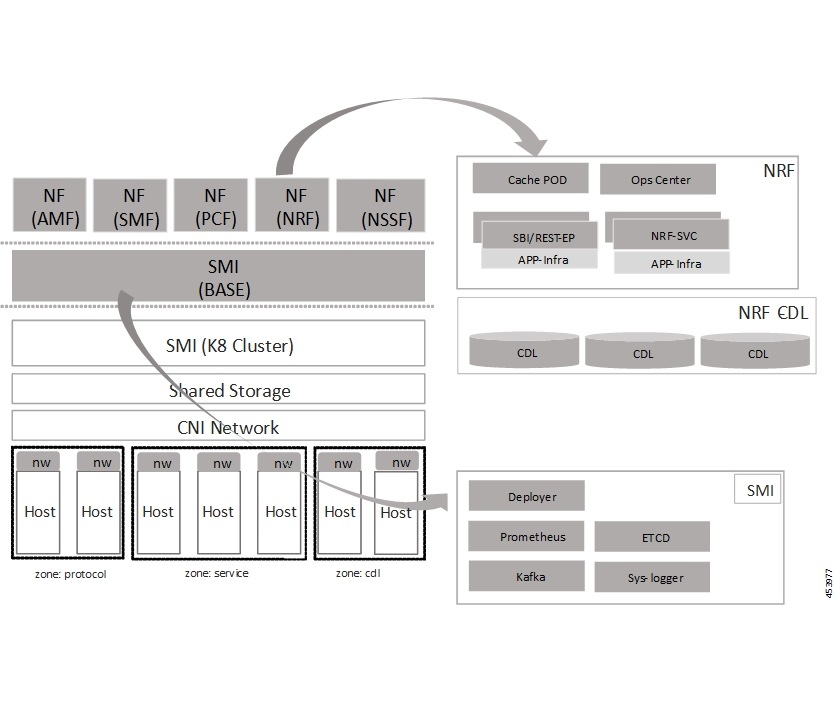
The following workflow provides a high-level visibility into the host machines, and the associated pods and services. It also represents how the pods interact with each other. The representation might defer based on your deployment infrastructure.

Figure 1. Communication Workflow of Pods

Kubernetes deployment includes the kubectl command-line tool to manage the Kubernetes resources in the cluster. You can manage the pods, nodes, and services.

For generic information on the Kubernetes concepts, see the Kubernetes documentation.

Pods

A pod is a process that runs on your Kubernetes cluster. Pod encapsulates a granular unit known as a container. A pod contains one or multiple containers.

Kubernetes deploys one or multiple pods on a single node which can be a physical or virtual machine. Each pod has a discrete identity with an internal IP address and port space. However, the containers within a pod can share the storage and network resources.

The following tables list the NRF and Common Execution Environment (CEE) pod names and the hosts on which they are deployed depending on the labels that you assign. For information on how to assign the labels, see Associating Pods to the Nodes.

Table 3. NRF Pods
Pod Name Description Host Name
base-entitlement-nrf Supports Smart Licensing feature. OAM
cache-pod Operates as the pod to cache any sort of system information that will be used by other pods as applicable. Protocol
cdl-ep-session-c1 Provides an interface to the CDL. Session
cdl-index-session-c1 Preserves the mapping of keys to the session pods. Session
cdl-slot-session-c1 Operates as the CDL Session pod to store the session data. Session
documentation Contains the documentation. OAM
etcd-nrf-etcd-cluster Hosts the etcd for the NRF application to store information, such as pod instances, leader information, NF-UUID, endpoints, and so on. OAM

georeplication

Responsible for cache, etcd replication across sites, and site role management.

Note


In the current release, this pod is not actively used in NRF.

Protocol

grafana-dashboard-app-infra Contains the default dashboard of app-infra metrics in Grafana. OAM
grafana-dashboard-cdl Contains the default dashboard of CDL metrics in Grafana. OAM
grafana-dashboard-etcd

Contains the default dashboard of etcd metrics in Grafana.

OAM
grafana-dashboard-nrf Contains the default dashboard of nrf-service metrics in Grafana. OAM
kafka Hosts the Kafka details for the CDL replication. Protocol
oam-pod Operates as the pod to facilitate Ops Center actions, such as show commands, configuration commands, monitor protocol monitor subscriber, and so on. OAM
ops-center-nrf-ops-center Acts as the NRF Ops Center. OAM

prometheus-rules-cdl

Contains the default alerting rules and recording rules for Prometheus CDL.

OAM

prometheus-rules-etcd

Contains the default alerting rules and recording rules for Prometheus etcd.

OAM
smart-agent-nrf-ops-center Operates as the utility pod for the NRF Ops Center. OAM

nrf-nrf-service

Contains main business logic of the NRF.

Service

nrf-nrf-rest-ep Operates as REST endpoint of NRF for HTTP/2 communication. Protocol
zookeeper Assists Kafka for topology management. OAM

Services

The NRF configuration is composed of several microservices that run on a set of discrete pods. Microservices are deployed during the NRF deployment. NRF uses these services to enable communication between the pods. When interacting with another pod, the service identifies the pod's IP address to initiate the transaction and acts as an endpoint for the pod.

The following table describes the NRF services and the pod on which they run.

Table 4. NRF Services and Pods
Service Name Pod Name Description
base-entitlement-nrf base-entitlement-nrf Supports Smart Licensing feature.
datastore-ep-session cdl-ep-session-c1 Responsible for the CDL session.
datastore-notification-ep nrf-rest-ep Responsible for sending the notifications from the CDL to the nrf-service through nrf-rest-ep.
datastore-tls-ep-session cdl-ep-session-c1 Responsible for the secure CDL connection.
documentation documentation Responsible for the NRF documents.
etcd etcd-nrf-etcd-cluster-0 Responsible for pod discovery within the namespace.
etcd-nrf-etcd-cluster etcd-nrf-etcd-cluster-0 Responsible for synchronization of data among the etcd cluster.
grafana-dashboard-app-infra grafana-dashboard-app-infra Responsible for the default dashboard of app-infra metrics in Grafana.
grafana-dashboard-cdl grafana-dashboard-cdl Responsible for the default dashboard of CDL metrics in Grafana.

grafana-dashboard-etcd

grafana-dashboard-etcd

Contains the default dashboard of etcd metrics in Grafana.

grafana-dashboard-nrf grafana-dashboard-nrf Responsible for the default dashboard of nrf-service metrics in Grafana.
kafka kafka Processes the Kafka messages.
local-ldap-proxy-nrf-ops-center ops-center-nrf-ops-center Responsible for leveraging Ops Center credentials by other applications, such as Grafana.
oam-pod oam-pod Responsible to facilitate Exec commands on the Ops Center.
ops-center-nrf-ops-center ops-center-nrf-ops-center Manages the NRF Ops Center.
ops-center-nrf-ops-center-expose-cli ops-center-nrf-ops-center To access NRF Ops Center with external IP address.
smart-agent-nrf-ops-center smart-agent-nrf-ops-center Responsible for the NRF Ops Center API.
nrf-rest-ep nrf-rest-ep Responsible for routing the incoming HTTP2 messages to the rest-ep pods.
nrf-service nrf-service Responsible for inter-pod communication with nrf-service pod.
zookeeper zookeeper Assists Kafka for topology management.
zookeeper-service zookeeper Assists Kafka for topology management.

Associating Pods to the Nodes

This section describes how to associate a pod to the node based on their labels.

After you have configured a cluster, you can associate pods to the nodes through labels. This association enables the pods to get deployed on the appropriate node based on the key-value pair.

Labels are required for the pods to identify the nodes where they must get deployed and to run the services. For example, when you configure the protocol-layer label with the required key-value pair, the pods are deployed on the nodes that match the key-value pair.

To associate pods to the nodes through the labels, use the following configuration:

config 
  label 
    cdl-layer   
      key key_value 
      value value 
    oam-layer   
      key key_value 
      value value 
    protocol-layer   
      key key_value 
      value value 
    service-layer   
      key key_value 
      value value 
      end 

Note


If you opt not to configure the labels, then NRF assumes the labels with the default key-value pair.

  • label { cdl-layer { key key_value | value value } : Configures the key value pair for CDL.

  • oam-layer { key key_value | value value } : Configures the key value pair for OAM layer.

  • protocol-layer { key key_value | value value } : Configures the key value pair for protocol layer.

  • service-layer { key key_value | value value } : Configures the key value pair for the service layer.


Viewing the Pod Details and Status

If the service requires additional pods, nrf creates and deploys the pods. You can view the list of pods that are participating in your deployment through the nrf Ops Center. You can run the kubectl command from the master node to manage the Kubernetes resources.

  • To view the comprehensive pod details, use the following command.

    kubectl get pods -n nrf pod_name -o yaml

    The pod details are available in YAML format. The output of this command results in the following information:

    • The IP address of the host where the pod is deployed.

    • The service and application that is running on the pod.

    • The ID and name of the container within the pod.

    • The IP address of the pod.

    • The current state and phase in which the pod is.

    • The start time from which pod is in the current state.

  • Use the following command to view the summary of the pod details.

    kubectl get pods -n nrf_namespace -o wide

States

Understanding the pod's state lets you determine the current health and prevent the potential risks. The following table describes the pod's states.

Table 5. Pod States

State

Description

Running

The pod is healthy and deployed on a node.

It contains one or more containers

Pending

The application is in the process of creating the container images for the pod

Succeeded

Indicates that all the containers in the pod are successfully terminated. These pods cannot be restarted.

Failed

One ore more containers in the pod have failed the termination process. The failure occurred as the container either exited with non zero status or the system terminated the container.

Unknown

The state of the pod could not be determined. Typically, this could be observed because the node where the pod resides was not reachable.