NF Management Services

The Nnrf_NFManagement service enables an NF instance to register, update, or de-register its profile in the local NRF or another NRF located in the serving PLMN.

It also enables an NF to subscribe to be notified of registration, de-registration, and profile changes of NF instances along with their NF services.

The NF profile consists of general parameters of the NF instance, and also the parameters of the different NF service instances exposed by the NF instance.

The Nnrf_NFManagement service also enables retrieving a list of NF instances currently registered in the NRF or the NF Profile of a given NF instance.

NF Registration and Deregistration Service Operations

Feature Summary and Revision History

Summary Data

Table 1. Summary Data

Applicable Product(s) or Functional Area

5G-NRF

Applicable Platform(s)

SMI

Feature Default Setting

Enabled – Always-on

Related Changes in this Release

Not Applicable

Related Documentation

Not Applicable

Revision History

Table 2. Revision History

Revision Details

Release

First introduced.

2026.01

Feature Description

The NF Register and Deregister service operations enable NRF to process the NF registration or deregistration request from any of the NF and store it in, or remove it from, the database.

How it Works

This section describes how NF Registration and Deregistration feature works.

NF Registration

NRF REST Endpoint
  1. The NRF REST endpoint receives the NFRegister request over HTTP2/JSON. The HTTP method is PUT, and the URL is /root/nnrf-nfm/v1/nf-instances. The body contains the NFProfile in JSON format.

    Note: The default value, /root, is a configurable parameter.

  2. On receiving the request, the request is validated to check if the mandatory fields are present in the request. If not, then the response is sent back with status 400 (BAD REQUEST).

  3. If the validation succeeds, then the NFRegister request is transformed into protobuf format and sent towards the Service Pod for processing.

  4. The worker, after processing the request, sends a response toward the endpoint. The response is then transformed from protobuf-based format to JSON-based format.

  5. The response is then checked for the response code; if it’s a new node success response, then the updated NFProfile is sent back in the response body with the status code as 201 (CREATED). Else, if it’s an error code, the error code is sent back to the client.

NRF Service Engine
  1. The NRF Engine receives the protobuf-based request from the REST endpoint through the IPC system.

  2. The NRF Engine gets the nfInstanceId from the message and creates an entry in CDL, with nfInstanceId as Primary key and few other required fields as Unique and non-Unique keys.

  3. The entire NFProfile is set into the data of the DBRecord request.

  4. If the create is successful, the response code 201 is sent back to the REST endpoint.

  5. In case of error while storing the response, error code is sent back as 500.

NF Deregistration

NRF REST Endpoint
  1. The NRF REST endpoint receives the NFDeregister request over HTTP2/JSON. The HTTP method is DELETE, and the URL is /root/nnrf-nfm/v1/nf-instances/{nfInstanceId} with no request body.

    Note: The default value, /root, is a configurable parameter.

  2. The NFDeregister request is transformed into protobuf format and sent toward the Service Pod for processing.

  3. The messages are routed from REST endpoint to Service Pod based on Affinity. The nfInstanceId is the Primary key for Affinity.

  4. The Service Pod, after processing the request, sends a response toward the endpoint. The response is transformed from protobuf-based format to JSON-based format.

  5. The response is then checked for the response code; if it’s a success response, then the status code 204 (NO CONTENT) is sent back to the client with no response body. If the response code is 404, then the status code 404 (NOT FOUND) is sent back to the client with no response body. In other error cases, response code 500 is sent back.

NRF Service Engine
  1. The NRF Engine receives the protobuf-based request from the REST endpoint through the IPC system.

  2. The NRF Engine gets the nfInstanceId and attempts to load the profile from the CDL DB.

  3. If the profile is not present, the response is sent back to the rest-ep with response code as 404.

  4. If the profile is present, the profile is deleted by sending a delete request to the Datastore service.

  5. If the request is successful, the response is sent back to the rest-ep with response code as 200.

  6. For errors while deleting, response code is sent back as 500.

Call Flows

NFRegister Success Call Flow

This section describes the successful NF Registration call flow.
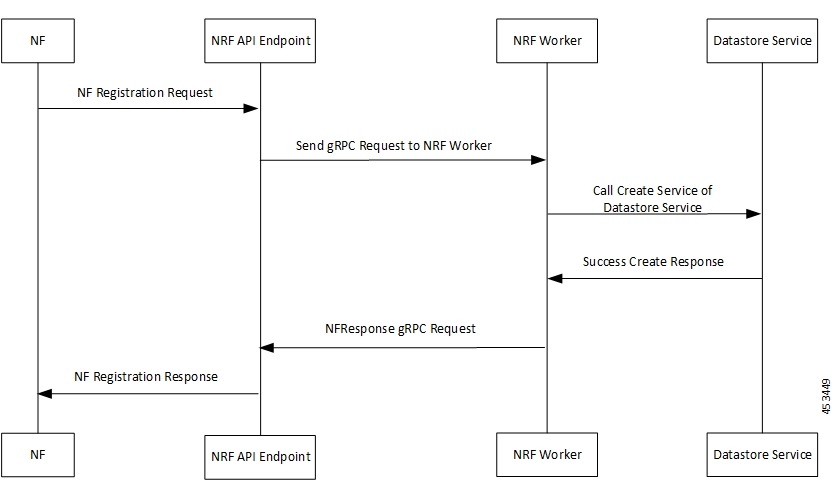
Figure 1. NFRegister Success Call Flow
Table 3. NFRegister Success Call Flow

Step

Description

1

The NF sends NF Registration Request to NRF API endpoint.

The NRF API endpoint transforms the REST request to gRPC.

2

The NRF API endpoint sends gRPC request to the NRF worker.

The NRF worker decodes gRPC request and prepares DBRecord message to be sent to the Datastore service.

3

The NRF worker sends call create service to Datastore service.

4

The Datastore service responds to NRF worker with SUCCESS Create Response.

5

The NRF worker builds NFResponse gRPC Request and sends it to NRF API endpoint.

The NRF API endpoint transforms the gRPC NFResponse message to REST-based response message.

6

The NRF API endpoint sends NF Registration Response to the NF.

NFDeregister Success Call Flow

This section describes the successful NF Deregistration call flow.
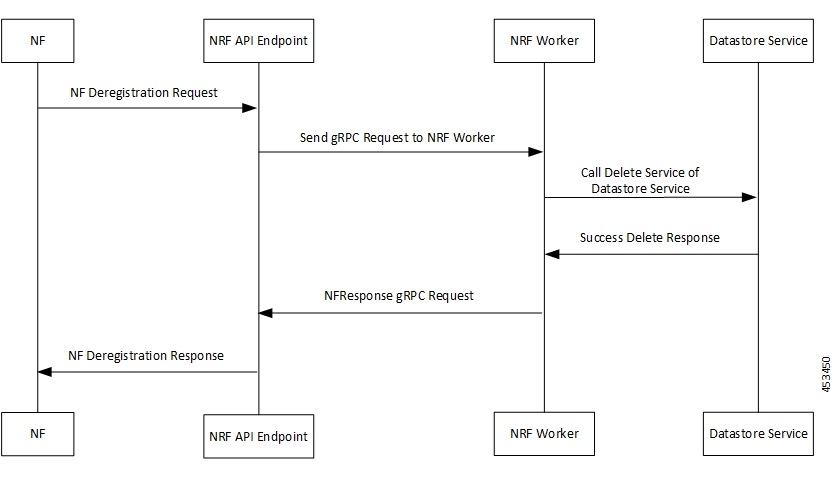
Figure 2. NFDeregister Success Call Flow
Table 4. NFDeregister Success Call Flow

Step

Description

1

The NF sends NF Deregistration Request to NRF API endpoint.

The NRF API endpoint transforms the REST request to gRPC.

2

The NRF API endpoint sends gRPC request to the NRF worker.

The NRF worker decodes gRPC request and prepares DBRecordFilter message to be sent to the Datastore service.

3

The NRF worker sends call delete service to Datastore service.

4

The Datastore service responds to NRF worker with SUCCESS Delete Response.

5

The NRF worker builds NFResponse gRPC Request and sends it to NRF API endpoint.

The NRF API endpoint transforms the gRPC NFResponse message to REST-based response message.

6

The NRF API endpoint sends NF Deregistration Response to the NF.

NF Update Service Operation

Feature Summary and Revision History

Summary Data

Table 5. Summary Data

Applicable Product(s) or Functional Area

5G-NRF

Applicable Platform(s)

SMI

Feature Default Setting

Not Applicable

Related Changes in this Release

Not Applicable

Related Documentation

Not Applicable

Revision History

Table 6. Revision History

Revision Details

Release

First introduced.

2026.01

Feature Description

The NFUpdate service operation enables an NF instance to partially update or completely replace the parameters of its NF profile in the NRF. It also enables an NF instance to add or delete its services.

The NFUpdate feature provides the following functionality:

  • NRF handles PATCH request with Add, Delete, and Replace operations for all the service operation parameters.

  • NRF validates the PATCH request after receiving it and enables patch operations, which are based on the input parameters, value range, and so on.

  • NRF validates the input parameters, which are validated as part of NF Registration.

  • NRF uses PUT request to discard and completely replace the old NF profile with a new profile.

  • NRF performs the following validations to update an NF profile:

    • The delete operation of mandatory parameters of an NF profile is not allowed.

How it Works

The update request is a HTTP PATCH request to the resource URI, which contains the NF instance ID. The body of the PATCH request contains the list of operations (add, delete, or replace), which is applied to the NF Profile of the NF instance. These operations may be directed to individual parameters of the NF Profile or to the list of services and their parameters as offered by the NF Instances.

NRF REST Endpoint

  1. The NRF Rest endpoint receives the following types of Update requests:

    1. The NF Profile Partial Update request over HTTP2/JSON-PATCH+JSON. The HTTP method is PATCH and the URL is {apiRoot}/nnrf-nfm/v1/nf-instances/{nfInstanceID} and the body contains PATCH data in JSON format.

    2. The NF Profile Complete Update request over HTTP2 request with content type header application/JSON. The HTTP method is PUT and the URL is {apiRoot}/nnrf-nfm/v1/nf-instances/{nfInstanceID}(NFProfile) and the body contains the complete NF profile data in JSON format.

    Note: The default value, {apiRoot}, is a configurable parameter.

  2. On receiving the request, NRF validates the input message format. If the validation fails, the response is sent with status 400 (BAD REQUEST).

  3. If the validation succeeds, then the NF Profile Partial Update request is transformed into Protobuf format and sent toward the service engine for processing.

  4. The service engine sends a response toward the endpoint after processing the request. The response is then transformed from Protobuf format to JSON format.

  5. The response is then converted to OpenAPI format and sent toward the NF. If it’s a successful response, then the response message contains the updated NF profile with the status code as 200 (OK). Else, if it’s a failure, the error code is sent back to the client along with problem details.

NRF Service Engine

  1. The NRF Service Engine receives the Protobuf-based request from the REST endpoint through the IPC system.

  2. On receiving the request, NRF validates the PATCH request.

  3. NRF fetches the NF profile based on nfInstanceId as primary key, and then apply the patch locally.

  4. If patch operations are successful, then NRF validates the parameters, which are validated as part of NF Registration.

  5. If complete NF profile validation (after patch operations) is:

    • Successful - NRF updates the NF profile in DB, and the service engine sends response code 200 (OK) to the REST endpoint along with updated NF profile.

    • Unsuccessful - The service engine sends a response message with an error code to the REST endpoint, which depends on the type of failure:

      • No NF profile is available for given nfInstanceID : 404 (Not Found)

      • Any validation failure: 400 (Bad Request)

      • Invalid path in the PATCH update request - 404 (Not Found)

Call Flows

NF Update Success Call Flow

This section describes the successful NF Update call flow.

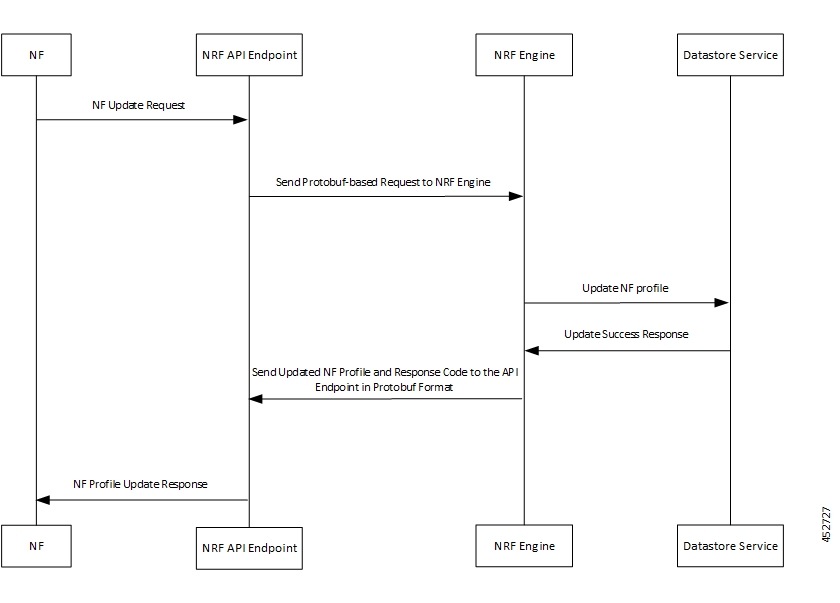
Figure 3. NF Update Success Call Flow
Table 7. NF Update Success Call Flow

Step

Description

1

The NF sends NF Update Request to the NRF API endpoint.

2

The NRF API endpoint transforms the PATCH (partial update) or PUT (complete replacement) request to Protobuf format.

The NRF API endpoint sends Protobuf-based request to the NRF engine.

3

The NRF engine transforms the Protobuf-based request to JSON format and applies PATCH to JSON format.

Then, the NRF engine successfully updates the NF profile in DB.

4

The Datastore service (DB) responds to NRF engine with the update success message.

5

The NRF engine sends the response code 200 along with updated NF profile in Protobuf format to the REST endpoint.

6

The NRF API endpoint decodes and transforms the Protobuf-based response message to PATCH or PUT format, which contains the updated NF profile and response code 200.

Then, the NRF API endpoint sends NF Update Response to the NF.

NF Heart-Beat Service Operation

Feature Summary and Revision History

Summary Data

Table 8. Summary Data

Applicable Product(s) or Functional Area

5G-NRF

Applicable Platform(s)

SMI

Feature Default Setting

Not Applicable

Related Changes in this Release

Not Applicable

Related Documentation

Not Applicable

Revision History

Table 9. Revision History

Revision Details

Release

First introduced.

2026.01

Feature Description

The NF Heart-Beat service operation enables each NF that has previously registered in NRF to contact the NRF periodically (Heart-Beat). The NF invokes the NFUpdate service operation, in order to show that the NF is still active.

The NF Heart-Beat feature provides the following functionality:

  • NRF handles NF Heart-Beat PATCH Requests with Replace operation for the following parameter:

    • nfStatus

  • NRF handles the start, restart, and expiry for Heart-Beat timer.

  • NRF configures the Hear-Beat timer differently for the NFs with different NF types.

  • NRF configures the Heart-Beat service operation with the default level as NF type. If the service operation is not configured as NF type, then NRF configures the Heart-Beat timer as global.

  • If NRF modifies the Heart-Beat interval value of any registered NF instance, it returns the new value to the registered NF. The service engine sends the new value in the response message of the next periodic Heart-Beat interaction that is received from the NFs. Until then, NRF applies the Heart-Beat check procedure according to the initial interval value.

How it Works

The Heart-Beat request contains a NF PATCH Request with multiple input parameters such as NF ID, type of update (replace), path (/nfStatus), and value (REGISTERED, SUSPENDED or UNDISCOVERABLE). After NRF validates the request, it sends the request to the DB to update the NF instance. Upon successfully updating the NF instance, NRF sends a NF PATCH Success response to the NF instance.

NRF REST Endpoint

  1. The NRF Rest endpoint receives the NF Heart-Beat request over HTTP2/JSON-PATCH+JSON. The HTTP method is PATCH and the URL is root/nnrf-nfm/v1/nf-instances/{nfInstanceID} and the body contains Patch Data in JSON format.

  2. On receiving the request, NRF validates the input message format. If the validation fails, the response is sent with status 400 (BAD REQUEST).

  3. If the validation succeeds, then the NF Heart-Beat request is transformed into Protobuf format and sent toward the service engine for processing.

  4. The service engine sends a response toward the endpoint after processing the request. The response is then transformed from Protobuf format to JSON format.

  5. The response is then converted to OpenAPI format and sent toward the NF. If it’s a successful response, then the response message contains the status code as 204 (No Content). Else, if it’s a failure, the error code is sent back to the client along with problem details.

NF Heart-Beat Purge Timer Expiry

  1. DB sends the Timer Expiry notification with DBRecord as body, which is received as a new transaction at REST endpoint.

  2. The REST endpoint converts the Timer Expiry notification into Protobuf format and sends it toward the service engine for processing. The REST endpoint sends the message as an asynchronous call because it does not expect any response from NRF service engine.

NRF Service Engine

  1. The NRF service engine receives the Protobuf-based request from the REST endpoint through the IPC system.

  2. On receiving the request, NRF validates the PATCH request.

  3. NRF fetches the NF profile based on nfInstanceId as primary key, and then apply the patch locally.

  4. If complete NF profile validation (after patch operations) is:

    • Successful -

      1. NRF updates the NF profile in DB, and the service engine sends response code 204 (No Content) to the REST endpoint.

      2. NRF starts or restarts NF Heart-Beat timer (period is NF Heart-Beat timer + Heart-Beat Grace Time). If NF Profile Purge timer is started already, then it is overwritten with NF Heart-Beat timer + Heart-Beat Grace Time).

    • Unsuccessful – The service engine sends a response message with an error code to the REST endpoint, which depends on the type of failure:

      • No NF profile is available for given nfInstanceID : 404 (Not Found)

      • Any validation failure: 400 (Bad Request)

NF Heart-Beat Purge Timer Expiry

  1. The NRF service engine receives the TimerExpiry Protobuf-based request from the REST endpoint through the IPC system.

  2. The body contains primary key of the NF profile to which the timer is associated. The service engine fetches the NF profile using the same key.

  • If no NF profile is available, then the service engine ignores the request.

  • If an NF profile is found, then the service engine processes the request based on the following conditions:

    • If the timer is Heart-Beat timer, then the service engine updates the DB with NFStatus in the NF profile as Suspended. After this update, the service engine starts the NF Profile Purge timer.

    • If the timer is NF Profile purge timer, then the service engine deletes the NF profile from DB.

Call Flows

NF Heart-Beat Success Call Flow

This section describes the successful NF Heart-Beat call flow.

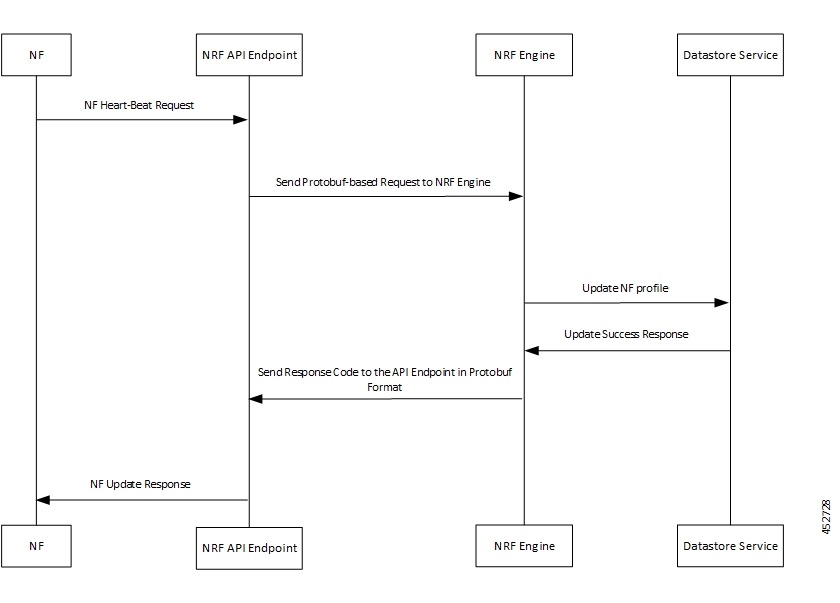
Figure 4. NF Heart-Beat Success Call Flow
Table 10. NF Heart-Beat Success Call Flow

Step

Description

1

The NF sends NF Heart-Beat Request to the NRF API endpoint.

2

The NRF API endpoint transforms the Heart-Beat request to Protobuf format.

The NRF API endpoint sends Protobuf-based request to the NRF engine.

3

The NRF engine transforms the Protobuf-based request to JSON format.

Then, the NRF engine successfully updates the NF profile in DB.

4

The Datastore service (DB) responds to NRF engine with the update success message.

5

The NRF engine sends the response code 204 (No Content) in Protobuf format to the REST endpoint.

6

The NRF API endpoint decodes and transforms the Protobuf-based response message to PATCH format, which contains the response code 204 (no content).

Then, the NRF API endpoint sends NF Heart-Beat Response to the NF.

Configuring the NF Heart-Beat Service Operation

  1. NRF configures Heart-Beat timers as both global and NF type levels.

  2. To configure Heart-Beat service operation, the default level is NF type. If the service operation is not configured as NF type, then NRF configures the Heart-Beat timer as global. During registration, NRF sends the response message with the same Heart-Beat timer value in NF Profile or the newly configured value, whichever is lesser.

  3. If the Heart-Beat interval value of any registered NF instance is modified, NRF returns the new value to the registered NF. The service engine sends the new value in the response message of the next periodic Heart-Beat interaction received from the NFs. NRF sends the response message with the updated NF profile and code as 200 (OK). Until then, NRF applies the Heart-Beat check procedure according to the initial interval value.

    Note:

    • NF Heart-Beat request is same as NF Profile Partial Update, but with limited parameters, NFStatus and Load.

    • If NRF sends NFStatus and Load along with other parameters, it’s treated as partial update request. The response message contains the updated NF profile and code as 200 (OK). Also, NRF handles the Heart-Beat timer like a Heart-Beat Request.

NF Status Subscribe, Status Unsubscribe, and Status Notify Service Operations

Feature Summary and Revision History

Summary Data

Table 11. Summary Data

Applicable Product(s) or Functional Area

5G-NRF

Applicable Platform(s)

SMI

Feature Default Setting

Not Applicable

Related Changes in this Release

Not Applicable

Related Documentation

Not Applicable

Revision History

Table 12. Revision History

Revision Details

Release

First introduced.

2026.01

Feature Description

The NFStatusSubscribe service operation enables an NF instance to subscribe to notifications for profile or status changes of other NF instances. The NFStatusUnSubscribe service operation enables an NF instance to unsubscribe the subscriptions registered in the NRF already.

The NFStatusNotify service operation enables the NRF to notify changes in status of NF instances to a subscriber of NF status. The service operation also provides information regarding newly registered and de-registered NFs.

The NFStatusSubscribe, NFStatusUnSubscribe, and NFStatusNotify feature enables NRF to provide the following functionality:

  • Process the request to subscribe from an NF and store the subscription details in the DB.

  • Process the request to unsubscribe from an NF and remove the subscription details from the DB.

  • Update the subscription details in DB (204 No Content).

  • Support subscription in the same PLMN.

  • Authorize the NF client, which requests a subscription based on reqNfType, reqFqdn, and reqSnssais.

  • Support subscription for all the conditions.

  • Support notification for all NotificationEventTypes.

  • Support notification for any update in all parameters.

  • Support notification for the update of NF Profile for complete replacement (PUT request).

  • Support the update of subscription. The NRF assigns a validity time different from the value suggested by the NF Service Consumer. The response code is 200 OK.

  • Support a flag, which sends the full NF profile in the notification during NF profile PATCH update. This flag must be enabled for the option to work properly.

  • Support subscriptions for notification condition for both monitoredAttributes and unmonitoredAttributes.

  • Support not to trigger “NF_PROFILE_CHANGED” notification for any change in the allowedPlmns, allowedNfTypes, allowedNfDomains, and allowedNssais parameters.

  • Support not to include allowedPlmns, allowedNfTypes, allowedNfDomains, and allowedNssais parameters in the profile change notification.

How it Works

The following sections describe how the NFStatusSubscribe, NFStatusUnsubscribe, and NFStatusNotify feature works.

NFStatusSubscribe

NRF REST Endpoint
  1. The NRF Rest endpoint receives the NFStatusSubscribe request over HTTP2/JSON. The HTTP method is POST and the URL is /root/nnrf-nfm/v1/subscriptions. The body of request message contains the SubscriptionData in JSON format.

    Note: The default value, /root, is a configurable parameter.

  2. On receiving the request, it is validated to check whether the mandatory field is present, and the parameters and their values and types are valid. If the validation fails, the response is sent with status 400 Bad Request.

  3. The NFStatusSubscribe request is transformed into Protobuf format and sent toward the service engine for processing.

  4. The service engine sends a response toward the endpoint after processing the request. The response is then transformed from protobuf-based format to JSON-based format.

  5. The response is then checked for the response code; if it’s a success response, then the updated SubscriptionData is sent back in the response body with the status code as 201 (Created). Else, if it’s an error code, the error code is sent back to the client along with the problem details.

NRF Service Engine
  1. The NRF Service Engine receives the protobuf-based request from the REST endpoint through the IPC system.

  2. The NRF Service Engine gets nfStatusNotificationUri from the request message and creates a unique subscriptionID by considering it as an input along with the current timestamp.

  3. The NRF Service Engine creates an entry in CDL with subscriptionID as primary key.

  4. The NRF Service Engine checks whether the subscription is for a specific instance and validates whether respective NFProfile instance is absent in the NRF. If the validation fails, response code is sent back as 404 Not Found.

  5. If the subscription is for an NF instance, the NRF Service Engine authorizes the message based on reqNfType, reqFqdn, and reqSnssai against all the NFProfiles. If reqNfType, reqFqdn, and reqSnssai does not match the allowedNfTypes, allowedNfDomains, and allowedNssais of any of the NFProfiles, the response code is sent back as 403 (Forbidden).

  6. The entire SubscriptionData is set into the data of the DBRecord request.

  7. If the create event is successful, the response code 201 (Created) is sent back to the REST endpoint. Or else, in case of an error while storing the SubscriptionData, response error code is sent back as 500 (Internal Server Error).

Note: The endpoint verifies whether the request contains a notification condition to monitor or exclude changes in any attribute based on an array index for that attribute of the NF profile, as part of monitoredAttributes or unmonitoredAttributes array. If the request contains such a condition, the NRF applies the same condition to all the elements of the root element in the mentioned array.

NFStatusUnSubscribe

NRF REST Endpoint
  1. The NRF Rest endpoint receives the NFStatusUnSubscribe request over HTTP2/JSON. The HTTP method is DELETE and the URL is /root/nnrf-nfm/v1/subscriptions/{subscriptionID} with no body of request message.

  2. Note: The default value, /root, is a configurable parameter.

  3. The NFStatusUnSubscribe request is transformed into Protobuf format and sent toward the service engine for processing.

  4. The messages are routed from the REST endpoint to the NRF Service Engine based on Affinity. The subscriptionID attribute is the primary key for Affinity.

  5. The service engine sends a response toward the endpoint after processing the request. The response is then transformed from protobuf-based format to JSON-based format.

  6. The response is then checked for the response code; if it’s a success response, then the status code as 204 No Content is sent back to the client with no response body. If the response code is 404, then the status code 404 Not Found is sent back to the client with no response body. In other error cases, response code 500 Internal Server Error is sent back to the client. Else, if it’s an error code, the error code is sent back to the client along with the problem details.

NRF Service Engine
  1. The NRF Service Engine receives the protobuf-based request from the REST endpoint through the IPC system.

  2. The NRF Service Engine gets the subscriptionID from the request message and attempts to load the NF profile from the CDL DB.

  3. If the load event for the NF profile from the CDL DB is:

    • Successful: The subscription details are deleted by sending a delete request to the datastore service.

    • Unsuccessful: The response is sent back to the REST endpoint with the response code as 404 Not Found.

  4. If the unsubscribe request is successful, the response code 204 No Content is sent back to the REST endpoint. Or else, in case of an error while deleting the subscription details, response error code is sent back as 500 (Internal Server Error).

Updating a Subscription

NRF REST Endpoint
  1. The NRF REST endpoint receives the request for updating a subscription over HTTP2/JSON-PATCH+JSON. The HTTP method is PATCH and the URL is /root/nnrf-nfm/v1/ subscriptions/{subscriptionID} and the body contains PATCH data in JSON format.

    Note: The default value, /root, is a configurable parameter.

  2. On receiving the request, NRF validates the input message format. If the validation fails, the response is sent with status 400 Bad Request.

  3. If the validation succeeds, then the request for updating a subscription is transformed into Protobuf format and sent toward the service engine for processing.

  4. The service engine sends a response toward the endpoint after processing the request. The response is then transformed from Protobuf format to JSON format.

  5. The response is then checked for the response code; if it’s a success response, then the status code as 204 No Content or 200 OK with SubscriptionData is sent back to the client with no response body. If the response code is 404, then the status code 404 Not Found is sent back to the client with no response body. In other error cases, response code 500 Internal Server Error is sent back to the client. Else, if it’s an error code, the error code is sent back to the client along with the problem details.

NRF Service Engine
  1. The NRF Service Engine receives the Protobuf-based request from the REST endpoint through the IPC system.

  2. The NRF Service Engine fetches the subscription data based on subscriptionID as primary key, and then replace the validity time with the value received in the request.

  3. If patch operations are:

    • Successful - Checks whether the validity time mentioned in the PATCH operation is more than the timer value configured in the NRF.

      • If the configured value is more than the received value, response code as 204 No Content is sent back to the client.

      • If the configured value is less than the received value, response code with 200 OK along with the maximum possible value within the configured timer value is sent back to the client.

    • Unsuccessful - The service engine sends a response message with an error code to the REST endpoint, which depends on the type of failure:

      • No NF profile is available for given subscriptionID: 404 Not Found

      • Any validation failure: 400 Bad Request

NFStatusNotify

NRF REST Endpoint
  1. On receiving notification from the NRF Service Engine, the NRF REST endpoint creates an HTTP2/JSON message.

  2. The HTTP method is POST and the URI received as part of the notification is used as the notification URL.

  3. The NRF REST endpoint sends a response back to NRF Service Engine as received from the subscribed NF.

NRF Service Engine
  1. The NRF REST endpoint triggers the NFStatusNotify service operation once it receives an NF Registration, Deregistration or Update message.

  2. The NRF Service Engine initiates an asynchronous routine for further processing of NFStatusNotify to unblock other ongoing management operations.

  3. The NRF Service Engine filters the subscription details based on the received NF profile and the subscription condition.

  4. The NRF Service Engine further filters duplicate subscriptions based on the notification URI.

  5. The NRF Service Engine initiates sending notification to all the remaining NFs, which are subscribed to NRF.

    • For NF Registration, it includes the NF profile, NFInstanceID and notification type in the notification data.

    • For NF Deregistration, it includes the NFInstanceID and notification type in the notification data.

    • For NF Update, if there is any change in the parameter value, it includes the NF profile or partial NF changes, NFInstanceID, and notification type in the notification data.

  6. The NRF Service Engine prepares and sends the notification data and the notification URI to the NRF REST endpoint.

  7. For NF update, if there is any change in parameter value, it includes either Full NF profile or partial NF changes, NFInstanceID, and notification type in the notification data.

  8. For NF update, if the Subscription Data does not contain the Notification Condition, then NRF Service Engine sends the notification for change of any attribute in the NF profile.

  9. For NF update, if the Subscription Data contains a Notification Condition:

    • If NotifCondition contains monitoredAttributes, then NRF Service Engine sends the notification for change in only those attributes of NF profile, which are configured as part of monitoredAttributes.

    • If NotifCondition contains unmonitoredAttributes, then NRF Service Engine sends the notification for change in only those attributes of NF profile, which are not configured as part of unmonitoredAttributes.

  10. The NRF Service Engine does not include the allowedPlmns, allowedNfTypes, allowedNfDomains, allowedNssais parameters either in NF Profile or NF Services in the NF Profile change notification.

  11. The NRF Service Engine does not trigger the “NF_PROFILE_CHANGED” notification for any change in the allowedPlmns, allowedNfTypes, allowedNfDomains, and allowedNssais parameters.

  12. Partial NF changes are sent when a PATCH update is triggered. When there is a complete profile update (PUT request), the complete NF profile is sent back to the client.

  13. Partial NF changes are supported for change in only non-array parameters of PATCH update. Else, complete NF profile is sent as a notification.

  14. If the flag, notify-always-complete-profile, is enabled, NRF sends back the complete profile as a notification.

  15. The NRF Service Engine creates a separate transaction for each notification.

  16. The NRF REST endpoint sends a response toward the NRF Service Engine after getting a response from the subscribed NF.

  17. If the operation is successful, the NRF Service Engine receives a message with response code 204 No Content. Else, the response code is 404 Not Found.

Call Flows

NFStatusSubscribe Success Call Flow

This section describes the successful NFStatusSubscribe call flow.

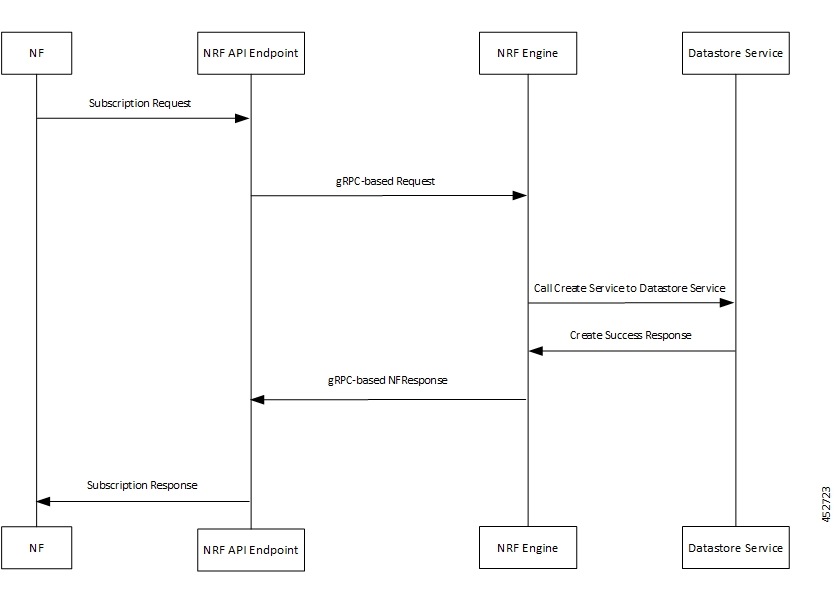
Figure 5. NFStatusSubscribe Success Call Flow
Table 13. NFStatusSubscribe Success Call Flow

Step

Description

1

The NF sends NF Subscription Request to the NRF API endpoint.

2

The NRF API endpoint transforms the REST request to gRPC.

The NRF API endpoint sends gRPC request to the NRF Service Engine.

3

The NRF Service Engine decodes gRPC request to derive the subscription ID and prepares DBRecord message to be sent to the Datastore service.

The NRF Service Engine sends call create service to Datastore service.

4

The Datastore service responds to NRF Service Engine with SubscriptionData in the response body and status code as 201 (Created).

5

The NRF Service Engine creates the NFResponse gRPC-based message and sends it to the NRF API endpoint.

6

The NRF API endpoint transforms the gRPC NFResponse message to REST-based response message.

Then, the NRF API endpoint sends NF Subscription Response to the NF client.

NFStatusUnSubscribe Success Call Flow

This section describes the successful NFStatusUnSubscribe call flow.

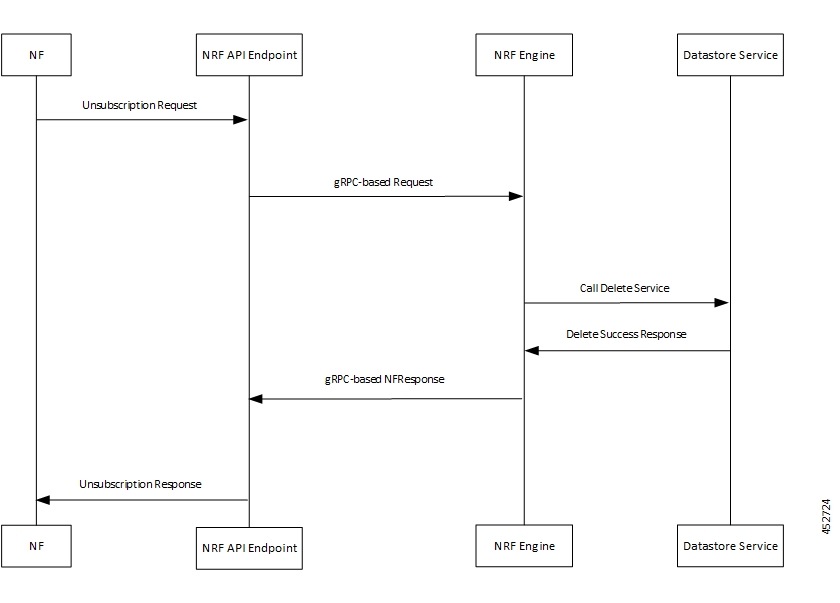
Figure 6. NFStatusUnSubscribe Success Call Flow
Table 14. NFStatusUnSubscribe Success Call Flow

Step

Description

1

The NF sends NF Unsubscription Request to the NRF API endpoint.

2

The NRF API endpoint transforms the REST request to gRPC.

The NRF API endpoint sends gRPC request to the NRF Service Engine.

3

The NRF Service Engine decodes gRPC request to derive the subscription ID based on Affinity and prepares DBRecordFilter message to be sent to the Datastore service.

The NRF Service Engine sends call delete service to Datastore service.

4

The Datastore service responds to NRF Service Engine with response code 204 No Content.

5

The NRF Service Engine creates the NFResponse gRPC-based message and sends it to the NRF API endpoint.

6

The NRF API endpoint transforms the gRPC NFResponse message to REST-based response message.

Then, the NRF API endpoint sends NF Subscription Response to the NF client.

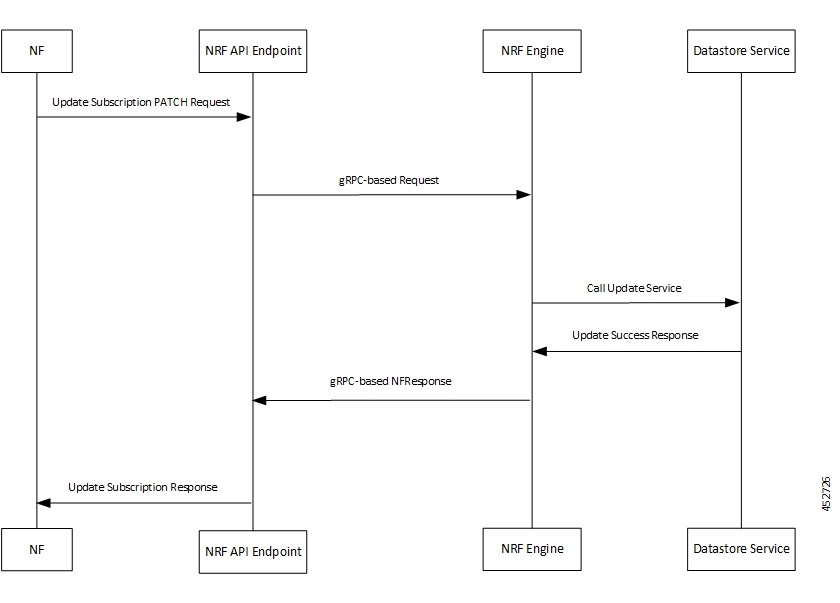
Updating a Subscription Call Flow

This section describes the call flow for successful update of a subscription.

Figure 7. Updating a Subscription Call Flow
Table 15. Updating a Subscription Call Flow

Step

Description

1

The NF sends NF Update Subscription PATCH Request to the NRF API endpoint.

2

The NRF API endpoint transforms the REST request to gRPC.

The NRF API endpoint sends gRPC request to the NRF Service Engine.

3

The NRF Service Engine decodes gRPC request and prepares DBRecordFilter for the validitytime based on the subscription ID to be sent to the Datastore service.

The NRF Service Engine sends call update service to Datastore service.

4

The Datastore service responds to NRF Service Engine with response code 204 No Content.

5

The NRF Service Engine creates the NFResponse gRPC-based message and sends it to the NRF API endpoint.

6

The NRF API endpoint transforms the gRPC NFResponse message to REST-based response message.

Then, the NRF API endpoint sends NF Update Subscription Response to the NF client.

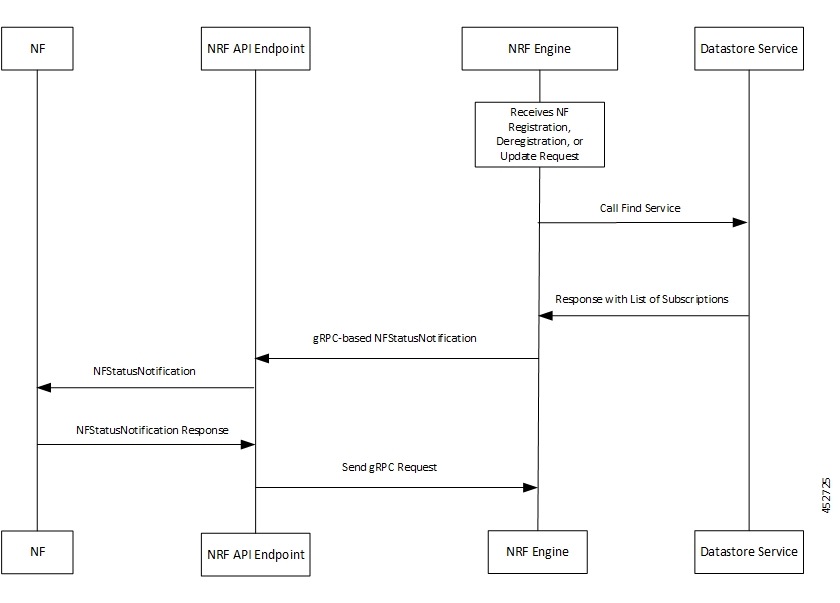
NFStatusNotify Success Call Flow

This section describes the successful NFStatusNotify call flow.

Figure 8. NFStatusNotify Success Call Flow
Table 16. NFStatusNotify Success Call Flow

Step

Description

1

The NRF REST endpoint triggers the NFStatusNotify service operation once it receives an NF Registration, Deregistration or Update message.

The NRF Service Engine initiates a gRPC request and sends it to itself.

The NRF Service Engine sends call find service to Datastore service.

2

The Datastore service responds to NRF Service Engine with the Find response containing a list of subscriptions.

3

The NRF Service Engine filters the subscription details based on the subscription conditions, reqNFType, reqFqdn, reqSnssai, and duplicate subscriptions based on the notification URI. The NRF Service Engine creates a separate transaction for each notification.

The NRF Service Engine creates the gRPC-based NFStatusNotification message and sends it to the NRF API endpoint.

4

The NRF API endpoint transforms the gRPC-based NFStatusNotification message to REST-based response message.

Then, the NRF API endpoint sends NFStatusNotification Response to the NF client.

5

The NF client sends NFStatusNotification Response to the NRF API endpoint.

6

The NRF API endpoint transforms the REST request to gRPC.

The NRF API endpoint sends gRPC request to the NRF Service Engine.

Handling HTTP Response Codes

Feature Summary and Revision History

Summary Data
Table 17. Summary Data

Applicable Product(s) or Functional Area

5G-NRF

Applicable Platform(s)

SMI

Feature Default Setting

Enabled – Always-on

Related Changes in this Release

Not Applicable

Related Documentation

Not Applicable

Revision History
Table 18. Revision History

Revision Details

Release

First introduced.

2022.02

Feature Description

This feature enables NRF to handle HTTP status codes received in response from other NFs. Some examples of HTTP status codes are 503, 429, and so on.

This feature also enables NRF to resend messages for failure responses. You can configure both the number of retry attempts and the time limit for attempting the retries, as follows:

  • max-notify-retry-count = 3

  • max-notify-retry-time = 11

This feature only supports the following HTTP status codes in the retry responses:

  • 403 Forbidden

  • 404 Not Found

  • 413 Payload Too Large

  • 429 Too Many Requests

  • 500 Internal Server Error

  • 503 Service Unavailable

How it Works

NRF handles the failure HTTP response codes in the following ways:

  • If the Retry-After header is absent, retransmit the notification after waiting for a fixed time interval of 3 seconds.

  • Retransmit the notification after waiting for the time interval value received in the Retry-After header.

  • Do not retransmit the notification.

  • The retry process ends when one of the following conditions are met (whichever comes first):

    • The configured "max-notify-retry-count" number of retry attempts are made.

    • No more retry attempts is possible within the configured "max-notify-retry-time" time interval in seconds.

Notes:

  • NRF retransmits notifications only for specific error codes.

  • NRF handles the Retry-After header only for overhead scenarios.

  • NRF handles the Retry-After header only when the timer value is within permissible limits for NRF application. Otherwise, NRF ignores the response code.

NRF handles the notification failure response that is based on the error codes in the HTTP response.

NF List Retrieval and Profile Retrieval Service Operations

Feature Summary and Revision History

Summary Data

Table 19. Summary Data

Applicable Product(s) or Functional Area

5G-NRF

Applicable Platform(s)

SMI

Feature Default Setting

Not Applicable

Related Changes in this Release

Not Applicable

Related Documentation

Not Applicable

Revision History

Table 20. Revision History

Revision Details

Release

First introduced.

2026.01

Feature Description

The NFListRetrieval service operation enables NRF to retrieve a list of NF profiles, which are currently registered with NRF.

For NFListRetrieval service operation, the NRF supports GET request with the following input filter parameters:

  • nfType: The type of NF instance to filter the search result for NF instances.

  • limit: Maximum number of list items that can be returned in the GET request.

The NFProfileRetrieval service operation retrieves the NF profile, which matches the NF Instance ID specified in the URI.

How it Works

For NFListRetrieval service operation, the NRF service engine retrieves all the NF profile records from CDL DB based on the nfType parameter used in the GET request. If the limit parameter is used in the GET request after NRF service engine retrieves the NF profiles, the number of search results is limited up to that count.

For NFProfileRetrieval service operation, the NRF service engine retrieves the NF profile records from CDL DB based on the NF Instance IDs along with the necessary validations and error handling.

Retrieving List of Profiles and Deleting Stale Profiles

Feature Summary and Revision History

Summary Data

Table 21. Summary Data

Applicable Product(s) or Functional Area

5G-NRF

Applicable Platform(s)

SMI

Feature Default Setting

Not Applicable

Related Changes in this Release

Not Applicable

Related Documentation

Not Applicable

Revision History

Table 22. Revision History

Revision Details

Release

First introduced.

2026.01

Feature Description

The NF CLI enables NRF to retrieve a list of NF profiles and delete stale NF profiles.

This NF CLI provides the following functionality:

  • NRF supports CLI command to retrieve an NF profile with a specific NF instance ID.

  • NRF supports CLI command to retrieve the list of all NF profiles currently registered. This CLI command is used for debugging purpose.

  • NRF supports CLI command to delete stale NF profiles. When an NF re-registers with a new instance ID after recovery, this functionality is used to delete a stale NF profile, which cannot be deleted by the NF.

How it Works

This section describes the sequence of operation.

NRF Ops Center

  1. A product-call-back framework enables NRF to add a backend code for a CLI command whenever it’s required.

  2. The NFProfileRetrieval procedure retrieves the NF instance details based on the NF instance ID.

  3. The NFDeregistration procedure deletes the NF profile from NRF based on the NF instance ID.

    Note: To maintain integrity and reduce errors in its function, NRF does not support a command to delete all NF Profiles together. To delete all the NF Profiles together, use search instance all option to retrieve all the NF Profiles based on their NF instance ID. Then, NRF can delete NF Profiles based on the search result.

NRF REST Endpoint

  1. The NRF Rest endpoint receives a request from an NF with URL as {apiRoot}/nnrf-nfm/v1/nf-instances-all.

    Note: The default value, {apiRoot}, is a configurable parameter.

  2. On receiving the request, NRF Rest endpoint transforms the message into Protobuf format and sends it toward the service engine for processing.

  3. The service engine sends a response toward the endpoint after processing the request. The response is then transformed from Protobuf format to JSON format.

  4. The response is then converted to OpenAPI format and sent toward the NF. If it’s a successful response, then the response message contains the updated NF profile with the status code as 200 (OK). Else, if it’s a failure, the error code is sent back to the client along with problem details.

NRF Service Engine

  1. The NRF Service Engine receives the Protobuf-based request from the REST endpoint through the IPC system.

  2. On receiving the request, NRF fetches all the available profiles from CDL.

  3. If the fetch operation is successful:

    • NF profiles unavailable - The service engine sends response code 204 (No Content) to the REST endpoint.

    • NF profiles available - The service engine sends response code 200 (OK) to the REST endpoint along with updated NF profiles.

    • Unsuccessful – If there is an error, the service engine sends a response message with error code 500 along with the problem details to the REST endpoint.

Deep Validation of Service Request Parameters

Feature Summary and Revision History

Summary Data

Table 23. Summary Data

Applicable Product(s) or Functional Area

5G-NRF

Applicable Platform(s)

SMI

Feature Default Setting

Disabled - Configuration Required

Related Changes in this Release

Not Applicable

Related Documentation

Not Applicable

Revision History

Table 24. Revision History

Revision Details

Release

First introduced.

2026.01

Feature Description

This configurable NRF feature enables deep validation of API request parameters for all procedures. NRF primarily performs deep validation of service requests at the API REST endpoints.

Deep validation for the information elements (IEs) includes the following conditions:

  • Verify the presence of mandatory IEs in the API-based service request.

  • Verify the following criteria in the service request:

    • IE range checks

    • IE enumerations (enum) checks

    • Conditional IE checks

    • Description compliance checks

    • IE syntax checks

How it Works

NRF REST Endpoint

  1. The NRF REST endpoint receives the API-based service request over HTTP2/JSON.

  2. On receiving the request, NRF validates the input message for the following criteria:

    • Presence of Mandatory IEs in the service request.

    • IE range checks for all the IEs in the service request.

    • Enum checks for all the IEs in the service request.

    • Conditional checks for all the IEs in the service request.

    • Checks for compliance to description and syntax of all the IEs in the service request.

    If the validation fails, the response is sent with status 400 (BAD REQUEST) and the corresponding error details.

  3. If the validation succeeds, then the call flow is same as per the service operation process mentioned for the corresponding features.


Note


  • The IpEndPoint data-type can only contain a maximum of either one ipv4Address or ipv6Address. However the presence of either ipv4Address or ipv6Address in the data-type is not mandatory.

  • If the Range data-types, for example, SupiRange have all three attributes (start, end and pattern) present, deep validation of attributes that contain such data-types fails.


NRF Service Engine

  1. The NRF service engine performs deep validation of those IEs in service requests, which cannot be validated by the NRF API REST endpoint.

  2. If the validation succeeds, then the call flow is same as per the service operation process mentioned for the corresponding features.


Note


  • The discovery query parameter, service-names must contain an array of unique service names for the NRF to provide the list of profiles in response to a query.

  • The discovery query parameters, Supi and Gpsi comply with the regex pattern mentioned in 3GPP TS 29.510.


Limitations

In this release, the deep validation feature has the following limitations:

  • NRF recognizes timestamps in RFC3339 date-time format except for the time-stamps that have leap seconds.

    For example, NRF considers the time-stamp 1990-12-31T15:59:60-08:00 (RFC3339 format) as invalid because it does not support leap seconds.

Configuring Deep Validation

To configure deep validation of API request parameters for all procedures, use the following sample configuration:


Note


It is not recommended to enable this feature in a performance environment handling high TPS. For more details about the performance impact, contact your Cisco account representative.


config 
   nrf-profile profile-settings { enable-deep-validation { false | true } 
   exit 

NOTES:

  • enable-deep-validation { false | true } : E nable or disable the Deep Validation feature.

    Default Value: false .