Cisco Unified Contact Center Enterprise Features Guide, Release 15.0(1)
Bias-Free Language
The documentation set for this product strives to use bias-free language. For the purposes of this documentation set, bias-free is defined as language that does not imply discrimination based on age, disability, gender, racial identity, ethnic identity, sexual orientation, socioeconomic status, and intersectionality. Exceptions may be present in the documentation due to language that is hardcoded in the user interfaces of the product software, language used based on RFP documentation, or language that is used by a referenced third-party product. Learn more about how Cisco is using Inclusive Language.
This chapter provides guidance on planning, preparing, and configuring the Bring Your Own Virtual Agent (BYOVA) feature for
voice within Contact Center Enterprise (CCE) environments, including Unified Contact Center Enterprise (UCCE) and Packaged
Contact Center Enterprise (PCCE).
Successful implementation requires the integration of Unified Customer Voice Portal (CVP), Cisco Virtualized Voice Browser
(VVB), Cloud Connect, and Call Studio, utilizing the Virtual Agent Voice element in Call Studio.
Intended Audience
This section targets customer and partner architects, voice application designers, and operations teams that manage existing
CCE voice environments and integrate a third-party virtual agent through the Cisco Contact Center AI (CCAI) framework. Ensure
that you have obtained the necessary administrative access and entitlements for Cisco Webex Control Hub and Webex for Developers
before you begin the configuration process.
Organization
For a comprehensive contact center deployment, we recommend that you review this guide in its entirety. Alternatively, you
may navigate directly to the section that matches your current project phase:
Overview, Scope, and Connector Model - Defines the BYOVA framework for CCE voice and outlines the division of responsibilities.
Readiness and Prerequisites - Details the necessary entitlements, network configurations, security requirements, and qualification criteria required
prior to modifying production workflows.
Configuration Task Flow - Provides a sequential guide for setup, ranging from Control Hub and connector configuration to Call Studio implementation
and final validation.
Events, Media, and Roles - Explains operational behaviors and delineates ownership for ongoing maintenance.
References - Provides links to authoritative Cisco documentation, including BYOVA resources, data sources, and CCE programming guides.
Terms Used in this Chapter
Terminology
Description
BYOVA
BYOVA (Bring Your Own Virtual Agent): Use your chosen AI vendor with Cisco orchestration for voice.
BYODS
Bring Your Own Data Source: provides a standardized framework for integrating external data repositories, including the necessary
procedures for connector registration and secure credential management.
CCAI
Contact Center AI: cloud services that coordinate speech, dialog, and connector interaction.
Cloud Connect
On-premises component that obtains and refreshes tokens for VVB to reach cloud services.
Configuration ID
Configuration ID: Identifier from your Control Hub CCAI configuration, mapped in Call Studio.
Agent ID
Agent ID: Virtual agent identifier from your provider, mapped in Call Studio.
ICM
ICM (Intelligent Contact Management): CCE routing that selects VA treatment and agent transfer.
VVB
Cisco Virtualized Voice Browser: Streams caller audio to the cloud orchestrator for VA treatment.
Virtual Agent Voice
Virtual Agent Voice: Call Studio element that binds the BYOVA path to your script.
Related Cisco Documentation
Cisco provides comprehensive guidance on Service Application setup, Bring Your Own Data Source (BYODS), Control Hub tasks,
the Voice Virtual Agent API schema, sample connector code, and program-level validation on the Cisco Webex for Developers
and Webex Help Center portals. This CCE documentation focuses specifically on voice-related design and configuration.
A Service Application is a registered software integration within the Webex ecosystem that acts as a secure intermediary between
the Cisco contact center platform and external third-party services. It facilitates the authentication and communication necessary
to integrate custom AI engines, external data sources, or specialized business logic into your voice environment.
Use the following links for the shared program material, then return here for Unified CVP, Cisco VVB, Cloud Connect, Contact
Center Enterprise (CCE), and Call Studio:
BYOVA enables customers to integrate a third-party virtual agent with CCE through Contact Center AI Services. Customers can
retain an existing AI provider, business vocabulary, and trained conversation flows while leveraging CCE for orchestration,
flow control, and operations. On voice channels, the Contact Center AI (CCAI) integration path invokes the virtual agent,
while tenant configuration, security controls, and runtime flow logic govern its behavior.
The virtual agent represents an approved integration for your tenant: entitlement, security boundaries, and support paths
apply consistently with other platform features. Your Call Studio voice application remains under CCE and Intelligent Contact
Manager (ICM) control for routing, queueing, and agent transfer.
Functional Scope
Depending on the requirements, you can onboard your AI Agent with the supported capabilities as listed below:
Scripted and autonomous virtual agent invocation
Event-driven flow transitions
DTMF and speech handling for voice channels
Prompt and timeout management
Fallback and escalation handling
While behavior depends on the provider, the onboarding goal remains the same: the customer must be able to provision, invoke,
operate, and support the virtual agent through a repeatable Cisco-aligned model.
BYOVA Connector Model
Following the overview above, the connector model represents the primary architectural decision: Cisco cloud services orchestrate
audio and dialog, while a customer- or partner-developed connector bridges Cisco interfaces with the AI provider.
BYOVA utilizes the cloud connector model. The connector runs in customer-managed or partner-managed infrastructure. Cisco
supplies orchestration interfaces, integration contracts, and tenant boundaries as documented for the BYOVA program on Webex
for Developers.
That approach preserves a stable integration contract while allowing choice of AI provider. This avoids requiring Cisco to
host the provider-specific conversational runtime within the connector environment.
Responsibility Boundaries
Authentication between Cisco orchestration and the connector is mandatory. Implement network paths between Cisco cloud integration
services and your environment in accordance with current Cisco documentation and your organization’s security policies. Consult
your Cisco account team and review the latest connectivity documentation to ensure compliance with supported topologies and
data-plane requirements.
Cisco (Platform)
Partner or Customer
Orchestration interfaces and integration contracts, tenant configuration and entitlement boundaries, platform lifecycle controls.
Host and operate the connector, implement compatibility with published Cisco interfaces (for example, gRPC or WebSocket as
qualified for the program).
Manage availability, scale, patching, and security. Manage provider-side virtual agent configuration and lifecycle.
Note
This release focuses on partner-managed or customer-managed cloud connector deployment.
Ensure your environment meets all program prerequisites before proceeding with the configuration steps. This section outlines
the importance of the qualification process and provides access to the visual onboarding workflow.
Design intent
The connector model standardizes authentication, event exchange, media interaction, and response handling, ensuring that service
provisioning and validation remain consistent and repeatable. Providers must implement Cisco-defined onboarding and runtime
interfaces rather than applying custom modifications within CCE.
The connector model standardizes authentication, event exchange, media interaction, and response handling. It ensures consistent,
repeatable service provisioning and validation. Providers implement Cisco-defined onboarding and runtime interfaces instead
of applying custom modifications within CCE.
For details about phased onboarding, evidence submission, and security reviews, see the BYOVA program documentation on the
Webex for Developers portal.
The illustrations show the end-to-end qualification flow, and the annotations explain each phase.
Prerequisites
Complete the following requirements before creating or modifying production voice applications. Ensuring all prerequisites
are met is essential for avoiding potential deployment delays.
Platform and Entitlement:
Platform readiness extends beyond software version requirements to include critical commercial and operational prerequisites.
Before proceeding, verify ordering, tenant entitlement, and administrative access for the target deployment.For information
regarding minimum software requirements, refer to this section and the release notes corresponding to the specific CCE version.
Supported components include, but are not limited to, Unified CVP, Cisco VVB, and Cloud Connect.
Note
Unified CCE release ICM_15.0(1) ES202603 is mandatory for enabling BYOVA voice functionality.
Verify all version requirements against the official documentation before procurement or deployment.
Confirm that your tenant model provides administrative access in Control Hub for the CCAI and service application tasks that
the deployment requires.
Deployment Environment:
Partners and customers can develop their integration connectors by using the associated artifacts using one of the following
two approaches:
On-premises Lab: You can perform development directly and carry out validation in an on-premises lab environment that uses supported software
releases.
Cisco-approved Cloud Sandbox: Alternatively, if you do not have an on-premises lab setup, you may apply for a Cisco-approved cloud sandbox by reaching
out to the Cisco Product Management (PM) team.
Authentication and credential controlsCustomer-provided data source authentication follows the BYODS model, where a Control Hub-approved Service Application provides
customer-specific tokens, and Webex uses signed tokens to authenticate requests securely, depending on how you design the
integration. For more information, see https://developer.webex.com/docs/bring-your-own-datasource. Validate certificate lifecycle and trust stores end-to-end.
Connector and Runtime Readiness:
Deploy the connector in a supported environment; validate health, availability, and failover semantics.
Configure the provider-side virtual agent and capture runtime identifiers required by CCE flow logic (Configuration ID, Agent
ID, and any provider-specific mapping).
Network and Security:
Validate reachability between Cisco integration components, Cloud Connect, orchestrator endpoints, and the customer connector.
Validate TLS trust chains, proxy policy, and certificate rotation procedures.
Allow List Guidance:
Allow lists are deployment-specific and region-specific. Use host names and ranges from current product documentation for
your tenant and data center. Categories commonly include catalog (U2C), regional orchestrator and insight endpoints, identity
broker endpoints, Cloud Connect configuration endpoints, and the partner connector endpoint. Prefer explicit host and port
rules; use domain wildcards only when consistent with your organization security policy.
Example patterns (non-exhaustive; replace with values from official documentation):
Prior to production deployment, define and document the expected system behavior for connectivity loss, connector impairment,
data center events, and site recovery. Ensure your documentation specifies caller-visible effects, fallback procedures, and
recovery objectives.
Readiness Outcome:
Before proceeding with functional validation, ensure you can confirm the following:
Is the tenant entitled and the feature enabled?
Is the connector reachable under production-like network policy?
Is the trust and token model implemented and tested?
Are provider runtime identifiers known and mapped into Call Studio?
Are required network paths supportable in production?
Important
Do not proceed to full production validation until you confirm all requirements.
Operational Considerations
Validation readiness: Complete baseline functional, security, and operational checks before go-live.
Scale: Validate traffic, latency, and recovery for the intended profile.
Security: Connector environments must meet agreed security and compliance controls.
Observability: Logging, correlation identifiers, and health monitoring for support.
Usage visibility: Understand reporting and any commercial metering boundaries with your Cisco Product Management (PM) team.
Reference architecture: Follow the published Cisco onboarding model for repeatable deployment.
Figure 3. Scale Readiness Checklist
Configuration Task Flow for Voice Channels
Once you satisfy all prerequisites, configure the cloud, connector, and Call Studio components in the sequence outlined below.
This chapter summarizes the standard procedures for the BYOVA program. Use the documentation listed in the Related Cisco Documentation
section to complete these tasks.
Voice Prerequisites
Before voice provisioning begins, confirm the following items:
Install and register Cloud Connect components.
Ensure that the Unified CVP or Cisco VVB integration path operates for VA traffic.
The Call Studio voice application exists for the VA segment.
Use the Virtual Agent Voice element for the BYOVA flow.
Import and trust the required certificates.
Validate connector authentication and reachability.
Provider runtime identifiers are available for mapping (Configuration ID and Agent ID at minimum).
Voice onboarding requires rigorous validation because media behavior, caller experience, and escalation are immediately visible
in production.
Procedure
Step 1
Validate entitlement and Control Hub readiness
Confirm tenant entitlement and verify that administrators can complete the Control Hub tasks required for the service application
and CCAI configuration
Step 2
Register connector and establish trust
For a new service application, complete connector registration and trust using the procedures and checklists in https://developer.webex.com/webex-contact-center/docs/bring-your-own-virtual-agent
and https://developer.webex.com/docs/bring-your-own-datasource.
On the provider side, configure all virtual agent identifiers consistently. Depending on how you provision the virtual agent,
you may use a Project ID, an Agent ID, or a Bot ID. Align these values with the Config ID in Control Hub, the Agent ID mapping
in CCE, and the Call Studio Virtual Agent Voice element configuration. This alignment ensures that the solution maps and uses
all bot-related identifiers consistently.
Step 5
Configure Virtual Agent Voice in Call Studio (BYOVA)
Set Connector type to Service app (for BYOVA or third-party VA).
Set Config ID from the Control Hub CCAI configuration.
Set the Agent ID, Virtual Agent ID, or Bot ID, as required by the provider.
Set Virtual Agent mode (Scripted or Autonomous) per design and provider support.
Configure events, timeouts, error exits, DTMF, speech, and escalation
Complete application logic so that welcome, custom events, no-input, error, and agent-transfer paths match your Cisco ICM
and CVP design.
Step 7
Execute validation and go-live checklist.
Run functional, scale, and failure-path tests; complete internal go-live approval before production promotion.
VAV Element Provisioning Requirements
Map the Configuration ID to the correct tenant and environment.
Align the virtual agent identifier with the provider naming convention (Agent ID or Bot ID).
Custom events for start, transition, fallback, and exit, if used.
Timeout and no-response treatment.
Error exits and escalation routes.
DTMF handling configuration.
The Virtual Agent Voice element binds the provider runtime to the Cisco voice application. Treat it as controlled application
logic; identifier or event mismatches typically surface as runtime failures.
Voice Validation Expectation
Before production enablement, demonstrate correct provider invocation, supported codec behavior, consistent DTMF and speech
handling, recovery from timeout and connector faults, and clean agent transfer without orphaned sessions.
Figure 4. Validation Readiness Flow
Supported Events and Media Behavior
Event Model
BYOVA requires a consistent event model across the provider runtime, connector, and Call Studio branches. Minimum planning
categories:
Start or welcome invocation
Custom transition events, if used
No-input or no-response
Error and fallback
Exit and escalation
Re-entry, if supported by the provider
Document the origin, mapping, and consumption for each event. The Voice Virtual Agent schema in the BYOVA documentation serves
as the authoritative reference. Treat all JSON examples in supplementary materials as informational only; validate them against
the official schema before implementation.
Custom Payload Handling
Illustrative JSON structures in documentation are examples only. Validate payload compatibility against the published schema
and the ICM_15.0(1) ES202603 release. Keep payload evolution versioned to avoid silent regressions.
Validate codec behavior during onboarding. The typical baseline for cloud voice integration is G.711 μ-law unless additional
codec support is explicitly documented and tested for the supported release and provider path.
Note
Validate barge-in and provider-side voice activity detection in the deployment environment.
DTMF, Speech, and Barge-In
Define a standardized approach for handling DTMF input and speech recognition across the voice application. Validate barge-in
and transition behavior to ensure provider-specific variations do not surface as inconsistent or unexplained experiences for
callers.
Error and Escalation Handling
Timeout and no-response
Connector unreachability
Provider failure
Controlled escalation to live agent
Graceful disconnect on abnormal termination
Error handling is a caller-experience requirement: avoid dead air and endless loops, and direct callers to recovery or agent
assistance where appropriate.
Roles and Responsibilities for Service Integration Readiness
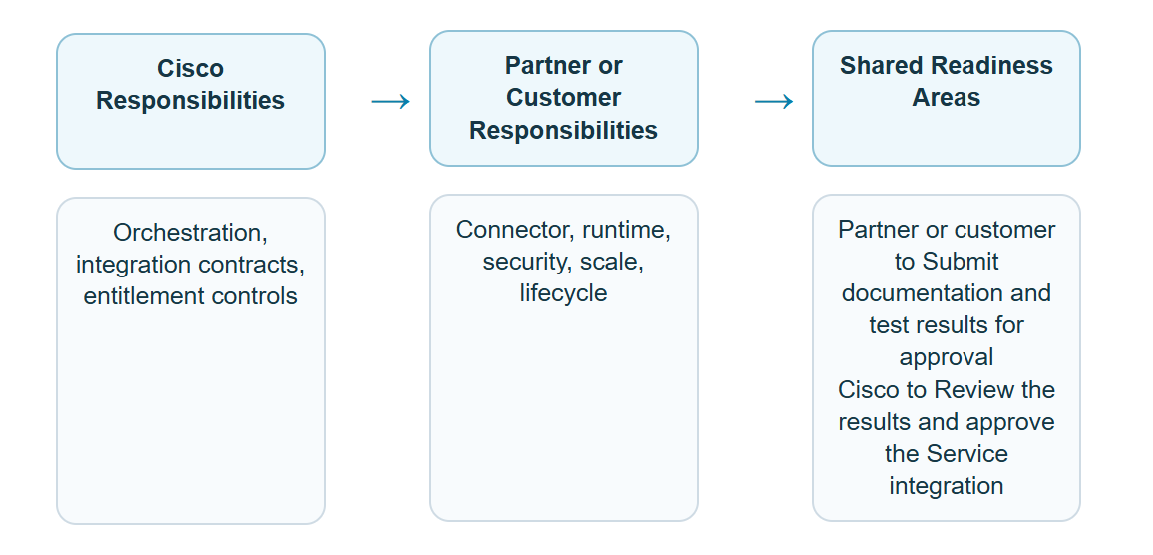
Use the following summary during implementation planning and stakeholder reviews to supplement the responsibility boundaries
defined earlier in this chapter and to keep Cisco, partner, and customer teams aligned on roles, ownership, and delivery expectations.
Area
Cisco Responsibilities
Partner or Customer Responsibilities
Shared Readiness Areas
Platform integration
Provide orchestration contracts and tenant boundaries.
Host connector, meet published interfaces, operate connector and provider VA.
The partner or customer submits the required documentation and test results for approval.
Cisco reviews the submission and approves the service integration if the results meet the required criteria.
Figure 5. Responsibility Boundary View
Customer Expectation
After completing this section and reviewing the BYOVA and BYODS documentation, you will be able to address the following questions:
Is the service entitled for the tenant?
Is the integration visible and administrable in the agreed workflow (Control Hub with on-premises components)?
How is the virtual agent invoked from the CCE voice flow (Call Studio Virtual Agent Voice and CCE/Unified CVP path)?
Which security controls apply across Cloud Connect, cloud integration endpoints, and the connector?
How does the service behave under normal, degraded, and failure conditions?
Successful BYOVA is more than API reachability. The end-to-end service must be fully operational and maintainable as a core
platform capability.
Figure 6. What the Customer Should Understand by the End of the Guide
References
Cisco maintains the following URLs outside individual CCE book builds; use the latest version available on Cisco.com and developer.webex.com.






 Feedback