Cisco UCS XE150c M8 Compute Node Overview

This chapter contains the following topics:

Compute Node Overview

The Cisco UCS XE150c M8 Compute Node is a half-width, short-depth, 2-RU compute node for the Cisco UCS XE9305 Chassis. The chassis supports up to two compute nodes. The node supports Intel Granite Rapids-D HCC processor with 20-core or 32-core options, and provides expansion capacity for a high-power GPU.

The Cisco UCS XE150c M8 Compute Node has the following features

  • Eight DDR5-6400 registered DIMM (RDIMM) slots support two, four, or eight DIMMs, with capacities of 16, 32, 48, 64, 96, or 128 GB per DIMM and up to 1,024 GB total.

  • Two front-facing 10-Gbps RJ-45 ports provide host connectivity. Two 25-Gbps backplane links provide data-plane connectivity to the chassis management controllers; one link is active and one is standby.

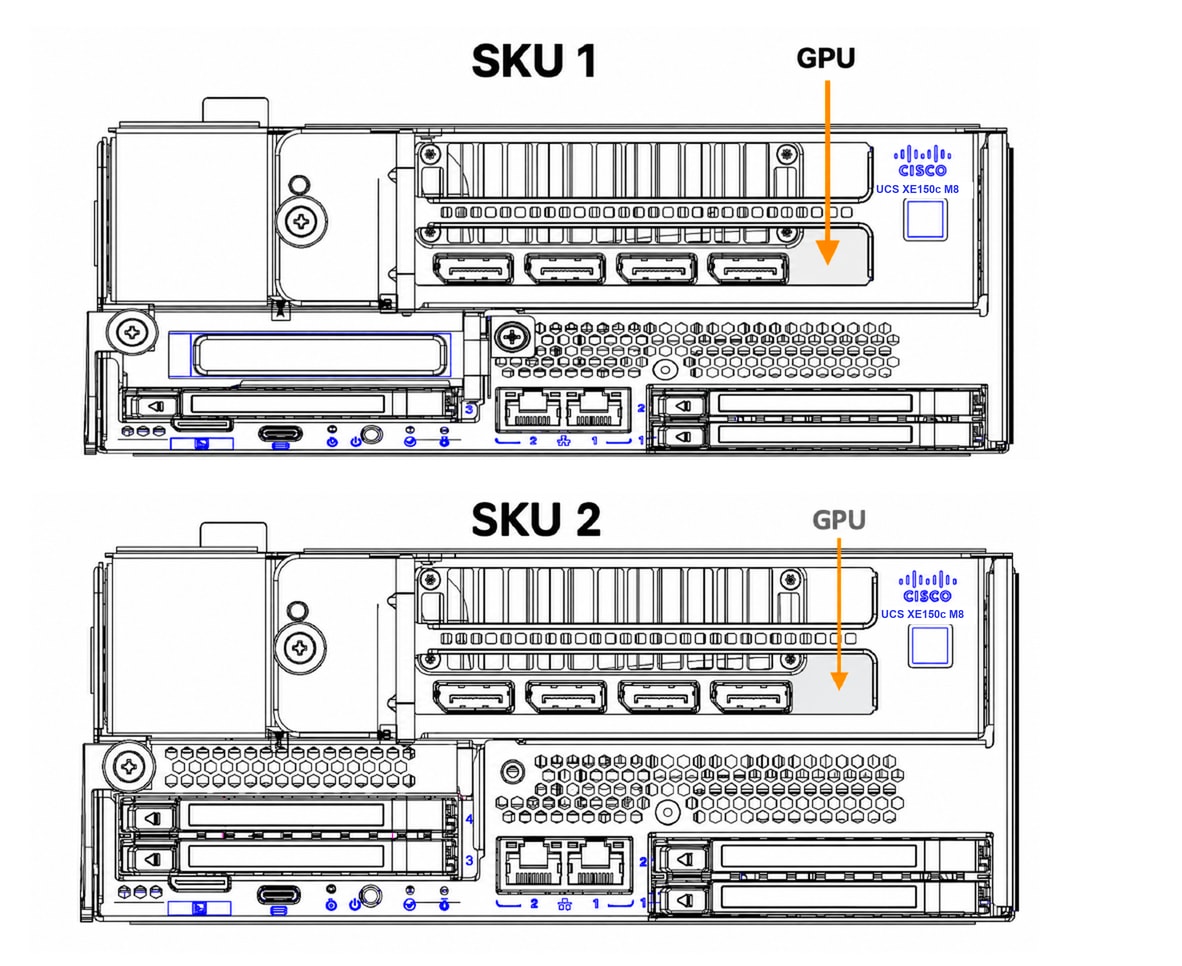
  • Front storage supports three or four hot-pluggable E3.S NVMe drives, depending on configuration. SKU 1 includes three drive bays and a PCIe card; SKU 2 includes four drive bays. Each drive supports up to 30 TB.

  • Optional boot storage supports up to two M.2 SSDs using SATA or NVMe storage options. The specification lists 480-GB and 960-GB capacities and RAID 0 or RAID 1 support.

  • A dedicated PCIe Gen5 x16 slot supports a GPU with a power envelope up to 450 W.

  • The front panel provides a USB Type-C console, a UCS-X KVM connector, two host ports, status and locator indicators, a power button, and a reset button.

  • The node includes a Trusted Platform Module (TPM) 2.0 for the host and a separate TPM 2.0 module for baseboard management controller (BMC) secure boot. Cisco Intersight provides system management.
Compute Node Configurations

The two configurations provide either an additional PCIe expansion option or a fourth E3.S drive bay. Both configurations retain the dedicated PCIe Gen5 x16 GPU slot.

Table 1. Compute node configurations

Configuration

Front storage

Expansion

SKU1

Three E3.S drive bays

Left-side PCIe expansion option

SKU2

Four E3.S drive bays

Fourth drive bay occupies the left-side expansion position

Compute Node Front Panel

Four-Drive Compute Node

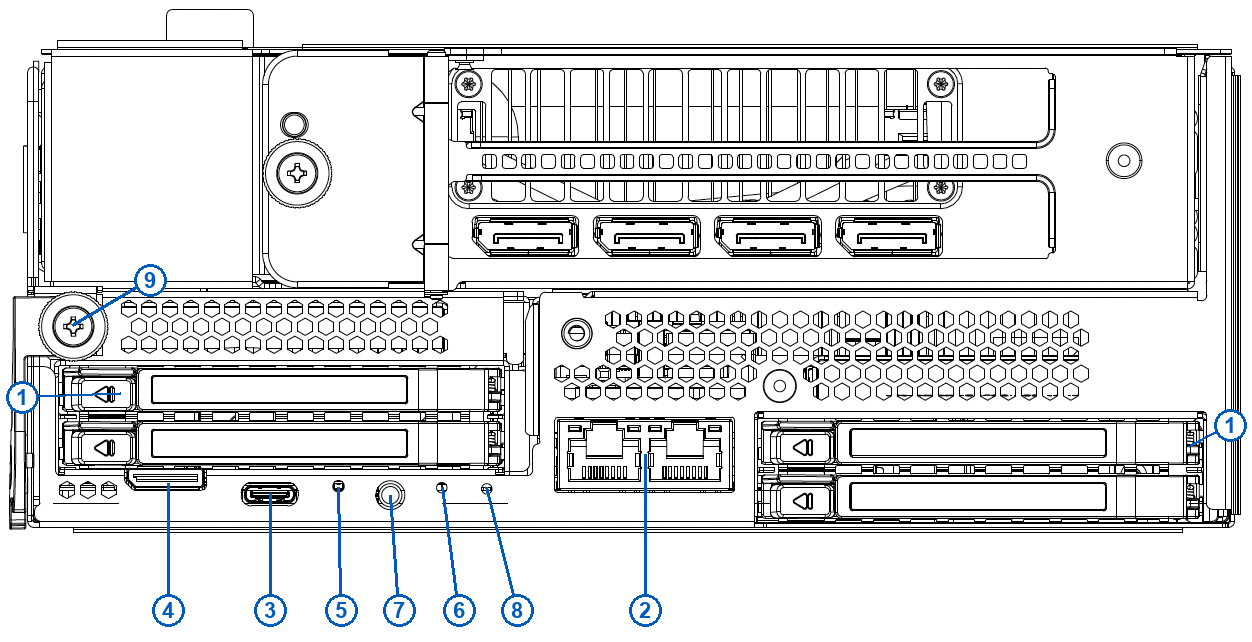
The four-drive configuration has the following features.

Three-Drive Compute Node

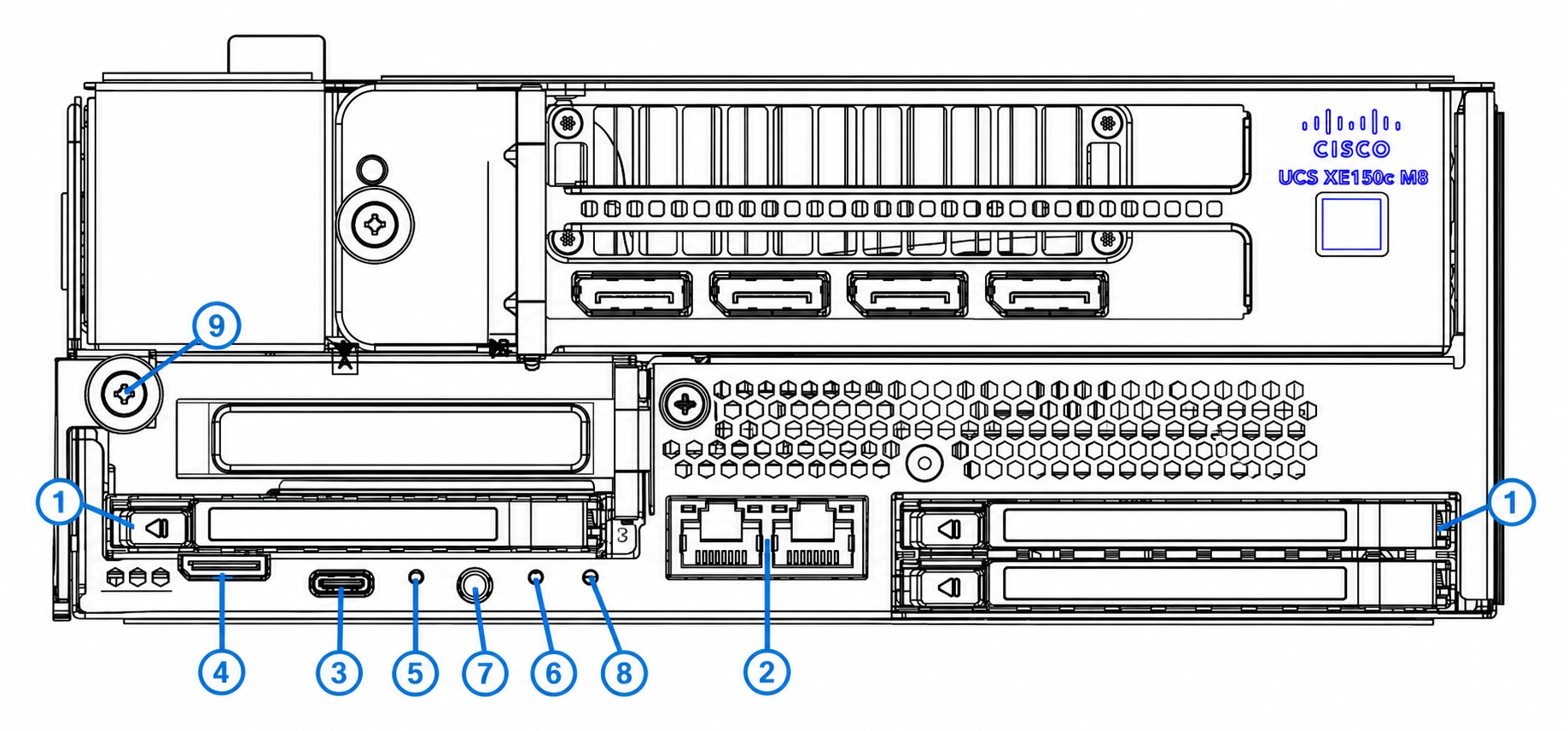
The three-drive configuration has the following features.

Table 2. Four and Three-Drive Compute Node features

1

Four Drive Compute Node: Four hot-pluggable E3.S drive (slots 1, 2, 3, and 4)

Three-Drive Compute Node: Three hot-pluggable E3.S drive (slots 1, 2, and 3)

2

10GBASE-T host ports. Two RJ-45 ports provide 10-Gbps host connectivity.

3

USB Type-C console port. Provides the BIOS UART console connection.

4

UCS-X KVM connector. Supports local console access with the supported KVM cable or debug board.

5

Reset button. Recessed reset control on the front panel.

6

Status LED. Green and amber indicator reports node status.

7

Power button and power LED. The button supports ACPI-compliant power control; the LED indicates power state.

8

Locator LED. Blue indicator identifies a selected compute node.

9

Node ejector thumbscrew. Secures the compute node in the chassis.

Compute Node LEDs

Each of the Cisco UCS XE150c M8 Compute Node features the following module indicator LEDs.

Table 3. Compute Node Status LEDs

LED

Color

Description

Locater LED

Blue, Steady

Compute sled is not being selected

Blue, Blinking

Compute sled is being selected

Off

Locater is not enabled

Status LED

Green, Steady

Normal operation condition

Green, Blinking

System initialization or memory check

Amber, Steady

Degrade operation

  • System is in a degraded operational state

  • Processor fault

  • Memory RAS failure

  • Drive failure

Amber, Blinking

Critical Error

  • Boot failure

  • Fatal processor or bus error detected

  • Loss of both eCMC connection

  • Over temperature condition

Off

Power Off

Power LED

Green, Steady

Processor is in S0 state

Amber, Steady

Processor is not in S0 state

Off

Compute sled power is off

Supported PCIe Cards

The Cisco UCS XE150c M8 Compute Node offers customizable PCIe connectivity through a configurage PCIe riser cage that can accept up to one PCIe adapter card, a NIC or an HBA.

The optional PCIe card can be installed on the left side of the node, above slot 3 or in slots 3 and 4 depending on whether the PCIe cage is one slot or two. The following PCIe cages are supported to complete either a three drive or four drive configuration.

  • Left E3.S 2-Drive Riser Assembly for UCS XE9305 Chassis, four drives (UCSXE-1U-E3S-2L).

  • Left E3.S 2-Drive Riser Assembly for UCS XE9305 Chassis, three drives (UCSXE-1U-E3S-1L). With this configuration a separate riser (UCSXE-1U-PCI-L) is also required.

Each riser cage can accept one of the following third-party PCIe cards.

Table 4. PCIe Cards

Card Type

Card

Cisco PID

NIC

Cisco(R) I710T4LG 4x1 GbE RJ45 PCIe NIC

UCSXE-P-IQ1GC

Intel E835CQDA2 2x100 GbE QSFP28 PCIe NIC

UCSXE-P-I835D100GF

Intel E835XXVDA4 4x25/10 GbE SFP PCIe NIC

UCSXE-P-I835Q25GF

Intel E835XXVDA2 2x25/10 GbE SFP PCIe NIC

UCSXE-P-I835D25GF

Cisco - Intel E810CQDA2 2x100 GbE QSFP28 PCIe NIC

UCSXE-P-I8D100GF

Cisco - Intel E810XXVDA2 2x25/10 GbE SFP PCIe NIC

UCSXE-P-I8D25GF

Cisco - Intel X710T2LG 2x10 GbE RJ45 PCIe NIC

UCSXE-P-ID10GC

Cisco(R) X710T4LG 4x10 GbE RJ45 PCIe NIC

UCSXE-P-IQ10GC

HBA

Cisco-QLogic QLE2872 2x64GFC Gen 7 PCIe HBA

UCSXE-P-Q7D64GF

Supported GPUs

Through the use of optional PCI riser cages, each Cisco UCS XE150c M8 Compute Node can be customized to accept up to one GPU.

The riser cage and GPU can be installed on the right side of the node, above slots 1 and 2.

If you order a GPU with your initial shipment, the GPU will be pre-installed, but additional GPUs can be ordered and installed in the field, as your deployment scales out.

The following table shows the model and form factor of GPU supported by the compute node.

Table 5. Full-Height, Full Length (FHFL) Single-Slot and Double-Slot GPUs

GPUs

Cisco PID

NVIDIA RTX Pro 4500: 160W, 32GB, Gen5 1-slot FHFL GPU

UCSXE-GPU-RTXP4500

NVIDIA RTX Pro 6000: 600W, 96GB, 2-slot FHFL GPU

UCSXE-GPU-RTXP6000

NVIDIA L40S: 350W, 48GB, 2-slot FHFL GPU

UCSXE-GPU-L40S