Network Edge Access Topology

802.1x supplicant and authenticator switches with network edge access topology

An 802.1x supplicant and authenticator switch with network edge access topology is a LAN access control solution that

  • uses the 802.1x standard1 to authenticate clients before granting access to LAN services

  • extends identity and authentication outside the wiring closet using Network Edge Access Topology (NEAT), and

  • supports secure connectivity and trunk configuration for devices connected through layer 2 ports.

1: The 802.1x standard defines a client-server-based access control and authentication protocol that prevents unauthorized clients from connecting to a LAN through publicly accessible ports unless they are properly authenticated.

Network edge access topology features

The NEAT feature allows any device to authenticate on the port, propagating client MAC and VLAN information between supplicant and authenticator switches using CISP. NEAT and CISP are supported only on layer 2 ports, not on layer 3 ports. NEAT can be configured on Cisco Catalyst IE9300 Rugged series Switches.

  • 802.1x switch supplicant: Configure a switch to act as a supplicant to another switch using the 802.1x supplicant feature. This is useful when a switch is outside a wiring closet and connected to an upstream switch through a trunk port. The supplicant switch authenticates with the upstream switch for secure connectivity. After successful authentication, the port mode changes from access to trunk in the authenticator switch. On the supplicant switch, manually configure the trunk when enabling CISP.

  • If the access VLAN is configured on the authenticator switch, it becomes the native VLAN for the trunk port after successful authentication.

When connecting a supplicant switch to an authenticator switch with BPDU guard enabled, the authenticator port may be error-disabled if it receives STP BPDU packets before authentication. You can control traffic exiting the supplicant port during authentication. Entering the dot1x supplicant controlled transient global configuration command temporarily blocks the supplicant port during authentication to prevent the authenticator port from shutting down before authentication completes. If authentication fails, the supplicant port opens. Entering the no dot1x supplicant controlled transient global configuration command opens the supplicant port during authentication, which is the default behavior.

Use the dot1x supplicant controlled transient command on a supplicant switch when BPDU guard is enabled on the authenticator switch port with the spanning-tree bpduguard enable interface configuration command.


Note


If you globally enable BPDU guard on the authenticator switch by using the spanning-tree portfast bpduguard default global configuration command, entering the dot1x supplicant controlled transient command on the supplicant switch does not prevent the BPDU violation.


You can enable MDA or multiauth mode on the authenticator switch interface that connects to one or more supplicant switches. Multihost mode is not supported on the authenticator switch interface.

When you reboot an authenticator switch with single-host mode enabled on the interface, the interface may move to err-disabled state before authentication. To recover from err-disabled state, flap the authenticator port to activate the interface again and initiate authentication.

Use the dot1x supplicant force-multicast global configuration command on the supplicant switch for NEAT to work in all host modes.

  • Host authorization: Ensures that only traffic from authorized hosts connecting to the switch with supplicant is allowed on the network. The switches use CISP to send the MAC addresses connecting to the supplicant switch to the authenticator switch.

  • Auto enablement: Automatically enables trunk configuration on the authenticator switch, allowing user traffic from multiple VLANs coming from supplicant switches. Configure the cisco-av-pair as device-traffic-class=switch at the ISE. (You can configure this under the group or the user settings.)

    Figure 1. Authenticator and supplicant switch using CISP
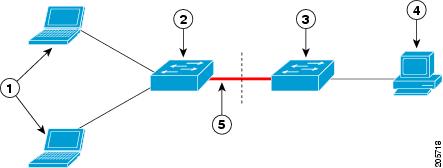
Table 1. Network edge access topology components

1

Workstations (clients)

2

Supplicant switch (outside wiring closet)

3

Authenticator switch

4

Cisco ISE

5

Trunk port


Note


The switchport nonegotiate command is not supported on supplicant and authenticator switches with NEAT. This command should not be configured at the supplicant side of the topology. If configured on the authenticator side, the internal macros automatically remove this command from the port.


For more information about 802.1x, including configuration information, see Configuring IEEE 802.1x Port-Based Authentication.

Guidelines and limitations for NEAT configuration

Guidelines and limitations

  • A Radius server such as Cisco's Identity Server Engine (ISE) is required.

  • CISP and NEAT are supported only on L2 ports, not on L3 ports.

  • NEAT and 802.1x are not supported on EtherChannel ports.

  • NEAT is not supported on dynamic ports.

  • MACsec is supported with NEAT.

  • NEAT can operate with PTP.

  • MAB and NEAT are mutually exclusive. You cannot enable MAB when NEAT is enabled on an interface, and you should not enable NEAT when MAB is enabled on an interface.

Configure an authenticator switch with NEAT

This task enables you to configure a switch as an authenticator using NEAT, allowing secure network access for devices connected outside the wiring closet.

  • Ensures that the switch can authenticate connected supplicant switches and dynamically set trunk interfaces after authentication.

Configuring this feature requires that one switch outside a wiring closet is configured as a supplicant and is connected to an authenticator switch.


Note


  • The cisco-av-pairs must be configured as device-traffic-class=switch on the ISE, which sets the interface as a trunk after the supplicant is successfully authenticated.


This configuration is typically performed when you need to extend authentication services to switches located outside the main wiring closet, ensuring secure access and dynamic interface configuration.

Before you begin

Before you begin, ensure you have access to the switch in privileged EXEC mode and that the supplicant switch is physically connected to the authenticator switch.

  • Verify that the ISE is configured with the required cisco-av-pairs for device-traffic-class.

Follow these steps to configure an authenticator switch with NEAT:

Procedure


Step 1

Use the enable command to enables privileged EXEC mode.

Example:

Switch> enable

Enter your password if prompted.

Step 2

Use the configure terminal command to enters global configuration mode.

Example:

Switch# configure terminal

Step 3

Use the CISP enable command to enable CISP.

Example:

Switch(config)# cisp enable

Step 4

Use the interface interface-id command to specify the port to be configured, and enters interface configuration mode.

Example:

Switch(config)# interface gigabitethernet 1/0/2

Step 5

Use the switchport mode access command to sets the port mode to access .

Example:

Switch(config-if)# switchport mode access

Sets the port mode to access .

Step 6

Use the authentication port-control auto command to set the port-authentication mode to auto.

Example:

Switch(config-if)# authentication port-control auto

Step 7

Use the dot1x PAE authenticator command to configure the interface as a port access entity (PAE) authenticator.

Example:

Switch(config-if)# dot1x pae authenticator

Step 8

Use the spanning-tree portfast command to enable the interface to quickly transition to spanning-tree forwarding state for an interface which is a member of multiple VLANs.

Example:

Switch(config-if)# spanning-tree portfast trunk

Use this command only when you are sure that the switch-to-switch connection is not part of a layer2 loop.

Step 9

Use the end command to exit interface configuration mode and returns to privileged EXEC mode.

Example:

Switch(config-if)# end

Configure a supplicant switch with NEAT

This task configures a switch as a supplicant using NEAT, enabling secure authentication and trunking for network access.

  • Ensures the switch can participate in 802.1X authentication as a supplicant.

  • Allows NEAT to operate on the supplicant switch in all host modes.

Use this task when you need to configure a switch to act as a supplicant in a NEAT-enabled environment.

Beginning in privileged EXEC mode, follow these steps to configure a switch as a supplicant:

  • Applicable for environments requiring secure port-based authentication and trunking.

Before you begin

Ensure you are in privileged EXEC mode before starting the configuration.

  • Have access to the switch console.

Follow these steps to configure a supplicant switch with NEAT:

Procedure


Step 1

Global configuration modes

  1. Use the enable comamnd to enables privileged EXEC mode.

    Example:

    Switch> enable

    Enter your password if prompted.

  2. Use the configure terminal command to enters global configuration mode.

    Example:

    Switch# configure terminal

Step 2

Configure CISP, EAP profile, and 802.1X credentials

  1. Use the CISP enable command to enable CISP.

    Example:

    Switch(config)# cisp enable
  2. Use the EAP profile profile-name command to create an Extensible Authentication Protocol (EAP) profile and enters EAP profile configuration mode.

    Example:

    Switch(config)# eap profile CISP
  3. Use the method type command to specify the EAP authentication method.

    Example:

    Switch(config-eap-profile)# method md5
  4. Use the exit command to exit EAP profile configuration mode.

    Example:

    Switch(config-eap-profile)# exit 
  5. Use the dot1x credentials profile command to create 802.1x credentials profile. This must be attached to the port that is configured as supplicant.

    Example:

    Switch(config)# dot1x credentials test
  6. Use the username suppswitch command to create a username.

    Example:

    Switch(config)# username suppswitch
  7. Use the password password command to creates a password for the new username.

    Example:

    Switch(config)# password myswitch
  8. Use the dot1x supplicant force-multicast command to force the switch to send only multicast EAPOL packets when it receives either unicast or multicast packets.

    Example:

    Switch(config)# dot1x supplicant force-multicast

    This command also allows NEAT to work on the supplicant switch in all host modes.

Step 3

Interface configuration

  1. Use the interface interface-id command to specify the port to be configured, and enters interface configuration mode.

    Example:

    Switch(config)# interface gigabitethernet1/0/1
  2. Use the switchport trunk encapsulation dot1q command to set the port to trunk mode.

    Example:

    Switch(config-if)# switchport trunk encapsulation dot1q
  3. Use the switchport mode trunk command to configure the interface as a VLAN trunk port.

    Example:

    Switch(config-if)# switchport mode trunk
  4. Use the dot1x PAE supplicant command to configure the interface as a port access entity (PAE) supplicant.

    Example:

    Switch(config-if)# dot1x pae supplicant
  5. Use the dot1x credentials profile-name command to attach the 802.1x credentials profile to the interface.

    Example:

    Switch(config-if)# dot1x credentials test
  6. Use the dot1x supplicant EAP profile profile-name command to assign the EAP-TLS profile to the 802.1X interface.

    Example:

    Switch(config-if)# dot1x supplicant eap profile cisp
  7. Use the end command to exit interface configuration mode and returns to privileged EXEC mode.

    Example:

    Switch(config-if)# end

Configuration verification

Use show and debug commands to verify and troubleshoot Client Information Signalling Protocol (CISP) and Network Edge Access Topology (NEAT) configuration.

Use these show commands to verify information about Client Information Signalling Protocol (CISP) and Network Edge Access Topology (NEAT) configuration:

  • show CISP interface <interface name>

  • show CISP clients

  • show CISP summary

  • show CISP registrations

This is an example for show CISP commands. GigabitEthernet 1/0/1 is configured as Authenticator, and GigabitEthernet 1/0/2 is configured as Supplicant.

Auth# show cisp interface Gi1/0/2

CISP Status for interface Gi1/0/2
 ------------------------------------- 
Version: 1 
Mode: Supplicant Peer 
Mode: Authenticator 
Supp State: Idle

Auth# <userinput>show cisp clients</userinput> 

Authenticator Client Table:
 ------------------------
 MAC Address VLAN Interface
 ---------------------------------
 0050.5695.4de8 1 Gi1/0/10 
6c03.09e7.3947 1 Gi1/0/10 
6c03.09e7.3954 11 Gi1/0/10 
6c03.09e7.4485 1 Gi1/0/10
 9077.ee4a.8567 1 Gi1/0/10 
e41f.7ba1.bbd4 1 Gi1/0/10 

Supplicant Client Table: 
------------------------ 
MAC Address VLAN Interface 
--------------------------------- 
9077.ee4a.856b 11 Vl11 
9077.ee4a.8572 1 Ap1/1 
e41f.7bc7.2f03 1 Gi1/0/9

Auth# show cisp summary

CISP is running on the following interface(s):
----------------------------------------------
Gi1/0/2 (Authenticator)

Supp# show cisp summary

CISP is running on the following interface(s):
----------------------------------------------
Gi1/0/1 (Supplicant)

Auth# show cisp registrations

Interface(s) with CISP registered user(s):
------------------------------------------
Gi1/0/2
Auth Mgr (Authenticator)

Supp# show cisp registration

Interface(s) with CISP registered user(s):
------------------------------------------
Gi1/0/1
802.1x Sup (Supplicant)

Use these debug commands to troubleshoot CISP and NEAT:

  • debug access-session errors

  • debug access-session event

  • debug dot1x errors

  • debug dot1x packets

  • debug dot1x events

Feature History

Feature Name

Release

Feature Information

Network Edge Access Topology (NEAT)

Cisco IOS XE 17.8.1

Initial support on Cisco Catalyst IE9300 Rugged Series Switches.