IPv6 ACLs

IPv6 access control lists

An IPv6 access control list is a set of rules that

  • limit access to a particular interface

  • are configured on the device and applied to the management interface and dynamic interfaces, and

  • support options such as source, destination, source, and destination ports.

IPv6 access control lists can be used to create preauthentication ACLs for web authentication, allowing certain types of traffic before authentication is complete.

Guidelines and restrictions for IPv6 ACLs

Guidelines

  • When configuring an ACL, you can enter any keywords regardless of platform support. When you apply the ACL to an interface that requires hardware forwarding (physical ports or SVIs), the switch checks to determine whether ACL can be supported on the interface or not. If the ACL is not supported on the interface, the ACL is rejected.

  • If a downloadable ACL contains any type of duplicate entries, the entries are not auto merged. As a result, the 802.1X session authorization fails. Ensure that the downloadable ACL is optimized without any duplicate entries, for example port-based and name-based entries for the same port.

  • When you apply a scale ACL to an interface that does not program TCAM for a protocol and the ACLs that have been unloaded, it can impact the existing normal movement of traffic for other protocols.

Restrictions for IPv6 ACLs

IPv6 supports only named ACLs. With IPv4 ACLs, you can configure standard and extended numbered IP ACLs, named IP ACLs, and MAC ACLs. The switch supports most Cisco IOS-supported IPv6 ACLs with some exceptions.

  • The switch does not support matching on these keywords:

    • flowlabel

    • routing header

    • undetermined-transport

    • reflexive ACLs (the reflect keyword)

    • vrf-also keyword is mutually exclusive of IPv6 access-class line command.

    • MAC-based ACLs

  • If an ACL is applied to an interface and you attempt to add an access control entry (ACE) with an unsupported keyword, the switch does not allow the ACE to be added to the ACL that is currently attached to the interface.

  • Time-to-live (TTL) classification is not supported on ACLs.

  • Egress ACL lookup is not supported for injected traffic that is forwarded by the software.

  • ACLs support only layer 3 interfaces (such as routed interfaces and VLAN interfaces).
Supported ACLs

A supported ACL is a traffic filtering mechanism that includes port ACLs to control access for traffic entering a layer 2 interface.

Types of supported ACLs

The switch supports three types of ACLs to filter the traffic:

  • Port ACLs access-control traffic entering a layer 2 interface. You can apply port ACLs to a layer 2 interface in each direction to each access list type—IPv4, IPv6, and MAC.

  • Router ACLs access-control traffic routed between VLANs and are applied to Layer 3 interfaces in a specific direction (inbound or outbound).

Types of ACL

The following sections provide information on the types of ACL:

Per-user IPv6 ACLs

A per-user IPv6 ACL is an access control list that

  • applies IPv6 access control entries to individual users, and

  • configures full access control entries as text strings on Cisco Secure Access Control Server

Filter ID IPv6 ACLs

A filter ID IPv6 ACL is an access control list that

  • stores the full ACEs and the ACL name (filter-ID) on the device, and

  • configures only the filter-ID on the Cisco Secure ACS, and

ACL precedences

An ACL precedence is a filtering order that determines which ACL type filters the packets first for ingress and egress traffic. It

  • applies port ACL, and router ACL in ingress path, and

  • applies router ACL, and port ACL, in egress path

VLAN maps

A VLAN map is a network traffic control mechanism that

  • applies to all packets bridged within a VLAN in the switch

  • enforces access control for non-IP protocols through MAC addresses and Ethertype, and

  • permits or denies packet forwarding based on the action specified in the map.

VLAN map reference information

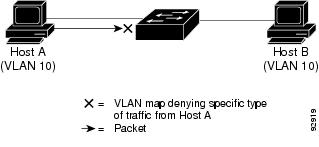
VLAN ACLs or VLAN maps are used to control the network traffic within a VLAN. You can apply VLAN maps to all packets that are bridged within a VLAN in the switch. VACLs are strictly for the security packet filtering and for redirecting traffic to specific physical interfaces. VACLs are not defined by direction (ingress or egress).

All non-IP protocols are access-controlled through MAC addresses and Ethertype using MAC VLAN maps. (IP traffic is not access-controlled by MAC VLAN maps.) You can enforce VLAN maps only on packets going through the switch; you cannot enforce VLAN maps on traffic between hosts on a hub or on another switch that is connected to this switch.

Figure 1. Using VLAN maps to control traffic

Interactions with other features and switches

An interaction with other features and switches is a network behavior that

  • determines how IPv6 ACLs affect packet routing and bridging

  • controls ACL configuration and error handling, and

  • manages hardware memory limitations and packet drop statistics.

IPv6 ACL interactions with features and switches

IPv6 ACLs interact with other features and switches in several ways:

  • If an IPv6 router ACL is configured to deny a packet, the packet is not routed. A copy of the packet is sent to the Internet Control Message Protocol (ICMP) queue to generate an ICMP unreachable message for the frame.

  • If a bridged frame is to be dropped due to a port ACL, the frame is not bridged.

  • You can create both IPv4 and IPv6 ACLs on a switch, and you can apply both IPv4 and IPv6 ACLs to the same interface. Each ACL must have a unique name; an error message appears if you try to use a name that is already configured.

    You use different commands to create IPv4 and IPv6 ACLs and to attach IPv4 or IPv6 ACLs to the same Layer 2 or Layer 3 interface. If you use the wrong command to attach an ACL (for example, an IPv4 command to attach an IPv6 ACL), you receive an error message.

  • You cannot use MAC ACLs to filter IPv6 frames. MAC ACLs can only filter non-IP frames.

  • If the hardware memory is full, packets are dropped on the interface and an unload error message is logged.

    If the hardware memory is full, for any additional configured ACLs, packets are dropped to the CPU, and the ACLs are applied in software. When the hardware is full a message is printed to the console indicating the ACL has been unloaded and the packets will be dropped on the interface.

Configure an IPv6 ACL

Default configuration for IPv6 ACLs

This reference describes the default configuration for IPv6 access control lists (ACLs).

The default IPv6 ACL configuration is as follows:

Device# show access-lists preauth_ipv6_acl

IPv6 access list preauth_ipv6_acl (per-user)
permit udp any any eq domain sequence 10
permit tcp any any eq domain sequence 20
permit icmp any any nd-ns sequence 30
permit icmp any any nd-na sequence 40
permit icmp any any router-solicitation sequence 50
permit icmp any any router-advertisement sequence 60
permit icmp any any redirect sequence 70
permit udp any eq 547 any eq 546 sequence 80
permit udp any eq 546 any eq 547 sequence 90
deny ipv6 any any sequence 100

Configure IPv6 ACLs

Configure IPv6 ACLs to filter IPv6 traffic and control access to your network switches. This task enables you to define permit and deny conditions for IPv6 packets.

  • Improve network security by restricting IPv6 traffic based on protocol, source, and destination addresses.

  • Apply granular control over IPv6 packet flow using access control lists.

IPv6 ACLs are used to filter IPv6 traffic and enforce security policies on network switches. This procedure is relevant when you need to restrict or permit IPv6 packets based on specific criteria.

Perform this task when configuring IPv6 security or managing access to resources in an IPv6-enabled environment.

  • Use this task to define and verify IPv6 ACLs for routers and switches supporting IPv6.

Before you begin

Ensure you have access to the Switch CLI and privileged EXEC mode. No explicit prerequisites are stated in the source, but access to the Switch is implied.

  • Have the IPv6 addresses and protocols you want to filter ready.

Follow these steps to configure IPv6 ACLs:

Procedure


Step 1

Use the enable command to enable privileged EXEC mode.

Example:

Switch> enable
Enter your password, if prompted.

Step 2

Use the configure terminal command to enter global configuration mode.

Example:

Switch# configure terminal

Step 3

Use the ipv6 access-list {list-name | log-update threshold | role-based list-name} command to define an IPv6 ACL name, and enters IPv6 access list configuration mode.

Example:

Switch(config)# ipv6 access-list example_acl_list

Step 4

Use the {deny | permit} protocol {source-ipv6-prefix/ |prefix-length |any threshold| host source-ipv6-address} [ operator [ port-number ]] { destination-ipv6-prefix/ prefix-length | any | host destination-ipv6-address} [operator [port-number]][dscp value] [fragments] [log] [log-input][sequence value] [time-range name] command to specify permit or deny conditions for an IPv6 ACL.

Example:

Switch(config-ipv6-acl)# permit tcp 2001:DB8:0300:0201::/32 eq telnet any 
Table 1. IPv6 ACL configurable paramets and their description

Parameter

Description

ahp , esp , icmp , ipv6 , pcp , stcp , TCP , or UDP , or an integer in the range 0 to 255 representing an IPv6 protocol number.

Provide any supported IPv6 protocols.

source-ipv6-prefix/prefix-length or destination-ipv6-prefix/ prefix-length

Provide the source or destination IPv6 network or class of networks for which to set deny or permit conditions, specified in hexadecimal and using 16-bit values between colons (see RFC 2373)

any

Provide an abbreviation for the IPv6 prefix ::/0

host source-ipv6-address or destination-ipv6-address

Specify the source or destination IPv6 host address for which to set deny or permit conditions.

Specify the values in hexadecimal using 16-bit values between colons.

lt (less than), gt (greater than), eq (equal), neq (not equal), and range

These are the supported operators. Specify an operand that compares the source or destination ports of the specified protocol.

These are optional parameters.

source-ipv6-prefix/prefix-length destination-ipv6- prefix/prefix-length

Provide the port. If the operator follows the source-ipv6-prefix/prefix-length argument, it must match the source port. If the operator follows the destination-ipv6- prefix/prefix-length argument, it must match the destination port.

port-number

Provide any decimal number from 0 to 65535 or the name of a TCP or UDP port. You can use TCP port names only when filtering TCP. You can use UDP port names only when filtering UDP.

It is an optional parameter.

dscp

Specify a value to match a differentiated services code point value against the traffic class value in the Traffic Class field of each IPv6 packet header. The acceptable range is from 0 to 63.

It is an optiional parameter.

fragments

Specify to check noninitial fragments. This keyword is visible only if the protocol is ipv6.

It is an optiional parameter.

log log-input

Specify to cause a logging message to be sent to the console about the packet that matches the entry. Enter log-input to include the input interface in the log entry. Logging is supported only for router ACLs.

It is an optiional parameter.

sequence value

Specify the sequence number for the access list statement. The acceptable range is from 1 to 4,294,967,295.

It is an optiional parameter.

time-range

Specify a name to enter the time range that applies to the deny or permit statement.

It is an optiional parameter.

Step 5

Use the {deny | permit} TCP {source-ipv6-prefix/prefix-length | any | host source-ipv6-address} [operator [port-number]] {destination-ipv6- prefix/prefix-length | any | host destination-ipv6-address} [operator [port-number]] [ACK] [dscp value] [established] [fin] [log] [log-input] [neq {port | protocol}] [psh] [range {port | protocol}] [RST] [sequence value] [syn] [time-range name] [urg] command to specify permit or deny conditions for an IPv6 ACL.

Example:

Switch(config-ipv6-acl)# deny tcp host 2001:DB8:1::1 any log-input 

Enter TCP for Transmission Control Protocol. The parameters are the same as those described in step 4, with these additional optional parameters:

Table 2. TCP optional paramets

Parameter

Description

ACK

Acknowledgment bit set.

established

An established connection. A match occurs if the TCP datagram has the ACK or RST bits set.

fin

Finished bit set; no more data from sender.

neq { port |protocol}

Matches only packets that are not on a given port number.

RST

Reset bit set.

syn

Synchronize bit set.

urg

Urgent pointer bit set.

psh

Push function bit set.

range { port |protocol}

Matches only packets in the port number range.

Step 6

Use the end command to exit IPv6 access list configuration mode and return to privileged EXEC mode.

Example:

Switch(config-ipv6-acl)# end

Step 7

(Optional) Use the show ipv6 access-list command to verifies that IPv6 ACLs configuration

Example:

Switch# show ipv6 access-list

Attach an IPv6 ACL to an interface

Attach an IPv6 ACL to an interface to control access and manage traffic flow. This task allows you to restrict inbound or outbound traffic based on IPv6 addresses.

You can apply an ACL to outbound or inbound traffic on Layer 3 interfaces, or to inbound traffic on Layer 2 interfaces. You can also apply ACLs only to inbound management traffic on Layer 3 interfaces.

This task is relevant when you need to control access to an interface using IPv6 ACLs for security or traffic management purposes.

Before you begin

Ensure you have created the IPv6 ACL that you want to attach to the interface.

Follow these steps to attach an IPv6 ACL to an interface:

Procedure


Step 1

Use the enable command to enable privileged EXEC mode.

Example:

Switch> enable
Enter your password, if prompted.

Step 2

Use the configure terminal command to enter global configuration mode.

Example:

Switch# configure terminal

Step 3

Use the interface interface-id command to identify a Layer 2 interface (for port ACLs) or Layer 3 interface (for router ACLs) on which to apply an access list, and enters interface configuration mode.

Example:

Switch(config)# interface gigabitethernet1/0/1

Step 4

Use the no switchport command to return the interface to the routed-interface status and erases all further layer 2 configuration.

Example:

Switch(config-if)# no switchport

Step 5

Use the ipv6 addressipv6-address command to configure an IPv6 address on a layer 3 interface (for router ACLs).

Example:

Switch(config-if)# ipv6 address 2001:DB8::1

Step 6

Use the ipv6 traffic-filter access-list-name {in | out} command to apply the access list to incoming or outgoing traffic on the interface.

Example:

Switch(config-if)# ipv6 traffic-filter acl1 in

Step 7

Use the end command to exit IPv6 access list configuration mode and return to privileged EXEC mode.

Example:

Switch(config-ipv6-acl)# end

Configure an IPv6 ACL in template mode

This task describes how to configure an IPv6 access control list (ACL) in template mode to manage network traffic and enhance security on your Switch interfaces.


Note


You can configure ipv6 traffic-filter command in the template configuration mode. You can configure the source template command only once to an interface.


Use this procedure when you need to apply IPv6 ACLs to interfaces using templates for consistent and scalable configuration. Begin in privileged EXEC mode.

Before you begin

Ensure you have access to the Switch with appropriate privileges and that you are in privileged EXEC mode.

Follow these steps to configure an IPv6 ACL in template mode:

Procedure


Step 1

Use the ipv6 access-list {list-name | log-update threshold | role-based list-name} command to define an IPv6 ACL name, and enters IPv6 access list configuration mode.

Example:

Switch(config)# ipv6 access-list v6acl10

Step 2

Use the ipv6 access-list {list-name | log-update threshold | role-based list-name} command to define an IPv6 ACL name, and enters IPv6 access list configuration mode.

Example:

Switch(config-ipv6-acl)#ipv6 access-list v6acl11

Step 3

Use the exit command to exit access-list configuration mode.

Example:

Switch(config-ipv6-acl)#exit

Step 4

Use the template command to create a user template and enters template configuration mode.

Example:

Switch(config)# template test

Step 5

Use the ipv6 traffic-filter {access-list-number | name} {in | out} command to control access to the specified interface.

Example:

Switch(config-template)# ipv6 traffic-filter v6acl10 in
Table 3. IPv6 Traffic filter parametrs

Parameter

Description

access-list-number

Defines the access list. The access list can be a number.

name

Defines the access list. The access list can be a name

in

Directs the access list in the incoming direction of the interface

out

Direct the access list in the outgoing direction of the interface.

Step 6

Use the exit command to exit template configuration mode and return to privileged EXEC mode.

Example:

Switch(config-template)# exit

Step 7

Use the interface interface-id command to identify a specific interface for configuration.

Example:

Switch(config)# interface gigabitethernet1/0/1

The interface can be a layer 2 interface (port ACL), or a layer 3 interface (router ACL).

Step 8

Use the ipv6 traffic-filter {access-list-number | name} {in | out} command to controls access to the specified interface.

Example:

Switch(config-if)# ipv6 traffic-filter v6acl11 out
Table 4. IPv6 traffic filter parametrs

Parameter

Description

access-list-number

Defines the access list. The access list can be a number.

name

Defines the access list. The access list can be a name

in

Directs the access list in the incoming direction of the interface

out

Direct the access list in the outgoing direction of the interface.

Step 9

(Optional) Use the source template name command to apply an interface template to a target.

Example:

Switch(config)# source template test

Configure a VLAN map

This task enables you to configure a VLAN map, which allows you to filter traffic on VLANs using access control lists (ACLs). By following these steps, you can create, match, and apply VLAN maps to control packet forwarding or dropping within your network.

Use this task when you need to apply ACLs to VLANs for granular traffic control. VLAN maps are used to match packets against ACLs and specify actions such as forwarding or dropping packets based on the match criteria.

VLAN maps do not use explicit permit or deny keywords; instead, the action is determined by the ACL and the map configuration.

Before you begin

Create the IPv6 ACL that you want to apply to the VLAN.

Follow these steps to configure a VLAN map:

Procedure


Step 1

Use the enable command to enable privileged EXEC mode.

Example:

Switch> enable
Enter your password, if prompted.

Step 2

Use the configure terminal command to enter global configuration mode.

Example:

Switch# configure terminal

Step 3

Use the VLAN access-map name [number] command to create a VLAN map.

Example:

Switch(config)# vlan access-map map_1 20

VLAN map can have a name or (optionally) a number. The number is the sequence number of the entry within the map.

When you create VLAN maps with the same name, numbers are assigned sequentially in increments of 10. When modifying or deleting maps, you can enter the number of the map entry that you want to modify or delete.

VLAN maps do not use the specific permit or deny keywords. To deny a packet by using VLAN maps, create an ACL that would match the packet, and set the action to drop. A permit in the ACL counts as a match. A deny in the ACL means no match.

Step 4

Use the match {IP | ipv6 | MAC} address {name | number} [name | number] command to Matches the packet against one or more access lists.

Example:

Switch(config-access-map)# match ipv6 address ip_net

Note


Packets are only matched against access lists of the correct protocol type. IP packets are matched against IP access lists. Non-IP packets are only matched against named MAC access lists.

If the VLAN map is configured with a match clause for a type of packet (IP or MAC) and the map action is drop, all packets that match the type are dropped. If the VLAN map has no match clause, and the configured action is drop, all IP and Layer 2 packets are dropped.

Step 5

Use one of these commands to specify an IP packet or a non-IP packet (with only a known MAC address) and to match the packet against one or more ACLs:

  • action { forward }
    Switch(config-access-map)# action forward
  • action { drop }
    Switch(config-access-map)# action drop

Sets the action for the map entry.

Step 6

Use the VLAN filter mapname VLAN-list list command to apply the VLAN map to one or more VLAN IDs.

Example:

Switch(config)# vlan filter map 1 vlan-list 20-22

The list can be a single VLAN ID (22), a consecutive list (10-22), or a string of VLAN IDs (12, 22, 30). Spaces around the comma and hyphen are optional.

Step 7

Use the end command to exit IPv6 access list configuration mode and return to privileged EXEC mode.

Example:

Switch(config-ipv6-acl)# end

Apply a VLAN map to a VLAN

This task allows you to apply a VLAN map to one or more VLANs, enabling traffic filtering and policy enforcement on specified VLANs.

Use this task when you need to control or filter traffic on specific VLANs by associating a VLAN map with those VLAN IDs. This is typically performed during VLAN configuration or when updating network security policies.

Before you begin

Perform these steps to apply a VLAN map to a VLAN:

Procedure


Step 1

Use the enable command to enable privileged EXEC mode.

Example:

Switch> enable
Enter your password, if prompted.

Step 2

Use the configure terminal command to enter global configuration mode.

Example:

Switch# configure terminal

Step 3

Use the VLAN filter mapname VLAN-list list command to apply the VLAN map to one or more VLAN IDs.

Example:

Switch(config)# vlan filter map 1 vlan-list 20-22

The VLAN-list can be a single VLAN ID (22), a consecutive list (10-22), or a string of VLAN IDs (12, 22, 30). Spaces around the comma and hyphen are optional.

Step 4

Use the end command to exit IPv6 access list configuration mode and return to privileged EXEC mode.

Example:

Switch(config-ipv6-acl)# end

IPv6 ACL monitoring commands

This reference lists the privileged EXEC commands used to display information about all configured access lists, all IPv6 access lists, or a specific access list.
Table 5. Show ACL commands

Command

Purpose

show access-lists

Displays all access lists configured on the switch.

show ipv6 access-list [access-list-name]

Displays all configured IPv6 access lists or the access list specified by name.

show VLAN access-map [map-name]

Displays VLAN access map configuration.

show VLAN filter [access-map access-map | VLAN VLAN-id]

Displays the mapping between VACLs and VLANs.