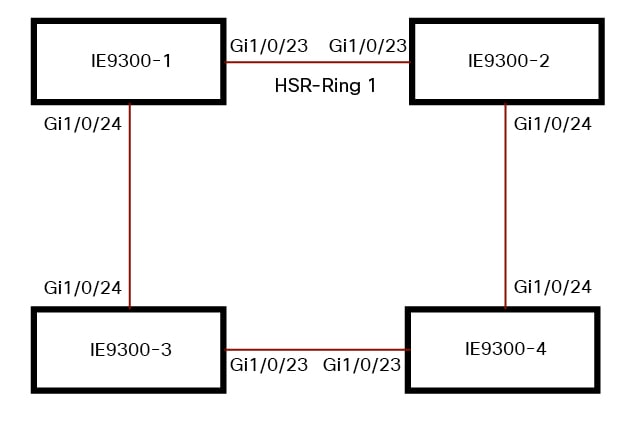
High-availability Seamless Redundancy
High-availability Seamless Redundancy (HSR) is a network protocol defined in IEC 62439-3-2016 that provides seamless redundancy in ring topologies by sending traffic in both directions and using protocol-specific information to eliminate duplicate packets.
-
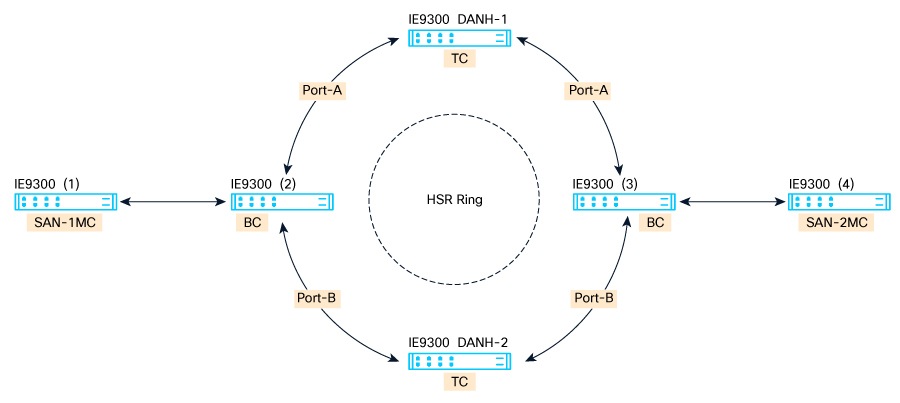
HSR operates in a ring topology, with Port-A sending traffic counterclockwise and Port-B sending traffic clockwise.
-
The HSR packet format includes a header (HSR header) containing a sequence number to identify duplicate frames.
-
HSR is similar to Parallel Redundancy Protocol (PRP), but differs in topology and packet format; PRP uses a redundancy control trailer (RCT) instead of a header.
HSR Protocol Operation and Device Support
![]() Note |
HSR is supported on specific Cisco Catalyst IE9300 Rugged Series Switches SKUs. For information about supported SKUs, refer to the Guidelines and Limitations section in this guide. The term switch in this document refers to a Cisco Catalyst IE9300 Rugged Series Switch unless otherwise noted. |
In this release, the switch supports only HSR-singly attached node (SAN) and only one HSR instance. You can create only one HSR instance or one PRP instance. If you have created a PRP instance, no HSR instance can be created.
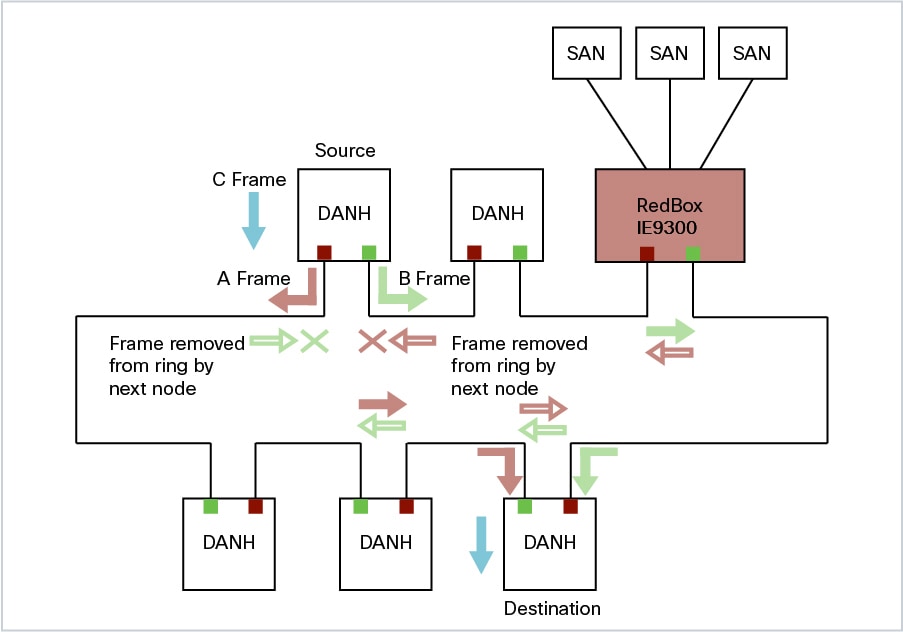
The non-switching nodes with two interfaces attached to the HSR ring are referred to as Doubly Attached Nodes implementing HSR (DANHs). Similar to PRP, Singly Attached Nodes (SANs) are attached to the HSR ring through a device called a RedBox (Redundancy Box). The RedBox acts as a DANH for any traffic when it is the source or the destination. The switch implements RedBox functionality using Gigabit Ethernet port connections to the HSR ring.
The following figure shows an example of an HSR ring as described in IEC 62439-3. In this example, the RedBox is an Cisco Catalyst IE9300 Rugged Series Switch .

Devices that do not support HSR directly, such as laptops and printers, must not be attached to the HSR ring. All HSR-capable devices must process the HSR header on packets received from the ring and add the HSR header to packets sent into the ring. Non-HSR devices are connected to the HSR ring through a RedBox.
As shown in the figure above, the RedBox has two ports on the DANH side. Non-HSR SAN devices are attached to the upstream switch ports. The RedBox generates supervision frames for these devices, so they appear as DANH devices on the ring. Because the RedBox emulates these as DANH, they are called Virtual Doubly Attached Nodes (VDAN).
loop avoidance mechanisms
Loop avoidance is a mechanism in HSR rings that prevents data frames from circulating endlessly, ensuring efficient use of network bandwidth and avoiding network loops.
-
Each node forwards frames from one HSR port to the other, but the RedBox does not retransmit frames already sent in the same direction.
-
Unicast packets destined for nodes inside the ring are consumed by the destination node and not forwarded further.
-
Packets that complete a loop are detected and dropped by the originating node to prevent looping.
Loop avoidance in HSR rings is achieved through specific forwarding and dropping behaviors for unicast and multicast packets.
-
Unicast packet with destination inside the ring: When the unicast packet reaches the destination node, the packet is consumed by the respective node and is not forwarded.
-
Unicast packet with destination not inside the ring: This packet does not have a destination node in the ring, so every node forwards it until it returns to the originating node. Each node tracks the packets it sends and their direction. When the originating node recognizes that the packet has completed a loop, it drops the packet.
-
Multicast packet: Each node forwards a multicast packet, as there can be more than one recipient. As a result, the multicast packet always returns to the originating node. Every node checks whether it has already forwarded the packet through its outgoing interface. When the packet returns to the originating node, the node identifies it as already forwarded and drops it instead of forwarding it again.
HSR RedBox operation modes
The HSR RedBox enables connectivity between SAN devices and HSR rings. It can also bridge HSR and PRP networks or connect two HSR rings, depending on its mode of operation.
-
HSR-SAN mode connects SAN devices to an HSR ring and represents SAN devices as VDANs on the ring.
-
HSR-PRP mode bridges HSR and PRP networks by converting frames between the two protocols.
-
HSR-HSR mode connects two HSR rings using a QuadBox device, associating switch ports with each ring.
Supported HSR RedBox Modes
The HSR RedBox can operate in several modes. Each mode defines how packets are handled in different network scenarios.
-
HSR-SAN : The most basic mode, where the RedBox connects SAN devices to an HSR ring. No other PRP or HSR network is involved. Traffic on the upstream switch port does not have HSR/PRP tags, and the RedBox represents the SAN device as a VDAN in the ring.
-
HSR-PRP : Used to bridge HSR and PRP networks. The RedBox extracts data from the PRP frame and generates the HSR frame, and performs the reverse operation for packets in the opposite direction. More than one PRP network can be bridged to one HSR ring and vice versa.
-
HSR-HSR : Connects two HSR rings through a QuadBox device. Two ports on the switch are associated with one HSR ring, and the other two ports are associated with the second HSR ring. The remaining ports on the switch are shut down.
![]() Note |
In this release, the switch supports HSR-SAN mode only. |
Example: HSR RedBox in HSR-SAN Mode
For example, in HSR-SAN mode, the RedBox connects SAN devices to an HSR ring, and the RedBox represents each SAN device as a VDAN on the ring. No HSR or PRP tags are present on the upstream switch port traffic.
HSR SAN mode in RedBox ring topology
HSR SAN mode is a configuration in which the RedBox inserts the HSR tag for the host within a ring topology. The RedBox also manages forwarding of ring traffic, applying specific rules for handling frames, duplicates, and unique destinations.
In HSR SAN mode, packets are handled in these ways:
-
A source DANH sends a frame passed from its upper layers (C frame). It prefixes the frame with an HSR tag to identify frame duplicates and sends the frame over each port (A frame and B frame).
-
A destination DANH receives two identical frames from each port within a certain interval. The destination DANH removes the HSR tag of the first frame before passing it to its upper layers and discards any duplicate.
-
Each node in the HSR ring forwards frames received from one port to the other port of the HSR pair. However, specific exceptions apply:
-
The received frame returns to the originating node in the ring.
-
The frame is a unicast frame with a destination MAC address of a node upstream of the receiving node.
-
The node had already sent the same frame in the same direction. This rule prevents a frame from spinning in the ring in an infinite loop.
-
CDP and LLDP for HSR
HSR supports the Cisco Discovery Protocol (CDP) and Link Layer Discovery Protocol (LLDP). CDP and LLDP are Layer 2 neighbor discovery protocols. Both CDP and LLDP can provide information about nodes directly connected to the device. They also provide additional information, including the local and remote interface names and device names.
When CDP or LLDP is enabled, you can use the CDP or LLDP information to find the adjacent nodes on an HSR ring and their status. You can use the neighbor information from each node to determine the complete HSR network topology. Additionally, you can debug and locate ring faults.
CDP and LLDP are configured on physical interfaces only.
For more information, see Configuring an HSR Ring and Verifying Configuration.
HSR Alarms
An HSR ring can generate the following two alarms:
-
Partial Ring Fault: This fault is generated by an HSR RedBox when one of its physical ring ports/links is down. Because the packets can be sent using the redundant path, this is considered as a partial fault. However, this fault still requires user intervention to restore the ring. This is a minor fault and cannot be associated with an external hardware alarm relay.
-
Full Ring Fault: This fault is generated by an HSR RedBox when both of its physical ring ports/links are down. This is a catastrophic failure and needs immediate attention. This is a major fault and can be associated with an external hardware alarm relay.
When an event that raises an alarm is generated, it can be associated with one or more of the following actions to notify the user:
-
Syslog: A syslog is generated when the Alarm is raised/cleared.
-
SNMP Notification: SNMP notification is sent when the alarm is raised/cleared.
-
Relay output: External relay contacts can be asserted/de-asserted in response to the alarm. Relays are activated by major faults only.
See Enabling HSR Alarms for steps to configure HSR alarms.
The following table lists the HSR events and their representations.
|
Event Number |
Event Description |
System Log (Level) |
Alert/Alarm Log |
Alarm LED and Output relay |
|---|---|---|---|---|
|
1 |
Ring goes from UP to DOWN state. |
2 |
2 |
Major Alarm/Assert |
|
2 |
Ring goes from DOWN to UP state. |
6 |
6 |
De-assert |
|
3 |
One ring port goes DOWN, the other ring port and the ring itself is UP. |
3 |
3 |
|
|
4 |
Both ring ports are UP again. |
6 |
6 |
You can view currently active alarms using the show facility alarm status command. The following example shows alarm status for minor and major HSR alarms:
Switch#show facility-alarm status
Source Severity Description Relay Time
Switch MINOR 34 HSR ring is partially down MAJ Oct 24 2017 10:16:10
-------
Switch# show facility-alarm status
Source Severity Description Relay Time
Switch MAJOR 33 HSR ring is down MAJ Oct 24 2017 10:17:07
The following examples show the syslog entries that are generated for each HSR alarm event assertion and clear event (if configured):
-
Syslog generated on occurrence of Partial fault:
Oct 24 11:07:13.952 IST: %HSR_ALARM-3-HSR_PARTIALFAULT: The HSR ring in now in PARTIAL FAULT state -
Syslog generated when the Partial fault is cleared:
Oct 24 11:07:38.032 IST: %HSR_ALARM-3-HSR_PARTIALFAULT: The HSR ring in now in PARTIAL FAULT state - event cleared -
Syslog generated on occurrence of Full fault:
Oct 24 11:07:38.036 IST: %HSR_ALARM-2-HSR_RINGFAULT: The HSR ring in now in FAULT state -
Syslog generated when the Full fault is cleared:
Oct 24 11:08:19.082 IST: %HSR_ALARM-2-HSR_RINGFAULT: The HSR ring in now in FAULT state - event cleared
HSR Uplink Redundancy Enhancement
The HSR Uplink Redundancy Enhancement feature is a network capability that allows two separate interfaces to connect upstream from the HSR ring through two separate HSR RedBoxes, ensuring there is no single point of failure when exiting the HSR ring.
-
Enables flexible network designs with dual uplinks for redundancy.
-
Supports high availability protocols such as HSRP, VRRP, and REP.
-
Prevents next-hop split-brain conditions and reduces failover times.
HSR Uplink Redundancy Enhancement Reference Information
The HSR Uplink Redundancy Enhancement feature allows two separate interfaces to connect upstream from the HSR ring through two separate HSR RedBoxes. This design ensures there is no single point of failure exiting the HSR ring. Protocols such as HSRP, VRRP, and REP can leverage this feature to improve high availability. Prior to this enhancement, using these protocols on redundant uplinks could result in issues like next-hop split-brain conditions or slow REP failover times.
To implement HSR Uplink Redundancy, confirm that the fpgamode-DualUplinkEnhancement feature is enabled. The feature provides connectivity to a dual router (HSRP) on the distribution layer.
-
Verify the status of the feature using the following command:
Switch# show hsr ring 1 detail | include fpgamode fpgamode-DualUplinkEnhancement: Enabled -
If the output shows fpgamode-DualUplinkEnhancement : Disabled , enable the feature with the following commands:
Switch# conf t Enter configuration commands, one per line. End with CNTL/Z. Switch(config)# hsr-ring 1 fpgamode-DualUplinkEnhancement Switch(config)# end
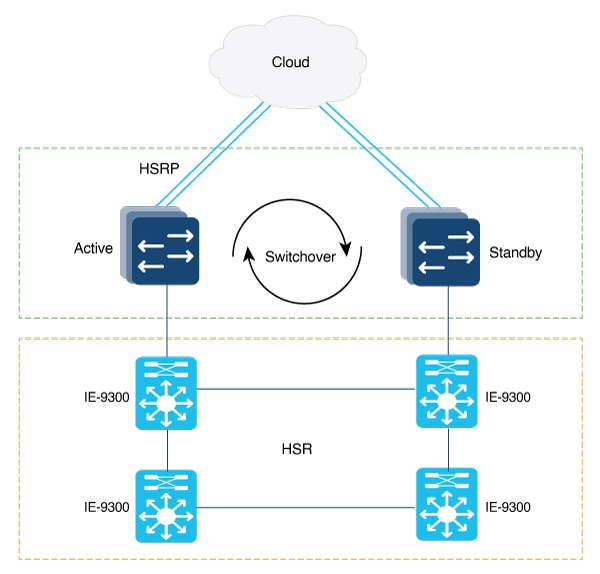
A diagram shows an example network with HSR and HSRP that allows uplink next-hop gateway redundancy out of the HSR ring.

This example HSRP configuration applies to the two distribution switches Active and Standby depicted in the diagram. In this configuration, HSRP is configured in a Switch Virtual Interface (SVI).
Active#
conf t
Enter configuration commands, one per line. End with CNTL/Z.
Active(config)#
interface vlan 10
Active(config-if)#
ip address 30.30.30.2 255.255.255.0
Active(config-if)#
standby 1 ip 30.30.30.1
Active(config-if)#
standby 1 priority 120
Active(config-if)#
end
Standby#
conf t
Enter configuration commands, one per line. End with CNTL/Z.
Standby(config)#
interface Vlan10
Standby(config-if)#
ip address 30.30.30.4 255.255.255.0
Standby(config-if)#
standby 1 ip 30.30.30.1
Standby(config-if)#
end
Active#
show standby
Vlan10 - Group 1
State is Active
8 state changes, last state change 00:03:55
Track object 1 (unknown)
Virtual IP address is 30.30.30.1
Active virtual MAC address is 0000.0c07.ac01 (MAC In Use)
Local virtual MAC address is 0000.0c07.ac01 (v1 default)
Hello time 200 msec, hold time 750 msec
Next hello sent in 0.176 secs
Preemption enabled, delay min 5 secs, reload 5 secs, sync 5 secs
Active router is local
Standby router is 30.30.30.4, priority 100 (expires in 0.656 sec)
Priority 120 (configured 120)
Group name is "hsrp-Vl10-1" (default)
FLAGS: 0/1
Active#
show standby brief
P indicates configured to preempt.
|
Interface Grp Pri P State Active Standby Virtual IP
Vl10 1 120 P Active local 30.30.30.4 30.30.30.1
Standby#
show standby
Vlan10 - Group 1
State is Standby
13 state changes, last state change 00:04:17
Track object 1 (unknown)
Virtual IP address is 30.30.30.1
Active virtual MAC address is 0000.0c07.ac01 (MAC Not In Use)
Local virtual MAC address is 0000.0c07.ac01 (v1 default)
Hello time 200 msec, hold time 750 msec
Next hello sent in 0.064 secs
Preemption enabled, delay min 5 secs, reload 5 secs, sync 5 secs
Active router is 30.30.30.2, priority 120 (expires in 0.816 sec)
Standby router is local
Priority 100 (default 100)
Group name is "hsrp-Vl10-1" (default)
FLAGS: 0/1
Standby#
show standby brief
P indicates configured to preempt.
|
Interface Grp Pri P State Active Standby Virtual IP
Vl10 1 100 P Standby 30.30.30.2 local 30.30.30.1
HSR Uplink Redundancy Enhancement Example
This example demonstrates a network using HSR and HSRP to provide uplink next-hop gateway redundancy out of the HSR ring, with configuration steps for both Active and Standby distribution switches.


Feedback